
Minecraft server TUI for Linux servers meant to be used over ssh.
Java
12
213 commits
updated Oct 2, 2026
See what people are saying
README
  __  __
 |  \/  |_   _ _ __ ___ ___  ___
 | |\/| | | | | '__/ __/ _ \/ __|
 | |  | | |_| | | | (_|  __/\__ \
 |_|  |_|\__,_|_|  \___\___||___/
    Minecraft Server Manager v1.0.0
MurCes
A high-performance, zero-overhead TUI & CLI manager for dedicated Minecraft servers on Linux.






Why MurCes • Visual Tour • Quickstart • CLI Usage • Hotkeys • Fonts • Architecture & IPC • Build
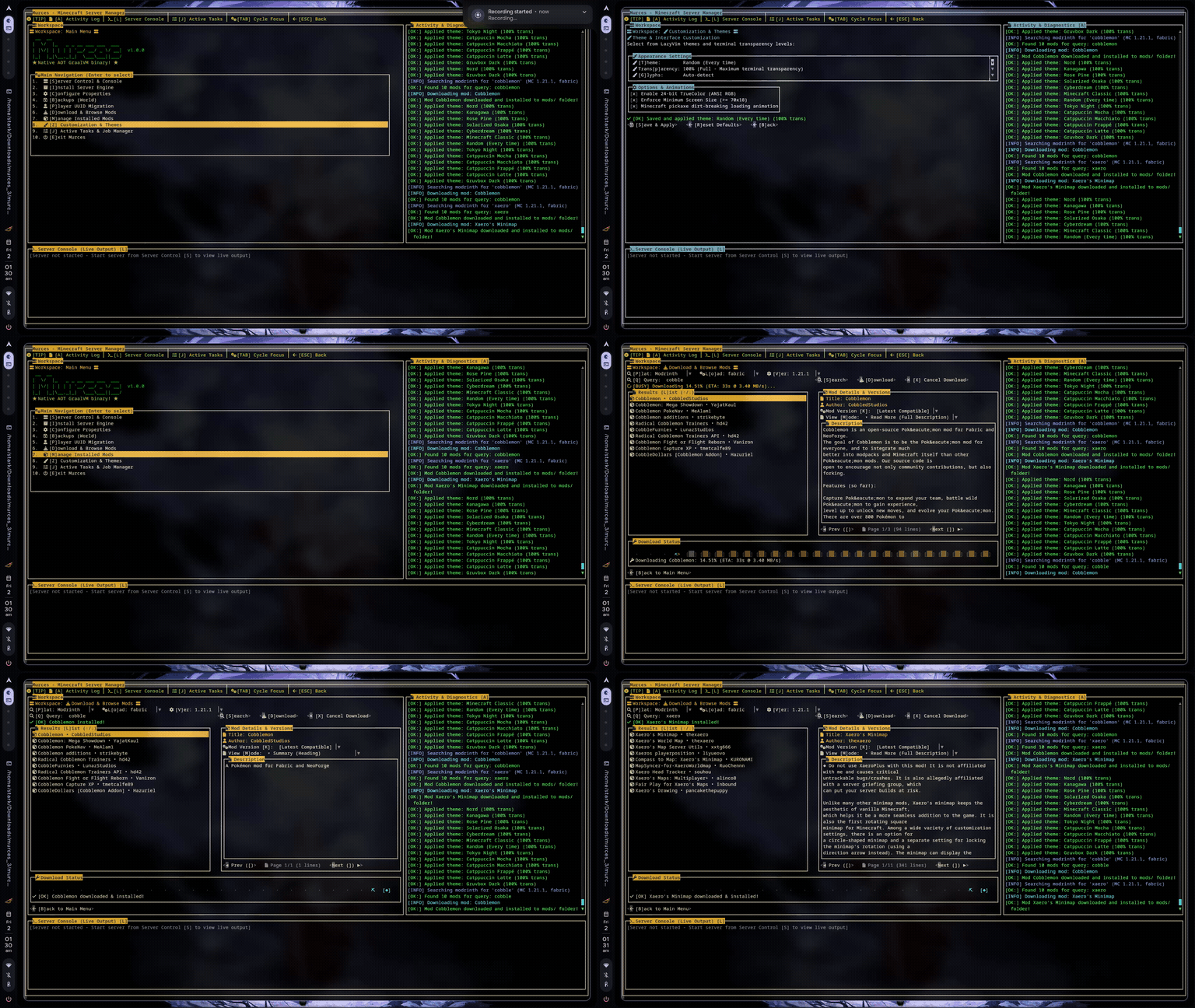
Why MurCes?
Managing dedicated Minecraft servers on budget VPS nodes or homelabs often forces an uncomfortable compromise:
- Heavy Web Panels (Pterodactyl, AMP, MineOS) require Docker daemons, Node.js runtimes, Nginx reverse proxies, MySQL databases, and background web workers, consuming 500MB to 1.5GB of RAM before your Minecraft server even allocates its heap.
- Raw Shell Scripts are brittle, lack visual status monitoring, don't handle dependency resolution, and make tweaking
server.propertiesor installing mods a chore.
MurCes delivers the sweet spot:
- Native Ahead-of-Time (AOT) Binary: Compiled into a standalone ~30MB Linux executable via GraalVM Native Image. Launches in < 20ms with less than 25MB resident memory and zero JVM warmup.
- Detached Process Supervision: Your server runs inside an isolated, background
tmuxsession (mcsv). If your SSH connection drops or MurCes exits, the server remains completely unaffected. - Modern Terminal Aesthetics: Designed with 24-bit TrueColor support, background transparency, and popular developer themes (Catppuccin, Nord, Gruvbox, Tokyo Night, Cyberdream, Rose Pine, Kanagawa).
- Built-in Mod Ecosystem: Query both Modrinth and CurseForge directly inside the terminal with loader & version filtering, dependency lookups, and one-key atomic downloads.
- Safe World State Flushing: Performs live memory flushing (
save-off→save-all→ tar archive →save-on) to eliminate backup chunk corruption, with automated retention rotation and optionalrclonecloud replication. - Zero-Config Port Forwarding: Built-in Playit.gg integration (
-p) creates secure public tunnels on demand without touching router NAT tables.
Visual Tour & Features
1. Main Dashboard & Workspace
Unified server management cockpit with dual-panel activity diagnostics and live console log stream.
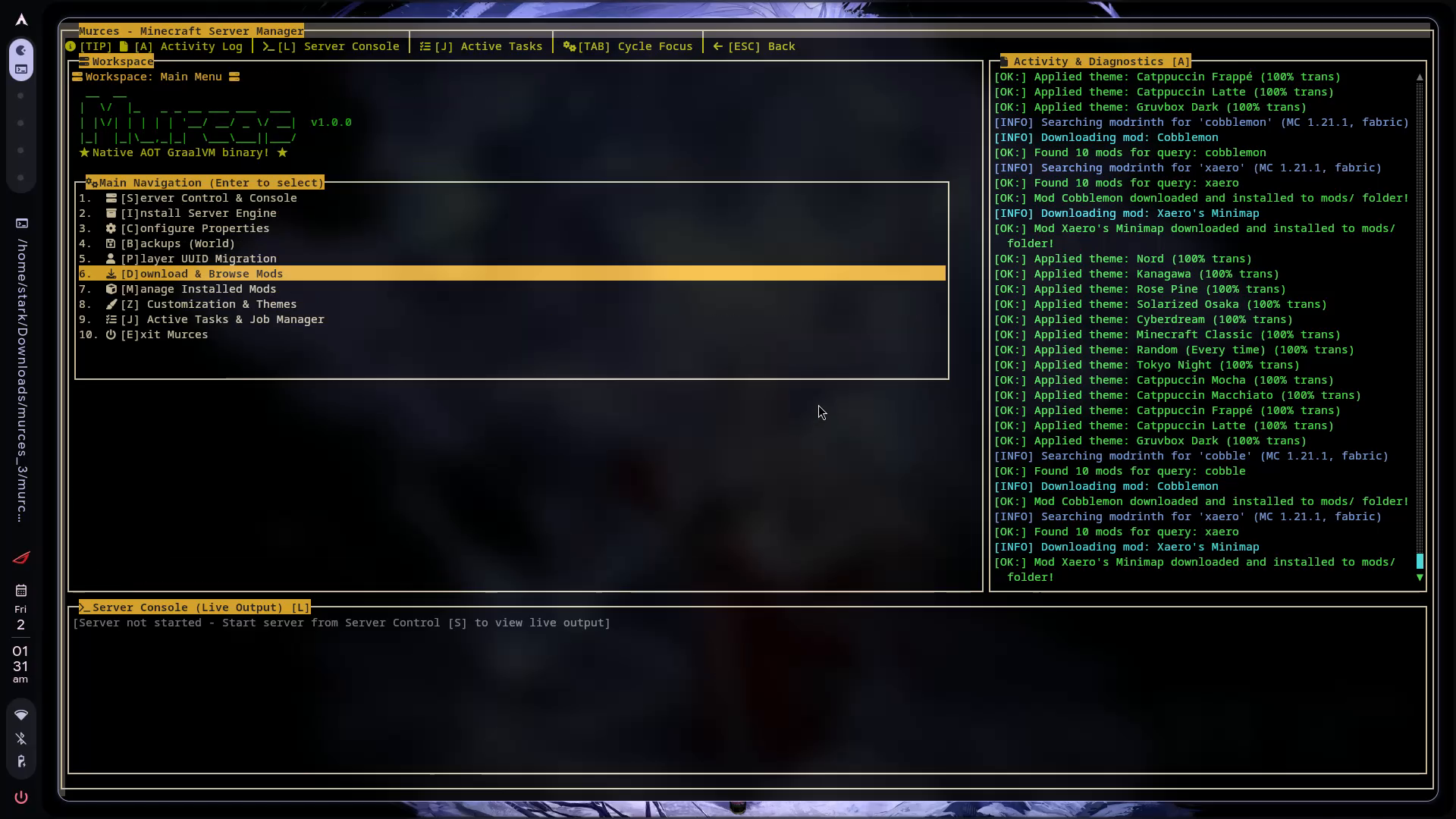
- Navigation Hub: Direct keyboard access to engine installers, mod managers, backups, and configs.
- Activity & Diagnostics Panel: Real-time status logs for theme changes, network queries, and download triggers.
- Embedded Console: Immediate visibility into the underlying Minecraft server output.
2. Server Control & Command Dispatch
Monitor server lifecycle, toggle Playit.gg tunnels, and dispatch in-game commands directly to the tmux session.
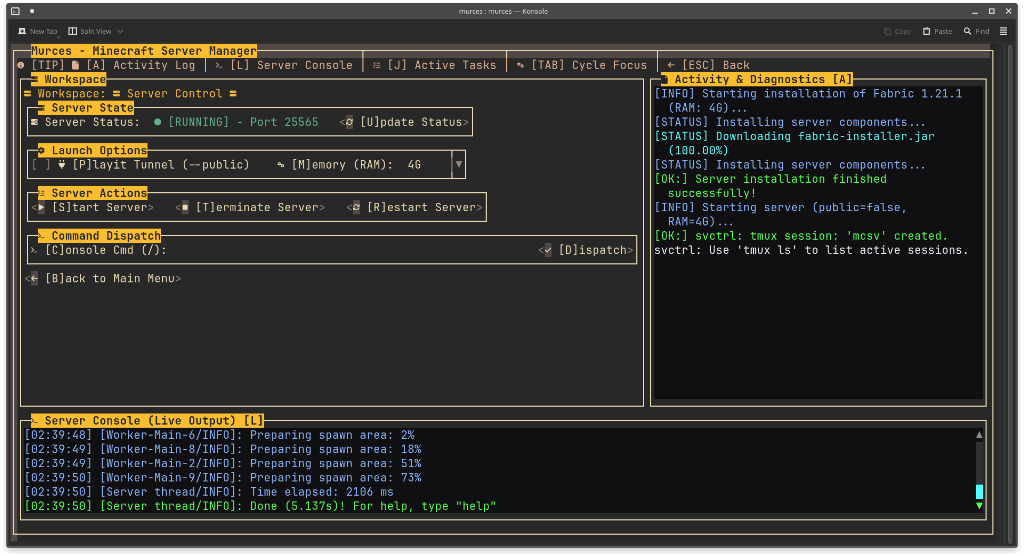
- Process Telemetry: Live status indicator with active port reporting (
[RUNNING] - Port 25565). - One-Click Actions: Start, restart, or safely terminate the Minecraft daemon with graceful world saves.
- In-Game Command Prompt: Dispatch console commands directly into the
mcsvsession without manually attaching tmux. - Networking Controls: Toggle Playit.gg public tunnels and adjust runtime memory allocations on the fly.
3. Server Engine & Version Setup
Configure and boot server engines with automatic Mojang EULA acceptance and custom RAM allocation flags.
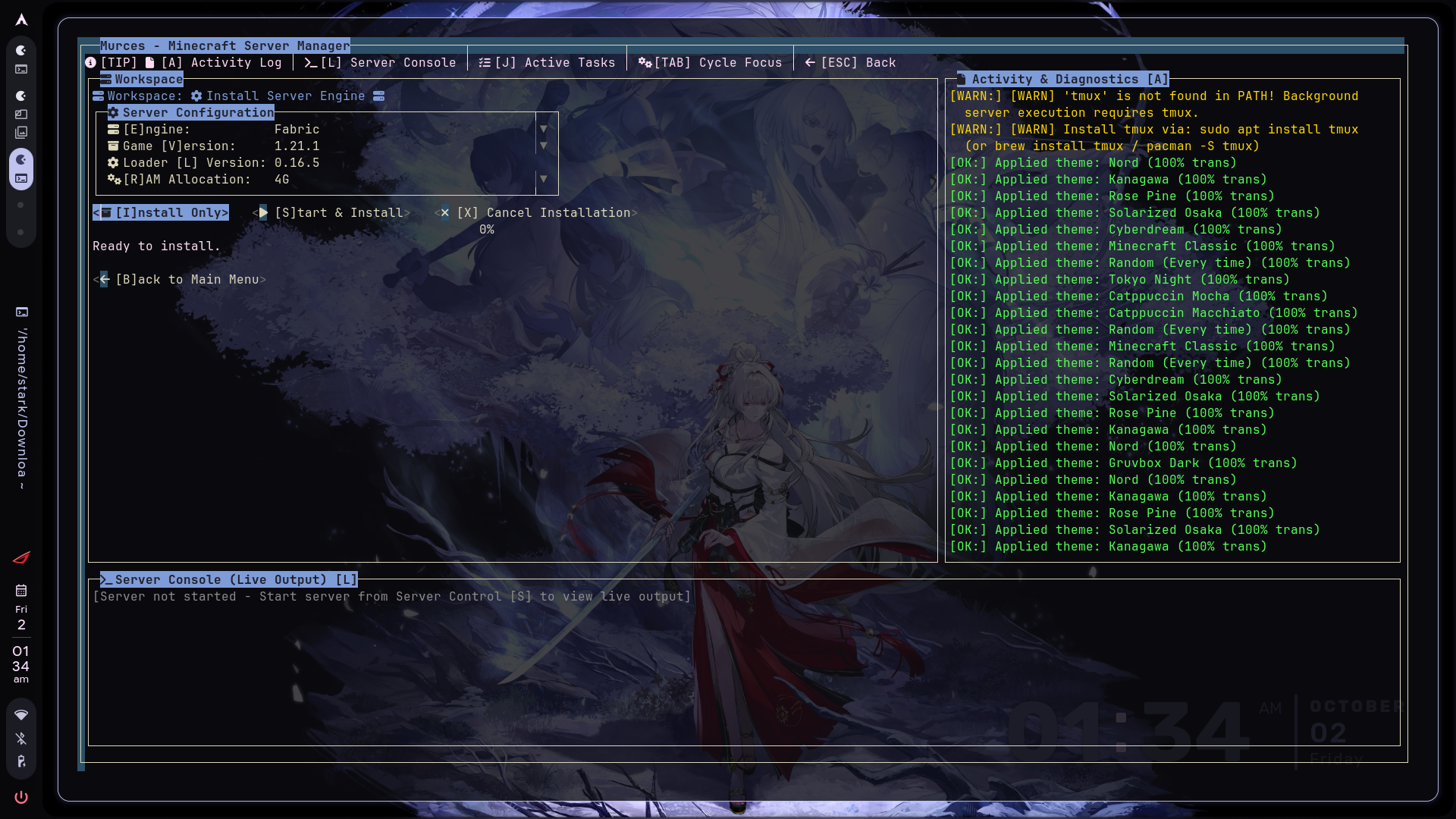
- Supported Loaders: Fabric, Paper, Forge, NeoForge, Spigot, and Vanilla.
- Dynamic Version Resolver: Queries live version manifests for both game releases and loader builds.
- Heap Allocation: Fine-tune
-Xmsand-XmxRAM allocations without modifying startup shell scripts.
3. In-TUI Mod Search & Downloader
Search, inspect, and install mods from Modrinth and CurseForge without leaving your terminal.
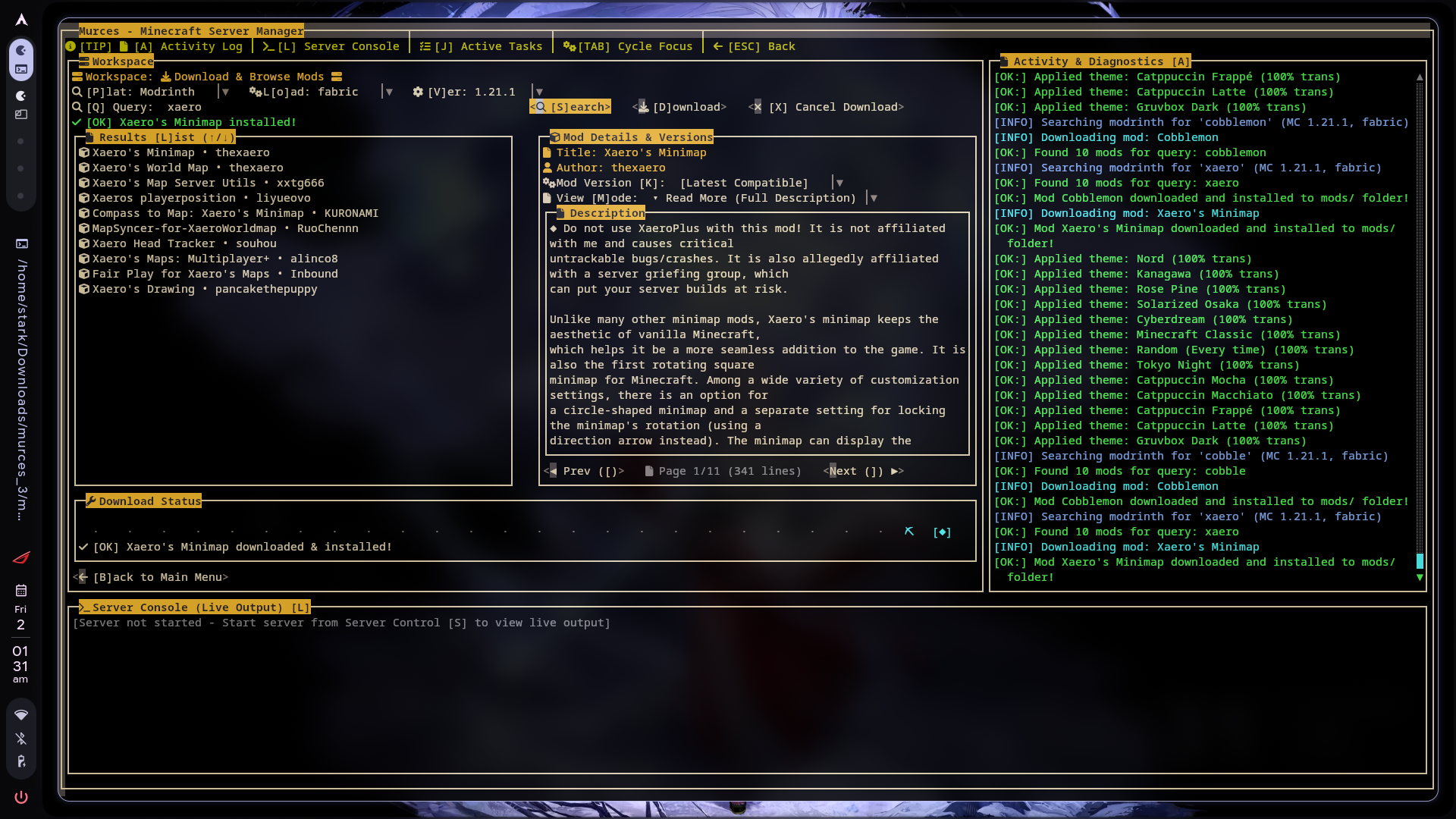
- Universal Mod Index: Switch between Modrinth and CurseForge API providers on the fly.
- Smart Filtering: Automatically filters releases by your active server loader (Fabric, Forge, NeoForge, Quilt) and game version.
- Interactive Inspector: Read full mod summaries, descriptions, dependencies, and author metadata.
- Atomic Telemetry: Real-time progress bar downloads into
.tmpstaging before atomic deployment tomods/.
4. Installed Mods Manager
Audit and maintain your active server mods directory cleanly.
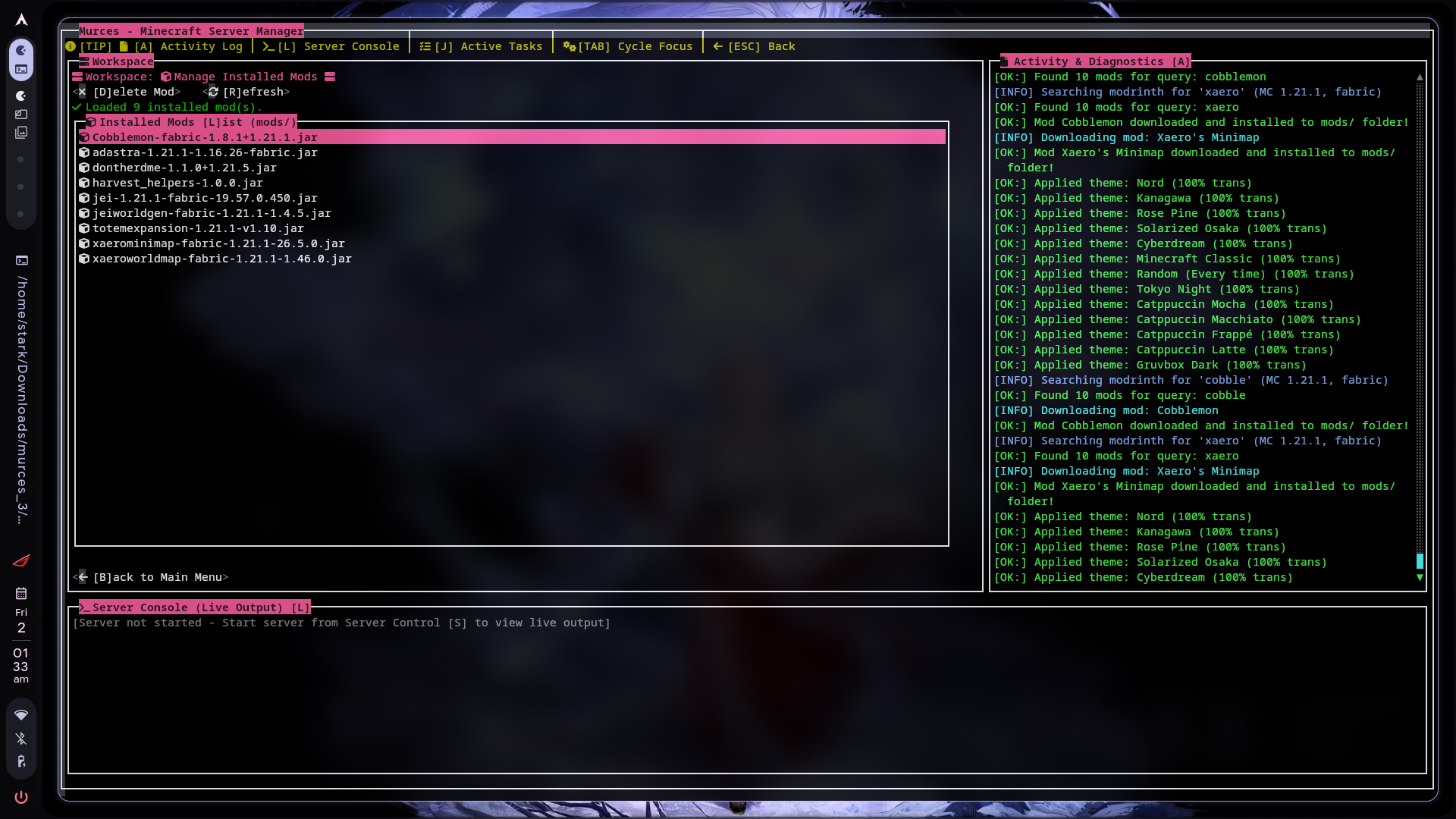
- Inspect all
.jarfiles present in the server'smods/directory. - Instant single-key mod removal (
[D]elete Mod) with confirmation safety. - Live file system re-indexing (
[R]efresh).
5. Searchable server.properties Editor
Tweak server configuration with a keyboard-driven visual inspector.
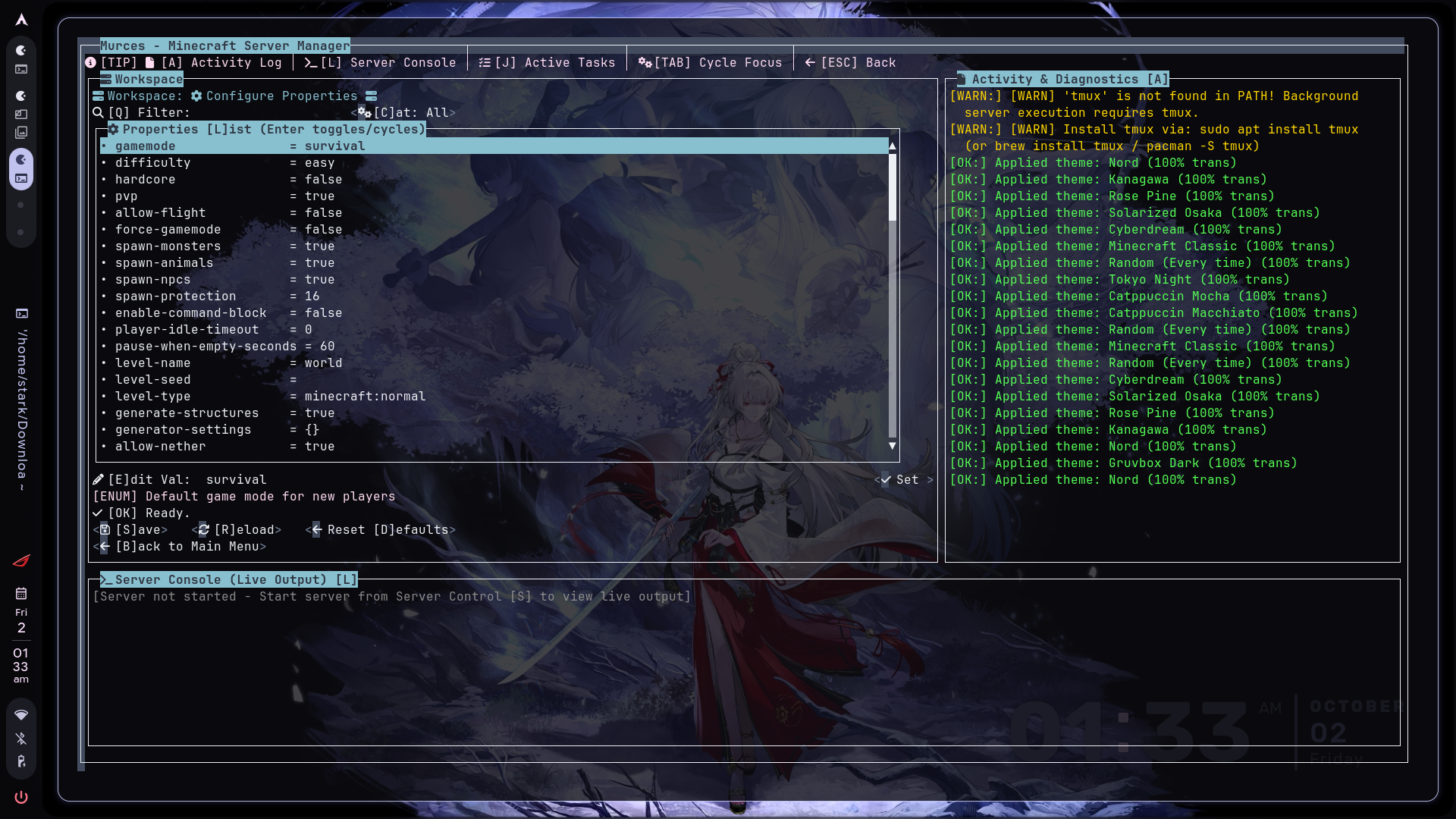
- Live Fuzzy Filter: Press
[Q]to filter across all available properties instantly. - Categorized Sections: Grouped into Gameplay, World, Network, Security, and Performance.
- One-Key Enum Cycling: Press
[Enter]on boolean or enum flags (gamemode,difficulty,pvp,spawn-monsters) to cycle values immediately. - Safe Persistence: Built-in validation with
[S]ave,[R]eload, andReset [D]efaultsactions.
6. World Backups & Live Memory Flushing
Safe level snapshots that flush memory buffers first to guarantee zero world corruption.
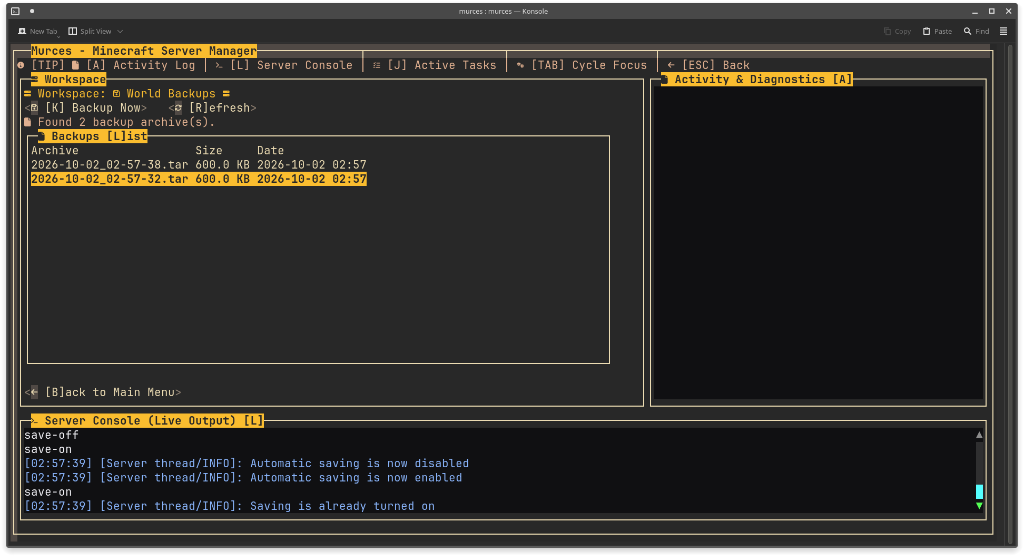
- Automated Memory Flushing: Issues
save-offandsave-allto disk before packaging the tarball, re-enabling auto-saving (save-on) on exit. - Archive Management: View timestamped
.tarsnapshots with file sizes directly in the TUI. - Retention & Cloud Replication: Automatically retains the latest snapshots and optionally syncs archives offsite via
rclone.
Configuring Google Drive Backups (backup.sh)
backup.sh handles automated save flushing, tar archiving, snapshot rotation, and cloud synchronization via rclone.
-
Install rclone:
sudo apt install rclone # or: curl https://rclone.org/install.sh | sudo bash -
Configure the Google Drive remote: Run the interactive configuration wizard:
rclone config- Press
nfor a new remote. - Name the remote
minecraftdrive(matching line 39 inbackup.sh). - Select
drivefor Google Drive. - Leave client ID and secret blank for defaults, or provide your own OAuth credentials.
- Select access scope
1(full access). - Complete browser authentication when prompted.
- Press
-
Verify the connection:
rclone lsd minecraftdrive: -
Customize
backup.shsettings (optional): Edit the parameters at the top ofbackup.sh:SOURCE_FOLDER="world" # World directory to archive TARGET_FOLDER="backup" # Local storage folder for .tar snapshots- Custom Remote Name: If your rclone remote is named differently, update line 39:
rclone sync "$TARGET_FOLDER" your_remote_name:"$TARGET_FOLDER" - Local Retention Limit: By default, only the 3 newest
.tararchives are kept locally. To change this quota, modify line 30:if [ "$COUNT" -gt 5 ]; then # Retains 5 newest archives
- Custom Remote Name: If your rclone remote is named differently, update line 39:
-
Trigger a backup: Run directly or via MurCes CLI:
./murces backup
# or execute the script directly:
./backup.sh
7. Player UUID & Data Migration
Seamlessly transfer inventories, stats, and advancements between player UUIDs.
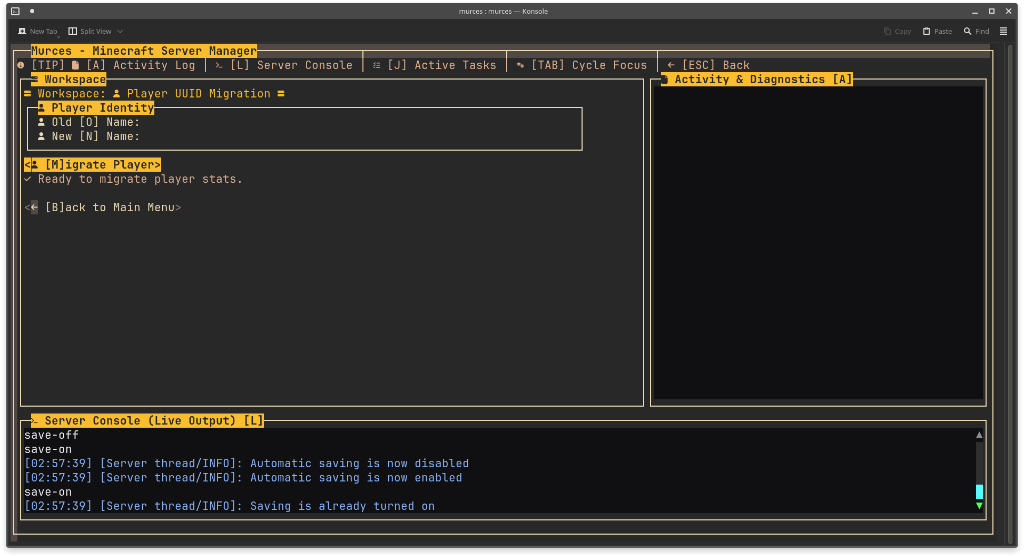
- Identity Mapping: Migrate stats, advancements, and playerdata from an old player name or UUID to a new one.
- Automatic Backup Safeguard: Bundles existing playerdata, usercache, stats, and advancements into a safety archive before modifying files.
- Offline/Online Migration: Resolve UUID discrepancies caused by switching between offline-mode and Mojang authentication.
8. Themes, Transparency & Glyphs
Complete visual customization to match your personal terminal setup.
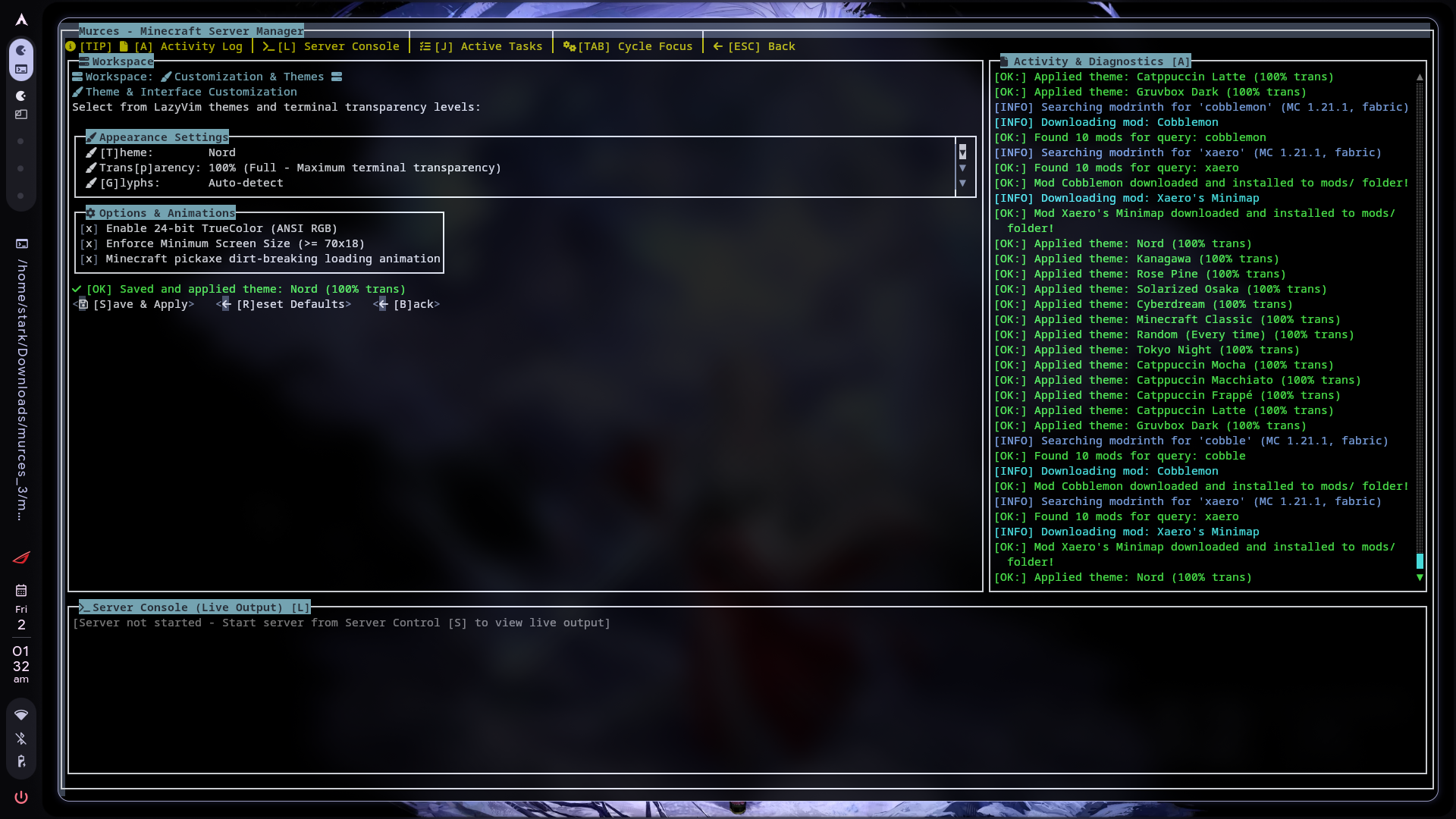
- Curated Theme Palettes: Catppuccin (Mocha, Macchiato, Frappé, Latte), Tokyo Night, Nord, Gruvbox Dark, Rose Pine, Kanagawa, Cyberdream, Solarized Osaka, and Minecraft Classic.
- Terminal Transparency: Adjustable from
0%(solid opaque) to100%(full terminal background passthrough). - Glyph Engine: Native Nerd Font icon support with automatic graceful fallback for bare Linux TTYs.
- Aesthetic Touches: Optional 24-bit TrueColor rendering and animated pickaxe dirt-breaking loading spinner.
9. Active Tasks & Job Telemetry
Monitor asynchronous background operations in real time.
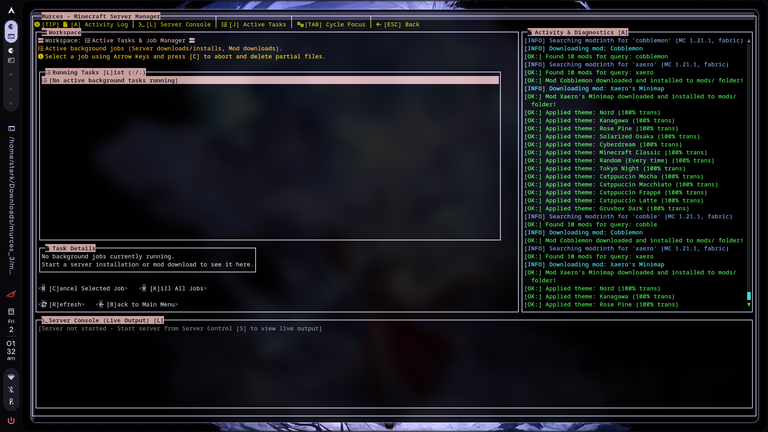
- Real-time tracking of non-blocking server installations, engine updates, and mod downloads.
- Detailed task telemetry showing active step, bytes transferred, and speed.
- Emergency controls to cancel selected jobs (
[C]) or terminate all workers ([K]).
Quickstart
1. Download & Extract
Download the latest murces.zip release bundle from GitHub Releases into your Minecraft server directory:
# Download and unzip the standalone native release
curl -sSLO https://github.com/DeployedReject/murces/releases/latest/download/murces.zip
unzip murces.zip

# Grant executable permissions
chmod +x murces svctrl.sh backup.sh

# Launch the interactive dashboard
./murces
[!NOTE] The precompiled native release is completely self-contained. It does not require a JDK or GraalVM runtime installed on your server.
CLI Commands
MurCes functions both as an interactive TUI and as a fast, scriptable CLI tool:
./murces [command] [options]
| Command | Description | Flags |
|---|---|---|
./murces | Launches the interactive Lanterna TUI dashboard | None |
./murces start | Starts Minecraft in a detached tmux session | -p, --public (starts Playit.gg tunnel) |
./murces stop | Sends graceful stop command and terminates the session | None |
./murces status | Checks if the Minecraft server daemon is active | None |
./murces backup | Flushes world memory, creates a .tar snapshot, and cleans old backups | None |
./murces --test-tui | Runs headless self-test across all TUI screens and exits | None |
./murces --help | Displays available command options and syntax | None |
./murces --version | Outputs current release version information | None |
Hotkeys & Navigation
| Keybinding | Action |
|---|---|
[TAB] / [Shift+TAB] | Cycle focus between Workspace, Activity Log, and Live Console |
[ESC] / [B] | Return to previous view / Back to Main Menu |
[A] | Toggle / Jump focus directly to Activity & Diagnostics Log |
[L] | Toggle / Jump focus directly to Server Live Console |
[J] | Open Active Tasks & Job Manager |
[S] | Open Server Control & Console |
[I] | Open Install Server Engine |
[C] | Open Configure Properties (server.properties) |
[B] | Open World Backups |
[P] | Open Player UUID Migration |
[D] | Open Download & Browse Mods |
[M] | Open Manage Installed Mods |
[Z] | Open Customization & Themes |
[E] | Exit MurCes |
System Requirements
| Component | Requirement | Details |
|---|---|---|
| Operating System | Linux 64-bit (x86_64) | Tested on Ubuntu, Debian, Arch Linux, Alpine, Fedora, and WSL2 |
| Terminal Multiplexer | tmux | Required for detached background session supervision |
| HTTP Downloader | curl or wget | Required for dependency and package fetching |
| Terminal Font | Nerd Font (v3.0+) | Required for icons, navigation glyphs, and status indicators |
| Cloud Sync (Optional) | rclone | Required only if using Google Drive/S3 offsite world backups |
| Public Tunnels (Optional) | playit | Required only if running public servers without port forwarding |
| Runtime Environment | None | The native binary runs out of the box with zero Java dependencies |
Terminal Rendering & Fonts
MurCes features rich icons and glyphs powered by Nerd Fonts.
Automatic Fallback (Zero Setup Needed)
You do not need a Nerd Font to use MurCes.
If you are connected from a basic terminal emulator, standard Linux virtual console (/dev/tty*), or an SSH client without patched font glyphs:
- MurCes automatically detects terminal capabilities at startup.
- It seamlessly downgrades all UI icons to clean, standard ASCII / Unicode glyphs.
- No missing glyph boxes (``), character overflow, or corrupted line wraps.
Manual Overrides
- In-App: Press
[Z] Customization & Themes→ toggle[G]lyphsbetweenAuto-detect,Force Nerd Fonts, orBasic (Fallback). - Environment Variables:
NO_NERD_FONT=1 ./murces      # Force basic ASCII fallback
FORCE_NERD_FONT=1 ./murces   # Force full Nerd Font icons
Installing Nerd Fonts with getnf
If you want the full icon experience, install any patched Nerd Font in seconds:
# Install getnf
curl -fsSL https://raw.githubusercontent.com/getnf/getnf/main/install.sh | bash

# Browse and install your preferred font (e.g. JetBrains Mono, Fira Code, Hack)
getnf
Decoupled Orchestrator (IPC)
MurCes is architected around a decoupled backend engine: murces-orchestrator.
The orchestrator communicates over standard I/O (stdin/stdout) via structured JSON IPC messages. This allows you to embed MurCes into custom Discord bots, custom web frontends, CLI automation scripts, or remote administration sidecars.
flowchart LR
    subgraph Clients["Frontend Clients"]
        TUI["MurCes Native TUI\n(Lanterna / GraalVM)"]
        CLI["CLI Subcommands\n(Bash / Scripts)"]
        EXT["Custom Integrations\n(Discord Bot, Web UI)"]
    end

    subgraph Core["Backend Orchestration Layer"]
        IPC["JSON IPC (stdin / stdout)"]
        ORCH["murces-orchestrator\n(Lifecycle & Package Engine)"]
    end

    subgraph Systems["System Services & External APIs"]
        TMUX["tmux Session ('mcsv')\nMinecraft Daemon"]
        MODS["Modrinth & CurseForge\nREST APIs"]
        MOJANG["Mojang Version Manifests\n& Paper/Fabric APIs"]
        BAK["Safe tar Snapshot Engine\n& rclone Cloud Sync"]
    end

    TUI <--> IPC
    CLI <--> IPC
    EXT <--> IPC
    IPC <--> ORCH
    ORCH --> TMUX
    ORCH --> MODS
    ORCH --> MOJANG
    ORCH --> BAK
IPC Examples
Bash / Shell
Pipe JSON payloads straight into standard input:
# 1. Query supported server engines
echo '{"type": "server", "serverType": "none", "gameVersion": "none", "loaderVersion": "none", "ram": 0, "job": 3}' | java -jar murces-orchestrator-1.0.jar

# 2. Download and boot Paper 1.20.4 with 4GB RAM
echo '{"type": "server", "serverType": "paper", "gameVersion": "1.20.4", "loaderVersion": "none", "ram": 4, "job": 1}' | java -jar murces-orchestrator-1.0.jar

# 3. Search Modrinth for "sodium" on Fabric 1.20.4
echo '{"type": "modding", "modBrowser": "modrinth", "subType": "search", "modName": "sodium", "version": "1.20.4", "modLoader": "fabric", "modId": "0"}' | java -jar murces-orchestrator-1.0.jar
Python Integration (Bots or Web Backends)
import subprocess
import json

proc = subprocess.Popen(
    ["java", "-jar", "murces-orchestrator-1.0.jar"],
    stdin=subprocess.PIPE,
    stdout=subprocess.PIPE,
    text=True,
    bufsize=1
)

def send_ipc(payload):
    proc.stdin.write(json.dumps(payload) + "\n")
    proc.stdin.flush()
    return json.loads(proc.stdout.readline())

# Query live server running state
response = send_ipc({
    "type": "server",
    "serverType": "none",
    "gameVersion": "none",
    "loaderVersion": "none",
    "ram": 0,
    "job": 4
})

print(f"Server Active: {response.get('running')}")
[!TIP] For detailed IPC payload schemas, job IDs, and response formats, refer to the full specification in
doc/API-SPEC.md.
Building from Source
If you prefer to compile MurCes from source rather than using the official native release:
Prerequisites
- JDK 21+
- Apache Maven 3.9+
- GraalVM Native Image (
native-imagetoolchain installed)
1. Compile the Orchestrator
cd java/orchestrator
mvn clean install
cd ../..
2. Build the Java TUI (JAR)
cd java/tui
mvn clean package
# Artifact generated at java/tui/target/murces-tui-0.1.jar
cd ../..
3. Compile Standalone Native Binary (GraalVM)
cd java/tui
mvn clean package -Pnative
cp target/murces ../../
cd ../..
Configuration & API Keys
- Release Binaries: Precompiled releases (
murces.zip) have the CurseForge API client credentials pre-configured and baked in. Mod browsing works out of the box with zero configuration required. - Source Builds & Custom Keys: If you are compiling from source or wish to provide your own developer credentials, create a
.envfile in the root directory:
curseAPI="YOUR_CURSEFORGE_API_KEY"
email="your_developer_email@example.com"
Branches
main: Active production branch containing the Lanterna TUI, decoupled orchestrator backend, and GraalVM build configuration.archived: Historical C prototype and initial proof-of-concept codebase preserved for reference.
Contributing & Community
Contributions, bug reports, and feature proposals are warmly welcome!
- Found a bug? Open an issue on the GitHub Issue Tracker.
- Want to contribute code? Fork the repository, create a topic branch, and submit a Pull Request.
License
MurCes is free and open-source software licensed under the GNU General Public License v3.0.
Similar repos


Languages
Java
97.3%
Shell
2.7%
Minecraft server TUI for Linux servers meant to be used over ssh.
Java
12
213 commits
updated Oct 2, 2026
See what people are saying
README
  __  __
 |  \/  |_   _ _ __ ___ ___  ___
 | |\/| | | | | '__/ __/ _ \/ __|
 | |  | | |_| | | | (_|  __/\__ \
 |_|  |_|\__,_|_|  \___\___||___/
    Minecraft Server Manager v1.0.0
MurCes
A high-performance, zero-overhead TUI & CLI manager for dedicated Minecraft servers on Linux.
Why MurCes • Visual Tour • Quickstart • CLI Usage • Hotkeys • Fonts • Architecture & IPC • Build
Why MurCes?
Managing dedicated Minecraft servers on budget VPS nodes or homelabs often forces an uncomfortable compromise:
- Heavy Web Panels (Pterodactyl, AMP, MineOS) require Docker daemons, Node.js runtimes, Nginx reverse proxies, MySQL databases, and background web workers, consuming 500MB to 1.5GB of RAM before your Minecraft server even allocates its heap.
- Raw Shell Scripts are brittle, lack visual status monitoring, don't handle dependency resolution, and make tweaking
server.propertiesor installing mods a chore.
MurCes delivers the sweet spot:
- Native Ahead-of-Time (AOT) Binary: Compiled into a standalone ~30MB Linux executable via GraalVM Native Image. Launches in < 20ms with less than 25MB resident memory and zero JVM warmup.
- Detached Process Supervision: Your server runs inside an isolated, background
tmuxsession (mcsv). If your SSH connection drops or MurCes exits, the server remains completely unaffected. - Modern Terminal Aesthetics: Designed with 24-bit TrueColor support, background transparency, and popular developer themes (Catppuccin, Nord, Gruvbox, Tokyo Night, Cyberdream, Rose Pine, Kanagawa).
- Built-in Mod Ecosystem: Query both Modrinth and CurseForge directly inside the terminal with loader & version filtering, dependency lookups, and one-key atomic downloads.
- Safe World State Flushing: Performs live memory flushing (
save-off→save-all→ tar archive →save-on) to eliminate backup chunk corruption, with automated retention rotation and optionalrclonecloud replication. - Zero-Config Port Forwarding: Built-in Playit.gg integration (
-p) creates secure public tunnels on demand without touching router NAT tables.
Visual Tour & Features
1. Main Dashboard & Workspace
Unified server management cockpit with dual-panel activity diagnostics and live console log stream.
- Navigation Hub: Direct keyboard access to engine installers, mod managers, backups, and configs.
- Activity & Diagnostics Panel: Real-time status logs for theme changes, network queries, and download triggers.
- Embedded Console: Immediate visibility into the underlying Minecraft server output.
2. Server Control & Command Dispatch
Monitor server lifecycle, toggle Playit.gg tunnels, and dispatch in-game commands directly to the tmux session.
- Process Telemetry: Live status indicator with active port reporting (
[RUNNING] - Port 25565). - One-Click Actions: Start, restart, or safely terminate the Minecraft daemon with graceful world saves.
- In-Game Command Prompt: Dispatch console commands directly into the
mcsvsession without manually attaching tmux. - Networking Controls: Toggle Playit.gg public tunnels and adjust runtime memory allocations on the fly.
3. Server Engine & Version Setup
Configure and boot server engines with automatic Mojang EULA acceptance and custom RAM allocation flags.
- Supported Loaders: Fabric, Paper, Forge, NeoForge, Spigot, and Vanilla.
- Dynamic Version Resolver: Queries live version manifests for both game releases and loader builds.
- Heap Allocation: Fine-tune
-Xmsand-XmxRAM allocations without modifying startup shell scripts.
3. In-TUI Mod Search & Downloader
Search, inspect, and install mods from Modrinth and CurseForge without leaving your terminal.
- Universal Mod Index: Switch between Modrinth and CurseForge API providers on the fly.
- Smart Filtering: Automatically filters releases by your active server loader (Fabric, Forge, NeoForge, Quilt) and game version.
- Interactive Inspector: Read full mod summaries, descriptions, dependencies, and author metadata.
- Atomic Telemetry: Real-time progress bar downloads into
.tmpstaging before atomic deployment tomods/.
4. Installed Mods Manager
Audit and maintain your active server mods directory cleanly.
- Inspect all
.jarfiles present in the server'smods/directory. - Instant single-key mod removal (
[D]elete Mod) with confirmation safety. - Live file system re-indexing (
[R]efresh).
5. Searchable server.properties Editor
Tweak server configuration with a keyboard-driven visual inspector.
- Live Fuzzy Filter: Press
[Q]to filter across all available properties instantly. - Categorized Sections: Grouped into Gameplay, World, Network, Security, and Performance.
- One-Key Enum Cycling: Press
[Enter]on boolean or enum flags (gamemode,difficulty,pvp,spawn-monsters) to cycle values immediately. - Safe Persistence: Built-in validation with
[S]ave,[R]eload, andReset [D]efaultsactions.
6. World Backups & Live Memory Flushing
Safe level snapshots that flush memory buffers first to guarantee zero world corruption.
- Automated Memory Flushing: Issues
save-offandsave-allto disk before packaging the tarball, re-enabling auto-saving (save-on) on exit. - Archive Management: View timestamped
.tarsnapshots with file sizes directly in the TUI. - Retention & Cloud Replication: Automatically retains the latest snapshots and optionally syncs archives offsite via
rclone.
Configuring Google Drive Backups (backup.sh)
backup.sh handles automated save flushing, tar archiving, snapshot rotation, and cloud synchronization via rclone.
-
Install rclone:
sudo apt install rclone # or: curl https://rclone.org/install.sh | sudo bash -
Configure the Google Drive remote: Run the interactive configuration wizard:
rclone config- Press
nfor a new remote. - Name the remote
minecraftdrive(matching line 39 inbackup.sh). - Select
drivefor Google Drive. - Leave client ID and secret blank for defaults, or provide your own OAuth credentials.
- Select access scope
1(full access). - Complete browser authentication when prompted.
- Press
-
Verify the connection:
rclone lsd minecraftdrive: -
Customize
backup.shsettings (optional): Edit the parameters at the top ofbackup.sh:SOURCE_FOLDER="world" # World directory to archive TARGET_FOLDER="backup" # Local storage folder for .tar snapshots- Custom Remote Name: If your rclone remote is named differently, update line 39:
rclone sync "$TARGET_FOLDER" your_remote_name:"$TARGET_FOLDER" - Local Retention Limit: By default, only the 3 newest
.tararchives are kept locally. To change this quota, modify line 30:if [ "$COUNT" -gt 5 ]; then # Retains 5 newest archives
- Custom Remote Name: If your rclone remote is named differently, update line 39:
-
Trigger a backup: Run directly or via MurCes CLI:
./murces backup
# or execute the script directly:
./backup.sh
7. Player UUID & Data Migration
Seamlessly transfer inventories, stats, and advancements between player UUIDs.
- Identity Mapping: Migrate stats, advancements, and playerdata from an old player name or UUID to a new one.
- Automatic Backup Safeguard: Bundles existing playerdata, usercache, stats, and advancements into a safety archive before modifying files.
- Offline/Online Migration: Resolve UUID discrepancies caused by switching between offline-mode and Mojang authentication.
8. Themes, Transparency & Glyphs
Complete visual customization to match your personal terminal setup.
- Curated Theme Palettes: Catppuccin (Mocha, Macchiato, Frappé, Latte), Tokyo Night, Nord, Gruvbox Dark, Rose Pine, Kanagawa, Cyberdream, Solarized Osaka, and Minecraft Classic.
- Terminal Transparency: Adjustable from
0%(solid opaque) to100%(full terminal background passthrough). - Glyph Engine: Native Nerd Font icon support with automatic graceful fallback for bare Linux TTYs.
- Aesthetic Touches: Optional 24-bit TrueColor rendering and animated pickaxe dirt-breaking loading spinner.
9. Active Tasks & Job Telemetry
Monitor asynchronous background operations in real time.
- Real-time tracking of non-blocking server installations, engine updates, and mod downloads.
- Detailed task telemetry showing active step, bytes transferred, and speed.
- Emergency controls to cancel selected jobs (
[C]) or terminate all workers ([K]).
Quickstart
1. Download & Extract
Download the latest murces.zip release bundle from GitHub Releases into your Minecraft server directory:
# Download and unzip the standalone native release
curl -sSLO https://github.com/DeployedReject/murces/releases/latest/download/murces.zip
unzip murces.zip

# Grant executable permissions
chmod +x murces svctrl.sh backup.sh

# Launch the interactive dashboard
./murces
[!NOTE] The precompiled native release is completely self-contained. It does not require a JDK or GraalVM runtime installed on your server.
CLI Commands
MurCes functions both as an interactive TUI and as a fast, scriptable CLI tool:
./murces [command] [options]
| Command | Description | Flags |
|---|---|---|
./murces | Launches the interactive Lanterna TUI dashboard | None |
./murces start | Starts Minecraft in a detached tmux session | -p, --public (starts Playit.gg tunnel) |
./murces stop | Sends graceful stop command and terminates the session | None |
./murces status | Checks if the Minecraft server daemon is active | None |
./murces backup | Flushes world memory, creates a .tar snapshot, and cleans old backups | None |
./murces --test-tui | Runs headless self-test across all TUI screens and exits | None |
./murces --help | Displays available command options and syntax | None |
./murces --version | Outputs current release version information | None |
Hotkeys & Navigation
| Keybinding | Action |
|---|---|
[TAB] / [Shift+TAB] | Cycle focus between Workspace, Activity Log, and Live Console |
[ESC] / [B] | Return to previous view / Back to Main Menu |
[A] | Toggle / Jump focus directly to Activity & Diagnostics Log |
[L] | Toggle / Jump focus directly to Server Live Console |
[J] | Open Active Tasks & Job Manager |
[S] | Open Server Control & Console |
[I] | Open Install Server Engine |
[C] | Open Configure Properties (server.properties) |
[B] | Open World Backups |
[P] | Open Player UUID Migration |
[D] | Open Download & Browse Mods |
[M] | Open Manage Installed Mods |
[Z] | Open Customization & Themes |
[E] | Exit MurCes |
System Requirements
| Component | Requirement | Details |
|---|---|---|
| Operating System | Linux 64-bit (x86_64) | Tested on Ubuntu, Debian, Arch Linux, Alpine, Fedora, and WSL2 |
| Terminal Multiplexer | tmux | Required for detached background session supervision |
| HTTP Downloader | curl or wget | Required for dependency and package fetching |
| Terminal Font | Nerd Font (v3.0+) | Required for icons, navigation glyphs, and status indicators |
| Cloud Sync (Optional) | rclone | Required only if using Google Drive/S3 offsite world backups |
| Public Tunnels (Optional) | playit | Required only if running public servers without port forwarding |
| Runtime Environment | None | The native binary runs out of the box with zero Java dependencies |
Terminal Rendering & Fonts
MurCes features rich icons and glyphs powered by Nerd Fonts.
Automatic Fallback (Zero Setup Needed)
You do not need a Nerd Font to use MurCes.
If you are connected from a basic terminal emulator, standard Linux virtual console (/dev/tty*), or an SSH client without patched font glyphs:
- MurCes automatically detects terminal capabilities at startup.
- It seamlessly downgrades all UI icons to clean, standard ASCII / Unicode glyphs.
- No missing glyph boxes (``), character overflow, or corrupted line wraps.
Manual Overrides
- In-App: Press
[Z] Customization & Themes→ toggle[G]lyphsbetweenAuto-detect,Force Nerd Fonts, orBasic (Fallback). - Environment Variables:
NO_NERD_FONT=1 ./murces      # Force basic ASCII fallback
FORCE_NERD_FONT=1 ./murces   # Force full Nerd Font icons
Installing Nerd Fonts with getnf
If you want the full icon experience, install any patched Nerd Font in seconds:
# Install getnf
curl -fsSL https://raw.githubusercontent.com/getnf/getnf/main/install.sh | bash

# Browse and install your preferred font (e.g. JetBrains Mono, Fira Code, Hack)
getnf
Decoupled Orchestrator (IPC)
MurCes is architected around a decoupled backend engine: murces-orchestrator.
The orchestrator communicates over standard I/O (stdin/stdout) via structured JSON IPC messages. This allows you to embed MurCes into custom Discord bots, custom web frontends, CLI automation scripts, or remote administration sidecars.
flowchart LR
    subgraph Clients["Frontend Clients"]
        TUI["MurCes Native TUI\n(Lanterna / GraalVM)"]
        CLI["CLI Subcommands\n(Bash / Scripts)"]
        EXT["Custom Integrations\n(Discord Bot, Web UI)"]
    end

    subgraph Core["Backend Orchestration Layer"]
        IPC["JSON IPC (stdin / stdout)"]
        ORCH["murces-orchestrator\n(Lifecycle & Package Engine)"]
    end

    subgraph Systems["System Services & External APIs"]
        TMUX["tmux Session ('mcsv')\nMinecraft Daemon"]
        MODS["Modrinth & CurseForge\nREST APIs"]
        MOJANG["Mojang Version Manifests\n& Paper/Fabric APIs"]
        BAK["Safe tar Snapshot Engine\n& rclone Cloud Sync"]
    end

    TUI <--> IPC
    CLI <--> IPC
    EXT <--> IPC
    IPC <--> ORCH
    ORCH --> TMUX
    ORCH --> MODS
    ORCH --> MOJANG
    ORCH --> BAK
IPC Examples
Bash / Shell
Pipe JSON payloads straight into standard input:
# 1. Query supported server engines
echo '{"type": "server", "serverType": "none", "gameVersion": "none", "loaderVersion": "none", "ram": 0, "job": 3}' | java -jar murces-orchestrator-1.0.jar

# 2. Download and boot Paper 1.20.4 with 4GB RAM
echo '{"type": "server", "serverType": "paper", "gameVersion": "1.20.4", "loaderVersion": "none", "ram": 4, "job": 1}' | java -jar murces-orchestrator-1.0.jar

# 3. Search Modrinth for "sodium" on Fabric 1.20.4
echo '{"type": "modding", "modBrowser": "modrinth", "subType": "search", "modName": "sodium", "version": "1.20.4", "modLoader": "fabric", "modId": "0"}' | java -jar murces-orchestrator-1.0.jar
Python Integration (Bots or Web Backends)
import subprocess
import json

proc = subprocess.Popen(
    ["java", "-jar", "murces-orchestrator-1.0.jar"],
    stdin=subprocess.PIPE,
    stdout=subprocess.PIPE,
    text=True,
    bufsize=1
)

def send_ipc(payload):
    proc.stdin.write(json.dumps(payload) + "\n")
    proc.stdin.flush()
    return json.loads(proc.stdout.readline())

# Query live server running state
response = send_ipc({
    "type": "server",
    "serverType": "none",
    "gameVersion": "none",
    "loaderVersion": "none",
    "ram": 0,
    "job": 4
})

print(f"Server Active: {response.get('running')}")
[!TIP] For detailed IPC payload schemas, job IDs, and response formats, refer to the full specification in
doc/API-SPEC.md.
Building from Source
If you prefer to compile MurCes from source rather than using the official native release:
Prerequisites
- JDK 21+
- Apache Maven 3.9+
- GraalVM Native Image (
native-imagetoolchain installed)
1. Compile the Orchestrator
cd java/orchestrator
mvn clean install
cd ../..
2. Build the Java TUI (JAR)
cd java/tui
mvn clean package
# Artifact generated at java/tui/target/murces-tui-0.1.jar
cd ../..
3. Compile Standalone Native Binary (GraalVM)
cd java/tui
mvn clean package -Pnative
cp target/murces ../../
cd ../..
Configuration & API Keys
- Release Binaries: Precompiled releases (
murces.zip) have the CurseForge API client credentials pre-configured and baked in. Mod browsing works out of the box with zero configuration required. - Source Builds & Custom Keys: If you are compiling from source or wish to provide your own developer credentials, create a
.envfile in the root directory:
curseAPI="YOUR_CURSEFORGE_API_KEY"
email="your_developer_email@example.com"
Branches
main: Active production branch containing the Lanterna TUI, decoupled orchestrator backend, and GraalVM build configuration.archived: Historical C prototype and initial proof-of-concept codebase preserved for reference.
Contributing & Community
Contributions, bug reports, and feature proposals are warmly welcome!
- Found a bug? Open an issue on the GitHub Issue Tracker.
- Want to contribute code? Fork the repository, create a topic branch, and submit a Pull Request.
License
MurCes is free and open-source software licensed under the GNU General Public License v3.0.
Similar repos
Languages
Java
97.3%
Shell
2.7%