
Windows-first RFID attendance kiosk (Tauri v2 + React + SQLite) with LAN live dashboard, payroll PDFs, and bathroom key log
TypeScript
0
340 commits
updated Sep 23, 2026
README
Alpha Premier Attendance
Windows-first RFID attendance kiosk for the front desk.
Tap a card. See the photo. Done in under a second.



Download · Features · Kiosk · Payroll · LAN viewer · Stack · Development
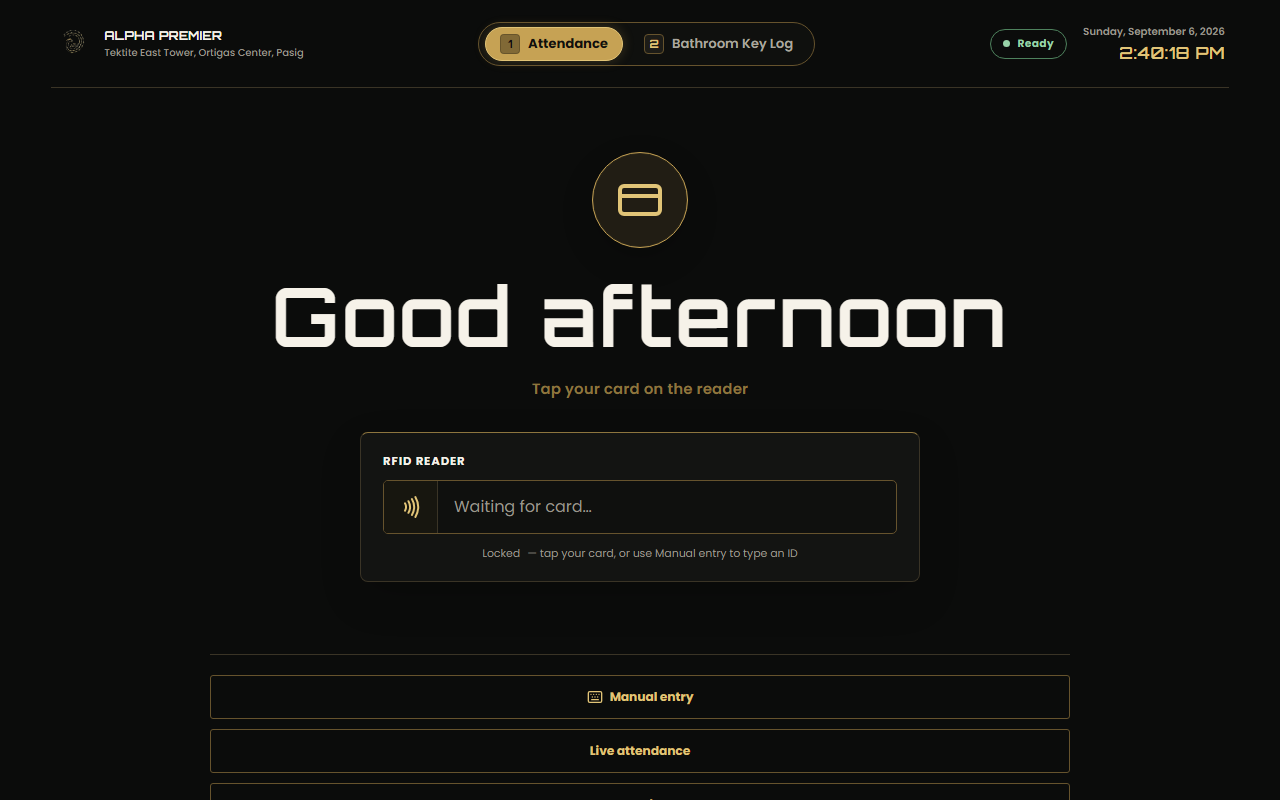
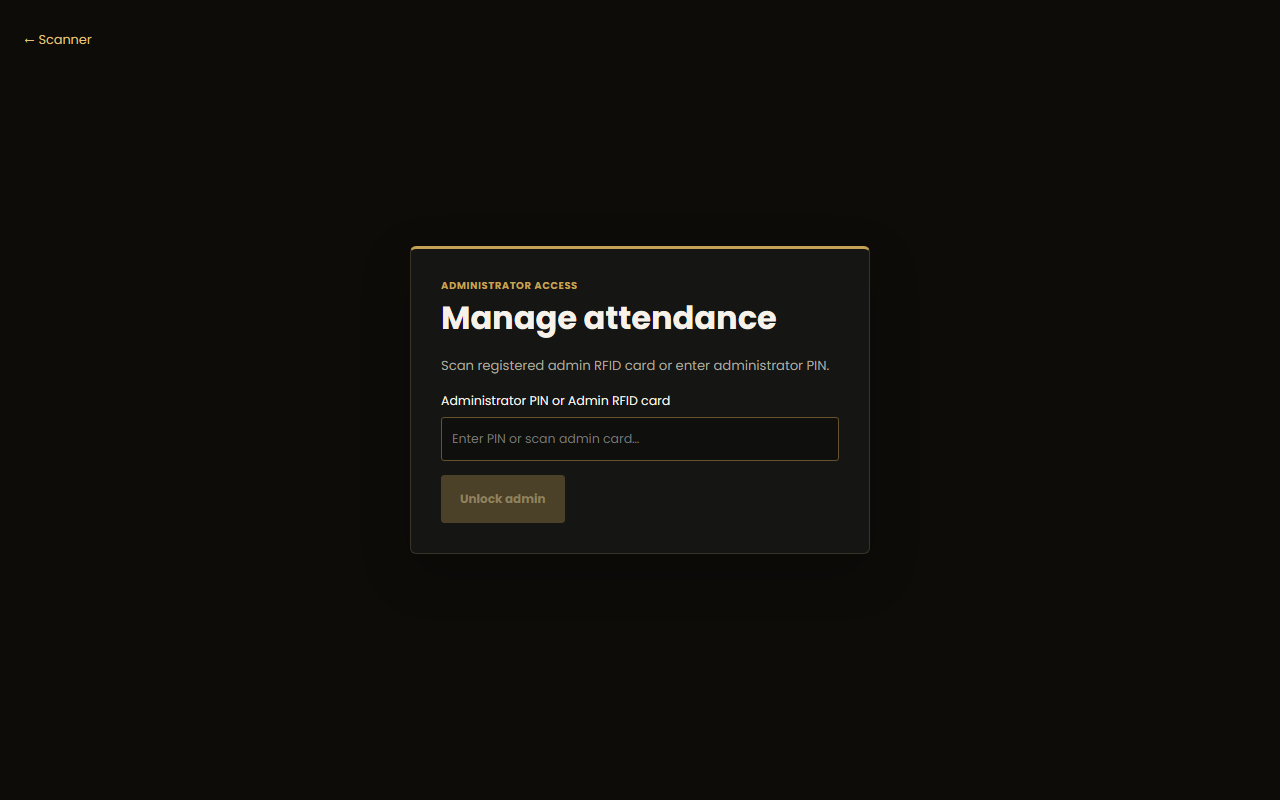
The front-desk kiosk at rest — card tap drives the whole flow. Below: bathroom key mode, live viewer, and admin unlock.
What is Alpha Premier Attendance?
Paper logbooks and generic HR tools assume someone is watching the door. This app is the watcher: a Tauri v2 desktop app on the front-desk Windows laptop, the only machine connected to the RFID reader and the only attendance writer. It stores everything in local SQLite and exposes a read-only live dashboard to the office LAN.
| Approach | Needs watcher | Works offline | Per-tap proof | Payroll-ready |
|---|---|---|---|---|
| Paper logbook / Sheets | Yes | Yes | No | Manual |
| Generic cloud HR | Yes | No | Sometimes | Varies |
| Alpha Premier Attendance | No — kiosk is always on | Yes, SQLite-first | Photo + audit trail | One-click PDF per cutoff |
- Offline-first kiosk — SQLite is the source of truth; Google Sheets is an optional write-only export, never required for a scan.
- Sub-second tap flow — native-layer capture, photo feedback, duplicate cooldown.
- Office rules built in — 8:00–17:00 hours, grace, late-timeout, unpaid lunch.
- Boss-friendly live view — read-only browser dashboard over the office Wi-Fi, no install.
- Audit-ready payroll — semi-monthly cutoffs, one consolidated PDF per worker type.
Download
| Platform | Download |
|---|---|
| Windows 10/11 x64 | Setup.exe on GitHub Releases |
The NSIS package bundles the WebView2 bootstrapper and installs machine-wide (admin approval required). The portable
.exeneeds WebView2 already installed — prefer the NSIS package for fresh machines.Pushing a
v*tag builds and signs release bundles in CI (.github/workflows/release.yml).
Features
Kiosk
The / route is the always-on front screen. Mode tabs switch the workflow — press 1 for attendance, 2 for bathroom keys (keypresses are ignored while typing in inputs).
| Mode | What happens on tap |
|---|---|
| Attendance | Time-in/out recorded, employee photo shown, duplicate taps cooled down |
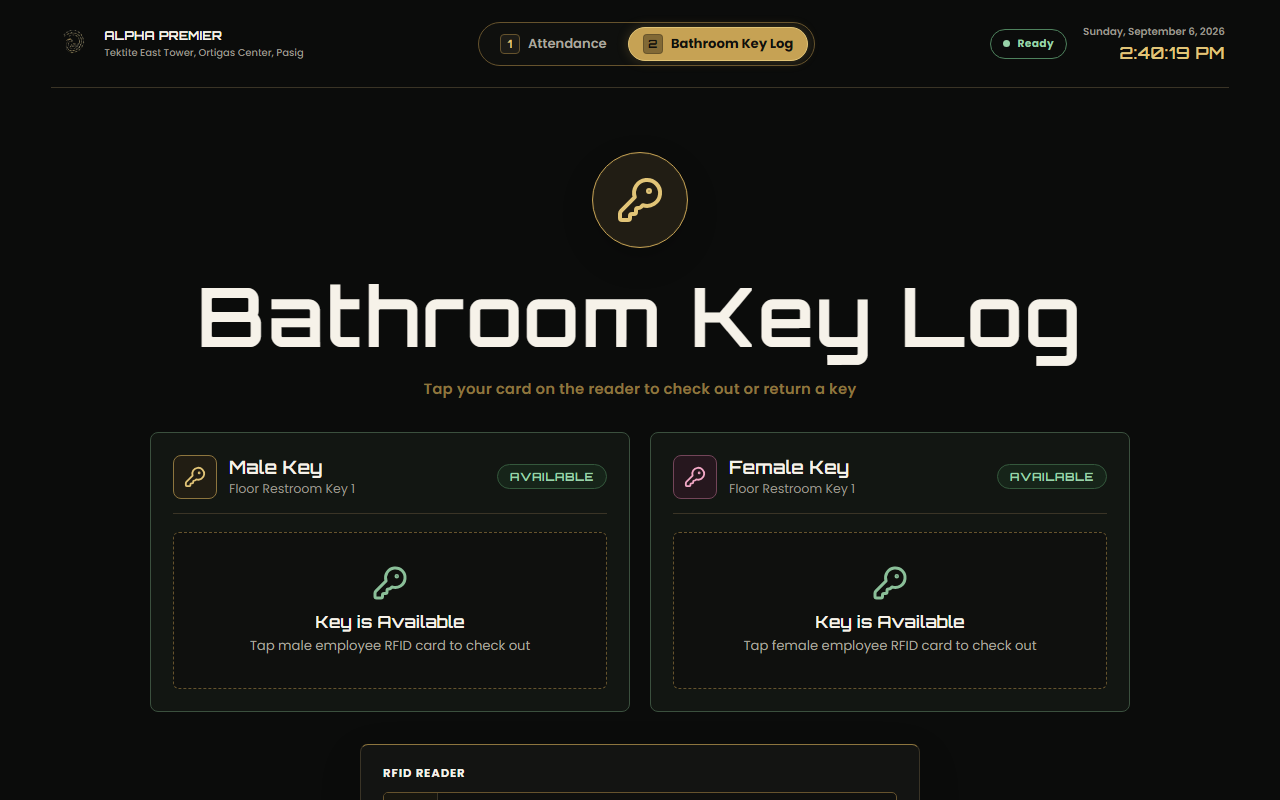
| Bathroom Key Log | Male/Female key checked out to the tapper with a live elapsed timer, or returned with duration logged |
Scanner feedback stays on the kiosk (processing, success + photo, unknown card, duplicate cooldown, error). Diagnostics live in admin/setup — never on the main screen. Closing the window hides the app to the tray; scanning keeps running. A scan while hidden shows a Windows toast without stealing focus.
RFID and readers
| Reader | Transport | Capture |
|---|---|---|
| 125 kHz EM4100 USB (default) | Keyboard wedge: 10 decimal digits + Enter, burst under 100 ms | Foreground only (kiosk focused), heuristic classification |
The Rust layer completes a scan on the Enter suffix or idle-timeout fallback, normalizes the UID to uppercase hex, validates length, and dedupes repeats in a short window. The scanner listener pauses while the operator types in admin, setup, or manual-entry screens. The admin Scanner panel shows read-only keyboard-wedge status (mode, expected length, detail).
Attendance rules
| Rule | Value |
|---|---|
| Office hours | 08:00–17:00, Asia/Manila |
| Late grace | Arrival after 08:15 is late; grace usable at most once per user per week |
| Late time-out | Time-out at or after 18:00 is saved as LATE_TIMEOUT — kept and flagged, no payroll row until the official time-out is re-entered before 18:00 |
| Lunch | 12:00–13:00 fixed window is unpaid — subtracted from worked hours, the TOTAL_HOURS workbook column, and overtime inputs (intern lateness still measured from 08:00) |
| Intern rate | PHP 80.00/day, PHP 10.00/hour late deduction after weekly grace |
Admin
/admin unlocks with the administrator PIN or a registered admin RFID card into a short-lived session. Tabs: users (roster + card binding), attendance (editor, exports), payroll (cutoff workspace), data (backup/restore, LAN viewer, updater), voice (TTS settings).
Payroll
The Payroll tab has exactly two generate actions — Generate Employee Payroll PDF and Generate Intern Payroll PDF. Each produces one consolidated landscape sheet (printpdf, no browser print) with the reference columns, company/cutoff header, and a highlighted Gross Compensation grand total. Files land timestamped in the exports folder, are recorded in the payroll_pdfs table (period, worker type, headcount, total, SHA-256, size), and listed with Open PDF / Show in Folder.
Cutoff payroll supports semi-monthly profiles, allowances, incentives, manual adjustments, finalization, and a fillable late-deduction section (total late hours × PHP-per-hour rate, overridable). Interns appear on the intern sheet at the fixed daily rate.
Bathroom key log
A parallel mode digitizing the handwritten restroom-key logbook: exactly one physical key per gender (MALE/FEMALE), enforced by a partial unique index plus backend validation so a checked-out key cannot be double-issued. Live elapsed timer, searchable employee picker, and a chronological log with date filter, timestamps, duration, and OUT/RETURNED status (pictured above).
LAN viewer
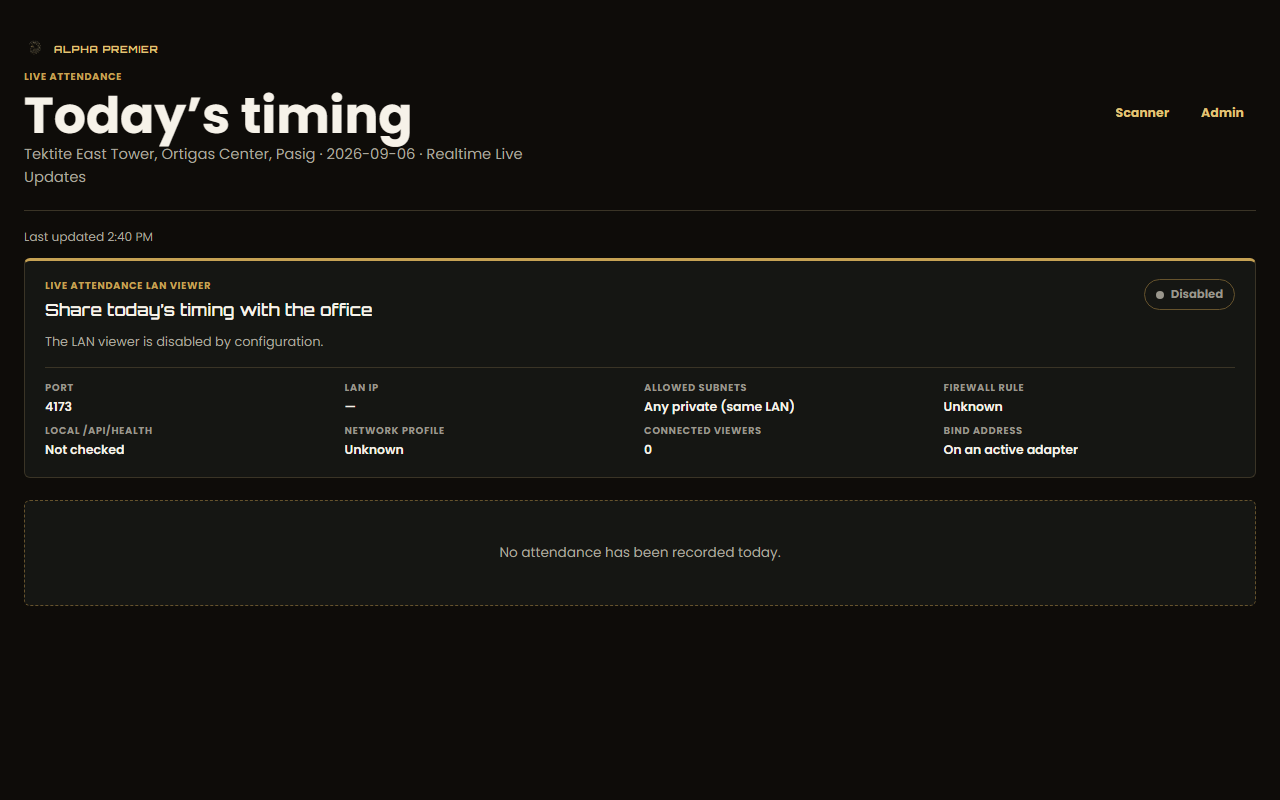
The front-desk laptop serves a read-only dashboard to the office network. The boss opens the printed LAN URL from any browser — no Tauri install.
| Route | Purpose |
|---|---|
GET /attendance | Read-only browser dashboard |
GET /api/attendance/today?date=YYYY-MM-DD | Manila-date snapshot |
GET /api/events/attendance | SSE stream (polling fallback) |
GET /api/health | Service, SQLite, LAN, and export health |
Admin, payroll, setup, photo, and mutation APIs stay local to the Tauri app. If phones hang on "Connecting…", allow port 4173 in Windows Firewall as Administrator:
netsh advfirewall firewall add rule name="Alpha Premier Live Attendance" dir=in action=allow protocol=TCP localport=4173
See docs/lan-dashboard-deployment.md and docs/lan-dashboard-troubleshooting.md.
Install and run
npm install
npm run dev        # web stack: API on :3001 + Vite on :5173
npm run tauri:dev  # desktop app (builds client first)
Kiosk routes: / scan · /attendance local view · /admin protected admin.
Front-desk configuration
Copy-Item src-tauri/config.example.toml "$env:APPDATA\com.alphapremier.attendance\config.toml"
[lan]
enabled = true
port = 4173
allowed_subnets = ["192.168.1.0/24"]
auth_mode = "password"
viewer_password_hash = "<sha256-hex-token-hash>"

[office]
company_name = "Alpha Premier"
office_display_full = "Unit 3104C, Tektite East Tower, Ortigas Center, Pasig, Metro Manila"
Leave bind_address unset to auto-detect the office Wi-Fi IP. Secrets stay on the laptop and are never committed. Office identity defaults to the real Tektite East Tower address even with no config file. Full reference: docs/deployment.md, docs/google-sheets-setup.md.
Windows packaging
npm run tauri:build
src-tauri/target/release/alpha-premier-attendance.exe
src-tauri/target/release/bundle/nsis/Alpha Premier Attendance_0.1.51_x64-setup.exe
Generated files and portable mode
Everything the app creates (attendance/payroll workbooks, CSVs, payslips, register PDFs) goes to the exports folder, and the UI shows the exact path with Open file / Show in folder.
| Mode | Location |
|---|---|
| Installed (default) | %LOCALAPPDATA%\com.alphapremier.attendance\exports\ |
Portable (portable.dat next to the .exe, or ALPHA_PREMIER_PORTABLE=1) | Data\exports\, Data\attendance.db next to the executable |
Photos live under the data dir as {user_id}.webp (JPEG/PNG/WebP input, 512×512 max, 500 KB) and are never served over LAN. File actions require an admin session and only accept paths inside the data root.
Self-updating
Powered by the Tauri v2 updater against signed minisign artifacts on GitHub Releases: silent background checks every 8 hours, manual check via tray menu or Admin → Data and backup, per-terminal opt-out in Admin settings or ALPHA_PREMIER_DISABLE_AUTO_UPDATE=1. Keypair setup: docs/UPDATES.md.
Data migration and moving PCs
npm run migrate:from-sheets -- --dry-run --input .\sheets-export
npm run migrate:from-sheets -- --execute --input .\sheets-export --db .\attendance.db
The database is one file — move machines via Admin → Data and backup: create backup on the old PC, copy the .apbackup archive (database, photos, exports, sync state, config), restore on the new PC. Never copy attendance.db while the app is open. Details: docs/database-migration.md, docs/migration-cutover.md, docs/payroll-operations.md.
Tech stack
| Layer | Technology |
|---|---|
| Desktop shell | Tauri v2 (com.alphapremier.attendance), system tray, updater, opener |
| Frontend | React 19 + TypeScript + Vite (client/) |
| Store | SQLite via SQLx, WAL mode, numbered migrations (src-tauri/db/migrations) |
| LAN server | Axum + SSE on port 4173 (read-only) |
| Export | Async Google Sheets queue (optional, write-only) + printpdf payroll PDFs |
| Voice | Piper/ONNX TTS with cloned voices (scripts/generate_cloned_voices.py) |
| Contracts | Shared TS API/LAN/office-hours rules (shared/) mirrored in Rust |
| Automation | Tauri MCP bridge (ws://127.0.0.1:9223) — doctor:mcp / verify:mcp |
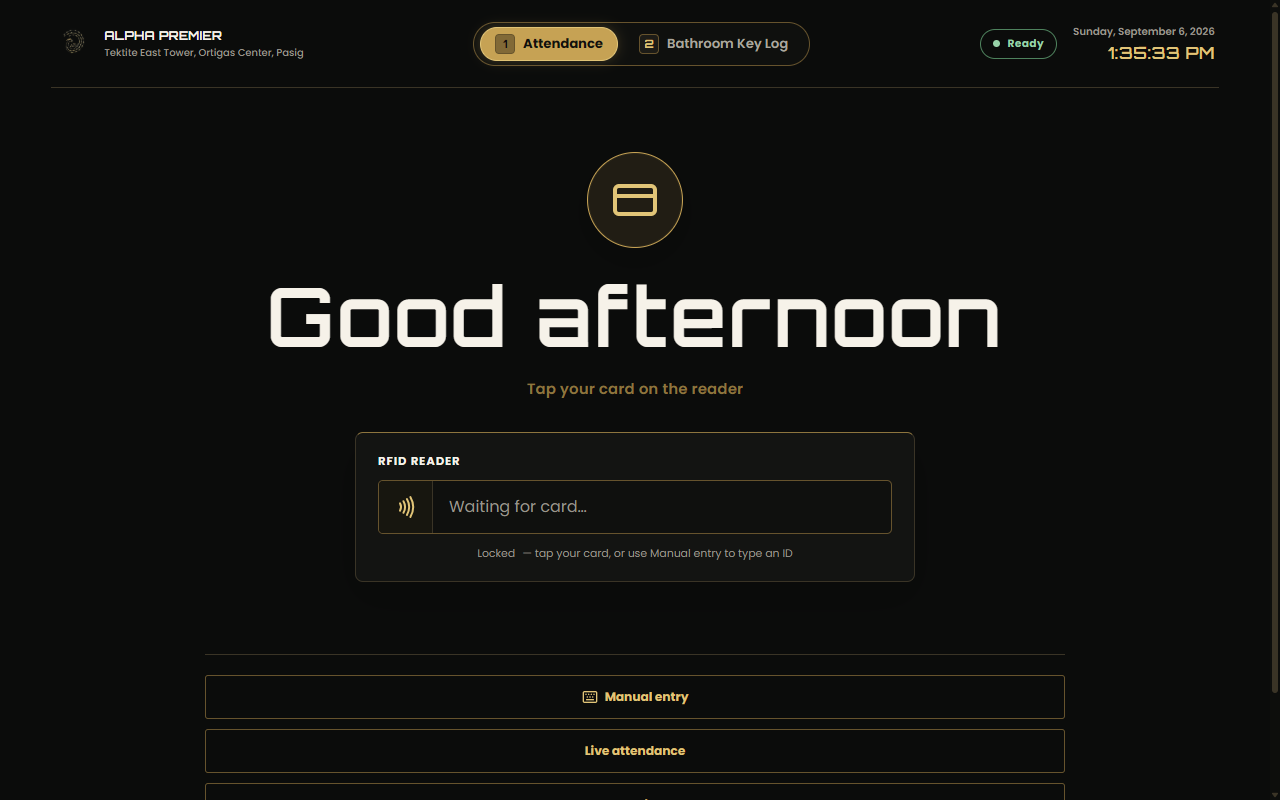
Native screenshot captured through the live Tauri MCP bridge during automated verification.
Roadmap
| Feature | Description |
|---|---|
| Signed auto-update rollout | Promote updater artifacts to the front-desk fleet |
| Sheets reconciliation UI | Surface export queue health in the Data tab |
| Multi-terminal roster sync | Keep single-writer SQLite, share snapshots |
| Self-enrollment kiosk flow | Assisted card binding without admin help |
Development
npm run build       # shared + client + server
npm run typecheck   # shared, client, server
npm run lint        # eslint workspaces + oxlint
npm test            # vitest: shared, client, server
npm run rust:check
npm run rust:test
node scripts/doctor-tauri-mcp.mjs   # Tauri bridge pre-flight
node scripts/verify-tauri-mcp.mjs   # drives kiosk/admin/payroll via bridge
node scripts/capture-readme-screenshots.mjs  # refresh docs/screenshots/
client/       React, Vite, TypeScript kiosk and admin UI
server/       Web API retained for compatibility and comparison
shared/       Shared TypeScript API and LAN contracts
src-tauri/    Tauri v2 app, Rust commands, services, SQLite, LAN server
docs/         Deployment, hardware, payroll, migration guides
docs/screenshots/  README screenshots captured from the running app
scripts/      Dev, migration, voice, and screenshot helpers
evidence/     Automated verification output + native screenshots
Contributing
- Fork and create a feature branch.
- Keep the diff minimal — reuse existing helpers and patterns.
- Run
npm run typecheck,npm run lint:oxlint,npm test. - Open a PR describing behavior change and verification.
Security
Admin/PIN sessions are short-lived in-memory Tauri state. PINs, token hashes, and Google credentials never leave the front-desk laptop; the LAN viewer is read-only and subnet-restricted. Report vulnerabilities privately to the repository owner.
License
MIT — see LICENSE.
Contributors

322 commits

18 commits
Similar repos


Languages
TypeScript
34.6%
NSIS
31.3%
Rust
26.1%
JavaScript
3.0%
CSS
2.4%
Windows-first RFID attendance kiosk (Tauri v2 + React + SQLite) with LAN live dashboard, payroll PDFs, and bathroom key log
TypeScript
0
340 commits
updated Sep 23, 2026
README
Alpha Premier Attendance
Windows-first RFID attendance kiosk for the front desk.
Tap a card. See the photo. Done in under a second.
Download · Features · Kiosk · Payroll · LAN viewer · Stack · Development
The front-desk kiosk at rest — card tap drives the whole flow. Below: bathroom key mode, live viewer, and admin unlock.
What is Alpha Premier Attendance?
Paper logbooks and generic HR tools assume someone is watching the door. This app is the watcher: a Tauri v2 desktop app on the front-desk Windows laptop, the only machine connected to the RFID reader and the only attendance writer. It stores everything in local SQLite and exposes a read-only live dashboard to the office LAN.
| Approach | Needs watcher | Works offline | Per-tap proof | Payroll-ready |
|---|---|---|---|---|
| Paper logbook / Sheets | Yes | Yes | No | Manual |
| Generic cloud HR | Yes | No | Sometimes | Varies |
| Alpha Premier Attendance | No — kiosk is always on | Yes, SQLite-first | Photo + audit trail | One-click PDF per cutoff |
- Offline-first kiosk — SQLite is the source of truth; Google Sheets is an optional write-only export, never required for a scan.
- Sub-second tap flow — native-layer capture, photo feedback, duplicate cooldown.
- Office rules built in — 8:00–17:00 hours, grace, late-timeout, unpaid lunch.
- Boss-friendly live view — read-only browser dashboard over the office Wi-Fi, no install.
- Audit-ready payroll — semi-monthly cutoffs, one consolidated PDF per worker type.
Download
| Platform | Download |
|---|---|
| Windows 10/11 x64 | Setup.exe on GitHub Releases |
The NSIS package bundles the WebView2 bootstrapper and installs machine-wide (admin approval required). The portable
.exeneeds WebView2 already installed — prefer the NSIS package for fresh machines.Pushing a
v*tag builds and signs release bundles in CI (.github/workflows/release.yml).
Features
Kiosk
The / route is the always-on front screen. Mode tabs switch the workflow — press 1 for attendance, 2 for bathroom keys (keypresses are ignored while typing in inputs).
| Mode | What happens on tap |
|---|---|
| Attendance | Time-in/out recorded, employee photo shown, duplicate taps cooled down |
| Bathroom Key Log | Male/Female key checked out to the tapper with a live elapsed timer, or returned with duration logged |
Scanner feedback stays on the kiosk (processing, success + photo, unknown card, duplicate cooldown, error). Diagnostics live in admin/setup — never on the main screen. Closing the window hides the app to the tray; scanning keeps running. A scan while hidden shows a Windows toast without stealing focus.
RFID and readers
| Reader | Transport | Capture |
|---|---|---|
| 125 kHz EM4100 USB (default) | Keyboard wedge: 10 decimal digits + Enter, burst under 100 ms | Foreground only (kiosk focused), heuristic classification |
The Rust layer completes a scan on the Enter suffix or idle-timeout fallback, normalizes the UID to uppercase hex, validates length, and dedupes repeats in a short window. The scanner listener pauses while the operator types in admin, setup, or manual-entry screens. The admin Scanner panel shows read-only keyboard-wedge status (mode, expected length, detail).
Attendance rules
| Rule | Value |
|---|---|
| Office hours | 08:00–17:00, Asia/Manila |
| Late grace | Arrival after 08:15 is late; grace usable at most once per user per week |
| Late time-out | Time-out at or after 18:00 is saved as LATE_TIMEOUT — kept and flagged, no payroll row until the official time-out is re-entered before 18:00 |
| Lunch | 12:00–13:00 fixed window is unpaid — subtracted from worked hours, the TOTAL_HOURS workbook column, and overtime inputs (intern lateness still measured from 08:00) |
| Intern rate | PHP 80.00/day, PHP 10.00/hour late deduction after weekly grace |
Admin
/admin unlocks with the administrator PIN or a registered admin RFID card into a short-lived session. Tabs: users (roster + card binding), attendance (editor, exports), payroll (cutoff workspace), data (backup/restore, LAN viewer, updater), voice (TTS settings).
Payroll
The Payroll tab has exactly two generate actions — Generate Employee Payroll PDF and Generate Intern Payroll PDF. Each produces one consolidated landscape sheet (printpdf, no browser print) with the reference columns, company/cutoff header, and a highlighted Gross Compensation grand total. Files land timestamped in the exports folder, are recorded in the payroll_pdfs table (period, worker type, headcount, total, SHA-256, size), and listed with Open PDF / Show in Folder.
Cutoff payroll supports semi-monthly profiles, allowances, incentives, manual adjustments, finalization, and a fillable late-deduction section (total late hours × PHP-per-hour rate, overridable). Interns appear on the intern sheet at the fixed daily rate.
Bathroom key log
A parallel mode digitizing the handwritten restroom-key logbook: exactly one physical key per gender (MALE/FEMALE), enforced by a partial unique index plus backend validation so a checked-out key cannot be double-issued. Live elapsed timer, searchable employee picker, and a chronological log with date filter, timestamps, duration, and OUT/RETURNED status (pictured above).
LAN viewer
The front-desk laptop serves a read-only dashboard to the office network. The boss opens the printed LAN URL from any browser — no Tauri install.
| Route | Purpose |
|---|---|
GET /attendance | Read-only browser dashboard |
GET /api/attendance/today?date=YYYY-MM-DD | Manila-date snapshot |
GET /api/events/attendance | SSE stream (polling fallback) |
GET /api/health | Service, SQLite, LAN, and export health |
Admin, payroll, setup, photo, and mutation APIs stay local to the Tauri app. If phones hang on "Connecting…", allow port 4173 in Windows Firewall as Administrator:
netsh advfirewall firewall add rule name="Alpha Premier Live Attendance" dir=in action=allow protocol=TCP localport=4173
See docs/lan-dashboard-deployment.md and docs/lan-dashboard-troubleshooting.md.
Install and run
npm install
npm run dev        # web stack: API on :3001 + Vite on :5173
npm run tauri:dev  # desktop app (builds client first)
Kiosk routes: / scan · /attendance local view · /admin protected admin.
Front-desk configuration
Copy-Item src-tauri/config.example.toml "$env:APPDATA\com.alphapremier.attendance\config.toml"
[lan]
enabled = true
port = 4173
allowed_subnets = ["192.168.1.0/24"]
auth_mode = "password"
viewer_password_hash = "<sha256-hex-token-hash>"

[office]
company_name = "Alpha Premier"
office_display_full = "Unit 3104C, Tektite East Tower, Ortigas Center, Pasig, Metro Manila"
Leave bind_address unset to auto-detect the office Wi-Fi IP. Secrets stay on the laptop and are never committed. Office identity defaults to the real Tektite East Tower address even with no config file. Full reference: docs/deployment.md, docs/google-sheets-setup.md.
Windows packaging
npm run tauri:build
src-tauri/target/release/alpha-premier-attendance.exe
src-tauri/target/release/bundle/nsis/Alpha Premier Attendance_0.1.51_x64-setup.exe
Generated files and portable mode
Everything the app creates (attendance/payroll workbooks, CSVs, payslips, register PDFs) goes to the exports folder, and the UI shows the exact path with Open file / Show in folder.
| Mode | Location |
|---|---|
| Installed (default) | %LOCALAPPDATA%\com.alphapremier.attendance\exports\ |
Portable (portable.dat next to the .exe, or ALPHA_PREMIER_PORTABLE=1) | Data\exports\, Data\attendance.db next to the executable |
Photos live under the data dir as {user_id}.webp (JPEG/PNG/WebP input, 512×512 max, 500 KB) and are never served over LAN. File actions require an admin session and only accept paths inside the data root.
Self-updating
Powered by the Tauri v2 updater against signed minisign artifacts on GitHub Releases: silent background checks every 8 hours, manual check via tray menu or Admin → Data and backup, per-terminal opt-out in Admin settings or ALPHA_PREMIER_DISABLE_AUTO_UPDATE=1. Keypair setup: docs/UPDATES.md.
Data migration and moving PCs
npm run migrate:from-sheets -- --dry-run --input .\sheets-export
npm run migrate:from-sheets -- --execute --input .\sheets-export --db .\attendance.db
The database is one file — move machines via Admin → Data and backup: create backup on the old PC, copy the .apbackup archive (database, photos, exports, sync state, config), restore on the new PC. Never copy attendance.db while the app is open. Details: docs/database-migration.md, docs/migration-cutover.md, docs/payroll-operations.md.
Tech stack
| Layer | Technology |
|---|---|
| Desktop shell | Tauri v2 (com.alphapremier.attendance), system tray, updater, opener |
| Frontend | React 19 + TypeScript + Vite (client/) |
| Store | SQLite via SQLx, WAL mode, numbered migrations (src-tauri/db/migrations) |
| LAN server | Axum + SSE on port 4173 (read-only) |
| Export | Async Google Sheets queue (optional, write-only) + printpdf payroll PDFs |
| Voice | Piper/ONNX TTS with cloned voices (scripts/generate_cloned_voices.py) |
| Contracts | Shared TS API/LAN/office-hours rules (shared/) mirrored in Rust |
| Automation | Tauri MCP bridge (ws://127.0.0.1:9223) — doctor:mcp / verify:mcp |
Native screenshot captured through the live Tauri MCP bridge during automated verification.
Roadmap
| Feature | Description |
|---|---|
| Signed auto-update rollout | Promote updater artifacts to the front-desk fleet |
| Sheets reconciliation UI | Surface export queue health in the Data tab |
| Multi-terminal roster sync | Keep single-writer SQLite, share snapshots |
| Self-enrollment kiosk flow | Assisted card binding without admin help |
Development
npm run build       # shared + client + server
npm run typecheck   # shared, client, server
npm run lint        # eslint workspaces + oxlint
npm test            # vitest: shared, client, server
npm run rust:check
npm run rust:test
node scripts/doctor-tauri-mcp.mjs   # Tauri bridge pre-flight
node scripts/verify-tauri-mcp.mjs   # drives kiosk/admin/payroll via bridge
node scripts/capture-readme-screenshots.mjs  # refresh docs/screenshots/
client/       React, Vite, TypeScript kiosk and admin UI
server/       Web API retained for compatibility and comparison
shared/       Shared TypeScript API and LAN contracts
src-tauri/    Tauri v2 app, Rust commands, services, SQLite, LAN server
docs/         Deployment, hardware, payroll, migration guides
docs/screenshots/  README screenshots captured from the running app
scripts/      Dev, migration, voice, and screenshot helpers
evidence/     Automated verification output + native screenshots
Contributing
- Fork and create a feature branch.
- Keep the diff minimal — reuse existing helpers and patterns.
- Run
npm run typecheck,npm run lint:oxlint,npm test. - Open a PR describing behavior change and verification.
Security
Admin/PIN sessions are short-lived in-memory Tauri state. PINs, token hashes, and Google credentials never leave the front-desk laptop; the LAN viewer is read-only and subnet-restricted. Report vulnerabilities privately to the repository owner.
License
MIT — see LICENSE.
Similar repos
Contributors
322 commits
18 commits
Languages
TypeScript
34.6%
NSIS
31.3%
Rust
26.1%
JavaScript
3.0%
CSS
2.4%