Distributed image and video generation in ComfyUI for two NVIDIA DGX Sparks.
Python
17
7 commits
updated Oct 12, 2026



Generate images and video across two DGX Sparks from one ComfyUI window. Split a render between the GPUs, run separate prompts at once, or shard supported model weights to fit larger checkpoints.
DGX Monarch provides model loaders, samplers, memory controls, and 58 example workflows. Text encoding, VAE decode, saving, and the rest of your graph stay in ComfyUI.
Get started · Installation · Model support · Benchmarks
dgxm top show memory use, render progress, connection state, and errors.
 Krea2 RAW and Turbo Image generation, with LoRA support and several ways to split work across the pair. |
 MiniMax H3 Video with audio, plus image-guide and reference-video workflows. |
 Ideogram4 Image generation with support for its two-model workflow. |
 Qwen Image 2.1 Image generation and editing with up to ten references, including alpha-masked images. |
The pack also includes Flux, Chroma, LTX, Hunyuan, Wan, and other families. Model support lists the tested configurations and limits for each. Support for one workflow does not mean every precision, LoRA, or parallel mode has been tested.
Recorded renders on two DGX Sparks connected over ConnectX-7 200G:
| Workflow | One GPU | Two GPUs | Speedup |
|---|---|---|---|
| Krea2 RAW BF16, 1536×1536, 8 steps, CFG++ sampler, Ulysses | 74.1 s | 48.1 s | 1.54× |
| Ideogram4 FP8, dual-model, 1024×1024, 20 steps, Ulysses | 36.0 s | 26.0 s | 1.38× |
| MiniMax H3 INT8 ConvRot, 1280×720, 241 frames, 20 steps, Ulysses | 42m 03s | 23m 07s | 1.82× |
Krea2 and Ideogram4 timings are warm renders of matching graphs. Their separate one-step output checks matched one GPU; those checks do not prove equality at every step of a full render. H3 uses exact attention: the one-GPU timing is stock ComfyUI, while one Monarch worker took 42m 20s and matched the pair's output. Results depend on the settings and hardware; benchmark details describe each comparison.
Qwen Image 2.1: 12 model formats matched native ComfyUI output in one-step tests. Separate full 25-step generation and editing tests also matched, including ten-reference editing. A comparable speed measurement has not been recorded. Qwen test results.
Full benchmarks include slower configurations. Validation explains output comparisons and remaining gaps. Campaign results provide the detailed measurements.
Run dgxm top to see memory use, render progress, GPU activity, and connection status in your terminal. The ComfyUI sidebar shows the same cluster while you work on a graph.
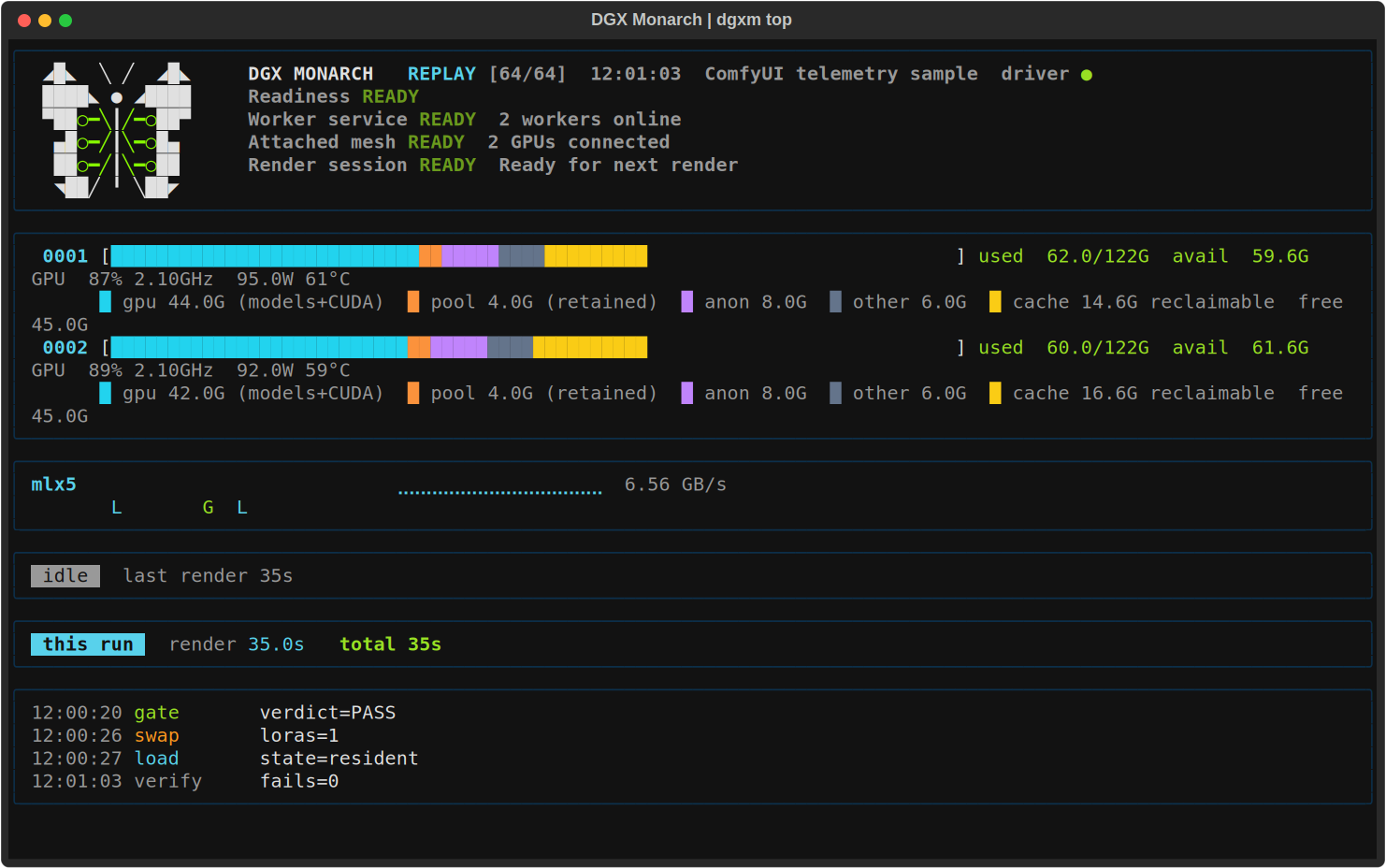
Dashboard shown with sample data. See the TUI guide for setup, keyboard controls, and recording.
Use an agent with a shell on the driver Spark, approved SSH access to the other Spark, and access to the selected ComfyUI and model directories. It needs network access for source and dependency downloads. A browser-only agent cannot complete the hardware steps without a connection to those machines. You may need to approve maintenance or complete sudo, SSH trust, repository access, or model-license steps yourself. Grant read or write access only where needed, using the narrowest existing parent directories for files it will create. Keep its sandbox enabled. Never paste private keys or tokens into chat.
Copy this prompt into your agent:
Help me install DGX Monarch from https://github.com/Deen-Media/dgx-monarch on my two DGX Sparks. Use the checkout I provide, or clone the repository if needed. Explicitly read skills/dgx-monarch/SKILL.md and follow it and its linked docs; do not assume skills are discovered automatically.

Discover the existing setup and prerequisites first. Ask together for missing inputs and the specific read or write directory access you need. Then present one concise installation and recovery plan, explicitly listing package, service and any security changes for approval. Reuse that approval for the listed work; ask again only if the scope changes. Preserve existing environments, models, credentials and unrelated work. Never print credentials. Reuse my existing installation where suitable; ask where new permanent files should live. Ask whether I want the dgxm TUI and an easy launch script, and where to save the script. Do not install into temporary or chat-output folders. This is a normal installation, not a clean-machine acceptance test.

Use a supported model and workflow I already have or choose. Chroma is optional; recommend it only if I have no preference. Follow the selected model's documented files and distributed settings. Complete a real distributed render, save its output, and show that both Sparks participated. Check that rerunning setup preserves the installation. Finish with how to start it, which machine and browser URL to use, whether ComfyUI is running, and where the installation, workflow and outputs live. Then report the commit, versions, reused components, manual steps, results and limitations. Do not claim success from imports or Doctor alone.
The maintained setup procedure is skills/dgx-monarch/SKILL.md. Review the agent's plan before it changes your machines. See the fresh-agent installation results for the tested setup and its limits.
You need an existing ComfyUI installation. For the tested two-Spark setup, both hosts need matching software and model files, plus an isolated, source-restricted fabric connection. Read the fabric requirements before setup: the attach API has no peer authentication, and restricting the Worker port alone is insufficient.
custom_nodes.dgxm doctor and dgxm status.Worker services stay running when ComfyUI closes. Use dgxm down when you intend to stop them.
One Spark also works: Init mode=auto without cluster.toml stays local. The memory tools, templates, sidebar, and diagnostics remain available.
With the default auto_gate=first_use, a new combination using slab and low-RSS or FSDP may run reference renders before producing your result. Allow 2-4 minutes on the tested hardware. A successful check is reused for the same combination; an upgrade requires new checks before those results can be reused.
If the comparison fails, supported resident paths use stock residency with the memory optimizations disabled. FSDP has no stock fallback and refuses. Some large FSDP checkpoints cannot fit the gate's reload; the model guide and troubleshooting explain the available choices.
Native latent RDMA is off by default and remains NOT RUN / HOLD. Latents return through actor messages; this does not disable NCCL rendering across the pair. comfy_managed residency is opt-in and has additional memory and LoRA restrictions. Smaller jobs may gain little from using two GPUs.
Documentation index · Model guide · Troubleshooting · FAQ · Contributing
DGX Monarch uses PyTorch Monarch for actors and xDiT / xfuser for parallel attention, inside ComfyUI. These dependencies are installed separately; this repository does not vendor their code.
License: Apache-2.0.
Distributed image and video generation in ComfyUI for two NVIDIA DGX Sparks.
Python
17
7 commits
updated Oct 12, 2026
Generate images and video across two DGX Sparks from one ComfyUI window. Split a render between the GPUs, run separate prompts at once, or shard supported model weights to fit larger checkpoints.
DGX Monarch provides model loaders, samplers, memory controls, and 58 example workflows. Text encoding, VAE decode, saving, and the rest of your graph stay in ComfyUI.
Get started · Installation · Model support · Benchmarks
dgxm top show memory use, render progress, connection state, and errors.|
Krea2 RAW and Turbo Image generation, with LoRA support and several ways to split work across the pair. |
MiniMax H3 Video with audio, plus image-guide and reference-video workflows. |
|
Ideogram4 Image generation with support for its two-model workflow. |
Qwen Image 2.1 Image generation and editing with up to ten references, including alpha-masked images. |
The pack also includes Flux, Chroma, LTX, Hunyuan, Wan, and other families. Model support lists the tested configurations and limits for each. Support for one workflow does not mean every precision, LoRA, or parallel mode has been tested.
Recorded renders on two DGX Sparks connected over ConnectX-7 200G:
| Workflow | One GPU | Two GPUs | Speedup |
|---|---|---|---|
| Krea2 RAW BF16, 1536×1536, 8 steps, CFG++ sampler, Ulysses | 74.1 s | 48.1 s | 1.54× |
| Ideogram4 FP8, dual-model, 1024×1024, 20 steps, Ulysses | 36.0 s | 26.0 s | 1.38× |
| MiniMax H3 INT8 ConvRot, 1280×720, 241 frames, 20 steps, Ulysses | 42m 03s | 23m 07s | 1.82× |
Krea2 and Ideogram4 timings are warm renders of matching graphs. Their separate one-step output checks matched one GPU; those checks do not prove equality at every step of a full render. H3 uses exact attention: the one-GPU timing is stock ComfyUI, while one Monarch worker took 42m 20s and matched the pair's output. Results depend on the settings and hardware; benchmark details describe each comparison.
Qwen Image 2.1: 12 model formats matched native ComfyUI output in one-step tests. Separate full 25-step generation and editing tests also matched, including ten-reference editing. A comparable speed measurement has not been recorded. Qwen test results.
Full benchmarks include slower configurations. Validation explains output comparisons and remaining gaps. Campaign results provide the detailed measurements.
Run dgxm top to see memory use, render progress, GPU activity, and connection status in your terminal. The ComfyUI sidebar shows the same cluster while you work on a graph.
Dashboard shown with sample data. See the TUI guide for setup, keyboard controls, and recording.
Use an agent with a shell on the driver Spark, approved SSH access to the other Spark, and access to the selected ComfyUI and model directories. It needs network access for source and dependency downloads. A browser-only agent cannot complete the hardware steps without a connection to those machines. You may need to approve maintenance or complete sudo, SSH trust, repository access, or model-license steps yourself. Grant read or write access only where needed, using the narrowest existing parent directories for files it will create. Keep its sandbox enabled. Never paste private keys or tokens into chat.
Copy this prompt into your agent:
Help me install DGX Monarch from https://github.com/Deen-Media/dgx-monarch on my two DGX Sparks. Use the checkout I provide, or clone the repository if needed. Explicitly read skills/dgx-monarch/SKILL.md and follow it and its linked docs; do not assume skills are discovered automatically.

Discover the existing setup and prerequisites first. Ask together for missing inputs and the specific read or write directory access you need. Then present one concise installation and recovery plan, explicitly listing package, service and any security changes for approval. Reuse that approval for the listed work; ask again only if the scope changes. Preserve existing environments, models, credentials and unrelated work. Never print credentials. Reuse my existing installation where suitable; ask where new permanent files should live. Ask whether I want the dgxm TUI and an easy launch script, and where to save the script. Do not install into temporary or chat-output folders. This is a normal installation, not a clean-machine acceptance test.

Use a supported model and workflow I already have or choose. Chroma is optional; recommend it only if I have no preference. Follow the selected model's documented files and distributed settings. Complete a real distributed render, save its output, and show that both Sparks participated. Check that rerunning setup preserves the installation. Finish with how to start it, which machine and browser URL to use, whether ComfyUI is running, and where the installation, workflow and outputs live. Then report the commit, versions, reused components, manual steps, results and limitations. Do not claim success from imports or Doctor alone.
The maintained setup procedure is skills/dgx-monarch/SKILL.md. Review the agent's plan before it changes your machines. See the fresh-agent installation results for the tested setup and its limits.
You need an existing ComfyUI installation. For the tested two-Spark setup, both hosts need matching software and model files, plus an isolated, source-restricted fabric connection. Read the fabric requirements before setup: the attach API has no peer authentication, and restricting the Worker port alone is insufficient.
custom_nodes.dgxm doctor and dgxm status.Worker services stay running when ComfyUI closes. Use dgxm down when you intend to stop them.
One Spark also works: Init mode=auto without cluster.toml stays local. The memory tools, templates, sidebar, and diagnostics remain available.
With the default auto_gate=first_use, a new combination using slab and low-RSS or FSDP may run reference renders before producing your result. Allow 2-4 minutes on the tested hardware. A successful check is reused for the same combination; an upgrade requires new checks before those results can be reused.
If the comparison fails, supported resident paths use stock residency with the memory optimizations disabled. FSDP has no stock fallback and refuses. Some large FSDP checkpoints cannot fit the gate's reload; the model guide and troubleshooting explain the available choices.
Native latent RDMA is off by default and remains NOT RUN / HOLD. Latents return through actor messages; this does not disable NCCL rendering across the pair. comfy_managed residency is opt-in and has additional memory and LoRA restrictions. Smaller jobs may gain little from using two GPUs.
Documentation index · Model guide · Troubleshooting · FAQ · Contributing
DGX Monarch uses PyTorch Monarch for actors and xDiT / xfuser for parallel attention, inside ComfyUI. These dependencies are installed separately; this repository does not vendor their code.
License: Apache-2.0.



