
README

diffusers-workflow
Your GPU, as something an agent can drive.
diffusers-workflow wraps the Hugging Face Diffusers library in an engine that runs image, video and audio generation as jobs, and puts two front ends on it: an MCP server, so Claude Code (or any MCP client) can author, run and inspect generations; and a web UI for doing the same by hand. A CLI and REPL sit underneath for when you want neither.
Python 3.10-3.14 | CUDA (NVIDIA) | MPS (Apple Silicon) | CPU

Getting started
1. Install. The script picks the right torch build for your platform, creates a virtual environment and installs everything, MCP server included.
# Linux / macOS
bash ./install.sh
source ./activate

# Windows
.\install.ps1
.\venv\scripts\activate
python -m dw.test confirms torch and diffusers import and shows which
accelerator was found.
2. Start the engine. Leave it running; everything else talks to it.
dw-serve
# diffusers-workflow server on http://127.0.0.1:8765
That address is the web UI. Open it and run templates/text-to-image — a
small, ungated model, so the first generation needs no Hugging Face login and
downloads only a few GB.
3. Connect Claude Code. Register the MCP server with the absolute path to
dw-mcp in the venv you just made (the relative path is the one setup detail
that reliably goes wrong):
claude mcp add dw -- "$(pwd)/venv/bin/dw-mcp"
Then, optionally, the dw plugin — one skill per model family that knows which workflow fits a request and the rules that bite:
/plugin marketplace add dkackman/diffusers-workflow
/plugin install dw@diffusers-workflow
Most of the shipped workflows (Flux, LTX-2, MiniMax...) use gated models.
Request access on the model's Hugging Face page, then huggingface-cli login
once; without it the run fails partway through with a 401/403 from the Hub.
GPU on another machine? Start the engine there with
--mcpand connect over HTTP — nothing to install on the laptop:# on the GPU box dw-serve --host 0.0.0.0 --token "$DW_API_TOKEN" --mcp --workspace ~/studio # on your laptop claude mcp add --transport http dw http://gpu-box:8765/mcp \ --header "Authorization: Bearer $DW_API_TOKEN"The server's own Server page composes that line for the address you pick. End to end: Remote GPU server.
Drive it from an agent
Then just ask. The agent has 55 tools covering the whole surface — the workflow catalog, the real diffusers pipeline signatures, the job queue, the gallery, the model cache:
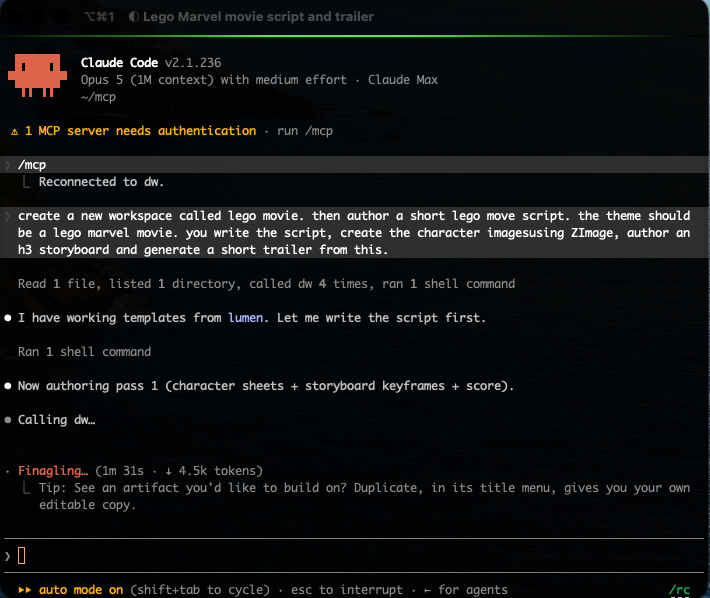
Generation is the long pass, and the agent stays with it — queuing each shot, waiting it out, and reporting what came back:
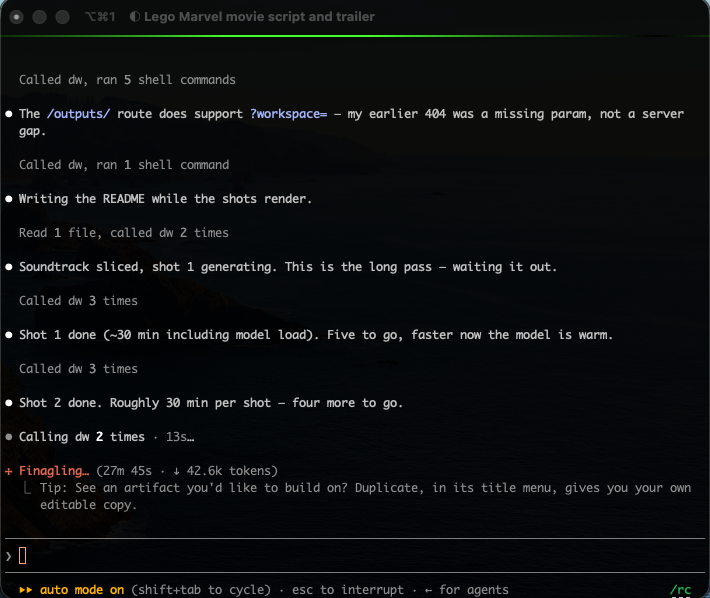
What a session looks like:
- "What can this box run, and what do I already have?" —
get_server_infofor the accelerator and workspace,list_workflowsfor the catalog with each entry's shape, cost and variables,list_modelsfor what is already in the hub cache. The agent knows the device before it proposes anything CUDA-only. - "Take my Flux workflow, swap in the portrait LoRA, render four at 1024."
—
get_workflow,get_pipeline_signatureto check the arguments exist,validate_workflow(free: schema and signature checking, no model loads),save_workflow,run_workflow. That last one refuses until the agent passesacknowledged_cost=true, so it has to tell you what it is about to spend. - "How's it going?" —
wait_for_jobblocks for a bounded interval instead of polling;get_output_imagebrings the result back into the conversation so the agent can look at what it made. - "That third frame is the one — keep it and seed the video pass from it."
—
keep_outputpromotes the file into the asset library under a name you pick, and the next workflow referencesasset:hero-frame.png.
Everything that costs real GPU time or real disk (run_workflow, rerun_job,
enhance_prompt, download_model, delete_model, update_diffusers,
delete_workspace) refuses until it is explicitly acknowledged, so an agent
cannot quietly burn an hour of GPU or delete 40GB of weights.
One server holds several workspaces — each with its own workflows, assets
and outputs — so two agents, or an agent and you in the browser, share the GPU
without saving over each other. An agent calls use_workspace once and the
rest of the session lands there.
The complete tool reference, client configuration for other MCP hosts, and the troubleshooting table: MCP Server. Workspaces in depth: Workspaces.
The web UI
Everything the engine does, in a browser, backed by the same persistent GPU worker — models stay loaded between runs.
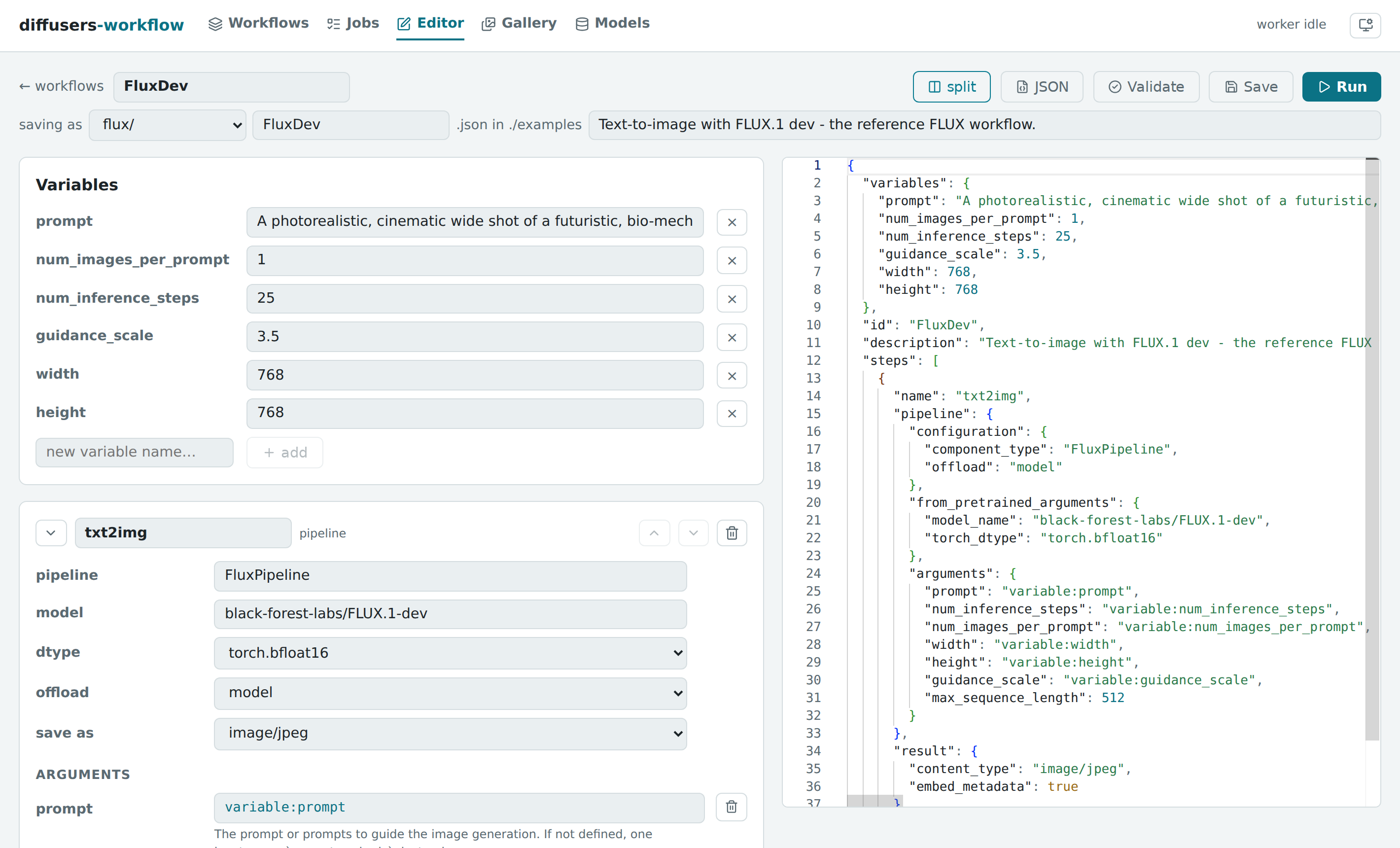
An editor built from the real pipeline signatures. Forms and argument autocomplete are generated by introspecting diffusers itself, so every knob a pipeline exposes is there with its documentation. Validation catches schema errors and argument typos before any model loads.
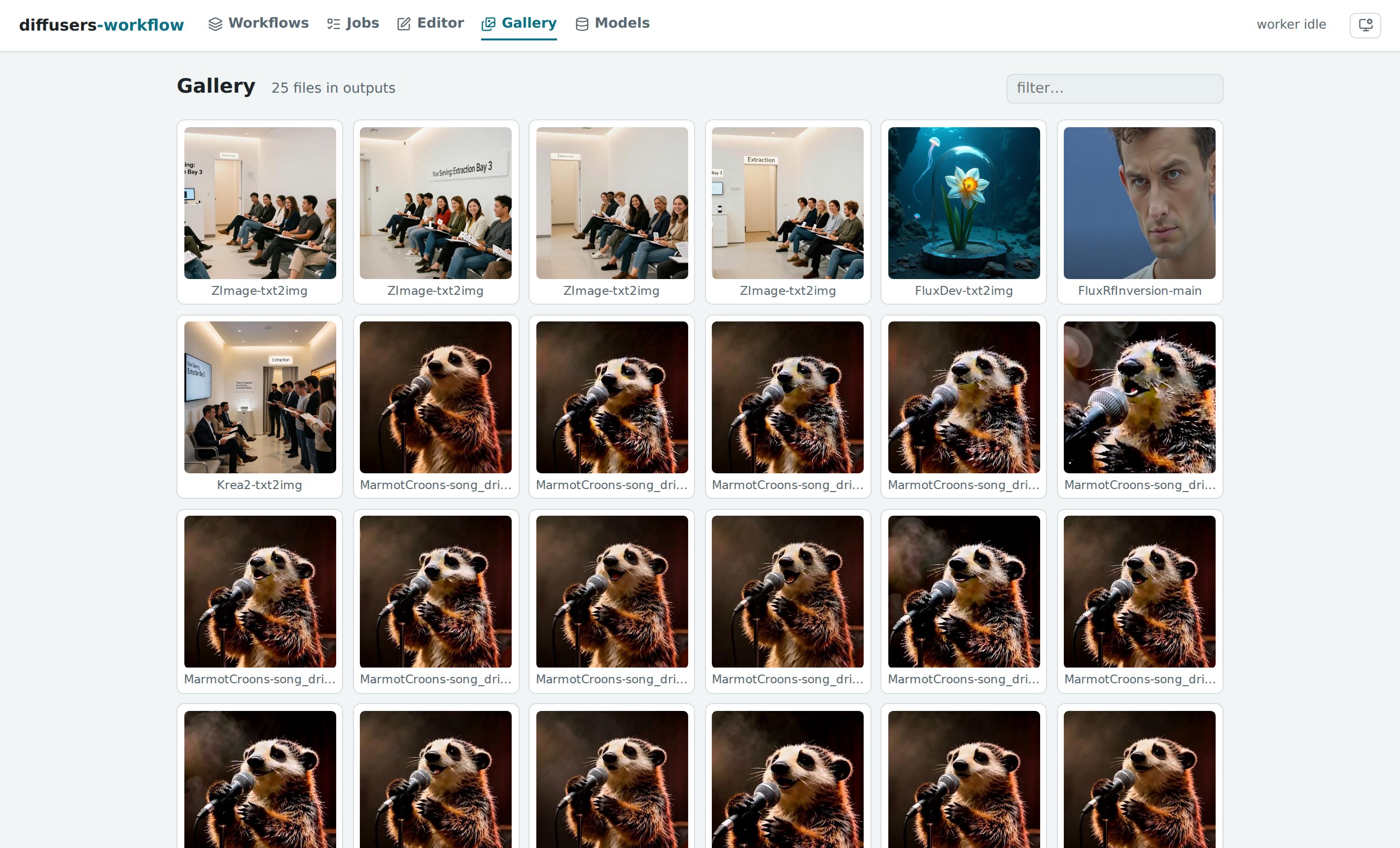
A gallery where every image is a recipe. Outputs carry their full workflow and seed; open as workflow drops any image back into the editor, ready to reproduce or riff on. Keep as asset promotes a generated file into the asset library for later workflows to build on.
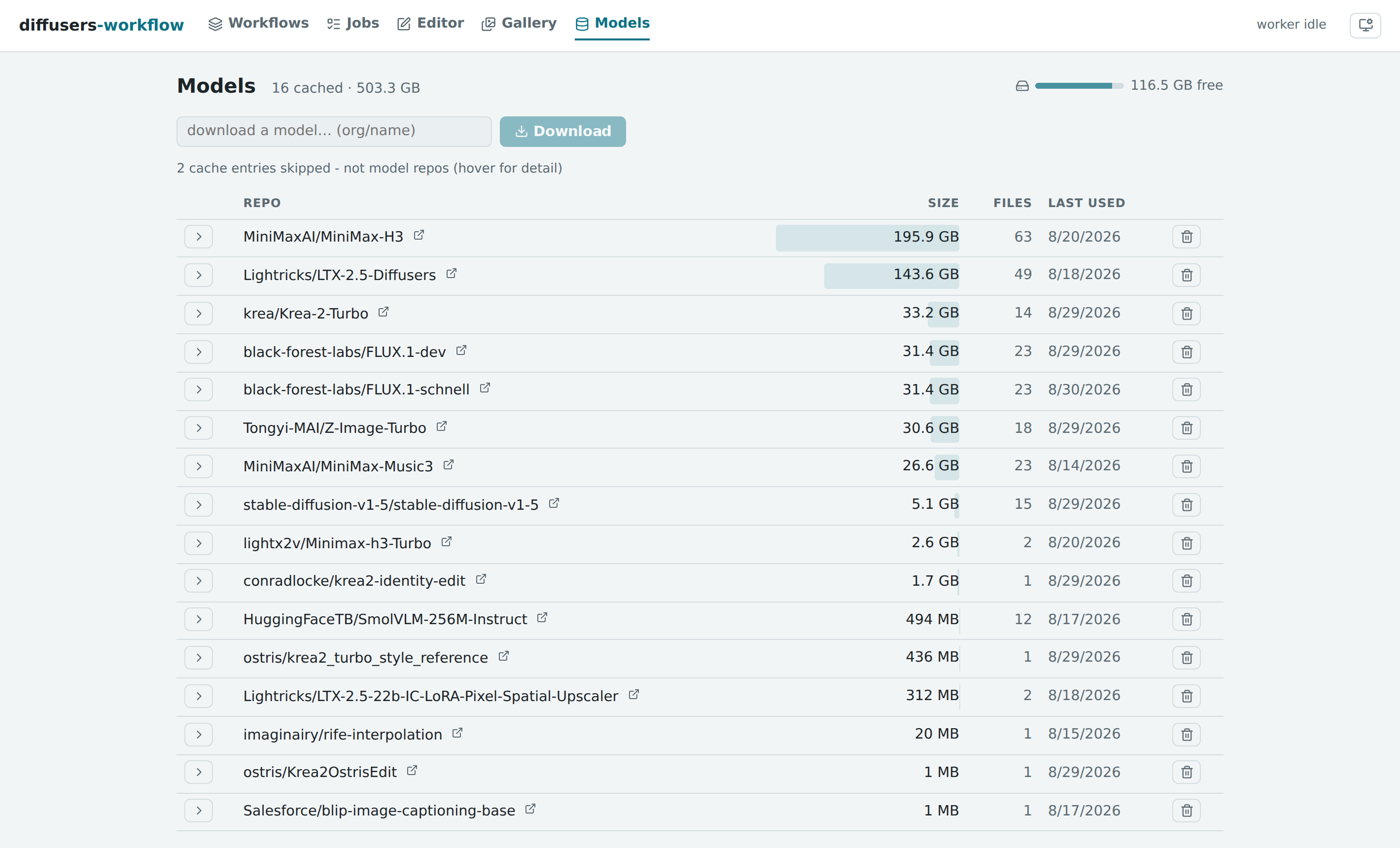
A prompt library stores a prompt once and lets any workflow reference it, with an Enhance with AI panel that expands an idea into a full prompt using a local language model. A model manager inventories the Hugging Face hub cache — sizes, last use, free space — and downloads or deletes models with live progress.
Jobs queue, stream progress live per denoising step, cancel cooperatively and persist to a searchable history. See Server & Web UI for the pages and the HTTP API.
The command line
The engine also runs standalone, with no server involved:
python -m dw.run workflows/templates/text-to-image.json
python -m dw.run workflows/templates/text-to-image.json prompt="a cat" num_images_per_prompt=4
python -m dw.validate workflows/models/flux-dev.json
An interactive REPL (python -m dw.repl) keeps models resident between runs
for 2-4x faster iteration. See REPL Commands.
What's underneath
Every front end reads and writes the same thing: a JSON document of named steps, each a diffusers pipeline or a utility task, whose arguments reference variables, earlier steps' outputs, stored prompts and assets rather than hard-coded values. That is what makes text-to-image chain into image-to-video, and what makes a generated image reopen as the exact recipe that produced it. workflows/ is a corpus of runnable examples across model families; the Workflow Guide is the reference when you do want to write one.
Because a workflow reaches any diffusers pipeline or quantization backend by
dynamic import, loading one can execute arbitrary Python. Treat a workflow
file from someone else the way you'd treat a .py script — see
Trust model.
Under the hood the engine also handles: quantization (BitsAndBytes, TorchAO, GGUF, SDNQ, optimum-quanto); inference acceleration (TeaCache, FirstBlockCache, FasterCache, MagCache, TaylorSeerCache); LoRA and IP-Adapter; A1111-style prompt weighting; long-video chaining with audio-driven length; step-output caching, so re-running a fixed-seed workflow finishes instantly; and utility tasks for upscaling, face restoration, segmentation, captioning, frame interpolation and more.
Documentation
Guides
- MCP Server — The agent tool surface (Claude Code, Claude Desktop)
- Server & Web UI — The web UI, jobs API, and introspection service
- Remote GPU server — Using the server, UI and MCP from another machine
- Workspaces — Where your content lives, run directories, and several workspaces on one server
- Workflow Guide — JSON structure, variables, steps, data flow
- Quantization — BitsAndBytes, TorchAO, GGUF, SDNQ
- Inference Acceleration — torch.compile, FirstBlockCache, MagCache, TaylorSeer, TeaCache
- Fast on 24GB — Recommended speed/memory configurations per model family
- LoRA — Loading and stacking LoRA adapters
- IP-Adapter — Image-prompt conditioning
- Prompt Weighting — A1111-style syntax
- Prompt References — The stored prompt library and
prompt:references - Tasks — Image processing, ControlNet preprocessors, utilities
Reference
- REPL Commands — Interactive REPL command reference
- Worker Guide — GPU persistence and troubleshooting
- Dependencies — Installation details
- Security — Security model
- Testing — Running the test suite
- Releasing — Cutting a release from a version tag
- Agent Loop — What the automated implementer/tester ticket labels mean, for anyone joining an Issue


Similar repos



Languages
Python
83.9%
Svelte
8.2%
TypeScript
7.0%
README
diffusers-workflow
Your GPU, as something an agent can drive.
diffusers-workflow wraps the Hugging Face Diffusers library in an engine that runs image, video and audio generation as jobs, and puts two front ends on it: an MCP server, so Claude Code (or any MCP client) can author, run and inspect generations; and a web UI for doing the same by hand. A CLI and REPL sit underneath for when you want neither.
Python 3.10-3.14 | CUDA (NVIDIA) | MPS (Apple Silicon) | CPU
Getting started
1. Install. The script picks the right torch build for your platform, creates a virtual environment and installs everything, MCP server included.
# Linux / macOS
bash ./install.sh
source ./activate

# Windows
.\install.ps1
.\venv\scripts\activate
python -m dw.test confirms torch and diffusers import and shows which
accelerator was found.
2. Start the engine. Leave it running; everything else talks to it.
dw-serve
# diffusers-workflow server on http://127.0.0.1:8765
That address is the web UI. Open it and run templates/text-to-image — a
small, ungated model, so the first generation needs no Hugging Face login and
downloads only a few GB.
3. Connect Claude Code. Register the MCP server with the absolute path to
dw-mcp in the venv you just made (the relative path is the one setup detail
that reliably goes wrong):
claude mcp add dw -- "$(pwd)/venv/bin/dw-mcp"
Then, optionally, the dw plugin — one skill per model family that knows which workflow fits a request and the rules that bite:
/plugin marketplace add dkackman/diffusers-workflow
/plugin install dw@diffusers-workflow
Most of the shipped workflows (Flux, LTX-2, MiniMax...) use gated models.
Request access on the model's Hugging Face page, then huggingface-cli login
once; without it the run fails partway through with a 401/403 from the Hub.
GPU on another machine? Start the engine there with
--mcpand connect over HTTP — nothing to install on the laptop:# on the GPU box dw-serve --host 0.0.0.0 --token "$DW_API_TOKEN" --mcp --workspace ~/studio # on your laptop claude mcp add --transport http dw http://gpu-box:8765/mcp \ --header "Authorization: Bearer $DW_API_TOKEN"The server's own Server page composes that line for the address you pick. End to end: Remote GPU server.
Drive it from an agent
Then just ask. The agent has 55 tools covering the whole surface — the workflow catalog, the real diffusers pipeline signatures, the job queue, the gallery, the model cache:
Generation is the long pass, and the agent stays with it — queuing each shot, waiting it out, and reporting what came back:
What a session looks like:
- "What can this box run, and what do I already have?" —
get_server_infofor the accelerator and workspace,list_workflowsfor the catalog with each entry's shape, cost and variables,list_modelsfor what is already in the hub cache. The agent knows the device before it proposes anything CUDA-only. - "Take my Flux workflow, swap in the portrait LoRA, render four at 1024."
—
get_workflow,get_pipeline_signatureto check the arguments exist,validate_workflow(free: schema and signature checking, no model loads),save_workflow,run_workflow. That last one refuses until the agent passesacknowledged_cost=true, so it has to tell you what it is about to spend. - "How's it going?" —
wait_for_jobblocks for a bounded interval instead of polling;get_output_imagebrings the result back into the conversation so the agent can look at what it made. - "That third frame is the one — keep it and seed the video pass from it."
—
keep_outputpromotes the file into the asset library under a name you pick, and the next workflow referencesasset:hero-frame.png.
Everything that costs real GPU time or real disk (run_workflow, rerun_job,
enhance_prompt, download_model, delete_model, update_diffusers,
delete_workspace) refuses until it is explicitly acknowledged, so an agent
cannot quietly burn an hour of GPU or delete 40GB of weights.
One server holds several workspaces — each with its own workflows, assets
and outputs — so two agents, or an agent and you in the browser, share the GPU
without saving over each other. An agent calls use_workspace once and the
rest of the session lands there.
The complete tool reference, client configuration for other MCP hosts, and the troubleshooting table: MCP Server. Workspaces in depth: Workspaces.
The web UI
Everything the engine does, in a browser, backed by the same persistent GPU worker — models stay loaded between runs.
An editor built from the real pipeline signatures. Forms and argument autocomplete are generated by introspecting diffusers itself, so every knob a pipeline exposes is there with its documentation. Validation catches schema errors and argument typos before any model loads.
A gallery where every image is a recipe. Outputs carry their full workflow and seed; open as workflow drops any image back into the editor, ready to reproduce or riff on. Keep as asset promotes a generated file into the asset library for later workflows to build on.
A prompt library stores a prompt once and lets any workflow reference it, with an Enhance with AI panel that expands an idea into a full prompt using a local language model. A model manager inventories the Hugging Face hub cache — sizes, last use, free space — and downloads or deletes models with live progress.
Jobs queue, stream progress live per denoising step, cancel cooperatively and persist to a searchable history. See Server & Web UI for the pages and the HTTP API.
The command line
The engine also runs standalone, with no server involved:
python -m dw.run workflows/templates/text-to-image.json
python -m dw.run workflows/templates/text-to-image.json prompt="a cat" num_images_per_prompt=4
python -m dw.validate workflows/models/flux-dev.json
An interactive REPL (python -m dw.repl) keeps models resident between runs
for 2-4x faster iteration. See REPL Commands.
What's underneath
Every front end reads and writes the same thing: a JSON document of named steps, each a diffusers pipeline or a utility task, whose arguments reference variables, earlier steps' outputs, stored prompts and assets rather than hard-coded values. That is what makes text-to-image chain into image-to-video, and what makes a generated image reopen as the exact recipe that produced it. workflows/ is a corpus of runnable examples across model families; the Workflow Guide is the reference when you do want to write one.
Because a workflow reaches any diffusers pipeline or quantization backend by
dynamic import, loading one can execute arbitrary Python. Treat a workflow
file from someone else the way you'd treat a .py script — see
Trust model.
Under the hood the engine also handles: quantization (BitsAndBytes, TorchAO, GGUF, SDNQ, optimum-quanto); inference acceleration (TeaCache, FirstBlockCache, FasterCache, MagCache, TaylorSeerCache); LoRA and IP-Adapter; A1111-style prompt weighting; long-video chaining with audio-driven length; step-output caching, so re-running a fixed-seed workflow finishes instantly; and utility tasks for upscaling, face restoration, segmentation, captioning, frame interpolation and more.
Documentation
Guides
- MCP Server — The agent tool surface (Claude Code, Claude Desktop)
- Server & Web UI — The web UI, jobs API, and introspection service
- Remote GPU server — Using the server, UI and MCP from another machine
- Workspaces — Where your content lives, run directories, and several workspaces on one server
- Workflow Guide — JSON structure, variables, steps, data flow
- Quantization — BitsAndBytes, TorchAO, GGUF, SDNQ
- Inference Acceleration — torch.compile, FirstBlockCache, MagCache, TaylorSeer, TeaCache
- Fast on 24GB — Recommended speed/memory configurations per model family
- LoRA — Loading and stacking LoRA adapters
- IP-Adapter — Image-prompt conditioning
- Prompt Weighting — A1111-style syntax
- Prompt References — The stored prompt library and
prompt:references - Tasks — Image processing, ControlNet preprocessors, utilities
Reference
- REPL Commands — Interactive REPL command reference
- Worker Guide — GPU persistence and troubleshooting
- Dependencies — Installation details
- Security — Security model
- Testing — Running the test suite
- Releasing — Cutting a release from a version tag
- Agent Loop — What the automated implementer/tester ticket labels mean, for anyone joining an Issue
Similar repos
Languages
Python
83.9%
Svelte
8.2%
TypeScript
7.0%