
Self-hosted AI business analyst. Ask questions about a company's spreadsheets, contracts, PDFs and emails, and get answers that name the source file. Runs on your computer with your own model key.
TypeScript
1
79 commits
updated Sep 28, 2026
See what people are saying
README
MentaAgent
An AI business analyst that actually knows your business. It runs on your own computer, uses open-weight models by default or any provider you have a key for, and is free (Apache 2.0).
Give it a company's spreadsheets, contracts, PDFs and emails. It tells you what the business is lacking, where the risks are, and what to improve, and its answers name the files they came from. It remembers what it learns across conversations.
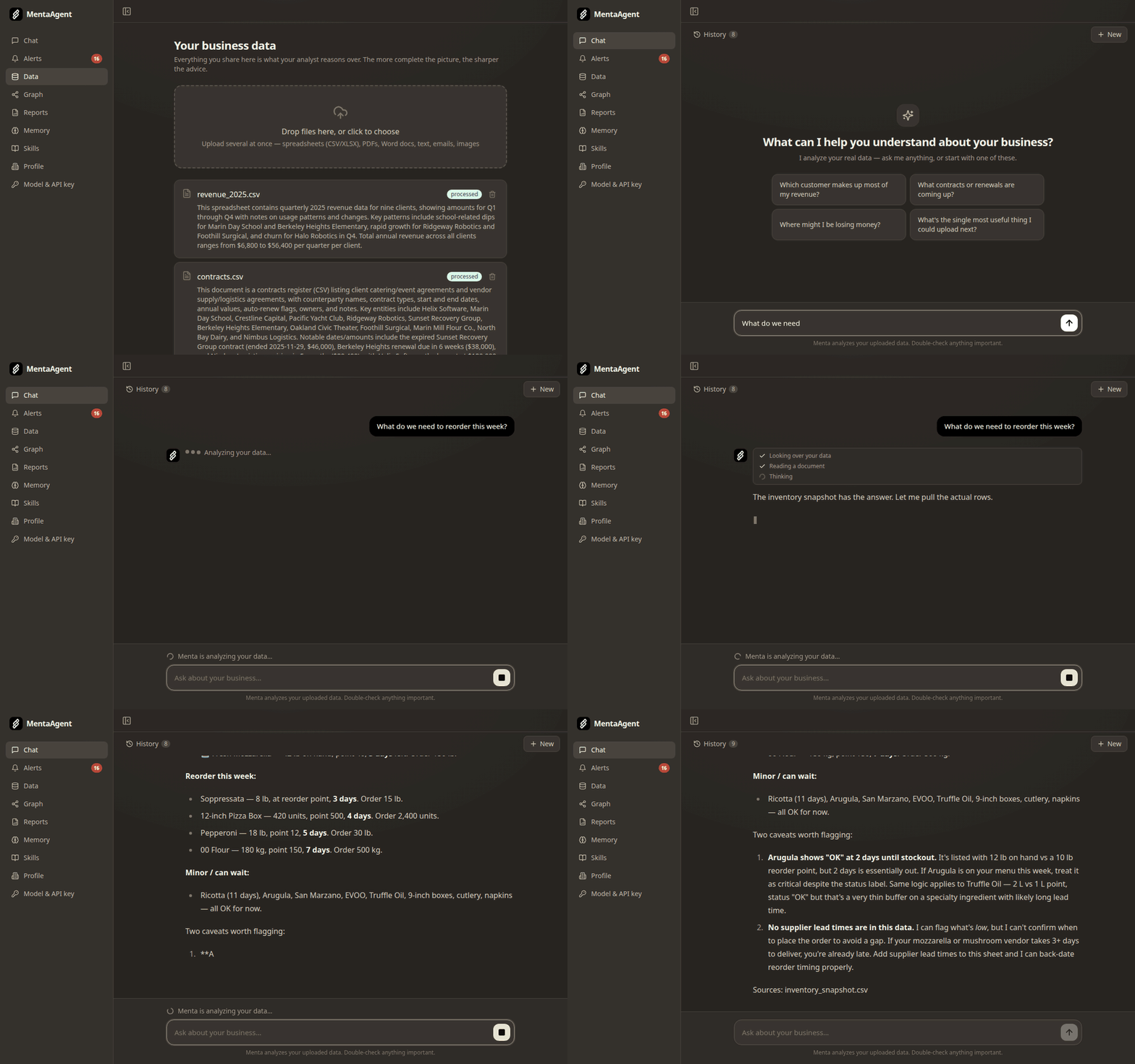
All of it runs on your machine. There is no account, no sign-up, no subscription. Your files stay on your computer; only what the agent reads is sent to the model provider you choose.
Quickstart
You need Docker with Compose v2.
git clone https://github.com/DanielKim03/mentaagent.git
cd mentaagent
docker compose up
Open http://localhost:3000. That's it: no account to create.
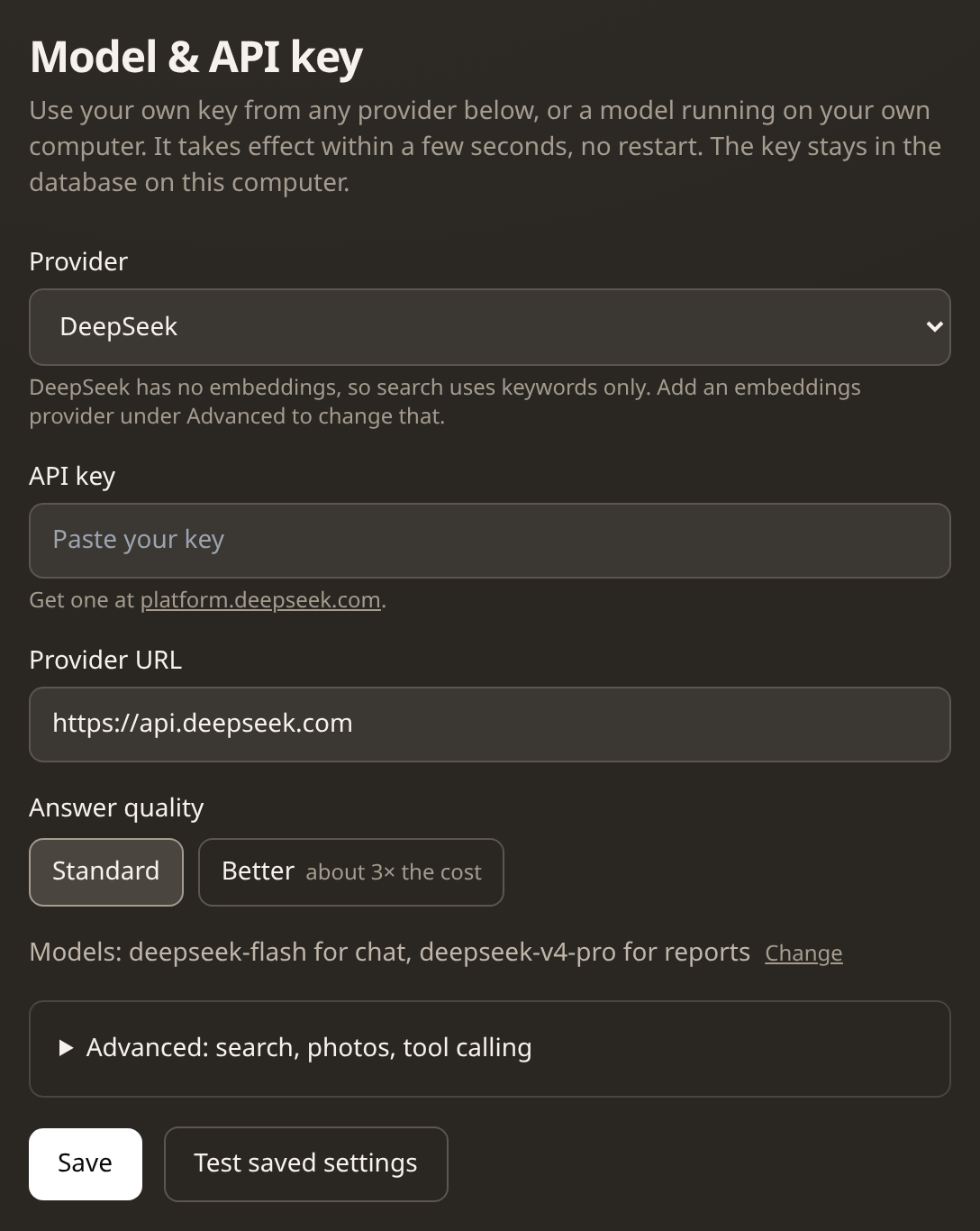
- Add a model key. Open Model & API key in the sidebar, pick your provider, paste your own key and press Save. It takes effect within seconds, no restart. The provider's suggested models are filled in for you; choose Standard or Better answers (Better costs more, and the page says roughly how much), or click Change to pick any model the provider offers. "Test saved settings" checks the key before you rely on it.
- Tell it about the business on the Profile page.
- Upload files on the Data page. To try it without your own data, use
samples/: eight spreadsheets from a fictional catering company (revenue, clients, contracts, vendors, employees, products, inventory, supplier invoices). - Ask in Chat.
Without a key the app still runs, on a stub model that gives canned answers. That's useful for seeing how the pieces fit before spending anything, but not for real questions.
The first build takes a few minutes; later starts take seconds. Your database, uploaded files and settings are kept in Docker volumes between restarts.
Good to know
- Any provider, your own key. Presets for OpenAI, Anthropic (Claude), Google Gemini, OpenRouter, DeepSeek, Ollama, Groq, Mistral, Together and DeepInfra, plus any other OpenAI-compatible server. Each provider's models, address and prices were checked against its documentation in September 2026, and the differences between providers (such as switching off a model's "thinking" step) are handled for you. Tested end to end with real keys: DeepInfra and DeepSeek. The others follow their documentation; the test button tells you quickly if something is off. The chat model must support tool calling.
- Ollama runs it for free on your own computer, but is untested. Pick
"Ollama", no key needed; the app reaches it at
host.docker.internal:11434. Runollama pull qwen3.5:4bandollama pull bge-m3first. Small local models are slower and less reliable at tool calling than hosted ones. - Search and photos depend on the provider. Semantic search needs an embeddings model that returns 1024-dimension vectors. DeepInfra, OpenAI, Gemini, Mistral, OpenRouter and Ollama have one. Anthropic, DeepSeek, Groq and Together don't, so search falls back to keyword search (Postgres full-text); you can add a separate embeddings provider under Advanced. Groq can't read photos; with no vision model, photo uploads are refused rather than failing later.
- Reports run on their own, weekly and monthly once you have uploaded
files, and Generate report now on the Reports page starts one whenever
you like. With a real model each one costs money on your provider's account.
LLM_DAILY_USD_CAP(below) sets a daily ceiling.
Optional settings
Everything works without these. To use one, create a file named .env next to
docker-compose.yml, put the line in it, and restart with
docker compose up -d.
| Setting | What it does |
|---|---|
LLM_DAILY_USD_CAP=5 | Stops model calls for the day once spending reaches $5. Default: no cap. |
WEB_ORIGIN=https://your.domain | The address the app is served on, if not http://localhost:3000 (comma-separated for several). Requests addressed to anything else are refused (see Security). It is built into the app, so rebuild after changing it: docker compose up -d --build. |
LLM_API_KEY, LLM_BASE_URL, AGENT_MODEL, HEAVY_MODEL, LLM_TOOL_MODE, EMBEDDINGS_API_KEY, EMBEDDINGS_BASE_URL, EMBEDDINGS_MODEL, VISION_BASE_URL, VISION_API_KEY, VISION_MODEL | The same model settings as the Settings page, for people who prefer a file. Values saved on the page win. |
Security
- Nothing is reachable from other machines. The app, database and Redis
listen on
127.0.0.1only, because there is no login. To use it from another device, put it behind something that does authentication (a VPN such as Tailscale, or a reverse proxy with a password) and add that address toWEB_ORIGIN. Do not simply open the port. - Other websites can't use it through your browser. A page open in your
browser runs on the same machine, so the app also refuses requests
addressed to any name but
localhost(blocking DNS rebinding) and changes that come from another site's pages. - Your API key only goes to its provider. Keys are stored in the local database and never sent back to the browser (it shows the last four characters). If the provider address changes without a new key, the saved key is deleted.
- Documents are untrusted input. The model reads your files, so a file could try to steer it. Document text is marked as data, the tools the agent can use are limited per kind of task, and the calculator only understands numbers and arithmetic. This reduces the risk; it does not remove it. Only upload files you'd be comfortable having the model read.
- Known and not yet fixed: Next.js 14 and Fastify 4 have published advisories that are fixed only in their next major versions. Each was reviewed and none applies to this setup (they need Windows hosting, features the app doesn't use, or requests the checks above refuse); the image optimizer several of them concern is switched off. The upgrade is a good first contribution.
What it does, in detail
- Reads your files. CSV, Excel, PDF, Word,
.eml, plain text, and photos (through a vision model). Each file is parsed, summarised and chunked in the background, and embedded for search when an embeddings model is set. - Answers with sources. The agent investigates with tools over your data (search, read, aggregate, calculate) and ends each answer with the files it drew on.
- Knowledge graph. Documents are linked to the people, customers, vendors, products and contracts they mention. The agent follows those links to reason across files, and you can browse them.
- Remembers. Memory in four categories: business facts, owner preferences, advisor notes, open loops, each with a hard size limit so it gets consolidated instead of growing forever. You can read and edit all of it.
- Learns playbooks. After a conversation goes idle, a reflection run can propose a new skill (a markdown playbook). Nothing is added until you approve it.
- Reports. Seven dimensions, each investigated with a fresh context, then summarised by a larger model.
- Alerts. A monitor run checks what you asked it to watch and what changed, after new files arrive and once a week, and raises alerts only when something is worth raising.
Architecture
flowchart LR
  B[Browser] --> W["web<br/>Next.js :3000"]
  W -->|"/api/proxy + shared secret"| A["api<br/>Fastify :3001"]
  A --> P[("Postgres 16<br/>+ pgvector")]
  A -->|BullMQ jobs| R[("Redis")]
  R --> K["worker<br/>ingest · agent · maintenance"]
  K --> P
  K -->|OpenAI-compatible API| M["Model provider"]
  K -.->|events via Redis| A
  A -.->|SSE stream| B
Three processes and two databases, all started by docker compose up. The
web app (Next.js) renders the pages and forwards browser requests to the
api (Fastify), which only it can call, after checking each request comes
from the app itself (see Security). The api writes to Postgres and puts
jobs on Redis queues. The worker does the slow work: parsing and embedding
uploads, running the agent, and a maintenance tick every 15 minutes (reflection
on idle chats, the weekly monitor, memory consolidation, scheduled reports).
Agent output streams back to the browser as it is generated: worker → Redis
pub/sub → api → server-sent events. Every model call goes through one
OpenAI-compatible client, so switching providers is a settings change.
Developer notes, conventions and local setup without Docker are in
CLAUDE.md.
Parts you can reuse on their own
These solve problems that come up in most LLM agent projects:
- Spend accounting that can't be raced
(
services/llm/client.ts). Every model call reserves its estimated cost in Postgres under an advisory lock before it runs, then reconciles to the real token count. Concurrent calls can't all slip under a cap at once, and a failed call is not billed. - An agent loop with guard rails
(
services/agent/loop.ts). Per-run limits on steps, cost and wall-clock time; a cancel flag in Redis; tool errors handed back to the model so it can correct itself, a nudge after 2 failures in a row and a stop after 4. - Tool calling for models without it
(
services/agent/provider.ts). Native OpenAI-style tools, or Hermes-style XML (schemas in the prompt,<tool_call>blocks parsed out of the text) for hosts that don't support tools, plus a scriptable stub provider for tests. - Bounded memory
(
services/memory/store.ts). Four categories with hard character budgets. A write over budget fails with "consolidate first", which makes the agent merge old entries rather than append forever, and duplicates are skipped. - One place for provider differences
(
adaptChatParams). "OpenAI-compatible" providers still differ: which parameter turns thinking off, whethermax_tokensis accepted, which fields are rejected. One function adjusts each request per provider, with tests. - A calculator the model can't escape
(
tools/math.ts). A small arithmetic parser (numbers, operators, a fixed list of functions) for model-written expressions, which come from untrusted documents in the end. - Prompt-injection hygiene. Document text is always wrapped in
<document>markers and the model is told it is data, never instructions. Tools are whitelisted per kind of run, and the workspace id comes from the job, never from model output. This reduces the risk; it does not remove it.
Models
The defaults, all on DeepInfra with one key:
| Job | Model | List price per million tokens (Sep 2026) |
|---|---|---|
| Chat and agent work (Standard) | deepseek-ai/DeepSeek-V4-Flash-0731 | $0.06 in / $0.18 out |
| Chat and agent work (Better) | deepseek-ai/DeepSeek-V4.1-Flash | $0.20 in / $0.60 out |
| Report summaries | deepseek-ai/DeepSeek-V4-Pro | $1.30 in / $2.60 out |
| Embeddings | BAAI/bge-m3 (1024 dimensions) | $0.01 |
| Reading images | Qwen/Qwen3-VL-30B-A3B-Instruct | $0.15 in / $0.60 out |
Every other provider has its own Standard and Better models; see
lib/providers.ts.
What it actually cost, measured on 2026-09-28 with DeepSeek's own API
(deepseek-flash for chat, deepseek-v4-pro for the report summary) on the
sample data. Figures are computed from the token counts at DeepSeek's list
prices, off-peak to peak, before cache discounts, so real bills are usually
lower. The samples are small: read them as orders of magnitude.
| Run | Measured runs | Average | Highest |
|---|---|---|---|
| A chat question | 12 | $0.002–0.004 | $0.009 |
| A full report (7 sections + summary, ~2 min) | 1 | $0.07–0.14 | |
| Weekly monitor | 1 | $0.006–0.011 | |
| Memory consolidation | 1 | $0.001 |
Each kind of run also has a hard cost cap in
services/agent/types.ts (for
example $0.25 per chat answer, $2 per report), and LLM_DAILY_USD_CAP caps a
day. The app meters every call against the price table at the top of
services/llm/client.ts; a model
missing from it is metered at a deliberately high fallback rate and logs a
warning, so add yours there.
Why it exists
Technology should be something anyone can choose to use, not only what a few companies ship. Most people only choose it when it is as easy as the default, so this is packaged to run with one command and no configuration files. MentaAgent is released as finished work in that spirit. Nothing is being sold here.
Status
Built in eight days in June 2026 as a subscription product, stopped before launch, and released here as finished work: accounts and billing removed, one person per install. There is no hosted version and no company behind it.
What works: everything above, tested end to end on a fresh clone with
docker compose up. What is not built: connectors (Google Drive and others)
and PDF export of reports beyond print styles.
From October 2026 to April 2028 the maintainer will be slow to answer issues and pull requests. The code is yours to fork.
Contributing
Issues and pull requests are welcome; expect slow replies until April 2028 (see above). To work on the code without Docker for the apps:
docker compose up -d postgres redis
pnpm install
pnpm --filter api migrate
pnpm --filter api dev          # API on :3001
pnpm --filter api dev:worker   # worker, in a second terminal
pnpm --filter web dev          # web on :3000, in a third
pnpm --filter api test         # tests use a stub model and never call a paid one
Good first contributions: upgrading to Next.js 15 and Fastify 5 (see
Security), a real-key test report for a provider not yet tested, more file
types (.doc, .msg), translations of the UI, and pricing entries for more
models.
License
Similar repos


Languages
TypeScript
94.5%
PLpgSQL
3.6%
Self-hosted AI business analyst. Ask questions about a company's spreadsheets, contracts, PDFs and emails, and get answers that name the source file. Runs on your computer with your own model key.
TypeScript
1
79 commits
updated Sep 28, 2026
See what people are saying
README
MentaAgent
An AI business analyst that actually knows your business. It runs on your own computer, uses open-weight models by default or any provider you have a key for, and is free (Apache 2.0).
Give it a company's spreadsheets, contracts, PDFs and emails. It tells you what the business is lacking, where the risks are, and what to improve, and its answers name the files they came from. It remembers what it learns across conversations.
All of it runs on your machine. There is no account, no sign-up, no subscription. Your files stay on your computer; only what the agent reads is sent to the model provider you choose.
Quickstart
You need Docker with Compose v2.
git clone https://github.com/DanielKim03/mentaagent.git
cd mentaagent
docker compose up
Open http://localhost:3000. That's it: no account to create.
- Add a model key. Open Model & API key in the sidebar, pick your provider, paste your own key and press Save. It takes effect within seconds, no restart. The provider's suggested models are filled in for you; choose Standard or Better answers (Better costs more, and the page says roughly how much), or click Change to pick any model the provider offers. "Test saved settings" checks the key before you rely on it.
- Tell it about the business on the Profile page.
- Upload files on the Data page. To try it without your own data, use
samples/: eight spreadsheets from a fictional catering company (revenue, clients, contracts, vendors, employees, products, inventory, supplier invoices). - Ask in Chat.
Without a key the app still runs, on a stub model that gives canned answers. That's useful for seeing how the pieces fit before spending anything, but not for real questions.
The first build takes a few minutes; later starts take seconds. Your database, uploaded files and settings are kept in Docker volumes between restarts.
Good to know
- Any provider, your own key. Presets for OpenAI, Anthropic (Claude), Google Gemini, OpenRouter, DeepSeek, Ollama, Groq, Mistral, Together and DeepInfra, plus any other OpenAI-compatible server. Each provider's models, address and prices were checked against its documentation in September 2026, and the differences between providers (such as switching off a model's "thinking" step) are handled for you. Tested end to end with real keys: DeepInfra and DeepSeek. The others follow their documentation; the test button tells you quickly if something is off. The chat model must support tool calling.
- Ollama runs it for free on your own computer, but is untested. Pick
"Ollama", no key needed; the app reaches it at
host.docker.internal:11434. Runollama pull qwen3.5:4bandollama pull bge-m3first. Small local models are slower and less reliable at tool calling than hosted ones. - Search and photos depend on the provider. Semantic search needs an embeddings model that returns 1024-dimension vectors. DeepInfra, OpenAI, Gemini, Mistral, OpenRouter and Ollama have one. Anthropic, DeepSeek, Groq and Together don't, so search falls back to keyword search (Postgres full-text); you can add a separate embeddings provider under Advanced. Groq can't read photos; with no vision model, photo uploads are refused rather than failing later.
- Reports run on their own, weekly and monthly once you have uploaded
files, and Generate report now on the Reports page starts one whenever
you like. With a real model each one costs money on your provider's account.
LLM_DAILY_USD_CAP(below) sets a daily ceiling.
Optional settings
Everything works without these. To use one, create a file named .env next to
docker-compose.yml, put the line in it, and restart with
docker compose up -d.
| Setting | What it does |
|---|---|
LLM_DAILY_USD_CAP=5 | Stops model calls for the day once spending reaches $5. Default: no cap. |
WEB_ORIGIN=https://your.domain | The address the app is served on, if not http://localhost:3000 (comma-separated for several). Requests addressed to anything else are refused (see Security). It is built into the app, so rebuild after changing it: docker compose up -d --build. |
LLM_API_KEY, LLM_BASE_URL, AGENT_MODEL, HEAVY_MODEL, LLM_TOOL_MODE, EMBEDDINGS_API_KEY, EMBEDDINGS_BASE_URL, EMBEDDINGS_MODEL, VISION_BASE_URL, VISION_API_KEY, VISION_MODEL | The same model settings as the Settings page, for people who prefer a file. Values saved on the page win. |
Security
- Nothing is reachable from other machines. The app, database and Redis
listen on
127.0.0.1only, because there is no login. To use it from another device, put it behind something that does authentication (a VPN such as Tailscale, or a reverse proxy with a password) and add that address toWEB_ORIGIN. Do not simply open the port. - Other websites can't use it through your browser. A page open in your
browser runs on the same machine, so the app also refuses requests
addressed to any name but
localhost(blocking DNS rebinding) and changes that come from another site's pages. - Your API key only goes to its provider. Keys are stored in the local database and never sent back to the browser (it shows the last four characters). If the provider address changes without a new key, the saved key is deleted.
- Documents are untrusted input. The model reads your files, so a file could try to steer it. Document text is marked as data, the tools the agent can use are limited per kind of task, and the calculator only understands numbers and arithmetic. This reduces the risk; it does not remove it. Only upload files you'd be comfortable having the model read.
- Known and not yet fixed: Next.js 14 and Fastify 4 have published advisories that are fixed only in their next major versions. Each was reviewed and none applies to this setup (they need Windows hosting, features the app doesn't use, or requests the checks above refuse); the image optimizer several of them concern is switched off. The upgrade is a good first contribution.
What it does, in detail
- Reads your files. CSV, Excel, PDF, Word,
.eml, plain text, and photos (through a vision model). Each file is parsed, summarised and chunked in the background, and embedded for search when an embeddings model is set. - Answers with sources. The agent investigates with tools over your data (search, read, aggregate, calculate) and ends each answer with the files it drew on.
- Knowledge graph. Documents are linked to the people, customers, vendors, products and contracts they mention. The agent follows those links to reason across files, and you can browse them.
- Remembers. Memory in four categories: business facts, owner preferences, advisor notes, open loops, each with a hard size limit so it gets consolidated instead of growing forever. You can read and edit all of it.
- Learns playbooks. After a conversation goes idle, a reflection run can propose a new skill (a markdown playbook). Nothing is added until you approve it.
- Reports. Seven dimensions, each investigated with a fresh context, then summarised by a larger model.
- Alerts. A monitor run checks what you asked it to watch and what changed, after new files arrive and once a week, and raises alerts only when something is worth raising.
Architecture
flowchart LR
  B[Browser] --> W["web<br/>Next.js :3000"]
  W -->|"/api/proxy + shared secret"| A["api<br/>Fastify :3001"]
  A --> P[("Postgres 16<br/>+ pgvector")]
  A -->|BullMQ jobs| R[("Redis")]
  R --> K["worker<br/>ingest · agent · maintenance"]
  K --> P
  K -->|OpenAI-compatible API| M["Model provider"]
  K -.->|events via Redis| A
  A -.->|SSE stream| B
Three processes and two databases, all started by docker compose up. The
web app (Next.js) renders the pages and forwards browser requests to the
api (Fastify), which only it can call, after checking each request comes
from the app itself (see Security). The api writes to Postgres and puts
jobs on Redis queues. The worker does the slow work: parsing and embedding
uploads, running the agent, and a maintenance tick every 15 minutes (reflection
on idle chats, the weekly monitor, memory consolidation, scheduled reports).
Agent output streams back to the browser as it is generated: worker → Redis
pub/sub → api → server-sent events. Every model call goes through one
OpenAI-compatible client, so switching providers is a settings change.
Developer notes, conventions and local setup without Docker are in
CLAUDE.md.
Parts you can reuse on their own
These solve problems that come up in most LLM agent projects:
- Spend accounting that can't be raced
(
services/llm/client.ts). Every model call reserves its estimated cost in Postgres under an advisory lock before it runs, then reconciles to the real token count. Concurrent calls can't all slip under a cap at once, and a failed call is not billed. - An agent loop with guard rails
(
services/agent/loop.ts). Per-run limits on steps, cost and wall-clock time; a cancel flag in Redis; tool errors handed back to the model so it can correct itself, a nudge after 2 failures in a row and a stop after 4. - Tool calling for models without it
(
services/agent/provider.ts). Native OpenAI-style tools, or Hermes-style XML (schemas in the prompt,<tool_call>blocks parsed out of the text) for hosts that don't support tools, plus a scriptable stub provider for tests. - Bounded memory
(
services/memory/store.ts). Four categories with hard character budgets. A write over budget fails with "consolidate first", which makes the agent merge old entries rather than append forever, and duplicates are skipped. - One place for provider differences
(
adaptChatParams). "OpenAI-compatible" providers still differ: which parameter turns thinking off, whethermax_tokensis accepted, which fields are rejected. One function adjusts each request per provider, with tests. - A calculator the model can't escape
(
tools/math.ts). A small arithmetic parser (numbers, operators, a fixed list of functions) for model-written expressions, which come from untrusted documents in the end. - Prompt-injection hygiene. Document text is always wrapped in
<document>markers and the model is told it is data, never instructions. Tools are whitelisted per kind of run, and the workspace id comes from the job, never from model output. This reduces the risk; it does not remove it.
Models
The defaults, all on DeepInfra with one key:
| Job | Model | List price per million tokens (Sep 2026) |
|---|---|---|
| Chat and agent work (Standard) | deepseek-ai/DeepSeek-V4-Flash-0731 | $0.06 in / $0.18 out |
| Chat and agent work (Better) | deepseek-ai/DeepSeek-V4.1-Flash | $0.20 in / $0.60 out |
| Report summaries | deepseek-ai/DeepSeek-V4-Pro | $1.30 in / $2.60 out |
| Embeddings | BAAI/bge-m3 (1024 dimensions) | $0.01 |
| Reading images | Qwen/Qwen3-VL-30B-A3B-Instruct | $0.15 in / $0.60 out |
Every other provider has its own Standard and Better models; see
lib/providers.ts.
What it actually cost, measured on 2026-09-28 with DeepSeek's own API
(deepseek-flash for chat, deepseek-v4-pro for the report summary) on the
sample data. Figures are computed from the token counts at DeepSeek's list
prices, off-peak to peak, before cache discounts, so real bills are usually
lower. The samples are small: read them as orders of magnitude.
| Run | Measured runs | Average | Highest |
|---|---|---|---|
| A chat question | 12 | $0.002–0.004 | $0.009 |
| A full report (7 sections + summary, ~2 min) | 1 | $0.07–0.14 | |
| Weekly monitor | 1 | $0.006–0.011 | |
| Memory consolidation | 1 | $0.001 |
Each kind of run also has a hard cost cap in
services/agent/types.ts (for
example $0.25 per chat answer, $2 per report), and LLM_DAILY_USD_CAP caps a
day. The app meters every call against the price table at the top of
services/llm/client.ts; a model
missing from it is metered at a deliberately high fallback rate and logs a
warning, so add yours there.
Why it exists
Technology should be something anyone can choose to use, not only what a few companies ship. Most people only choose it when it is as easy as the default, so this is packaged to run with one command and no configuration files. MentaAgent is released as finished work in that spirit. Nothing is being sold here.
Status
Built in eight days in June 2026 as a subscription product, stopped before launch, and released here as finished work: accounts and billing removed, one person per install. There is no hosted version and no company behind it.
What works: everything above, tested end to end on a fresh clone with
docker compose up. What is not built: connectors (Google Drive and others)
and PDF export of reports beyond print styles.
From October 2026 to April 2028 the maintainer will be slow to answer issues and pull requests. The code is yours to fork.
Contributing
Issues and pull requests are welcome; expect slow replies until April 2028 (see above). To work on the code without Docker for the apps:
docker compose up -d postgres redis
pnpm install
pnpm --filter api migrate
pnpm --filter api dev          # API on :3001
pnpm --filter api dev:worker   # worker, in a second terminal
pnpm --filter web dev          # web on :3000, in a third
pnpm --filter api test         # tests use a stub model and never call a paid one
Good first contributions: upgrading to Next.js 15 and Fastify 5 (see
Security), a real-key test report for a provider not yet tested, more file
types (.doc, .msg), translations of the UI, and pricing entries for more
models.
License
Similar repos
Languages
TypeScript
94.5%
PLpgSQL
3.6%