AI-Powered Watermark Remover using Florence-2 and LaMA: Remove watermarks from images and videos, including AI-generated content from Sora, Runway, and others. Features a modern PyWebview GUI.
Python
2,041
66 commits
updated Oct 12, 2026
AI-Powered Watermark Removal Tool using Florence-2 and LaMA Models
🇬🇧 English | 🇫🇷 Français | 🇨🇳 中文 | 🇯🇵 日本語 | 🇧🇷 Português | 🧠 Brainrot

WatermarkRemover-AI is a cutting-edge application that leverages AI models for precise watermark detection and seamless removal. Perfect for removing watermarks from AI-generated videos like Sora, Sora 2, Runway, and others.
It uses Florence-2 from Microsoft for watermark identification and LaMA for inpainting to fill in the removed regions naturally. The software features a modern GUI built with PyWebview for an accessible and intuitive experience.
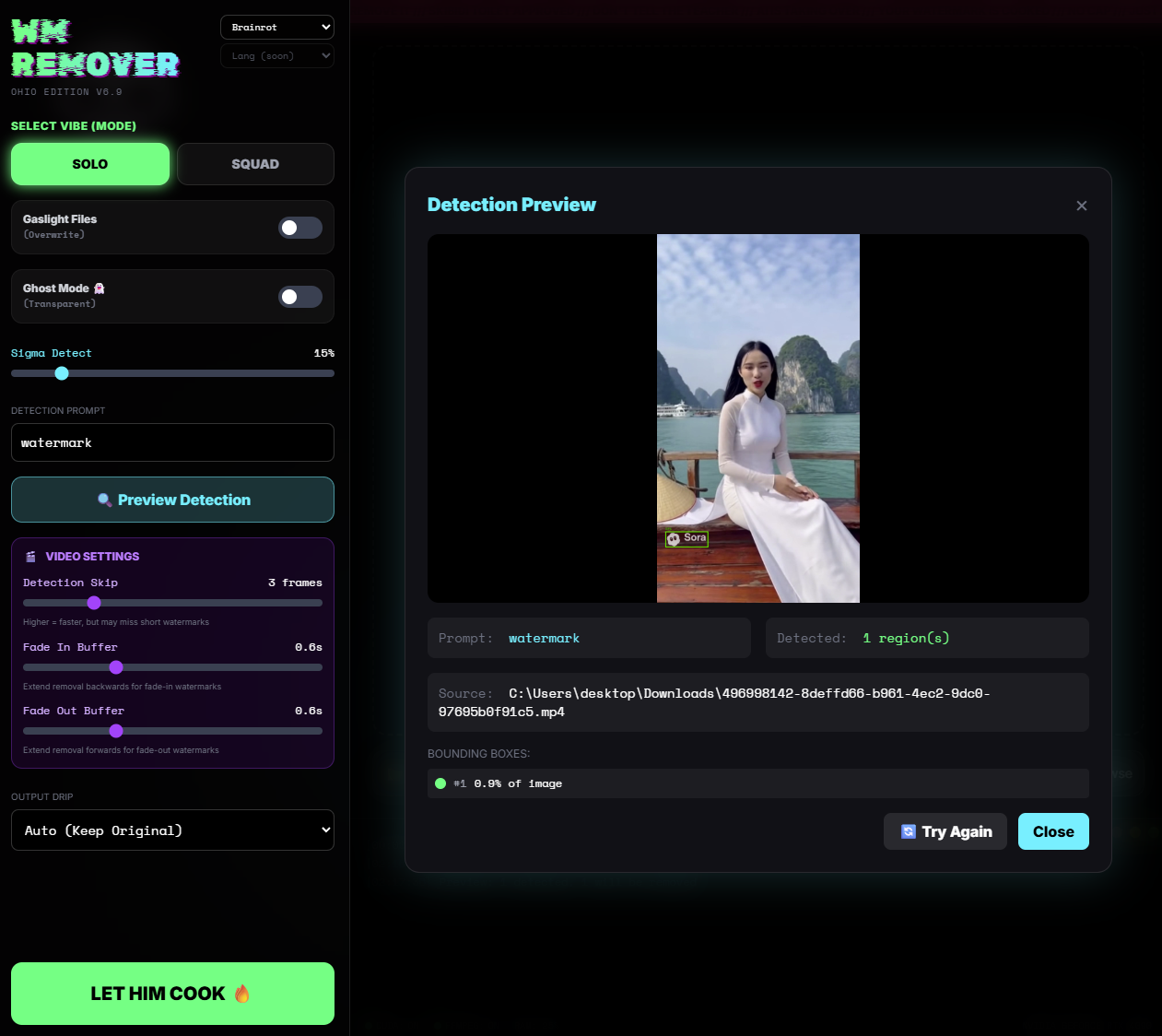
https://github.com/user-attachments/assets/505be2a8-8eda-4def-90b6-5a4ceefee456
The versioned Windows package includes an .exe launcher, Python and the desktop
runtime. See portable setup, model downloads and troubleshooting.
The first launch prepares verified models with visible progress and a retry button.
The setup script downloads a portable Python environment automatically - no system Python required.
git clone https://github.com/D-Ogi/WatermarkRemover-AI.git
cd WatermarkRemover-AI
.\setup.ps1
After setup, double-click run.bat to launch the app.
Requires Python 3.10+ installed on your system.
git clone https://github.com/D-Ogi/WatermarkRemover-AI.git
cd WatermarkRemover-AI
chmod +x setup.sh
./setup.sh
After setup, run ./run.sh to launch the app.
Install FFmpeg to preserve audio when processing videos:
sudo apt install ffmpegbrew install ffmpegrun.bat on Windows, ./run.sh on macOS/Linux)Your settings are automatically saved and restored on next launch.
# Basic usage
python remwm.py input.png output_folder/

# With options
python remwm.py ./images ./output --overwrite --max-bbox-percent=15 --force-format=PNG

# Process video with two-pass detection
python remwm.py video.mp4 ./output --detection-skip=3 --fade-in=0.5 --fade-out=0.5

# Stroke-level mask with second inpainting pass
python remwm.py input.png output/ --mask-mode=stroke --double-pass

# Preview mode (detect without processing)
python remwm.py input.png --preview
| Option | Description |
|---|---|
--overwrite | Overwrite existing files |
--transparent | Make watermark regions transparent (images only) |
--max-bbox-percent | Max detection size as % of image (default: 10) |
--force-format | Force output format (PNG, WEBP, JPG, MP4, AVI) |
--detection-prompt | Custom detection prompt (default: "watermark") |
--detection-skip | Detect every N frames for videos (1-10, default: 1) |
--fade-in | Extend mask backwards by N seconds (for fade-in watermarks) |
--fade-out | Extend mask forwards by N seconds (for fade-out watermarks) |
--preview | Preview detected watermarks without processing |
--mask-mode | Mask method: box (default) or stroke for edge/stroke-level mask |
--double-pass | Run a second inpainting pass to reduce residual artifacts |
--max-dim | Downscale image if max dimension exceeds this value (default: None) |
--detection-skip > 1--fade-in / --fade-out for watermarks that appear/disappear graduallyContributions are welcome! Feel free to:
This project is licensed under the MIT License. See the LICENSE file for details.
LaMA inpainting runs directly from verified TorchScript weights; IOPaint is no
longer required. See runtime, cache and migration instructions
when upgrading an older installation. Use a fresh application environment and check
it with python -m pip check to avoid retaining old IOPaint dependency conflicts.
AI-Powered Watermark Remover using Florence-2 and LaMA: Remove watermarks from images and videos, including AI-generated content from Sora, Runway, and others. Features a modern PyWebview GUI.
Python
2,041
66 commits
updated Oct 12, 2026
AI-Powered Watermark Removal Tool using Florence-2 and LaMA Models
🇬🇧 English | 🇫🇷 Français | 🇨🇳 中文 | 🇯🇵 日本語 | 🇧🇷 Português | 🧠 Brainrot
WatermarkRemover-AI is a cutting-edge application that leverages AI models for precise watermark detection and seamless removal. Perfect for removing watermarks from AI-generated videos like Sora, Sora 2, Runway, and others.
It uses Florence-2 from Microsoft for watermark identification and LaMA for inpainting to fill in the removed regions naturally. The software features a modern GUI built with PyWebview for an accessible and intuitive experience.
https://github.com/user-attachments/assets/505be2a8-8eda-4def-90b6-5a4ceefee456
The versioned Windows package includes an .exe launcher, Python and the desktop
runtime. See portable setup, model downloads and troubleshooting.
The first launch prepares verified models with visible progress and a retry button.
The setup script downloads a portable Python environment automatically - no system Python required.
git clone https://github.com/D-Ogi/WatermarkRemover-AI.git
cd WatermarkRemover-AI
.\setup.ps1
After setup, double-click run.bat to launch the app.
Requires Python 3.10+ installed on your system.
git clone https://github.com/D-Ogi/WatermarkRemover-AI.git
cd WatermarkRemover-AI
chmod +x setup.sh
./setup.sh
After setup, run ./run.sh to launch the app.
Install FFmpeg to preserve audio when processing videos:
sudo apt install ffmpegbrew install ffmpegrun.bat on Windows, ./run.sh on macOS/Linux)Your settings are automatically saved and restored on next launch.
# Basic usage
python remwm.py input.png output_folder/

# With options
python remwm.py ./images ./output --overwrite --max-bbox-percent=15 --force-format=PNG

# Process video with two-pass detection
python remwm.py video.mp4 ./output --detection-skip=3 --fade-in=0.5 --fade-out=0.5

# Stroke-level mask with second inpainting pass
python remwm.py input.png output/ --mask-mode=stroke --double-pass

# Preview mode (detect without processing)
python remwm.py input.png --preview
| Option | Description |
|---|---|
--overwrite | Overwrite existing files |
--transparent | Make watermark regions transparent (images only) |
--max-bbox-percent | Max detection size as % of image (default: 10) |
--force-format | Force output format (PNG, WEBP, JPG, MP4, AVI) |
--detection-prompt | Custom detection prompt (default: "watermark") |
--detection-skip | Detect every N frames for videos (1-10, default: 1) |
--fade-in | Extend mask backwards by N seconds (for fade-in watermarks) |
--fade-out | Extend mask forwards by N seconds (for fade-out watermarks) |
--preview | Preview detected watermarks without processing |
--mask-mode | Mask method: box (default) or stroke for edge/stroke-level mask |
--double-pass | Run a second inpainting pass to reduce residual artifacts |
--max-dim | Downscale image if max dimension exceeds this value (default: None) |
--detection-skip > 1--fade-in / --fade-out for watermarks that appear/disappear graduallyContributions are welcome! Feel free to:
This project is licensed under the MIT License. See the LICENSE file for details.
LaMA inpainting runs directly from verified TorchScript weights; IOPaint is no
longer required. See runtime, cache and migration instructions
when upgrading an older installation. Use a fresh application environment and check
it with python -m pip check to avoid retaining old IOPaint dependency conflicts.



