A comprehensive suite of tools for UniFi network management and monitoring.
Note: This project is not affiliated with, endorsed by, or sponsored by Ubiquiti Inc. UniFi is a trademark of Ubiquiti Inc.
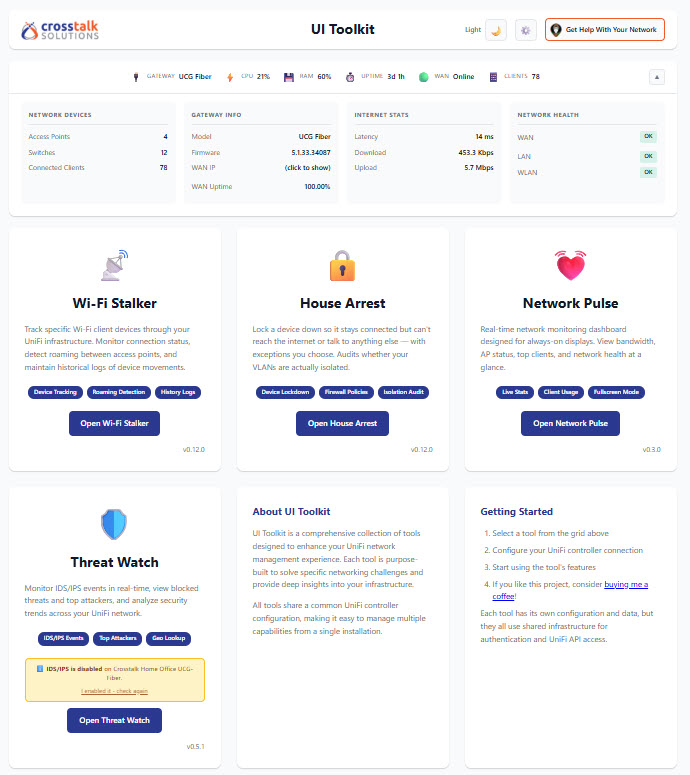
Real-time system status including:
Track specific client devices through your UniFi infrastructure.
Monitor IDS/IPS security events from your UniFi gateway.
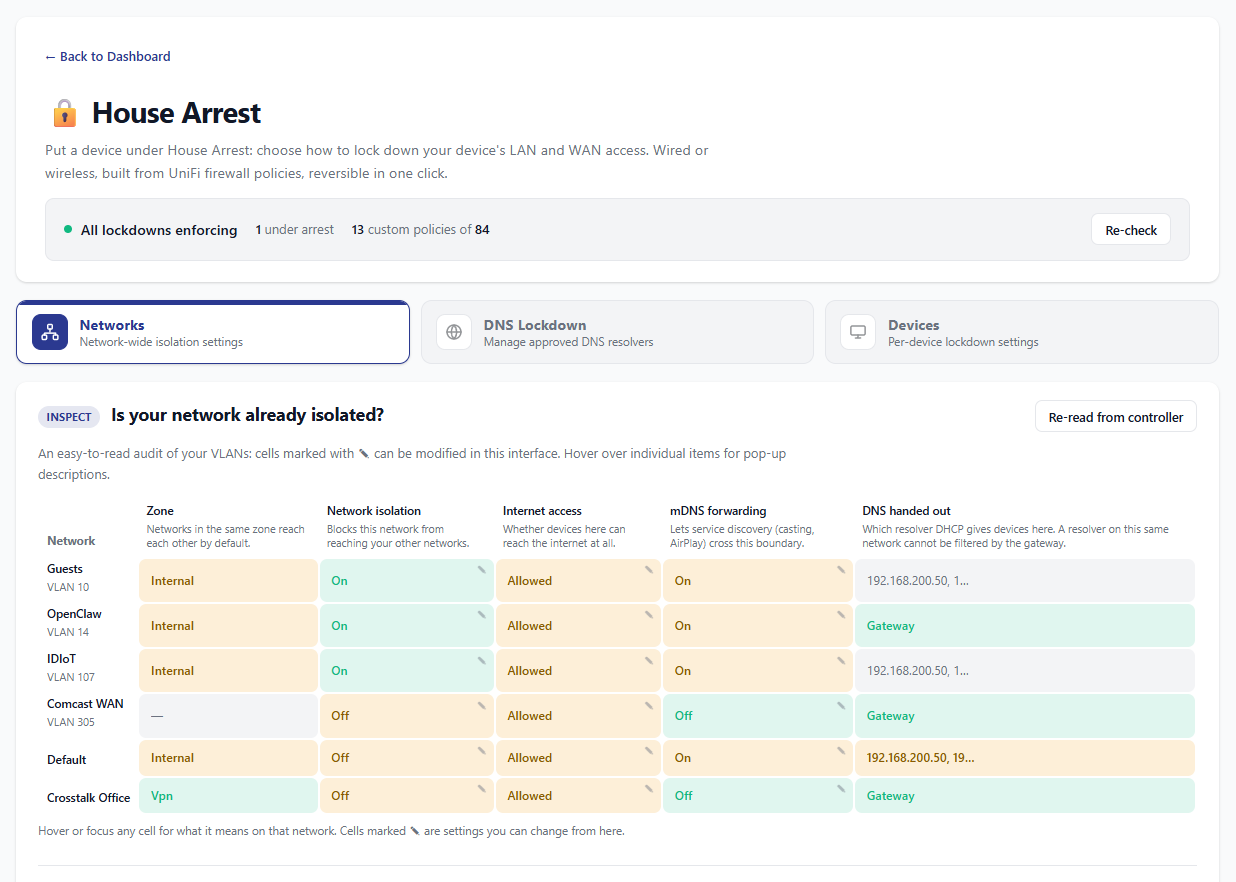
Lock a device or a whole network down using UniFi's zone-based firewall. Reversible in one click, and honest about exactly what is and is not being blocked.
See docs/HOUSE-ARREST.md for the full guide, including measured limitations.
Real-time network monitoring dashboard.
No authentication, access via http://localhost:8000
Prerequisites: Install Docker first - see docs/INSTALLATION.md
# Clone and setup
git clone https://github.com/Crosstalk-Solutions/unifi-toolkit.git
cd unifi-toolkit
./setup.sh  # Select 1 for Local

# Start
docker compose up -d
Access at http://localhost:8000
Authentication enabled, HTTPS with Let's Encrypt via Caddy
Prerequisites: Install Docker first - see docs/INSTALLATION.md
# Clone and setup
git clone https://github.com/Crosstalk-Solutions/unifi-toolkit.git
cd unifi-toolkit
./setup.sh  # Select 2 for Production
# Enter: domain name, admin username, password

# Open firewall ports
sudo ufw allow 80/tcp && sudo ufw allow 443/tcp

# Start with HTTPS
docker compose --profile production up -d
Access at https://your-domain.com
| Guide | Description |
|---|---|
| INSTALLATION.md | Complete installation guide with troubleshooting |
| SYNOLOGY.md | Synology NAS Container Manager setup |
| QNAP Guide | QNAP Container Station setup (community) |
| Unraid Guide | Unraid Community apps Setup |
| QUICKSTART.md | 5-minute quick start reference |
| HOUSE-ARREST.md | House Arrest guide: lockdowns, DNS control, and measured limitations |
| Action | Command |
|---|---|
| Start (local) | docker compose up -d |
| Start (production) | docker compose --profile production up -d |
| Stop | docker compose down |
| View logs | docker compose logs -f |
| Restart | docker compose restart |
| Reset password | ./reset_password.sh |
| Update | ./upgrade.sh |
Images are published to both GHCR (ghcr.io/crosstalk-solutions/unifi-toolkit) and Docker Hub (crosstalksolutions/unifi-toolkit), and they are identical. :latest is the release channel and only moves on tagged releases. :edge is the beta channel, rebuilt on every merge. See Running the beta channel.
Run the interactive setup wizard:
./setup.sh
The wizard will:
.env fileCopy and edit the example configuration:
cp .env.example .env
| Variable | Description |
|---|---|
ENCRYPTION_KEY | Encrypts stored credentials (auto-generated by setup wizard) |
| Variable | Description |
|---|---|
DEPLOYMENT_TYPE | local or production |
DOMAIN | Your domain name (e.g., toolkit.example.com) |
AUTH_USERNAME | Admin username |
AUTH_PASSWORD_HASH | Bcrypt password hash (generated by setup wizard) |
UniFi controller credentials are configured through the web UI after first launch (the gear icon on the dashboard). They are stored encrypted in the database, not read from environment variables.
| Setting (web UI) | Description |
|---|---|
| Controller URL | Local controller IP/hostname (e.g., https://192.168.1.1) |
| API key | Recommended. Generate in UniFi OS Settings → Admins |
| Username / password | Fallback if not using an API key |
| Site ID | Site ID from URL, not friendly name (default: default). For multi-site, use ID from /manage/site/{id}/... |
| Verify SSL | Off by default (self-signed controller certificates) |
Note: Use your controller's local IP address (e.g.,
https://192.168.1.1). Cloud access viaunifi.ui.comis not supported.
| Variable | Description |
|---|---|
STALKER_REFRESH_INTERVAL | Device refresh interval in seconds (default: 60) |
ALLOWED_HOSTS | Extra hostnames allowed to reach the toolkit (comma separated). The toolkit rejects requests whose Host header is not an IP, localhost, a .local-style name, or your DOMAIN, which protects against DNS-rebinding. If you access it through a Tailscale name or reverse-proxy alias, add that name here. |
WEBHOOK_ALLOW_PRIVATE_IPS | Set to true to allow webhook targets on private/LAN addresses, such as Home Assistant, n8n, ntfy, or Gotify running on your own network (default: false). By default webhooks may only target public addresses, so a toolkit exposed beyond your LAN cannot be used to probe it. Cloud-metadata and link-local addresses stay blocked even when enabled. |
Every secret-carrying variable also accepts a _FILE variant (e.g. ENCRYPTION_KEY_FILE=/run/secrets/key) for Docker Swarm / Kubernetes secrets mounted as files.
Production deployments use Caddy for automatic HTTPS:
When managing multiple UniFi sites, always use site-to-site VPN:
✅ RECOMMENDED: VPN Connection
┌──────────────────┐         ┌──────────────────┐
│  UI Toolkit      │◄──VPN──►│  Remote UniFi    │
│  Server          │         │  Controller      │
└──────────────────┘         └──────────────────┘

❌ AVOID: Direct Internet Exposure
Never expose UniFi controllers via port forwarding
VPN Options: UniFi Site-to-Site, WireGuard, Tailscale, IPSec
UNIFI_VERIFY_SSL=false for self-signed certificatesdocker compose logs caddy./reset_password.sh if you forgot your passwordlocalhost, a .local-style name, or your configured DOMAIN (anti-DNS-rebinding protection). Add other names, like a Tailscale MagicDNS name or a reverse-proxy alias, to ALLOWED_HOSTS in .env..env exists and contains ENCRYPTION_KEYdocker compose logs -fdocker compose pull && docker compose up -d# Clone repository
git clone https://github.com/Crosstalk-Solutions/unifi-toolkit.git
cd unifi-toolkit
# Create virtual environment (Python 3.9+)
python3 -m venv venv
source venv/bin/activate
# Install dependencies
pip install -r requirements.txt
# Run setup wizard
./setup.sh
# Start application
python run.py
unifi-toolkit/
├── app/                    # Main application
│   ├── main.py            # FastAPI entry point
│   ├── routers/           # API routes (auth, config)
│   ├── static/            # CSS, images
│   └── templates/         # HTML templates
├── tools/                 # Individual tools
│   ├── wifi_stalker/      # Wi-Fi Stalker tool
│   ├── threat_watch/      # Threat Watch tool
│   ├── network_pulse/     # Network Pulse tool
│   └── house_arrest/      # House Arrest tool
├── shared/                # Shared infrastructure
│   ├── config.py          # Settings management
│   ├── database.py        # SQLAlchemy setup
│   ├── unifi_client.py    # UniFi API wrapper
│   └── crypto.py          # Credential encryption
├── docs/                  # Documentation
├── data/                  # Database (created at runtime)
├── setup.sh               # Setup wizard
├── upgrade.sh             # Upgrade script
├── reset_password.sh      # Password reset utility
├── Caddyfile              # Reverse proxy config
├── docker-compose.yml     # Docker configuration
└── requirements.txt       # Python dependencies
The project includes a comprehensive test suite covering authentication, caching, configuration, and encryption.
# Install development dependencies
pip install -r requirements-dev.txt

# Run all tests
pytest tests/ -v

# Run specific test file
pytest tests/test_auth.py -v

# Run with coverage
pytest tests/ --cov=shared --cov=app -v
Test modules:
tests/test_auth.py - Authentication, session management, rate limiting (23 tests)tests/test_cache.py - In-memory caching with TTL expiration (19 tests)tests/test_config.py - Pydantic settings and environment variables (13 tests)tests/test_crypto.py - Fernet encryption for credentials (14 tests)tests/test_house_arrest_policies.py - House Arrest policy builders, zone resolution, safety checks (199 tests)If you find UI Toolkit useful, consider supporting development:

Developed by Crosstalk Solutions
MIT License
33 followers · starred Feb 2026
A comprehensive suite of tools for UniFi network management and monitoring.
Note: This project is not affiliated with, endorsed by, or sponsored by Ubiquiti Inc. UniFi is a trademark of Ubiquiti Inc.
Real-time system status including:
Track specific client devices through your UniFi infrastructure.
Monitor IDS/IPS security events from your UniFi gateway.
Lock a device or a whole network down using UniFi's zone-based firewall. Reversible in one click, and honest about exactly what is and is not being blocked.
See docs/HOUSE-ARREST.md for the full guide, including measured limitations.
Real-time network monitoring dashboard.
No authentication, access via http://localhost:8000
Prerequisites: Install Docker first - see docs/INSTALLATION.md
# Clone and setup
git clone https://github.com/Crosstalk-Solutions/unifi-toolkit.git
cd unifi-toolkit
./setup.sh  # Select 1 for Local

# Start
docker compose up -d
Access at http://localhost:8000
Authentication enabled, HTTPS with Let's Encrypt via Caddy
Prerequisites: Install Docker first - see docs/INSTALLATION.md
# Clone and setup
git clone https://github.com/Crosstalk-Solutions/unifi-toolkit.git
cd unifi-toolkit
./setup.sh  # Select 2 for Production
# Enter: domain name, admin username, password

# Open firewall ports
sudo ufw allow 80/tcp && sudo ufw allow 443/tcp

# Start with HTTPS
docker compose --profile production up -d
Access at https://your-domain.com
| Guide | Description |
|---|---|
| INSTALLATION.md | Complete installation guide with troubleshooting |
| SYNOLOGY.md | Synology NAS Container Manager setup |
| QNAP Guide | QNAP Container Station setup (community) |
| Unraid Guide | Unraid Community apps Setup |
| QUICKSTART.md | 5-minute quick start reference |
| HOUSE-ARREST.md | House Arrest guide: lockdowns, DNS control, and measured limitations |
| Action | Command |
|---|---|
| Start (local) | docker compose up -d |
| Start (production) | docker compose --profile production up -d |
| Stop | docker compose down |
| View logs | docker compose logs -f |
| Restart | docker compose restart |
| Reset password | ./reset_password.sh |
| Update | ./upgrade.sh |
Images are published to both GHCR (ghcr.io/crosstalk-solutions/unifi-toolkit) and Docker Hub (crosstalksolutions/unifi-toolkit), and they are identical. :latest is the release channel and only moves on tagged releases. :edge is the beta channel, rebuilt on every merge. See Running the beta channel.
Run the interactive setup wizard:
./setup.sh
The wizard will:
.env fileCopy and edit the example configuration:
cp .env.example .env
| Variable | Description |
|---|---|
ENCRYPTION_KEY | Encrypts stored credentials (auto-generated by setup wizard) |
| Variable | Description |
|---|---|
DEPLOYMENT_TYPE | local or production |
DOMAIN | Your domain name (e.g., toolkit.example.com) |
AUTH_USERNAME | Admin username |
AUTH_PASSWORD_HASH | Bcrypt password hash (generated by setup wizard) |
UniFi controller credentials are configured through the web UI after first launch (the gear icon on the dashboard). They are stored encrypted in the database, not read from environment variables.
| Setting (web UI) | Description |
|---|---|
| Controller URL | Local controller IP/hostname (e.g., https://192.168.1.1) |
| API key | Recommended. Generate in UniFi OS Settings → Admins |
| Username / password | Fallback if not using an API key |
| Site ID | Site ID from URL, not friendly name (default: default). For multi-site, use ID from /manage/site/{id}/... |
| Verify SSL | Off by default (self-signed controller certificates) |
Note: Use your controller's local IP address (e.g.,
https://192.168.1.1). Cloud access viaunifi.ui.comis not supported.
| Variable | Description |
|---|---|
STALKER_REFRESH_INTERVAL | Device refresh interval in seconds (default: 60) |
ALLOWED_HOSTS | Extra hostnames allowed to reach the toolkit (comma separated). The toolkit rejects requests whose Host header is not an IP, localhost, a .local-style name, or your DOMAIN, which protects against DNS-rebinding. If you access it through a Tailscale name or reverse-proxy alias, add that name here. |
WEBHOOK_ALLOW_PRIVATE_IPS | Set to true to allow webhook targets on private/LAN addresses, such as Home Assistant, n8n, ntfy, or Gotify running on your own network (default: false). By default webhooks may only target public addresses, so a toolkit exposed beyond your LAN cannot be used to probe it. Cloud-metadata and link-local addresses stay blocked even when enabled. |
Every secret-carrying variable also accepts a _FILE variant (e.g. ENCRYPTION_KEY_FILE=/run/secrets/key) for Docker Swarm / Kubernetes secrets mounted as files.
Production deployments use Caddy for automatic HTTPS:
When managing multiple UniFi sites, always use site-to-site VPN:
✅ RECOMMENDED: VPN Connection
┌──────────────────┐         ┌──────────────────┐
│  UI Toolkit      │◄──VPN──►│  Remote UniFi    │
│  Server          │         │  Controller      │
└──────────────────┘         └──────────────────┘

❌ AVOID: Direct Internet Exposure
Never expose UniFi controllers via port forwarding
VPN Options: UniFi Site-to-Site, WireGuard, Tailscale, IPSec
UNIFI_VERIFY_SSL=false for self-signed certificatesdocker compose logs caddy./reset_password.sh if you forgot your passwordlocalhost, a .local-style name, or your configured DOMAIN (anti-DNS-rebinding protection). Add other names, like a Tailscale MagicDNS name or a reverse-proxy alias, to ALLOWED_HOSTS in .env..env exists and contains ENCRYPTION_KEYdocker compose logs -fdocker compose pull && docker compose up -d# Clone repository
git clone https://github.com/Crosstalk-Solutions/unifi-toolkit.git
cd unifi-toolkit
# Create virtual environment (Python 3.9+)
python3 -m venv venv
source venv/bin/activate
# Install dependencies
pip install -r requirements.txt
# Run setup wizard
./setup.sh
# Start application
python run.py
unifi-toolkit/
├── app/                    # Main application
│   ├── main.py            # FastAPI entry point
│   ├── routers/           # API routes (auth, config)
│   ├── static/            # CSS, images
│   └── templates/         # HTML templates
├── tools/                 # Individual tools
│   ├── wifi_stalker/      # Wi-Fi Stalker tool
│   ├── threat_watch/      # Threat Watch tool
│   ├── network_pulse/     # Network Pulse tool
│   └── house_arrest/      # House Arrest tool
├── shared/                # Shared infrastructure
│   ├── config.py          # Settings management
│   ├── database.py        # SQLAlchemy setup
│   ├── unifi_client.py    # UniFi API wrapper
│   └── crypto.py          # Credential encryption
├── docs/                  # Documentation
├── data/                  # Database (created at runtime)
├── setup.sh               # Setup wizard
├── upgrade.sh             # Upgrade script
├── reset_password.sh      # Password reset utility
├── Caddyfile              # Reverse proxy config
├── docker-compose.yml     # Docker configuration
└── requirements.txt       # Python dependencies
The project includes a comprehensive test suite covering authentication, caching, configuration, and encryption.
# Install development dependencies
pip install -r requirements-dev.txt

# Run all tests
pytest tests/ -v

# Run specific test file
pytest tests/test_auth.py -v

# Run with coverage
pytest tests/ --cov=shared --cov=app -v
Test modules:
tests/test_auth.py - Authentication, session management, rate limiting (23 tests)tests/test_cache.py - In-memory caching with TTL expiration (19 tests)tests/test_config.py - Pydantic settings and environment variables (13 tests)tests/test_crypto.py - Fernet encryption for credentials (14 tests)tests/test_house_arrest_policies.py - House Arrest policy builders, zone resolution, safety checks (199 tests)If you find UI Toolkit useful, consider supporting development:
Developed by Crosstalk Solutions
MIT License
33 followers · starred Feb 2026



