
Private rollback rooms and a controller-first overlay for Ultra Street Fighter IV. An unofficial experimental port of Anthony Danducci's sf4e.
C++
84
749 commits
updated Oct 7, 2026
README

SF4 Ember Netplay
Your room. Your rivals. One more game.
Private rollback rooms and a controller-first overlay for Ultra Street Fighter IV.




Download v1.1.1 for Windows · Get started · Player guide · Release notes · Discord
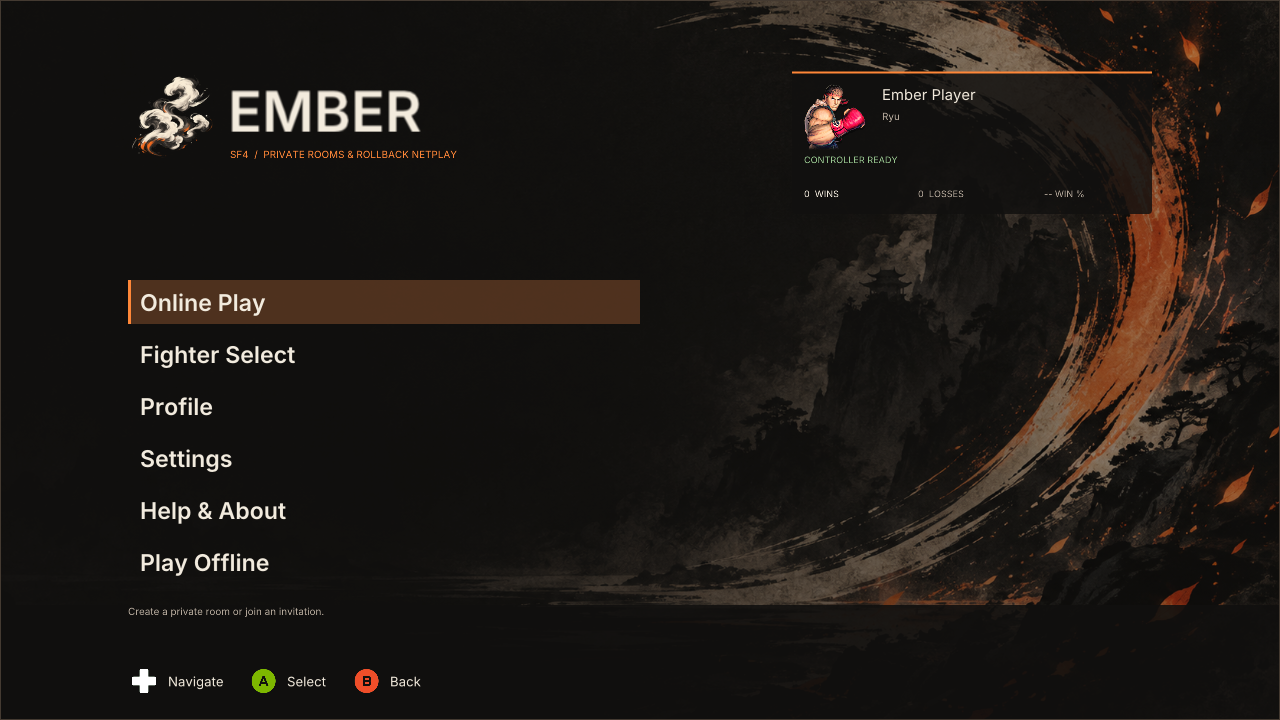
SF4 Ember Netplay brings private rooms, four rollback battle tables, spectators and offline training tools into a fixed in-game interface. Create a room, share an invitation and choose where to play or watch. The charcoal, ivory and orange interface supports controllers, arcade sticks and keyboard navigation.
An experimental unofficial port of sf4e by Anthony Danducci and contributors, under the MIT license. Anthony Danducci does not maintain, endorse or support this build. Ember is not affiliated with Capcom or Valve. See attribution and scope and limitations.
Inside Ember
| Play together | Make it yours |
|---|---|
| Private rooms for up to 16 members | Fighter, edition, costume, color and Ultra selection |
| Four battle tables, queues and spectators | Player profile, main fighter and confirmed online record |
| Room chat and short invitations | SF4 controller assignment, including DirectInput sticks |
| Iroh networking and Discord invitations | Controller prompts and interface settings |
A room for the whole group
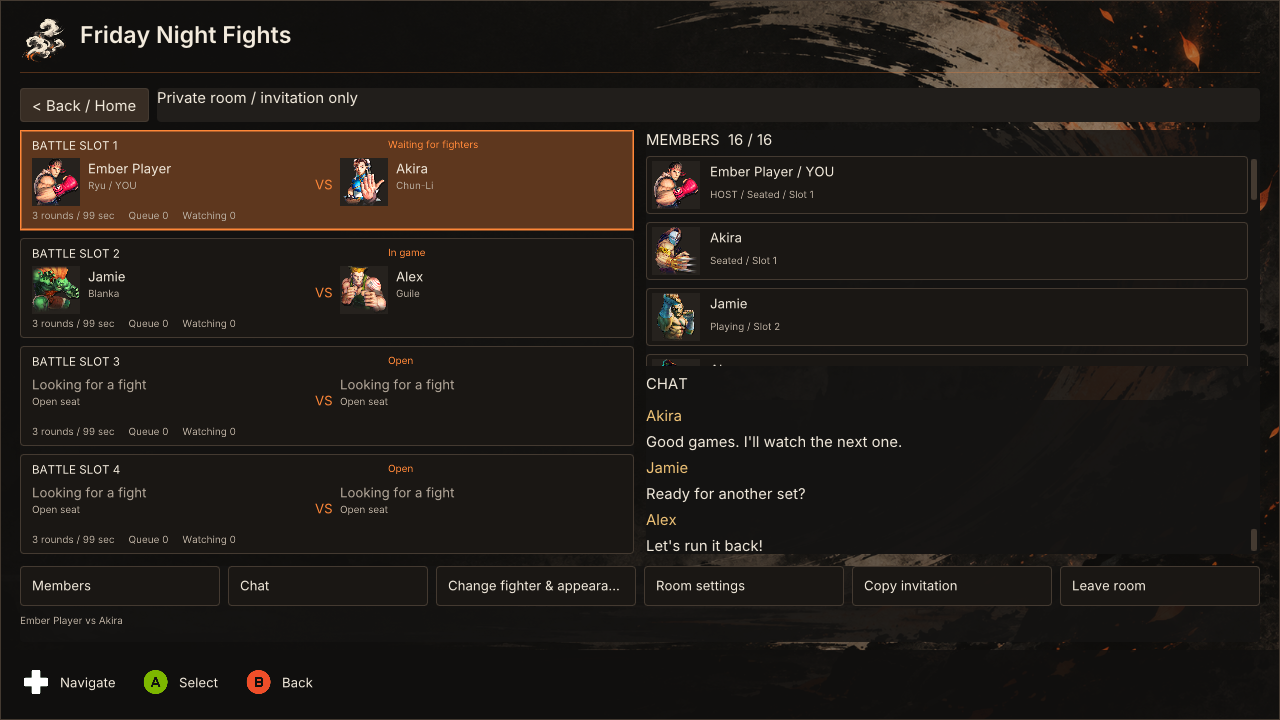
Join a table, enter its queue or watch the next game. Room membership and active matches are separate, and each member plays one game at a time.
Choose your fighter
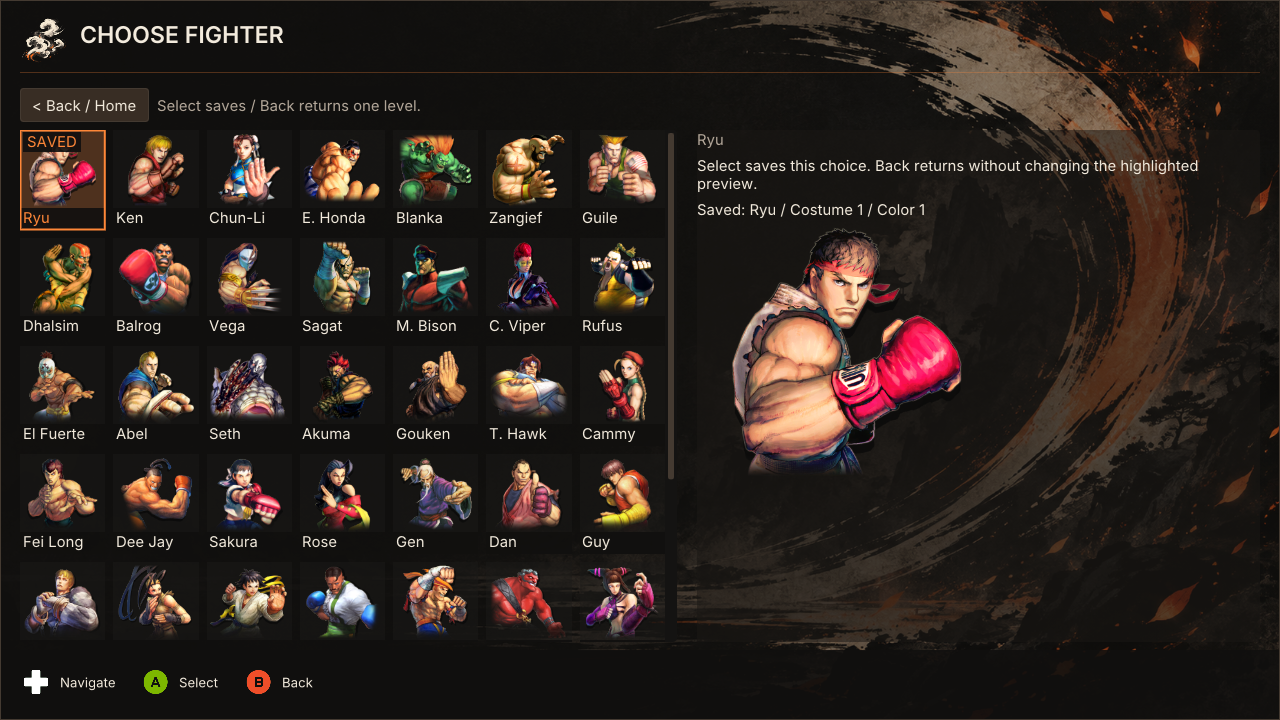
Save your fighter and appearance before joining a room or while waiting. Select your edition, Ultra and available costume and color; P1 chooses the stage.
Find your look
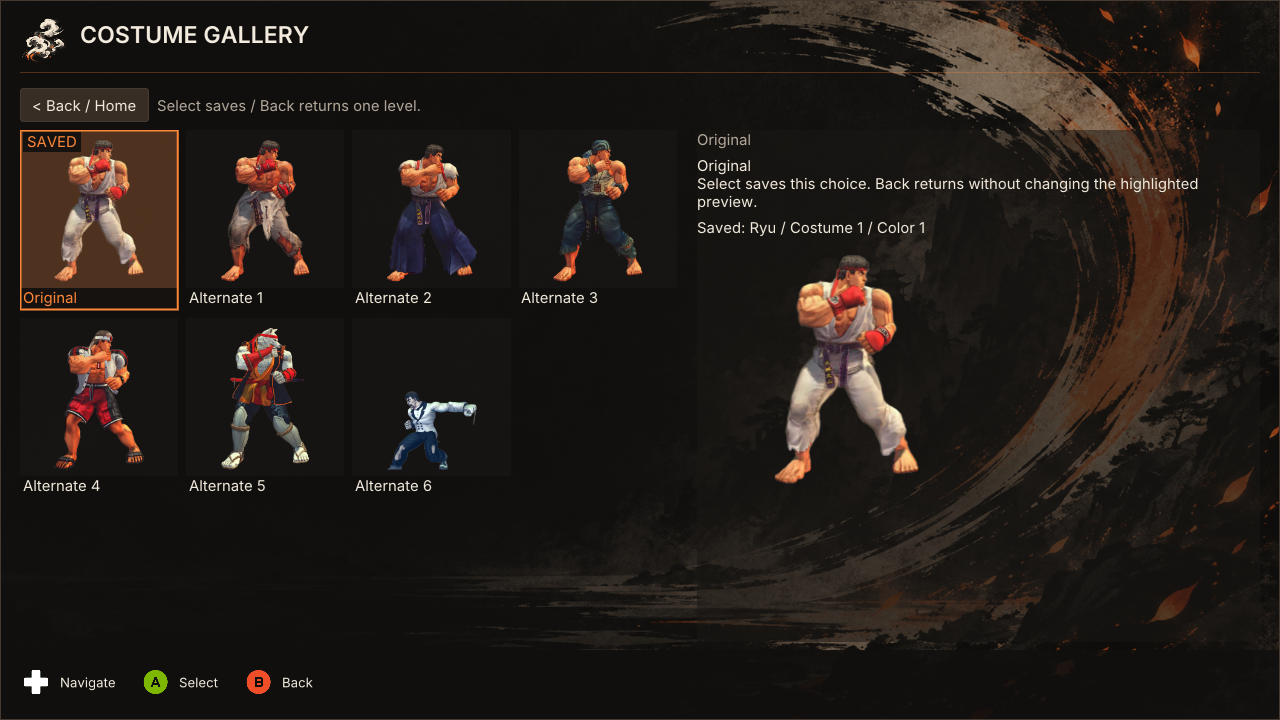
Browse costume previews, choose an available outfit and fine-tune its color before returning to your room.
The screenshots above were captured from the 0.8.0 UI renderer using sample session data, so some screens have changed since. They are not photographs of a live multiplayer test.
Frame meter
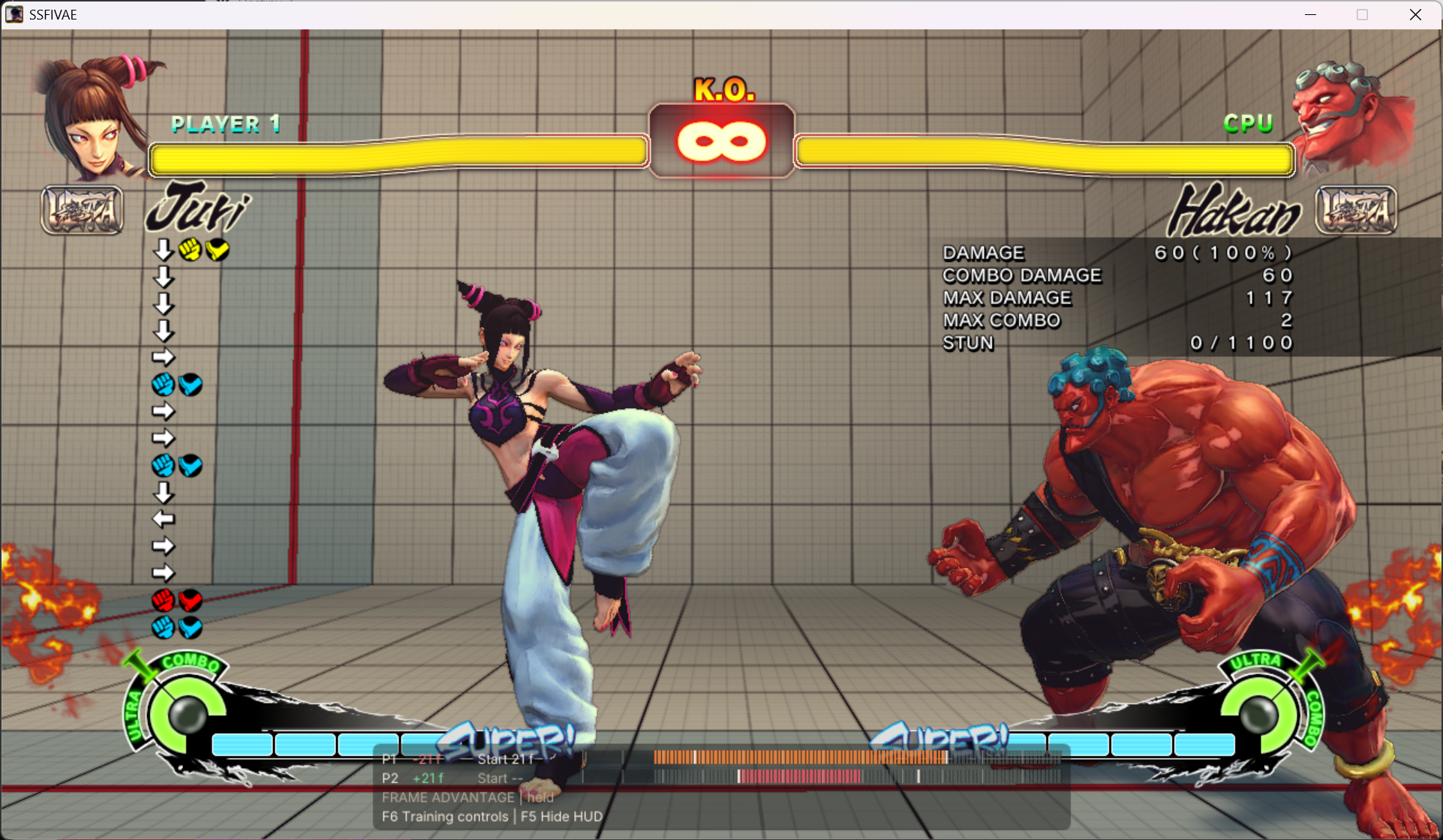
An in-game capture supplied by the project owner, showing Ember's frame meter, player timelines and frame-advantage readout during training.
Get started
You need Windows 10 or later (x64), an owned Steam copy of Ultra Street Fighter IV, and the latest Microsoft Visual C++ x86 runtime (the launcher will not start with an older one and offers the download). The game is not included.
- For a fresh installation, download the complete v1.1.1 ZIP and its SHA-256 checksum. Choose a release package, not GitHub's source-code download. Alternatively, setup.exe installs Ember into an empty folder with a Start menu entry and an uninstaller.
- Extract everything into a new writable folder. Keep your old launcher installation separate; moving from the legacy launcher to Ember is a fresh install.
- Run
preflight.cmd, thenLauncher.exe. Successful startup goes directly to the game. If needed, select the folder containingSSFIV.exein launch recovery. - At the main menu, choose your controller and player name. Use Online play → Create room, then copy the invitation. Guests choose Join room and paste it.
- Choose a table, join its queue or watch. Save your fighter selection and ready when seated. All participants must use the same Ember release.
No VPS account or manual port configuration is required. Iroh can use public relays when a direct connection is unavailable. Discord support is included in the package.
Controls
| Action | Keyboard | Assigned XInput controller | DirectInput / arcade stick |
|---|---|---|---|
| Navigate | Arrow keys | D-pad | SF4-mapped directions |
| Select | Enter | A | SF4-mapped Light Punch |
| Back | Escape | B | SF4-mapped Light Kick |
| Open at safe menu states | F10 | Start | SF4-mapped Start |
| Change fighter (in a room) | none | X | none |
| Table options (in a room) | none | Y | none |
| Chat (in a room) | none | View | none |
Back returns through menus, and from Home it hides Ember. On your own table card in a room, Back leaves your seat or queue place at once. Leaving the room itself requires the explicit Leave room action. Use Play offline for native game menus. More detail: controller guide.
Settings, updates and legacy builds
Existing Ember preferences remain under %APPDATA%\sf4e. Help & About provides the version, update checking, attribution and redacted diagnostic exports. Ember updates use the renamed repository and verify the downloaded ZIP's SHA-256 before installation.
release is the current Ember branch. Legacy main preserves the previous SF4 Netplay Launcher. Its releases and archived README remain available. Legacy in-place upgrades to Ember are not supported; follow the fresh-install steps above.
Browse the branch archive for all retired development branches, preserved as tagged snapshots with their original commit history.
Status and documentation
Ember remains experimental. Local builds, automated UI and transport tests, and package verification do not establish native gameplay acceptance. Results and repeated rematches, spectators, disconnect recovery, different-network play and clean-machine behavior require recorded SF4 testing. Read the limitations before playing.
| Guide | What it covers |
|---|---|
| Player guide | Hosting, joining, controls and day-to-day play |
| Custom rooms | Tables, queues, spectators and room behavior |
| Discord integration | Presence, invitations and privacy |
| Troubleshooting | Startup, connections and diagnostics |
| Saving logs | Save logs and diagnostics from both players for a bug report |
| Build and package | Reproducible local builds and release provenance |
| Server | Everything that runs on the Ember server: bridge, public rooms, short links, hosting |
| Server traffic | Diagrams of what travels between the Ember server and players, for public and private rooms |
| All documentation | Design notes, validation results, reports and release notes |
Community
Find opponents, organise sets and get help in the Ember Discord. You can also open it from the in-game menu under Help & About. Report bugs in Issues so they are not lost.
License and credits
This project is under the MIT license, which carries both the SF4 Ember Netplay contributors copyright and the upstream copyright with Anthony Danducci's sf4e attribution. Anyone reusing code from this port must keep both notices; see using code from this port. ATTRIBUTION.md records upstream, dependency, font and artwork credits. Packages include dependency notices, Inter's OFL and Kenney's input-prompt license. Capcom game imagery is separate from the source-code license.
External Licenses and Copyright Information
Street Fighter, Street Fighter 4, Ultra Street Fighter 4, and all related software Copyright (c) CAPCOM.
Steam Copyright (c) Valve Corporation.
Visual Studio, vcpkg, and Detours Copyright (c) Microsoft Corporation.
CMake - Cross Platform Makefile Generator Copyright (c) Kitware, Inc. and Contributors.
Dear Imgui Copyright (c) Omar Cornut
spdlog Copyright (c) 2016 Gabi Melman.
nlohmann/json Copyright (c) 2013-2022 Niels Lohmann
GGPO (Good Game Peace Out) Copyright (c) GroundStorm Studios, LLC.
Significant stargazers

85 followers · starred Sep 2026
Similar repos


Private rollback rooms and a controller-first overlay for Ultra Street Fighter IV. An unofficial experimental port of Anthony Danducci's sf4e.
C++
84
749 commits
updated Oct 7, 2026
README
SF4 Ember Netplay
Your room. Your rivals. One more game.
Private rollback rooms and a controller-first overlay for Ultra Street Fighter IV.
Download v1.1.1 for Windows · Get started · Player guide · Release notes · Discord
SF4 Ember Netplay brings private rooms, four rollback battle tables, spectators and offline training tools into a fixed in-game interface. Create a room, share an invitation and choose where to play or watch. The charcoal, ivory and orange interface supports controllers, arcade sticks and keyboard navigation.
An experimental unofficial port of sf4e by Anthony Danducci and contributors, under the MIT license. Anthony Danducci does not maintain, endorse or support this build. Ember is not affiliated with Capcom or Valve. See attribution and scope and limitations.
Inside Ember
| Play together | Make it yours |
|---|---|
| Private rooms for up to 16 members | Fighter, edition, costume, color and Ultra selection |
| Four battle tables, queues and spectators | Player profile, main fighter and confirmed online record |
| Room chat and short invitations | SF4 controller assignment, including DirectInput sticks |
| Iroh networking and Discord invitations | Controller prompts and interface settings |
A room for the whole group
Join a table, enter its queue or watch the next game. Room membership and active matches are separate, and each member plays one game at a time.
Choose your fighter
Save your fighter and appearance before joining a room or while waiting. Select your edition, Ultra and available costume and color; P1 chooses the stage.
Find your look
Browse costume previews, choose an available outfit and fine-tune its color before returning to your room.
The screenshots above were captured from the 0.8.0 UI renderer using sample session data, so some screens have changed since. They are not photographs of a live multiplayer test.
Frame meter
An in-game capture supplied by the project owner, showing Ember's frame meter, player timelines and frame-advantage readout during training.
Get started
You need Windows 10 or later (x64), an owned Steam copy of Ultra Street Fighter IV, and the latest Microsoft Visual C++ x86 runtime (the launcher will not start with an older one and offers the download). The game is not included.
- For a fresh installation, download the complete v1.1.1 ZIP and its SHA-256 checksum. Choose a release package, not GitHub's source-code download. Alternatively, setup.exe installs Ember into an empty folder with a Start menu entry and an uninstaller.
- Extract everything into a new writable folder. Keep your old launcher installation separate; moving from the legacy launcher to Ember is a fresh install.
- Run
preflight.cmd, thenLauncher.exe. Successful startup goes directly to the game. If needed, select the folder containingSSFIV.exein launch recovery. - At the main menu, choose your controller and player name. Use Online play → Create room, then copy the invitation. Guests choose Join room and paste it.
- Choose a table, join its queue or watch. Save your fighter selection and ready when seated. All participants must use the same Ember release.
No VPS account or manual port configuration is required. Iroh can use public relays when a direct connection is unavailable. Discord support is included in the package.
Controls
| Action | Keyboard | Assigned XInput controller | DirectInput / arcade stick |
|---|---|---|---|
| Navigate | Arrow keys | D-pad | SF4-mapped directions |
| Select | Enter | A | SF4-mapped Light Punch |
| Back | Escape | B | SF4-mapped Light Kick |
| Open at safe menu states | F10 | Start | SF4-mapped Start |
| Change fighter (in a room) | none | X | none |
| Table options (in a room) | none | Y | none |
| Chat (in a room) | none | View | none |
Back returns through menus, and from Home it hides Ember. On your own table card in a room, Back leaves your seat or queue place at once. Leaving the room itself requires the explicit Leave room action. Use Play offline for native game menus. More detail: controller guide.
Settings, updates and legacy builds
Existing Ember preferences remain under %APPDATA%\sf4e. Help & About provides the version, update checking, attribution and redacted diagnostic exports. Ember updates use the renamed repository and verify the downloaded ZIP's SHA-256 before installation.
release is the current Ember branch. Legacy main preserves the previous SF4 Netplay Launcher. Its releases and archived README remain available. Legacy in-place upgrades to Ember are not supported; follow the fresh-install steps above.
Browse the branch archive for all retired development branches, preserved as tagged snapshots with their original commit history.
Status and documentation
Ember remains experimental. Local builds, automated UI and transport tests, and package verification do not establish native gameplay acceptance. Results and repeated rematches, spectators, disconnect recovery, different-network play and clean-machine behavior require recorded SF4 testing. Read the limitations before playing.
| Guide | What it covers |
|---|---|
| Player guide | Hosting, joining, controls and day-to-day play |
| Custom rooms | Tables, queues, spectators and room behavior |
| Discord integration | Presence, invitations and privacy |
| Troubleshooting | Startup, connections and diagnostics |
| Saving logs | Save logs and diagnostics from both players for a bug report |
| Build and package | Reproducible local builds and release provenance |
| Server | Everything that runs on the Ember server: bridge, public rooms, short links, hosting |
| Server traffic | Diagrams of what travels between the Ember server and players, for public and private rooms |
| All documentation | Design notes, validation results, reports and release notes |
Community
Find opponents, organise sets and get help in the Ember Discord. You can also open it from the in-game menu under Help & About. Report bugs in Issues so they are not lost.
License and credits
This project is under the MIT license, which carries both the SF4 Ember Netplay contributors copyright and the upstream copyright with Anthony Danducci's sf4e attribution. Anyone reusing code from this port must keep both notices; see using code from this port. ATTRIBUTION.md records upstream, dependency, font and artwork credits. Packages include dependency notices, Inter's OFL and Kenney's input-prompt license. Capcom game imagery is separate from the source-code license.
External Licenses and Copyright Information
Street Fighter, Street Fighter 4, Ultra Street Fighter 4, and all related software Copyright (c) CAPCOM.
Steam Copyright (c) Valve Corporation.
Visual Studio, vcpkg, and Detours Copyright (c) Microsoft Corporation.
CMake - Cross Platform Makefile Generator Copyright (c) Kitware, Inc. and Contributors.
Dear Imgui Copyright (c) Omar Cornut
spdlog Copyright (c) 2016 Gabi Melman.
nlohmann/json Copyright (c) 2013-2022 Niels Lohmann
GGPO (Good Game Peace Out) Copyright (c) GroundStorm Studios, LLC.
Significant stargazers
85 followers · starred Sep 2026