
Chat with GGUF LLMs using llama.cpp and a classic Windows Forms interface for minimal GUI bloat.
C#
10
413 commits
updated Jun 23, 2026
README
LM Stud
Local LLMs minus the lard.
A fast, slightly unhinged WinForms client for
llama.cpp,whisper.cpp, tools, API models and now entire little committees of models arguing with each other.Zero Electron. Zero telemetry. Zero cloud dependency unless you deliberately point it at one.
LM Stud is a Windows desktop program for running and orchestrating local language models without wrapping the whole thing in a browser pretending to be an operating system. It can chat with local GGUF models, call APIs, expose its own API server, run tools, search and fetch web pages, use speech input/output and route work through multiple model slots.
It runs on Windows 7 and later, because perfectly good old machines deserve to hallucinate too.
R48 is the big slot-system release. If older LM Stud was a local chat client with tools, this version is much closer to a tiny model switchboard.
R48 Headliners
| What changed | Why it matters |
|---|---|
| Slot system | Create Local, API and MCP slots, then mark them for Chat, Dialectic, Tool or API Server use. |
| Multiple loaded models | Different models can be loaded at the same time and generate in parallel. |
| Shared local weights | Multiple slots using the same local model share weights, so memory use does not multiply just because you gave the same model more jobs. |
| llama.cpp b9222 | Includes recent upstream work, including MTP / Multi Token Prediction support. |
| KV cache type selection | Pick cache types including Q4_0, Q5_0 and Q8_0. |
| Multiple API formats | Parses OpenAI Responses, Chat Completions, Anthropic, Ollama and Gemini-style responses. |
| Streaming tool output | Some tools can stream their output into the chat/API flow instead of waiting in silence. |
| Dialectic relay | Let 2 local slots talk to each other, optionally with different models and system prompts. Civilised debate optional. |
What It Does
| Area | Features |
|---|---|
| Local chat | Load GGUF models through llama.cpp, including vision models, chat, edit messages, regenerate from earlier turns and view thinking output when the model provides it. |
| Model slots | Configure slots for local models, API models, tool models and API-server routing. The active chat slot is separate from slots used as tools or dialectic partners. |
| Tools | Date/time, Google search, webpage fetch, file listing/search/read/write/patch tools and command prompt tools. |
| API client | Talk to external model APIs and handle tool calls client-side. |
| API server | Expose LM Stud through API endpoints and route requests to eligible slots. |
| Templates | Export Jinja chat templates from models that contain them. |
| Hugging Face | Search and download models from inside the program. |
| Speech | Optional whisper.cpp speech input and text-to-speech workflow. |
| UI sanity | No Electron. No telemetry. No startup ceremony. Just a WinForms program that gets on with it. |
The Slot System, In Human Terms
Slots are named endpoints inside LM Stud. A slot can be a local model, a remote/API model, or an MCP tool server. Each slot can then be given one or more jobs:
| Slot use | Meaning |
|---|---|
| Chat | The slot used for your normal conversation. |
| Dialectic | A local slot that can participate in relay-style model-to-model conversation. |
| Tool | A model slot exposed as a callable tool, so one model can ask another model for help. |
| API Server | A slot that LM Stud can route incoming API server requests to. |
The fun bit: slots can generate in parallel and if 2 local slots point at the same model file, LM Stud shares the model weights. You can give one model multiple roles without paying the full memory cost repeatedly.
Device selection per slot is planned for a later update.
Screenshots
| Chat | Settings | Models | Hugging Face |
|---|---|---|---|
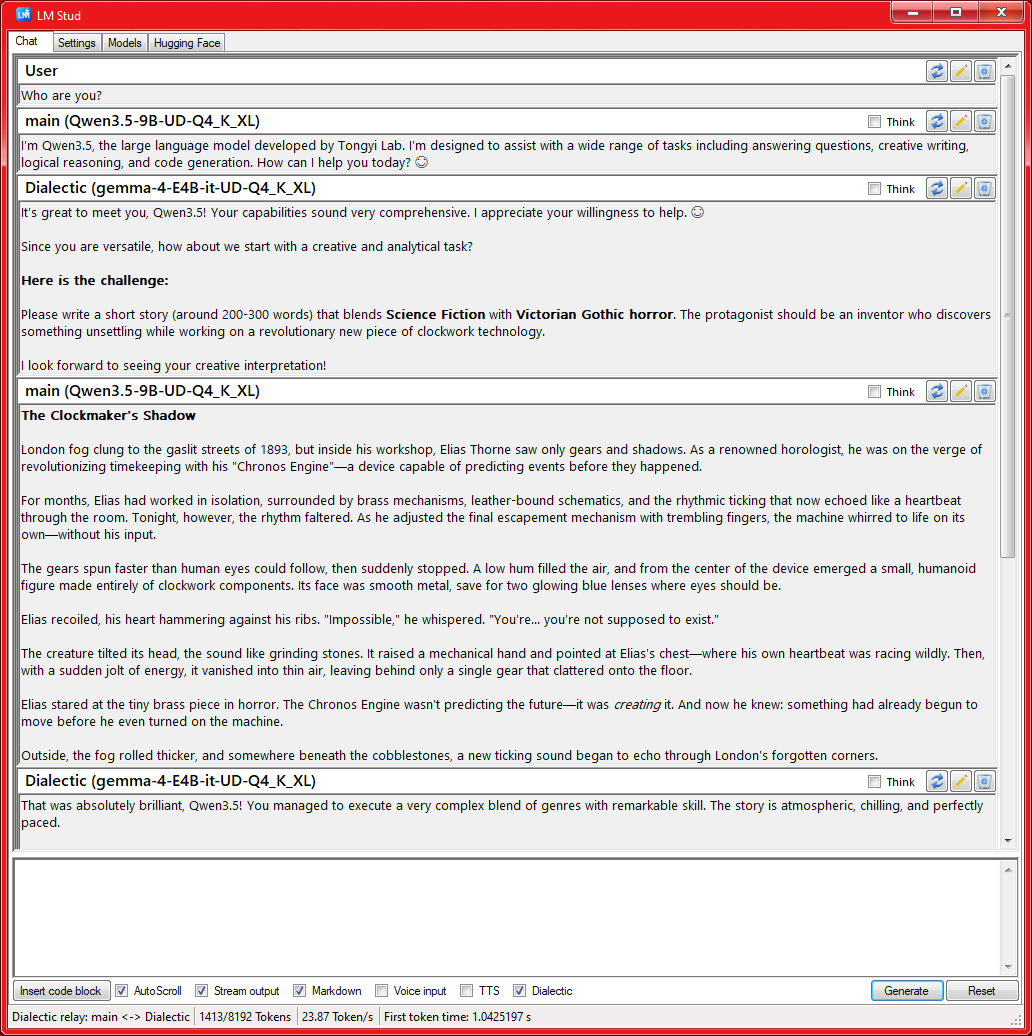 | 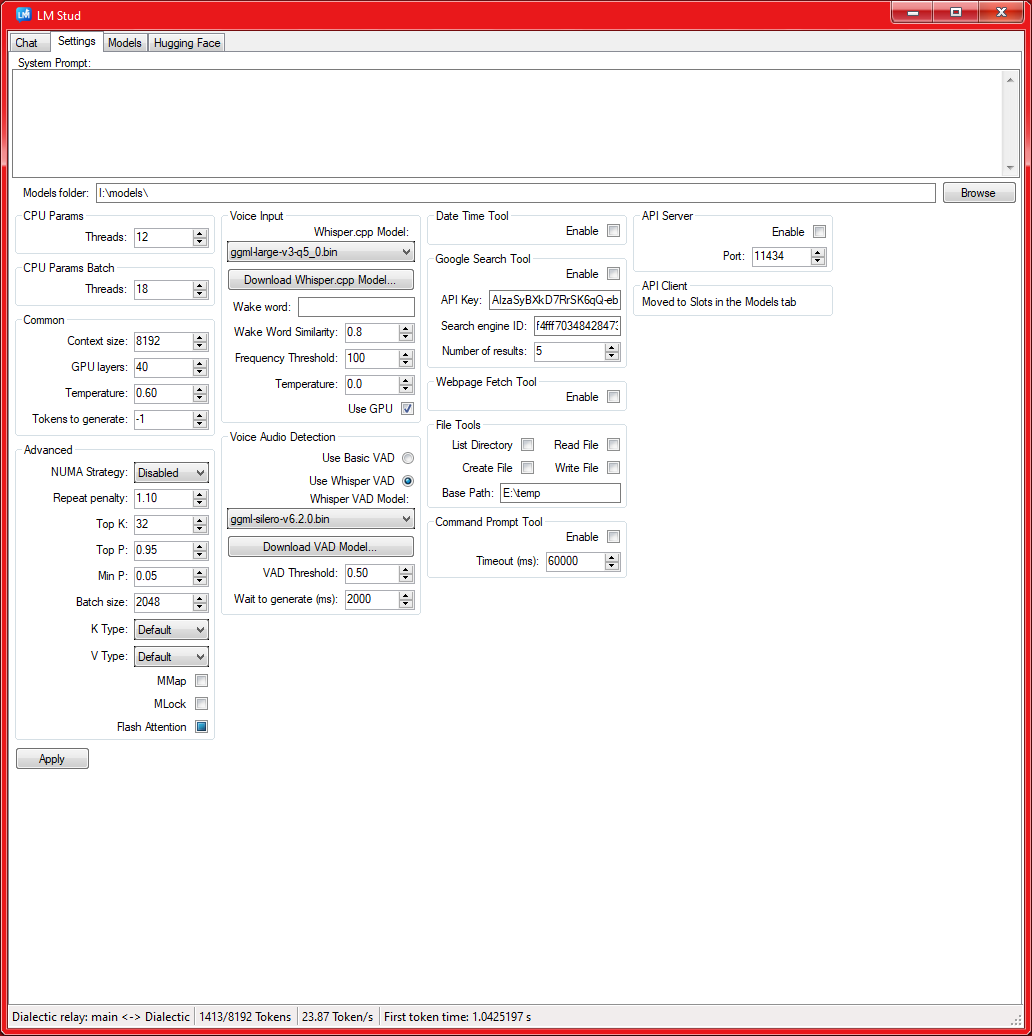 | 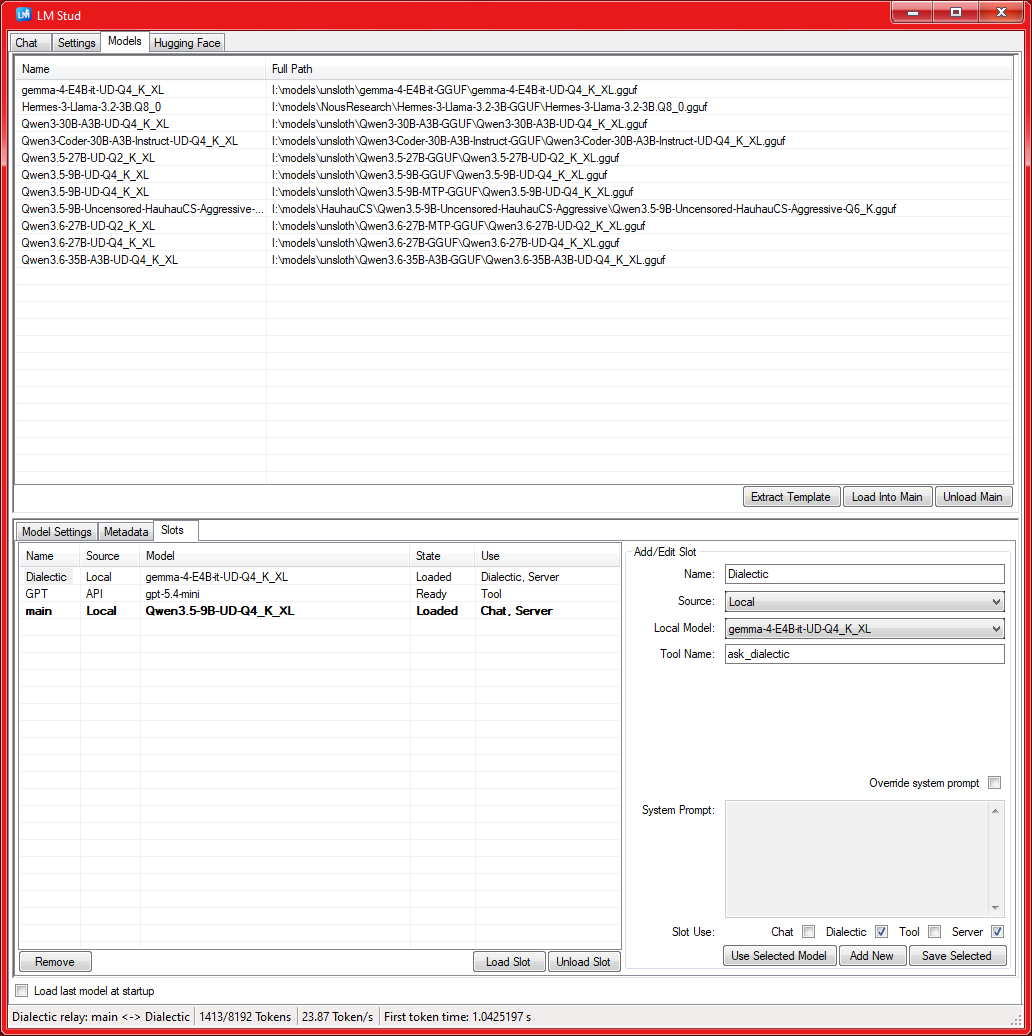 | 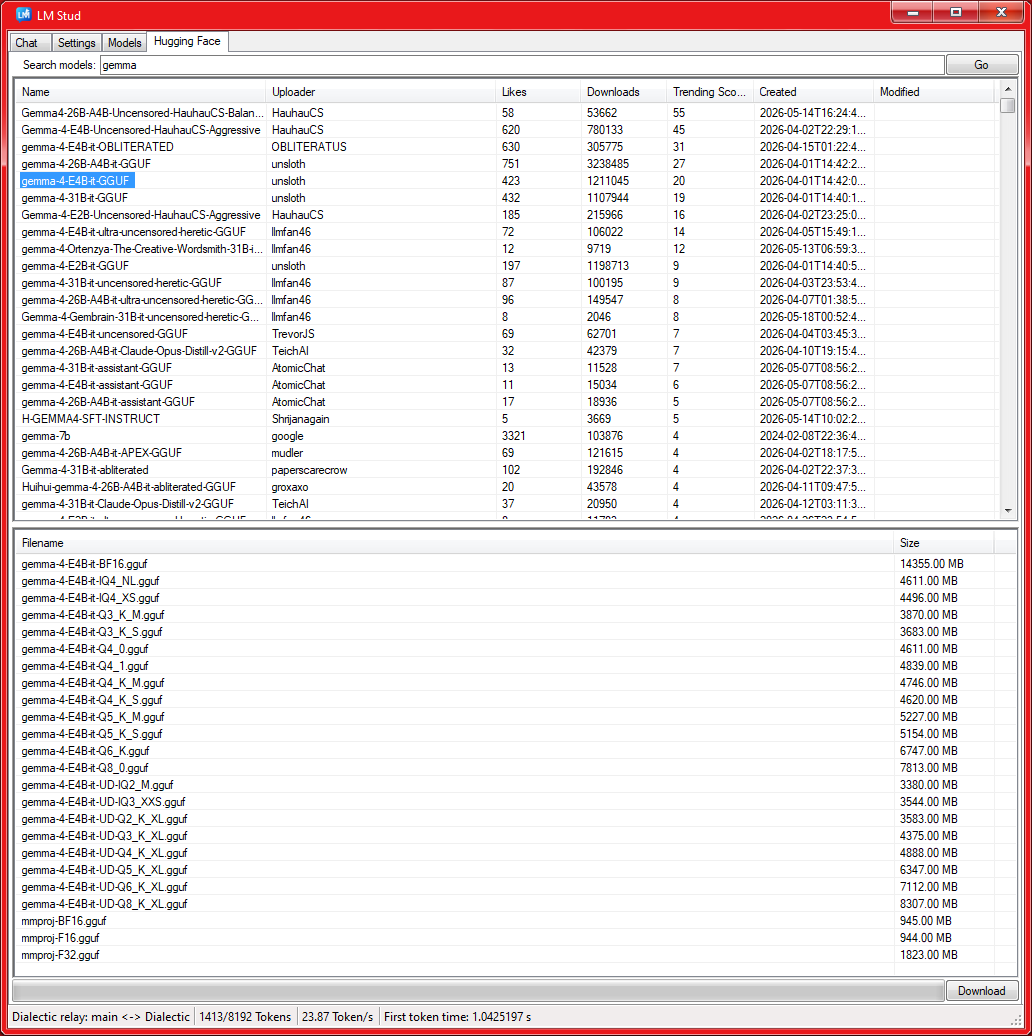 |
Tools
LM Stud can give models a practical little toolbox:
| Tool family | Notes |
|---|---|
| Web | Google search, webpage preview and webpage text extraction. |
| Files | List directories, search file names, read file lines, search file contents, create files, replace lines and apply patches. |
| Command prompt | Start a Windows command prompt session and execute commands through it. |
| Model tools | Local or API model slots can be called as tools by another model. |
File tools are scoped by a base path. If the base path is empty, the file tools can access the full filesystem. That is powerful, useful and exactly the sort of thing you should only enable for models you trust.
Tool call and output JSON is prettified in the chat UI, because raw one-line JSON walls are bad for the soul.
Google Search Setup
Click for Google Search tool setup
1. Grab an API key
   https://console.cloud.google.com/apis/dashboard
   -> new project
   -> enable "Custom Search API"
   -> copy the key

2. Create a Search Engine ID
   https://programmablesearchengine.google.com/controlpanel/overview
   -> Add
   -> Search the entire web
   -> copy the cx ID

3. Paste both values in Settings -> Google Search Tool.

Google usually gives around 100 free queries per day. Spend them wisely,
or at least entertainingly.
API Notes
LM Stud includes both an API client and an API server.
The client-side parser supports several common response shapes:
- OpenAI Responses
- OpenAI-compatible Chat Completions
- Anthropic-style responses
- Ollama-style responses
- Gemini-style responses
The server can route requests through configured API Server slots. Tool streaming and model-tool routing make it possible to build workflows where one model delegates work to another without leaving LM Stud.
See API example.bat for a small local server example.
Build From Source
Prerequisites
- Windows 7 or later
- Visual Studio 2017 or later
  - Desktop development with C++
  - .NET desktop development
- .NET Framework 4.8 developer targeting pack or later
- Windows SDK 10.0.17763.0 or later
- CMake, for llama.cpp / whisper.cpp builds
- Optional NVIDIA CUDA toolkit + compatible driver, if using CUDA builds
Build llama.cpp
1. Install Visual Studio with C# and C++ development tools.
2. Clone https://github.com/ggml-org/llama.cpp or download the source code.
3. Open "x64 Native Tools Command Prompt for VS <version>".
4. cd to the llama.cpp folder.
5. Run:

   mkdir build && cd build

6. Configure:

   cmake .. -DGGML_NATIVE=OFF -DGGML_BACKEND_DL=ON -DGGML_AVX2=ON -DGGML_BMI2=ON -DGGML_CUDA=ON -DGGML_CUDA_F16=ON -DLLAMA_CURL=OFF -DLLAMA_ALL_WARNINGS=OFF -DLLAMA_BUILD_TESTS=OFF -DLLAMA_BUILD_TOOLS=ON -DLLAMA_BUILD_EXAMPLES=OFF -DLLAMA_BUILD_SERVER=OFF

7. Open build\llama.cpp.sln in Visual Studio and build Release.
Copy Native Files
1. Clone https://github.com/CommanderLake/LMStud
2. Adjust "VC++ Directories" in the Stud project so the paths match your
   local llama.cpp and whisper.cpp folders.
3. From llama.cpp build\bin\Release, copy all .dll files to:

   <LMStud solution folder>\LM Stud\bin\x64\Release

4. For Debug builds, repeat the copy step with Debug paths.
5. For whisper.cpp voice input, build whisper.cpp similarly and copy only
   whisper.dll to the same LM Stud output folder.
The project currently uses Release for CUDA 10.2 and ReleaseCUDA12 for the CUDA 12.8 build.
Vision Models
Local vision uses llama.cpp's mtmd library. Put the text-model GGUF and its matching
mmproj*.gguf projector in the same directory. When exactly one projector is present,
LM Stud loads it with the model and shows [vision] in the status bar.
Images attached from local files or data URLs are sent to the native model. HTTP image links remain Markdown text for local models; remote API models may receive those URLs directly when their API supports vision.
Set Up vcpkg Dependencies
1. Set up vcpkg:
   https://learn.microsoft.com/en-us/vcpkg/get_started/get-started

2. From a fresh Visual Studio command prompt:

   vcpkg install SDL2:x64-windows-static
   vcpkg install curl[openssl]:x64-windows-static

3. Open LM Stud.sln in Visual Studio.
4. Adjust "Include Directories" in the Stud project's "VC++ Directories"
   to your llama.cpp, whisper.cpp and vcpkg locations.
5. Build LM Stud.
Settings Cheat Sheet
| Section | Useful knobs |
|---|---|
| CPU Params / Batch | Generation threads and batch threads. |
| Common | Context size, GPU layers, temperature and tokens to generate. |
| Advanced | NUMA strategy, repeat penalty, top-k/top-p, min-p, batch size and KV cache types. |
| Slots | Local/API/MCP slot setup, slot usage flags, per-slot system prompts and active chat selection. |
| Tools | Web tools, file tools, command prompt tools and model-tool routing. |
| Voice | Whisper model, wake word, VAD, frequency threshold and GPU toggle. |
Philosophy
LM Stud is for people who want local models to feel like local software:
fast to open
plain to inspect
cheap to idle
happy to run without accounts
dangerous only when you explicitly hand it dangerous tools
It is not trying to be a cloud platform in a trench coat. It is a desktop app with sharp edges, useful knobs and a suspiciously high tolerance for experimental model behaviour.
License
Copyright (c) 2026 CommanderLake
All rights reserved.
No right is granted to reproduce, redistribute, publish, sublicense, or share this software or any modified version of it, whether in source or compiled form, except as permitted below.
You may download, clone, view, modify, compile and use the source code and official releases privately for personal or internal use.
Public redistribution is not permitted. This includes, without limitation, posting copies or modified versions in other repositories, creating mirrors, sharing release files, or distributing compiled builds to third parties.
Disclaimer
THE SOFTWARE IS PROVIDED "AS IS", WITHOUT WARRANTY OF ANY KIND, EXPRESS OR IMPLIED, INCLUDING BUT NOT LIMITED TO THE WARRANTIES OF MERCHANTABILITY, FITNESS FOR A PARTICULAR PURPOSE AND NON-INFRINGEMENT, TO THE MAXIMUM EXTENT PERMITTED BY LAW.
Similar repos


Chat with GGUF LLMs using llama.cpp and a classic Windows Forms interface for minimal GUI bloat.
C#
10
413 commits
updated Jun 23, 2026
README
LM Stud
Local LLMs minus the lard.
A fast, slightly unhinged WinForms client for
llama.cpp,whisper.cpp, tools, API models and now entire little committees of models arguing with each other.Zero Electron. Zero telemetry. Zero cloud dependency unless you deliberately point it at one.
LM Stud is a Windows desktop program for running and orchestrating local language models without wrapping the whole thing in a browser pretending to be an operating system. It can chat with local GGUF models, call APIs, expose its own API server, run tools, search and fetch web pages, use speech input/output and route work through multiple model slots.
It runs on Windows 7 and later, because perfectly good old machines deserve to hallucinate too.
R48 is the big slot-system release. If older LM Stud was a local chat client with tools, this version is much closer to a tiny model switchboard.
R48 Headliners
| What changed | Why it matters |
|---|---|
| Slot system | Create Local, API and MCP slots, then mark them for Chat, Dialectic, Tool or API Server use. |
| Multiple loaded models | Different models can be loaded at the same time and generate in parallel. |
| Shared local weights | Multiple slots using the same local model share weights, so memory use does not multiply just because you gave the same model more jobs. |
| llama.cpp b9222 | Includes recent upstream work, including MTP / Multi Token Prediction support. |
| KV cache type selection | Pick cache types including Q4_0, Q5_0 and Q8_0. |
| Multiple API formats | Parses OpenAI Responses, Chat Completions, Anthropic, Ollama and Gemini-style responses. |
| Streaming tool output | Some tools can stream their output into the chat/API flow instead of waiting in silence. |
| Dialectic relay | Let 2 local slots talk to each other, optionally with different models and system prompts. Civilised debate optional. |
What It Does
| Area | Features |
|---|---|
| Local chat | Load GGUF models through llama.cpp, including vision models, chat, edit messages, regenerate from earlier turns and view thinking output when the model provides it. |
| Model slots | Configure slots for local models, API models, tool models and API-server routing. The active chat slot is separate from slots used as tools or dialectic partners. |
| Tools | Date/time, Google search, webpage fetch, file listing/search/read/write/patch tools and command prompt tools. |
| API client | Talk to external model APIs and handle tool calls client-side. |
| API server | Expose LM Stud through API endpoints and route requests to eligible slots. |
| Templates | Export Jinja chat templates from models that contain them. |
| Hugging Face | Search and download models from inside the program. |
| Speech | Optional whisper.cpp speech input and text-to-speech workflow. |
| UI sanity | No Electron. No telemetry. No startup ceremony. Just a WinForms program that gets on with it. |
The Slot System, In Human Terms
Slots are named endpoints inside LM Stud. A slot can be a local model, a remote/API model, or an MCP tool server. Each slot can then be given one or more jobs:
| Slot use | Meaning |
|---|---|
| Chat | The slot used for your normal conversation. |
| Dialectic | A local slot that can participate in relay-style model-to-model conversation. |
| Tool | A model slot exposed as a callable tool, so one model can ask another model for help. |
| API Server | A slot that LM Stud can route incoming API server requests to. |
The fun bit: slots can generate in parallel and if 2 local slots point at the same model file, LM Stud shares the model weights. You can give one model multiple roles without paying the full memory cost repeatedly.
Device selection per slot is planned for a later update.
Screenshots
| Chat | Settings | Models | Hugging Face |
|---|---|---|---|
| | | |
Tools
LM Stud can give models a practical little toolbox:
| Tool family | Notes |
|---|---|
| Web | Google search, webpage preview and webpage text extraction. |
| Files | List directories, search file names, read file lines, search file contents, create files, replace lines and apply patches. |
| Command prompt | Start a Windows command prompt session and execute commands through it. |
| Model tools | Local or API model slots can be called as tools by another model. |
File tools are scoped by a base path. If the base path is empty, the file tools can access the full filesystem. That is powerful, useful and exactly the sort of thing you should only enable for models you trust.
Tool call and output JSON is prettified in the chat UI, because raw one-line JSON walls are bad for the soul.
Google Search Setup
Click for Google Search tool setup
1. Grab an API key
   https://console.cloud.google.com/apis/dashboard
   -> new project
   -> enable "Custom Search API"
   -> copy the key

2. Create a Search Engine ID
   https://programmablesearchengine.google.com/controlpanel/overview
   -> Add
   -> Search the entire web
   -> copy the cx ID

3. Paste both values in Settings -> Google Search Tool.

Google usually gives around 100 free queries per day. Spend them wisely,
or at least entertainingly.
API Notes
LM Stud includes both an API client and an API server.
The client-side parser supports several common response shapes:
- OpenAI Responses
- OpenAI-compatible Chat Completions
- Anthropic-style responses
- Ollama-style responses
- Gemini-style responses
The server can route requests through configured API Server slots. Tool streaming and model-tool routing make it possible to build workflows where one model delegates work to another without leaving LM Stud.
See API example.bat for a small local server example.
Build From Source
Prerequisites
- Windows 7 or later
- Visual Studio 2017 or later
  - Desktop development with C++
  - .NET desktop development
- .NET Framework 4.8 developer targeting pack or later
- Windows SDK 10.0.17763.0 or later
- CMake, for llama.cpp / whisper.cpp builds
- Optional NVIDIA CUDA toolkit + compatible driver, if using CUDA builds
Build llama.cpp
1. Install Visual Studio with C# and C++ development tools.
2. Clone https://github.com/ggml-org/llama.cpp or download the source code.
3. Open "x64 Native Tools Command Prompt for VS <version>".
4. cd to the llama.cpp folder.
5. Run:

   mkdir build && cd build

6. Configure:

   cmake .. -DGGML_NATIVE=OFF -DGGML_BACKEND_DL=ON -DGGML_AVX2=ON -DGGML_BMI2=ON -DGGML_CUDA=ON -DGGML_CUDA_F16=ON -DLLAMA_CURL=OFF -DLLAMA_ALL_WARNINGS=OFF -DLLAMA_BUILD_TESTS=OFF -DLLAMA_BUILD_TOOLS=ON -DLLAMA_BUILD_EXAMPLES=OFF -DLLAMA_BUILD_SERVER=OFF

7. Open build\llama.cpp.sln in Visual Studio and build Release.
Copy Native Files
1. Clone https://github.com/CommanderLake/LMStud
2. Adjust "VC++ Directories" in the Stud project so the paths match your
   local llama.cpp and whisper.cpp folders.
3. From llama.cpp build\bin\Release, copy all .dll files to:

   <LMStud solution folder>\LM Stud\bin\x64\Release

4. For Debug builds, repeat the copy step with Debug paths.
5. For whisper.cpp voice input, build whisper.cpp similarly and copy only
   whisper.dll to the same LM Stud output folder.
The project currently uses Release for CUDA 10.2 and ReleaseCUDA12 for the CUDA 12.8 build.
Vision Models
Local vision uses llama.cpp's mtmd library. Put the text-model GGUF and its matching
mmproj*.gguf projector in the same directory. When exactly one projector is present,
LM Stud loads it with the model and shows [vision] in the status bar.
Images attached from local files or data URLs are sent to the native model. HTTP image links remain Markdown text for local models; remote API models may receive those URLs directly when their API supports vision.
Set Up vcpkg Dependencies
1. Set up vcpkg:
   https://learn.microsoft.com/en-us/vcpkg/get_started/get-started

2. From a fresh Visual Studio command prompt:

   vcpkg install SDL2:x64-windows-static
   vcpkg install curl[openssl]:x64-windows-static

3. Open LM Stud.sln in Visual Studio.
4. Adjust "Include Directories" in the Stud project's "VC++ Directories"
   to your llama.cpp, whisper.cpp and vcpkg locations.
5. Build LM Stud.
Settings Cheat Sheet
| Section | Useful knobs |
|---|---|
| CPU Params / Batch | Generation threads and batch threads. |
| Common | Context size, GPU layers, temperature and tokens to generate. |
| Advanced | NUMA strategy, repeat penalty, top-k/top-p, min-p, batch size and KV cache types. |
| Slots | Local/API/MCP slot setup, slot usage flags, per-slot system prompts and active chat selection. |
| Tools | Web tools, file tools, command prompt tools and model-tool routing. |
| Voice | Whisper model, wake word, VAD, frequency threshold and GPU toggle. |
Philosophy
LM Stud is for people who want local models to feel like local software:
fast to open
plain to inspect
cheap to idle
happy to run without accounts
dangerous only when you explicitly hand it dangerous tools
It is not trying to be a cloud platform in a trench coat. It is a desktop app with sharp edges, useful knobs and a suspiciously high tolerance for experimental model behaviour.
License
Copyright (c) 2026 CommanderLake
All rights reserved.
No right is granted to reproduce, redistribute, publish, sublicense, or share this software or any modified version of it, whether in source or compiled form, except as permitted below.
You may download, clone, view, modify, compile and use the source code and official releases privately for personal or internal use.
Public redistribution is not permitted. This includes, without limitation, posting copies or modified versions in other repositories, creating mirrors, sharing release files, or distributing compiled builds to third parties.
Disclaimer
THE SOFTWARE IS PROVIDED "AS IS", WITHOUT WARRANTY OF ANY KIND, EXPRESS OR IMPLIED, INCLUDING BUT NOT LIMITED TO THE WARRANTIES OF MERCHANTABILITY, FITNESS FOR A PARTICULAR PURPOSE AND NON-INFRINGEMENT, TO THE MAXIMUM EXTENT PERMITTED BY LAW.