A Linux native mod manager for a variety of games
Python
1,190
2,848 commits
updated Oct 13, 2026
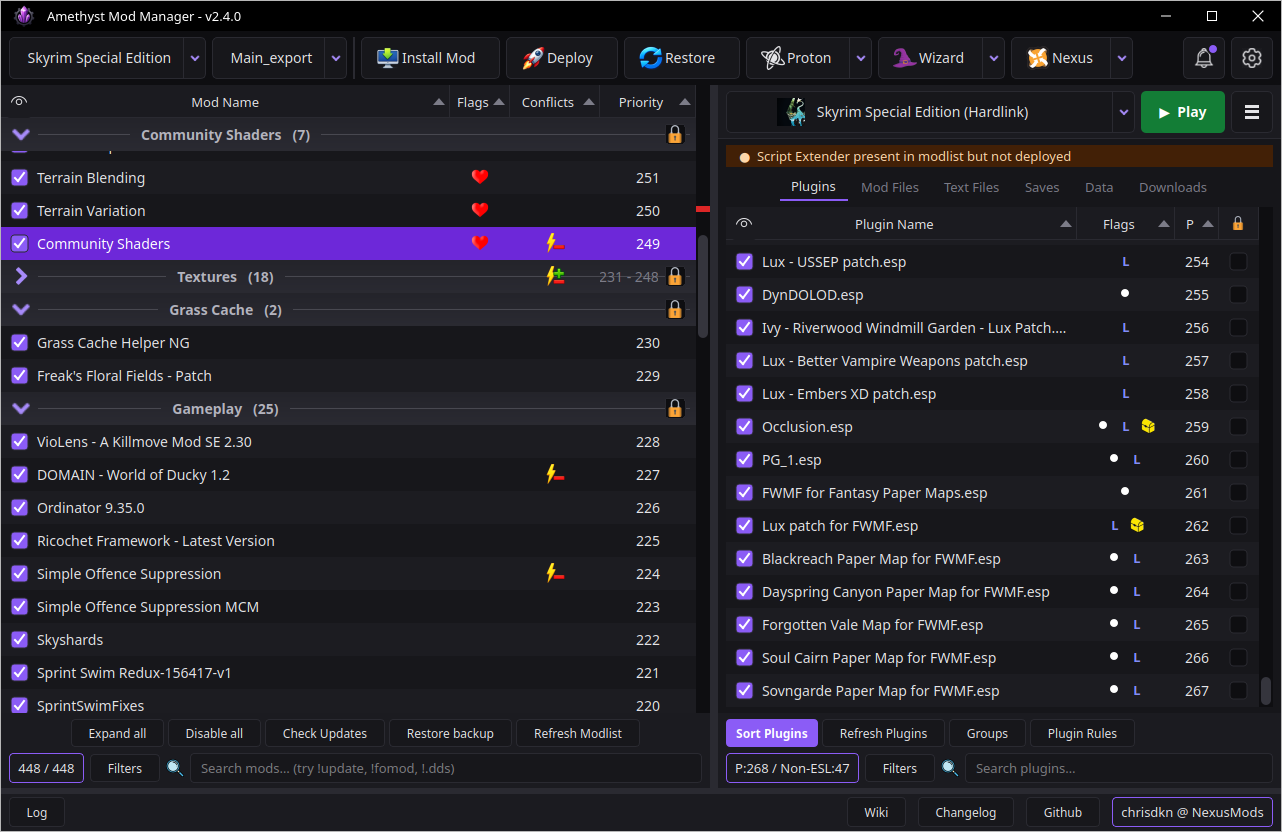
The Application may ask to set a password, This is for the OS keyring to store your nexus API key as we do not store it in a plain text file. Set the password to anything you want
Run the following command in a terminal. It will appear in your applications menu under Games and Utilities.
curl -sSL https://raw.githubusercontent.com/ChrisDKN/Amethyst-Mod-Manager/main/src/appimage/Amethyst-MM-installer.sh | bash
Alternatively you download the appimage via the release page and install via gear lever
The application will notifiy when a new update goes live, Pressing the update button will rerun the script and update to any new version
Run the following command
flatpak install --user https://chrisdkn.github.io/Amethyst-Mod-Manager/amethyst.flatpakref
The remote can also be added manually where you can then install from the app store/discover store
flatpak remote-add --user --if-not-exists modmanager-origin https://chrisdkn.github.io/Amethyst-Mod-Manager/amethyst.flatpakrepo
flatpak install --user modmanager-origin io.github.Amethyst.ModManager//stable
The repo carries two branches, stable and beta, so name the one you want.
Updates will be shown in your package manager
Manually swap to the beta branch
flatpak install --user --reinstall modmanager-origin io.github.Amethyst.ModManager//beta
(swap --user for --system if that's where you installed it)
Installing from a bundle skips the 32-bit compat extensions that running Windows tools (Proton/wine) requires - The app installs them automatically on first launch, or you can add them yourself:
flatpak install --user flathub org.freedesktop.Platform.Compat.i386//24.08 org.freedesktop.Platform.GL32.default//24.08

Almost 100 games are currently added/supported. See the wiki for the full list
See the wiki page for a detailed guide on how to the use the mod manager and its functions.
The wiki is also built into the manager and can be viewed there.
For building from source see the section on the wiki here
Feature requests and pull requests are welcome and I will go through these when I have the time.
If you would like to help improve translations, feel free to contribute on the crowdin page
Your feedback is enough and is greatly appreciated as this benefits everyone but if you'd like donate you can on Ko-fi

907 followers · starred Jun 2026
102 followers · starred Aug 2026
59 followers · starred Apr 2026
20 followers · starred Apr 2026
A Linux native mod manager for a variety of games
Python
1,190
2,848 commits
updated Oct 13, 2026
The Application may ask to set a password, This is for the OS keyring to store your nexus API key as we do not store it in a plain text file. Set the password to anything you want
Run the following command in a terminal. It will appear in your applications menu under Games and Utilities.
curl -sSL https://raw.githubusercontent.com/ChrisDKN/Amethyst-Mod-Manager/main/src/appimage/Amethyst-MM-installer.sh | bash
Alternatively you download the appimage via the release page and install via gear lever
The application will notifiy when a new update goes live, Pressing the update button will rerun the script and update to any new version
Run the following command
flatpak install --user https://chrisdkn.github.io/Amethyst-Mod-Manager/amethyst.flatpakref
The remote can also be added manually where you can then install from the app store/discover store
flatpak remote-add --user --if-not-exists modmanager-origin https://chrisdkn.github.io/Amethyst-Mod-Manager/amethyst.flatpakrepo
flatpak install --user modmanager-origin io.github.Amethyst.ModManager//stable
The repo carries two branches, stable and beta, so name the one you want.
Updates will be shown in your package manager
Manually swap to the beta branch
flatpak install --user --reinstall modmanager-origin io.github.Amethyst.ModManager//beta
(swap --user for --system if that's where you installed it)
Installing from a bundle skips the 32-bit compat extensions that running Windows tools (Proton/wine) requires - The app installs them automatically on first launch, or you can add them yourself:
flatpak install --user flathub org.freedesktop.Platform.Compat.i386//24.08 org.freedesktop.Platform.GL32.default//24.08
Almost 100 games are currently added/supported. See the wiki for the full list
See the wiki page for a detailed guide on how to the use the mod manager and its functions.
The wiki is also built into the manager and can be viewed there.
For building from source see the section on the wiki here
Feature requests and pull requests are welcome and I will go through these when I have the time.
If you would like to help improve translations, feel free to contribute on the crowdin page
Your feedback is enough and is greatly appreciated as this benefits everyone but if you'd like donate you can on Ko-fi
907 followers · starred Jun 2026
102 followers · starred Aug 2026
59 followers · starred Apr 2026
20 followers · starred Apr 2026