A plugin that does one thing only: Detect and manage duplicate items in Zotero.
See the code
👉







* Many thanks to Patrick O'Brien for the German tutorial.
** Many thanks to Frédérique Flamerie for the French tutorial.
A plugin that does one thing only: Detect and Manage duplicate items in  .
.
If you find this project helpful, please consider giving it a star ⭐. It would be a great encouragement for me!
[!IMPORTANT]
Zoplicate does NOT delete the duplicate items arbitrarily.
Instead, it extracts the useful information from the duplicate items and merges them into the retained item.
It makes some improvements based on the official detection and merging methods of Zotero.
This hotfix resolves the Zotero sync error reported as Invalid setting 'zoplicate-nonDuplicatePairs':
Zotero.SyncedSettings.zoplicate-nonDuplicatePairs local synced setting on startup so Zotero stops retrying the invalid upload.This version focuses on Zotero 9–10 compatibility and data integrity work:
9.0 through 10.0.*) and the release manifest includes Zotero 10.Zotero.SyncedSettings with key-based storage for cross-device portability.Many thanks to all the contributors and users who liked, reported issues, and provided valuable feedback! ❤️
We are now supporting Zotero 8!
In this version, we have made the following changes:
In this version, we have updated the dependencies and adapted to the latest version of Zotero.
Thanks to pascaloettli for the feedback in issue #131.
In this version, we have made the following changes:
In this version, we have made the following changes:
In this version, we have made the following changes:
In this version, we have made the following changes:
itemType will not be considered as duplicates.In this version, we have made the following changes:
In this version, we have made the following changes:
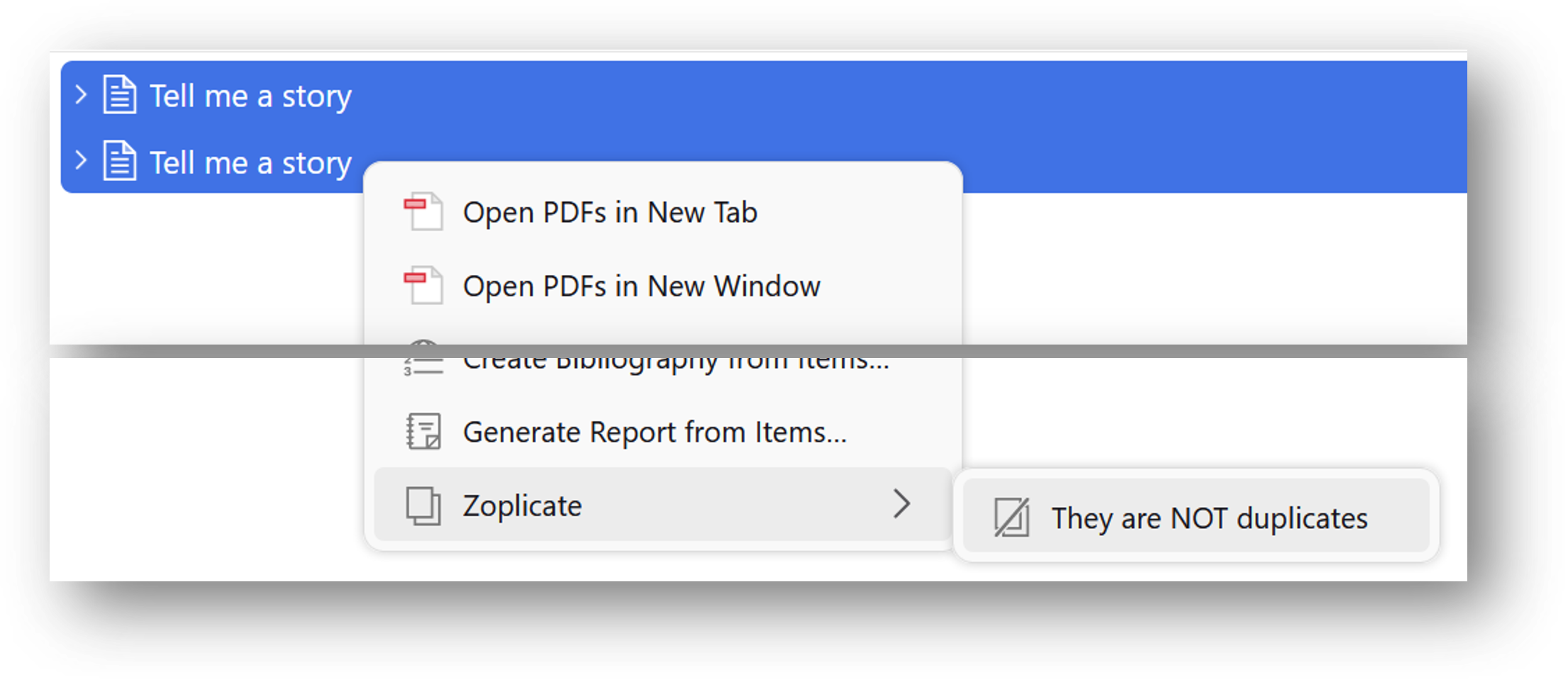
They are NOT duplicates menu items in the context menu.
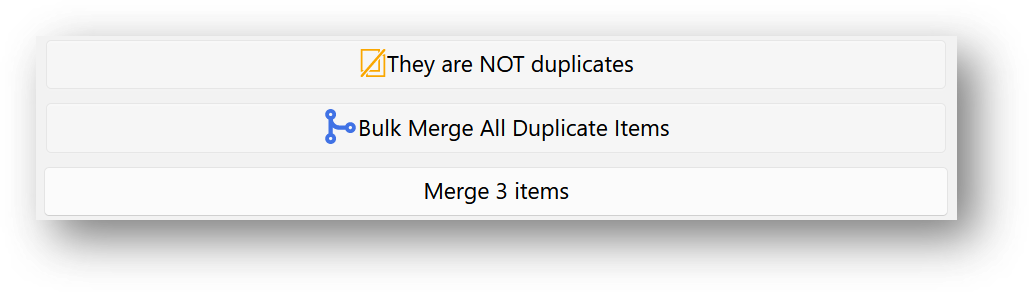
They are NOT duplicates button in the Duplicate Items panel.
In this version, we have made the following changes:
You can find the option in the Zoplicate tab in the settings.
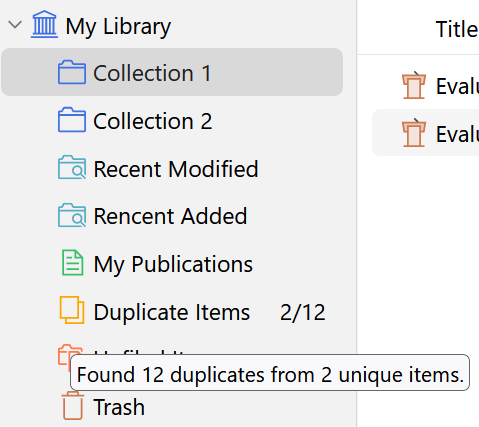
When your mouse hovers over the Duplicate Items entry, a tooltip will show the duplicate statistics.
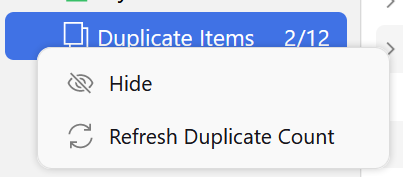
The duplicate count will be updated automatically. You can also find the Refresh Duplicate Count menu to update the count manually.
Thanks Apollo7777777's idea mentioned in discussion #18
Bulk Merge icons to not maintain aspect ratios.In this version, we have made the following changes:
In this version, we have made the following changes:
In this version, we have made the following changes:
Duplicate Items panel.In this version, we have made the following changes:
🧬 CHANGE!: We have changed the processing method of duplicate items.
Previously, we use the Trash method to process duplicate items, i.e., delete the duplicate items.
However, this method will cause the loss of some information of the duplicate items.
In this version, we use the Merge method to process duplicate items.
This method will copy all the aforementioned information to the retained item, and then delete the duplicate items.
Merge method will copy the file link of the duplicate items to the retained item.Thanks ChinJCheung's idea mentioned in issue #5.
9.0 through 10.0.*).zoplicate.xpi file.
Tools -> Plugins and drag the .xpi onto the Plugins window.
Additional third-party plugin is required.
Zoplicate in the Add-on Market and install it.Zoplicate 然后单击 下载 按钮。In Zotero, click Edit -> Settings, go to Zoplicate tab, and you will see the settings.
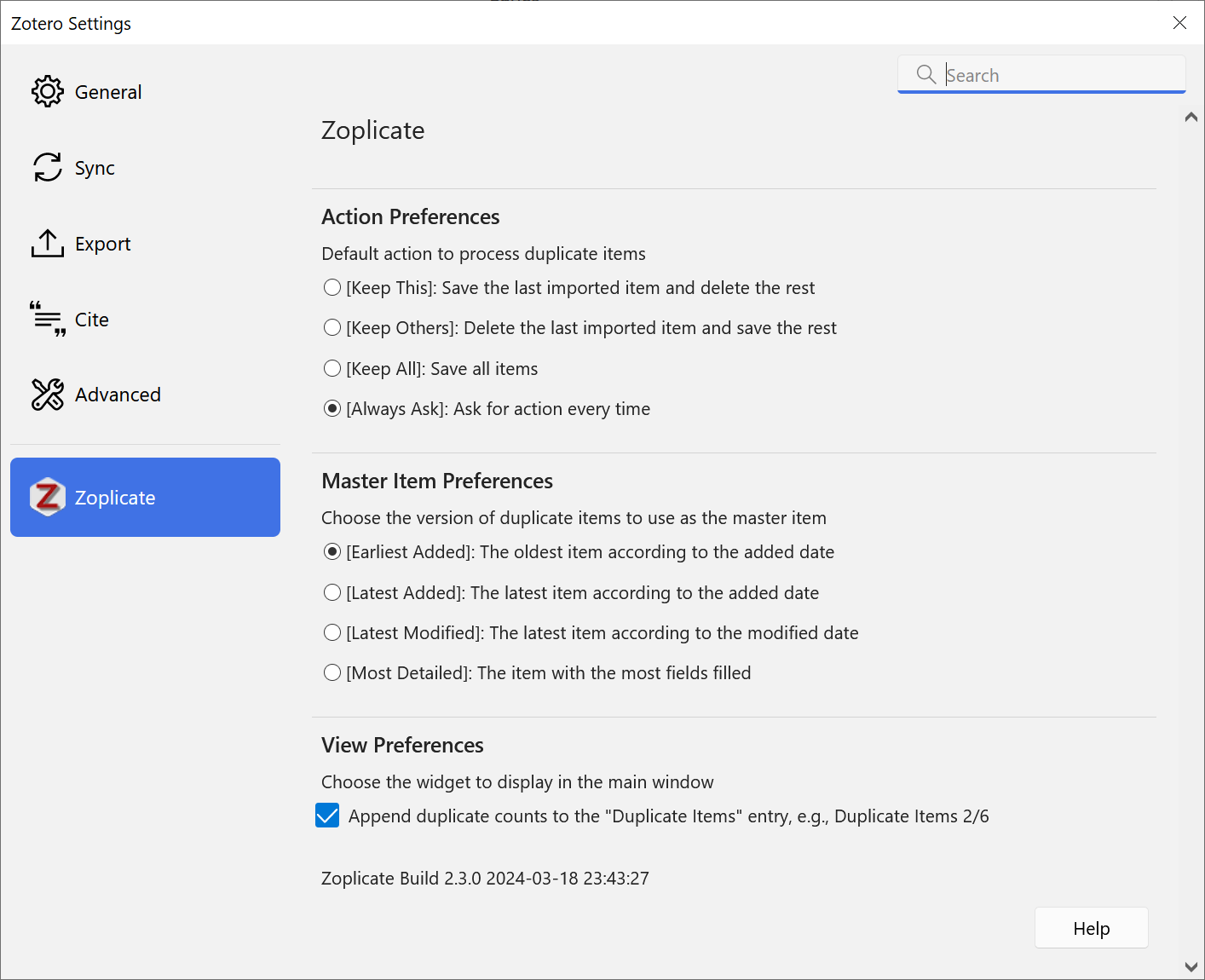
Always Ask is the default option if you have not changed the settings.Earliest Added is the default option if you have not changed the settings.By default, or you have selected Always Ask in the settings,
a dialog will pop up when you import a new item that is a duplicate of an existing item.
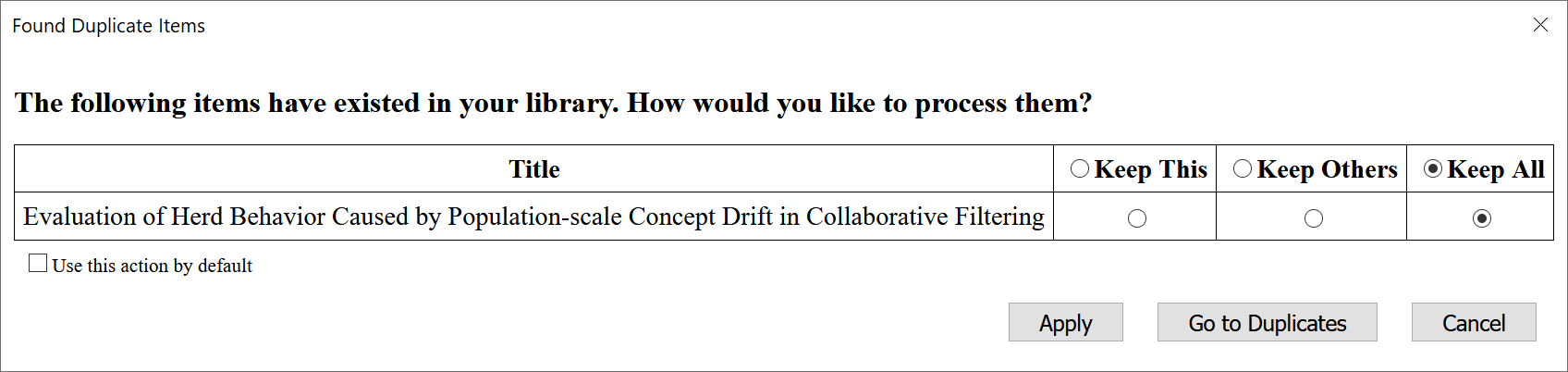
The dialog will show the duplicate items and the actions you can take.
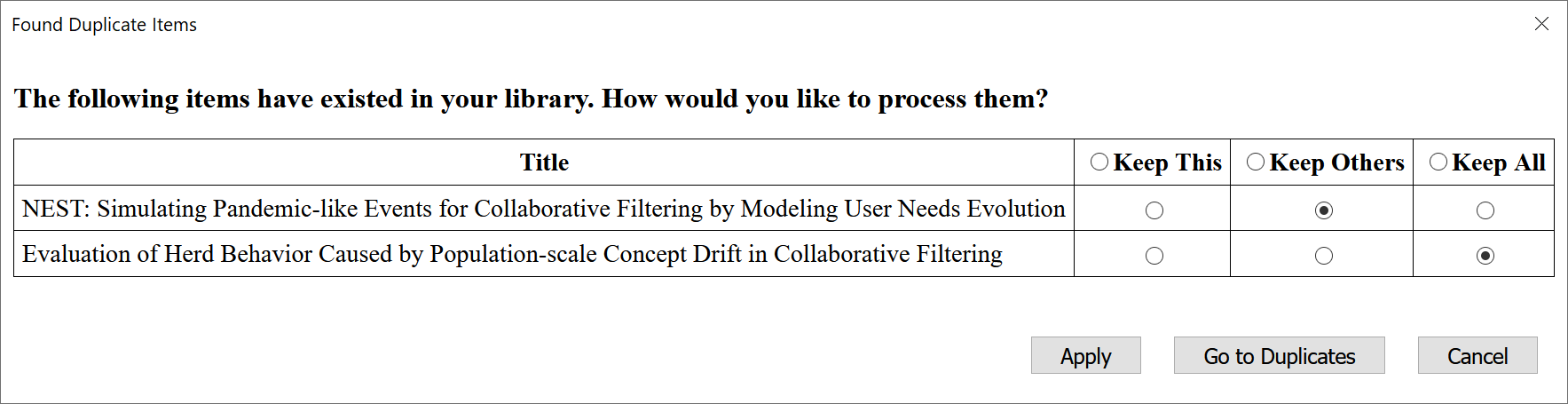
Duplicate Items panel and merge the duplicate items manually.When you import multiple duplicate items, or import another duplicate item before you process the previous duplicate items, the dialog will show all the duplicate items and the actions you can take.
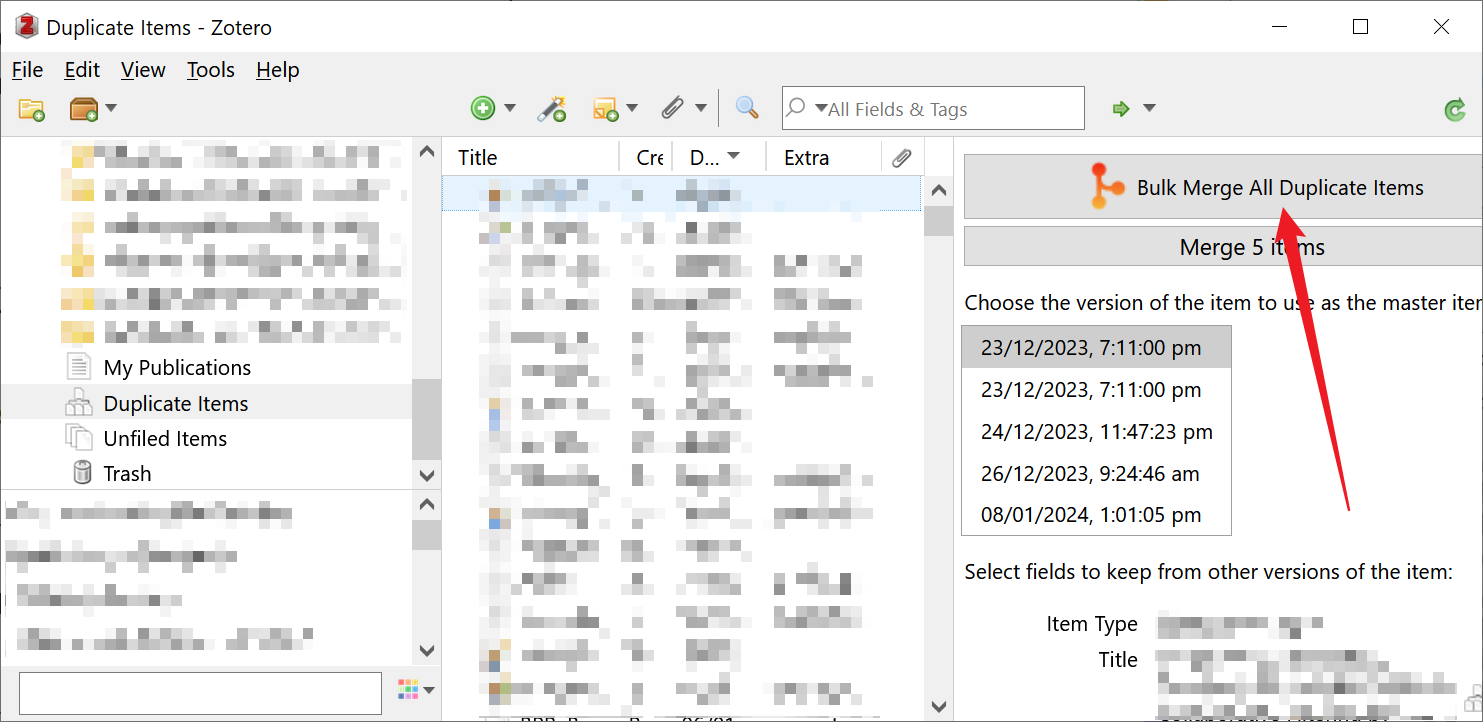
Inspired by csdaboluo's idea and ZoteroDuplicatesMerger, we have added the Bulk Merge functionality in Version 2.0.0.
In the Duplicate Items panel, you can find the Bulk Merge All Duplicate Items button:
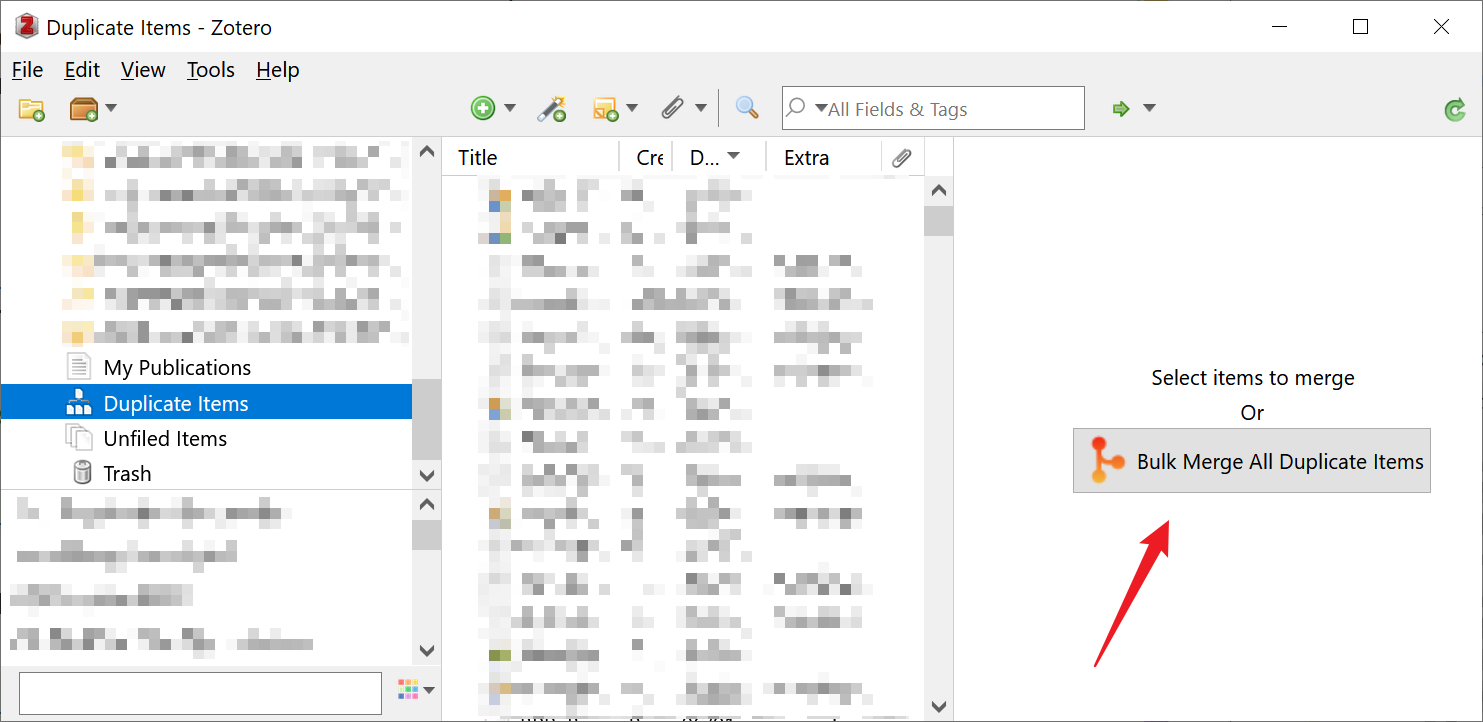
You can also find it when you select one or more duplicate items:
[!WARNING]
- Before clicking the button, please make sure you have properly configured the Master Item preferences in Settings.
- The Bulk Merge functionality will take a while to complete if you have a large number of duplicate items.
[!TIP]
To speed up merging a large number of duplicate items, you can increase the parallel merges setting (Edit > Settings > Zoplicate, 1–8, default: 3), which merges multiple duplicate groups concurrently. Set it to
1to restore the previous sequential behavior.
You will see the progress of the bulk merge process:
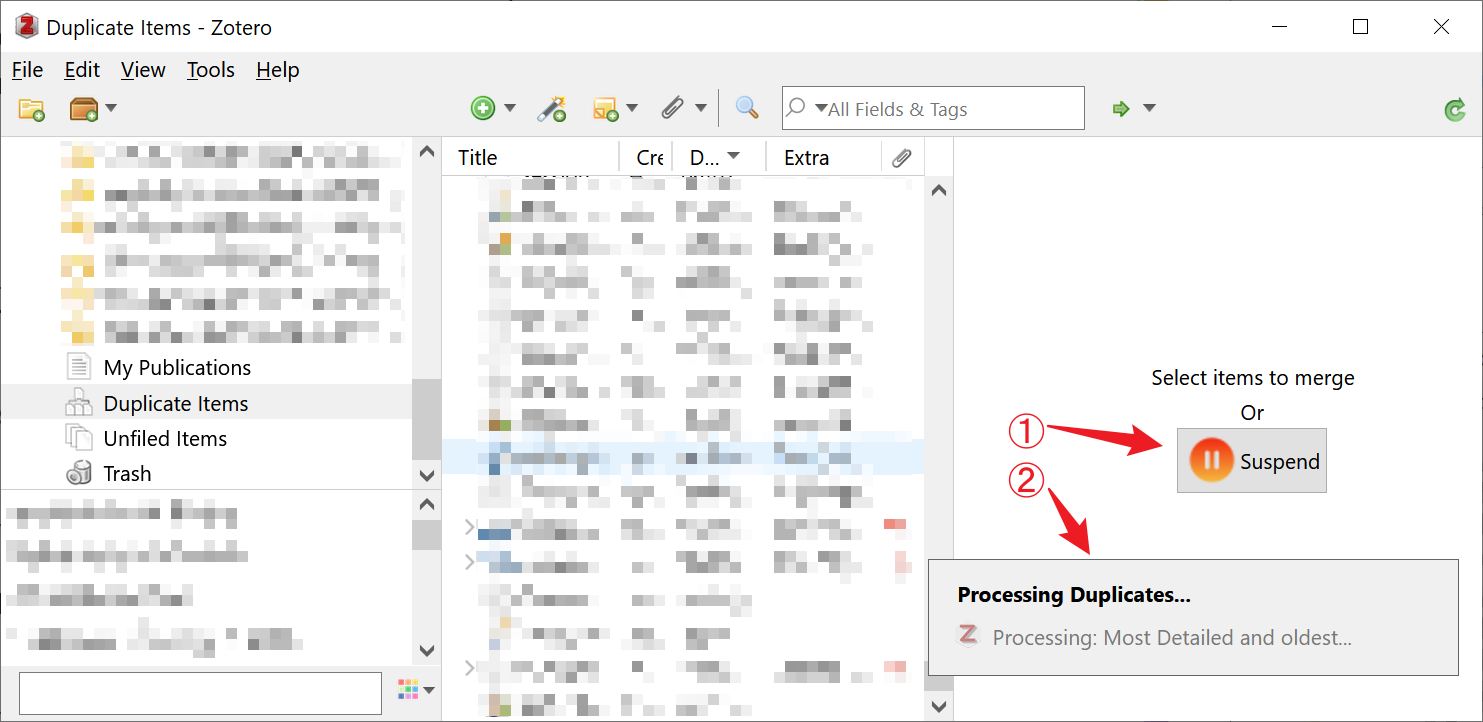
You can click the Suspend button to suspend the bulk merge process.
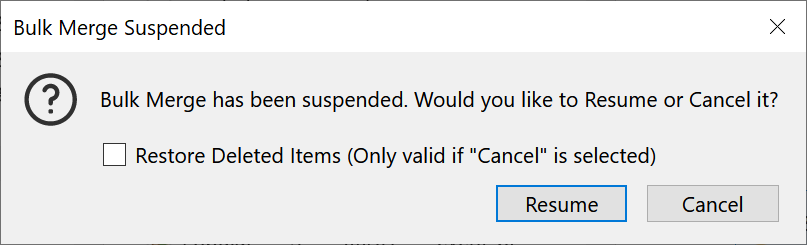
A dialog will pop up to confirm your action:
[!TIP]
If you want to Restore the duplicate items that have been merged, you can go to
Trashpanel and restore them.
- Select the duplicate items you want to restore.
- Click Restore to Library button to process.
Starting from Version 2.3.0, we have added an option to show the duplicate count on the left collection pane.
You can find the option in the Zoplicate tab in the settings.
When your mouse hovers over the Duplicate Items entry, a tooltip will show the duplicate statistics.
The duplicate count will be updated automatically. You can also find the Refresh menu to update the count manually.
Starting from Version 3.0.0, we have added the Non-duplicates functionality.
You can mark items as Non-duplicates when they are mistakenly identified as "duplicates" by Zotero.
Selecting an item, you can manage the Non-duplicates items in the side panel:
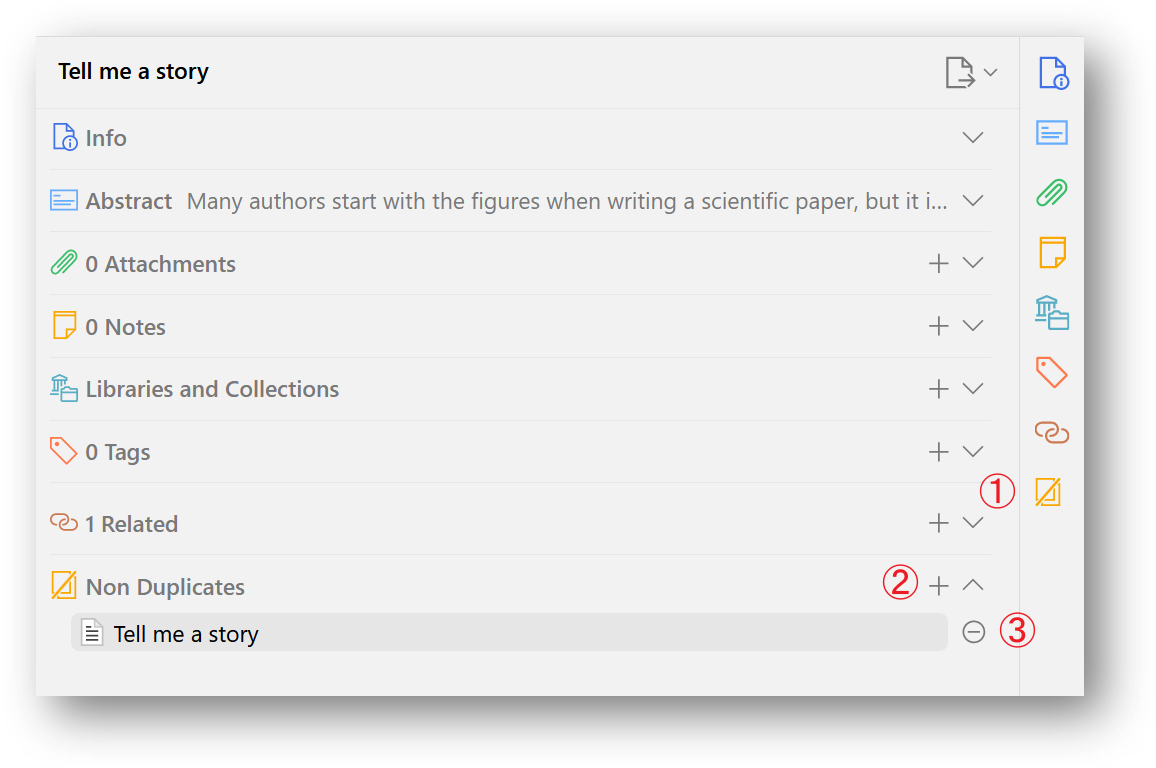
 button to show the Non-duplicates section.
There are some ways to mark and unmark items as Non-duplicates:
They are NOT duplicates menu items in the context menu.
They are NOT duplicates button in the Duplicate Items panel.
They are duplicates menu items in the context menu.
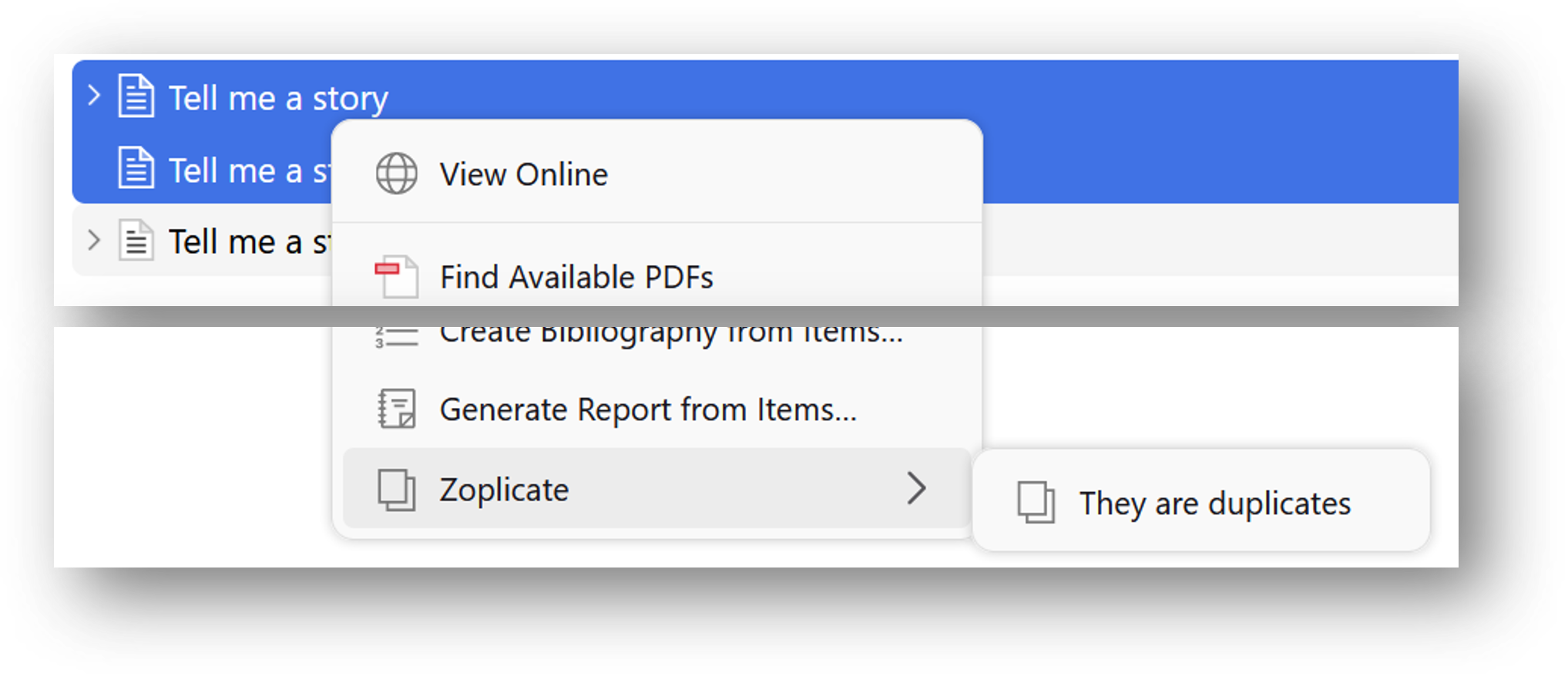
Non-duplicate decisions are stored locally and do not sync automatically across devices via Zotero sync. To transfer your non-duplicate records to another device:
Edit -> Settings -> Zoplicate -> Data Management section.[!NOTE]
- The export file uses stable item keys (not local IDs), so it works correctly across different Zotero installations that share the same synced library.
- Importing is additive — it only adds new records and never removes existing ones. You can safely import the same file multiple times.
- If an item referenced in the export file does not exist on the target device (e.g., not yet synced or deleted), that pair will be skipped.
Ma, C. (2026). Zoplicate (v5.0.0) [Software]. Zenodo. https://doi.org/10.5281/zenodo.16986945
@software{zoplicate_16986945,
  author = {Ma, Chenglong},
  title = {Zoplicate: Detect and manage duplicate items in Zotero},
  version = {v5.0.0},
  date = {2026-04-16},
  doi = {10.5281/zenodo.16986945},
  url = {https://github.com/ChenglongMa/zoplicate}
}
👋 Welcome to Zoplicate! We're excited to have your contributions. Here's how you can get involved:
💡 Discuss New Ideas: Have a creative idea or suggestion? Start a discussion in the Discussions tab to share your thoughts and gather feedback from the community.
❓ Ask Questions: Got questions or need clarification on something in the repository? Feel free to open an Issue labeled as a "question" or participate in Discussions.
🐛 Issue a Bug: If you've identified a bug or an issue with the code, please open a new Issue with a clear description of the problem, steps to reproduce it, and your environment details.
✨ Introduce New Features: Want to add a new feature or enhancement to the project? Fork the repository, create a new branch, and submit a Pull Request with your changes. Make sure to follow our contribution guidelines.
💖 Funding: If you'd like to financially support the project, you can do so by sponsoring the repository on GitHub. Your contributions help us maintain and improve the project.
I would like to express my gratitude to the following individuals and organizations for their generous support and contributions to this project:
Usually, a ⭐️ is enough to make me happy. Your sponsorship will help me maintain and improve the project. Also, part of the sponsorship will be donated to the open-source community.
Thank you for considering contributing to Zoplicate. We value your input and look forward to collaborating with you!
310 followers · starred Aug 2024
69 followers · starred May 2026
16 followers · starred Aug 2026
261 followers · starred Apr 2024
A plugin that does one thing only: Detect and manage duplicate items in Zotero.
See the code
👉
* Many thanks to Patrick O'Brien for the German tutorial.
** Many thanks to Frédérique Flamerie for the French tutorial.
A plugin that does one thing only: Detect and Manage duplicate items in .
If you find this project helpful, please consider giving it a star ⭐. It would be a great encouragement for me!
[!IMPORTANT]
Zoplicate does NOT delete the duplicate items arbitrarily.
Instead, it extracts the useful information from the duplicate items and merges them into the retained item.
It makes some improvements based on the official detection and merging methods of Zotero.
This hotfix resolves the Zotero sync error reported as Invalid setting 'zoplicate-nonDuplicatePairs':
Zotero.SyncedSettings.zoplicate-nonDuplicatePairs local synced setting on startup so Zotero stops retrying the invalid upload.This version focuses on Zotero 9–10 compatibility and data integrity work:
9.0 through 10.0.*) and the release manifest includes Zotero 10.Zotero.SyncedSettings with key-based storage for cross-device portability.Many thanks to all the contributors and users who liked, reported issues, and provided valuable feedback! ❤️
We are now supporting Zotero 8!
In this version, we have made the following changes:
In this version, we have updated the dependencies and adapted to the latest version of Zotero.
Thanks to pascaloettli for the feedback in issue #131.
In this version, we have made the following changes:
In this version, we have made the following changes:
In this version, we have made the following changes:
In this version, we have made the following changes:
itemType will not be considered as duplicates.In this version, we have made the following changes:
In this version, we have made the following changes:
They are NOT duplicates menu items in the context menu.
They are NOT duplicates button in the Duplicate Items panel.
In this version, we have made the following changes:
You can find the option in the Zoplicate tab in the settings.
When your mouse hovers over the Duplicate Items entry, a tooltip will show the duplicate statistics.
The duplicate count will be updated automatically. You can also find the Refresh Duplicate Count menu to update the count manually.
Thanks Apollo7777777's idea mentioned in discussion #18
Bulk Merge icons to not maintain aspect ratios.In this version, we have made the following changes:
In this version, we have made the following changes:
In this version, we have made the following changes:
Duplicate Items panel.In this version, we have made the following changes:
🧬 CHANGE!: We have changed the processing method of duplicate items.
Previously, we use the Trash method to process duplicate items, i.e., delete the duplicate items.
However, this method will cause the loss of some information of the duplicate items.
In this version, we use the Merge method to process duplicate items.
This method will copy all the aforementioned information to the retained item, and then delete the duplicate items.
Merge method will copy the file link of the duplicate items to the retained item.Thanks ChinJCheung's idea mentioned in issue #5.
9.0 through 10.0.*).zoplicate.xpi file.
Tools -> Plugins and drag the .xpi onto the Plugins window.
Additional third-party plugin is required.
Zoplicate in the Add-on Market and install it.Zoplicate 然后单击 下载 按钮。In Zotero, click Edit -> Settings, go to Zoplicate tab, and you will see the settings.
Always Ask is the default option if you have not changed the settings.Earliest Added is the default option if you have not changed the settings.By default, or you have selected Always Ask in the settings,
a dialog will pop up when you import a new item that is a duplicate of an existing item.
The dialog will show the duplicate items and the actions you can take.
Duplicate Items panel and merge the duplicate items manually.When you import multiple duplicate items, or import another duplicate item before you process the previous duplicate items, the dialog will show all the duplicate items and the actions you can take.
Inspired by csdaboluo's idea and ZoteroDuplicatesMerger, we have added the Bulk Merge functionality in Version 2.0.0.
In the Duplicate Items panel, you can find the Bulk Merge All Duplicate Items button:
You can also find it when you select one or more duplicate items:
[!WARNING]
- Before clicking the button, please make sure you have properly configured the Master Item preferences in Settings.
- The Bulk Merge functionality will take a while to complete if you have a large number of duplicate items.
[!TIP]
To speed up merging a large number of duplicate items, you can increase the parallel merges setting (Edit > Settings > Zoplicate, 1–8, default: 3), which merges multiple duplicate groups concurrently. Set it to
1to restore the previous sequential behavior.
You will see the progress of the bulk merge process:
You can click the Suspend button to suspend the bulk merge process.
A dialog will pop up to confirm your action:
[!TIP]
If you want to Restore the duplicate items that have been merged, you can go to
Trashpanel and restore them.
- Select the duplicate items you want to restore.
- Click Restore to Library button to process.
Starting from Version 2.3.0, we have added an option to show the duplicate count on the left collection pane.
You can find the option in the Zoplicate tab in the settings.
When your mouse hovers over the Duplicate Items entry, a tooltip will show the duplicate statistics.
The duplicate count will be updated automatically. You can also find the Refresh menu to update the count manually.
Starting from Version 3.0.0, we have added the Non-duplicates functionality.
You can mark items as Non-duplicates when they are mistakenly identified as "duplicates" by Zotero.
Selecting an item, you can manage the Non-duplicates items in the side panel:
button to show the Non-duplicates section.There are some ways to mark and unmark items as Non-duplicates:
They are NOT duplicates menu items in the context menu.
They are NOT duplicates button in the Duplicate Items panel.
They are duplicates menu items in the context menu.
Non-duplicate decisions are stored locally and do not sync automatically across devices via Zotero sync. To transfer your non-duplicate records to another device:
Edit -> Settings -> Zoplicate -> Data Management section.[!NOTE]
- The export file uses stable item keys (not local IDs), so it works correctly across different Zotero installations that share the same synced library.
- Importing is additive — it only adds new records and never removes existing ones. You can safely import the same file multiple times.
- If an item referenced in the export file does not exist on the target device (e.g., not yet synced or deleted), that pair will be skipped.
Ma, C. (2026). Zoplicate (v5.0.0) [Software]. Zenodo. https://doi.org/10.5281/zenodo.16986945
@software{zoplicate_16986945,
  author = {Ma, Chenglong},
  title = {Zoplicate: Detect and manage duplicate items in Zotero},
  version = {v5.0.0},
  date = {2026-04-16},
  doi = {10.5281/zenodo.16986945},
  url = {https://github.com/ChenglongMa/zoplicate}
}
👋 Welcome to Zoplicate! We're excited to have your contributions. Here's how you can get involved:
💡 Discuss New Ideas: Have a creative idea or suggestion? Start a discussion in the Discussions tab to share your thoughts and gather feedback from the community.
❓ Ask Questions: Got questions or need clarification on something in the repository? Feel free to open an Issue labeled as a "question" or participate in Discussions.
🐛 Issue a Bug: If you've identified a bug or an issue with the code, please open a new Issue with a clear description of the problem, steps to reproduce it, and your environment details.
✨ Introduce New Features: Want to add a new feature or enhancement to the project? Fork the repository, create a new branch, and submit a Pull Request with your changes. Make sure to follow our contribution guidelines.
💖 Funding: If you'd like to financially support the project, you can do so by sponsoring the repository on GitHub. Your contributions help us maintain and improve the project.
I would like to express my gratitude to the following individuals and organizations for their generous support and contributions to this project:
Usually, a ⭐️ is enough to make me happy. Your sponsorship will help me maintain and improve the project. Also, part of the sponsorship will be donated to the open-source community.
Thank you for considering contributing to Zoplicate. We value your input and look forward to collaborating with you!
310 followers · starred Aug 2024
69 followers · starred May 2026
16 followers · starred Aug 2026
261 followers · starred Apr 2024



