Chat with Databases using NSQL from Numberstations and LLama-2
Python
0
19 commits
updated Feb 8, 2024
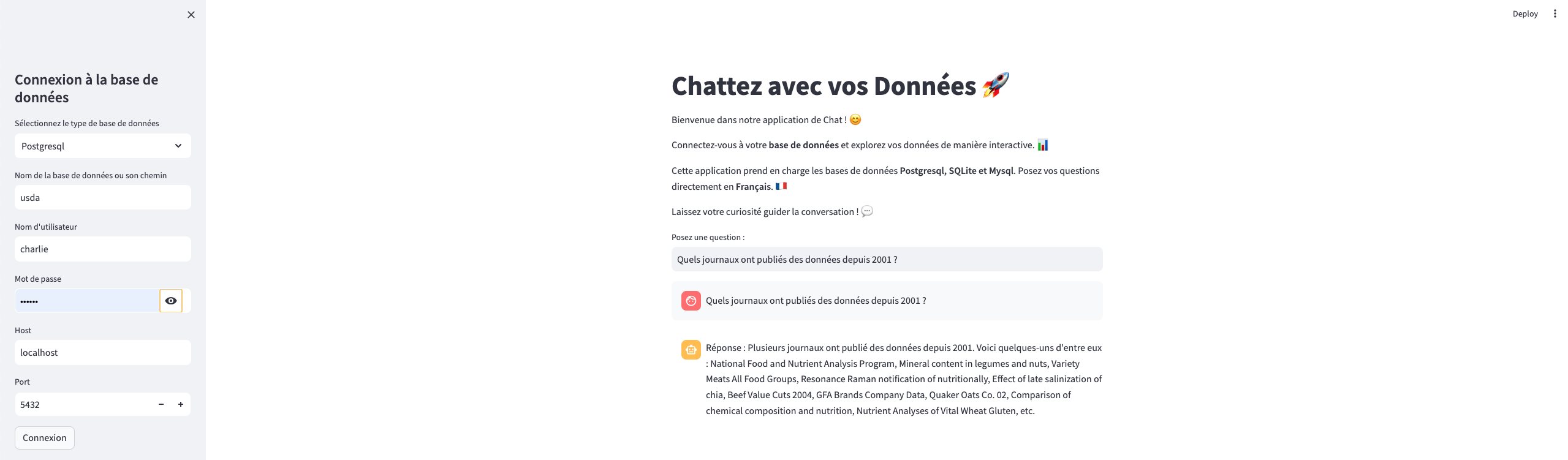
Chat with your own Mysql, Postgresql and SQLite Databases in French
TOYBIZ's main objective is to create an AI assistant that will enable decision-makers to obtain quick and accurate answers to their business-related questions, whether in text or audio form. The aim is to simplify the decision-making process and increase the efficiency of decision-makers.
IDEAL: Supporting both text and audio inputs, TOYBIZ allows users to interact with the AI assistant in a way that suits their preferences and requirements. TOYBIZ seamlessly integrates with different database systems, including MongoDB, PostgreSQL, SQLite, and MySQL, providing versatility to users with diverse data infrastructure.
REALITY: TOYBIZ's current implementation includes functionalities for text-based interactions with its AI assistant. Users can pose questions related to their databases in natural language, and TOYBIZ will generate SQL queries using a language model. The system supports various database systems such as PostgreSQL, SQLite, and MySQL, enhancing flexibility and compatibility.
CONSEQUENCES: TOYBIZ accelerates the decision-making process by providing quick and accurate responses to business-related queries. The integration of a language model streamlines the interaction, enabling decision-makers to obtain insights rapidly. The current implementation focuses on text-based interactions, allowing users to articulate questions in natural language. TOYBIZ utilizes a language model to generate SQL queries, facilitating a user-friendly experience for those familiar with standard language queries. TOYBIZ's adaptability extends to supporting different database systems, including PostgreSQL, SQLite, and MySQL. This flexibility enhances compatibility with various databases commonly used in business environments.
        +------------------------------------+---------------------------+
        |                                    |                           |
        |     Application : TOYBIZ           |   Database Connection :   |
        |   Database Interaction & Model     |       connections         |
        |   Initialization                   |   Information & Model     |
        |                                    |   Initialization          |
        +----------------------+-------------+---------------------------+
                               |
                               v
        +----------------------+---------------------------+
        |                                                  |
        |                   User Input                     |
        |   (Text Prompt in French) -> Prompt in English   |
        |   Translated by googletrans                      |
        +----------------------+---------------------------+
                               |
                               v
        +----------------------+---------------------------+
        |                                                   |
        |         Open-source Finetuned LLM                 |
        |        (NumbersStation/nsql-350M)                 |
        |                                                   |
        +----------------------+---------------------------+
                               |
                               v
        +----------------------+---------------------------+
        |                                                  |
        |         SQL Request Generation                   |
        |         (Text to SQL Conversion)                 |
        +----------------------+---------------------------+
                               |
                               v
        +----------------------+---------------------------+
        |                                                   |
        |        Execute SQL Query                          |
        |        (Interaction with Database)                |
        +----------------------+---------------------------+
                               |
                               v
        +----------------------+---------------------------+
        |                                                  |
        |           Query Results                          |
        |           (Data from Database)                   |
        +----------------------+---------------------------+
                               |
                               v
        +----------------------+---------------------------+
        |                                                  |
        |   GPT-3 Language Model Inference                 |
        |         (Question + Result)                      |
        +----------------------+---------------------------+
                               |
                               v
        +----------------------+---------------------------+
        |                                                  |
        |      Constructed Answer (Generated by GPT-3)     |
        |                                                  |
        +----------------------+---------------------------+
                               |
                               v
        +----------------------+---------------------------+
        |                                                  |
        |       Print Generated Answer                     |
        |                                                  |
        +----------------------+---------------------------+
db_connectors.py:
prompt_formatters.py:
RajkumarFormatter class which formats database schemas for SQL queries.Database_Manager.py:
DatabaseManager class which manages the connection to the database, the initialization of the language model, the execution of SQL queries, and the display of results.Main.py:
nsql_streamlit.py:
To run the application, follow this instructions
Version of Python : 3.8.18
Version of PIP : 23.3.1
After cloning this project, run :
pip install -r requirements.txt
Put your openai key in Database_Manager.py file
sk-********************************
Then download the different models by running :
model_nsllama = "NumbersStation/nsql-llama-2-7B"
tokenizer = AutoTokenizer.from_pretrained(model_nsllama)
model = AutoModelForCausalLM.from_pretrained(model_nsllama, torch_dtype=torch.bfloat16)
After configure your database, run :
streamlit run nsql_streamlit.py
Chat with Databases using NSQL from Numberstations and LLama-2
Python
0
19 commits
updated Feb 8, 2024
Chat with your own Mysql, Postgresql and SQLite Databases in French
TOYBIZ's main objective is to create an AI assistant that will enable decision-makers to obtain quick and accurate answers to their business-related questions, whether in text or audio form. The aim is to simplify the decision-making process and increase the efficiency of decision-makers.
IDEAL: Supporting both text and audio inputs, TOYBIZ allows users to interact with the AI assistant in a way that suits their preferences and requirements. TOYBIZ seamlessly integrates with different database systems, including MongoDB, PostgreSQL, SQLite, and MySQL, providing versatility to users with diverse data infrastructure.
REALITY: TOYBIZ's current implementation includes functionalities for text-based interactions with its AI assistant. Users can pose questions related to their databases in natural language, and TOYBIZ will generate SQL queries using a language model. The system supports various database systems such as PostgreSQL, SQLite, and MySQL, enhancing flexibility and compatibility.
CONSEQUENCES: TOYBIZ accelerates the decision-making process by providing quick and accurate responses to business-related queries. The integration of a language model streamlines the interaction, enabling decision-makers to obtain insights rapidly. The current implementation focuses on text-based interactions, allowing users to articulate questions in natural language. TOYBIZ utilizes a language model to generate SQL queries, facilitating a user-friendly experience for those familiar with standard language queries. TOYBIZ's adaptability extends to supporting different database systems, including PostgreSQL, SQLite, and MySQL. This flexibility enhances compatibility with various databases commonly used in business environments.
        +------------------------------------+---------------------------+
        |                                    |                           |
        |     Application : TOYBIZ           |   Database Connection :   |
        |   Database Interaction & Model     |       connections         |
        |   Initialization                   |   Information & Model     |
        |                                    |   Initialization          |
        +----------------------+-------------+---------------------------+
                               |
                               v
        +----------------------+---------------------------+
        |                                                  |
        |                   User Input                     |
        |   (Text Prompt in French) -> Prompt in English   |
        |   Translated by googletrans                      |
        +----------------------+---------------------------+
                               |
                               v
        +----------------------+---------------------------+
        |                                                   |
        |         Open-source Finetuned LLM                 |
        |        (NumbersStation/nsql-350M)                 |
        |                                                   |
        +----------------------+---------------------------+
                               |
                               v
        +----------------------+---------------------------+
        |                                                  |
        |         SQL Request Generation                   |
        |         (Text to SQL Conversion)                 |
        +----------------------+---------------------------+
                               |
                               v
        +----------------------+---------------------------+
        |                                                   |
        |        Execute SQL Query                          |
        |        (Interaction with Database)                |
        +----------------------+---------------------------+
                               |
                               v
        +----------------------+---------------------------+
        |                                                  |
        |           Query Results                          |
        |           (Data from Database)                   |
        +----------------------+---------------------------+
                               |
                               v
        +----------------------+---------------------------+
        |                                                  |
        |   GPT-3 Language Model Inference                 |
        |         (Question + Result)                      |
        +----------------------+---------------------------+
                               |
                               v
        +----------------------+---------------------------+
        |                                                  |
        |      Constructed Answer (Generated by GPT-3)     |
        |                                                  |
        +----------------------+---------------------------+
                               |
                               v
        +----------------------+---------------------------+
        |                                                  |
        |       Print Generated Answer                     |
        |                                                  |
        +----------------------+---------------------------+
db_connectors.py:
prompt_formatters.py:
RajkumarFormatter class which formats database schemas for SQL queries.Database_Manager.py:
DatabaseManager class which manages the connection to the database, the initialization of the language model, the execution of SQL queries, and the display of results.Main.py:
nsql_streamlit.py:
To run the application, follow this instructions
Version of Python : 3.8.18
Version of PIP : 23.3.1
After cloning this project, run :
pip install -r requirements.txt
Put your openai key in Database_Manager.py file
sk-********************************
Then download the different models by running :
model_nsllama = "NumbersStation/nsql-llama-2-7B"
tokenizer = AutoTokenizer.from_pretrained(model_nsllama)
model = AutoModelForCausalLM.from_pretrained(model_nsllama, torch_dtype=torch.bfloat16)
After configure your database, run :
streamlit run nsql_streamlit.py



