Terminal system monitor for Apple Silicon Macs: CPU, GPU, power, temperatures, processes.
Rust
34
4 commits
updated Oct 17, 2026
A calm, honest system monitor for Apple Silicon, in the terminal you already live in.
Real watts, real clocks and real temperatures from every M1–M5 chip. No sudo, no telemetry, about 1.3% of one core.




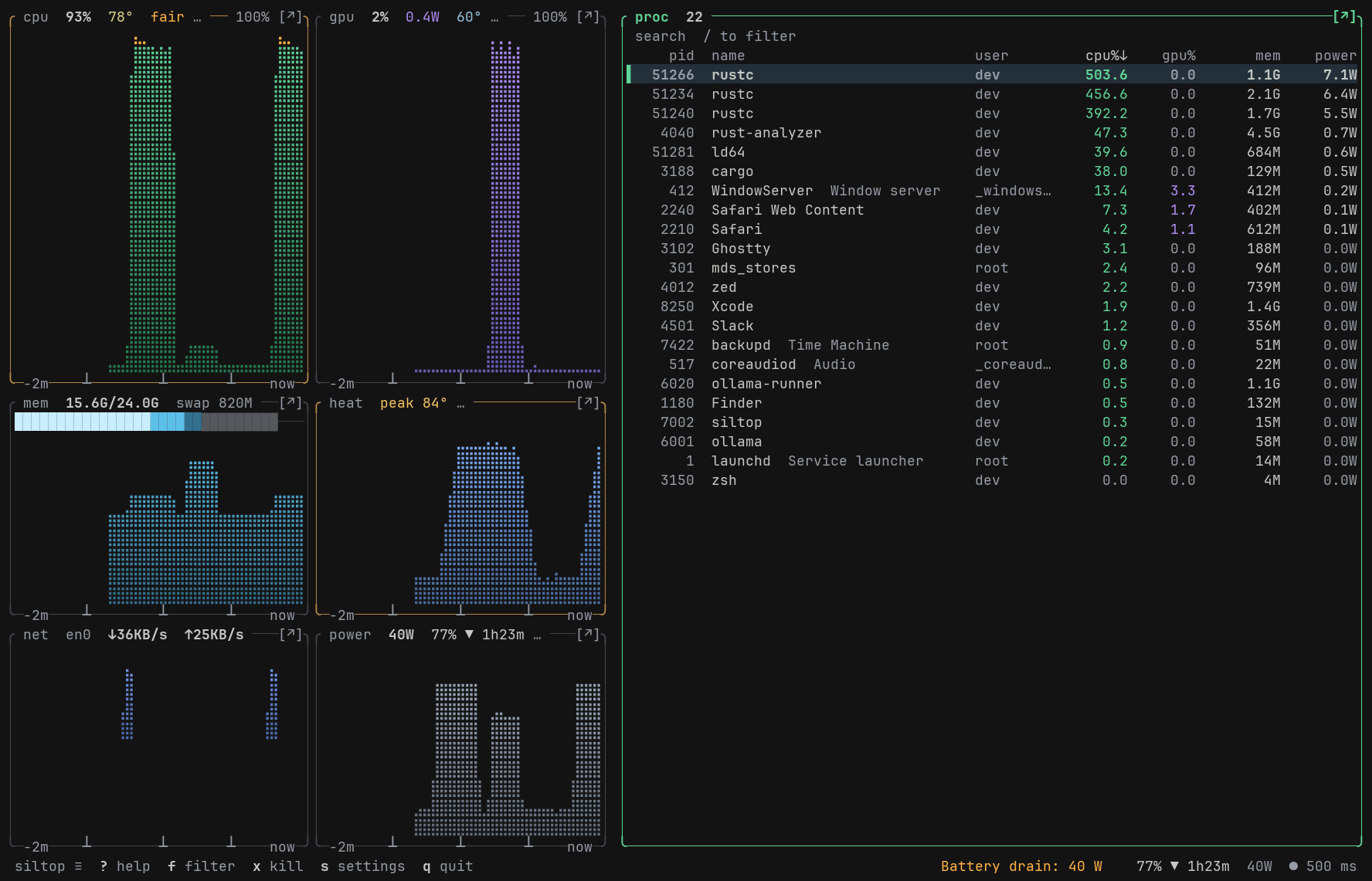
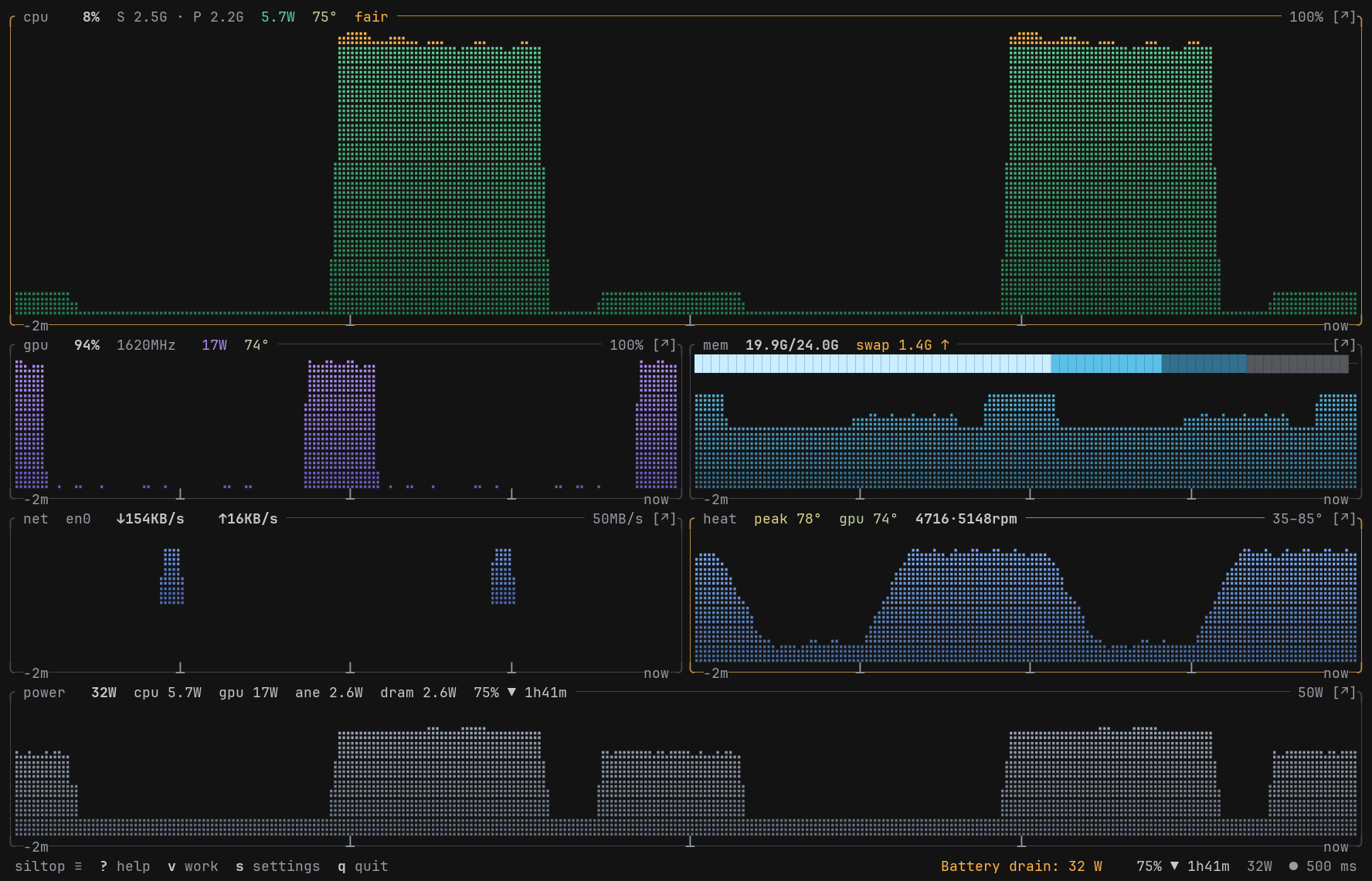
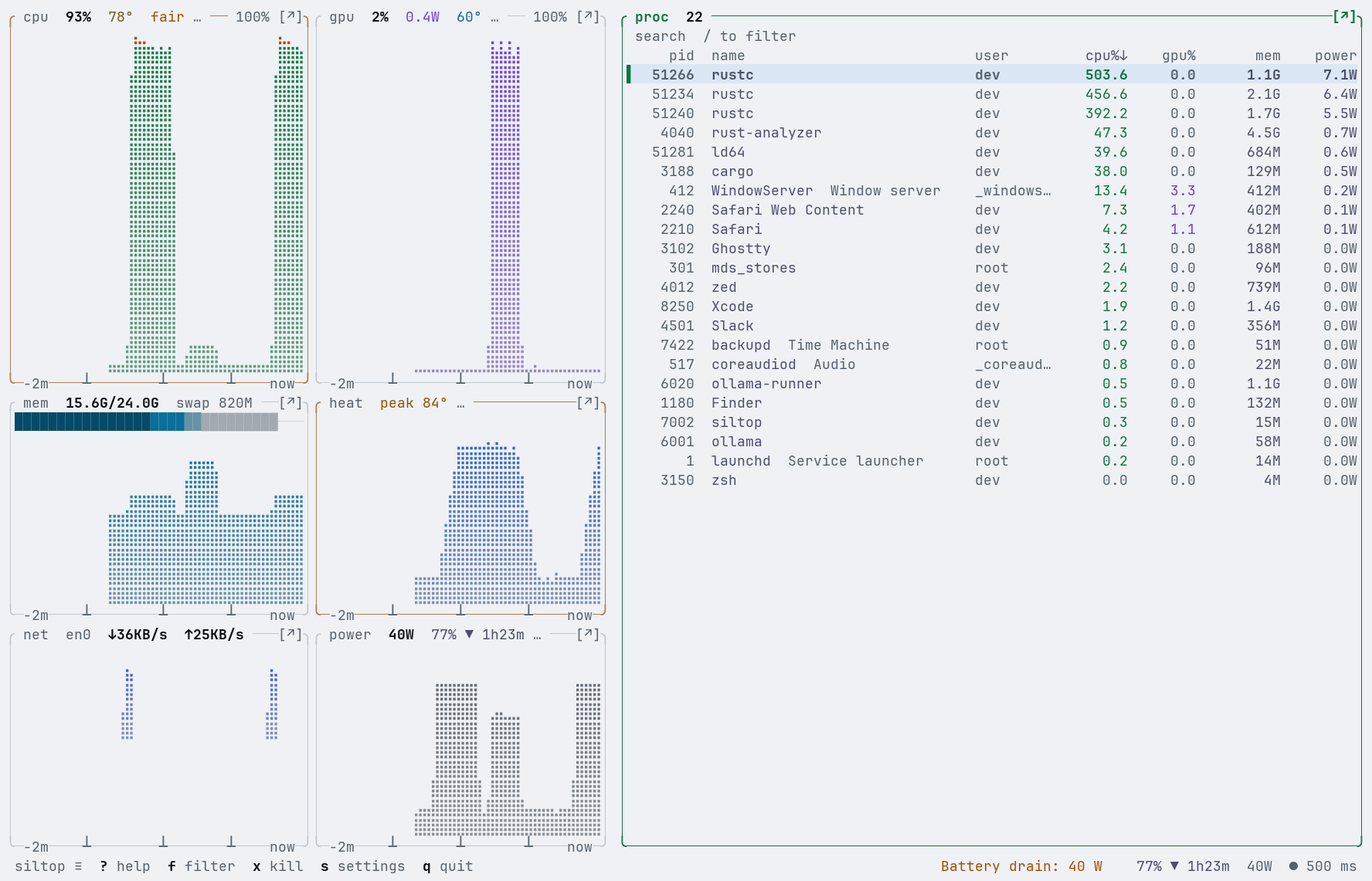
Screenshots come from siltop --demo, a canned 60-second session (build burst, GPU inference, battery drain, rising heat), so they look the same on every Mac.
btop is beautiful, but on a Mac it can't see the chip: no watts, no GPU, no cluster clocks. asitop and powermetrics see the chip but need sudo. macmon is lean but stops at the SoC. siltop sits in between: as clean as you want by default, as deep as you need when something is wrong.
| siltop | btop | macmon | asitop | |
|---|---|---|---|---|
| CPU / GPU / ANE / DRAM watts | ✓ | — | ✓ | ✓ |
| Per-cluster clocks (E / P / Super cores) | ✓ | — | ✓ | ✓ |
| Temperatures and fans | ✓ | CPU temp | temps | — |
| Per-process energy and GPU | ✓ | — | — | — |
| Full process manager (tree, signals, filter) | ✓ | ✓ | — | — |
Runs without sudo | ✓ | ✓ | ✓ | — |
| Machine-readable output | JSON / NDJSON / Prometheus / CSV | — | JSON | — |
Self-cost was measured back to back with btop and macmon on the same machine; the method and raw numbers are in docs/research/12-self-cost.md.
Truth
IOReport for CPU and GPU clocks and energy, Mach and sysctl for CPU, memory and processes. No ps, no powermetrics, no scraping.0. Fanless Airs show no fans, desktops show no battery, a process the kernel won't describe shows —.All normal, Busy: rustc using 9.1 cores, Hot: fans at 80%) with the evidence behind it.Speed
p) stops sampling entirely.Beauty
z zooms time.NO_COLOR fallbacks.1–5 and a zen mode (Z) that leaves only the graphs.Control
Beyond the dashboard
--json / --json-stream for scripts and status bars, siltop line for tmux and SketchyBar, alerts with shell hooks, a timeline with reports, session record/replay, a Prometheus endpoint, a sustained-performance bench and a multi-Mac fleet view.Requires macOS on Apple Silicon.
Homebrew
brew install cloaky233/tap/siltop
Prebuilt binary (curl downloads are not quarantined, so it runs straight away)
mkdir -p ~/.local/bin && curl -fsSL https://github.com/CLoaKY233/siltop/releases/download/v1.2.1/siltop-v1.2.1-macos-arm64.tar.gz | tar -xz --strip-components 1 -C ~/.local/bin siltop-v1.2.1-macos-arm64/siltop
Make sure ~/.local/bin is on your PATH. siltop update --yes keeps this copy current. Every release also has a .zip and SHA-256 files. A copy downloaded with a browser is quarantined by macOS and blocked on first run, because it is not notarized. Clear that before running it: xattr -d com.apple.quarantine siltop.
From source (Rust 1.98 or newer)
cargo install --git https://github.com/CLoaKY233/siltop --tag v1.2.1 siltop --locked
Then run siltop. Try siltop --demo first if you just want to look around.
siltop                                  # the dashboard
siltop --demo                           # a canned 60 s session, no hardware needed
siltop -i 1s --theme paper              # sample every second, Paper theme
siltop --surface glance --no-mouse      # the compact surface
siltop --json | jq .cpu.clusters        # one JSON sample (schema 1)
siltop --json-stream --count 3 -i 500   # NDJSON, one line per interval
siltop --diagnose                       # "All normal" / "Busy: Safari using 3.1 cores" + evidence
siltop doctor                           # chip ids, SMC keys, HID sensors, readability, self-cost
siltop line --style tmux                # one status line: "cpu 12% gpu 3% 8.4W 51°C"
siltop report week --json               # energy by app, peak temps, time spent hot
siltop agent install                    # alerts in the background, at login
siltop record --duration 10m            # a crash-tolerant session trace; `siltop replay` plays it
siltop serve                            # Prometheus metrics on 127.0.0.1:9101
siltop bench --duration 5m              # sustained CPU test: clocks, heat, throttling
siltop fleet studio mini.local          # this Mac beside two others, over your own ssh
siltop completions zsh                  # also bash and fish; `siltop man` prints the manual
The user guide walks through every panel, what the numbers mean, keys, settings, presets, themes, alerts, scripting and troubleshooting. ? inside the app shows every key; m opens the menu; s opens settings.
Everything is optional. Settings live in ~/.config/siltop/config.toml (or under $XDG_CONFIG_HOME), are written only when you change something, and keep your comments. The guide lists every key. Useful environment variables:
| Variable | Effect |
|---|---|
SILTOP_THEME=<name> | Use that theme. auto (the default) reads the terminal. |
SILTOP_KEYS=htop|btop | htop or btop key layout |
SILTOP_COLORS=truecolor|256|16|none | Override the colour-depth guess |
SILTOP_ICONS=nerd | Nerd Font icons in panel titles |
SILTOP_NO_UPDATE_CHECK=1 | Never run the opt-in daily update check |
NO_COLOR=1 | Attributes only (bold, dim, reverse) |
/usr/bin/curl against the GitHub releases API at most once a day and sends only its version in the User-Agent. siltop serve listens on 127.0.0.1 unless told otherwise; siltop fleet runs your own ssh.—, not guessed.Why do some processes show —?
macOS only lets you read CPU, memory and energy for your own processes. Rows owned by other users keep their name and pid, but the kernel refuses the rest, so siltop shows — rather than a made-up 0. Their CPU is still counted in the machine total.
Why does a watt figure sometimes show ≈ and an age?
Some power rails publish in batches, not every sample. Between publications siltop holds the last measured value and marks it ≈ with its age instead of inventing a number or dropping to zero.
Why does my CPU read lower than Activity Monitor's? The graph is frequency-weighted: a core busy at half its top clock counts as half busy, so it shows how much of the chip's real capacity is in use. Cluster rows show both the busy share and the clock.
Intel Macs, Linux? No. siltop is built around Apple Silicon APIs. Other platforms compile (the collectors are stubbed out) but sample nothing.
Four crates with a strict dependency direction (core ← {metrics, ui} ← bin):
| Crate | Role |
|---|---|
siltop-core | Snapshot types, history store, config, verdicts |
siltop-metrics | Collectors (SMC, IOReport, IOHID, Mach, sysctl) and the sampler. No UI types |
siltop-ui | Themes, braille graphs, layout, widgets. No metrics imports |
siltop | The binary: event loop, input, CLI, the demo session |
Each interval, Sampler::tick() on a worker thread builds one immutable Snapshot; the UI renders it read-only. See crates/ARCHITECTURE.md.
docs/research/ is a knowledge base on how macOS exposes this data: SMC keys per chip generation, the IOReport energy recipe without sudo, process data sources, graph rendering and colour on translucent terminals. If you're writing your own macOS monitor, start there.
Bug reports with siltop doctor output are the most useful thing you can send, especially from a chip or Mac model not covered yet. See CONTRIBUTING.md for building, tests and golden screens.
Licensed under either of
at your option. Copyright © 2026 Lay Sheth.
227 followers · starred Oct 2026
Terminal system monitor for Apple Silicon Macs: CPU, GPU, power, temperatures, processes.
Rust
34
4 commits
updated Oct 17, 2026
A calm, honest system monitor for Apple Silicon, in the terminal you already live in.
Real watts, real clocks and real temperatures from every M1–M5 chip. No sudo, no telemetry, about 1.3% of one core.
Screenshots come from siltop --demo, a canned 60-second session (build burst, GPU inference, battery drain, rising heat), so they look the same on every Mac.
btop is beautiful, but on a Mac it can't see the chip: no watts, no GPU, no cluster clocks. asitop and powermetrics see the chip but need sudo. macmon is lean but stops at the SoC. siltop sits in between: as clean as you want by default, as deep as you need when something is wrong.
| siltop | btop | macmon | asitop | |
|---|---|---|---|---|
| CPU / GPU / ANE / DRAM watts | ✓ | — | ✓ | ✓ |
| Per-cluster clocks (E / P / Super cores) | ✓ | — | ✓ | ✓ |
| Temperatures and fans | ✓ | CPU temp | temps | — |
| Per-process energy and GPU | ✓ | — | — | — |
| Full process manager (tree, signals, filter) | ✓ | ✓ | — | — |
Runs without sudo | ✓ | ✓ | ✓ | — |
| Machine-readable output | JSON / NDJSON / Prometheus / CSV | — | JSON | — |
Self-cost was measured back to back with btop and macmon on the same machine; the method and raw numbers are in docs/research/12-self-cost.md.
Truth
IOReport for CPU and GPU clocks and energy, Mach and sysctl for CPU, memory and processes. No ps, no powermetrics, no scraping.0. Fanless Airs show no fans, desktops show no battery, a process the kernel won't describe shows —.All normal, Busy: rustc using 9.1 cores, Hot: fans at 80%) with the evidence behind it.Speed
p) stops sampling entirely.Beauty
z zooms time.NO_COLOR fallbacks.1–5 and a zen mode (Z) that leaves only the graphs.Control
Beyond the dashboard
--json / --json-stream for scripts and status bars, siltop line for tmux and SketchyBar, alerts with shell hooks, a timeline with reports, session record/replay, a Prometheus endpoint, a sustained-performance bench and a multi-Mac fleet view.Requires macOS on Apple Silicon.
Homebrew
brew install cloaky233/tap/siltop
Prebuilt binary (curl downloads are not quarantined, so it runs straight away)
mkdir -p ~/.local/bin && curl -fsSL https://github.com/CLoaKY233/siltop/releases/download/v1.2.1/siltop-v1.2.1-macos-arm64.tar.gz | tar -xz --strip-components 1 -C ~/.local/bin siltop-v1.2.1-macos-arm64/siltop
Make sure ~/.local/bin is on your PATH. siltop update --yes keeps this copy current. Every release also has a .zip and SHA-256 files. A copy downloaded with a browser is quarantined by macOS and blocked on first run, because it is not notarized. Clear that before running it: xattr -d com.apple.quarantine siltop.
From source (Rust 1.98 or newer)
cargo install --git https://github.com/CLoaKY233/siltop --tag v1.2.1 siltop --locked
Then run siltop. Try siltop --demo first if you just want to look around.
siltop                                  # the dashboard
siltop --demo                           # a canned 60 s session, no hardware needed
siltop -i 1s --theme paper              # sample every second, Paper theme
siltop --surface glance --no-mouse      # the compact surface
siltop --json | jq .cpu.clusters        # one JSON sample (schema 1)
siltop --json-stream --count 3 -i 500   # NDJSON, one line per interval
siltop --diagnose                       # "All normal" / "Busy: Safari using 3.1 cores" + evidence
siltop doctor                           # chip ids, SMC keys, HID sensors, readability, self-cost
siltop line --style tmux                # one status line: "cpu 12% gpu 3% 8.4W 51°C"
siltop report week --json               # energy by app, peak temps, time spent hot
siltop agent install                    # alerts in the background, at login
siltop record --duration 10m            # a crash-tolerant session trace; `siltop replay` plays it
siltop serve                            # Prometheus metrics on 127.0.0.1:9101
siltop bench --duration 5m              # sustained CPU test: clocks, heat, throttling
siltop fleet studio mini.local          # this Mac beside two others, over your own ssh
siltop completions zsh                  # also bash and fish; `siltop man` prints the manual
The user guide walks through every panel, what the numbers mean, keys, settings, presets, themes, alerts, scripting and troubleshooting. ? inside the app shows every key; m opens the menu; s opens settings.
Everything is optional. Settings live in ~/.config/siltop/config.toml (or under $XDG_CONFIG_HOME), are written only when you change something, and keep your comments. The guide lists every key. Useful environment variables:
| Variable | Effect |
|---|---|
SILTOP_THEME=<name> | Use that theme. auto (the default) reads the terminal. |
SILTOP_KEYS=htop|btop | htop or btop key layout |
SILTOP_COLORS=truecolor|256|16|none | Override the colour-depth guess |
SILTOP_ICONS=nerd | Nerd Font icons in panel titles |
SILTOP_NO_UPDATE_CHECK=1 | Never run the opt-in daily update check |
NO_COLOR=1 | Attributes only (bold, dim, reverse) |
/usr/bin/curl against the GitHub releases API at most once a day and sends only its version in the User-Agent. siltop serve listens on 127.0.0.1 unless told otherwise; siltop fleet runs your own ssh.—, not guessed.Why do some processes show —?
macOS only lets you read CPU, memory and energy for your own processes. Rows owned by other users keep their name and pid, but the kernel refuses the rest, so siltop shows — rather than a made-up 0. Their CPU is still counted in the machine total.
Why does a watt figure sometimes show ≈ and an age?
Some power rails publish in batches, not every sample. Between publications siltop holds the last measured value and marks it ≈ with its age instead of inventing a number or dropping to zero.
Why does my CPU read lower than Activity Monitor's? The graph is frequency-weighted: a core busy at half its top clock counts as half busy, so it shows how much of the chip's real capacity is in use. Cluster rows show both the busy share and the clock.
Intel Macs, Linux? No. siltop is built around Apple Silicon APIs. Other platforms compile (the collectors are stubbed out) but sample nothing.
Four crates with a strict dependency direction (core ← {metrics, ui} ← bin):
| Crate | Role |
|---|---|
siltop-core | Snapshot types, history store, config, verdicts |
siltop-metrics | Collectors (SMC, IOReport, IOHID, Mach, sysctl) and the sampler. No UI types |
siltop-ui | Themes, braille graphs, layout, widgets. No metrics imports |
siltop | The binary: event loop, input, CLI, the demo session |
Each interval, Sampler::tick() on a worker thread builds one immutable Snapshot; the UI renders it read-only. See crates/ARCHITECTURE.md.
docs/research/ is a knowledge base on how macOS exposes this data: SMC keys per chip generation, the IOReport energy recipe without sudo, process data sources, graph rendering and colour on translucent terminals. If you're writing your own macOS monitor, start there.
Bug reports with siltop doctor output are the most useful thing you can send, especially from a chip or Mac model not covered yet. See CONTRIBUTING.md for building, tests and golden screens.
Licensed under either of
at your option. Copyright © 2026 Lay Sheth.
227 followers · starred Oct 2026



