A modern, open-source web console for Proxmox VE: live dashboard with console thumbnails, vSphere-style object pages, embedded VNC console and terminal, power actions, per-user preferences.
JavaScript
1
136 commits
updated Oct 8, 2026


Try it in your browser: https://c2tech-sys.github.io/proxion/ (sample data, no install)
Proxion is a modern, open-source web console for Proxmox VE that overlays the stock UI: daily-driver views for the things you look at all day, vSphere-style object pages for VMs/CTs/nodes, an embedded console and terminal, and deep links back to the stock UI for everything else.
It's a pnpm monorepo: a Vite/React frontend, a Fastify API/proxy server,
and a generated Proxmox VE API client. The read-only PVE proxy
(/api/pve/*) is permanently write-blocked; the writes Proxion does
perform -- guest power actions, rename/notes, snapshots, backup and
restore, clone, convert to template, migrate, hardware edits, node reboot/shutdown, storage uploads and deletes,
restore, clone, VM creation, migrate, hardware edits, node reboot/shutdown, storage uploads and deletes,
console thumbnails and per-user preferences -- each go through their own
allow-listed route,
checked against your real PVE privileges -- see
Feature status below.
| Dashboard | VM summary |
|---|---|
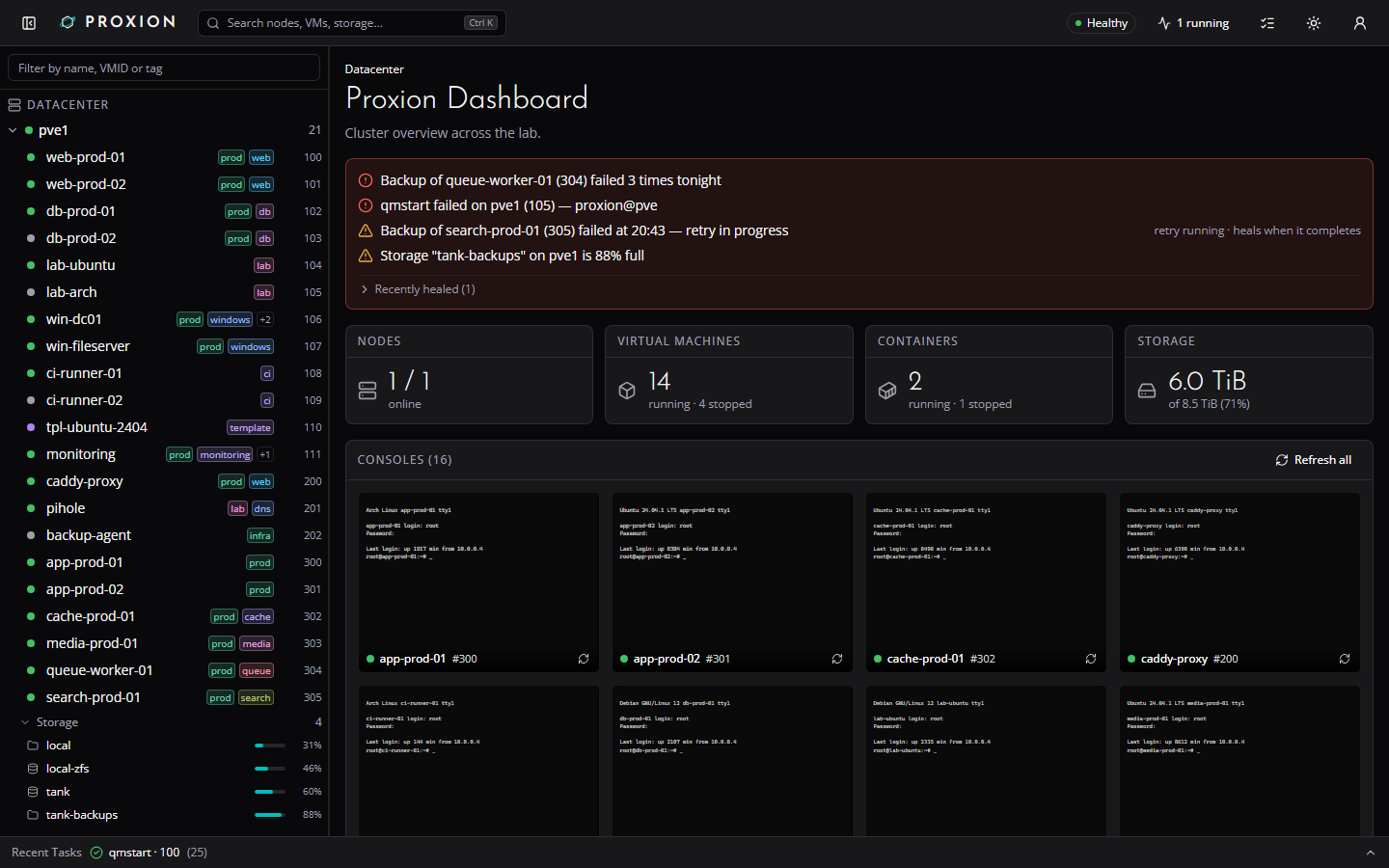 | 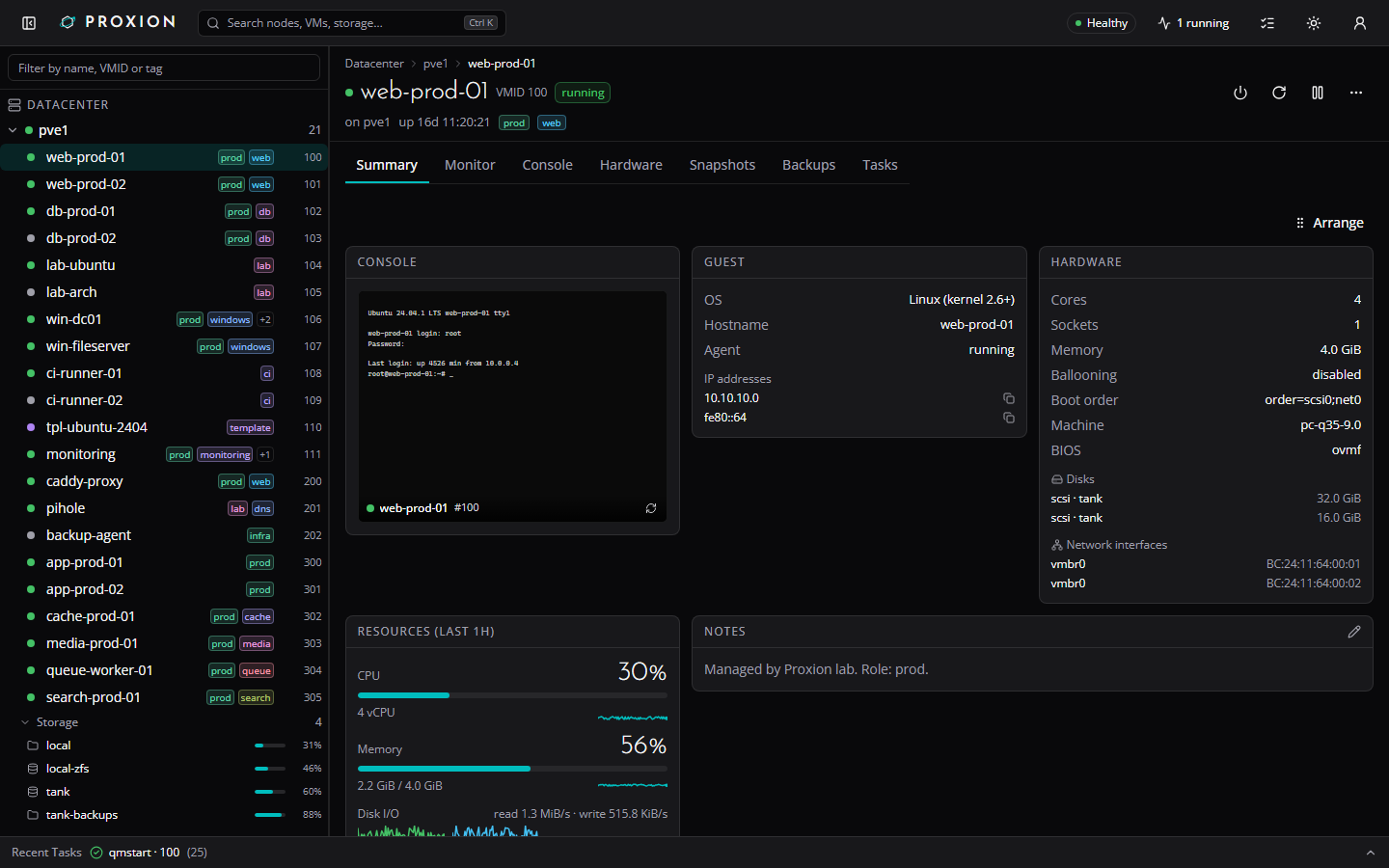 |
| VM monitor charts | VM hardware |
|---|---|
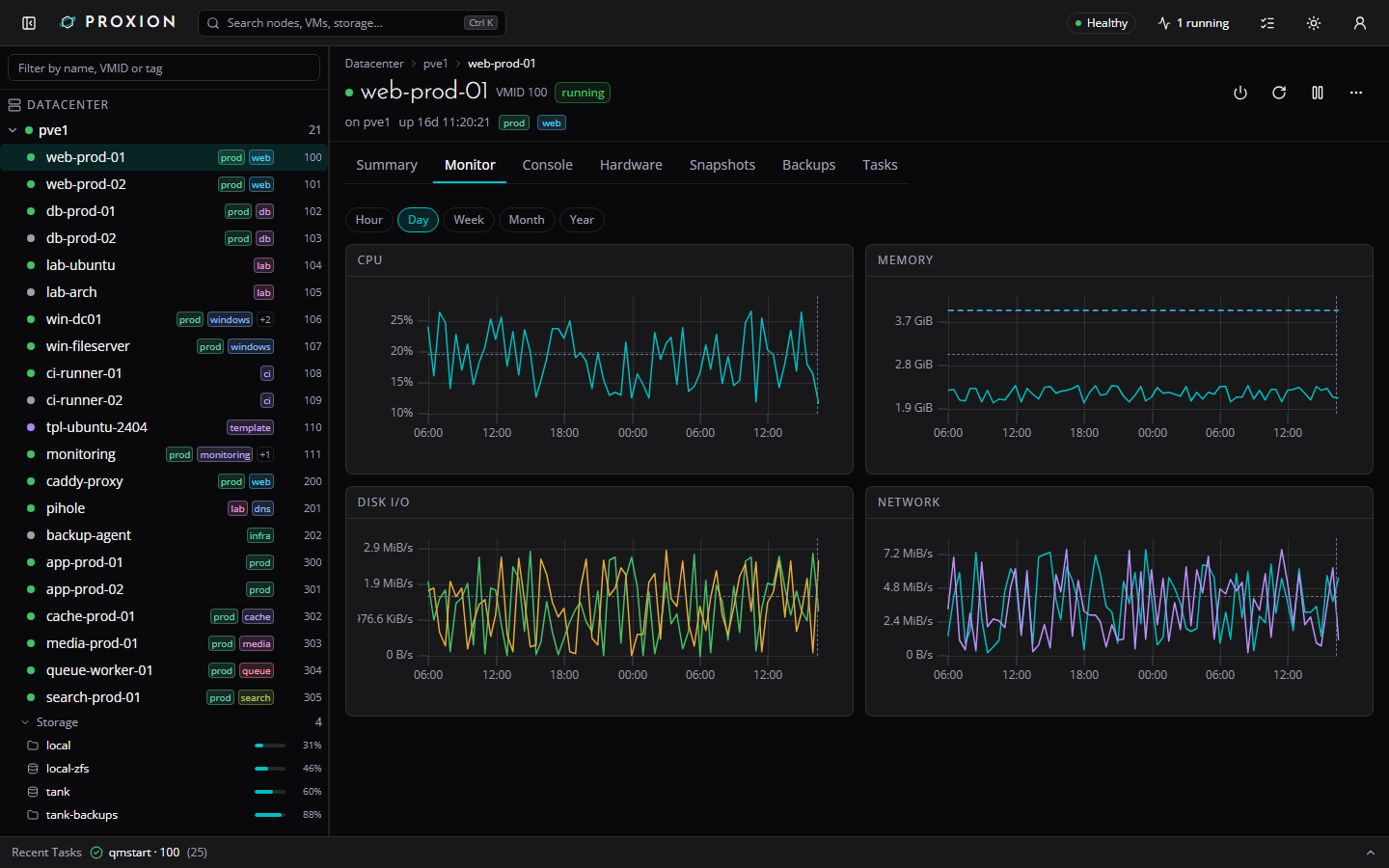 | 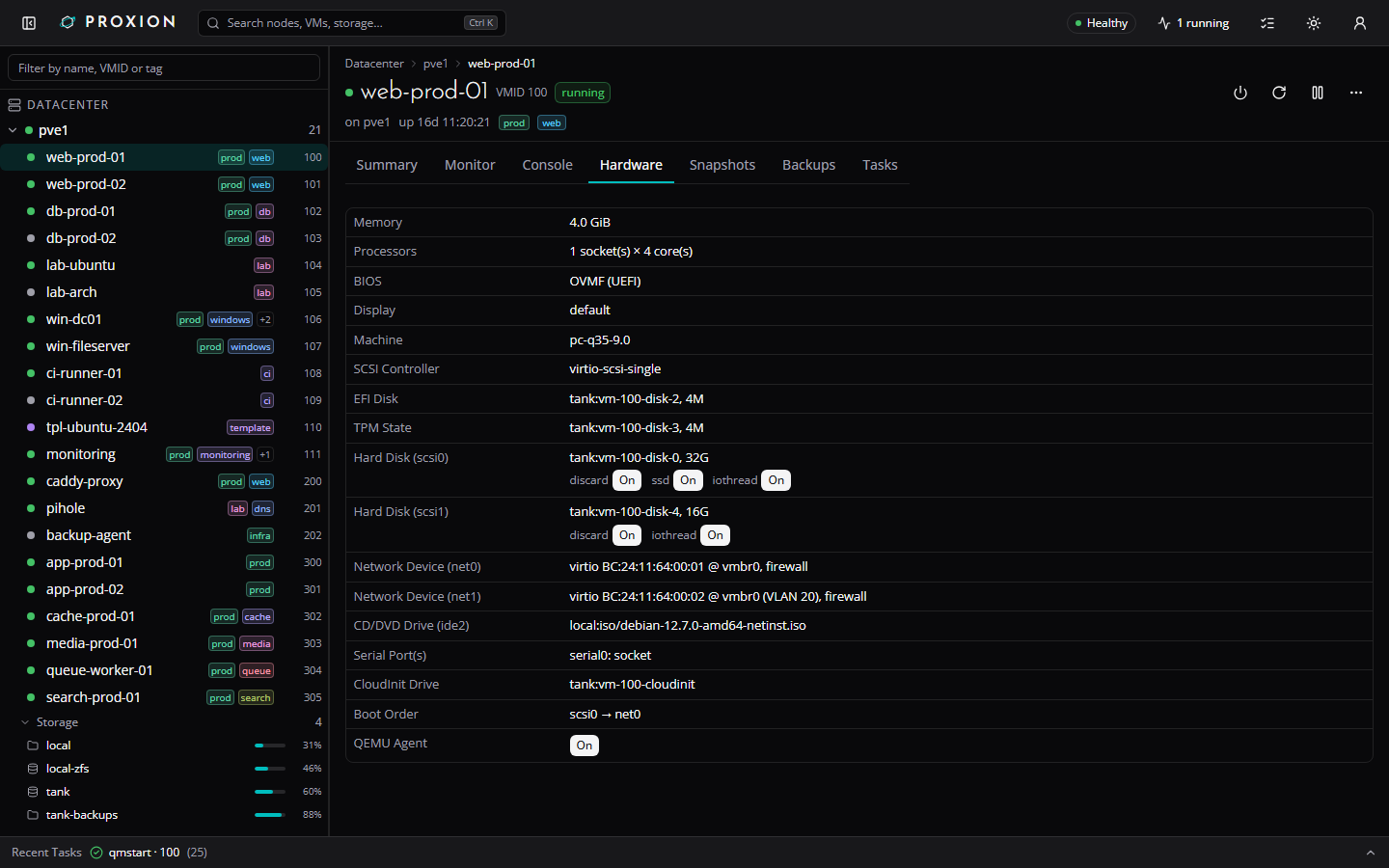 |
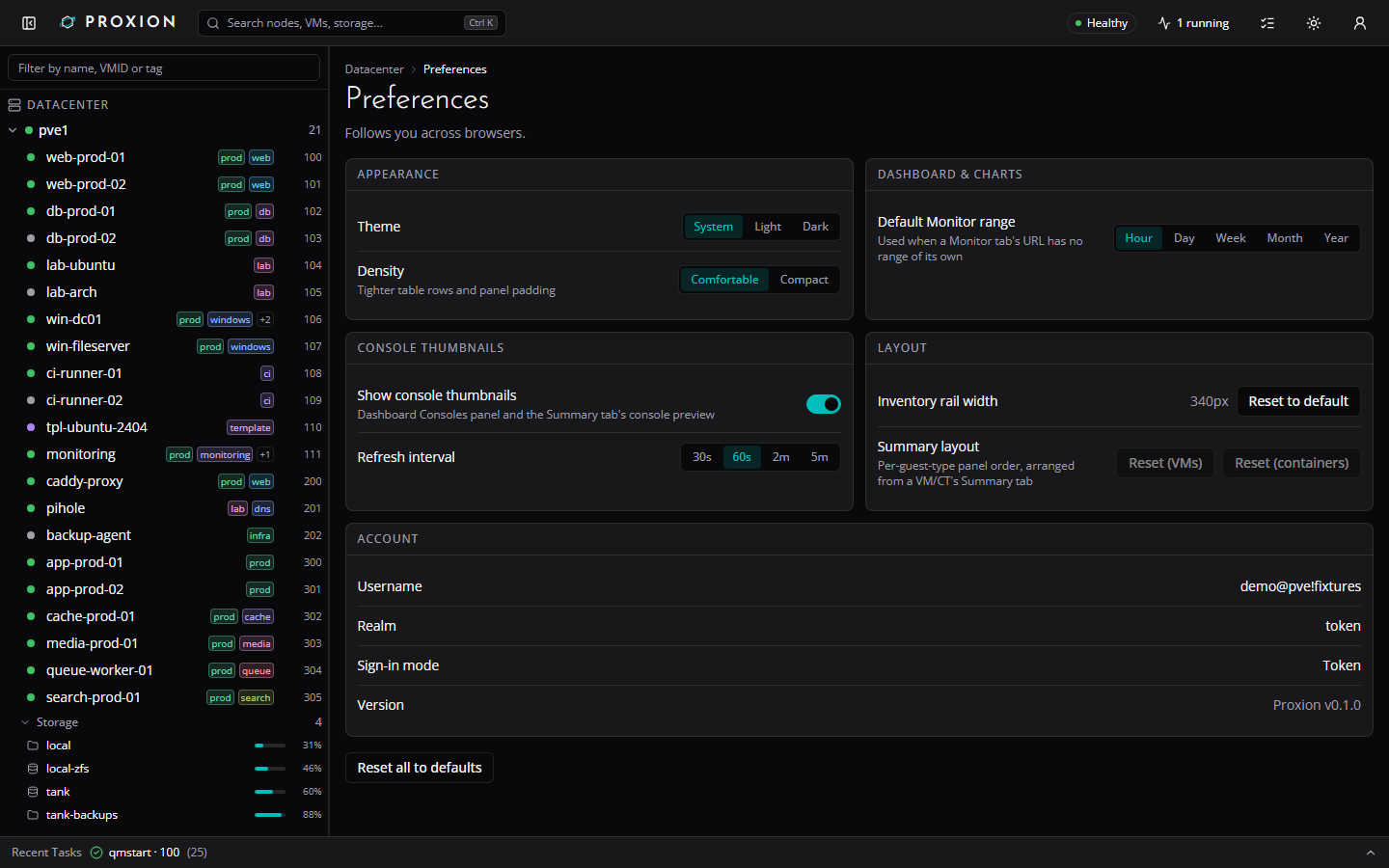
| Preferences | Guest action confirmation |
|---|---|
 | 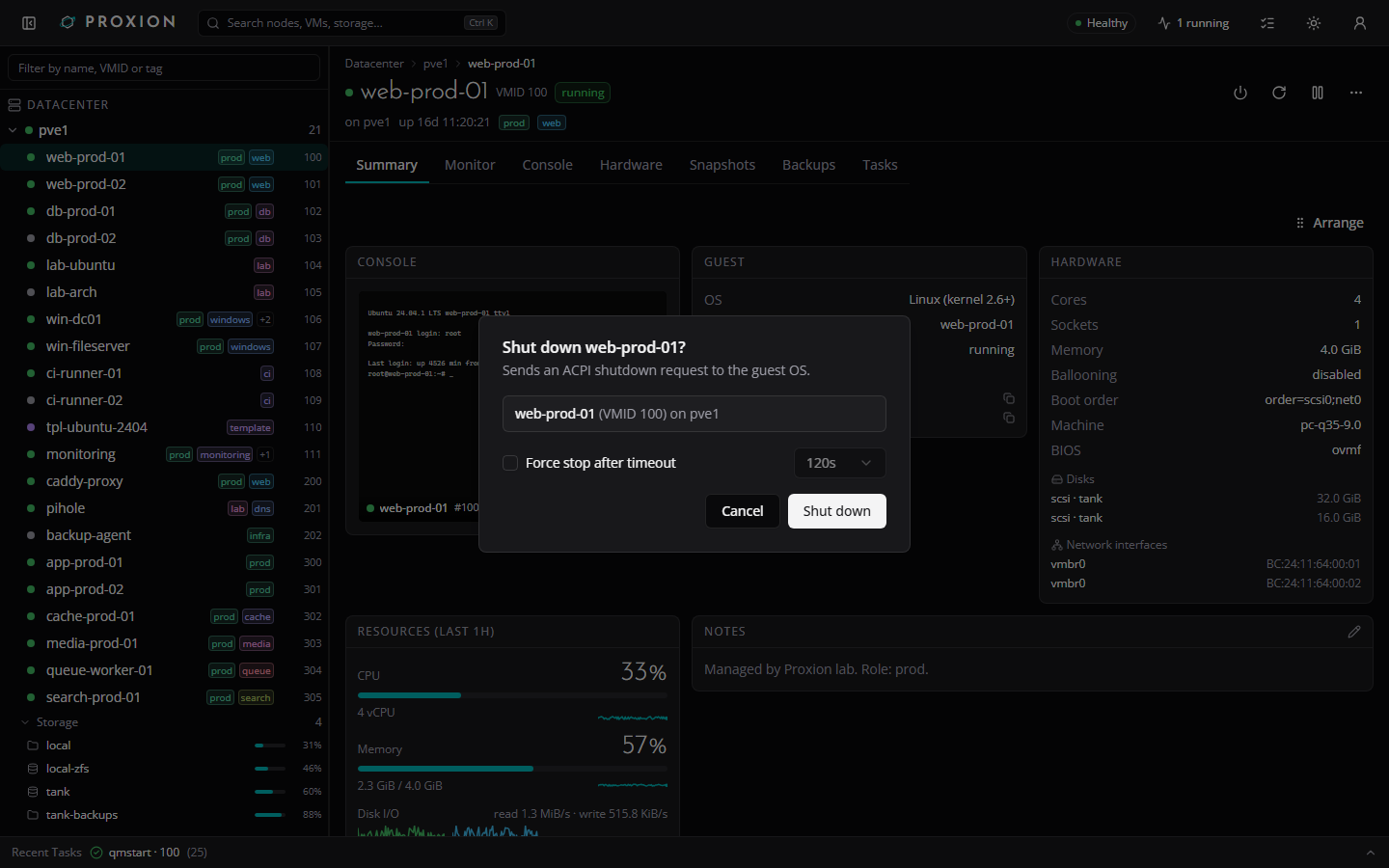 |
Get from nothing to a running Proxion in one docker compose up.
Run on a Proxmox node as root (or an equivalently privileged user) -- this gives Proxion's live dashboard/task feed just enough to read your cluster, plus console access for the embedded VNC/terminal bridges:
pveum role add ProxionReadOnly -privs "Datastore.Audit,Mapping.Audit,Pool.Audit,SDN.Audit,Sys.Audit,VM.Audit,VM.Console"
pveum user add proxion@pve
pveum aclmod / -user proxion@pve -role ProxionReadOnly
pveum user token add proxion@pve dev --privsep 0
The last command prints the token's secret once -- copy it somewhere safe;
you'll paste it into .env as PVE_TOKEN_SECRET below (PVE_TOKEN_ID is
proxion@pve!dev). You still sign in to the app itself with your own PVE
username/password (Proxion never stores it) -- this token is only for the
always-on cluster poller.
PVE's default certificate is self-signed, so Proxion pins to it instead of either trusting a real CA or disabling verification:
pvenode cert info
# or: openssl s_client -connect pve.example.local:8006 </dev/null 2>/dev/null \
#       | openssl x509 -fingerprint -sha256 -noout
Copy the Fingerprint (sha256) value into PVE_TLS_FINGERPRINT below.
cp .env.example .env
# edit .env: PVE_URL, PVE_TLS_FINGERPRINT, PVE_TOKEN_ID, PVE_TOKEN_SECRET, SESSION_SECRET, ...
cp docker-compose.example.yml docker-compose.yml
docker compose up -d
docker-compose.example.yml pulls the published image
(ghcr.io/c2tech-sys/proxion:0.1.0) by default; uncomment the build: .
line instead if you'd rather build it locally from this checkout.
Open http://:3080 and sign in with your own PVE username and password.
No cluster handy? Run the UI against static fixtures instead -- no server, no PVE, no Docker:
pnpm install && pnpm demo
SESSION_SECRET (openssl rand -hex 32) -- required in
production.PROXION_COOKIE_SECURE if Proxion itself is served over plain
HTTP behind something else that terminates TLS.vncproxy
task-log entry for every console thumbnail capture.PROXION_UPLOAD_MAX_BYTES below to cap the largest upload
this server will forward to PVE.Reads go through a permanently read-only proxy. The writes this app
performs -- guest power actions, rename/notes, snapshot
create/delete/rollback, and migrate (below) -- each go through their own
allow-listed route, gated on a signed-in session and the matching PVE
privilege on that guest. Nothing else here can edit config or otherwise
change your cluster -- /api/pve/* itself stays a read-only proxy.
| Area | Status | Notes |
|---|---|---|
| Auth | Works | Pass-through PVE login (username/password/realm), signed httpOnly session cookie, transparent ticket renewal. |
| Dashboard | Works | Cluster-wide totals, cluster nodes table, top CPU/memory consumers, per-storage usage, and an alerts strip (failed tasks, storage over 85% full) from the live poller. |
| Inventory tree | Works | Datacenter -> node -> VM/CT, type-to-filter, status dots, tag chips, right-click context menu (open, console, shell, copy VMID/IP). |
| Guest list | Works | vSphere-style "VMs and Templates" view at /guests: every guest across the cluster in one sortable, filterable table (search, status/type/node filters, per-user column visibility), sharing the inventory tree's own right-click actions. Row checkboxes (plus a select-all-in-view header checkbox) multi-select guests for bulk Start/Shut down/Reboot/Stop, confirmed in one dialog that lists what's applicable, skips guests it isn't (wrong power state, or a template), and runs them with limited concurrency. |
| Command palette (Cmd/Ctrl-K) | Works | Search nodes/VMs/CTs by name, VMID, IP, tag. |
| VM/CT Summary tab | Works | Guest info, hardware, resource gauges, notes, related objects, last backup. |
| VM/CT Monitor tab / node Monitor tab | Works | Resource graphs from PVE's RRD data, hour through year (plus decade for nodes), with time-range chips and a unified hover tooltip. |
| VM/CT Hardware tab | Works (edit CPU/memory/CD-ROM/disk size/boot order, add/detach/remove disks and mount points, add/edit/remove network devices, session sign-in only) | Full device breakdown: disks, EFI disk, TPM state, NICs (VLAN/rate), CD-ROM, cloud-init, boot order, serial/USB/PCI passthrough. A pencil on a row edits it: processors (sockets, cores, CPU type; lxc: cores) needs VM.Config.CPU; memory (+ balloon minimum for a VM, swap for a container) needs VM.Config.Memory; a CD/DVD drive's ISO (or "No media") needs VM.Config.CDROM; growing a disk (+N GiB, never a shrink) needs VM.Config.Disk; a VM's boot order (tick the devices to boot from and move them up or down; a VM only) needs VM.Config.Options; adding, editing or removing a network device (model, bridge, VLAN tag, firewall, rate limit, MTU, disconnect; a container's name, IPv4/IPv6) needs VM.Config.Network (PVE also checks SDN.Use on the bridge) -- options the dialog doesn't show (queues, trunks, ...) are kept on edit. "Add disk" (a VM) / "Add mount point" (a container) creates a new volume on an image-capable storage of the node (bus, size, format limited to what the storage supports, cache/discard/SSD/IO thread for a VM; path, backup, read-only, ACL for a container) and needs VM.Config.Disk on the guest plus Datastore.AllocateSpace on the storage; "Detach" (VM.Config.Disk) keeps the volume as an unused disk, and "Remove" on an unused disk destroys the volume permanently after typing its slot name (VM.Config.Disk; PVE enforces any further storage privilege itself). Changes PVE holds back until the guest restarts are listed in a banner with the affected rows badged "pending". Needs a signed-in session -- the shared service token stays read-only here too. A VM's "Add device" menu adds a USB device (Spice port, host vendor:device ID, host port, or a mapped device), a PCI passthrough device (host device grouped by IOMMU group, or a mapped device; All functions, PCI-Express, ROM-Bar, Primary GPU, MDev type) or a serial port (a socket); each device row can be edited (not serial) or removed, all needing VM.Config.HWType -- PVE itself restricts raw (non-mapped) USB/PCI devices to root@pam and checks Mapping.Use on mapped ones, and its message is shown as-is; the host device and mapping pickers need Sys.Modify / Mapping.Audit and fall back to typing the identifier without them. Containers' dev<n> passthrough stays read-only. Other disk options and BIOS/machine edits are not editable yet. |
| VM/CT Options tab | Works (session sign-in only) | A row list modelled on PVE's Options panel. VM: name, start at boot, start/shutdown order (order, up, down), OS type, protection, tags, QEMU guest agent (+ trim cloned disks), local time for RTC, tablet pointer, ACPI, KVM, hotplug. Container: hostname, start at boot, start/shutdown order, protection, tags, DNS servers, DNS search domain, plus read-only unprivileged / architecture rows. A pencil on a row edits it: name, start at boot, order, OS type, protection, tags, guest agent and local time need VM.Config.Options; tablet, ACPI, KVM and hotplug need VM.Config.HWType; a container's hostname and DNS settings need VM.Config.Network. Protection asks for confirmation. Name/hostname reuses the existing rename action. Editing the guest agent keeps the sub-options the dialog doesn't show (type, freeze-fs-on-backup). PVE enforces the datacenter tag policy itself and its message is relayed. Changes PVE holds back until the guest restarts are listed in a banner with the affected rows badged "pending". The shared service token stays read-only. |
| VM Cloud-Init tab | Works (edit settings and regenerate the image, session sign-in only) | A VM with a Cloud-Init drive gets PVE's Cloud-Init panel: user, password (hashed by Proxmox, never shown back or logged), DNS domain and servers, SSH public keys (shown decoded, one per line), package upgrade, type, and one IP config row per network device (DHCP, or a static address with gateway, IPv4 and IPv6). A pencil on a row edits it and "Regenerate image" rebuilds the cloud-init drive; all of it needs VM.Config.Cloudinit. Changes PVE holds back are listed in a banner with the affected rows badged "pending". A VM without a Cloud-Init drive shows a hint to add one on the Hardware tab (adding the drive is not done here). Needs a signed-in session -- the shared service token stays read-only. |
| VM/CT Snapshots tab | Works (create/delete/rollback, session sign-in only) | Snapshot tree, plus taking, deleting and rolling back snapshots (RAM-included snapshots and post-rollback guest start for qemu). Needs a signed-in session and VM.Snapshot (VM.Snapshot.Rollback for rollback) on the guest -- the shared service token stays read-only here too. |
| VM/CT Backups tab | Works (backup now / restore / delete, session sign-in only) | Every backup volume across backup-capable storages, with verification status, plus starting a backup (vzdump), restoring one (over an existing guest or to a new VMID), and deleting one from its own row menu. Needs a signed-in session and VM.Backup on the guest plus Datastore.AllocateSpace on the storage for backup; for restore, VM.Allocate on the target VMID for a new id, or VM.Backup/VM.Allocate on it to overwrite an existing guest (which must be stopped); for delete, Datastore.Allocate on the storage, or Datastore.AllocateSpace plus VM.Backup on that guest -- the shared service token stays read-only here too. |
| VM/CT Firewall tab | Works (rules + options, session sign-in only) | The guest's own firewall: an options card (enable the firewall -- with a confirmation when the input policy is DROP, since that can cut your own access -- input/output policy, DHCP, NDP, router advertisement, MAC filter, IP filter, log levels) and the rule table with add / edit / delete / enable-disable / move up and down, including rules that apply a cluster security group. Edits, deletes, moves and option changes forward PVE's digest of the last read, so a firewall someone else just changed is refused rather than overwritten. Needs a signed-in session and VM.Config.Network on the guest (what pve-firewall itself checks) -- the shared service token stays read-only here too. Aliases, IP sets, the firewall log and the datacenter/node firewall are not covered. |
| VM/CT and node Tasks tabs | Works | |
| Node Summary / Storage / Tasks tabs | Works | |
| Storage browser | Works | vSphere-style datastore page at /storage/$node/$storage: summary strip (status, type, shared/usage) plus a searchable, sortable content browser (type chips, owner links to guests), linked from the inventory tree, command palette, dashboard and node Storage tab. |
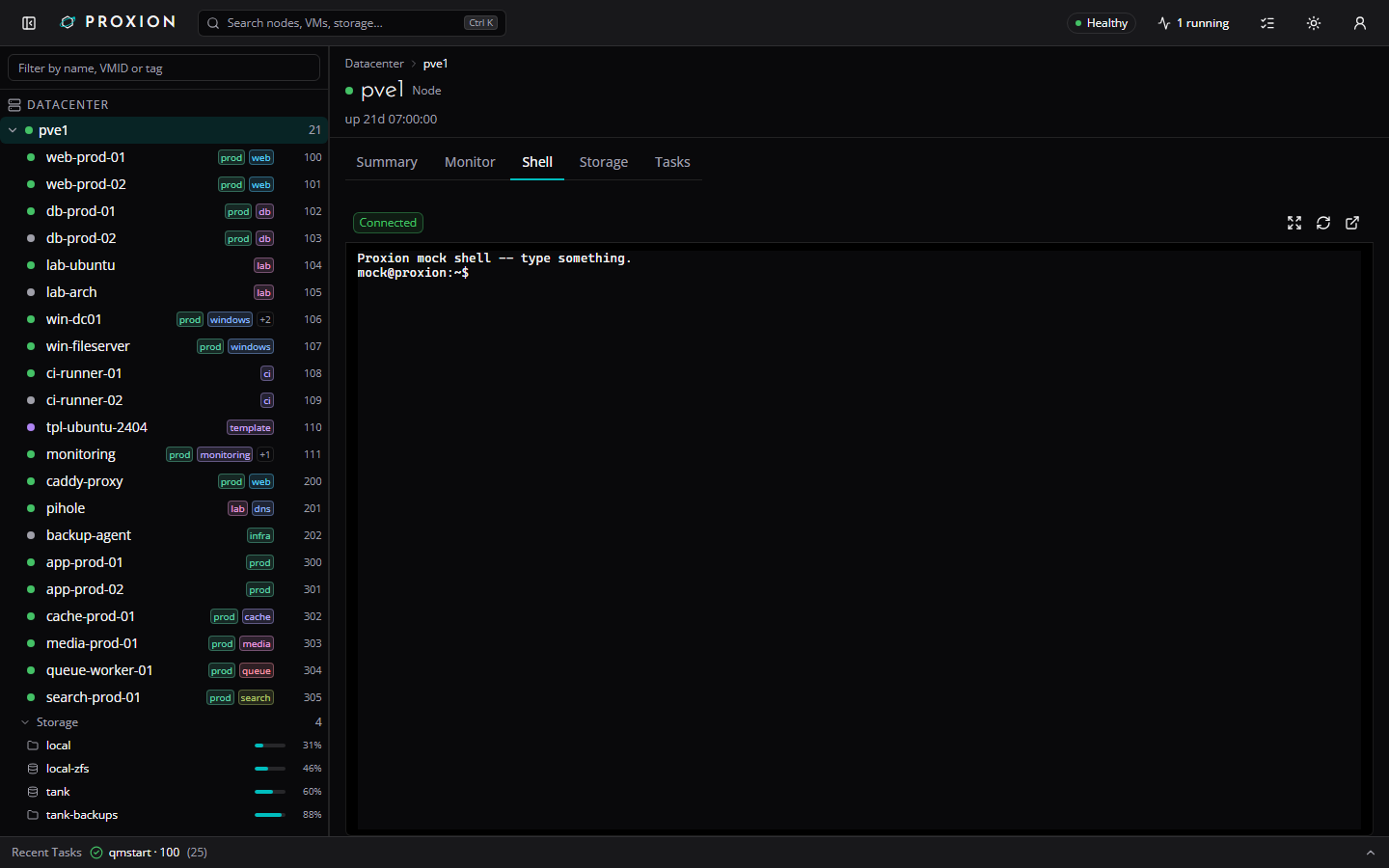
| Embedded VNC console / terminal | Works | noVNC-protocol VNC console and xterm.js terminal, each with a toolbar (Ctrl+Alt+Del, scale-to-fit, reconnect) and a dedicated pop-out window. The VNC console's Paste types the text into the guest as keystrokes (US layout assumed). |
| Node shell | Works | xterm.js terminal against the node's own shell, with pop-out. |
| Console thumbnails | Works | Dashboard "Consoles" panel, VM/CT Summary preview, and an inventory-tree hover card (hover or keyboard-focus a running guest row) of each running guest's display, captured server-side over VNC (needs VM.Console); one vncproxy task per capture. |
| Recent Tasks drawer | Works | Live, via the SSE task feed. |
| Preferences | Works | Theme, density, default Monitor range, console thumbnails on/off + refresh interval, inventory rail width, and your Summary panel order -- stored server-side per user, so they follow you across browsers. Read-only under the shared service token. |
| Power actions | Works (session sign-in only) | Start/Shut down/Reboot/Pause/Resume/Stop/Reset from the VM/CT object header (Start/Shut down/Reboot/Stop also in the inventory tree's context menu), each behind a confirmation dialog. Needs a signed-in session and VM.PowerMgmt on the guest -- the shared service token stays read-only, and so does the raw /api/pve/* proxy; this goes through one small, allow-listed server route instead. |
| Rename / notes | Works (session sign-in only) | Rename a VM/CT from the object header's "More" menu or the inventory tree's context menu; edit its notes (the PVE description field) inline from the Summary tab's Notes panel. Needs a signed-in session and VM.Config.Options on the guest -- a different privilege than power actions, checked independently; the shared service token stays read-only here too. |
| Migrate | Works (session sign-in only) | Move a VM/CT to another cluster node from the object header's "More" menu or the inventory tree's context menu: a target-node picker (offline nodes and PVE's not_allowed_nodes disabled with the reason) plus the migrate precheck (running state, local disks, local resources), online/local-disks options for qemu, automatic restart-mode for a running lxc. Needs a signed-in session, VM.Migrate on the guest, and another node in the cluster -- the shared service token stays read-only here too. |
| Clone | Works (session sign-in only) | Clone a VM/CT to a new VMID from the object header's "More" menu or the inventory tree's context menu: new VMID (with a "use next free ID" button), name/hostname, full vs linked clone (linked only from a template), target node/storage, an optional source snapshot, and a description. Needs a signed-in session, VM.Clone on the source guest, VM.Allocate on the new VMID, and Datastore.AllocateSpace on the target storage when one is given -- the shared service token stays read-only here too. |
| Create container | Works (session sign-in only) | An eight-step wizard (General, Template, Disks, CPU, Memory, Network, DNS, Confirm) opened from the node's context menu ("Create container here") or the top bar's Create menu: node, CT ID (prefilled with the next free one), hostname, unprivileged and nesting (both on by default), pool, tags, a root password (confirmed) and/or SSH public keys, a template from any vztmpl storage, a root disk on a rootdir storage (ACL/quota optional), cores (CPU limit/units optional), memory and swap, a network device (bridge, IPv4 DHCP/static + gateway/manual, IPv6 SLAAC/DHCP/static + gateway/manual, VLAN, firewall, optional MAC, or none at all) and DNS (the host's settings unless you set them). Creates it with one POST /api/actions/guest/:node/lxc/create, follows the task and opens the new container. Needs a signed-in session, VM.Allocate on the new CT ID and Datastore.AllocateSpace on the root disk's storage (PVE itself checks access to the template's storage) -- the shared service token stays read-only here too. The root password is sent to PVE (which hashes it) and is never logged, echoed or stored. |
| Create VM | Works (session sign-in only) | An eight-step wizard like PVE's (General, OS, System, Disks, CPU, Memory, Network, Confirm), opened from the top bar's Create menu or a node's context menu ("Create VM here"): node, next free VM ID (editable), name, resource pool, tags and start-after-created; an ISO image from any ISO-capable storage or no media, plus OS type and QEMU guest agent (on by default for Linux); machine type (q35 default), SeaBIOS or OVMF with an EFI disk, an optional TPM 2.0 (on by default for Windows 11), SCSI controller and display; one disk (bus, storage, size, format, cache, discard/SSD/IO thread) or none; CPU sockets/cores/type; memory and minimum memory (ballooning); one NIC (bridge, model, VLAN tag, firewall) or none. Nothing is sent until Create: the whole VM goes to PVE as one request, Proxion follows the task, and opens the new VM when it finishes. A VM ID that is already in use is refused (409) before PVE is called. Needs a signed-in session, VM.Allocate on the new VMID, Datastore.AllocateSpace on every storage a new volume goes on (disk, EFI disk, TPM state), and Datastore.Audit or Datastore.AllocateSpace on the ISO's storage; PVE's own per-option checks (VM.Config.*, SDN.Use) are relayed. The shared service token stays read-only here too. Containers are not covered by this wizard. |
| Delete guest | Works (session sign-in only) | Permanently destroy a stopped VM/CT from the object header's "More" menu or the inventory tree's context menu, behind a typed-VMID confirmation: optionally also remove it from backup jobs, replication and HA (purge; off by default) and destroy unreferenced disks it owns (on by default). A running or paused guest must be stopped first; templates can be deleted. Needs a signed-in session and VM.Allocate on the guest -- the shared service token stays read-only here too. |
| Convert to template | Works (session sign-in only) | Turn a stopped VM/CT into a template from the object header's "More" menu or the inventory tree's context menu, behind a typed-VMID confirmation that says the change is permanent (a template can only be cloned or deleted). The item is disabled with a reason while the guest is running or already a template. Needs a signed-in session and VM.Allocate on the guest -- the shared service token stays read-only here too. |
| Node power | Works (session sign-in only) | Reboot/Shut down a cluster node from a "Power" dropdown on the node page header, behind a confirmation dialog showing the running guests on that node and requiring the node name to be typed to confirm. Needs a signed-in session and Sys.PowerMgmt on the node -- the shared service token stays read-only here too. |
| Storage upload / download from URL / delete | Works (session sign-in only) | Upload an ISO image, container template, or import file from your browser, or have Proxmox itself download one from a URL, onto a storage that supports it -- from the storage page header (filenames must carry the Proxmox-required extension, e.g. .iso, .tar.zst, .ova). Delete a volume from its own row menu in the content browser. Needs a signed-in session and Datastore.AllocateTemplate on the storage for upload/download-from-URL, and Datastore.Allocate (or Datastore.AllocateSpace plus VM.Backup on that guest, for deleting your own backup) for delete -- the shared service token stays read-only here too. Uploads keep running and stay visible if you navigate away, close the dialog, or the page reloads its shell. Proxmox has no API to download a stored volume back to your browser, so "download" here is only Proxmox's own fetch-by-URL. |
| Any other write action (BIOS/machine, firewall aliases/IP sets, datacenter/node firewall, users/permissions, storage/pool setup, node network/...) | Not implemented | The proxy rejects non-GET requests to /api/pve/* outright; only guest power actions, rename/notes, snapshots, migrate, clone, create VM/container, convert to template, backup/restore, delete, node power, storage upload/download/delete, hardware edits (CPU, memory, CD-ROM, disks, network devices, boot order, USB/PCI/serial devices), guest options, cloud-init and the guest firewall (all above) have dedicated write routes so far. |
By default console thumbnails are captured server-side over VNC, which logs
a vncproxy task per capture. An optional per-node agent,
agent/, takes the screendump straight from QEMU's QMP
socket instead, avoiding that VNC session and task log entry entirely; see
its README for the install and security details.
flowchart LR
    subgraph Browser
        UI["Proxion web app<br/>React + Vite"]
    end

    subgraph Server["Proxion server (Fastify)"]
        API["REST /api/*<br/>+ SSE /api/events"]
        WS["Websocket bridges<br/>/ws/vnc/*, /ws/term/*"]
        Poller["Cluster poller"]
    end

    subgraph PVE["Proxmox VE cluster"]
        PVEAPI["PVE REST API<br/>/api2/json"]
        PVEWS["PVE console websockets<br/>vncwebsocket"]
    end

    UI -- "JSON over HTTPS" --> API
    UI -- "SSE (resource/task diffs)" --> API
    UI -- "websocket (console/terminal)" --> WS
    API -- "pass-through session ticket<br/>or service token" --> PVEAPI
    Poller -- "service token, polled" --> PVEAPI
    WS -- "ticket-authenticated" --> PVEWS
VITE_USE_FIXTURES=1) -- useful for a demo or for frontend
work with no lab handy.See docs/architecture.md for a one-page deeper look at the auth model, the read-only proxy vs. the allow-listed actions route, the console bridges, and the thumbnails/preferences stores.
Running Proxion in Docker? See Quickstart above and docs/deploy.md for every environment variable, reverse-proxy notes (websockets must be proxied for the console/ terminal to work), and the recommended read-only service-token role. This section is for working on Proxion itself.
Requirements: Node >= 24, pnpm (corepack enable picks up the version
pinned in package.json).
pnpm install
pnpm dev
/api and /ws are proxied to the server)/api/health)No Proxmox host handy? Demo the UI against static fixtures instead:
pnpm demo # fixture-mode UI, no Proxmox needed (any shell)
Other scripts: pnpm build, pnpm typecheck, pnpm lint, pnpm test, pnpm format. On a busy machine, PROXION_VITEST_WORKERS=<n> caps the web suite's vitest workers.
apps/web -- @proxion/web, the React UI (Vite, Tailwind v4, shadcn/ui, TanStack Router/Query).apps/server -- @proxion/server, the Fastify API/proxy server.packages/pve-api -- @proxion/pve-api, the generated Proxmox VE API client.Proxion can announce alerts (failed tasks, backup incidents, storage over the configured
threshold) as they open, escalate, resolve or clear -- over a webhook and/or email -- instead of
only showing them on the dashboard. Off by default; set any of the env vars below to enable a
channel. Multiple transitions within a short window are batched into one message per channel, and
a restart never re-announces something it already told a channel about (state persists to
<PROXION_DATA_DIR>/notify-state.json).
| Variable | Default | Notes |
|---|---|---|
PROXION_NOTIFY_WEBHOOK_URL | unset | Absolute http(s):// URL. Setting this enables the webhook channel. |
PROXION_NOTIFY_WEBHOOK_FORMAT | generic | generic | discord | slack | ntfy | gotify -- picks the request body shape. |
PROXION_NOTIFY_WEBHOOK_TOKEN | unset | Sent as Authorization: Bearer <token> (ntfy/gotify style). Never logged. |
PROXION_NOTIFY_SMTP_URL | unset | smtp://user:pass@host:port (STARTTLS) or smtps://... (implicit TLS). Setting this together with the two below enables the email channel. |
PROXION_NOTIFY_EMAIL_FROM | unset | Required together with PROXION_NOTIFY_SMTP_URL/_EMAIL_TO. |
PROXION_NOTIFY_EMAIL_TO | unset | Comma-separated recipient list. Required together with the two above. |
PROXION_NOTIFY_MIN_SEVERITY | warning | warning | error -- the lowest severity that opens a notification. |
PROXION_NOTIFY_INCLUDE_RESOLVED | true | Whether a heal/removal also sends a resolved/cleared notice. |
PROXION_NOTIFY_DEBOUNCE_MS | 10000 | How long transitions are batched before sending. |
PROXION_NOTIFY_SITE_NAME | Proxion | Shown in message titles/subjects, e.g. [Proxion] 2 opened — Backup failed .... |
PROXION_PUBLIC_URL | unset | When set, messages include a deep link back into the app for guest alerts. |
Discord (PROXION_NOTIFY_WEBHOOK_FORMAT=discord): create a channel webhook (Channel Settings
-> Integrations -> Webhooks) and set PROXION_NOTIFY_WEBHOOK_URL to its URL -- no token needed.
ntfy (PROXION_NOTIFY_WEBHOOK_FORMAT=ntfy): PROXION_NOTIFY_WEBHOOK_URL=https://ntfy.sh/your-topic
(self-hosted ntfy works the same way); set PROXION_NOTIFY_WEBHOOK_TOKEN if your topic requires
auth.
Email: PROXION_NOTIFY_SMTP_URL=smtps://user:pass@smtp.example.com:465,
PROXION_NOTIFY_EMAIL_FROM=proxion@example.com, PROXION_NOTIFY_EMAIL_TO=ops@example.com.
Each channel gets a formatted message rather than a text blob: email is an HTML message (plain-text
alternative included) with one card per alert -- a severity-coloured edge, the guest, node and
time, and an "Open in Proxion" button when PROXION_PUBLIC_URL is set; Discord gets one embed per
alert; Slack gets blocks (a header, then a section, meta line and divider per alert); ntfy gets a
Markdown body with a click action that opens the alert; Gotify gets Markdown too (and a click URL).
The generic webhook stays plain JSON, now with a headline, highestSeverity, sentAt and a
label/color/guestName/guestType on each event. Very large batches are cut off with an
"...and N more" line.
The webhook token and the SMTP URL's embedded credentials are never written to the server's logs -- a channel failure logs only the channel name and host.
Webhook destinations. Proxion assumes the people who can change notification settings (Sys.Modify
on /) are trusted operators, so a webhook or SMTP server on your LAN (a self-hosted ntfy or Gotify,
an internal mail relay) is fine and private addresses are not blocked. Two safeguards apply
regardless: a webhook request never follows a redirect (a 3xx is a failure, so a token is never sent
to a place you did not configure), and "Send test notification" reports a failure only as
request failed (HTTP <status>), (timeout) or (network) -- never a host, port, status text or
response body -- so it cannot be used to probe other machines. To restrict where notifications can
go, set PROXION_NOTIFY_ALLOWED_HOSTS to a comma-separated list of host names (case-insensitive,
exact match, a trailing dot is ignored, *.example.com matches exactly one extra label, ports are not
compared). When set, saving a webhook or SMTP URL on any other host is refused, and a saved
destination that no longer matches (for example after you tighten the list) is dropped at startup
with a warning that names the setting but not the host. Unset means no restriction. A list that cannot
be parsed (for example one with a port, hooks.example.com:443) fails closed: no destination is
allowed, nothing is sent, saving is refused, and the Preferences page shows the error until you fix
proxion.env and redeploy.
The Preferences page shows which channels are configured and has a "Send test notification"
button (a signed-in session only; disabled with a shared service token, same as every other write
in token mode) -- GET /api/notify/status / POST /api/notify/test. A bad notification value
disables notifications and shows why on the Preferences page; it never stops the server.
Managing notifications in the app. A user with Sys.Modify on / can manage all of this on
the Preferences page, without editing the env file: a master switch, snooze buttons (1 h, 8 h,
24 h, 7 days, Unmute), which alert kinds are announced (backups, failed tasks, storage usage),
the delivery settings above, and the webhook and email details. The environment variables above
stay the defaults: until someone saves from the page, they are what is in effect; the first save
(or snooze) writes the whole effective configuration to <PROXION_DATA_DIR>/notify-settings.json,
and from then on that file wins and takes effect at once, without a restart. The file holds the
webhook token and the SMTP URL (with its password) in plain text, so it is written with mode 0600
in the data directory -- keep that directory private and out of backups you do not trust. The API
never returns a secret: GET /api/notify/settings (any signed-in identity) shows the webhook's
host only, whether a token is set, and the SMTP host/port/user. PUT /api/notify/settings and
POST /api/notify/mute need a signed-in session (not the shared service token) and Sys.Modify
on /. While notifications are switched off or snoozed nothing is sent, but alert state keeps
being tracked, so nothing that happened meanwhile is announced when they come back; "Send test
notification" always sends, even while muted.
POST /access/ticket with the
credentials you type, and only the resulting ticket is kept -- in
memory, server-side, keyed by an opaque session id.PVE_TOKEN_ID/PVE_TOKEN_SECRET) used for the always-on cluster
poller/dashboard feed. See docs/deploy.md for the
recommended minimal-privilege role for that token.PVE_TLS_FINGERPRINT) instead of either trusting a real CA or
disabling verification outright (PVE_TLS_INSECURE, discouraged).SameSite=Lax, signed with SESSION_SECRET, and Secure by default in
production.GET request to
/api/pve/* (405), independent of the PVE user's actual permissions --
Phase 1 cannot write to your cluster even if the credentials used could.See SECURITY.md to report a vulnerability.
/api/pve/* itself stays a permanently read-only proxy. Done.Proxion started as a tool for my own Proxmox cluster, and I run it there every day. I build it together with Claude (Anthropic's Claude Code): I set the direction, decide what ships, review the changes and test them against a real host; Claude writes a large share of the code. I'd rather say that up front than have you find it in the commit history.
Every change goes through the same gates before it is tagged and published: a TypeScript typecheck across the workspace, ESLint with zero warnings, the unit and render test suites (over 800 tests, run against a fake PVE and fixture data, never a live host), and CI on GitHub. Releases build the multi-arch image from the tagged commit.
Found a bug? Open an issue. Fixes land quickly, and each one gets a test so it stays fixed.
Proxion is free and open source. If it saves you time, you can buy me a coffee -- it keeps the lab running and the features coming.
Apache License 2.0 -- see LICENSE. See NOTICE for third-party attributions (Proxmox VE, noVNC, xterm.js, uPlot, Josefin Sans, Open Sans).
Proxion is an independent, unofficial project and is not affiliated with or endorsed by Proxmox Server Solutions GmbH.
A modern, open-source web console for Proxmox VE: live dashboard with console thumbnails, vSphere-style object pages, embedded VNC console and terminal, power actions, per-user preferences.
JavaScript
1
136 commits
updated Oct 8, 2026
Try it in your browser: https://c2tech-sys.github.io/proxion/ (sample data, no install)
Proxion is a modern, open-source web console for Proxmox VE that overlays the stock UI: daily-driver views for the things you look at all day, vSphere-style object pages for VMs/CTs/nodes, an embedded console and terminal, and deep links back to the stock UI for everything else.
It's a pnpm monorepo: a Vite/React frontend, a Fastify API/proxy server,
and a generated Proxmox VE API client. The read-only PVE proxy
(/api/pve/*) is permanently write-blocked; the writes Proxion does
perform -- guest power actions, rename/notes, snapshots, backup and
restore, clone, convert to template, migrate, hardware edits, node reboot/shutdown, storage uploads and deletes,
restore, clone, VM creation, migrate, hardware edits, node reboot/shutdown, storage uploads and deletes,
console thumbnails and per-user preferences -- each go through their own
allow-listed route,
checked against your real PVE privileges -- see
Feature status below.
| Dashboard | VM summary |
|---|---|
| |
| VM monitor charts | VM hardware |
|---|---|
| |
| Preferences | Guest action confirmation |
|---|---|
| |
Get from nothing to a running Proxion in one docker compose up.
Run on a Proxmox node as root (or an equivalently privileged user) -- this gives Proxion's live dashboard/task feed just enough to read your cluster, plus console access for the embedded VNC/terminal bridges:
pveum role add ProxionReadOnly -privs "Datastore.Audit,Mapping.Audit,Pool.Audit,SDN.Audit,Sys.Audit,VM.Audit,VM.Console"
pveum user add proxion@pve
pveum aclmod / -user proxion@pve -role ProxionReadOnly
pveum user token add proxion@pve dev --privsep 0
The last command prints the token's secret once -- copy it somewhere safe;
you'll paste it into .env as PVE_TOKEN_SECRET below (PVE_TOKEN_ID is
proxion@pve!dev). You still sign in to the app itself with your own PVE
username/password (Proxion never stores it) -- this token is only for the
always-on cluster poller.
PVE's default certificate is self-signed, so Proxion pins to it instead of either trusting a real CA or disabling verification:
pvenode cert info
# or: openssl s_client -connect pve.example.local:8006 </dev/null 2>/dev/null \
#       | openssl x509 -fingerprint -sha256 -noout
Copy the Fingerprint (sha256) value into PVE_TLS_FINGERPRINT below.
cp .env.example .env
# edit .env: PVE_URL, PVE_TLS_FINGERPRINT, PVE_TOKEN_ID, PVE_TOKEN_SECRET, SESSION_SECRET, ...
cp docker-compose.example.yml docker-compose.yml
docker compose up -d
docker-compose.example.yml pulls the published image
(ghcr.io/c2tech-sys/proxion:0.1.0) by default; uncomment the build: .
line instead if you'd rather build it locally from this checkout.
Open http://:3080 and sign in with your own PVE username and password.
No cluster handy? Run the UI against static fixtures instead -- no server, no PVE, no Docker:
pnpm install && pnpm demo
SESSION_SECRET (openssl rand -hex 32) -- required in
production.PROXION_COOKIE_SECURE if Proxion itself is served over plain
HTTP behind something else that terminates TLS.vncproxy
task-log entry for every console thumbnail capture.PROXION_UPLOAD_MAX_BYTES below to cap the largest upload
this server will forward to PVE.Reads go through a permanently read-only proxy. The writes this app
performs -- guest power actions, rename/notes, snapshot
create/delete/rollback, and migrate (below) -- each go through their own
allow-listed route, gated on a signed-in session and the matching PVE
privilege on that guest. Nothing else here can edit config or otherwise
change your cluster -- /api/pve/* itself stays a read-only proxy.
| Area | Status | Notes |
|---|---|---|
| Auth | Works | Pass-through PVE login (username/password/realm), signed httpOnly session cookie, transparent ticket renewal. |
| Dashboard | Works | Cluster-wide totals, cluster nodes table, top CPU/memory consumers, per-storage usage, and an alerts strip (failed tasks, storage over 85% full) from the live poller. |
| Inventory tree | Works | Datacenter -> node -> VM/CT, type-to-filter, status dots, tag chips, right-click context menu (open, console, shell, copy VMID/IP). |
| Guest list | Works | vSphere-style "VMs and Templates" view at /guests: every guest across the cluster in one sortable, filterable table (search, status/type/node filters, per-user column visibility), sharing the inventory tree's own right-click actions. Row checkboxes (plus a select-all-in-view header checkbox) multi-select guests for bulk Start/Shut down/Reboot/Stop, confirmed in one dialog that lists what's applicable, skips guests it isn't (wrong power state, or a template), and runs them with limited concurrency. |
| Command palette (Cmd/Ctrl-K) | Works | Search nodes/VMs/CTs by name, VMID, IP, tag. |
| VM/CT Summary tab | Works | Guest info, hardware, resource gauges, notes, related objects, last backup. |
| VM/CT Monitor tab / node Monitor tab | Works | Resource graphs from PVE's RRD data, hour through year (plus decade for nodes), with time-range chips and a unified hover tooltip. |
| VM/CT Hardware tab | Works (edit CPU/memory/CD-ROM/disk size/boot order, add/detach/remove disks and mount points, add/edit/remove network devices, session sign-in only) | Full device breakdown: disks, EFI disk, TPM state, NICs (VLAN/rate), CD-ROM, cloud-init, boot order, serial/USB/PCI passthrough. A pencil on a row edits it: processors (sockets, cores, CPU type; lxc: cores) needs VM.Config.CPU; memory (+ balloon minimum for a VM, swap for a container) needs VM.Config.Memory; a CD/DVD drive's ISO (or "No media") needs VM.Config.CDROM; growing a disk (+N GiB, never a shrink) needs VM.Config.Disk; a VM's boot order (tick the devices to boot from and move them up or down; a VM only) needs VM.Config.Options; adding, editing or removing a network device (model, bridge, VLAN tag, firewall, rate limit, MTU, disconnect; a container's name, IPv4/IPv6) needs VM.Config.Network (PVE also checks SDN.Use on the bridge) -- options the dialog doesn't show (queues, trunks, ...) are kept on edit. "Add disk" (a VM) / "Add mount point" (a container) creates a new volume on an image-capable storage of the node (bus, size, format limited to what the storage supports, cache/discard/SSD/IO thread for a VM; path, backup, read-only, ACL for a container) and needs VM.Config.Disk on the guest plus Datastore.AllocateSpace on the storage; "Detach" (VM.Config.Disk) keeps the volume as an unused disk, and "Remove" on an unused disk destroys the volume permanently after typing its slot name (VM.Config.Disk; PVE enforces any further storage privilege itself). Changes PVE holds back until the guest restarts are listed in a banner with the affected rows badged "pending". Needs a signed-in session -- the shared service token stays read-only here too. A VM's "Add device" menu adds a USB device (Spice port, host vendor:device ID, host port, or a mapped device), a PCI passthrough device (host device grouped by IOMMU group, or a mapped device; All functions, PCI-Express, ROM-Bar, Primary GPU, MDev type) or a serial port (a socket); each device row can be edited (not serial) or removed, all needing VM.Config.HWType -- PVE itself restricts raw (non-mapped) USB/PCI devices to root@pam and checks Mapping.Use on mapped ones, and its message is shown as-is; the host device and mapping pickers need Sys.Modify / Mapping.Audit and fall back to typing the identifier without them. Containers' dev<n> passthrough stays read-only. Other disk options and BIOS/machine edits are not editable yet. |
| VM/CT Options tab | Works (session sign-in only) | A row list modelled on PVE's Options panel. VM: name, start at boot, start/shutdown order (order, up, down), OS type, protection, tags, QEMU guest agent (+ trim cloned disks), local time for RTC, tablet pointer, ACPI, KVM, hotplug. Container: hostname, start at boot, start/shutdown order, protection, tags, DNS servers, DNS search domain, plus read-only unprivileged / architecture rows. A pencil on a row edits it: name, start at boot, order, OS type, protection, tags, guest agent and local time need VM.Config.Options; tablet, ACPI, KVM and hotplug need VM.Config.HWType; a container's hostname and DNS settings need VM.Config.Network. Protection asks for confirmation. Name/hostname reuses the existing rename action. Editing the guest agent keeps the sub-options the dialog doesn't show (type, freeze-fs-on-backup). PVE enforces the datacenter tag policy itself and its message is relayed. Changes PVE holds back until the guest restarts are listed in a banner with the affected rows badged "pending". The shared service token stays read-only. |
| VM Cloud-Init tab | Works (edit settings and regenerate the image, session sign-in only) | A VM with a Cloud-Init drive gets PVE's Cloud-Init panel: user, password (hashed by Proxmox, never shown back or logged), DNS domain and servers, SSH public keys (shown decoded, one per line), package upgrade, type, and one IP config row per network device (DHCP, or a static address with gateway, IPv4 and IPv6). A pencil on a row edits it and "Regenerate image" rebuilds the cloud-init drive; all of it needs VM.Config.Cloudinit. Changes PVE holds back are listed in a banner with the affected rows badged "pending". A VM without a Cloud-Init drive shows a hint to add one on the Hardware tab (adding the drive is not done here). Needs a signed-in session -- the shared service token stays read-only. |
| VM/CT Snapshots tab | Works (create/delete/rollback, session sign-in only) | Snapshot tree, plus taking, deleting and rolling back snapshots (RAM-included snapshots and post-rollback guest start for qemu). Needs a signed-in session and VM.Snapshot (VM.Snapshot.Rollback for rollback) on the guest -- the shared service token stays read-only here too. |
| VM/CT Backups tab | Works (backup now / restore / delete, session sign-in only) | Every backup volume across backup-capable storages, with verification status, plus starting a backup (vzdump), restoring one (over an existing guest or to a new VMID), and deleting one from its own row menu. Needs a signed-in session and VM.Backup on the guest plus Datastore.AllocateSpace on the storage for backup; for restore, VM.Allocate on the target VMID for a new id, or VM.Backup/VM.Allocate on it to overwrite an existing guest (which must be stopped); for delete, Datastore.Allocate on the storage, or Datastore.AllocateSpace plus VM.Backup on that guest -- the shared service token stays read-only here too. |
| VM/CT Firewall tab | Works (rules + options, session sign-in only) | The guest's own firewall: an options card (enable the firewall -- with a confirmation when the input policy is DROP, since that can cut your own access -- input/output policy, DHCP, NDP, router advertisement, MAC filter, IP filter, log levels) and the rule table with add / edit / delete / enable-disable / move up and down, including rules that apply a cluster security group. Edits, deletes, moves and option changes forward PVE's digest of the last read, so a firewall someone else just changed is refused rather than overwritten. Needs a signed-in session and VM.Config.Network on the guest (what pve-firewall itself checks) -- the shared service token stays read-only here too. Aliases, IP sets, the firewall log and the datacenter/node firewall are not covered. |
| VM/CT and node Tasks tabs | Works | |
| Node Summary / Storage / Tasks tabs | Works | |
| Storage browser | Works | vSphere-style datastore page at /storage/$node/$storage: summary strip (status, type, shared/usage) plus a searchable, sortable content browser (type chips, owner links to guests), linked from the inventory tree, command palette, dashboard and node Storage tab. |
| Embedded VNC console / terminal | Works | noVNC-protocol VNC console and xterm.js terminal, each with a toolbar (Ctrl+Alt+Del, scale-to-fit, reconnect) and a dedicated pop-out window. The VNC console's Paste types the text into the guest as keystrokes (US layout assumed). |
| Node shell | Works | xterm.js terminal against the node's own shell, with pop-out. |
| Console thumbnails | Works | Dashboard "Consoles" panel, VM/CT Summary preview, and an inventory-tree hover card (hover or keyboard-focus a running guest row) of each running guest's display, captured server-side over VNC (needs VM.Console); one vncproxy task per capture. |
| Recent Tasks drawer | Works | Live, via the SSE task feed. |
| Preferences | Works | Theme, density, default Monitor range, console thumbnails on/off + refresh interval, inventory rail width, and your Summary panel order -- stored server-side per user, so they follow you across browsers. Read-only under the shared service token. |
| Power actions | Works (session sign-in only) | Start/Shut down/Reboot/Pause/Resume/Stop/Reset from the VM/CT object header (Start/Shut down/Reboot/Stop also in the inventory tree's context menu), each behind a confirmation dialog. Needs a signed-in session and VM.PowerMgmt on the guest -- the shared service token stays read-only, and so does the raw /api/pve/* proxy; this goes through one small, allow-listed server route instead. |
| Rename / notes | Works (session sign-in only) | Rename a VM/CT from the object header's "More" menu or the inventory tree's context menu; edit its notes (the PVE description field) inline from the Summary tab's Notes panel. Needs a signed-in session and VM.Config.Options on the guest -- a different privilege than power actions, checked independently; the shared service token stays read-only here too. |
| Migrate | Works (session sign-in only) | Move a VM/CT to another cluster node from the object header's "More" menu or the inventory tree's context menu: a target-node picker (offline nodes and PVE's not_allowed_nodes disabled with the reason) plus the migrate precheck (running state, local disks, local resources), online/local-disks options for qemu, automatic restart-mode for a running lxc. Needs a signed-in session, VM.Migrate on the guest, and another node in the cluster -- the shared service token stays read-only here too. |
| Clone | Works (session sign-in only) | Clone a VM/CT to a new VMID from the object header's "More" menu or the inventory tree's context menu: new VMID (with a "use next free ID" button), name/hostname, full vs linked clone (linked only from a template), target node/storage, an optional source snapshot, and a description. Needs a signed-in session, VM.Clone on the source guest, VM.Allocate on the new VMID, and Datastore.AllocateSpace on the target storage when one is given -- the shared service token stays read-only here too. |
| Create container | Works (session sign-in only) | An eight-step wizard (General, Template, Disks, CPU, Memory, Network, DNS, Confirm) opened from the node's context menu ("Create container here") or the top bar's Create menu: node, CT ID (prefilled with the next free one), hostname, unprivileged and nesting (both on by default), pool, tags, a root password (confirmed) and/or SSH public keys, a template from any vztmpl storage, a root disk on a rootdir storage (ACL/quota optional), cores (CPU limit/units optional), memory and swap, a network device (bridge, IPv4 DHCP/static + gateway/manual, IPv6 SLAAC/DHCP/static + gateway/manual, VLAN, firewall, optional MAC, or none at all) and DNS (the host's settings unless you set them). Creates it with one POST /api/actions/guest/:node/lxc/create, follows the task and opens the new container. Needs a signed-in session, VM.Allocate on the new CT ID and Datastore.AllocateSpace on the root disk's storage (PVE itself checks access to the template's storage) -- the shared service token stays read-only here too. The root password is sent to PVE (which hashes it) and is never logged, echoed or stored. |
| Create VM | Works (session sign-in only) | An eight-step wizard like PVE's (General, OS, System, Disks, CPU, Memory, Network, Confirm), opened from the top bar's Create menu or a node's context menu ("Create VM here"): node, next free VM ID (editable), name, resource pool, tags and start-after-created; an ISO image from any ISO-capable storage or no media, plus OS type and QEMU guest agent (on by default for Linux); machine type (q35 default), SeaBIOS or OVMF with an EFI disk, an optional TPM 2.0 (on by default for Windows 11), SCSI controller and display; one disk (bus, storage, size, format, cache, discard/SSD/IO thread) or none; CPU sockets/cores/type; memory and minimum memory (ballooning); one NIC (bridge, model, VLAN tag, firewall) or none. Nothing is sent until Create: the whole VM goes to PVE as one request, Proxion follows the task, and opens the new VM when it finishes. A VM ID that is already in use is refused (409) before PVE is called. Needs a signed-in session, VM.Allocate on the new VMID, Datastore.AllocateSpace on every storage a new volume goes on (disk, EFI disk, TPM state), and Datastore.Audit or Datastore.AllocateSpace on the ISO's storage; PVE's own per-option checks (VM.Config.*, SDN.Use) are relayed. The shared service token stays read-only here too. Containers are not covered by this wizard. |
| Delete guest | Works (session sign-in only) | Permanently destroy a stopped VM/CT from the object header's "More" menu or the inventory tree's context menu, behind a typed-VMID confirmation: optionally also remove it from backup jobs, replication and HA (purge; off by default) and destroy unreferenced disks it owns (on by default). A running or paused guest must be stopped first; templates can be deleted. Needs a signed-in session and VM.Allocate on the guest -- the shared service token stays read-only here too. |
| Convert to template | Works (session sign-in only) | Turn a stopped VM/CT into a template from the object header's "More" menu or the inventory tree's context menu, behind a typed-VMID confirmation that says the change is permanent (a template can only be cloned or deleted). The item is disabled with a reason while the guest is running or already a template. Needs a signed-in session and VM.Allocate on the guest -- the shared service token stays read-only here too. |
| Node power | Works (session sign-in only) | Reboot/Shut down a cluster node from a "Power" dropdown on the node page header, behind a confirmation dialog showing the running guests on that node and requiring the node name to be typed to confirm. Needs a signed-in session and Sys.PowerMgmt on the node -- the shared service token stays read-only here too. |
| Storage upload / download from URL / delete | Works (session sign-in only) | Upload an ISO image, container template, or import file from your browser, or have Proxmox itself download one from a URL, onto a storage that supports it -- from the storage page header (filenames must carry the Proxmox-required extension, e.g. .iso, .tar.zst, .ova). Delete a volume from its own row menu in the content browser. Needs a signed-in session and Datastore.AllocateTemplate on the storage for upload/download-from-URL, and Datastore.Allocate (or Datastore.AllocateSpace plus VM.Backup on that guest, for deleting your own backup) for delete -- the shared service token stays read-only here too. Uploads keep running and stay visible if you navigate away, close the dialog, or the page reloads its shell. Proxmox has no API to download a stored volume back to your browser, so "download" here is only Proxmox's own fetch-by-URL. |
| Any other write action (BIOS/machine, firewall aliases/IP sets, datacenter/node firewall, users/permissions, storage/pool setup, node network/...) | Not implemented | The proxy rejects non-GET requests to /api/pve/* outright; only guest power actions, rename/notes, snapshots, migrate, clone, create VM/container, convert to template, backup/restore, delete, node power, storage upload/download/delete, hardware edits (CPU, memory, CD-ROM, disks, network devices, boot order, USB/PCI/serial devices), guest options, cloud-init and the guest firewall (all above) have dedicated write routes so far. |
By default console thumbnails are captured server-side over VNC, which logs
a vncproxy task per capture. An optional per-node agent,
agent/, takes the screendump straight from QEMU's QMP
socket instead, avoiding that VNC session and task log entry entirely; see
its README for the install and security details.
flowchart LR
    subgraph Browser
        UI["Proxion web app<br/>React + Vite"]
    end

    subgraph Server["Proxion server (Fastify)"]
        API["REST /api/*<br/>+ SSE /api/events"]
        WS["Websocket bridges<br/>/ws/vnc/*, /ws/term/*"]
        Poller["Cluster poller"]
    end

    subgraph PVE["Proxmox VE cluster"]
        PVEAPI["PVE REST API<br/>/api2/json"]
        PVEWS["PVE console websockets<br/>vncwebsocket"]
    end

    UI -- "JSON over HTTPS" --> API
    UI -- "SSE (resource/task diffs)" --> API
    UI -- "websocket (console/terminal)" --> WS
    API -- "pass-through session ticket<br/>or service token" --> PVEAPI
    Poller -- "service token, polled" --> PVEAPI
    WS -- "ticket-authenticated" --> PVEWS
VITE_USE_FIXTURES=1) -- useful for a demo or for frontend
work with no lab handy.See docs/architecture.md for a one-page deeper look at the auth model, the read-only proxy vs. the allow-listed actions route, the console bridges, and the thumbnails/preferences stores.
Running Proxion in Docker? See Quickstart above and docs/deploy.md for every environment variable, reverse-proxy notes (websockets must be proxied for the console/ terminal to work), and the recommended read-only service-token role. This section is for working on Proxion itself.
Requirements: Node >= 24, pnpm (corepack enable picks up the version
pinned in package.json).
pnpm install
pnpm dev
/api and /ws are proxied to the server)/api/health)No Proxmox host handy? Demo the UI against static fixtures instead:
pnpm demo # fixture-mode UI, no Proxmox needed (any shell)
Other scripts: pnpm build, pnpm typecheck, pnpm lint, pnpm test, pnpm format. On a busy machine, PROXION_VITEST_WORKERS=<n> caps the web suite's vitest workers.
apps/web -- @proxion/web, the React UI (Vite, Tailwind v4, shadcn/ui, TanStack Router/Query).apps/server -- @proxion/server, the Fastify API/proxy server.packages/pve-api -- @proxion/pve-api, the generated Proxmox VE API client.Proxion can announce alerts (failed tasks, backup incidents, storage over the configured
threshold) as they open, escalate, resolve or clear -- over a webhook and/or email -- instead of
only showing them on the dashboard. Off by default; set any of the env vars below to enable a
channel. Multiple transitions within a short window are batched into one message per channel, and
a restart never re-announces something it already told a channel about (state persists to
<PROXION_DATA_DIR>/notify-state.json).
| Variable | Default | Notes |
|---|---|---|
PROXION_NOTIFY_WEBHOOK_URL | unset | Absolute http(s):// URL. Setting this enables the webhook channel. |
PROXION_NOTIFY_WEBHOOK_FORMAT | generic | generic | discord | slack | ntfy | gotify -- picks the request body shape. |
PROXION_NOTIFY_WEBHOOK_TOKEN | unset | Sent as Authorization: Bearer <token> (ntfy/gotify style). Never logged. |
PROXION_NOTIFY_SMTP_URL | unset | smtp://user:pass@host:port (STARTTLS) or smtps://... (implicit TLS). Setting this together with the two below enables the email channel. |
PROXION_NOTIFY_EMAIL_FROM | unset | Required together with PROXION_NOTIFY_SMTP_URL/_EMAIL_TO. |
PROXION_NOTIFY_EMAIL_TO | unset | Comma-separated recipient list. Required together with the two above. |
PROXION_NOTIFY_MIN_SEVERITY | warning | warning | error -- the lowest severity that opens a notification. |
PROXION_NOTIFY_INCLUDE_RESOLVED | true | Whether a heal/removal also sends a resolved/cleared notice. |
PROXION_NOTIFY_DEBOUNCE_MS | 10000 | How long transitions are batched before sending. |
PROXION_NOTIFY_SITE_NAME | Proxion | Shown in message titles/subjects, e.g. [Proxion] 2 opened — Backup failed .... |
PROXION_PUBLIC_URL | unset | When set, messages include a deep link back into the app for guest alerts. |
Discord (PROXION_NOTIFY_WEBHOOK_FORMAT=discord): create a channel webhook (Channel Settings
-> Integrations -> Webhooks) and set PROXION_NOTIFY_WEBHOOK_URL to its URL -- no token needed.
ntfy (PROXION_NOTIFY_WEBHOOK_FORMAT=ntfy): PROXION_NOTIFY_WEBHOOK_URL=https://ntfy.sh/your-topic
(self-hosted ntfy works the same way); set PROXION_NOTIFY_WEBHOOK_TOKEN if your topic requires
auth.
Email: PROXION_NOTIFY_SMTP_URL=smtps://user:pass@smtp.example.com:465,
PROXION_NOTIFY_EMAIL_FROM=proxion@example.com, PROXION_NOTIFY_EMAIL_TO=ops@example.com.
Each channel gets a formatted message rather than a text blob: email is an HTML message (plain-text
alternative included) with one card per alert -- a severity-coloured edge, the guest, node and
time, and an "Open in Proxion" button when PROXION_PUBLIC_URL is set; Discord gets one embed per
alert; Slack gets blocks (a header, then a section, meta line and divider per alert); ntfy gets a
Markdown body with a click action that opens the alert; Gotify gets Markdown too (and a click URL).
The generic webhook stays plain JSON, now with a headline, highestSeverity, sentAt and a
label/color/guestName/guestType on each event. Very large batches are cut off with an
"...and N more" line.
The webhook token and the SMTP URL's embedded credentials are never written to the server's logs -- a channel failure logs only the channel name and host.
Webhook destinations. Proxion assumes the people who can change notification settings (Sys.Modify
on /) are trusted operators, so a webhook or SMTP server on your LAN (a self-hosted ntfy or Gotify,
an internal mail relay) is fine and private addresses are not blocked. Two safeguards apply
regardless: a webhook request never follows a redirect (a 3xx is a failure, so a token is never sent
to a place you did not configure), and "Send test notification" reports a failure only as
request failed (HTTP <status>), (timeout) or (network) -- never a host, port, status text or
response body -- so it cannot be used to probe other machines. To restrict where notifications can
go, set PROXION_NOTIFY_ALLOWED_HOSTS to a comma-separated list of host names (case-insensitive,
exact match, a trailing dot is ignored, *.example.com matches exactly one extra label, ports are not
compared). When set, saving a webhook or SMTP URL on any other host is refused, and a saved
destination that no longer matches (for example after you tighten the list) is dropped at startup
with a warning that names the setting but not the host. Unset means no restriction. A list that cannot
be parsed (for example one with a port, hooks.example.com:443) fails closed: no destination is
allowed, nothing is sent, saving is refused, and the Preferences page shows the error until you fix
proxion.env and redeploy.
The Preferences page shows which channels are configured and has a "Send test notification"
button (a signed-in session only; disabled with a shared service token, same as every other write
in token mode) -- GET /api/notify/status / POST /api/notify/test. A bad notification value
disables notifications and shows why on the Preferences page; it never stops the server.
Managing notifications in the app. A user with Sys.Modify on / can manage all of this on
the Preferences page, without editing the env file: a master switch, snooze buttons (1 h, 8 h,
24 h, 7 days, Unmute), which alert kinds are announced (backups, failed tasks, storage usage),
the delivery settings above, and the webhook and email details. The environment variables above
stay the defaults: until someone saves from the page, they are what is in effect; the first save
(or snooze) writes the whole effective configuration to <PROXION_DATA_DIR>/notify-settings.json,
and from then on that file wins and takes effect at once, without a restart. The file holds the
webhook token and the SMTP URL (with its password) in plain text, so it is written with mode 0600
in the data directory -- keep that directory private and out of backups you do not trust. The API
never returns a secret: GET /api/notify/settings (any signed-in identity) shows the webhook's
host only, whether a token is set, and the SMTP host/port/user. PUT /api/notify/settings and
POST /api/notify/mute need a signed-in session (not the shared service token) and Sys.Modify
on /. While notifications are switched off or snoozed nothing is sent, but alert state keeps
being tracked, so nothing that happened meanwhile is announced when they come back; "Send test
notification" always sends, even while muted.
POST /access/ticket with the
credentials you type, and only the resulting ticket is kept -- in
memory, server-side, keyed by an opaque session id.PVE_TOKEN_ID/PVE_TOKEN_SECRET) used for the always-on cluster
poller/dashboard feed. See docs/deploy.md for the
recommended minimal-privilege role for that token.PVE_TLS_FINGERPRINT) instead of either trusting a real CA or
disabling verification outright (PVE_TLS_INSECURE, discouraged).SameSite=Lax, signed with SESSION_SECRET, and Secure by default in
production.GET request to
/api/pve/* (405), independent of the PVE user's actual permissions --
Phase 1 cannot write to your cluster even if the credentials used could.See SECURITY.md to report a vulnerability.
/api/pve/* itself stays a permanently read-only proxy. Done.Proxion started as a tool for my own Proxmox cluster, and I run it there every day. I build it together with Claude (Anthropic's Claude Code): I set the direction, decide what ships, review the changes and test them against a real host; Claude writes a large share of the code. I'd rather say that up front than have you find it in the commit history.
Every change goes through the same gates before it is tagged and published: a TypeScript typecheck across the workspace, ESLint with zero warnings, the unit and render test suites (over 800 tests, run against a fake PVE and fixture data, never a live host), and CI on GitHub. Releases build the multi-arch image from the tagged commit.
Found a bug? Open an issue. Fixes land quickly, and each one gets a test so it stays fixed.
Proxion is free and open source. If it saves you time, you can buy me a coffee -- it keeps the lab running and the features coming.
Apache License 2.0 -- see LICENSE. See NOTICE for third-party attributions (Proxmox VE, noVNC, xterm.js, uPlot, Josefin Sans, Open Sans).
Proxion is an independent, unofficial project and is not affiliated with or endorsed by Proxmox Server Solutions GmbH.





