



BAT is my ComfyUI node pack for video, animation, masking, and compositing. Many nodes have previews and editors directly on the graph.
On-node editors · BAT Profiler
Highlights · All nodes · Install · Example workflows · Help
Loader reads stills, sequences, folders, movies, and layered EXRs. Video Loader offers visual trimming. Video Combine exports video, GIF, WebP, or image sequences.
For EXRs, EXR Layer selects passes and Cryptomatte Matte builds masks from clicked points. Audio and alpha are available where the source supports them.
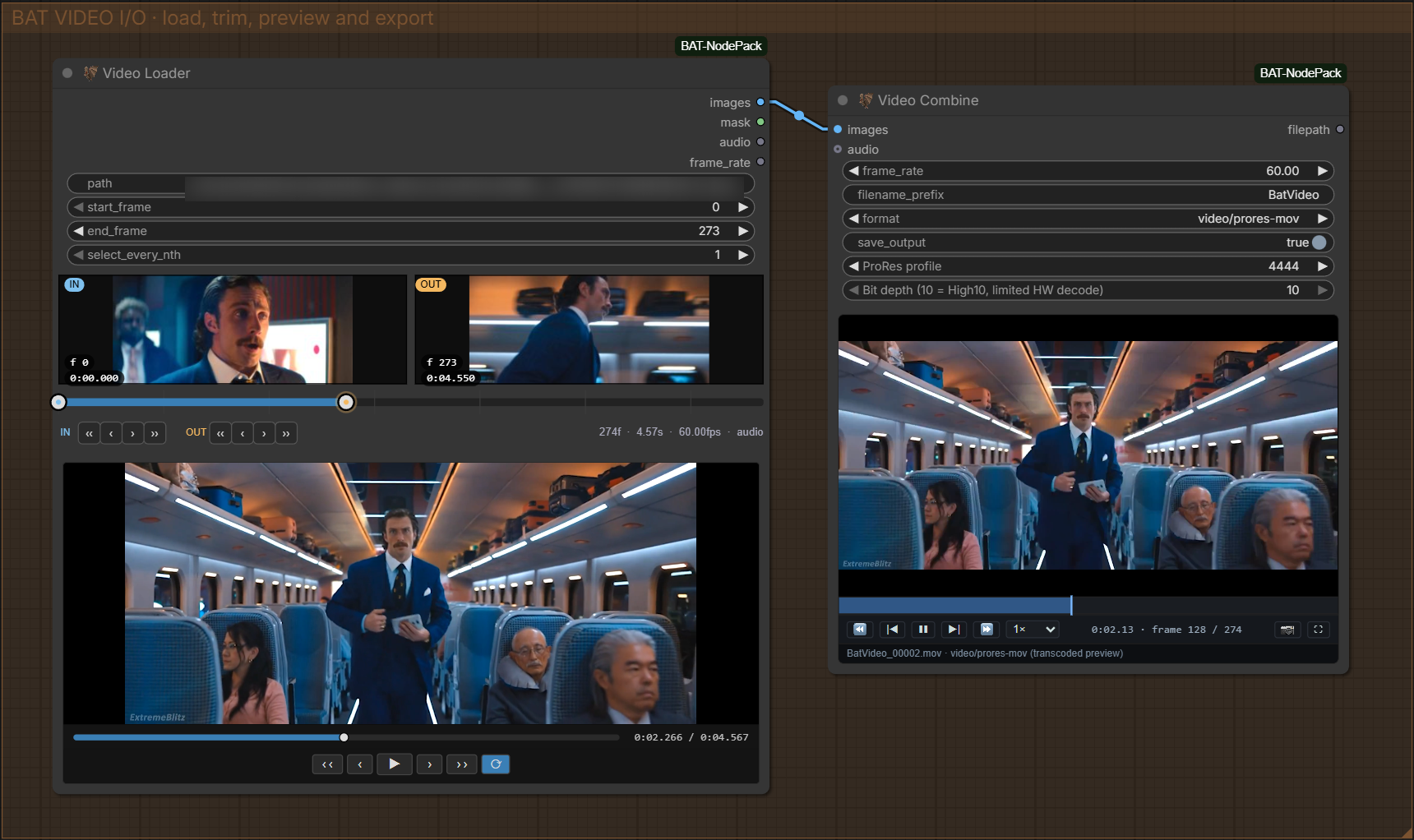
Video Loader → Video Combine.
Animated Crop, Animated Grade, and Roto put keyframes on the node. Uncrop places a processed crop back into its source frame.
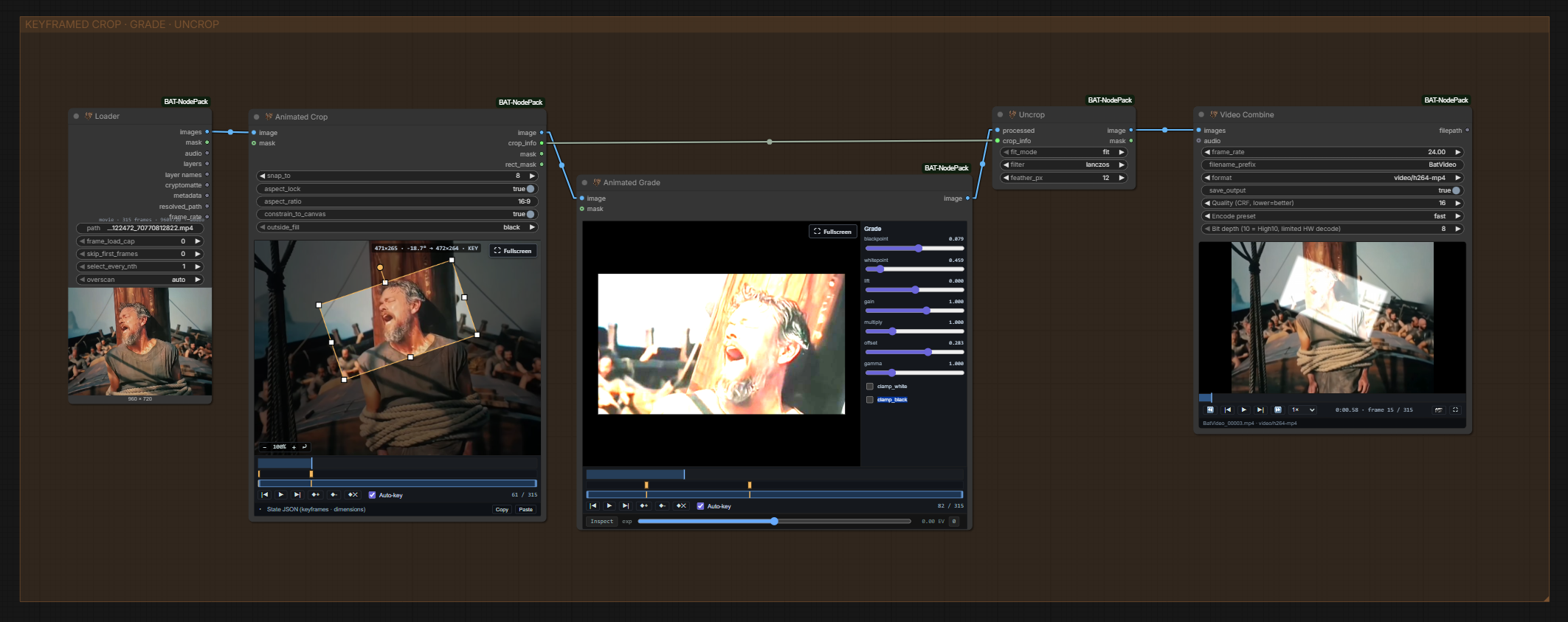
Animated Crop → Animated Grade → Uncrop.
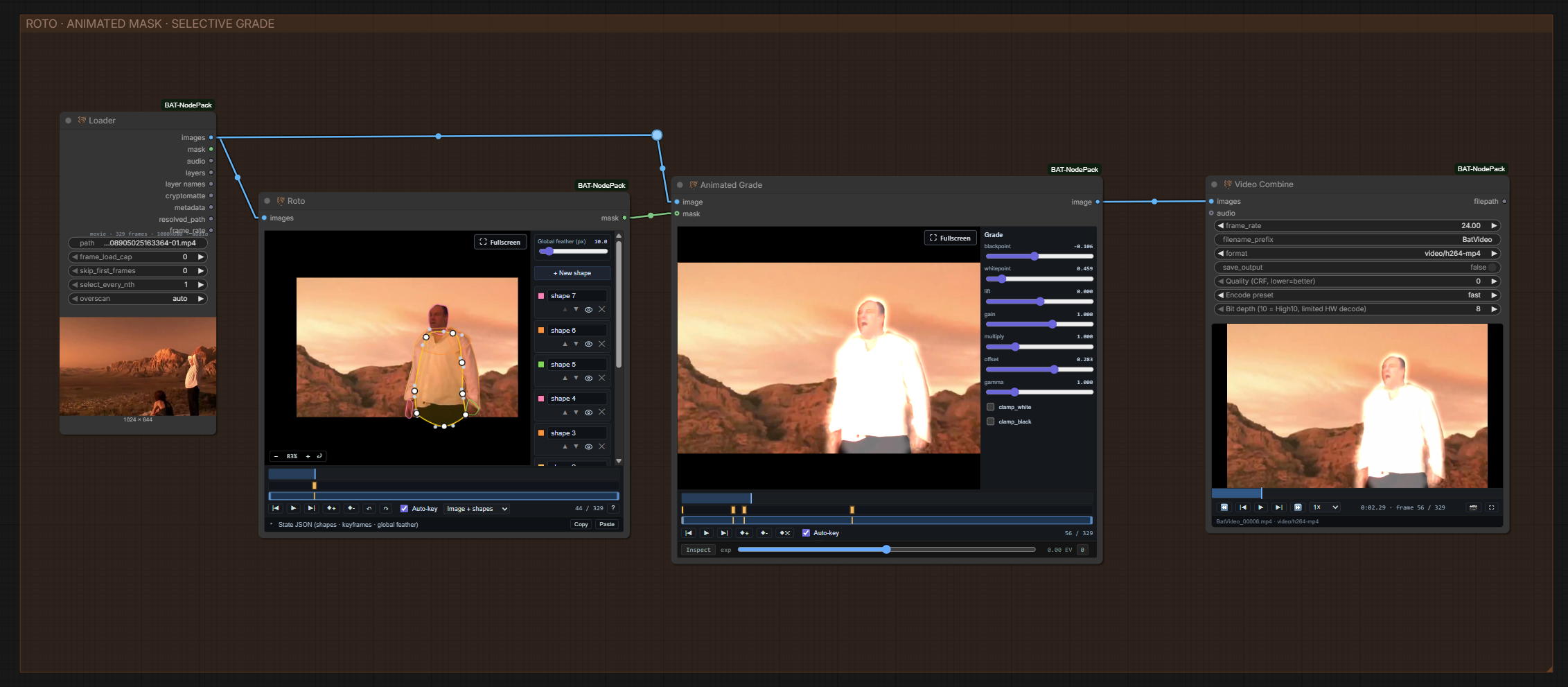
Roto mask → Animated Grade.
Grade, Advanced Blend, Layered Images, and Rescale cover common compositing tasks. The HDR nodes handle exposure-bracket reconstruction and tonal blending.
SeC Segmenter tracks an object mask through a clip from points or a box. It needs extra setup.
BAT Profiler shows per-node time, RAM, and VRAM in the sidebar. It records run history and can copy a report.
VACE Batch Tool places image and mask keyframes into a WAN VACE 2.1 batch, with fill and premultiplication controls.
Names match the Add Node menu; the 🦇 prefix is omitted here.
Loading · Video · Animation · Compositing · SeC · WAN / VACE · Helpers · Graph utilities
| Node | Use it to… |
|---|---|
| Loader | Load stills, sequences, folders, movies, and layered EXRs. |
| EXR Layer | Extract a named EXR pass. |
| Cryptomatte Matte | Make an EXR object mask from clicked points. |
| Node | Use it to… |
|---|---|
| Video Loader | Preview and trim video, with audio and alpha. |
| Video Combine | Export video, GIF, WebP, or image sequences. |
| BAT Frame Picker | Choose a frame from a contact sheet. |
| Framehold | Hold one frame across a batch. |
| Video Grid Split | Split video into overlapping grid regions. |
| Batch Format | Match frame counts for supported video models. |
| Node | Use it to… |
|---|---|
| Crop | Draw a crop for later Uncrop. |
| Animated Crop | Keyframe a moving crop. |
| Uncrop | Return a processed crop to its source. |
| Animated Grade | Keyframe colour adjustments. |
| Roto | Draw animated Bézier masks. |
| Grow Mask | Expand mask edges. |
| Erode Mask | Shrink mask edges. |
| Node | Use it to… |
|---|---|
| Grade | Adjust blackpoint, lift, gain, and gamma. |
| Advanced Blend | Blend images; mix tone and detail separately. |
| Layered Images | Composite up to eight masked layers. |
| Rescale | Resize while comparing at a fixed viewing size. |
| Exposure Bracket | Prepare exposures for LTX HDR reconstruction. |
| Exposure Merge | Merge reconstructed passes into linear HDR. |
| HDR Tonal Composite | Blend reconstructed shadows and highlights into a shot. |
The HDR nodes work with a separate LTX reconstruction workflow. Export their linear output in a suitable format such as EXR.
| Node | Use it to… |
|---|---|
| SeC Segmenter | Track an object mask through video. |
| SeC Advanced Params | Set model, device, and tracking options. |
| Node | Use it to… |
|---|---|
| VACE Batch Tool | Arrange WAN VACE 2.1 image and mask keyframes. |
| WAN Context Calculator | Set context, stride, and overlap. |
| WAN Batch Format | Prepare and pad a WAN video batch. |
| Batch Crop | Remove padding after generation. |
| Wan Reference Aligner | Align references with WAN context windows. |
| Node | Use it to… |
|---|---|
| Points Editor | Place labelled points on an image. |
| Filename Prefix | Build output names from workflow context. |
| Bypass Switch | Toggle bypass for node groups and backdrops. |
| Node | Use it to… |
|---|---|
| Show Any | Display a value and pass it through. |
| Show Tensor Shape | Show a tensor's shape, range, and memory use. |
| Convert Any | Convert to text, number, or boolean. |
| Any to String | Render a value as text or JSON. |
| Number to String | Format numbers with padding and precision. |
| Compare | Compare values for a boolean output. |
| Index Switch | Select one of ten inputs; others don't run. |
| List Length | Count items or frames. |
| List Index | Select an item or frame. |
| List Batch | Join lists or image batches. |
Also included, without adding a node:
Clone into your active ComfyUI installation's custom_nodes folder, then restart:
cd ComfyUI/custom_nodes
git clone https://github.com/BeeeFX/ComfyUI-BAT-NodePack.git
For Desktop, use its active custom_nodes folder. Downloading the repository ZIP also works; keep __init__.py at the folder root. Search the Add Node menu for BAT or 🦇.
Install these with the Python environment that runs ComfyUI:
python -m pip install OpenImageIO. Other Loader formats work without it.python -m pip install -r requirements.txt. Restart after installation. The default model is about 7.35 GB and downloads on first use. See model setup.To prevent the SeC model download, connect SeC Advanced Params and turn off auto_download before running.
| Goal | Nodes |
|---|---|
| Trim and export | Video Loader → Video Combine; connect frame rate and audio. |
| Moving crop | Animated Crop → processing → Uncrop; also connect crop_info. |
| EXR pass | Loader → EXR Layer → processing. |
| Object mask | Loader → Points Editor + Cryptomatte Matte. |
| Tracked mask | Video Loader → SeC Segmenter. |
Check the active custom_nodes folder, restart ComfyUI, and look for a BAT import error in the startup log.
Batch Format replaces Video Batch Format and WAN Batch Frame Format. Batch Crop was WAN Batch Crop; BAT Frame Picker replaces VRI Frame Picker. Legacy Volt_* nodes need the separate ETC migration tool or manual replacement.
For bugs or suggestions, open an issue. Include the node name and a small workflow or screenshot.
More detail: technical notes.
Made by BeeeFX.
BAT code is MIT licensed. The bundled SeC stack has separate third-party attribution and licensing; model weights are downloaded separately.
BAT is my ComfyUI node pack for video, animation, masking, and compositing. Many nodes have previews and editors directly on the graph.
On-node editors · BAT Profiler
Highlights · All nodes · Install · Example workflows · Help
Loader reads stills, sequences, folders, movies, and layered EXRs. Video Loader offers visual trimming. Video Combine exports video, GIF, WebP, or image sequences.
For EXRs, EXR Layer selects passes and Cryptomatte Matte builds masks from clicked points. Audio and alpha are available where the source supports them.
Video Loader → Video Combine.
Animated Crop, Animated Grade, and Roto put keyframes on the node. Uncrop places a processed crop back into its source frame.
Animated Crop → Animated Grade → Uncrop.
Roto mask → Animated Grade.
Grade, Advanced Blend, Layered Images, and Rescale cover common compositing tasks. The HDR nodes handle exposure-bracket reconstruction and tonal blending.
SeC Segmenter tracks an object mask through a clip from points or a box. It needs extra setup.
BAT Profiler shows per-node time, RAM, and VRAM in the sidebar. It records run history and can copy a report.
VACE Batch Tool places image and mask keyframes into a WAN VACE 2.1 batch, with fill and premultiplication controls.
Names match the Add Node menu; the 🦇 prefix is omitted here.
Loading · Video · Animation · Compositing · SeC · WAN / VACE · Helpers · Graph utilities
| Node | Use it to… |
|---|---|
| Loader | Load stills, sequences, folders, movies, and layered EXRs. |
| EXR Layer | Extract a named EXR pass. |
| Cryptomatte Matte | Make an EXR object mask from clicked points. |
| Node | Use it to… |
|---|---|
| Video Loader | Preview and trim video, with audio and alpha. |
| Video Combine | Export video, GIF, WebP, or image sequences. |
| BAT Frame Picker | Choose a frame from a contact sheet. |
| Framehold | Hold one frame across a batch. |
| Video Grid Split | Split video into overlapping grid regions. |
| Batch Format | Match frame counts for supported video models. |
| Node | Use it to… |
|---|---|
| Crop | Draw a crop for later Uncrop. |
| Animated Crop | Keyframe a moving crop. |
| Uncrop | Return a processed crop to its source. |
| Animated Grade | Keyframe colour adjustments. |
| Roto | Draw animated Bézier masks. |
| Grow Mask | Expand mask edges. |
| Erode Mask | Shrink mask edges. |
| Node | Use it to… |
|---|---|
| Grade | Adjust blackpoint, lift, gain, and gamma. |
| Advanced Blend | Blend images; mix tone and detail separately. |
| Layered Images | Composite up to eight masked layers. |
| Rescale | Resize while comparing at a fixed viewing size. |
| Exposure Bracket | Prepare exposures for LTX HDR reconstruction. |
| Exposure Merge | Merge reconstructed passes into linear HDR. |
| HDR Tonal Composite | Blend reconstructed shadows and highlights into a shot. |
The HDR nodes work with a separate LTX reconstruction workflow. Export their linear output in a suitable format such as EXR.
| Node | Use it to… |
|---|---|
| SeC Segmenter | Track an object mask through video. |
| SeC Advanced Params | Set model, device, and tracking options. |
| Node | Use it to… |
|---|---|
| VACE Batch Tool | Arrange WAN VACE 2.1 image and mask keyframes. |
| WAN Context Calculator | Set context, stride, and overlap. |
| WAN Batch Format | Prepare and pad a WAN video batch. |
| Batch Crop | Remove padding after generation. |
| Wan Reference Aligner | Align references with WAN context windows. |
| Node | Use it to… |
|---|---|
| Points Editor | Place labelled points on an image. |
| Filename Prefix | Build output names from workflow context. |
| Bypass Switch | Toggle bypass for node groups and backdrops. |
| Node | Use it to… |
|---|---|
| Show Any | Display a value and pass it through. |
| Show Tensor Shape | Show a tensor's shape, range, and memory use. |
| Convert Any | Convert to text, number, or boolean. |
| Any to String | Render a value as text or JSON. |
| Number to String | Format numbers with padding and precision. |
| Compare | Compare values for a boolean output. |
| Index Switch | Select one of ten inputs; others don't run. |
| List Length | Count items or frames. |
| List Index | Select an item or frame. |
| List Batch | Join lists or image batches. |
Also included, without adding a node:
Clone into your active ComfyUI installation's custom_nodes folder, then restart:
cd ComfyUI/custom_nodes
git clone https://github.com/BeeeFX/ComfyUI-BAT-NodePack.git
For Desktop, use its active custom_nodes folder. Downloading the repository ZIP also works; keep __init__.py at the folder root. Search the Add Node menu for BAT or 🦇.
Install these with the Python environment that runs ComfyUI:
python -m pip install OpenImageIO. Other Loader formats work without it.python -m pip install -r requirements.txt. Restart after installation. The default model is about 7.35 GB and downloads on first use. See model setup.To prevent the SeC model download, connect SeC Advanced Params and turn off auto_download before running.
| Goal | Nodes |
|---|---|
| Trim and export | Video Loader → Video Combine; connect frame rate and audio. |
| Moving crop | Animated Crop → processing → Uncrop; also connect crop_info. |
| EXR pass | Loader → EXR Layer → processing. |
| Object mask | Loader → Points Editor + Cryptomatte Matte. |
| Tracked mask | Video Loader → SeC Segmenter. |
Check the active custom_nodes folder, restart ComfyUI, and look for a BAT import error in the startup log.
Batch Format replaces Video Batch Format and WAN Batch Frame Format. Batch Crop was WAN Batch Crop; BAT Frame Picker replaces VRI Frame Picker. Legacy Volt_* nodes need the separate ETC migration tool or manual replacement.
For bugs or suggestions, open an issue. Include the node name and a small workflow or screenshot.
More detail: technical notes.
Made by BeeeFX.
BAT code is MIT licensed. The bundled SeC stack has separate third-party attribution and licensing; model weights are downloaded separately.



