Visualize CPU cache behavior in real-time. See exactly which lines of your code cause cache misses.
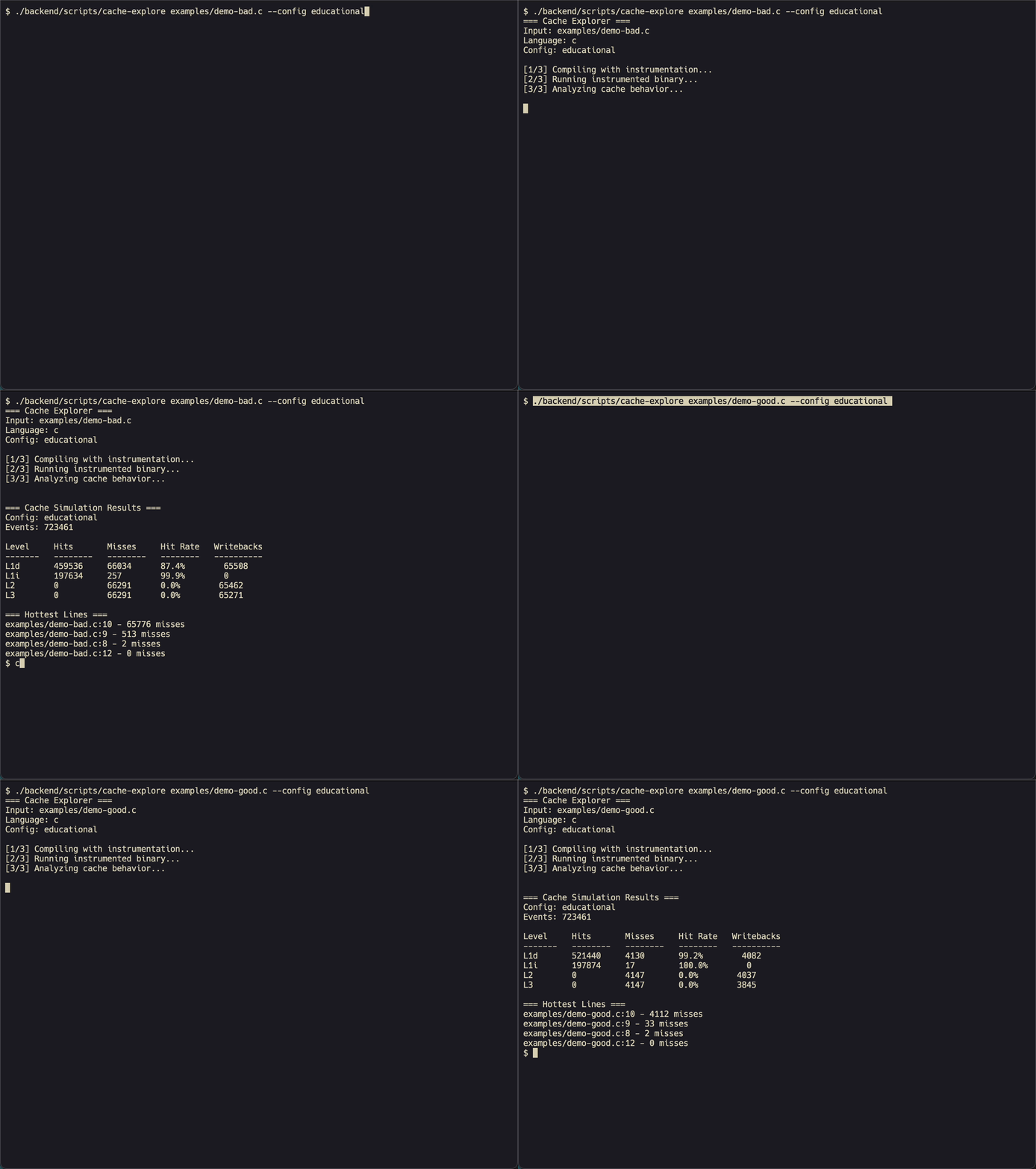
Before: "Why is my code slow?" → Guesswork, profilers, prayer
After: Exact line-by-line cache miss attribution
git clone https://github.com/AveryClapp/cache-explorer.git
cd cache-explorer
docker-compose up --build
# Open http://localhost:8080
# Check health with: docker compose ps
# Product health is proxied at http://localhost:8080/health
git clone https://github.com/AveryClapp/cache-explorer.git
cd cache-explorer

# Build if needed, install npm deps if needed, then run backend + frontend
./scripts/doctor.sh
./scripts/dev.sh
# Open the frontend URL it prints
./backend/scripts/cache-explore mycode.c --config intel --json
Release builds publish pre-built CacheProfiler LLVM passes for supported LLVM
versions. The download helper uses the official release repo by default and
verifies binaries against the release SHA256SUMS manifest when it is present:
./backend/scripts/cache-explore-download-pass 21
CACHE_EXPLORER_REQUIRE_CHECKSUM=1 ./backend/scripts/cache-explore-download-pass 21
| Vendor | Presets |
|---|---|
| Intel | 12th Gen, 14th Gen, Xeon, Sapphire Rapids |
| AMD | Zen 3, Zen 4, EPYC |
| Apple | M1, M2, M3 |
| ARM | AWS Graviton 3, Raspberry Pi 4 |
| Learning | Educational (tiny caches to see misses easily) |
Source Code (.c/.cpp)
        │
        ▼
┌───────────────────────┐
│  LLVM Pass            │  Instruments every load/store
└───────────────────────┘
        │
        ▼
┌───────────────────────┐
│  Runtime Library      │  Captures: address, size, file:line
└───────────────────────┘
        │
        ▼
┌───────────────────────┐
│  Cache Simulator      │  MESI coherence, prefetching, TLB
└───────────────────────┘
        │
        ▼
┌───────────────────────┐
│  Web UI / JSON        │  Real-time visualization
└───────────────────────┘
brew install llvm@18 cmake ninja node
export PATH="/opt/homebrew/opt/llvm@18/bin:$PATH"
wget https://apt.llvm.org/llvm.sh
chmod +x llvm.sh
sudo ./llvm.sh 18
sudo apt install cmake ninja-build nodejs npm
git clone https://github.com/AveryClapp/cache-explorer.git
cd cache-explorer

# Start the full local product
./scripts/doctor.sh
./scripts/dev.sh
# Basic analysis
cache-explore mycode.c --config intel

# With prefetching simulation
cache-explore mycode.c --config amd --prefetch stream

# Fast mode (3x faster, skips 3C classification)
cache-explore mycode.c --fast

# JSON output for scripting
cache-explore mycode.c --json

# Custom optimization level
cache-explore mycode.c -O3 --config apple

# List modeled hardware profile IDs
./backend/scripts/cache-explore profiles --ids

# Real-kernel hardware experiment
./backend/scripts/cache-explore examples/conv2d_kernel.c -O2 --hardware intel14 --json
./backend/scripts/cache-explore examples/conv2d_kernel.c -O2 -D RUN_TILED=1 --hardware intel14 --json
./backend/scripts/cache-explore compare examples/conv2d_kernel.c -O2 --configs educational,intel14,zen4,m3

# Compare named kernel variants across hardware profiles
./backend/scripts/cache-explore experiment examples/conv2d_kernel.c -O2 \
  --variant direct \
  --variant tiled:RUN_TILED=1 \
  --configs educational,intel14,zen4,m3 \
  --limit 200000
cd backend/cache-simulator/build
./CacheLevelTest        # 22 tests
./CacheSystemTest       # 25 tests
./MESICoherenceTest     # 19 tests
./MultiCorePrefetchTest # 18 tests
./MultiCoreTLBTest      # 8 tests
./MultiCoreTraceProcessorTest # 2 tests
./AdvancedInstrumentationTest # 31 tests
Frontend build and browser smoke:
cd frontend
npm ci
npm run build
npm run bundle:check
npm run tokens:check
npm run diagnostics:check
npm run smoke:ui
npm run visual:check
Calibration evidence packets can be validated without running benchmarks:
./backend/scripts/cache-explore calibration
Workload verification can also write benchmark-history artifacts and render a standalone HTML trend report:
./backend/scripts/cache-explore workloads --verify --json --history reports/workloads/history.json
./backend/scripts/cache-explore workloads --history-summary reports/workloads/history.json --html \
  > reports/workloads/history.html
On pushes to main, the Workload Dashboard workflow restores retained
workload-history JSON from the published Pages dashboard and the Actions cache,
keeps the latest 30 runs, and publishes an HTML trend report plus a
workload-history-index.json manifest to GitHub Pages when Pages is configured
for Actions.
The product workload catalog can surface that published history in-app. Point the server at either a local summary file or the hosted dashboard:
CACHE_EXPLORER_WORKLOAD_HISTORY_SUMMARY_PATH=reports/workloads/workload-history-summary.json npm start
CACHE_EXPLORER_DASHBOARD_BASE_URL=https://owner.github.io/Cache-Explorer npm start
Tagged releases include pre-built LLVM pass assets, SHA256SUMS for download
verification, and GitHub artifact attestations for release provenance.
Published GHCR Docker images include BuildKit provenance attestations and SBOMs.
The Release Validation workflow runs when a GitHub Release is published, and
can also be run manually with a tag to verify pass checksums, pass attestations,
GHCR image availability, and attach the published workload-history archive to
the release after shipping.
For hosted/server operation, see Deployment Readiness. For the empirical ladder behind hardware-profile trust labels, see Calibration Roadmap. Maintainers shipping builds should use the Release And Install Runbook.
See CONTRIBUTING.md for guidelines.
Community and maintainer docs:
MIT - See LICENSE for details.
Inspired by Compiler Explorer and Cachegrind.
529 followers · starred Jan 2026
60 followers · starred Feb 2026
1,102 followers · starred Jan 2026
1,001 followers · starred Jan 2026
Visualize CPU cache behavior in real-time. See exactly which lines of your code cause cache misses.
Before: "Why is my code slow?" → Guesswork, profilers, prayer
After: Exact line-by-line cache miss attribution
git clone https://github.com/AveryClapp/cache-explorer.git
cd cache-explorer
docker-compose up --build
# Open http://localhost:8080
# Check health with: docker compose ps
# Product health is proxied at http://localhost:8080/health
git clone https://github.com/AveryClapp/cache-explorer.git
cd cache-explorer

# Build if needed, install npm deps if needed, then run backend + frontend
./scripts/doctor.sh
./scripts/dev.sh
# Open the frontend URL it prints
./backend/scripts/cache-explore mycode.c --config intel --json
Release builds publish pre-built CacheProfiler LLVM passes for supported LLVM
versions. The download helper uses the official release repo by default and
verifies binaries against the release SHA256SUMS manifest when it is present:
./backend/scripts/cache-explore-download-pass 21
CACHE_EXPLORER_REQUIRE_CHECKSUM=1 ./backend/scripts/cache-explore-download-pass 21
| Vendor | Presets |
|---|---|
| Intel | 12th Gen, 14th Gen, Xeon, Sapphire Rapids |
| AMD | Zen 3, Zen 4, EPYC |
| Apple | M1, M2, M3 |
| ARM | AWS Graviton 3, Raspberry Pi 4 |
| Learning | Educational (tiny caches to see misses easily) |
Source Code (.c/.cpp)
        │
        ▼
┌───────────────────────┐
│  LLVM Pass            │  Instruments every load/store
└───────────────────────┘
        │
        ▼
┌───────────────────────┐
│  Runtime Library      │  Captures: address, size, file:line
└───────────────────────┘
        │
        ▼
┌───────────────────────┐
│  Cache Simulator      │  MESI coherence, prefetching, TLB
└───────────────────────┘
        │
        ▼
┌───────────────────────┐
│  Web UI / JSON        │  Real-time visualization
└───────────────────────┘
brew install llvm@18 cmake ninja node
export PATH="/opt/homebrew/opt/llvm@18/bin:$PATH"
wget https://apt.llvm.org/llvm.sh
chmod +x llvm.sh
sudo ./llvm.sh 18
sudo apt install cmake ninja-build nodejs npm
git clone https://github.com/AveryClapp/cache-explorer.git
cd cache-explorer

# Start the full local product
./scripts/doctor.sh
./scripts/dev.sh
# Basic analysis
cache-explore mycode.c --config intel

# With prefetching simulation
cache-explore mycode.c --config amd --prefetch stream

# Fast mode (3x faster, skips 3C classification)
cache-explore mycode.c --fast

# JSON output for scripting
cache-explore mycode.c --json

# Custom optimization level
cache-explore mycode.c -O3 --config apple

# List modeled hardware profile IDs
./backend/scripts/cache-explore profiles --ids

# Real-kernel hardware experiment
./backend/scripts/cache-explore examples/conv2d_kernel.c -O2 --hardware intel14 --json
./backend/scripts/cache-explore examples/conv2d_kernel.c -O2 -D RUN_TILED=1 --hardware intel14 --json
./backend/scripts/cache-explore compare examples/conv2d_kernel.c -O2 --configs educational,intel14,zen4,m3

# Compare named kernel variants across hardware profiles
./backend/scripts/cache-explore experiment examples/conv2d_kernel.c -O2 \
  --variant direct \
  --variant tiled:RUN_TILED=1 \
  --configs educational,intel14,zen4,m3 \
  --limit 200000
cd backend/cache-simulator/build
./CacheLevelTest        # 22 tests
./CacheSystemTest       # 25 tests
./MESICoherenceTest     # 19 tests
./MultiCorePrefetchTest # 18 tests
./MultiCoreTLBTest      # 8 tests
./MultiCoreTraceProcessorTest # 2 tests
./AdvancedInstrumentationTest # 31 tests
Frontend build and browser smoke:
cd frontend
npm ci
npm run build
npm run bundle:check
npm run tokens:check
npm run diagnostics:check
npm run smoke:ui
npm run visual:check
Calibration evidence packets can be validated without running benchmarks:
./backend/scripts/cache-explore calibration
Workload verification can also write benchmark-history artifacts and render a standalone HTML trend report:
./backend/scripts/cache-explore workloads --verify --json --history reports/workloads/history.json
./backend/scripts/cache-explore workloads --history-summary reports/workloads/history.json --html \
  > reports/workloads/history.html
On pushes to main, the Workload Dashboard workflow restores retained
workload-history JSON from the published Pages dashboard and the Actions cache,
keeps the latest 30 runs, and publishes an HTML trend report plus a
workload-history-index.json manifest to GitHub Pages when Pages is configured
for Actions.
The product workload catalog can surface that published history in-app. Point the server at either a local summary file or the hosted dashboard:
CACHE_EXPLORER_WORKLOAD_HISTORY_SUMMARY_PATH=reports/workloads/workload-history-summary.json npm start
CACHE_EXPLORER_DASHBOARD_BASE_URL=https://owner.github.io/Cache-Explorer npm start
Tagged releases include pre-built LLVM pass assets, SHA256SUMS for download
verification, and GitHub artifact attestations for release provenance.
Published GHCR Docker images include BuildKit provenance attestations and SBOMs.
The Release Validation workflow runs when a GitHub Release is published, and
can also be run manually with a tag to verify pass checksums, pass attestations,
GHCR image availability, and attach the published workload-history archive to
the release after shipping.
For hosted/server operation, see Deployment Readiness. For the empirical ladder behind hardware-profile trust labels, see Calibration Roadmap. Maintainers shipping builds should use the Release And Install Runbook.
See CONTRIBUTING.md for guidelines.
Community and maintainer docs:
MIT - See LICENSE for details.
Inspired by Compiler Explorer and Cachegrind.
529 followers · starred Jan 2026
60 followers · starred Feb 2026
1,102 followers · starred Jan 2026
1,001 followers · starred Jan 2026