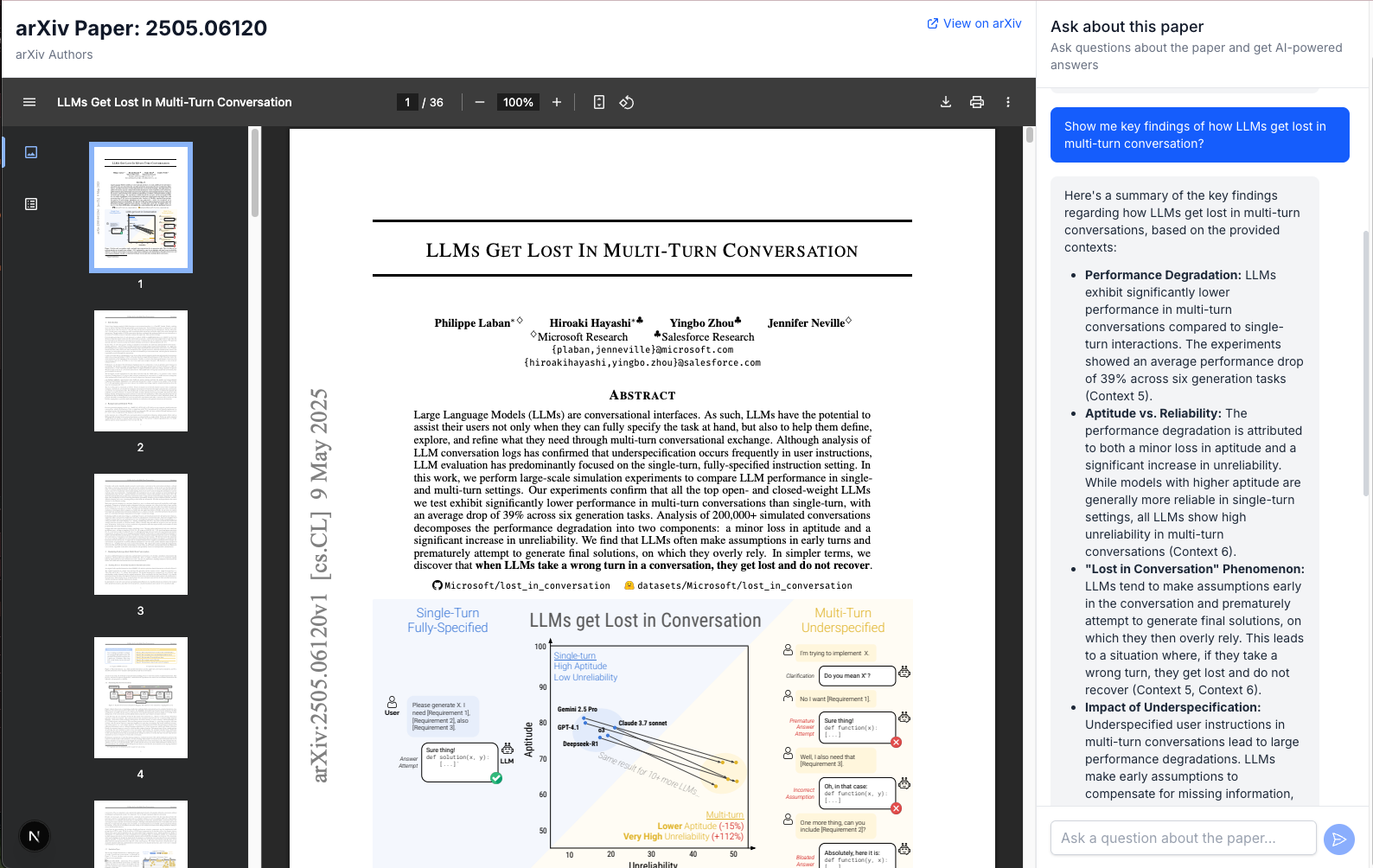
My own open-source implementation of AlphaXIV that allows users to chat with arXiv papers. This project uses FastAPI for the backend, markitdown for PDF conversion, MiniRAG for indexing, and Google's Gemini API for chat completions.
https://github.com/user-attachments/assets/e8eae8af-ad38-4e70-913e-60022157784b



AlphaXIV combines several powerful technologies to enable intelligent conversations with academic papers. Here's how it works behind the scenes:
When a user submits an arXiv paper URL, the system processes it through the following steps:
graph TD
    %% Document Processing Flow
    A[User inputs arXiv URL] --> B[Download PDF from arXiv]
    B --> C[Convert PDF to Markdown using Markitdown]
    C --> D[Process and clean Markdown content]
    D --> E[Split content into chunks]

    %% MiniRAG Heterogeneous Graph Indexing
    E --> F1[Extract named entities from chunks]
    E --> F2[Generate embeddings with OpenAI]
    F1 --> G1[Create entity nodes]
    F2 --> G2[Create text chunk nodes]
    G1 --> G3[Build entity-entity connections]
    G1 --> G4[Build entity-chunk connections]
    G2 --> G4
    G3 & G4 --> G5[Generate semantic descriptions for edges]
    G5 --> G6[Construct semantic-aware heterogeneous graph]

    subgraph "PDF Processing"
    B
    C
    D
    E
    end

    subgraph "Heterogeneous Graph Indexing"
    F1
    F2
    G1
    G2
    G3
    G4
    G5
    G6
    end

    class B,C,D,E processing;
    class F1,F2,G1,G2,G3,G4,G5,G6 indexing;
When a user asks a question about a paper, the system processes it through these steps:
graph TD
    %% Query Processing
    H[User asks question] --> I1[Extract entities from query]
    I1 --> I2[Predict potential answer types]
    I1 & I2 --> I3[Map query to graph entities]

    %% Graph-Based Knowledge Retrieval
    I3 --> J1[Identify starting nodes via semantic matching]
    J1 --> J2[Discover answer-aware entity nodes]
    J1 & J2 --> J3[Apply topology-enhanced graph retrieval]
    J3 --> J4[Score and rank reasoning paths]
    J4 --> J5[Retrieve connected text chunks]

    %% Response Generation
    J5 --> K[Combine query + retrieved context]
    K --> L[Send to Gemini API]
    L --> M[Return response to user]

    subgraph "Query Semantic Mapping"
    I1
    I2
    I3
    end

    subgraph "Topology-Enhanced Retrieval"
    J1
    J2
    J3
    J4
    J5
    end

    subgraph "Response Generation"
    K
    L
    M
    end

    class I1,I2,I3 mapping;
    class J1,J2,J3,J4,J5 retrieval;
    class K,L,M generation;
The system operates in five sophisticated phases:
PDF Processing: When you submit an arXiv URL, AlphaXIV downloads the PDF, converts it to Markdown using Microsoft's Markitdown tool, cleans the content, and splits it into manageable chunks.
Heterogeneous Graph Indexing: MiniRAG creates a semantic-aware knowledge graph with two types of nodes:
The system then builds connections between these nodes (entity-entity and entity-chunk) and generates semantic descriptions for each edge, creating a rich graph structure that captures the paper's knowledge.
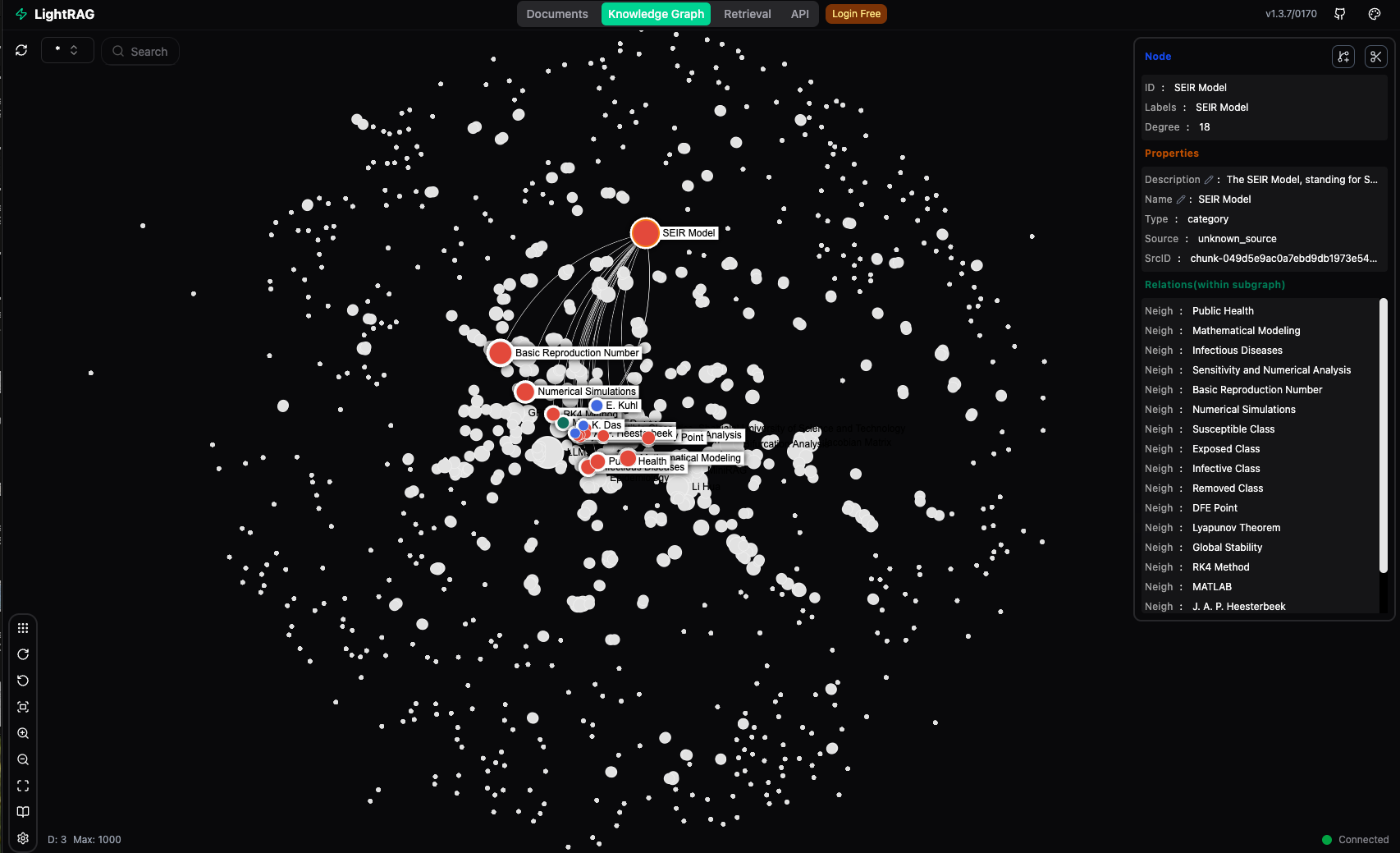
Query Semantic Mapping: When you ask a question, the system extracts entities from your query, predicts potential answer types, and maps these to the graph entities, creating an efficient bridge between your question and the knowledge graph.
Topology-Enhanced Retrieval: Unlike traditional vector-based retrieval, MiniRAG uses a sophisticated graph traversal approach:
Response Generation: The retrieved context chunks are combined with your query and sent to Google's Gemini API, which generates a comprehensive response that leverages both the semantic content and the structural relationships captured in the graph.
Markitdown is Microsoft's powerful document conversion tool that transforms various file formats (including PDFs) into clean, structured Markdown. We chose Markitdown for AlphaXIV because:
MiniRAG (distributed as LightRAG) is a lightweight, efficient Retrieval Augmented Generation system designed for simplicity and performance, based on the research paper "MiniRAG: Towards Extremely Simple Retrieval-Augmented Generation". We chose MiniRAG because:
When working with academic papers, MiniRAG's approach offers concrete benefits:
Clone the repository:
git clone https://github.com/AsyncFuncAI/alphaxiv-open
cd alphaxiv-open
Run the setup script:
./setup.sh
This will:
.env file from the exampleEdit the .env file and add your Google API key, OpenAI API key, and other configuration options.
Clone the repository:
git clone https://github.com/AsyncFuncAI/alphaxiv-open.git
cd alphaxiv-open
Run the setup script with the MiniRAG option:
./setup.sh --with-minirag
This will:
.env file from the exampleEdit the .env file and add your Google API key, OpenAI API key, and other configuration options.
Clone the repository:
git clone https://github.com/AsyncFuncAI/alphaxiv-open.git
cd alphaxiv-open
Create a virtual environment:
python -m venv venv
source venv/bin/activate  # On Windows: venv\Scripts\activate
Install dependencies:
pip install -r requirements.txt
(Optional) Install MiniRAG:
pip install lightrag-hku[api]
Create a .env file from the example:
cp .env.example .env
Edit the .env file and add your Google API key, OpenAI API key, and other configuration options.
Start the FastAPI server:
uvicorn app.main:app --reload
The API will be available at http://localhost:8000.
Use the following endpoints:
POST /api/papers/process: Process an arXiv paper URLPOST /api/chat: Chat with a processed paperIn this mode, the application will still process papers and convert them to markdown, but will use a simple keyword-based retrieval system instead of MiniRAG for context retrieval.
Install MiniRAG:
pip install lightrag-hku[api]
Configure your .env file with your OpenAI API key for embeddings:
OPENAI_API_KEY=your_openai_api_key_here
Start the MiniRAG server with OpenAI embeddings using the provided script:
python start_minirag.py
This script will read configuration from your .env file and start the MiniRAG server with the correct settings.
Alternatively, you can start the server manually:
lightrag-server --working-dir ./data/storage --chunk-size 1000 --chunk-overlap-size 200 --embedding-dim 1536 --cosine-threshold 0.4 --top-k 10 --embedding-binding openai --embedding-model text-embedding-3-small --openai-api-key your_openai_api_key_here
Note:
your_openai_api_key_here with your actual OpenAI API key, or the server will read it from the environment variable--top-k 10 parameter increases the number of context chunks returned (default is 5), which improves response quality for complex papers--embedding-dim 1536 parameter matches OpenAI's text-embedding-3-small model dimensionIn a separate terminal, start the FastAPI server:
uvicorn app.main:app --reload
The API will be available at http://localhost:8000.
Use the following endpoints:
POST /api/papers/process: Process an arXiv paper URLPOST /api/chat: Chat with a processed paperIn this mode, the application will use MiniRAG with OpenAI embeddings for advanced context retrieval, providing better results for complex academic papers.
Once the server is running, you can access the API documentation at:
http://localhost:8000/docshttp://localhost:8000/redoccurl -X POST "http://localhost:8000/api/papers/process" \
-H "Content-Type: application/json" \
-d '{"arxiv_url": "https://arxiv.org/abs/2201.08239"}'
curl -X POST "http://localhost:8000/api/chat" \
     -H "Content-Type: application/json" \
     -d '{"paper_id": "2201.08239", "query": "What is the main contribution of this paper?"}'
alphaxiv/
├── app/
│   ├── main.py                  # FastAPI entry point
│   ├── models/
│   │   ├── __init__.py
│   │   └── schemas.py           # Pydantic models
│   └── services/
│       ├── __init__.py
│       ├── arxiv_service.py     # Service for arXiv papers
│       ├── markdown_service.py  # Service for markdown conversion
│       ├── indexing_service.py  # Service for indexing with MiniRAG
│       └── gemini_service.py    # Service for Gemini API
├── data/
│   ├── papers/                  # Storage for papers
│   ├── index/                   # Storage for indices
│   └── storage/                 # Storage for MiniRAG
├── .env.example                 # Example environment variables
├── requirements.txt             # Dependencies
└── README.md                    # This file
Contributions are welcome! Feel free to:
This project is licensed under the MIT License - see the LICENSE file for details.
231 followers · starred May 2026
1,301 followers · starred Dec 2025
My own open-source implementation of AlphaXIV that allows users to chat with arXiv papers. This project uses FastAPI for the backend, markitdown for PDF conversion, MiniRAG for indexing, and Google's Gemini API for chat completions.
https://github.com/user-attachments/assets/e8eae8af-ad38-4e70-913e-60022157784b
AlphaXIV combines several powerful technologies to enable intelligent conversations with academic papers. Here's how it works behind the scenes:
When a user submits an arXiv paper URL, the system processes it through the following steps:
graph TD
    %% Document Processing Flow
    A[User inputs arXiv URL] --> B[Download PDF from arXiv]
    B --> C[Convert PDF to Markdown using Markitdown]
    C --> D[Process and clean Markdown content]
    D --> E[Split content into chunks]

    %% MiniRAG Heterogeneous Graph Indexing
    E --> F1[Extract named entities from chunks]
    E --> F2[Generate embeddings with OpenAI]
    F1 --> G1[Create entity nodes]
    F2 --> G2[Create text chunk nodes]
    G1 --> G3[Build entity-entity connections]
    G1 --> G4[Build entity-chunk connections]
    G2 --> G4
    G3 & G4 --> G5[Generate semantic descriptions for edges]
    G5 --> G6[Construct semantic-aware heterogeneous graph]

    subgraph "PDF Processing"
    B
    C
    D
    E
    end

    subgraph "Heterogeneous Graph Indexing"
    F1
    F2
    G1
    G2
    G3
    G4
    G5
    G6
    end

    class B,C,D,E processing;
    class F1,F2,G1,G2,G3,G4,G5,G6 indexing;
When a user asks a question about a paper, the system processes it through these steps:
graph TD
    %% Query Processing
    H[User asks question] --> I1[Extract entities from query]
    I1 --> I2[Predict potential answer types]
    I1 & I2 --> I3[Map query to graph entities]

    %% Graph-Based Knowledge Retrieval
    I3 --> J1[Identify starting nodes via semantic matching]
    J1 --> J2[Discover answer-aware entity nodes]
    J1 & J2 --> J3[Apply topology-enhanced graph retrieval]
    J3 --> J4[Score and rank reasoning paths]
    J4 --> J5[Retrieve connected text chunks]

    %% Response Generation
    J5 --> K[Combine query + retrieved context]
    K --> L[Send to Gemini API]
    L --> M[Return response to user]

    subgraph "Query Semantic Mapping"
    I1
    I2
    I3
    end

    subgraph "Topology-Enhanced Retrieval"
    J1
    J2
    J3
    J4
    J5
    end

    subgraph "Response Generation"
    K
    L
    M
    end

    class I1,I2,I3 mapping;
    class J1,J2,J3,J4,J5 retrieval;
    class K,L,M generation;
The system operates in five sophisticated phases:
PDF Processing: When you submit an arXiv URL, AlphaXIV downloads the PDF, converts it to Markdown using Microsoft's Markitdown tool, cleans the content, and splits it into manageable chunks.
Heterogeneous Graph Indexing: MiniRAG creates a semantic-aware knowledge graph with two types of nodes:
The system then builds connections between these nodes (entity-entity and entity-chunk) and generates semantic descriptions for each edge, creating a rich graph structure that captures the paper's knowledge.
Query Semantic Mapping: When you ask a question, the system extracts entities from your query, predicts potential answer types, and maps these to the graph entities, creating an efficient bridge between your question and the knowledge graph.
Topology-Enhanced Retrieval: Unlike traditional vector-based retrieval, MiniRAG uses a sophisticated graph traversal approach:
Response Generation: The retrieved context chunks are combined with your query and sent to Google's Gemini API, which generates a comprehensive response that leverages both the semantic content and the structural relationships captured in the graph.
Markitdown is Microsoft's powerful document conversion tool that transforms various file formats (including PDFs) into clean, structured Markdown. We chose Markitdown for AlphaXIV because:
MiniRAG (distributed as LightRAG) is a lightweight, efficient Retrieval Augmented Generation system designed for simplicity and performance, based on the research paper "MiniRAG: Towards Extremely Simple Retrieval-Augmented Generation". We chose MiniRAG because:
When working with academic papers, MiniRAG's approach offers concrete benefits:
Clone the repository:
git clone https://github.com/AsyncFuncAI/alphaxiv-open
cd alphaxiv-open
Run the setup script:
./setup.sh
This will:
.env file from the exampleEdit the .env file and add your Google API key, OpenAI API key, and other configuration options.
Clone the repository:
git clone https://github.com/AsyncFuncAI/alphaxiv-open.git
cd alphaxiv-open
Run the setup script with the MiniRAG option:
./setup.sh --with-minirag
This will:
.env file from the exampleEdit the .env file and add your Google API key, OpenAI API key, and other configuration options.
Clone the repository:
git clone https://github.com/AsyncFuncAI/alphaxiv-open.git
cd alphaxiv-open
Create a virtual environment:
python -m venv venv
source venv/bin/activate  # On Windows: venv\Scripts\activate
Install dependencies:
pip install -r requirements.txt
(Optional) Install MiniRAG:
pip install lightrag-hku[api]
Create a .env file from the example:
cp .env.example .env
Edit the .env file and add your Google API key, OpenAI API key, and other configuration options.
Start the FastAPI server:
uvicorn app.main:app --reload
The API will be available at http://localhost:8000.
Use the following endpoints:
POST /api/papers/process: Process an arXiv paper URLPOST /api/chat: Chat with a processed paperIn this mode, the application will still process papers and convert them to markdown, but will use a simple keyword-based retrieval system instead of MiniRAG for context retrieval.
Install MiniRAG:
pip install lightrag-hku[api]
Configure your .env file with your OpenAI API key for embeddings:
OPENAI_API_KEY=your_openai_api_key_here
Start the MiniRAG server with OpenAI embeddings using the provided script:
python start_minirag.py
This script will read configuration from your .env file and start the MiniRAG server with the correct settings.
Alternatively, you can start the server manually:
lightrag-server --working-dir ./data/storage --chunk-size 1000 --chunk-overlap-size 200 --embedding-dim 1536 --cosine-threshold 0.4 --top-k 10 --embedding-binding openai --embedding-model text-embedding-3-small --openai-api-key your_openai_api_key_here
Note:
your_openai_api_key_here with your actual OpenAI API key, or the server will read it from the environment variable--top-k 10 parameter increases the number of context chunks returned (default is 5), which improves response quality for complex papers--embedding-dim 1536 parameter matches OpenAI's text-embedding-3-small model dimensionIn a separate terminal, start the FastAPI server:
uvicorn app.main:app --reload
The API will be available at http://localhost:8000.
Use the following endpoints:
POST /api/papers/process: Process an arXiv paper URLPOST /api/chat: Chat with a processed paperIn this mode, the application will use MiniRAG with OpenAI embeddings for advanced context retrieval, providing better results for complex academic papers.
Once the server is running, you can access the API documentation at:
http://localhost:8000/docshttp://localhost:8000/redoccurl -X POST "http://localhost:8000/api/papers/process" \
-H "Content-Type: application/json" \
-d '{"arxiv_url": "https://arxiv.org/abs/2201.08239"}'
curl -X POST "http://localhost:8000/api/chat" \
     -H "Content-Type: application/json" \
     -d '{"paper_id": "2201.08239", "query": "What is the main contribution of this paper?"}'
alphaxiv/
├── app/
│   ├── main.py                  # FastAPI entry point
│   ├── models/
│   │   ├── __init__.py
│   │   └── schemas.py           # Pydantic models
│   └── services/
│       ├── __init__.py
│       ├── arxiv_service.py     # Service for arXiv papers
│       ├── markdown_service.py  # Service for markdown conversion
│       ├── indexing_service.py  # Service for indexing with MiniRAG
│       └── gemini_service.py    # Service for Gemini API
├── data/
│   ├── papers/                  # Storage for papers
│   ├── index/                   # Storage for indices
│   └── storage/                 # Storage for MiniRAG
├── .env.example                 # Example environment variables
├── requirements.txt             # Dependencies
└── README.md                    # This file
Contributions are welcome! Feel free to:
This project is licensed under the MIT License - see the LICENSE file for details.
231 followers · starred May 2026
1,301 followers · starred Dec 2025





