
Open-source Chrome extension for outbound research.
See the codeSee what people are saying
README

Sift
Open any company's website. One click tells you if it fits, why it matters now, and who to email.
A free, open-source Chrome extension for outbound. Runs on your own keys (Apollo, or treg with no Apollo plan, plus Jev), with no server in between.
Download ·
Install ·
Website ·
Privacy


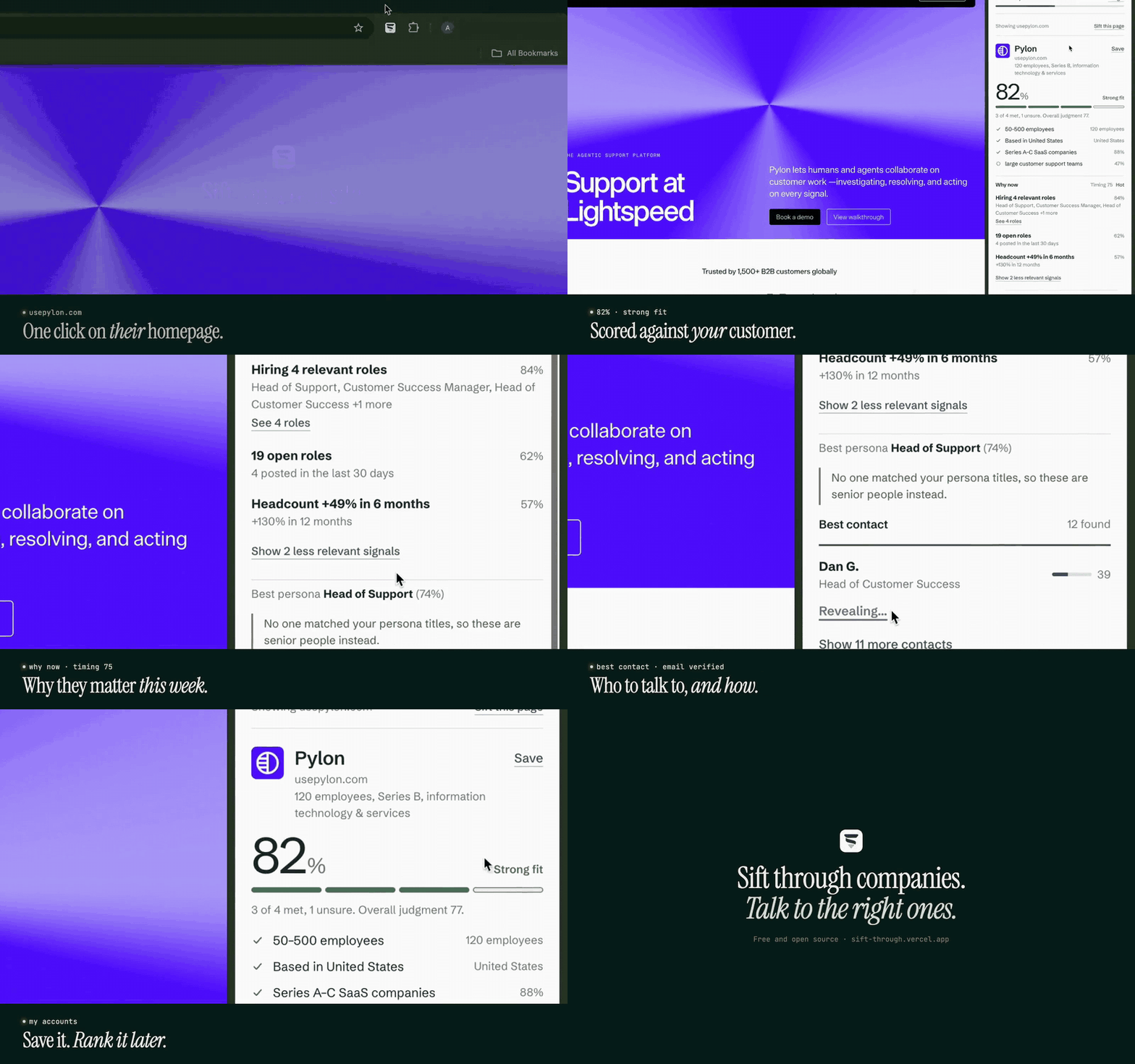
What it does
Click the Sift icon on a company's website (or press Alt+Shift+S, ⌥⇧S on a Mac) and a side panel answers:
- Does it fit? A score against your ideal customer, with every requirement shown: met, near miss, unsure or not met.
- Why now? Hiring for roles your product serves, headcount growth, funding, and what their own site says (enterprise plan, SOC 2, launches), each linked to its source.
- Who to email? The people most likely to own the problem you solve, ranked. Reveal an email in one click.
It also works on LinkedIn profiles, keeps a ranked list of My Accounts, and Discover finds companies like your best ones.
Install
Sift isn't on the Chrome Web Store yet, so you load it yourself. It takes about a minute:
- Download
sift-<version>-chrome.zipfrom the latest release and unzip it. - Open
chrome://extensionsand turn on Developer mode (top right). - Click Load unpacked and choose the unzipped folder.
- Pin Sift from the puzzle-piece menu. Its settings open by themselves: paste your two keys and answer three questions about what you sell.
Then open any company's website and click the Sift icon.
Updating: download the new release, replace the folder's contents, and press the reload icon on Sift's card in
chrome://extensions. Your keys and saved accounts stay.
What you need
| What it's for | Where to get it | Cost | |
|---|---|---|---|
| Apollo API key | Company data, people, emails | In Apollo: Settings → Integrations → API | Your Apollo credits: about 2 per new company and 1 per email revealed; finding people is free |
| or a treg API key | The same Apollo data, without an Apollo plan | treg.to | Pay per call from a treg balance: $0.026 per paid action (about $0.05 per new company), finding people is free |
| TypeSafe API key for Jev | The fit, ranking and why-now judgments | typesafe.ai | A few Jev calls per company |
Pick Apollo or treg in Settings and switch any time; both keys stay saved. Every paid action shows its price on the button (in credits, or dollars through treg), results are cached for 7 days so revisits are free, and you can set a monthly budget. Details are under Costs.
Privacy: no backend
- No Sift server, no account, no analytics. Sift talks straight from your browser to Apollo (or treg, if you choose it) and TypeSafe.
- Your keys, settings and saved accounts stay in your browser's local storage.
- Sift reads a website only when you click its icon there. It has no "read all websites" permission, and on LinkedIn it uses only the page address.
- If you choose treg, it forwards your lookups to Apollo and bills your treg account, so it sees the same requests Apollo would.
- The code is all here; the full policy is in PRIVACY.md.
More detail
On a LinkedIn profile, Sift identifies the person from the page address (Apollo, 1 credit, their email included), runs the same lookup on their company, and shows where they rank among the people there. It never reads LinkedIn pages.
Reveal all reveals every remaining email at once, showing the credit cost first. The best contacts are shown up front (two if two are nearly as good); the rest are one click away.
Discover (a tab in My Accounts) finds companies like your best saved accounts with Apollo's lookalike search, already filtered by your ICP's size and country and skipping anything you've saved, viewed or dismissed. 50 suggestions cost 1 credit and are kept for 7 days.
My Accounts is a full-page list of saved and recently viewed companies, ranked by priority (60% fit + 40% timing), with a status (New / Contacted / Replied / Not a fit), notes, search, a "Hot only" filter, per-account refresh and CSV export.
Sift this page: after you switch tabs, the panel offers to sift the page you're on. The first time, Chrome asks for the optional tabs permission, used only to read that tab's address when you press it.
Permissions: activeTab and scripting (only when you click the icon), sidePanel, storage, optional tabs, and host access to api.apollo.io, api.typesafe.ai and treg.to only.
Costs
Per Apollo's API pricing:
| Action | Cost |
|---|---|
| New company lookup | 2 Apollo credits: 1 for the company, 1 for job postings. Turn off hiring signals in Settings to make it 1 |
| People search | Free |
| LinkedIn profile | 1 credit to identify the person (their email comes with it), plus the company lookup if it isn't cached. Revisits within 30 days are free |
| Discover search | 1 credit per 50 suggestions (repeat visits within 7 days are free) |
| Fit, persona, ranking, why now | Three Jev calls, a few thousand input tokens per lookup |
| Reveal email | 1 Apollo credit, and the button says so |
Results are cached per domain for 7 days, so revisits are free. Revealed emails are kept for good.
The side panel shows a credit bar. With an Apollo master API key it shows your team's real balance. Other keys can't read the balance, so Sift counts its own spending this month instead. You can set a monthly budget: once it's reached, new lookups ask before spending.
Through treg
treg's apollo.* endpoints pass Sift's requests to Apollo unchanged and return Apollo's answer, so every feature works the same. Each call carries a cost cap, and the exact charge is added to the month's spend.
| Sift call | treg endpoint | Price |
|---|---|---|
| Find people | apollo.people.search | free |
| Company | apollo.companies.enrich | $0.026 |
| Job postings | apollo.companies.jobs | $0.026 per page |
| Discover lookalikes | apollo.companies.search | $0.026 per page |
| Reveal email, LinkedIn profile | apollo.people.enrich | $0.026, only when found |
The credit bar shows your treg balance, and the monthly budget is set in dollars.
Setup in detail
The settings page opens on install:
- Keys: choose where company and people data comes from (your Apollo key, or treg), then paste that key and your TypeSafe key. Keys are checked and saved as you paste them; switch sources from the dropdown any time.
- What you sell: three plain-English answers (what you sell, your ideal customer, who buys).
- Generate rules, then edit them:
- Company size and countries are checked exactly against Apollo data.
- Each company check ("B2B SaaS", "large support team") is a yes/no question for Jev.
- Who to look for (all prefilled): titles, seniority levels, keywords (single words such as "operations", which find titles you didn't list) and titles to leave out. People search costs no credits.
Build from source
npm install
npm run build        # outputs .output/chrome-mv3
Then open chrome://extensions, turn on Developer mode, click Load unpacked, and pick .output/chrome-mv3.
For development, npm run dev starts Chrome with the extension loaded and hot reload on.
The Chrome Web Store submission kit (listing text, permission justifications, screenshots) is in store/.
How it works
click icon → domain → Apollo company lookup
                        ├─ rules (code): headcount, country
                        ├─ Jev #1: fit score + yes/no checks + best persona   ┐ run in
                        ├─ Apollo people search (persona titles)              │ parallel
                        ├─ Apollo job postings                                │
                        └─ read the site: pricing, blog, changelog, security  ┘
                      → Jev #2: rank each person    ┐ parallel
                      → Jev #3: why now signals     │  (roles and site snippets
                                                    ┘   judged in batches of 10)
                      → side panel
Everything runs in the extension's background worker. See SPEC.md for the full design and log.md for the change history.
Tested with 131 Vitest unit tests and 37 Playwright browser checks, with CI on every push.
Develop
npm test             # unit tests
npm run compile      # type-check
APOLLO_KEY=... TYPESAFE_KEY=... npm test   # also runs the live end-to-end test (spends 2 Apollo credits)
TREG_TOKEN=trg_live_... npx vitest run src/lib/treg.live.test.ts   # Sift's Apollo calls live through treg (about $0.08)
TYPESAFE_KEY=... node eval/roles-eval.mjs  # compares role-question wordings on labelled roles
TYPESAFE_KEY=... node eval/site-signals-eval.mjs  # checks website-snippet labelling
SITES=https://linear.app/ npx vitest run src/lib/site-scan.live.test.ts --silent=false  # website reader on real sites
npm run build && npm run smoke             # loads the built extension in Chromium, checks the UI, screenshots every page (no API calls)
npm run build && npm run store-shots       # regenerates the Chrome Web Store images in store/
npm run zip                                # packages .output/sift-<version>-chrome.zip for upload

npm run site:dev                           # the landing page (site/), which runs the real side panel with sample data
npm run site:build                         # builds it to site/dist (what Vercel deploys, see vercel.json)

CI (`.github/workflows/ci.yml`) runs the type-check, unit tests, build and smoke test on every push. It needs no API keys and spends no credits.
Code map:
src/entrypoints/background.ts   icon click, messages, key tests
src/entrypoints/sidepanel/      the panel UI
src/entrypoints/options/        setup, rules editor, credits
src/entrypoints/accounts/       My Accounts page
src/lib/accounts.ts             priority, ranking, filters for My Accounts
src/lib/discover.ts             lookalike query, seeds, candidate merging (Discover)
src/lib/pipeline.ts             lookup orchestration and reveals
src/lib/apollo.ts, jev.ts       API clients
src/lib/questions.ts            every Jev question, in one place
src/lib/rules.ts                ICP text → rules; exact rule checks
src/lib/signals.ts              Apollo facts → why-now candidate signals
src/lib/credits.ts              credit ledger, budget, Apollo balance parsing
src/lib/site-scan.ts            website reader injected into the tab (self-contained)
src/lib/site-types.ts           the fixed library of website signal types
eval/roles-eval.mjs             wording eval for the per-role Jev question
src/lib/mapping.ts              Jev answers → fit, persona, ranking, why now
Roadmap
- Phone numbers through an optional self-hosted relay
License
MIT
Similar repos


Open-source Chrome extension for outbound research.
See the codeSee what people are saying
README
Sift
Open any company's website. One click tells you if it fits, why it matters now, and who to email.
A free, open-source Chrome extension for outbound. Runs on your own keys (Apollo, or treg with no Apollo plan, plus Jev), with no server in between.
Download ·
Install ·
Website ·
Privacy
What it does
Click the Sift icon on a company's website (or press Alt+Shift+S, ⌥⇧S on a Mac) and a side panel answers:
- Does it fit? A score against your ideal customer, with every requirement shown: met, near miss, unsure or not met.
- Why now? Hiring for roles your product serves, headcount growth, funding, and what their own site says (enterprise plan, SOC 2, launches), each linked to its source.
- Who to email? The people most likely to own the problem you solve, ranked. Reveal an email in one click.
It also works on LinkedIn profiles, keeps a ranked list of My Accounts, and Discover finds companies like your best ones.
Install
Sift isn't on the Chrome Web Store yet, so you load it yourself. It takes about a minute:
- Download
sift-<version>-chrome.zipfrom the latest release and unzip it. - Open
chrome://extensionsand turn on Developer mode (top right). - Click Load unpacked and choose the unzipped folder.
- Pin Sift from the puzzle-piece menu. Its settings open by themselves: paste your two keys and answer three questions about what you sell.
Then open any company's website and click the Sift icon.
Updating: download the new release, replace the folder's contents, and press the reload icon on Sift's card in
chrome://extensions. Your keys and saved accounts stay.
What you need
| What it's for | Where to get it | Cost | |
|---|---|---|---|
| Apollo API key | Company data, people, emails | In Apollo: Settings → Integrations → API | Your Apollo credits: about 2 per new company and 1 per email revealed; finding people is free |
| or a treg API key | The same Apollo data, without an Apollo plan | treg.to | Pay per call from a treg balance: $0.026 per paid action (about $0.05 per new company), finding people is free |
| TypeSafe API key for Jev | The fit, ranking and why-now judgments | typesafe.ai | A few Jev calls per company |
Pick Apollo or treg in Settings and switch any time; both keys stay saved. Every paid action shows its price on the button (in credits, or dollars through treg), results are cached for 7 days so revisits are free, and you can set a monthly budget. Details are under Costs.
Privacy: no backend
- No Sift server, no account, no analytics. Sift talks straight from your browser to Apollo (or treg, if you choose it) and TypeSafe.
- Your keys, settings and saved accounts stay in your browser's local storage.
- Sift reads a website only when you click its icon there. It has no "read all websites" permission, and on LinkedIn it uses only the page address.
- If you choose treg, it forwards your lookups to Apollo and bills your treg account, so it sees the same requests Apollo would.
- The code is all here; the full policy is in PRIVACY.md.
More detail
On a LinkedIn profile, Sift identifies the person from the page address (Apollo, 1 credit, their email included), runs the same lookup on their company, and shows where they rank among the people there. It never reads LinkedIn pages.
Reveal all reveals every remaining email at once, showing the credit cost first. The best contacts are shown up front (two if two are nearly as good); the rest are one click away.
Discover (a tab in My Accounts) finds companies like your best saved accounts with Apollo's lookalike search, already filtered by your ICP's size and country and skipping anything you've saved, viewed or dismissed. 50 suggestions cost 1 credit and are kept for 7 days.
My Accounts is a full-page list of saved and recently viewed companies, ranked by priority (60% fit + 40% timing), with a status (New / Contacted / Replied / Not a fit), notes, search, a "Hot only" filter, per-account refresh and CSV export.
Sift this page: after you switch tabs, the panel offers to sift the page you're on. The first time, Chrome asks for the optional tabs permission, used only to read that tab's address when you press it.
Permissions: activeTab and scripting (only when you click the icon), sidePanel, storage, optional tabs, and host access to api.apollo.io, api.typesafe.ai and treg.to only.
Costs
Per Apollo's API pricing:
| Action | Cost |
|---|---|
| New company lookup | 2 Apollo credits: 1 for the company, 1 for job postings. Turn off hiring signals in Settings to make it 1 |
| People search | Free |
| LinkedIn profile | 1 credit to identify the person (their email comes with it), plus the company lookup if it isn't cached. Revisits within 30 days are free |
| Discover search | 1 credit per 50 suggestions (repeat visits within 7 days are free) |
| Fit, persona, ranking, why now | Three Jev calls, a few thousand input tokens per lookup |
| Reveal email | 1 Apollo credit, and the button says so |
Results are cached per domain for 7 days, so revisits are free. Revealed emails are kept for good.
The side panel shows a credit bar. With an Apollo master API key it shows your team's real balance. Other keys can't read the balance, so Sift counts its own spending this month instead. You can set a monthly budget: once it's reached, new lookups ask before spending.
Through treg
treg's apollo.* endpoints pass Sift's requests to Apollo unchanged and return Apollo's answer, so every feature works the same. Each call carries a cost cap, and the exact charge is added to the month's spend.
| Sift call | treg endpoint | Price |
|---|---|---|
| Find people | apollo.people.search | free |
| Company | apollo.companies.enrich | $0.026 |
| Job postings | apollo.companies.jobs | $0.026 per page |
| Discover lookalikes | apollo.companies.search | $0.026 per page |
| Reveal email, LinkedIn profile | apollo.people.enrich | $0.026, only when found |
The credit bar shows your treg balance, and the monthly budget is set in dollars.
Setup in detail
The settings page opens on install:
- Keys: choose where company and people data comes from (your Apollo key, or treg), then paste that key and your TypeSafe key. Keys are checked and saved as you paste them; switch sources from the dropdown any time.
- What you sell: three plain-English answers (what you sell, your ideal customer, who buys).
- Generate rules, then edit them:
- Company size and countries are checked exactly against Apollo data.
- Each company check ("B2B SaaS", "large support team") is a yes/no question for Jev.
- Who to look for (all prefilled): titles, seniority levels, keywords (single words such as "operations", which find titles you didn't list) and titles to leave out. People search costs no credits.
Build from source
npm install
npm run build        # outputs .output/chrome-mv3
Then open chrome://extensions, turn on Developer mode, click Load unpacked, and pick .output/chrome-mv3.
For development, npm run dev starts Chrome with the extension loaded and hot reload on.
The Chrome Web Store submission kit (listing text, permission justifications, screenshots) is in store/.
How it works
click icon → domain → Apollo company lookup
                        ├─ rules (code): headcount, country
                        ├─ Jev #1: fit score + yes/no checks + best persona   ┐ run in
                        ├─ Apollo people search (persona titles)              │ parallel
                        ├─ Apollo job postings                                │
                        └─ read the site: pricing, blog, changelog, security  ┘
                      → Jev #2: rank each person    ┐ parallel
                      → Jev #3: why now signals     │  (roles and site snippets
                                                    ┘   judged in batches of 10)
                      → side panel
Everything runs in the extension's background worker. See SPEC.md for the full design and log.md for the change history.
Tested with 131 Vitest unit tests and 37 Playwright browser checks, with CI on every push.
Develop
npm test             # unit tests
npm run compile      # type-check
APOLLO_KEY=... TYPESAFE_KEY=... npm test   # also runs the live end-to-end test (spends 2 Apollo credits)
TREG_TOKEN=trg_live_... npx vitest run src/lib/treg.live.test.ts   # Sift's Apollo calls live through treg (about $0.08)
TYPESAFE_KEY=... node eval/roles-eval.mjs  # compares role-question wordings on labelled roles
TYPESAFE_KEY=... node eval/site-signals-eval.mjs  # checks website-snippet labelling
SITES=https://linear.app/ npx vitest run src/lib/site-scan.live.test.ts --silent=false  # website reader on real sites
npm run build && npm run smoke             # loads the built extension in Chromium, checks the UI, screenshots every page (no API calls)
npm run build && npm run store-shots       # regenerates the Chrome Web Store images in store/
npm run zip                                # packages .output/sift-<version>-chrome.zip for upload

npm run site:dev                           # the landing page (site/), which runs the real side panel with sample data
npm run site:build                         # builds it to site/dist (what Vercel deploys, see vercel.json)

CI (`.github/workflows/ci.yml`) runs the type-check, unit tests, build and smoke test on every push. It needs no API keys and spends no credits.
Code map:
src/entrypoints/background.ts   icon click, messages, key tests
src/entrypoints/sidepanel/      the panel UI
src/entrypoints/options/        setup, rules editor, credits
src/entrypoints/accounts/       My Accounts page
src/lib/accounts.ts             priority, ranking, filters for My Accounts
src/lib/discover.ts             lookalike query, seeds, candidate merging (Discover)
src/lib/pipeline.ts             lookup orchestration and reveals
src/lib/apollo.ts, jev.ts       API clients
src/lib/questions.ts            every Jev question, in one place
src/lib/rules.ts                ICP text → rules; exact rule checks
src/lib/signals.ts              Apollo facts → why-now candidate signals
src/lib/credits.ts              credit ledger, budget, Apollo balance parsing
src/lib/site-scan.ts            website reader injected into the tab (self-contained)
src/lib/site-types.ts           the fixed library of website signal types
eval/roles-eval.mjs             wording eval for the per-role Jev question
src/lib/mapping.ts              Jev answers → fit, persona, ranking, why now
Roadmap
- Phone numbers through an optional self-hosted relay
License
MIT