
Runs CLI coding agents (Claude Code, Codex, Copilot, Cursor, Gemini, opencode) against a task queue. Each works in an isolated VM; output is checked by configurable auditors, then merged via git. Pools multiple provider subscriptions with quota-aware routing and fallback. C#/.NET 10, MIT-licensed.
C#
7
1,238 commits
updated Oct 5, 2026
See what people are saying
README

An autonomous coding orchestrator you can hand work to and walk away from. Give it a task — a title and a prompt against one of your repos — and CodeyBox picks a coding agent, runs it inside a throwaway VM, and then does the part that makes walking away possible: it puts the change in front of a panel of auditors, sends every failing finding back to the agent as rework, and only lands the change on your branch (and on GitHub, if you point it there) once every auditor on the panel passes. You stay in the loop for product decisions; it handles the delivery grind.
The audit panel is why you don't have to watch it. An agent that says it is done is not trusted to be done. Every item goes through a default panel of sixteen auditors, each an independent hard gate — no averaging into "good enough", no single reviewer to talk round:
- The code has to work. A warnings-as-errors build, the full test suite, a diff-scoped coverage gate, and mutation testing that checks the new tests would actually catch a broken implementation.
- It can't be faked. A dedicated cheating review plus deterministic diff checks hunt for the shortcuts agents take to get to green — stubbed returns, deleted or skipped tests, suppressed warnings, assertions that can't fail — alongside a scan for test patterns that make suites flaky.
- It has to be safe. Secret scanning (gitleaks) and SAST (semgrep) on every diff, and an LLM security review.
- It has to be good. Separate LLM reviewers for architecture, quality, completeness and test meaningfulness, plus a check that the code matches the plan it was approved against.
On top of that panel sit 64 auditor plugins you can switch on for the stack you actually have — linters for a dozen languages, SAST, dependency vulnerabilities, secrets, infrastructure-as-code, licensing, schema and API compatibility, documentation — and language presets for C#, Python, Node, Go and Rust. Plugins are off until you enable them, so audit time tracks what you chose to check. See Quality gates you control.
It drives a fleet of twenty-five agent CLIs — Claude Code, OpenAI Codex, GitHub Copilot, Cursor, Devin, Gemini, opencode, Aider, Goose and more — and routes each task to whichever one is best and available, falling back automatically when a provider hits a rate limit. No coding agent ever runs on your host: every model call that touches a repository happens through an agent CLI inside a sandbox, boxed in a real VM with its own kernel (and, on Linux, behind a host-enforced firewall) — see Security: defense in depth.
Built in C#/.NET 10. Managed repos can be any stack — Python, Node, Go, Rust, C#, or your own — through config-driven auditors.
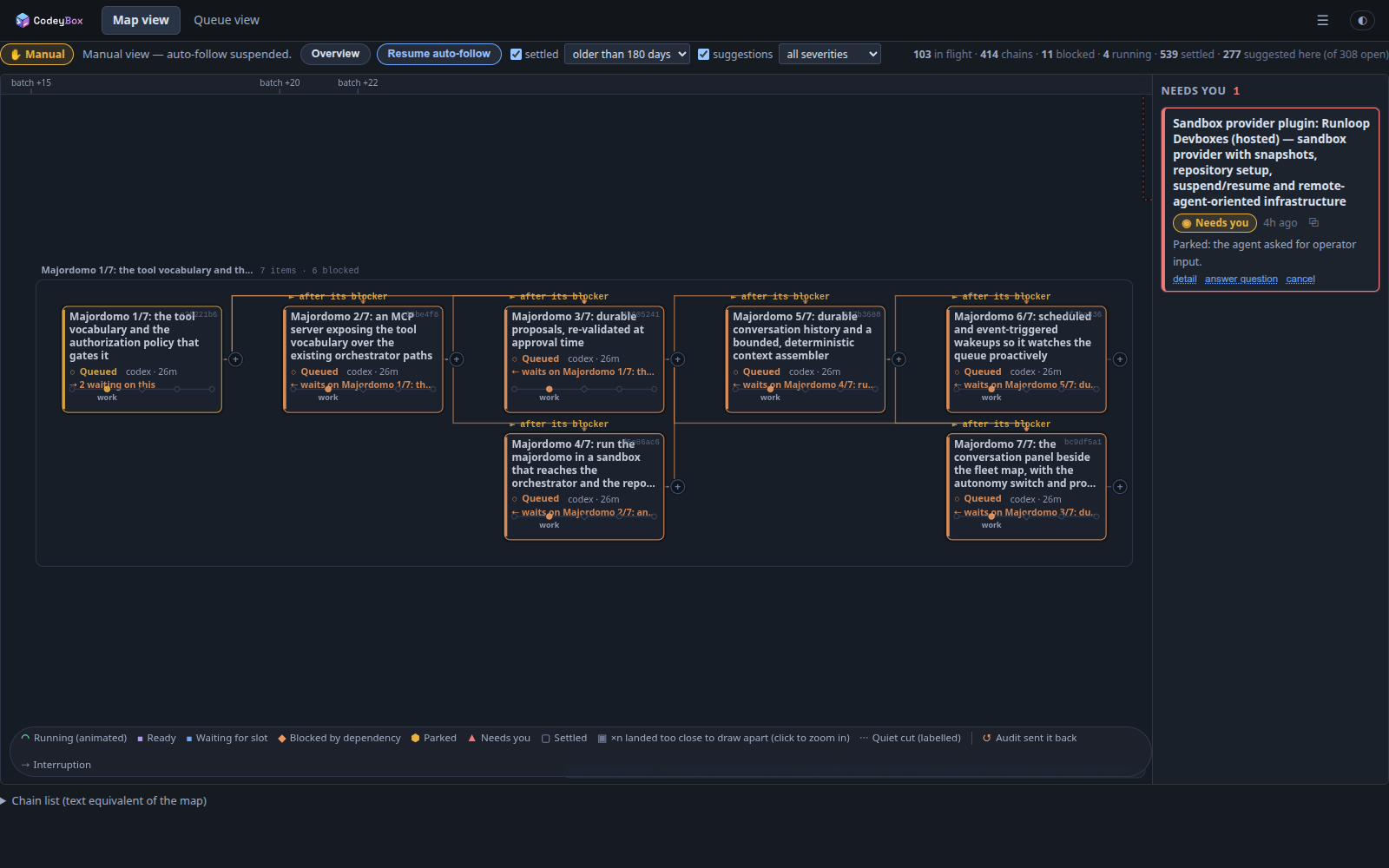
The admin
CodeyBox ships its own web admin on the host. It is two views of one fleet.
Map view is the default, and the picture above is what it is for. You file
a feature as a chain of small items with explicit dependencies; the map draws
the graph, and the orchestrator derives the execution order from it. Every
edge names the item it waits on by title rather than by id, and the (+)
beside a card files a new item that queues behind it.
Everything is placed against a time axis: landed work to the left, what is running now in the middle, the queue forecast to the right. Zoom is semantic — chains at a distance, cards close up, an item's full stage pipeline when you zoom into it. Idle time is compressed rather than scrolled through, so months of history stay on one screen, and positions are anchored to the work rather than to the clock, so nothing drifts under the cursor while you read it.
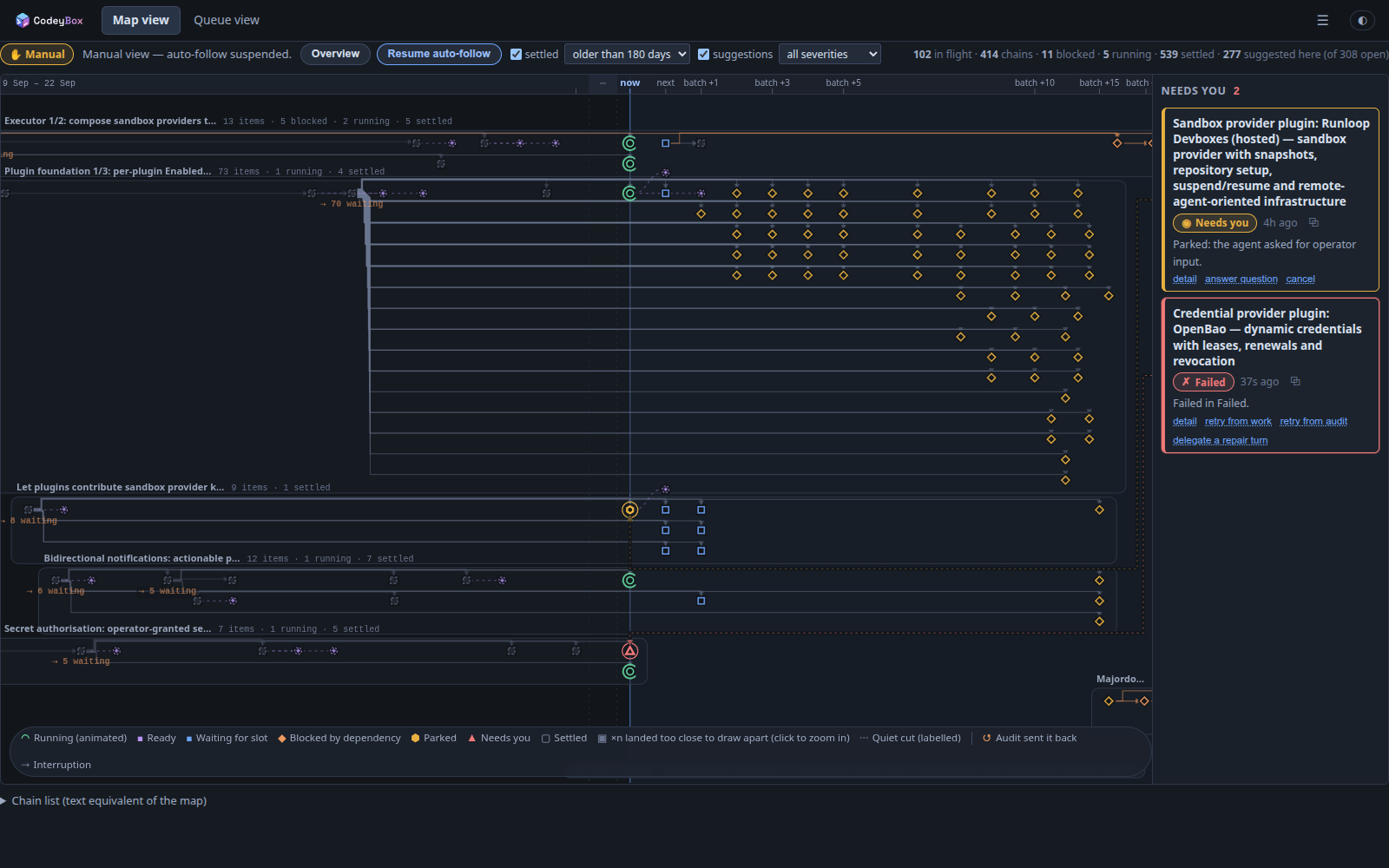 The whole fleet — chains with their counts, the fan-out of everything waiting on one item, and the predicted dispatch batches to the right of now. Four hundred chains and five hundred landed items on one canvas. | 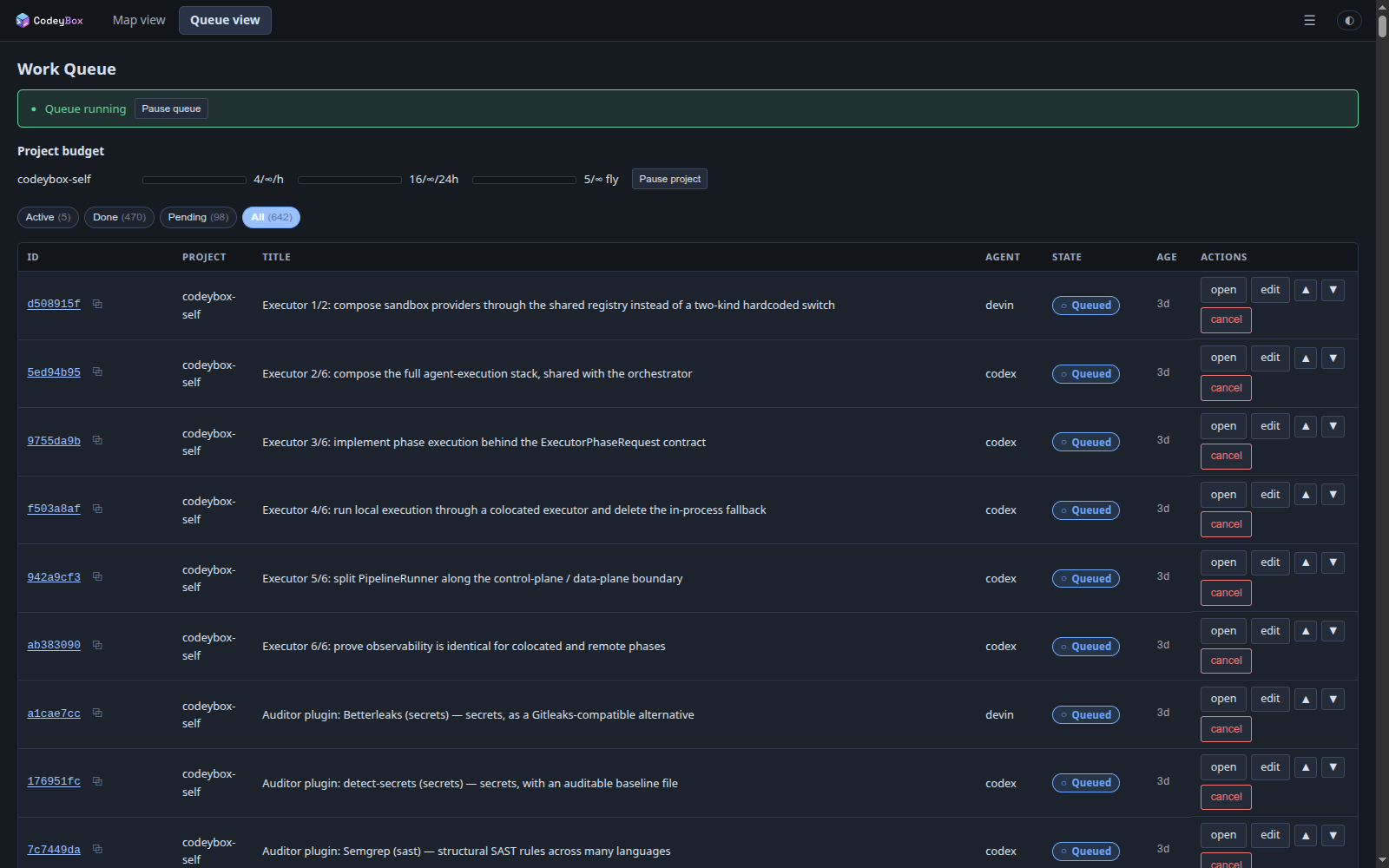 Queue view — the same fleet as a list when you want one: filter by state, reorder dispatch, and act on a row without leaving it. |
The audit gate is the point
Every item goes plan → work → audit → merge → landed, and audit is a gate,
not a step: its fail path returns the item to work. That loop is drawn rather
than described, and an item's record keeps the whole history — how many times
it worked, how many times audit sent it back, every finding and which auditor
raised it.
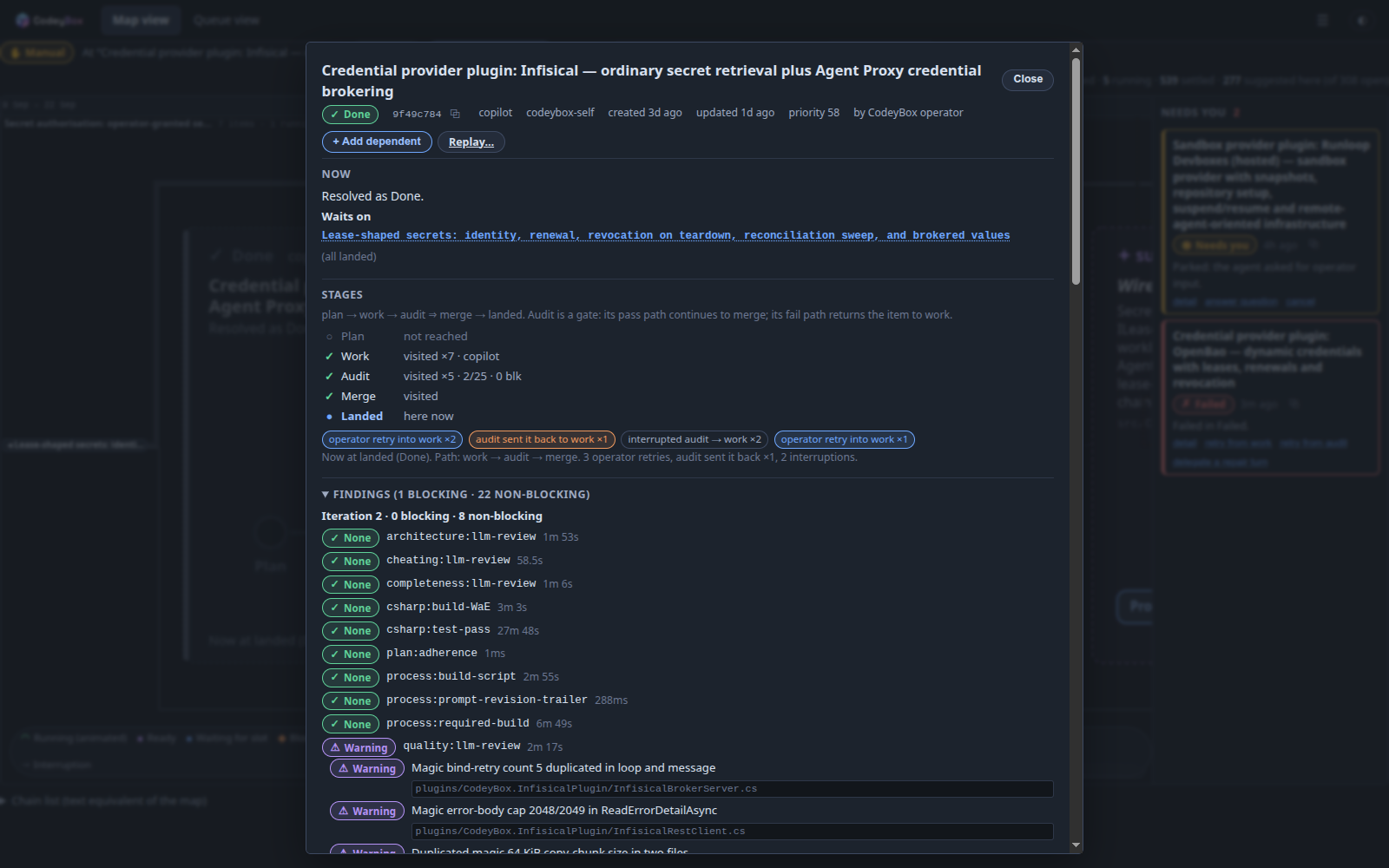 What it took to land — seven work attempts, five audits, one rejection that sent it back, and twenty-three findings across the auditor panel, each named, timed and quoted against the file it came from. | 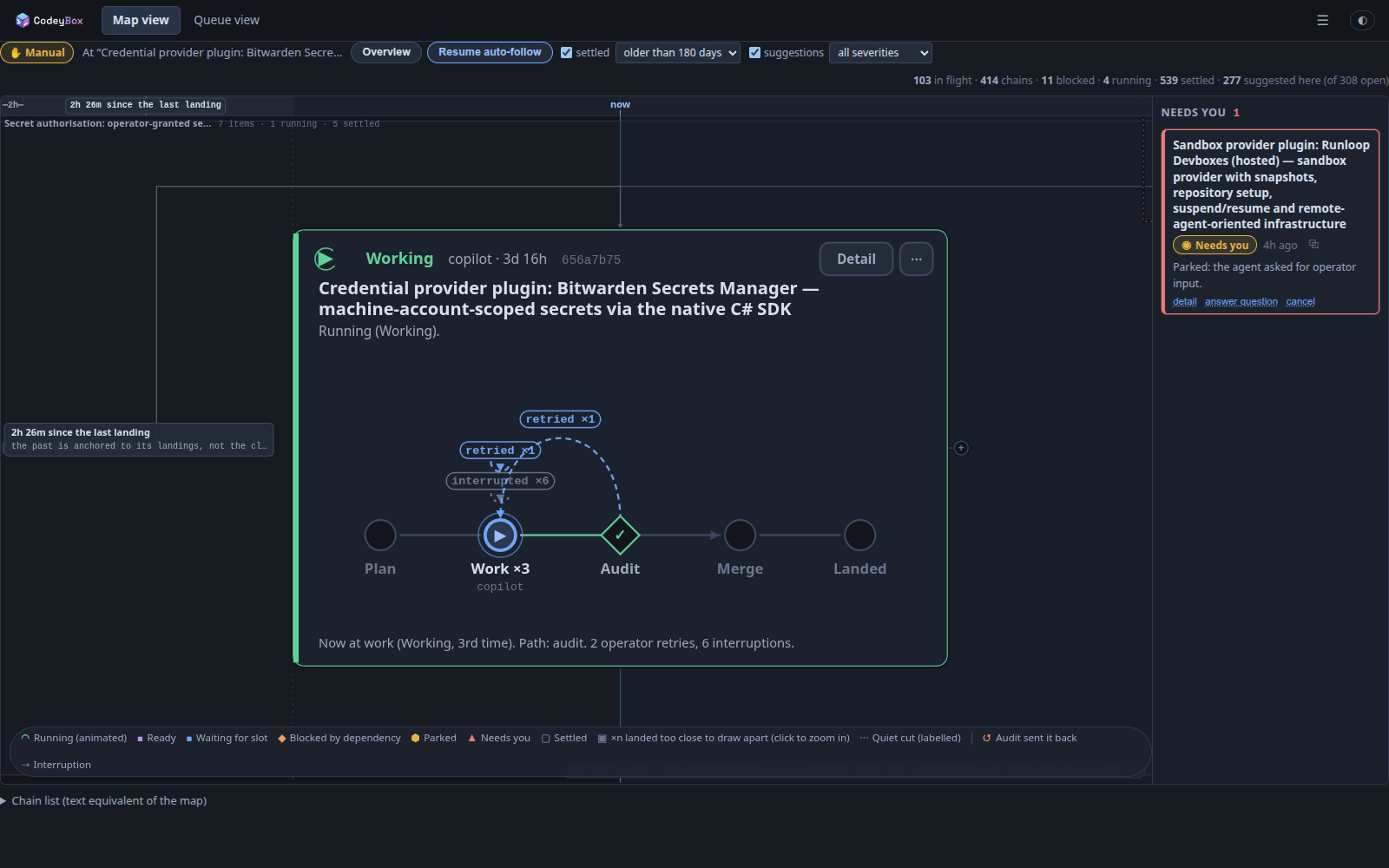 The loop, live — a running item on its third attempt with a passed audit, and the returns that got it there labelled on the arcs: operator retries and interruptions, stated in plain language underneath. |
It comes to you
What needs a decision is pinned to the side of the canvas rather than waiting to be found, with the actions that actually apply — answer the agent's question, retry from work, retry from audit, delegate a repair turn. Suggestions raised by agents while they work appear as ghost cards beside the item that produced them, and promote to real work items in one click.
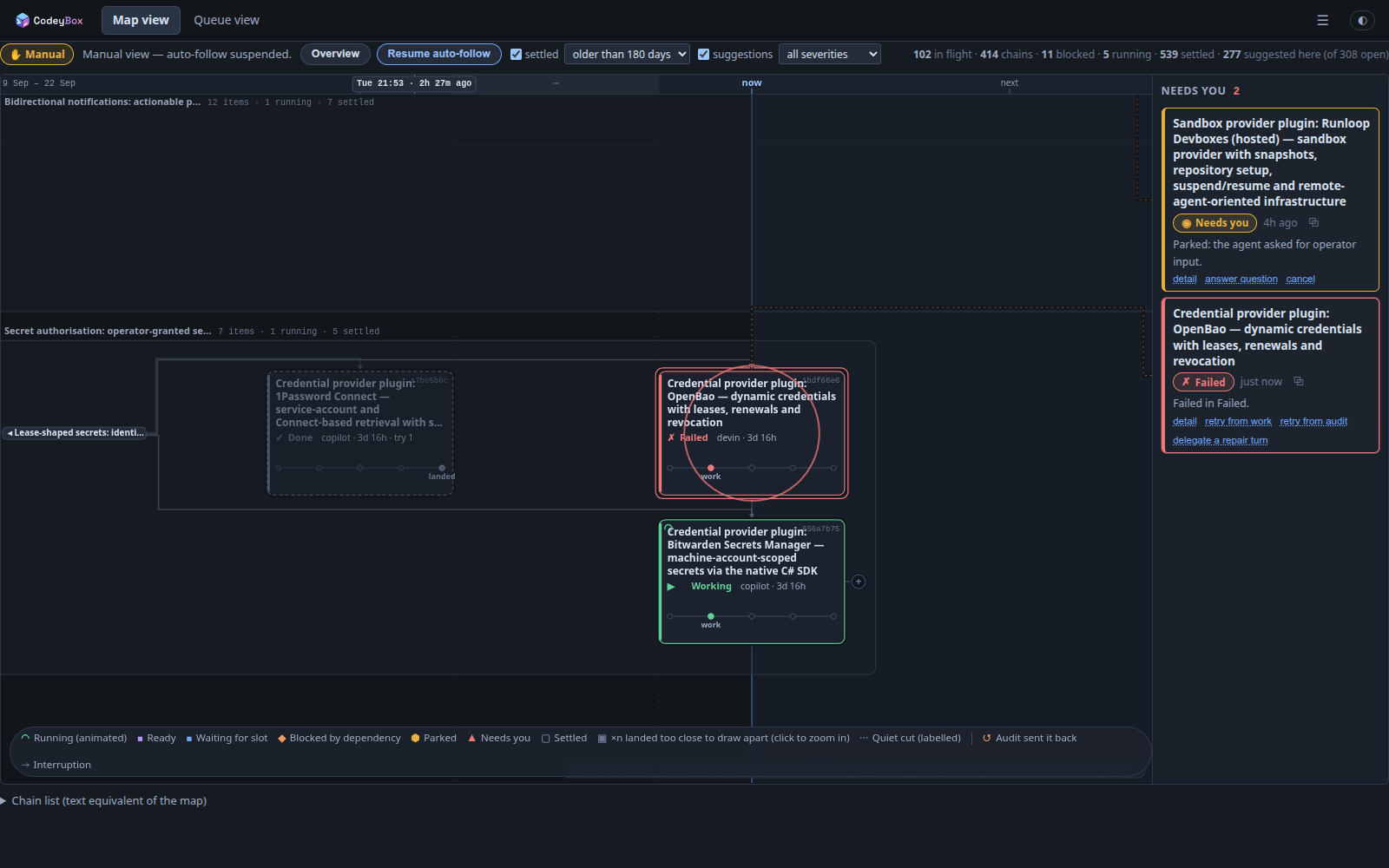 Landed, failed, running — three states of one chain side by side, with the failure tethered to its entry in the rail and offering the three things you can do about it. | 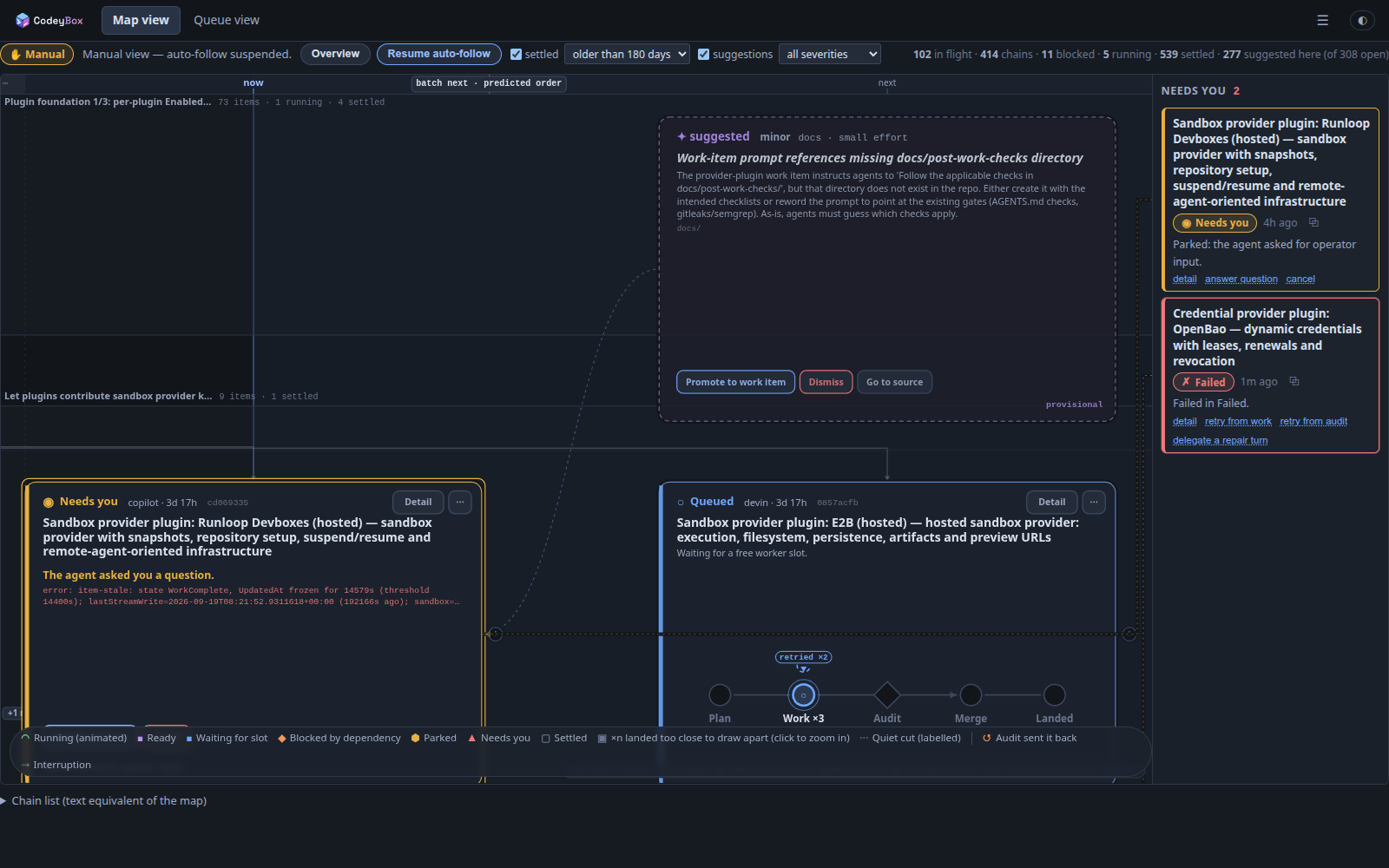 Suggestions — an agent noticed the work-item prompts point at a directory that does not exist, and proposed the fix. Promote it and it becomes a work item; dismiss it and it goes away. |
The remaining page screenshots in screenshots/ predate this
rework and still show the old sidebar shell; they are generated against a
deterministic seeded instance by tools/screenshots/ and
are being regenerated.
Want it on your phone? Use Agnes
CodeyBox is an orchestrator as well as an application. It exposes a REST API, a SignalR stream and a typed CLI, and it is designed to be left running without anyone watching it.
When you want to steer it from another machine or from your phone, use Agnes — a separate product, a remote interface to coding CLIs, which ships a first-class CodeyBox client. Point it at your orchestrator and you get the screens below. Neither product requires the other.
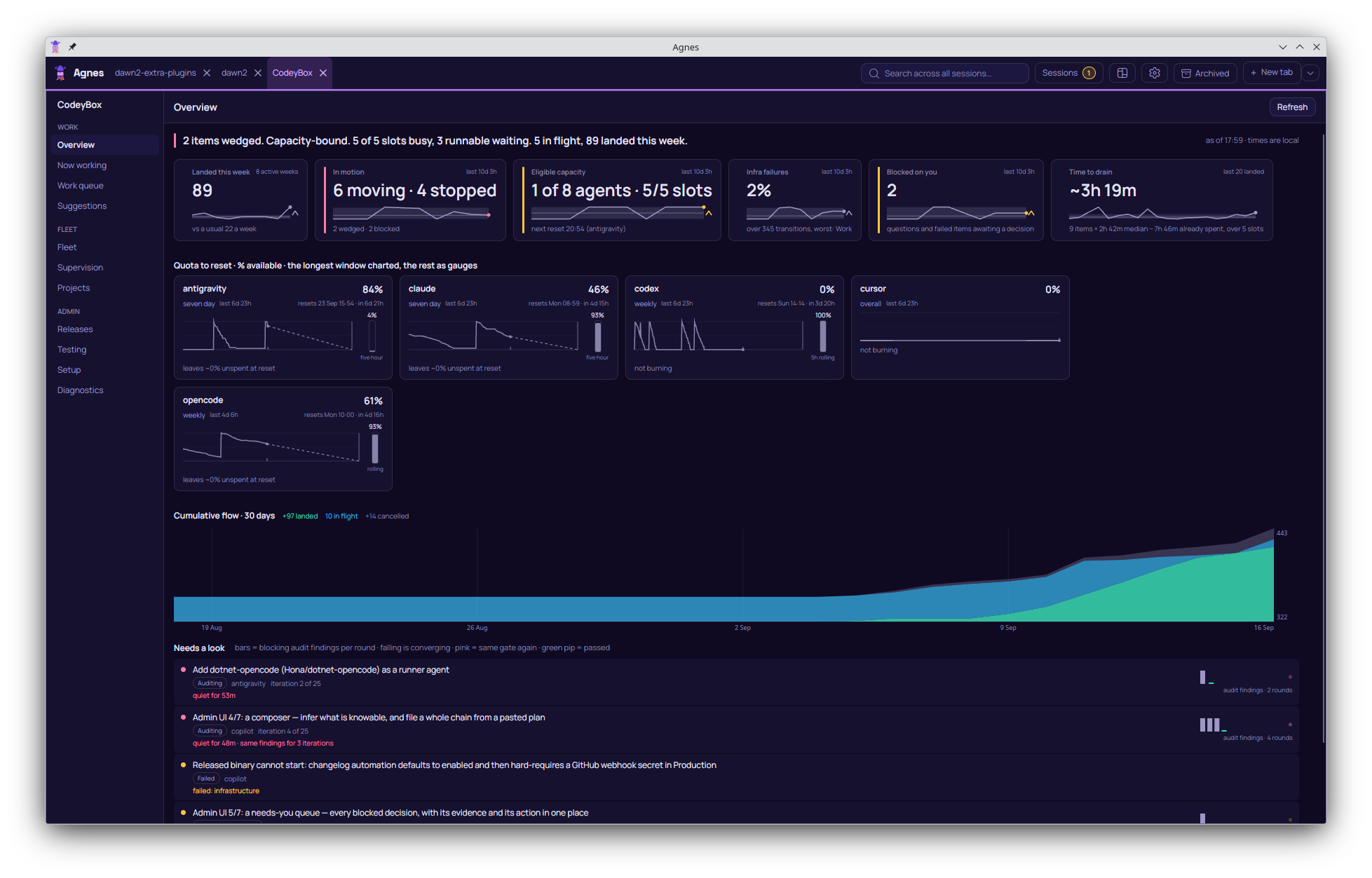 Overview — a plain-language verdict, quota-to-reset per agent, thirty days of cumulative flow, and a "needs a look" list ranked by how stuck something is rather than by age. | 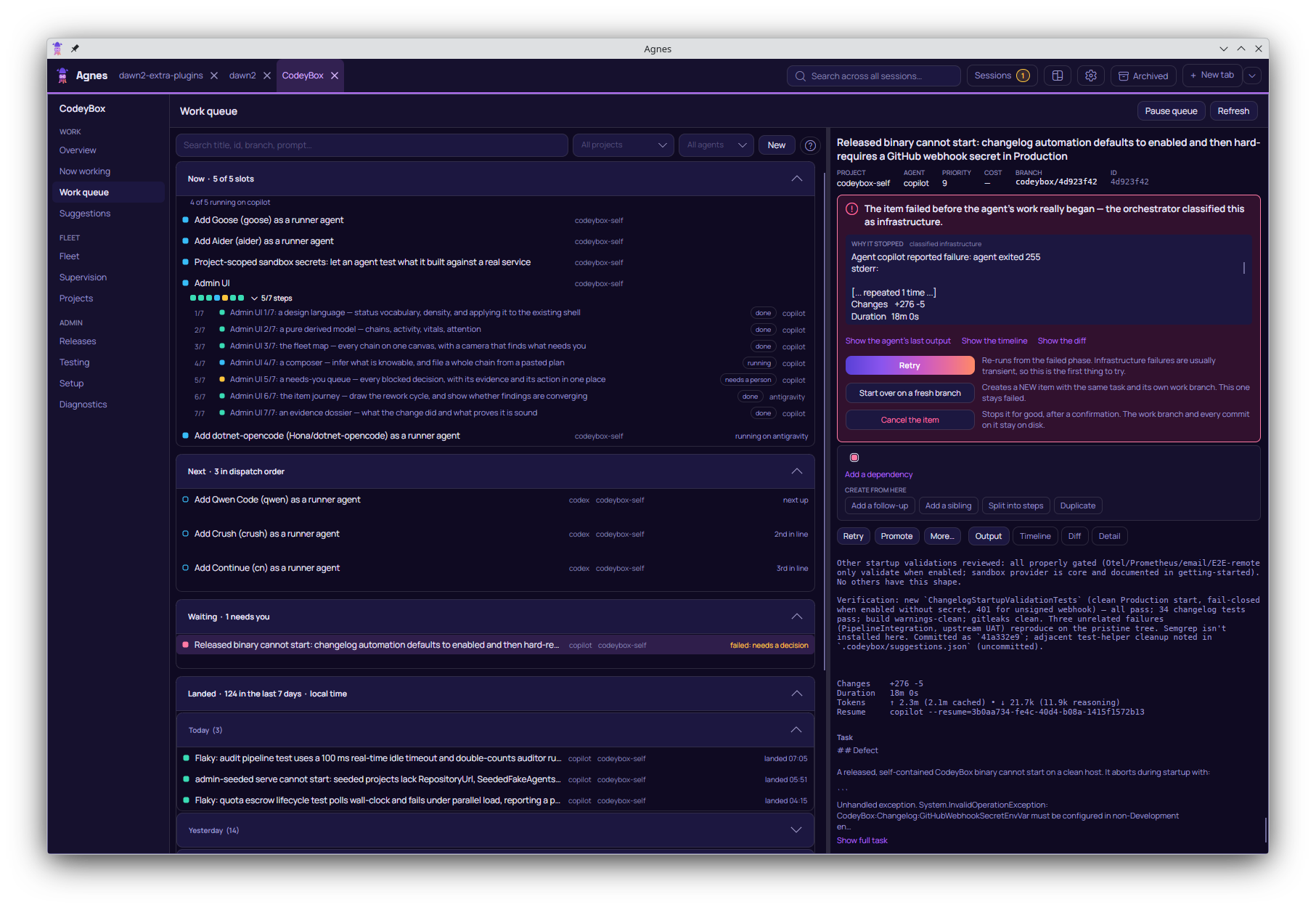 Work queue — now, next in dispatch order, waiting on you, and landed. A failed item explains itself and offers the three things you can actually do about it. |
Why you might want this
- You have more coding work than reviewer attention. Queue it. CodeyBox works items in parallel, runs the same audit gate a human reviewer would, and only bothers you when it genuinely needs a decision.
- You don't trust an LLM agent with
sudoon your machine. Every agent runs in a real VM with its own kernel, so a compromised agent can't reach your host — and on Linux hosts a host-enforced firewall stops it exfiltrating past its allowlist. - You pay for several coding subscriptions. CodeyBox pools them: one task queue, automatic routing across agents, quota-aware fallback, and per-agent cost tracking so you can see where the money goes.
- You want it to be hackable. Every subsystem sits behind an interface; add an agent, an auditor, a forge, or a credential backend without forking.
How it works
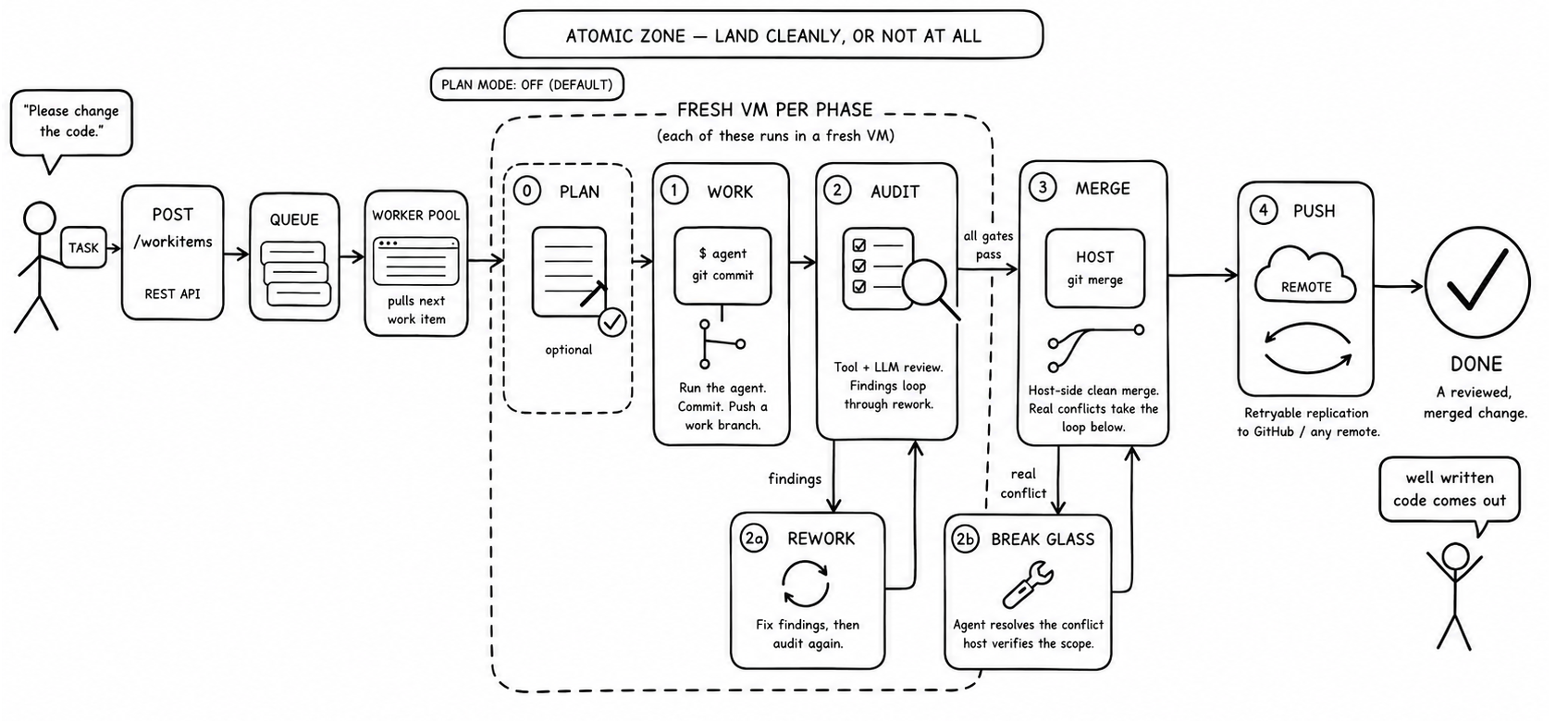
Phases 1–3 are atomic: the change lands cleanly or not at all. A clean merge is
pure git plumbing on the host — git merge-tree then git commit-tree, no VM,
no agent — and only a genuine content conflict is handed to an in-VM agent, then
checked by a deterministic host-side scope fence. Push is a separate retryable
tier, so a flaky remote never corrupts your local result.
The optional Plan phase runs first when a work item sets the plan knob:
the agent drafts a plan artifact that reviewers evaluate before any code is
written, which is worth the extra cycle on larger or higher-risk changes. The
full state machine is in docs/concepts/architecture.md.
Security: defense in depth
Most agent orchestrators run the model in a container or straight on the host. CodeyBox stacks several independent layers between an agent and your machine, so a prompt-injected or actively malicious agent has to defeat all of them:
- Real VMs, not containers — the primary boundary. Each agent runs in its own VM with its own kernel: KVM on Linux, Apple's Virtualization.framework on a Mac with Tart. A container shares the host kernel — one privilege-escalation bug and the agent is on your host. A guest-kernel exploit inside a VM isn't. Everything below is a further layer on top of this one.
- Host-enforced egress. On Linux providers the network allowlist is nftables
rules on the host, not inside the guest. An agent that gains
sudoin its sandbox still can't reach your LAN, cloud-metadata endpoints, or anything off its allowlist — it can't flush a firewall it can't see. Providers that can't enforce this are labelled egress not enforced, and work that requires an enforced network profile is never placed on them. One concession exists: a provider-host filter outside the guest (Tart Softnet on a Mac) may serve profiled work per sandbox, only after the host's own canary passes — and it is never ranked above host enforcement. - Least-privilege credentials. Audit-tool sandboxes get no agent secrets at all. Your upstream/GitHub credentials never leave the orchestrator process. An injected agent has nothing to exfiltrate beyond its own scoped token.
- Coding agents run only in sandboxes. The orchestrator makes no model call that hands over a repository. Its own HTTP calls are a fixed, narrow set — quota and smoke probes, model listing, changelog summarisation, and the deliberately tool-free text-only calls used to review a plan.
- A deterministic merge fence. Conflict resolutions are accepted by a host-side, non-LLM scope check — changed lines must fall within the actual conflict spans — so a model can't smuggle edits outside the conflict under cover of "resolving" it.
- A review gate before merge. The audit phase runs secret scanning, SAST, and LLM security review, catching a class of malicious or low-quality output before it ever lands.
Honest caveat: this is defense in depth, not a guarantee. A determined
adversary — especially one targeting a weaker coding agent you've installed —
may still find a path, and a misconfigured egress profile or an over-broad
project setup weakens the model. Sandbox-escape and egress-bypass testing on a
live KVM host is still outstanding. Read
docs/concepts/security.md before you trust it with
anything that matters.
Quickstart
On a Linux host, the fastest path — it checks prerequisites, installs what is missing, offers to set up host network isolation, builds, and writes a starter config:
curl -fsSL https://raw.githubusercontent.com/AdamFrisby/CodeyBox/main/install.sh | bash
It is idempotent, prompts before anything with side effects, and refuses to continue silently if host network isolation could not be set up. It does steps 1 to 3 for you and prints where it put the config, so when it finishes go straight to step 4.
Because the script arrives on stdin, flags need bash -s --:
curl -fsSL https://raw.githubusercontent.com/AdamFrisby/CodeyBox/main/install.sh | bash -s -- --yes
curl -fsSL https://raw.githubusercontent.com/AdamFrisby/CodeyBox/main/install.sh | bash -s -- --help
Step by step
Follow all four steps to set up by hand. Use them on macOS and Windows too, where the installer does not run and only the remote-executor topology is supported.
1. Install prerequisites — the .NET 10 SDK, Git, a sandbox provider, and at least one authenticated agent CLI.
2. Clone and build. Use ./build.sh on Linux and macOS — it heals an
unwritable NuGet home first (see below). On Windows use ./build.ps1, which
forwards to dotnet with the same telemetry settings.
git clone https://github.com/AdamFrisby/CodeyBox.git
cd CodeyBox
./build.sh          # Windows: ./build.ps1
If restore fails with
Failed to read NuGet.Config due to unauthorized access: This applies toinstall.shtoo, since it builds the same way. NuGet probes user-level configuration under$HOME/.nuget/NuGet/regardless of what the repository pins, so it needs that directory to be writable. A home baked read-only, or owned by another user, aborts restore for every project — and a checked-in config or--configfiledoes not help, because NuGet probes the user settings directory anyway.
./build.shhandles this for you: it sourcesscripts/nuget-home-heal.sh, which is the single source of truth for the repair and is shared with the audit path. It relocates an unwritable tree aside (no root needed), preserves the populated package cache by symlink so restore stays offline-safe, and seeds a readable user config. If$HOMEitself cannot be written to — an inherited read-only mount, say — then even moving the tree aside is impossible, so it instead redirectsDOTNET_CLI_HOMEto a writable scratch directory for that process tree../build.sh # builds, healing the NuGet home first if needed . scripts/nuget-home-heal.sh # or just heal the current shell
3. Configure a project. Drop a JSON file somewhere and point
CODEYBOX_EXTRA_CONFIG at it (it hot-reloads on change):
{
  "CodeyBox": {
    "SandboxProvider": "multipass",
    "Projects": [
      {
        "Id": "my-app",
        "RepositoryUrl": "https://github.com/you/my-app.git",
        "BaseBranch": "main",
        "Agent": "claude"
      }
    ]
  }
}
4. Run:
dotnet run --project tools/CodeyBox.Cli -- queue add \
  --project my-app \
  --title "Add a hello file" \
  --prompt "Add hello.txt containing the word hello."
dotnet run --project tools/CodeyBox.Cli -- queue watch WORK_ITEM_ID
The step-by-step version — host networking, a minimal config, the first work
item, and what to check when it fails — is in
docs/getting-started.md.
Running it well
CodeyBox trades wall-clock time and tokens for review depth. Throughput is bounded by host CPU and agent quota, because each concurrent phase runs a VM. Small, dependent tasks generally converge faster than monolithic prompts.
Tune concurrency, agent classes, auditors, iteration limits, and budgets for
your workload. Watch state transitions and updated timestamps — not only
completed-item count — to tell a quota-limited queue apart from a stuck one.
Recovery procedures are in
docs/operating/running.md and
docs/operating/recovery.md.
Features
- Agent fleet with quota-aware routing. Group agents into a class with
quality scores and concurrency caps; CodeyBox routes each task to the best
available member and falls back mid-task when one hits a quota wall, so a
single provider's 5-hour limit never stalls the queue.
→
docs/concepts/agent-classes.md - VM isolation with host-enforced egress. Each agent runs in a fresh microVM
with least-privilege credentials; network policy lives on the host as nftables
profiles a guest can't flush.
→
docs/operating/host-firewall.md - Quality gates you stack. Compose exactly which auditors must pass before a merge — tool checks (format/build/test, gitleaks, semgrep) and LLM reviews (security, architecture, quality, completeness, cheating, tests) — and nothing lands until it clears all of them. → Quality gates you control
- Per-item cost tracking. Every work item's token spend is tracked by phase and agent, so you know what each bugfix or feature actually cost to run. → Know what every change costs
- Agentic conflict resolution. The agent resolves merge conflicts inside its own sandbox through its normal CLI, then a deterministic host-side scope fence verifies the result before the push is accepted.
- Quota governance. Per-agent/per-model pricing, budgets, alerts, and a
burn-rate-aware quota gate that routes around exhausted providers.
→
docs/operating/quota.md - Durable and restartable. SQLite-backed state, crash/restart tolerance,
resumable agent turns, and deterministic replay.
→
docs/operating/recovery.md - Four ways to drive it. A REST API, a SignalR event stream, a typed CLI,
and the built-in Blazor admin — plus HMAC-signed outbound webhooks, and
Agnes if you want a remote front end.
→
docs/reference/api.md,docs/reference/webhooks.md - A majordomo beside the map. An LLM assistant docked next to the fleet map that you talk to about the queue — "what's blocking the executor chain?", "file this as three dependent items" — whose only hands are the queue's own validated tools. It runs in a sandbox with read-only access to the project repos, never touches the host, and works either proposal-and-approve or fully autonomous; you pick with a switch.
- Remote executors. Run sandbox phases on other machines: the orchestrator
keeps state, git, merges and auditing, and dispatches phases to registered
executor hosts with the repo staged in and out, with the same supervision and
agent streams as local work.
→
docs/operating/remote-executors.md - Pluggable everything, with a catalogue to start from. Beyond the auditors:
forges (GitLab, Bitbucket, Gitea, Forgejo, Azure DevOps — GitHub is built
in), work sources that sync issues in and status back (Jira, Linear, Plane,
Shortcut, YouTrack), notifications (Slack, Teams, Discord, ntfy, Gotify),
credential backends (1Password, Bitwarden, Doppler, Infisical, OpenBao), and
sandbox backends (below). All plugins, all off by default — or ship your own
as a NuGet package, no fork.
→
docs/extending/plugins.md
Quality gates you control
Auditors stack. You choose exactly which checks gate a merge — built-in tool auditors (formatting, build, the full test suite, coverage, mutation rigor, gitleaks secret scanning, semgrep SAST) and LLM reviewers over six audit types (security, architecture, quality, completeness, cheating, tests) — plus any of the plugin catalogue, or your own. Each runs in its own capability-scoped sandbox, and the tool-only ones hold no agent credentials.
The plugin catalogue (each one disabled until you enable it):
| Category | Auditors |
|---|---|
| Linting (22) | Biome, clang-tidy, Clippy, Cppcheck, Credo, detekt, ESLint, golangci-lint, ReSharper InspectCode, Knip, mypy, Oxlint, PHPStan, PMD, Pyright, Roslynator, RuboCop, Ruff, SpotBugs, Staticcheck, SwiftLint, and a SARIF example to build your own |
| SAST (5) | Bandit, Brakeman, CodeQL, DevSkim, Semgrep |
| Dependency vulnerabilities (8) | cargo-audit, cargo-deny, OWASP Dependency-Check, govulncheck, Grype, OSV-Scanner, Socket, Trivy |
| Secrets (4) | Betterleaks, detect-secrets, Gitleaks, TruffleHog (with live credential verification) |
| Infrastructure (10) | actionlint, cfn-lint, Checkov, Conftest, Hadolint, KICS, KubeLinter, kubeconform, TFLint, zizmor |
| Schema (3) | Spectral, SQLFluff, Squawk |
| API compatibility (3) | Buf breaking, cargo-semver-checks, GraphQL Inspector |
| Architecture (3) | dependency-cruiser, Import Linter, file-size limits |
| Documentation (3) | lychee, markdownlint, Vale |
| Scripting (2) | PSScriptAnalyzer, ShellCheck |
| Licensing (2) | REUSE, ScanCode Toolkit |
Enabling one adds its tool to the sandbox baseline; disabling it takes it back
out. → docs/extending/auditor-plugins.md
Test-heavy suites can opt into regression test selection: after every
merge CodeyBox records which lines each test covers, and audits run only the
tests a change can reach. It ships shadow-first — the full suite still runs and
the would-be selection is scored — and only switches to enforcing once a
calibration window shows it never skips a test that would have failed.
→ docs/quality/test-selection.md
The gate is hard: when any auditor fails, its findings go straight back to the
agent, which reworks and resubmits — the loop repeats until every gate passes
or it hits the iteration cap, at which point the item is flagged AuditFailed
and is not merged. The auditor set, the failing-severity threshold, and the
iteration cap are all per-project config.
→ docs/quality/audit.md
Know what every change costs
CodeyBox tracks token usage and estimated spend for every work item, broken down by phase (work, each rework, each audit iteration, merge) and by agent/model. So you can answer "what did this bugfix actually cost to run?" — and build a real feel for the economics of automated work before you scale it up.
Costs are normalised to pay-per-API list prices — even on subscription plans, and accounting for cached tokens — so they're comparable across agents and over time. Query per item or per project:
curl -H "authorization: Bearer $CODEYBOX_API_KEY" \
  http://localhost:5036/workitems/<id>/costs       # one item, broken out by phase
curl -H "authorization: Bearer $CODEYBOX_API_KEY" \
  http://localhost:5036/projects/my-app/costs      # the whole project
The admin dashboard's Costs tab charts the same data.
→ docs/operating/costs.md
Drive it from the CLI
codeybox is a typed client for the whole API — no more curl + jq. Run it from
source (dotnet run --project tools/CodeyBox.Cli -- <command>) or publish a
self-contained binary:
dotnet publish tools/CodeyBox.Cli -c Release -r linux-x64 -o ./bin/codeybox
codeybox configure          # save API URL + token to ~/.config/codeybox
Everyday use:
# Queue a task (inline, --prompt-file, or piped in) and follow it live
ID=$(codeybox queue add --project my-app --title "Add /healthz" \
       --prompt "Add a /healthz endpoint returning 200." --quiet)
codeybox queue watch "$ID"                    # streams state transitions over SSE

codeybox queue ls --state Working,Auditing    # what's in flight
codeybox queue show <id>                      # full detail for one item
codeybox queue retry <id> --from audit        # re-drive a failed item
codeybox queue cancel <id>
queue add also takes --agent, --work-branch, --base-branch,
--auditor-profile, --push-upstream, and --depends-on (to chain dependent
items); --json / --quiet make every command pipe-friendly.
→ docs/reference/cli.md
The agent fleet
Twenty-five agent CLIs are supported today:
claude · codex · copilot · cursor · devin · gemini · opencode ·
antigravity · crock · aider · goose · pi · prime · autohand ·
vibe · cline · kilo · omp · continue · qwen · cmd · crush ·
caveman · dotnet-opencode · unreal
Each lives in src/CodeyBox.Agents.<Name> and implements IAgentRunner — a
subclass of CliAgentRunnerBase that builds one non-interactive invocation.
Adding another is that class, a credential mapping, an install line in the
sandbox baseline, and two smoke probes.
Agents are interchangeable. A class lists members with quality scores; the router
prefers the highest-scoring one that's within quota and under its concurrency
cap. See
docs/concepts/agents.md for each agent's auth, its
sandbox install command, and its known quirks.
Host platform support
| Orchestrator host | incus | multipass (local) | tart (plugin) | multipass-remote | sprites | bubblewrap | process (dev-only) |
|---|---|---|---|---|---|---|---|
| Linux | ✅ VM, egress enforced on host | ✅ VM, egress enforced on host | ❌ macOS only | ✅ VM, egress enforced on executor | ✅ VM, egress enforced on executor | ⚠️ shared kernel, no egress | ⚠️ no isolation, dev only |
| macOS | ❌ | ❌ | ✅ VM (macOS or Linux guests), egress verified per sandbox via Softnet (see below) | ✅ VM, egress enforced on executor | ✅ VM, egress enforced on executor | ❌ | ❌ |
| Windows | ❌ | ❌ | ❌ | ✅ VM, egress enforced on executor | ✅ VM, egress enforced on executor | ❌ | ❌ |
On a Mac, run the orchestrator locally (./build.sh) and give agents
local VMs with the Tart plugin — a
fresh VM with its own kernel per work item, with macOS guests as well as Linux
ones, so Apple-platform work can run too. A Tart VM is VM isolation (its own
kernel — the primary boundary), but its egress is NotEnforced by default:
guest network follows the Mac's. Opt into Softnet mode plus host-owned
per-sandbox canary verification (CodeyBox:EgressVerification with tart
opted in) and each sandbox is handed over only after its own canary passes —
the verified grant (EnforcedOnProviderHostVerified) is deliberately never
stronger than host enforcement. The fail-closed and IPv6 properties are
established only by the Mac-only operator procedure
(scripts/verify-tart-softnet.sh); until it has run on real hardware the path
is documented as unverified. Use Tart for the
work you would trust with that, and a Linux host or a remote Linux executor for
the rest — work that requires an enforced network profile is placed there
automatically.
On Windows, run the orchestrator locally (./build.ps1) with VMs on a
remote Linux executor host, where the allowlist holds.
An unenforced allowlist is never described as isolation, and unsupported
provider + host combinations fail fast at startup with a message pointing at
the matrix (docs/concepts/host-platforms.md).
Sandbox providers
Pick with CodeyBox.SandboxProvider:
| Provider | Setup | Isolation |
|---|---|---|
incus | Incus 6.3+ and existing ZFS/Btrfs pool | KVM; fast, space-efficient copy-on-write baseline clones |
multipass | snap install multipass | KVM; simplest setup |
multipass-remote | Multipass on a remote host + SSH | KVM, VMs offloaded to another machine over SSH — orchestrator stays local |
sprites | a Fly.io Sprites account | Firecracker microVMs over an HTTP/WebSocket API; writable host mounts sync back at teardown, not per exec |
bubblewrap | apt install bubblewrap | namespaces, shared kernel; integration-tested |
process | none | none — testing only, never with untrusted prompts |
More backends ship as plugins (disabled by default): cloud VMs on any
OpenStack cloud (openstack, with a sample config for Infomaniak Public Cloud),
hosted sandboxes on Daytona, E2B, Modal, Runloop and Blaxel,
local microVMs with BoxLite and microsandbox, and macOS guests with
Tart. Their egress is classified not enforced — the host can't put its
firewall in front of a machine it doesn't own — so placement keeps any work that
requires an enforced network profile on a host-enforced provider, and each
plugin's doc says exactly what isolation it does and doesn't give. The one
exception is Tart in Softnet mode with host-owned canary verification (above):
a per-sandbox verified grant, never above host enforcement.
→ docs/extending/sandbox-plugins.md
Choose explicitly: prefer incus for persistent or high-throughput headless
installations, and multipass for the simplest setup. Multipass baseline clones
copy full VM images; Incus ZFS/Btrfs clones are copy-on-write, reducing launch
time, disk use, and repeated SSD writes. multipass-remote runs the same VMs on
a separate host over SSH while the orchestrator — state, git, merge, auditors —
stays local, so you can offload VM CPU without splitting the brain.
A graphical flavour (a desktop plus VNC/X display, and a computer-use bridge
exposing screenshots and input synthesis through the sandbox API) is available on
both Incus and Multipass. Turn it on per project with
"GraphicalSandbox": true, not by selecting a provider.
→ docs/concepts/sandboxes.md
Going to production
- Choose the provider deliberately. Prefer Incus for persistent,
high-throughput headless operation; use Multipass for the simplest setup.
(Graphical sandboxes are not a differentiator — they work on both.) Follow
docs/concepts/sandboxes.md, including Incus storage-pool and service-identity prerequisites. - Set up host egress once, with sudo:
scripts/setup-host-networks.shcreates a Linux bridge per network profile and writes nftables rules that drop anything not on the profile's allowlist. A compromised agent withsudocan't disable this, because it lives on the host, not in the guest. →docs/operating/host-firewall.md - Read
docs/concepts/security.md— the threat model, the trust boundaries, the sharp edges, and the known gaps. This is not optional.
Credentials are tiered: tool-only audit sandboxes hold no agent secrets, and upstream remote credentials (e.g. a GitHub PAT) live only in the orchestrator process and never cross into a sandbox.
Documentation
docs/ is the full reference, indexed by task. Good entry
points:
getting-started.md— clean host to merged changeconcepts/architecture.md— the system, its boundaries, the state machineconcepts/security.md— threat model (read before deploying)concepts/projects.md— project, auditor, and upstream configconcepts/agent-classes.md— routing, quotas, and fallbackextending/plugins.md— the plugin SDKreference/api.md— the full REST reference
Status
CodeyBox is under active development and builds clean against .NET 10. Incus is
recommended for persistent, high-throughput headless deployments; Multipass is
the simpler option. The process provider is for constrained testing only and
gives no isolation. Issues and contributions are welcome.
Because CodeyBox builds itself, its roadmap is its own work queue — and most of what's described above was built that way, by agents working through this same audit panel. Recently landed: the plugin catalogue (64 auditors plus forges, work sources, notifications, credential and sandbox backends), the majordomo, remote executors, and the coverage-baseline producer for test selection. The threads currently moving: calibrating test selection toward enforcement, verifying a merge's combined result builds before it lands, counting audit sessions against per-agent concurrency caps, autonomous exploratory testing that emits replayable regression artifacts, and smarter quota drain scheduling.
Significant stargazers

100 followers · starred Sep 2026
Similar repos


Runs CLI coding agents (Claude Code, Codex, Copilot, Cursor, Gemini, opencode) against a task queue. Each works in an isolated VM; output is checked by configurable auditors, then merged via git. Pools multiple provider subscriptions with quota-aware routing and fallback. C#/.NET 10, MIT-licensed.
C#
7
1,238 commits
updated Oct 5, 2026
See what people are saying
README
An autonomous coding orchestrator you can hand work to and walk away from. Give it a task — a title and a prompt against one of your repos — and CodeyBox picks a coding agent, runs it inside a throwaway VM, and then does the part that makes walking away possible: it puts the change in front of a panel of auditors, sends every failing finding back to the agent as rework, and only lands the change on your branch (and on GitHub, if you point it there) once every auditor on the panel passes. You stay in the loop for product decisions; it handles the delivery grind.
The audit panel is why you don't have to watch it. An agent that says it is done is not trusted to be done. Every item goes through a default panel of sixteen auditors, each an independent hard gate — no averaging into "good enough", no single reviewer to talk round:
- The code has to work. A warnings-as-errors build, the full test suite, a diff-scoped coverage gate, and mutation testing that checks the new tests would actually catch a broken implementation.
- It can't be faked. A dedicated cheating review plus deterministic diff checks hunt for the shortcuts agents take to get to green — stubbed returns, deleted or skipped tests, suppressed warnings, assertions that can't fail — alongside a scan for test patterns that make suites flaky.
- It has to be safe. Secret scanning (gitleaks) and SAST (semgrep) on every diff, and an LLM security review.
- It has to be good. Separate LLM reviewers for architecture, quality, completeness and test meaningfulness, plus a check that the code matches the plan it was approved against.
On top of that panel sit 64 auditor plugins you can switch on for the stack you actually have — linters for a dozen languages, SAST, dependency vulnerabilities, secrets, infrastructure-as-code, licensing, schema and API compatibility, documentation — and language presets for C#, Python, Node, Go and Rust. Plugins are off until you enable them, so audit time tracks what you chose to check. See Quality gates you control.
It drives a fleet of twenty-five agent CLIs — Claude Code, OpenAI Codex, GitHub Copilot, Cursor, Devin, Gemini, opencode, Aider, Goose and more — and routes each task to whichever one is best and available, falling back automatically when a provider hits a rate limit. No coding agent ever runs on your host: every model call that touches a repository happens through an agent CLI inside a sandbox, boxed in a real VM with its own kernel (and, on Linux, behind a host-enforced firewall) — see Security: defense in depth.
Built in C#/.NET 10. Managed repos can be any stack — Python, Node, Go, Rust, C#, or your own — through config-driven auditors.
The admin
CodeyBox ships its own web admin on the host. It is two views of one fleet.
Map view is the default, and the picture above is what it is for. You file
a feature as a chain of small items with explicit dependencies; the map draws
the graph, and the orchestrator derives the execution order from it. Every
edge names the item it waits on by title rather than by id, and the (+)
beside a card files a new item that queues behind it.
Everything is placed against a time axis: landed work to the left, what is running now in the middle, the queue forecast to the right. Zoom is semantic — chains at a distance, cards close up, an item's full stage pipeline when you zoom into it. Idle time is compressed rather than scrolled through, so months of history stay on one screen, and positions are anchored to the work rather than to the clock, so nothing drifts under the cursor while you read it.
The whole fleet — chains with their counts, the fan-out of everything waiting on one item, and the predicted dispatch batches to the right of now. Four hundred chains and five hundred landed items on one canvas. | Queue view — the same fleet as a list when you want one: filter by state, reorder dispatch, and act on a row without leaving it. |
The audit gate is the point
Every item goes plan → work → audit → merge → landed, and audit is a gate,
not a step: its fail path returns the item to work. That loop is drawn rather
than described, and an item's record keeps the whole history — how many times
it worked, how many times audit sent it back, every finding and which auditor
raised it.
What it took to land — seven work attempts, five audits, one rejection that sent it back, and twenty-three findings across the auditor panel, each named, timed and quoted against the file it came from. | The loop, live — a running item on its third attempt with a passed audit, and the returns that got it there labelled on the arcs: operator retries and interruptions, stated in plain language underneath. |
It comes to you
What needs a decision is pinned to the side of the canvas rather than waiting to be found, with the actions that actually apply — answer the agent's question, retry from work, retry from audit, delegate a repair turn. Suggestions raised by agents while they work appear as ghost cards beside the item that produced them, and promote to real work items in one click.
Landed, failed, running — three states of one chain side by side, with the failure tethered to its entry in the rail and offering the three things you can do about it. | Suggestions — an agent noticed the work-item prompts point at a directory that does not exist, and proposed the fix. Promote it and it becomes a work item; dismiss it and it goes away. |
The remaining page screenshots in screenshots/ predate this
rework and still show the old sidebar shell; they are generated against a
deterministic seeded instance by tools/screenshots/ and
are being regenerated.
Want it on your phone? Use Agnes
CodeyBox is an orchestrator as well as an application. It exposes a REST API, a SignalR stream and a typed CLI, and it is designed to be left running without anyone watching it.
When you want to steer it from another machine or from your phone, use Agnes — a separate product, a remote interface to coding CLIs, which ships a first-class CodeyBox client. Point it at your orchestrator and you get the screens below. Neither product requires the other.
Overview — a plain-language verdict, quota-to-reset per agent, thirty days of cumulative flow, and a "needs a look" list ranked by how stuck something is rather than by age. | Work queue — now, next in dispatch order, waiting on you, and landed. A failed item explains itself and offers the three things you can actually do about it. |
Why you might want this
- You have more coding work than reviewer attention. Queue it. CodeyBox works items in parallel, runs the same audit gate a human reviewer would, and only bothers you when it genuinely needs a decision.
- You don't trust an LLM agent with
sudoon your machine. Every agent runs in a real VM with its own kernel, so a compromised agent can't reach your host — and on Linux hosts a host-enforced firewall stops it exfiltrating past its allowlist. - You pay for several coding subscriptions. CodeyBox pools them: one task queue, automatic routing across agents, quota-aware fallback, and per-agent cost tracking so you can see where the money goes.
- You want it to be hackable. Every subsystem sits behind an interface; add an agent, an auditor, a forge, or a credential backend without forking.
How it works
Phases 1–3 are atomic: the change lands cleanly or not at all. A clean merge is
pure git plumbing on the host — git merge-tree then git commit-tree, no VM,
no agent — and only a genuine content conflict is handed to an in-VM agent, then
checked by a deterministic host-side scope fence. Push is a separate retryable
tier, so a flaky remote never corrupts your local result.
The optional Plan phase runs first when a work item sets the plan knob:
the agent drafts a plan artifact that reviewers evaluate before any code is
written, which is worth the extra cycle on larger or higher-risk changes. The
full state machine is in docs/concepts/architecture.md.
Security: defense in depth
Most agent orchestrators run the model in a container or straight on the host. CodeyBox stacks several independent layers between an agent and your machine, so a prompt-injected or actively malicious agent has to defeat all of them:
- Real VMs, not containers — the primary boundary. Each agent runs in its own VM with its own kernel: KVM on Linux, Apple's Virtualization.framework on a Mac with Tart. A container shares the host kernel — one privilege-escalation bug and the agent is on your host. A guest-kernel exploit inside a VM isn't. Everything below is a further layer on top of this one.
- Host-enforced egress. On Linux providers the network allowlist is nftables
rules on the host, not inside the guest. An agent that gains
sudoin its sandbox still can't reach your LAN, cloud-metadata endpoints, or anything off its allowlist — it can't flush a firewall it can't see. Providers that can't enforce this are labelled egress not enforced, and work that requires an enforced network profile is never placed on them. One concession exists: a provider-host filter outside the guest (Tart Softnet on a Mac) may serve profiled work per sandbox, only after the host's own canary passes — and it is never ranked above host enforcement. - Least-privilege credentials. Audit-tool sandboxes get no agent secrets at all. Your upstream/GitHub credentials never leave the orchestrator process. An injected agent has nothing to exfiltrate beyond its own scoped token.
- Coding agents run only in sandboxes. The orchestrator makes no model call that hands over a repository. Its own HTTP calls are a fixed, narrow set — quota and smoke probes, model listing, changelog summarisation, and the deliberately tool-free text-only calls used to review a plan.
- A deterministic merge fence. Conflict resolutions are accepted by a host-side, non-LLM scope check — changed lines must fall within the actual conflict spans — so a model can't smuggle edits outside the conflict under cover of "resolving" it.
- A review gate before merge. The audit phase runs secret scanning, SAST, and LLM security review, catching a class of malicious or low-quality output before it ever lands.
Honest caveat: this is defense in depth, not a guarantee. A determined
adversary — especially one targeting a weaker coding agent you've installed —
may still find a path, and a misconfigured egress profile or an over-broad
project setup weakens the model. Sandbox-escape and egress-bypass testing on a
live KVM host is still outstanding. Read
docs/concepts/security.md before you trust it with
anything that matters.
Quickstart
On a Linux host, the fastest path — it checks prerequisites, installs what is missing, offers to set up host network isolation, builds, and writes a starter config:
curl -fsSL https://raw.githubusercontent.com/AdamFrisby/CodeyBox/main/install.sh | bash
It is idempotent, prompts before anything with side effects, and refuses to continue silently if host network isolation could not be set up. It does steps 1 to 3 for you and prints where it put the config, so when it finishes go straight to step 4.
Because the script arrives on stdin, flags need bash -s --:
curl -fsSL https://raw.githubusercontent.com/AdamFrisby/CodeyBox/main/install.sh | bash -s -- --yes
curl -fsSL https://raw.githubusercontent.com/AdamFrisby/CodeyBox/main/install.sh | bash -s -- --help
Step by step
Follow all four steps to set up by hand. Use them on macOS and Windows too, where the installer does not run and only the remote-executor topology is supported.
1. Install prerequisites — the .NET 10 SDK, Git, a sandbox provider, and at least one authenticated agent CLI.
2. Clone and build. Use ./build.sh on Linux and macOS — it heals an
unwritable NuGet home first (see below). On Windows use ./build.ps1, which
forwards to dotnet with the same telemetry settings.
git clone https://github.com/AdamFrisby/CodeyBox.git
cd CodeyBox
./build.sh          # Windows: ./build.ps1
If restore fails with
Failed to read NuGet.Config due to unauthorized access: This applies toinstall.shtoo, since it builds the same way. NuGet probes user-level configuration under$HOME/.nuget/NuGet/regardless of what the repository pins, so it needs that directory to be writable. A home baked read-only, or owned by another user, aborts restore for every project — and a checked-in config or--configfiledoes not help, because NuGet probes the user settings directory anyway.
./build.shhandles this for you: it sourcesscripts/nuget-home-heal.sh, which is the single source of truth for the repair and is shared with the audit path. It relocates an unwritable tree aside (no root needed), preserves the populated package cache by symlink so restore stays offline-safe, and seeds a readable user config. If$HOMEitself cannot be written to — an inherited read-only mount, say — then even moving the tree aside is impossible, so it instead redirectsDOTNET_CLI_HOMEto a writable scratch directory for that process tree../build.sh # builds, healing the NuGet home first if needed . scripts/nuget-home-heal.sh # or just heal the current shell
3. Configure a project. Drop a JSON file somewhere and point
CODEYBOX_EXTRA_CONFIG at it (it hot-reloads on change):
{
  "CodeyBox": {
    "SandboxProvider": "multipass",
    "Projects": [
      {
        "Id": "my-app",
        "RepositoryUrl": "https://github.com/you/my-app.git",
        "BaseBranch": "main",
        "Agent": "claude"
      }
    ]
  }
}
4. Run:
dotnet run --project tools/CodeyBox.Cli -- queue add \
  --project my-app \
  --title "Add a hello file" \
  --prompt "Add hello.txt containing the word hello."
dotnet run --project tools/CodeyBox.Cli -- queue watch WORK_ITEM_ID
The step-by-step version — host networking, a minimal config, the first work
item, and what to check when it fails — is in
docs/getting-started.md.
Running it well
CodeyBox trades wall-clock time and tokens for review depth. Throughput is bounded by host CPU and agent quota, because each concurrent phase runs a VM. Small, dependent tasks generally converge faster than monolithic prompts.
Tune concurrency, agent classes, auditors, iteration limits, and budgets for
your workload. Watch state transitions and updated timestamps — not only
completed-item count — to tell a quota-limited queue apart from a stuck one.
Recovery procedures are in
docs/operating/running.md and
docs/operating/recovery.md.
Features
- Agent fleet with quota-aware routing. Group agents into a class with
quality scores and concurrency caps; CodeyBox routes each task to the best
available member and falls back mid-task when one hits a quota wall, so a
single provider's 5-hour limit never stalls the queue.
→
docs/concepts/agent-classes.md - VM isolation with host-enforced egress. Each agent runs in a fresh microVM
with least-privilege credentials; network policy lives on the host as nftables
profiles a guest can't flush.
→
docs/operating/host-firewall.md - Quality gates you stack. Compose exactly which auditors must pass before a merge — tool checks (format/build/test, gitleaks, semgrep) and LLM reviews (security, architecture, quality, completeness, cheating, tests) — and nothing lands until it clears all of them. → Quality gates you control
- Per-item cost tracking. Every work item's token spend is tracked by phase and agent, so you know what each bugfix or feature actually cost to run. → Know what every change costs
- Agentic conflict resolution. The agent resolves merge conflicts inside its own sandbox through its normal CLI, then a deterministic host-side scope fence verifies the result before the push is accepted.
- Quota governance. Per-agent/per-model pricing, budgets, alerts, and a
burn-rate-aware quota gate that routes around exhausted providers.
→
docs/operating/quota.md - Durable and restartable. SQLite-backed state, crash/restart tolerance,
resumable agent turns, and deterministic replay.
→
docs/operating/recovery.md - Four ways to drive it. A REST API, a SignalR event stream, a typed CLI,
and the built-in Blazor admin — plus HMAC-signed outbound webhooks, and
Agnes if you want a remote front end.
→
docs/reference/api.md,docs/reference/webhooks.md - A majordomo beside the map. An LLM assistant docked next to the fleet map that you talk to about the queue — "what's blocking the executor chain?", "file this as three dependent items" — whose only hands are the queue's own validated tools. It runs in a sandbox with read-only access to the project repos, never touches the host, and works either proposal-and-approve or fully autonomous; you pick with a switch.
- Remote executors. Run sandbox phases on other machines: the orchestrator
keeps state, git, merges and auditing, and dispatches phases to registered
executor hosts with the repo staged in and out, with the same supervision and
agent streams as local work.
→
docs/operating/remote-executors.md - Pluggable everything, with a catalogue to start from. Beyond the auditors:
forges (GitLab, Bitbucket, Gitea, Forgejo, Azure DevOps — GitHub is built
in), work sources that sync issues in and status back (Jira, Linear, Plane,
Shortcut, YouTrack), notifications (Slack, Teams, Discord, ntfy, Gotify),
credential backends (1Password, Bitwarden, Doppler, Infisical, OpenBao), and
sandbox backends (below). All plugins, all off by default — or ship your own
as a NuGet package, no fork.
→
docs/extending/plugins.md
Quality gates you control
Auditors stack. You choose exactly which checks gate a merge — built-in tool auditors (formatting, build, the full test suite, coverage, mutation rigor, gitleaks secret scanning, semgrep SAST) and LLM reviewers over six audit types (security, architecture, quality, completeness, cheating, tests) — plus any of the plugin catalogue, or your own. Each runs in its own capability-scoped sandbox, and the tool-only ones hold no agent credentials.
The plugin catalogue (each one disabled until you enable it):
| Category | Auditors |
|---|---|
| Linting (22) | Biome, clang-tidy, Clippy, Cppcheck, Credo, detekt, ESLint, golangci-lint, ReSharper InspectCode, Knip, mypy, Oxlint, PHPStan, PMD, Pyright, Roslynator, RuboCop, Ruff, SpotBugs, Staticcheck, SwiftLint, and a SARIF example to build your own |
| SAST (5) | Bandit, Brakeman, CodeQL, DevSkim, Semgrep |
| Dependency vulnerabilities (8) | cargo-audit, cargo-deny, OWASP Dependency-Check, govulncheck, Grype, OSV-Scanner, Socket, Trivy |
| Secrets (4) | Betterleaks, detect-secrets, Gitleaks, TruffleHog (with live credential verification) |
| Infrastructure (10) | actionlint, cfn-lint, Checkov, Conftest, Hadolint, KICS, KubeLinter, kubeconform, TFLint, zizmor |
| Schema (3) | Spectral, SQLFluff, Squawk |
| API compatibility (3) | Buf breaking, cargo-semver-checks, GraphQL Inspector |
| Architecture (3) | dependency-cruiser, Import Linter, file-size limits |
| Documentation (3) | lychee, markdownlint, Vale |
| Scripting (2) | PSScriptAnalyzer, ShellCheck |
| Licensing (2) | REUSE, ScanCode Toolkit |
Enabling one adds its tool to the sandbox baseline; disabling it takes it back
out. → docs/extending/auditor-plugins.md
Test-heavy suites can opt into regression test selection: after every
merge CodeyBox records which lines each test covers, and audits run only the
tests a change can reach. It ships shadow-first — the full suite still runs and
the would-be selection is scored — and only switches to enforcing once a
calibration window shows it never skips a test that would have failed.
→ docs/quality/test-selection.md
The gate is hard: when any auditor fails, its findings go straight back to the
agent, which reworks and resubmits — the loop repeats until every gate passes
or it hits the iteration cap, at which point the item is flagged AuditFailed
and is not merged. The auditor set, the failing-severity threshold, and the
iteration cap are all per-project config.
→ docs/quality/audit.md
Know what every change costs
CodeyBox tracks token usage and estimated spend for every work item, broken down by phase (work, each rework, each audit iteration, merge) and by agent/model. So you can answer "what did this bugfix actually cost to run?" — and build a real feel for the economics of automated work before you scale it up.
Costs are normalised to pay-per-API list prices — even on subscription plans, and accounting for cached tokens — so they're comparable across agents and over time. Query per item or per project:
curl -H "authorization: Bearer $CODEYBOX_API_KEY" \
  http://localhost:5036/workitems/<id>/costs       # one item, broken out by phase
curl -H "authorization: Bearer $CODEYBOX_API_KEY" \
  http://localhost:5036/projects/my-app/costs      # the whole project
The admin dashboard's Costs tab charts the same data.
→ docs/operating/costs.md
Drive it from the CLI
codeybox is a typed client for the whole API — no more curl + jq. Run it from
source (dotnet run --project tools/CodeyBox.Cli -- <command>) or publish a
self-contained binary:
dotnet publish tools/CodeyBox.Cli -c Release -r linux-x64 -o ./bin/codeybox
codeybox configure          # save API URL + token to ~/.config/codeybox
Everyday use:
# Queue a task (inline, --prompt-file, or piped in) and follow it live
ID=$(codeybox queue add --project my-app --title "Add /healthz" \
       --prompt "Add a /healthz endpoint returning 200." --quiet)
codeybox queue watch "$ID"                    # streams state transitions over SSE

codeybox queue ls --state Working,Auditing    # what's in flight
codeybox queue show <id>                      # full detail for one item
codeybox queue retry <id> --from audit        # re-drive a failed item
codeybox queue cancel <id>
queue add also takes --agent, --work-branch, --base-branch,
--auditor-profile, --push-upstream, and --depends-on (to chain dependent
items); --json / --quiet make every command pipe-friendly.
→ docs/reference/cli.md
The agent fleet
Twenty-five agent CLIs are supported today:
claude · codex · copilot · cursor · devin · gemini · opencode ·
antigravity · crock · aider · goose · pi · prime · autohand ·
vibe · cline · kilo · omp · continue · qwen · cmd · crush ·
caveman · dotnet-opencode · unreal
Each lives in src/CodeyBox.Agents.<Name> and implements IAgentRunner — a
subclass of CliAgentRunnerBase that builds one non-interactive invocation.
Adding another is that class, a credential mapping, an install line in the
sandbox baseline, and two smoke probes.
Agents are interchangeable. A class lists members with quality scores; the router
prefers the highest-scoring one that's within quota and under its concurrency
cap. See
docs/concepts/agents.md for each agent's auth, its
sandbox install command, and its known quirks.
Host platform support
| Orchestrator host | incus | multipass (local) | tart (plugin) | multipass-remote | sprites | bubblewrap | process (dev-only) |
|---|---|---|---|---|---|---|---|
| Linux | ✅ VM, egress enforced on host | ✅ VM, egress enforced on host | ❌ macOS only | ✅ VM, egress enforced on executor | ✅ VM, egress enforced on executor | ⚠️ shared kernel, no egress | ⚠️ no isolation, dev only |
| macOS | ❌ | ❌ | ✅ VM (macOS or Linux guests), egress verified per sandbox via Softnet (see below) | ✅ VM, egress enforced on executor | ✅ VM, egress enforced on executor | ❌ | ❌ |
| Windows | ❌ | ❌ | ❌ | ✅ VM, egress enforced on executor | ✅ VM, egress enforced on executor | ❌ | ❌ |
On a Mac, run the orchestrator locally (./build.sh) and give agents
local VMs with the Tart plugin — a
fresh VM with its own kernel per work item, with macOS guests as well as Linux
ones, so Apple-platform work can run too. A Tart VM is VM isolation (its own
kernel — the primary boundary), but its egress is NotEnforced by default:
guest network follows the Mac's. Opt into Softnet mode plus host-owned
per-sandbox canary verification (CodeyBox:EgressVerification with tart
opted in) and each sandbox is handed over only after its own canary passes —
the verified grant (EnforcedOnProviderHostVerified) is deliberately never
stronger than host enforcement. The fail-closed and IPv6 properties are
established only by the Mac-only operator procedure
(scripts/verify-tart-softnet.sh); until it has run on real hardware the path
is documented as unverified. Use Tart for the
work you would trust with that, and a Linux host or a remote Linux executor for
the rest — work that requires an enforced network profile is placed there
automatically.
On Windows, run the orchestrator locally (./build.ps1) with VMs on a
remote Linux executor host, where the allowlist holds.
An unenforced allowlist is never described as isolation, and unsupported
provider + host combinations fail fast at startup with a message pointing at
the matrix (docs/concepts/host-platforms.md).
Sandbox providers
Pick with CodeyBox.SandboxProvider:
| Provider | Setup | Isolation |
|---|---|---|
incus | Incus 6.3+ and existing ZFS/Btrfs pool | KVM; fast, space-efficient copy-on-write baseline clones |
multipass | snap install multipass | KVM; simplest setup |
multipass-remote | Multipass on a remote host + SSH | KVM, VMs offloaded to another machine over SSH — orchestrator stays local |
sprites | a Fly.io Sprites account | Firecracker microVMs over an HTTP/WebSocket API; writable host mounts sync back at teardown, not per exec |
bubblewrap | apt install bubblewrap | namespaces, shared kernel; integration-tested |
process | none | none — testing only, never with untrusted prompts |
More backends ship as plugins (disabled by default): cloud VMs on any
OpenStack cloud (openstack, with a sample config for Infomaniak Public Cloud),
hosted sandboxes on Daytona, E2B, Modal, Runloop and Blaxel,
local microVMs with BoxLite and microsandbox, and macOS guests with
Tart. Their egress is classified not enforced — the host can't put its
firewall in front of a machine it doesn't own — so placement keeps any work that
requires an enforced network profile on a host-enforced provider, and each
plugin's doc says exactly what isolation it does and doesn't give. The one
exception is Tart in Softnet mode with host-owned canary verification (above):
a per-sandbox verified grant, never above host enforcement.
→ docs/extending/sandbox-plugins.md
Choose explicitly: prefer incus for persistent or high-throughput headless
installations, and multipass for the simplest setup. Multipass baseline clones
copy full VM images; Incus ZFS/Btrfs clones are copy-on-write, reducing launch
time, disk use, and repeated SSD writes. multipass-remote runs the same VMs on
a separate host over SSH while the orchestrator — state, git, merge, auditors —
stays local, so you can offload VM CPU without splitting the brain.
A graphical flavour (a desktop plus VNC/X display, and a computer-use bridge
exposing screenshots and input synthesis through the sandbox API) is available on
both Incus and Multipass. Turn it on per project with
"GraphicalSandbox": true, not by selecting a provider.
→ docs/concepts/sandboxes.md
Going to production
- Choose the provider deliberately. Prefer Incus for persistent,
high-throughput headless operation; use Multipass for the simplest setup.
(Graphical sandboxes are not a differentiator — they work on both.) Follow
docs/concepts/sandboxes.md, including Incus storage-pool and service-identity prerequisites. - Set up host egress once, with sudo:
scripts/setup-host-networks.shcreates a Linux bridge per network profile and writes nftables rules that drop anything not on the profile's allowlist. A compromised agent withsudocan't disable this, because it lives on the host, not in the guest. →docs/operating/host-firewall.md - Read
docs/concepts/security.md— the threat model, the trust boundaries, the sharp edges, and the known gaps. This is not optional.
Credentials are tiered: tool-only audit sandboxes hold no agent secrets, and upstream remote credentials (e.g. a GitHub PAT) live only in the orchestrator process and never cross into a sandbox.
Documentation
docs/ is the full reference, indexed by task. Good entry
points:
getting-started.md— clean host to merged changeconcepts/architecture.md— the system, its boundaries, the state machineconcepts/security.md— threat model (read before deploying)concepts/projects.md— project, auditor, and upstream configconcepts/agent-classes.md— routing, quotas, and fallbackextending/plugins.md— the plugin SDKreference/api.md— the full REST reference
Status
CodeyBox is under active development and builds clean against .NET 10. Incus is
recommended for persistent, high-throughput headless deployments; Multipass is
the simpler option. The process provider is for constrained testing only and
gives no isolation. Issues and contributions are welcome.
Because CodeyBox builds itself, its roadmap is its own work queue — and most of what's described above was built that way, by agents working through this same audit panel. Recently landed: the plugin catalogue (64 auditors plus forges, work sources, notifications, credential and sandbox backends), the majordomo, remote executors, and the coverage-baseline producer for test selection. The threads currently moving: calibrating test selection toward enforcement, verifying a merge's combined result builds before it lands, counting audit sessions against per-agent concurrency caps, autonomous exploratory testing that emits replayable regression artifacts, and smarter quota drain scheduling.
Similar repos
Significant stargazers
100 followers · starred Sep 2026