
Local-first notes: folder tree, live graph, and zoomable board — offline by default.
TypeScript
0
0 commits
updated Oct 5, 2026
See what people are saying
README
Nexus Vault
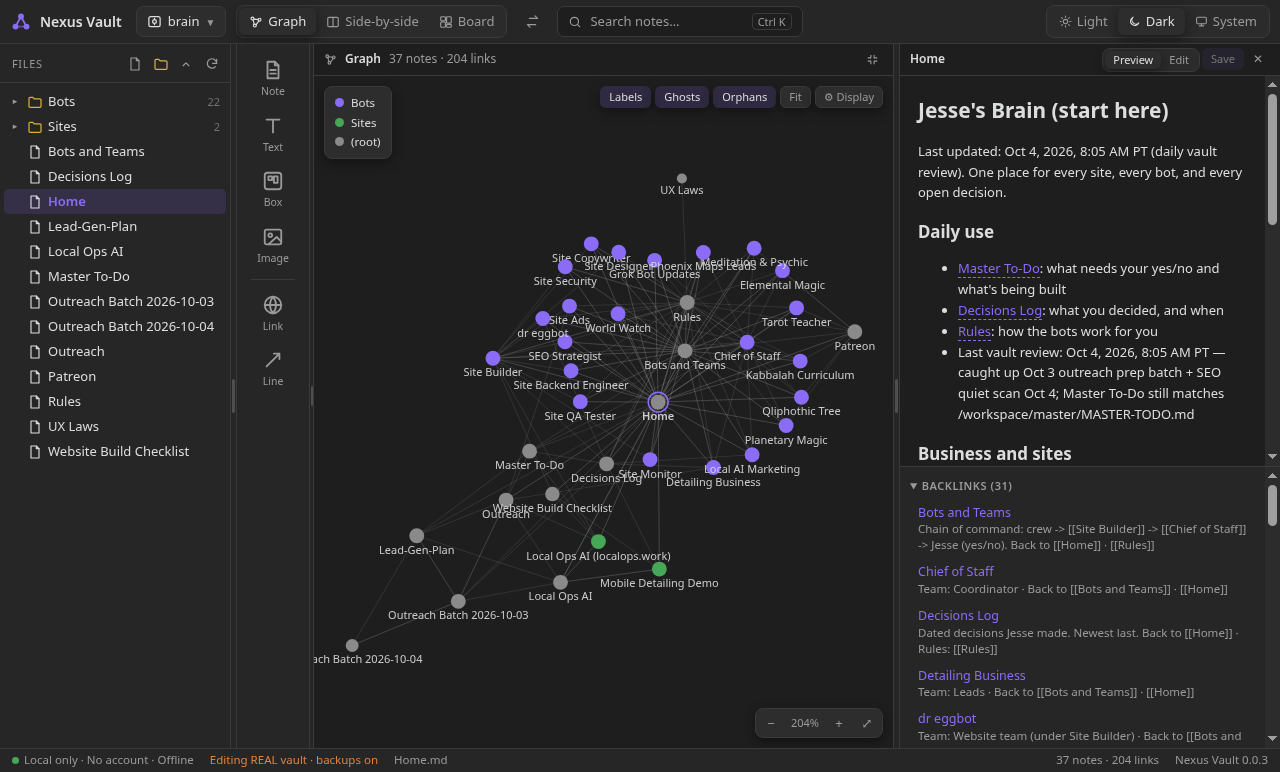
Nexus Vault — a local notes app with a live link graph, a zoomable project board, and nested folder boxes. Your files stay on your PC. Optional AI access stays on localhost.
Built with Electron, TypeScript, and React. Opens folders of plain Markdown notes (including vaults you already keep as .md files). Primary target is Windows; Linux builds work for development.
Status: early (0.0.x). Prebuilt Windows binaries are not published yet — build from source (see below).
How people use it
- Personal notes — daily notes, to-dos, decisions; link them with
[[wikilinks]]and browse the map on the graph - Knowledge library — folders for books, articles, references; Ctrl+K search; board view for a folder overview
- AI memory / brain — keep a notes vault as durable memory for a local AI (optional localhost MCP; memory packs per folder)
- Code / GitHub architecture — drop a repo folder or ZIP; read-only board + import graph; never changes the repo
- Project planning — zoomable board with note cards, nested folder boxes, and connection lines that become links
Windows note
Windows may block the unsigned installer or .exe (Smart App Control or SmartScreen), the same way it can with other new apps. Builds are not code-signed yet. If Windows blocks it, turn Smart App Control off (or choose Run / Allow when prompted) so you can install and try the app.
What's new in 0.0.4
- Back / Forward on Board + Graph (Alt+Left/Right, mouse back/forward buttons) — restores folder, pan/zoom, graph camera, selection and open note.
- Semantic search (local, OFF by default) — Ctrl+K Semantic chip, Related notes in the note panel.
- AI access (MCP) — optional localhost-only MCP server with bearer token, read-only by default (vault menu → AI access (MCP)…).
- Memory packs — per-folder Always / When relevant / Never policy for AI results (right-click a folder → AI memory).
- Snapshots — create / list / restore / delete point-in-time copies (vault menu → Snapshots…).
- Citations — Sources panel after search; MCP search hits carry path, snippet, start line and a cite link.
What 0.0.4 does (M0 + M1 + M2 + code mode)
- Vault picker / switcher: safe copy (recommended), open real folder, recent vaults, and Open GitHub repo / code project (drop a folder or
.zip). - Folder tree: lazy, keyboard-navigable; right-click menu (New note, New folder, Rename, Duplicate, Delete → vault
.trash, Reveal in File Explorer, Copy path, Open on board, Show in graph); drag notes onto the board; live-updates from a file watcher. - Graph (M1): force-directed graph of notes from
[[wikilinks]]and Markdown links (d3-force via react-force-graph-2d, bundled). Click opens a note, drag/zoom/pan, hover highlights neighbours, folder colours + legend, unresolved links as ghost nodes, toggles for labels/ghosts/orphans, zoom-to-fit. - Index (M1): in-memory index of links, tags, headings + MiniSearch full-text, kept fresh by chokidar (pure JS, no native modules).
- Ctrl+K quick search across titles and content.
- Note panel: Markdown preview (clickable
[[links]]) and editor; Ctrl+S saves; every write backs up the previous version into.nexus-backups/; conflict detection if the file changed on disk; backlinks with context, outgoing links, tags. - Board (M2): zoomable project board per folder, auto-populated with the folder's notes (cards) and subfolders (nested boxes you double-click to drill into; breadcrumb back). Tool strip works by click (adds at centre) or drag-and-drop: Note (creates a real
.md), Text/sticky, Box/group, Image, Link card, Line tool. Move, resize, Shift-select / marquee, Delete key, zoom/pan, card colours, labelled lines. - Lines ↔ links: a line from one note card to another appends
[[Target]]under## Connectionsin the source note; deleting that line unlinks it but keeps the word ([[Target]]→Target). Board layout is saved in.nexus/board.jsoninside the vault. - Code architecture mode (read-only): repos (package.json / pyproject / go.mod / Cargo.toml / .git+code; skips hidden editor folders) open strictly read-only. Board = folder boxes + file cards with import lines; graph = files + imports (JS/TS import/require, Python import/from, Go imports, md links), external packages as ghosts, big repos collapse to folder nodes. Code opens in a read-only viewer with syntax colouring. Zips are extracted into the app data folder; board layout for repos is stored in app data, never in the repo.
Semantic search (optional, OFF by default)
- Ctrl+K → click the Semantic chip → Enable. Results with similar meaning are added after keyword hits (tagged "similar").
- When on, the note panel shows Related notes (top 5).
- 100% local: hashing-trick embeddings computed in the app, kept in memory, no model download, no network.
- Turn off again via the setting
semanticSearch: false(settings.json in app data) — keyword search is unchanged either way.
Citations / Sources
- After a Ctrl+K search, opening a result (or Ctrl+Enter) shows a Sources panel listing the hits with path + snippet; click to open, Copy to get Markdown citations.
- MCP
searchreturns keyword + semantic hits (when semantic is on), each withpath,title,snippet,startLine,sourceand a ready-madecitelink. - Memory packs apply to AI-facing results: Never include folders are dropped from MCP search/list/backlinks,
get_note/append_noterefuse them, and semantic results/Related notes skip them; Always include folders rank first.
Privacy Statement
Nexus Vault is local-first and offline by design:
- No network requests of any kind (the main process blocks everything except local files)
- No telemetry, analytics, or crash reporting; no auto-update; no accounts
- Writes inside a vault: the notes you edit/create/rename/delete, backups in
.nexus-backups/, deleted items in.trash/, board layout in.nexus/board.json - Code repos are never written to
- Link cards open in your system browser only when you double-click and confirm
Development
# Install dependencies
npm install

# Run in development mode
npm run dev

# Type checking
npm run typecheck

# Run unit tests
npm test

# Build for production
npm run build

# Build Windows installer (NSIS + portable)
npm run dist:win

# Build Linux directory
npm run dist:linux
Building Windows Installer
Run on Windows or cross-compile from Linux:
npm run dist:win
Outputs to dist/:
Nexus-Vault-Setup-<version>.exe(NSIS installer)Nexus-Vault-Portable-<version>.exe(portable)
Or run scripts/package-win.sh for a slim, unpacked Windows x64 zip (split into ~62 MB parts) in dist/.
Cross-build from Linux works because:
- No native Node modules in M0
signAndEditExecutable: falsein electron-builder config- electron-builder downloads Windows Electron binaries automatically
Environment Variables (for testing/screenshots)
NEXUS_VAULT_OPEN=<path>— Open that folder as the active vault on launchNEXUS_THEME=light|dark— Force theme for session (no save)NEXUS_USER_DATA=<dir>— Override userData path (call before app ready)NEXUS_SCREENSHOT=<file.png>— Capture page to file after load, then quitNEXUS_EXPAND=<comma,separated,relPaths>— Pre-expand folders in tree
Memory packs
Per-folder AI context policy for search / MCP (default: When relevant):
- Always include — notes under this folder are prioritised for AI context
- When relevant — normal ranking (default; inherited from ancestors)
- Never include — notes under this folder are excluded from AI search results
Right-click a folder (or the empty tree background for the vault root) → AI memory …. Explicit Always/Never show a small ★ / ⊘ badge.
Stored at <vault>/.nexus/memory-packs.json for notes vaults. Code projects (read-only) store packs in app data, never inside the repo.
Snapshots
Create point-in-time copies of all notes and the board (vault menu → Snapshots…). Restore brings files back and moves newer notes into .trash/restore-<id>/. Notes vaults store snapshots in .nexus/snapshots/; code projects only snapshot the board layout into app data.
License
Apache-2.0 — Copyright 2026 Jesse Lugo
See LICENSE for full text.
Similar repos


Local-first notes: folder tree, live graph, and zoomable board — offline by default.
TypeScript
0
0 commits
updated Oct 5, 2026
See what people are saying
README
Nexus Vault
Nexus Vault — a local notes app with a live link graph, a zoomable project board, and nested folder boxes. Your files stay on your PC. Optional AI access stays on localhost.
Built with Electron, TypeScript, and React. Opens folders of plain Markdown notes (including vaults you already keep as .md files). Primary target is Windows; Linux builds work for development.
Status: early (0.0.x). Prebuilt Windows binaries are not published yet — build from source (see below).
How people use it
- Personal notes — daily notes, to-dos, decisions; link them with
[[wikilinks]]and browse the map on the graph - Knowledge library — folders for books, articles, references; Ctrl+K search; board view for a folder overview
- AI memory / brain — keep a notes vault as durable memory for a local AI (optional localhost MCP; memory packs per folder)
- Code / GitHub architecture — drop a repo folder or ZIP; read-only board + import graph; never changes the repo
- Project planning — zoomable board with note cards, nested folder boxes, and connection lines that become links
Windows note
Windows may block the unsigned installer or .exe (Smart App Control or SmartScreen), the same way it can with other new apps. Builds are not code-signed yet. If Windows blocks it, turn Smart App Control off (or choose Run / Allow when prompted) so you can install and try the app.
What's new in 0.0.4
- Back / Forward on Board + Graph (Alt+Left/Right, mouse back/forward buttons) — restores folder, pan/zoom, graph camera, selection and open note.
- Semantic search (local, OFF by default) — Ctrl+K Semantic chip, Related notes in the note panel.
- AI access (MCP) — optional localhost-only MCP server with bearer token, read-only by default (vault menu → AI access (MCP)…).
- Memory packs — per-folder Always / When relevant / Never policy for AI results (right-click a folder → AI memory).
- Snapshots — create / list / restore / delete point-in-time copies (vault menu → Snapshots…).
- Citations — Sources panel after search; MCP search hits carry path, snippet, start line and a cite link.
What 0.0.4 does (M0 + M1 + M2 + code mode)
- Vault picker / switcher: safe copy (recommended), open real folder, recent vaults, and Open GitHub repo / code project (drop a folder or
.zip). - Folder tree: lazy, keyboard-navigable; right-click menu (New note, New folder, Rename, Duplicate, Delete → vault
.trash, Reveal in File Explorer, Copy path, Open on board, Show in graph); drag notes onto the board; live-updates from a file watcher. - Graph (M1): force-directed graph of notes from
[[wikilinks]]and Markdown links (d3-force via react-force-graph-2d, bundled). Click opens a note, drag/zoom/pan, hover highlights neighbours, folder colours + legend, unresolved links as ghost nodes, toggles for labels/ghosts/orphans, zoom-to-fit. - Index (M1): in-memory index of links, tags, headings + MiniSearch full-text, kept fresh by chokidar (pure JS, no native modules).
- Ctrl+K quick search across titles and content.
- Note panel: Markdown preview (clickable
[[links]]) and editor; Ctrl+S saves; every write backs up the previous version into.nexus-backups/; conflict detection if the file changed on disk; backlinks with context, outgoing links, tags. - Board (M2): zoomable project board per folder, auto-populated with the folder's notes (cards) and subfolders (nested boxes you double-click to drill into; breadcrumb back). Tool strip works by click (adds at centre) or drag-and-drop: Note (creates a real
.md), Text/sticky, Box/group, Image, Link card, Line tool. Move, resize, Shift-select / marquee, Delete key, zoom/pan, card colours, labelled lines. - Lines ↔ links: a line from one note card to another appends
[[Target]]under## Connectionsin the source note; deleting that line unlinks it but keeps the word ([[Target]]→Target). Board layout is saved in.nexus/board.jsoninside the vault. - Code architecture mode (read-only): repos (package.json / pyproject / go.mod / Cargo.toml / .git+code; skips hidden editor folders) open strictly read-only. Board = folder boxes + file cards with import lines; graph = files + imports (JS/TS import/require, Python import/from, Go imports, md links), external packages as ghosts, big repos collapse to folder nodes. Code opens in a read-only viewer with syntax colouring. Zips are extracted into the app data folder; board layout for repos is stored in app data, never in the repo.
Semantic search (optional, OFF by default)
- Ctrl+K → click the Semantic chip → Enable. Results with similar meaning are added after keyword hits (tagged "similar").
- When on, the note panel shows Related notes (top 5).
- 100% local: hashing-trick embeddings computed in the app, kept in memory, no model download, no network.
- Turn off again via the setting
semanticSearch: false(settings.json in app data) — keyword search is unchanged either way.
Citations / Sources
- After a Ctrl+K search, opening a result (or Ctrl+Enter) shows a Sources panel listing the hits with path + snippet; click to open, Copy to get Markdown citations.
- MCP
searchreturns keyword + semantic hits (when semantic is on), each withpath,title,snippet,startLine,sourceand a ready-madecitelink. - Memory packs apply to AI-facing results: Never include folders are dropped from MCP search/list/backlinks,
get_note/append_noterefuse them, and semantic results/Related notes skip them; Always include folders rank first.
Privacy Statement
Nexus Vault is local-first and offline by design:
- No network requests of any kind (the main process blocks everything except local files)
- No telemetry, analytics, or crash reporting; no auto-update; no accounts
- Writes inside a vault: the notes you edit/create/rename/delete, backups in
.nexus-backups/, deleted items in.trash/, board layout in.nexus/board.json - Code repos are never written to
- Link cards open in your system browser only when you double-click and confirm
Development
# Install dependencies
npm install

# Run in development mode
npm run dev

# Type checking
npm run typecheck

# Run unit tests
npm test

# Build for production
npm run build

# Build Windows installer (NSIS + portable)
npm run dist:win

# Build Linux directory
npm run dist:linux
Building Windows Installer
Run on Windows or cross-compile from Linux:
npm run dist:win
Outputs to dist/:
Nexus-Vault-Setup-<version>.exe(NSIS installer)Nexus-Vault-Portable-<version>.exe(portable)
Or run scripts/package-win.sh for a slim, unpacked Windows x64 zip (split into ~62 MB parts) in dist/.
Cross-build from Linux works because:
- No native Node modules in M0
signAndEditExecutable: falsein electron-builder config- electron-builder downloads Windows Electron binaries automatically
Environment Variables (for testing/screenshots)
NEXUS_VAULT_OPEN=<path>— Open that folder as the active vault on launchNEXUS_THEME=light|dark— Force theme for session (no save)NEXUS_USER_DATA=<dir>— Override userData path (call before app ready)NEXUS_SCREENSHOT=<file.png>— Capture page to file after load, then quitNEXUS_EXPAND=<comma,separated,relPaths>— Pre-expand folders in tree
Memory packs
Per-folder AI context policy for search / MCP (default: When relevant):
- Always include — notes under this folder are prioritised for AI context
- When relevant — normal ranking (default; inherited from ancestors)
- Never include — notes under this folder are excluded from AI search results
Right-click a folder (or the empty tree background for the vault root) → AI memory …. Explicit Always/Never show a small ★ / ⊘ badge.
Stored at <vault>/.nexus/memory-packs.json for notes vaults. Code projects (read-only) store packs in app data, never inside the repo.
Snapshots
Create point-in-time copies of all notes and the board (vault menu → Snapshots…). Restore brings files back and moves newer notes into .trash/restore-<id>/. Notes vaults store snapshots in .nexus/snapshots/; code projects only snapshot the board layout into app data.
License
Apache-2.0 — Copyright 2026 Jesse Lugo
See LICENSE for full text.