
Free, self-hosted software license management and inventory for tracking licenses, renewals, contracts, costs, vendors, and entitlements.
See the codeSee what people are saying
README
LicenseTrack
LicenseTrack is a self-hosted software license procurement and lifecycle management system. It helps organisations track software requests through sourcing, purchasing, entitlement, renewal, and retirement.
LicenseTrack does not replace an ERP or ordering system. It provides the single source of truth and audit trail that general ordering tools usually do not.
LicenseTrack is source-available software. See Licensing before using, modifying, or redistributing it.
LicenseTrack 1.2.0
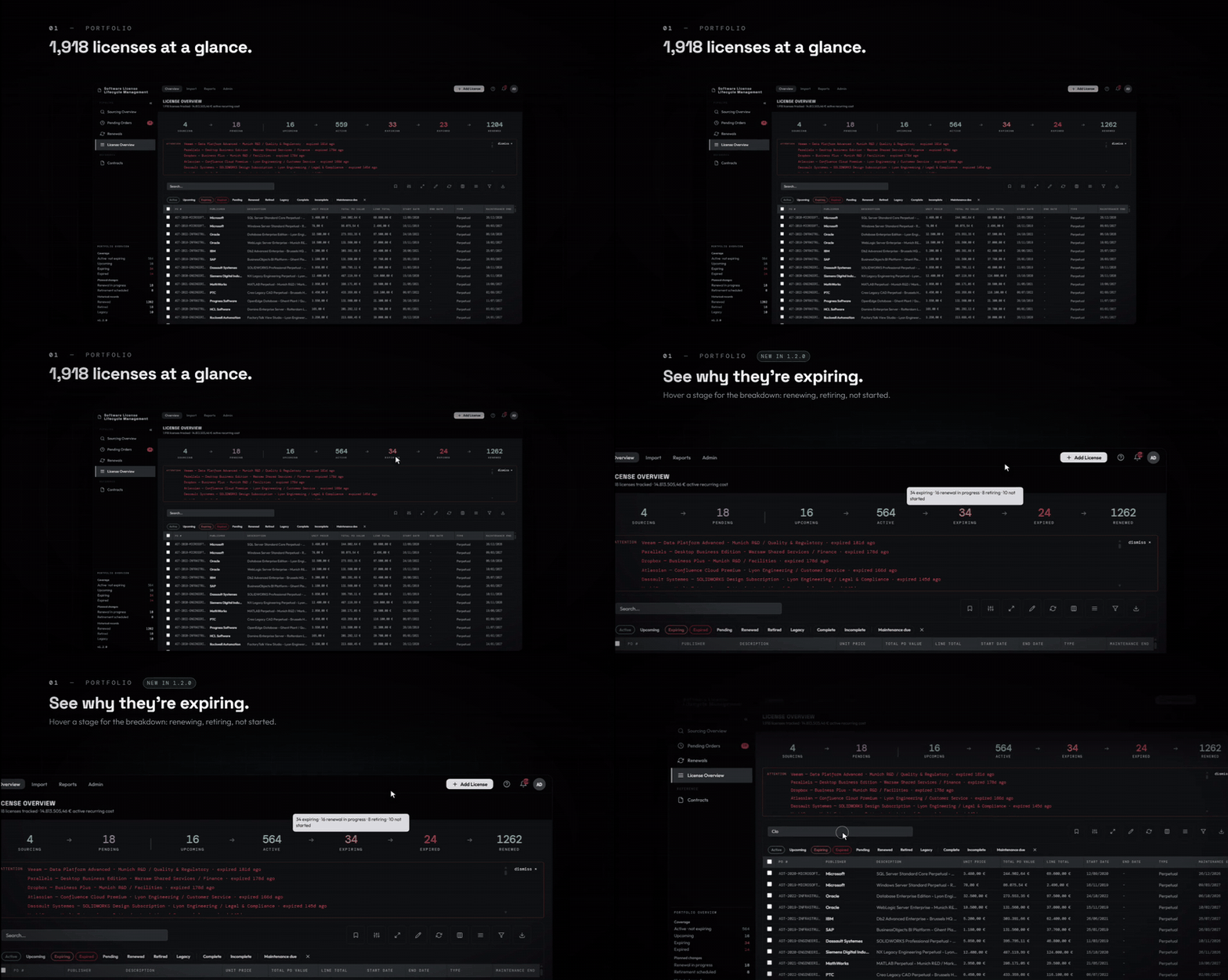
Version 1.2.0 adds Registry grouping and generated PO line numbers, with improvements to maintenance, numeric input, CSV import/export and procurement evidence handling. See the release notes and upgrade guide.
[!TIP] Try the hosted demo before installing.
Background
LicenseTrack came out of two jobs on opposite sides of the same problem.
The first was at a Value Added Reseller, where I worked as a software consultant. Tracking quotes, orders, and entitlement documents was fragmented. Required documents were routinely missing or scattered across emails and shared drives. There was no renewal dashboard for customers. Management's answer was Excel.
The second job was in License Management. Same problem, other side of the transaction: requesting quotes from resellers, pushing orders through internal purchasing, and receiving entitlements. An ITAM tool was available for importing purchases, but a general tracking tool and procurement dashboard were missing.
LicenseTrack is what I needed in both roles: a single source of truth for software license procurement, with document storage, optional email notifications, and clear license lifecycle logic. It is deliberately built around that workflow.
What LicenseTrack Does
-
Tracks requests, quotes, suppliers, costs, and documents through sourcing and pending orders.
-
Converts completed purchases into active license records while preserving their procurement history.
-
Handles paid licenses, freeware and open-source entitlements, included maintenance, and separately purchased maintenance.
-
Maintains a searchable license registry with column grouping, generated PO line numbers, custom fields, completeness checks, documents, contracts, secondary renewal contacts, and audit history.
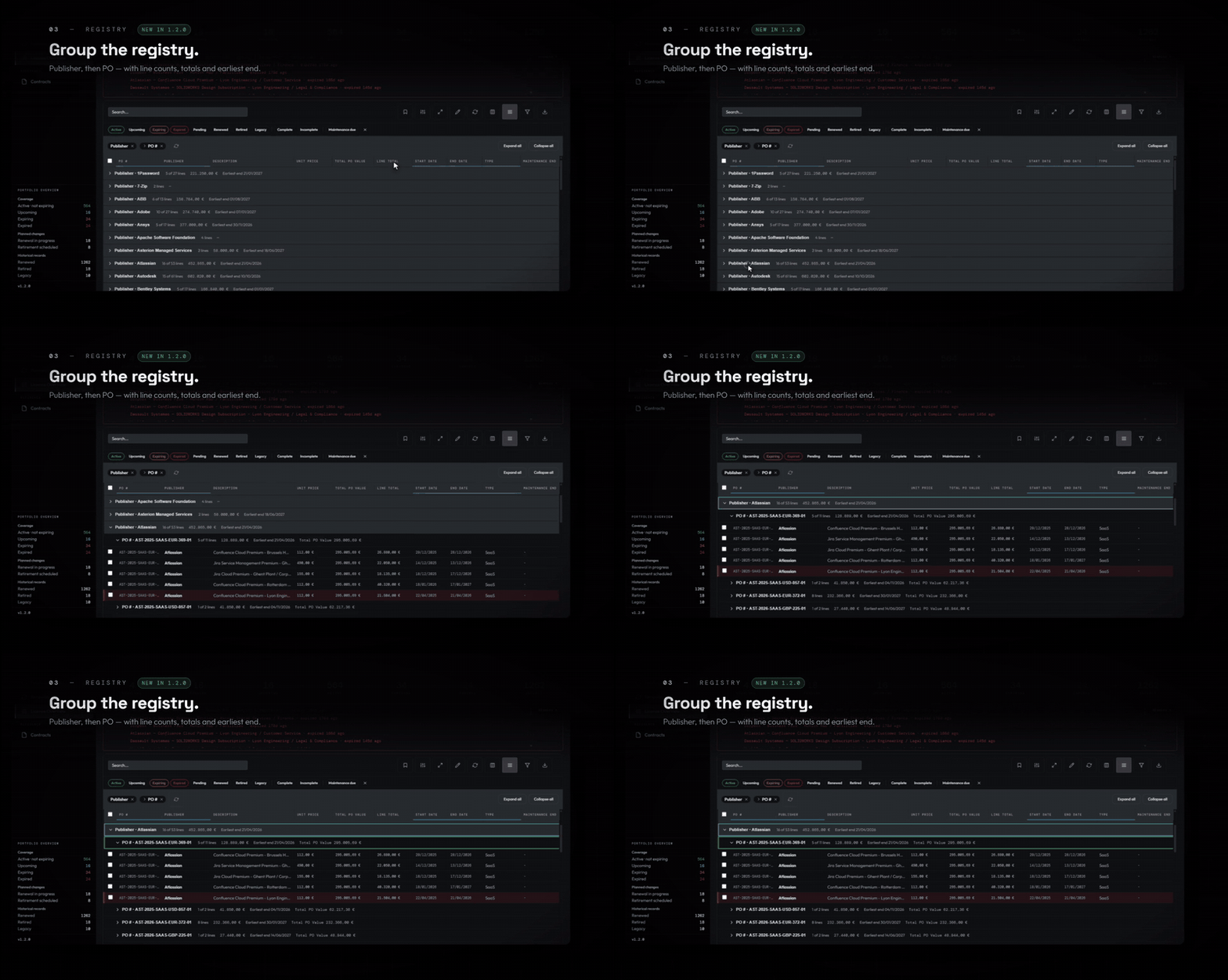
Group the Registry and review the purchase lines within each group.
-
Governs companies and cost centres as canonical reference data with aliases, role-aware selection, safe merges, and synchronized display names.
-
Carries renewals through sourcing and purchasing while preserving the license chain, supporting coterm opportunities, and adopting an already-purchased same-publisher license as the successor when appropriate.
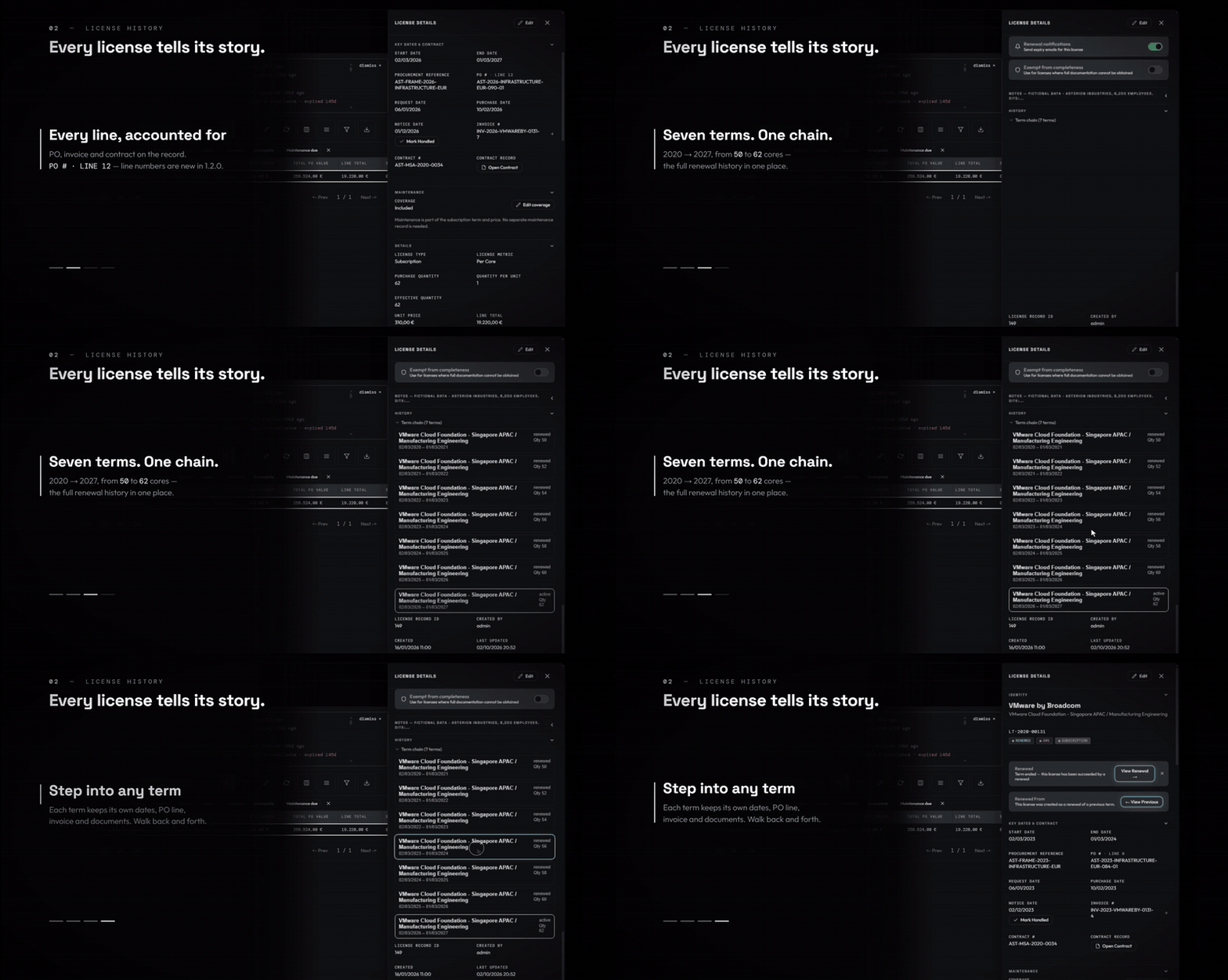
Follow a license through its terms and back to the purchase evidence.
-
Provides CSV import and export, including mapped imports from external tools, reference-data review, legacy-unlinked maintenance recovery, shared PO-value overrides, perpetual-maintenance and purchase-order trackers, operational spend and forecast reports, in-app notifications, and optional SMTP alerts.
-
Supports Admin, Editor, and Viewer roles, with optional OIDC/SSO and a local break-glass administrator.
-
Includes scheduled backups, restores from server-side or uploaded archives, and a guarded portfolio reset for clean pre-production starts.
Product Boundary
LicenseTrack is the procurement and governance layer. It can act as a central license registry on its own or work alongside discovery and compliance tools such as Flexera, Snow, or Lansweeper.
It does not scan networks, discover installed software, or reconcile deployments against entitlements. It keeps the structured, evidenced record of what was requested, purchased, received, maintained, and renewed so that data can be governed in LicenseTrack or exported for compliance reconciliation.
Quick Start
LicenseTrack is a web application accessed through a browser. The shortest production-style local setup uses Docker Compose:
cp .env.example .env
Set a strong JWT_SECRET and ADMIN_PASSWORD in .env, then start
LicenseTrack:
docker compose up -d --build
Open http://localhost:8080 and sign in as admin with the password from
.env. LicenseTrack rejects blank or common default secrets.
See the installation guide for secret generation and first-login guidance. Before exposing an instance to a network, follow the deployment and hardening guide.
Native Linux
LicenseTrack can also run directly on a supported systemd-based Linux host.
Download and extract the
licensetrack-native-<version>-linux-x86_64 release archive, then run:
sudo ./install.sh
See the native installation guide for supported hosts, network modes, unattended installation, upgrades, diagnostics, and removal.
Documentation
- Operator documentation
- Demo walkthrough and deployment options
- Installation and deployment
- Docker upgrade, native upgrade, and backup and restore
- API, webhook, and sidecar integrations
- Maintainer documentation and versioning policy
Version-local guidance is also available from the Help Center inside LicenseTrack.
Extensions and Integrations
LicenseTrack is complete without extensions or external integrations. Support for signed Official Extensions is built in, but no Official Extensions have been published yet. The first extensions, including document processing, are currently in development. The extension host remains disabled by default.
Custom and third-party automation should use the documented API, webhook, and sidecar contracts. Arbitrary third-party in-process packages are not supported. See the integration overview and Official Extension trust model.
Project Direction
LicenseTrack is under active development. The current focus is strengthening the 1.2.x foundation, preparing the first Official Extension for document processing, and expanding native Linux validation.
Delivered changes are recorded in the changelog.
Technology
LicenseTrack uses a React 19 frontend, a FastAPI and async SQLAlchemy backend, SQLite, and filesystem-backed document storage. It can be deployed with Docker Compose, Podman, or as a native systemd service. See the architecture overview for the detailed module map.
Development
Start with the maintainer documentation, especially the architecture map and style contract. Backend and frontend dependencies and commands are recorded beside their respective projects.
Frontend builds identify matching release tags with the released version.
Other builds from a Git checkout show a preview label with their branch and
commit. Builds without Git metadata, such as container builds (the build
context leaves out .git) and source archives, show the version number unless
LT_BUILD_REF and LT_BUILD_SHA are supplied. Container builds accept them as
build arguments, for example
--build-arg LT_BUILD_REF=refs/heads/main --build-arg LT_BUILD_SHA=<commit>.
Licensing
LicenseTrack is distributed under the LicenseTrack Source-Available License, not an OSI-approved open source license. See LICENSE.
The license allows internal self-hosted use, private internal modifications, implementation services, and independent integrations or extensions. A separate commercial license is required for hosted or managed services, tracking third-party licenses, commercial distribution of derivative works, or incorporation into a commercial product.
Third-party dependencies remain governed by their own license terms. See THIRD_PARTY_NOTICES.md.
Similar repos


Languages
Python
50.4%
JavaScript
47.0%
CSS
2.2%
Free, self-hosted software license management and inventory for tracking licenses, renewals, contracts, costs, vendors, and entitlements.
See the codeSee what people are saying
README
LicenseTrack
LicenseTrack is a self-hosted software license procurement and lifecycle management system. It helps organisations track software requests through sourcing, purchasing, entitlement, renewal, and retirement.
LicenseTrack does not replace an ERP or ordering system. It provides the single source of truth and audit trail that general ordering tools usually do not.
LicenseTrack is source-available software. See Licensing before using, modifying, or redistributing it.
LicenseTrack 1.2.0
Version 1.2.0 adds Registry grouping and generated PO line numbers, with improvements to maintenance, numeric input, CSV import/export and procurement evidence handling. See the release notes and upgrade guide.
[!TIP] Try the hosted demo before installing.
Background
LicenseTrack came out of two jobs on opposite sides of the same problem.
The first was at a Value Added Reseller, where I worked as a software consultant. Tracking quotes, orders, and entitlement documents was fragmented. Required documents were routinely missing or scattered across emails and shared drives. There was no renewal dashboard for customers. Management's answer was Excel.
The second job was in License Management. Same problem, other side of the transaction: requesting quotes from resellers, pushing orders through internal purchasing, and receiving entitlements. An ITAM tool was available for importing purchases, but a general tracking tool and procurement dashboard were missing.
LicenseTrack is what I needed in both roles: a single source of truth for software license procurement, with document storage, optional email notifications, and clear license lifecycle logic. It is deliberately built around that workflow.
What LicenseTrack Does
-
Tracks requests, quotes, suppliers, costs, and documents through sourcing and pending orders.
-
Converts completed purchases into active license records while preserving their procurement history.
-
Handles paid licenses, freeware and open-source entitlements, included maintenance, and separately purchased maintenance.
-
Maintains a searchable license registry with column grouping, generated PO line numbers, custom fields, completeness checks, documents, contracts, secondary renewal contacts, and audit history.
Group the Registry and review the purchase lines within each group.
-
Governs companies and cost centres as canonical reference data with aliases, role-aware selection, safe merges, and synchronized display names.
-
Carries renewals through sourcing and purchasing while preserving the license chain, supporting coterm opportunities, and adopting an already-purchased same-publisher license as the successor when appropriate.
Follow a license through its terms and back to the purchase evidence.
-
Provides CSV import and export, including mapped imports from external tools, reference-data review, legacy-unlinked maintenance recovery, shared PO-value overrides, perpetual-maintenance and purchase-order trackers, operational spend and forecast reports, in-app notifications, and optional SMTP alerts.
-
Supports Admin, Editor, and Viewer roles, with optional OIDC/SSO and a local break-glass administrator.
-
Includes scheduled backups, restores from server-side or uploaded archives, and a guarded portfolio reset for clean pre-production starts.
Product Boundary
LicenseTrack is the procurement and governance layer. It can act as a central license registry on its own or work alongside discovery and compliance tools such as Flexera, Snow, or Lansweeper.
It does not scan networks, discover installed software, or reconcile deployments against entitlements. It keeps the structured, evidenced record of what was requested, purchased, received, maintained, and renewed so that data can be governed in LicenseTrack or exported for compliance reconciliation.
Quick Start
LicenseTrack is a web application accessed through a browser. The shortest production-style local setup uses Docker Compose:
cp .env.example .env
Set a strong JWT_SECRET and ADMIN_PASSWORD in .env, then start
LicenseTrack:
docker compose up -d --build
Open http://localhost:8080 and sign in as admin with the password from
.env. LicenseTrack rejects blank or common default secrets.
See the installation guide for secret generation and first-login guidance. Before exposing an instance to a network, follow the deployment and hardening guide.
Native Linux
LicenseTrack can also run directly on a supported systemd-based Linux host.
Download and extract the
licensetrack-native-<version>-linux-x86_64 release archive, then run:
sudo ./install.sh
See the native installation guide for supported hosts, network modes, unattended installation, upgrades, diagnostics, and removal.
Documentation
- Operator documentation
- Demo walkthrough and deployment options
- Installation and deployment
- Docker upgrade, native upgrade, and backup and restore
- API, webhook, and sidecar integrations
- Maintainer documentation and versioning policy
Version-local guidance is also available from the Help Center inside LicenseTrack.
Extensions and Integrations
LicenseTrack is complete without extensions or external integrations. Support for signed Official Extensions is built in, but no Official Extensions have been published yet. The first extensions, including document processing, are currently in development. The extension host remains disabled by default.
Custom and third-party automation should use the documented API, webhook, and sidecar contracts. Arbitrary third-party in-process packages are not supported. See the integration overview and Official Extension trust model.
Project Direction
LicenseTrack is under active development. The current focus is strengthening the 1.2.x foundation, preparing the first Official Extension for document processing, and expanding native Linux validation.
Delivered changes are recorded in the changelog.
Technology
LicenseTrack uses a React 19 frontend, a FastAPI and async SQLAlchemy backend, SQLite, and filesystem-backed document storage. It can be deployed with Docker Compose, Podman, or as a native systemd service. See the architecture overview for the detailed module map.
Development
Start with the maintainer documentation, especially the architecture map and style contract. Backend and frontend dependencies and commands are recorded beside their respective projects.
Frontend builds identify matching release tags with the released version.
Other builds from a Git checkout show a preview label with their branch and
commit. Builds without Git metadata, such as container builds (the build
context leaves out .git) and source archives, show the version number unless
LT_BUILD_REF and LT_BUILD_SHA are supplied. Container builds accept them as
build arguments, for example
--build-arg LT_BUILD_REF=refs/heads/main --build-arg LT_BUILD_SHA=<commit>.
Licensing
LicenseTrack is distributed under the LicenseTrack Source-Available License, not an OSI-approved open source license. See LICENSE.
The license allows internal self-hosted use, private internal modifications, implementation services, and independent integrations or extensions. A separate commercial license is required for hosted or managed services, tracking third-party licenses, commercial distribution of derivative works, or incorporation into a commercial product.
Third-party dependencies remain governed by their own license terms. See THIRD_PARTY_NOTICES.md.
Similar repos
Languages
Python
50.4%
JavaScript
47.0%
CSS
2.2%