
See what people are saying
README


Features
- Intelligent proxy — Ox uses websites and apps on your behalf, freeing you from attention-hungry interfaces and slow legacy services. It turns what it learns into reusable capabilities, making future interactions faster and more reliable.
- Free to use — Ox is completely free and open source. You can use any model provider while keeping all your data on device.
- Peace of mind — Ox asks before taking any sensitive actions, keeps your credentials isolated and lets you pull the plug any time.
Ox Clients and Hosts
| Implementation | Client | Host |
|---|---|---|
| iOS app (source) | On-device app | Embedded on the device |
| CLI | Terminal app for macOS and Linux | Connects to a running Ox Host |
Install the standalone terminal Client on macOS or Linux:
curl -fsSL https://raw.githubusercontent.com/ziyzhu/openox/main/apps/cli/install.sh | sh
ox --help
Standalone downloads require a published ox-cli-v<version> GitHub Release.
The installer verifies the download and installs into ~/.local/bin without
requiring Bun or Node.js. Run the same command to update.
Live commands connect to a running Ox Host; the reference control endpoint is provided by a DEBUG iOS Simulator app. See the CLI guide for Host connections, offline commands, and package-manager alternatives.
Architecture
An Ox separates the interface, runtime, model, persistent state, and capabilities into seven components.
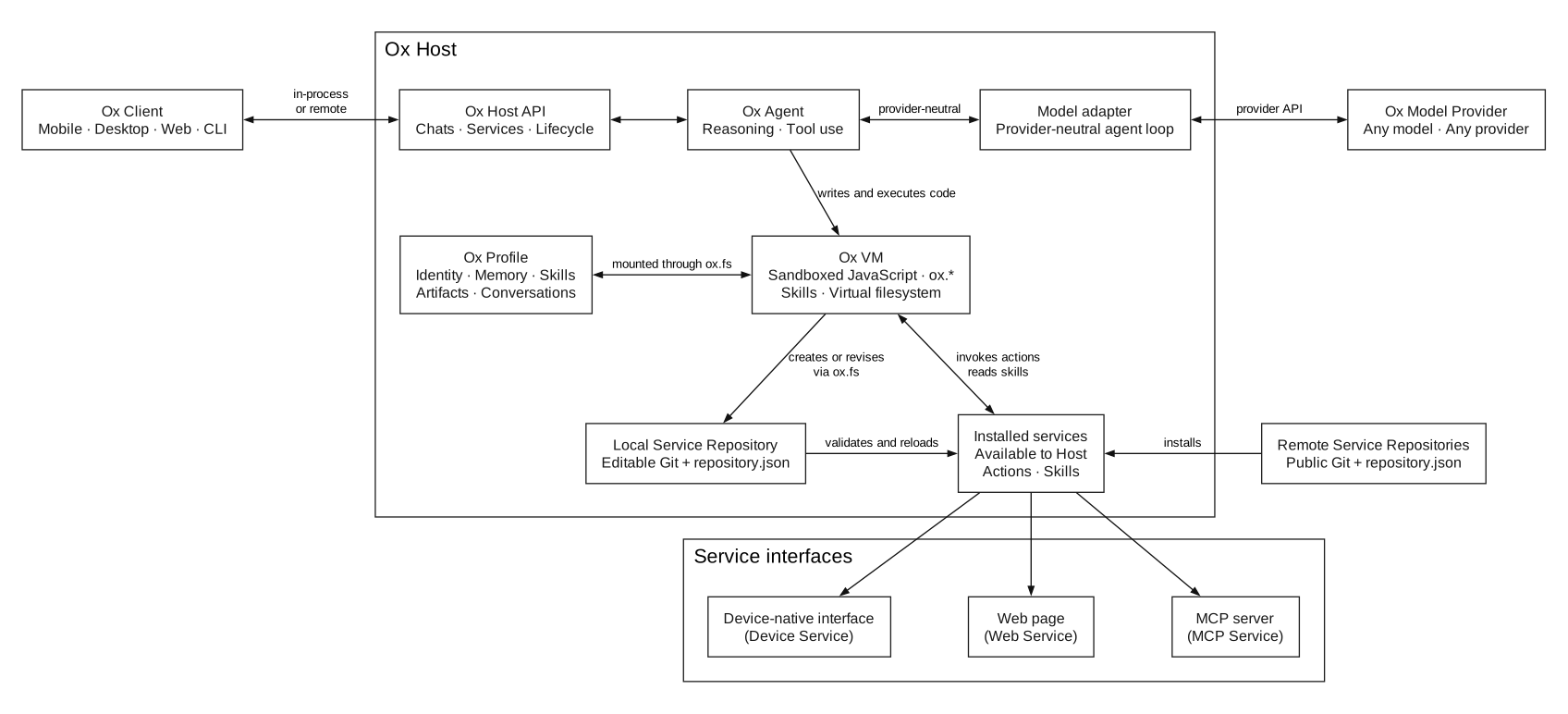
The Client and model remain replaceable around a Host that owns the Agent, Profile, VM, and service lifecycle.
-
Ox Client — An interface that connects to an Ox Host. A Client may be a mobile app, desktop app, web app, or command-line tool. The Host binds VM execution to the selected conversation, its permissions, attached services, and virtual filesystem view.
-
Ox Host — A process or device that opens an Ox Profile, runs the Ox VM, and supplies platform and service adapters. A Client can use an embedded Host or target a compatible Host elsewhere.
-
Ox Agent — The reasoning and tool-using process that pursues the user’s goals using the selected model, the state in an Ox Profile, and the capabilities exposed through the Ox VM.
-
Ox Model Provider — The language model selected by the user. OpenOx does not prescribe a model or provider; the Host adapts provider-specific APIs to the provider-neutral agent loop.
-
Ox Profile — A portable folder containing the Agent’s persistent state: its identity, memory, skills, artifacts, and conversation history. This keeps the Ox’s state independent of a particular Client or model.
-
Ox VM — The execution environment supplied by an Ox Host. The Agent writes and runs code inside the VM without direct access to the network, Host filesystem, or device. Instead, it uses explicit
ox.*capabilities to interact with the Profile, services, websites, users, and device capabilities. Theox.fsvirtual filesystem presents Profile content, skills, services, chats, and user-granted files while preserving each source’s permissions. -
Ox Service Repository — A versioned collection of services described by a
repository.jsonmanifest. Each Ox Host manages an editable Local repository and can install compatible remote repositories. Each service exposes typed actions the Agent can invoke and may include reusable skills that teach the Agent when and how to use them.- Device services are supplied by the Host’s platform adapters and expose capabilities such as Browser.
- Web services expose actions backed by websites and the user’s browser session.
- MCP services expose actions provided by an MCP server.
Anyone can publish compatible web and MCP services in a public Git repository containing a
repository.jsonmanifest. Any compatible Host can install that repository. Device services remain part of the Host implementation.
Distributed Evolution
Each Ox can self-evolve locally and, optionally, co-evolve with others. An Ox self-evolves through the VM, which lets it invoke an existing service while creating another one.
With an attached Browser capability, an Ox can navigate and inspect a website, perform approved interactions, and capture the evidence needed to create a reusable web service. That service becomes a set of actions the Ox can use again, combine with other services, or share through a repository.
- The Agent invokes Browser or another attached service from the VM to gather evidence for the required capability.
- The Agent uses
ox.fsto write or revise the service manifest, actions, and optional skills in its Local Service Repository. - The Host validates each source mutation, and the Agent uses
ox.service.attachto load or reload the service for the chat. - The Agent can invoke new actions later in the same turn or in subsequent turns. New skills guide subsequent agent work.
- Local Git can record the changes for inspection, reversal, and publication.
An Ox can therefore gain and apply a capability independently, without rebuilding or updating the Host or Client. Co-evolution is optional: an Ox can publish capabilities to shared repositories and install capabilities created by other Ox.
Contributors

292 commits
Similar repos


Languages
Swift
63.2%
JavaScript
26.7%
TypeScript
9.7%
See what people are saying
README
Features
- Intelligent proxy — Ox uses websites and apps on your behalf, freeing you from attention-hungry interfaces and slow legacy services. It turns what it learns into reusable capabilities, making future interactions faster and more reliable.
- Free to use — Ox is completely free and open source. You can use any model provider while keeping all your data on device.
- Peace of mind — Ox asks before taking any sensitive actions, keeps your credentials isolated and lets you pull the plug any time.
Ox Clients and Hosts
| Implementation | Client | Host |
|---|---|---|
| iOS app (source) | On-device app | Embedded on the device |
| CLI | Terminal app for macOS and Linux | Connects to a running Ox Host |
Install the standalone terminal Client on macOS or Linux:
curl -fsSL https://raw.githubusercontent.com/ziyzhu/openox/main/apps/cli/install.sh | sh
ox --help
Standalone downloads require a published ox-cli-v<version> GitHub Release.
The installer verifies the download and installs into ~/.local/bin without
requiring Bun or Node.js. Run the same command to update.
Live commands connect to a running Ox Host; the reference control endpoint is provided by a DEBUG iOS Simulator app. See the CLI guide for Host connections, offline commands, and package-manager alternatives.
Architecture
An Ox separates the interface, runtime, model, persistent state, and capabilities into seven components.
The Client and model remain replaceable around a Host that owns the Agent, Profile, VM, and service lifecycle.
-
Ox Client — An interface that connects to an Ox Host. A Client may be a mobile app, desktop app, web app, or command-line tool. The Host binds VM execution to the selected conversation, its permissions, attached services, and virtual filesystem view.
-
Ox Host — A process or device that opens an Ox Profile, runs the Ox VM, and supplies platform and service adapters. A Client can use an embedded Host or target a compatible Host elsewhere.
-
Ox Agent — The reasoning and tool-using process that pursues the user’s goals using the selected model, the state in an Ox Profile, and the capabilities exposed through the Ox VM.
-
Ox Model Provider — The language model selected by the user. OpenOx does not prescribe a model or provider; the Host adapts provider-specific APIs to the provider-neutral agent loop.
-
Ox Profile — A portable folder containing the Agent’s persistent state: its identity, memory, skills, artifacts, and conversation history. This keeps the Ox’s state independent of a particular Client or model.
-
Ox VM — The execution environment supplied by an Ox Host. The Agent writes and runs code inside the VM without direct access to the network, Host filesystem, or device. Instead, it uses explicit
ox.*capabilities to interact with the Profile, services, websites, users, and device capabilities. Theox.fsvirtual filesystem presents Profile content, skills, services, chats, and user-granted files while preserving each source’s permissions. -
Ox Service Repository — A versioned collection of services described by a
repository.jsonmanifest. Each Ox Host manages an editable Local repository and can install compatible remote repositories. Each service exposes typed actions the Agent can invoke and may include reusable skills that teach the Agent when and how to use them.- Device services are supplied by the Host’s platform adapters and expose capabilities such as Browser.
- Web services expose actions backed by websites and the user’s browser session.
- MCP services expose actions provided by an MCP server.
Anyone can publish compatible web and MCP services in a public Git repository containing a
repository.jsonmanifest. Any compatible Host can install that repository. Device services remain part of the Host implementation.
Distributed Evolution
Each Ox can self-evolve locally and, optionally, co-evolve with others. An Ox self-evolves through the VM, which lets it invoke an existing service while creating another one.
With an attached Browser capability, an Ox can navigate and inspect a website, perform approved interactions, and capture the evidence needed to create a reusable web service. That service becomes a set of actions the Ox can use again, combine with other services, or share through a repository.
- The Agent invokes Browser or another attached service from the VM to gather evidence for the required capability.
- The Agent uses
ox.fsto write or revise the service manifest, actions, and optional skills in its Local Service Repository. - The Host validates each source mutation, and the Agent uses
ox.service.attachto load or reload the service for the chat. - The Agent can invoke new actions later in the same turn or in subsequent turns. New skills guide subsequent agent work.
- Local Git can record the changes for inspection, reversal, and publication.
An Ox can therefore gain and apply a capability independently, without rebuilding or updating the Host or Client. Co-evolution is optional: an Ox can publish capabilities to shared repositories and install capabilities created by other Ox.
Similar repos
Contributors
292 commits
Languages
Swift
63.2%
JavaScript
26.7%
TypeScript
9.7%