Graph RAG with pure vector search, achieving SOTA performance in multi-hop reasoning scenarios.
See the codeGraph RAG with pure vector search — no graph database needed.






💡 Encode entities and relations as vectors in Milvus, retrieve multi-hop evidence with single-pass generative reranking or two-stage Jev scoring, without an iterative search loop.
pip install vector-graph-rag
# or
uv add vector-graph-rag
pip install "vector-graph-rag[loaders]"
# or
uv add "vector-graph-rag[loaders]"
pip install "vector-graph-rag[hf]"       # HuggingFace transformers
pip install "vector-graph-rag[ollama]"   # Ollama
pip install "vector-graph-rag[jina]"     # Jina AI
pip install "vector-graph-rag[all]"      # all optional providers
# or
uv add "vector-graph-rag[all]"
pip install "vector-graph-rag[observability]"
# or
uv add "vector-graph-rag[observability]"
from vector_graph_rag import VectorGraphRAG

rag = VectorGraphRAG()  # reads OPENAI_API_KEY from environment

rag.rebuild_texts([
    "Albert Einstein developed the theory of relativity.",
    "The theory of relativity revolutionized our understanding of space and time.",
])

result = rag.query("What did Einstein develop?")
print(result.answer)
Note: Set
OPENAI_API_KEYenvironment variable before running.
Skip LLM extraction if you already have knowledge graph triplets:
rag.rebuild_documents_with_triplets([
    {
        "passage": "Einstein developed relativity at Princeton.",
        "triplets": [
            ["Einstein", "developed", "relativity"],
            ["Einstein", "worked at", "Princeton"],
        ],
    },
])
Use upsert_documents_by_source() when a source file, message, or page is
created or modified. In Vector Graph RAG, a Document is a passage/chunk; the
source object is identified by metadata["source"] or the explicit source
argument. The method replaces only that source's chunks and graph references.
Source-level writes are not transactionally atomic, but the same upsert/delete
operation can be retried after an interruption to converge the source back to a
consistent state.
See the Incremental Updates guide for parser
integration, source key design, and retry recommendations.
from langchain_core.documents import Document

rag.upsert_documents_by_source(
    documents=[
        Document(
            page_content="Einstein developed relativity at Princeton.",
            metadata={
                "source": "file:file-123",
                "triplets": [
                    ["Einstein", "developed", "relativity"],
                    ["Einstein", "worked at", "Princeton"],
                ],
            },
        ),
    ],
    extract_triplets=False,
)

rag.delete_documents_by_source("file:file-123")
Migration note: v0.1.5 exposed
upsert_documents(document_id=...)anddelete_documents(document_id). These names were removed in v0.2.0 becauseDocumentmeans passage/chunk in this project. Use the*_by_source()APIs shown above.
The legacy add_* ingestion helpers rebuild the full knowledge base and are planned
for removal in v1.0.0. For explicit full refreshes, use rebuild_texts(),
rebuild_documents(), or rebuild_documents_with_triplets().
Vector Graph RAG can emit OpenTelemetry spans for ingestion, loaders, embeddings, Milvus operations, retrieval, and generation. Configure the OpenTelemetry SDK/exporter in your application, then attach request context around RAG calls:
from vector_graph_rag import VectorGraphRAG, observability_context

rag = VectorGraphRAG(collection_prefix="my_project")

with observability_context(
    request_id="req-123",
    tenant_id="tenant-a",
    graph_name="my_project",
    source="file-123",
):
    rag.upsert_documents_by_source(chunks, source="file-123")
The built-in spans avoid document text, prompts, query text, generated answers, filters, and full URLs by default. See the Observability guide for setup details.
from vector_graph_rag import VectorGraphRAG
from vector_graph_rag.loaders import DocumentImporter

# Import from URLs, PDFs, DOCX, etc. (with automatic chunking)
importer = DocumentImporter(chunk_size=1000, chunk_overlap=200)
result = importer.import_sources([
    "https://en.wikipedia.org/wiki/Albert_Einstein",
    "/path/to/document.pdf",
    "/path/to/report.docx",
])

rag = VectorGraphRAG(milvus_uri="./my_graph.db")
rag.rebuild_documents(result.documents, extract_triplets=True)

result = rag.query("What did Einstein discover?")
print(result.answer)
rag = VectorGraphRAG(
    milvus_uri="./my_data.db",          # or remote Milvus / Zilliz Cloud
    llm_model="gpt-4o",
    embedding_provider="openai",
    embedding_model="text-embedding-3-large",
    collection_prefix="my_project",     # isolate multiple datasets
)
All settings can also be configured via environment variables with VGRAG_ prefix or a .env file:
VGRAG_LLM_MODEL=gpt-4o
VGRAG_EMBEDDING_PROVIDER=openai
VGRAG_EMBEDDING_MODEL=text-embedding-3-large
VGRAG_MILVUS_URI=http://localhost:19530
📖 Full Python API reference → Python API docs
Indexing:
Documents → Triplet Extraction (LLM) → Entities + Relations → Embedding → Milvus
Query:
Question → Entity Extraction → Vector Search → Subgraph Expansion → LLM Reranking → Answer
Example: "What did Einstein develop?"
Einstein📖 Detailed pipeline walkthrough with diagrams → How It Works · Design Philosophy
Before introducing Jev, we evaluated Vector Graph RAG on three multi-hop QA benchmarks (Recall@5):
| Method | MuSiQue | HotpotQA | 2WikiMultiHopQA | Average |
|---|---|---|---|---|
| Naive RAG | 55.6% | 90.8% | 73.7% | 73.4% |
| IRCoT + HippoRAG¹ | 57.6% | 83.0% | 93.9% | 78.2% |
| HippoRAG 2² | 74.7% | 96.3% | 90.4% | 87.1% |
| Vector Graph RAG | 73.0% | 96.3% | 94.1% | 87.8% |
¹ HippoRAG (NeurIPS 2024) ² HippoRAG 2 (2025)
📖 Detailed analysis and reproduction steps → Evaluation
Two-stage Jev reaches the quality–latency Pareto frontier.
86.07% average Recall@5, the highest among the compared methods, with 3.13 seconds of additional model-call latency. On MuSiQue and 2Wiki (1,000 questions each), two-stage Jev reaches the Pareto frontier using the displayed timings. This two-dataset result is separate from the historical three-dataset average above.
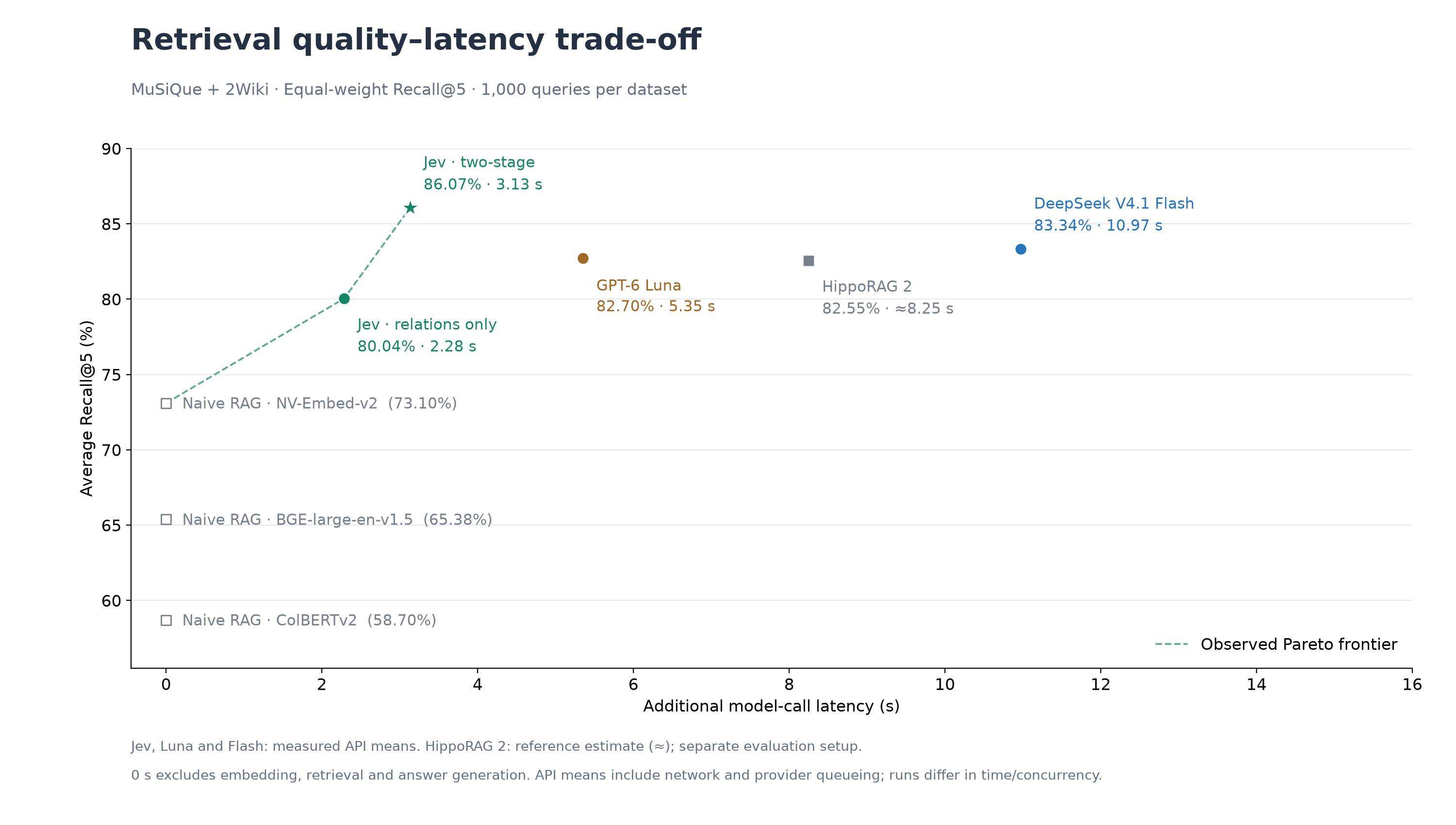
See Evaluation Results for the gains over relation-only Jev and other baselines, timing details and reproduction instructions.
Just change milvus_uri to switch between deployment modes:
Milvus Lite (default) — zero config, single-process, data stored in a local file. Great for prototyping and small datasets:
rag = VectorGraphRAG(milvus_uri="./my_graph.db") # just works
⭐ Zilliz Cloud — fully managed, free tier available — sign up 👇:
rag = VectorGraphRAG(
    milvus_uri="https://in03-xxx.api.gcp-us-west1.zillizcloud.com",
    milvus_token="your-api-key",
)
You can sign up on Zilliz Cloud to get a free cluster and API key.
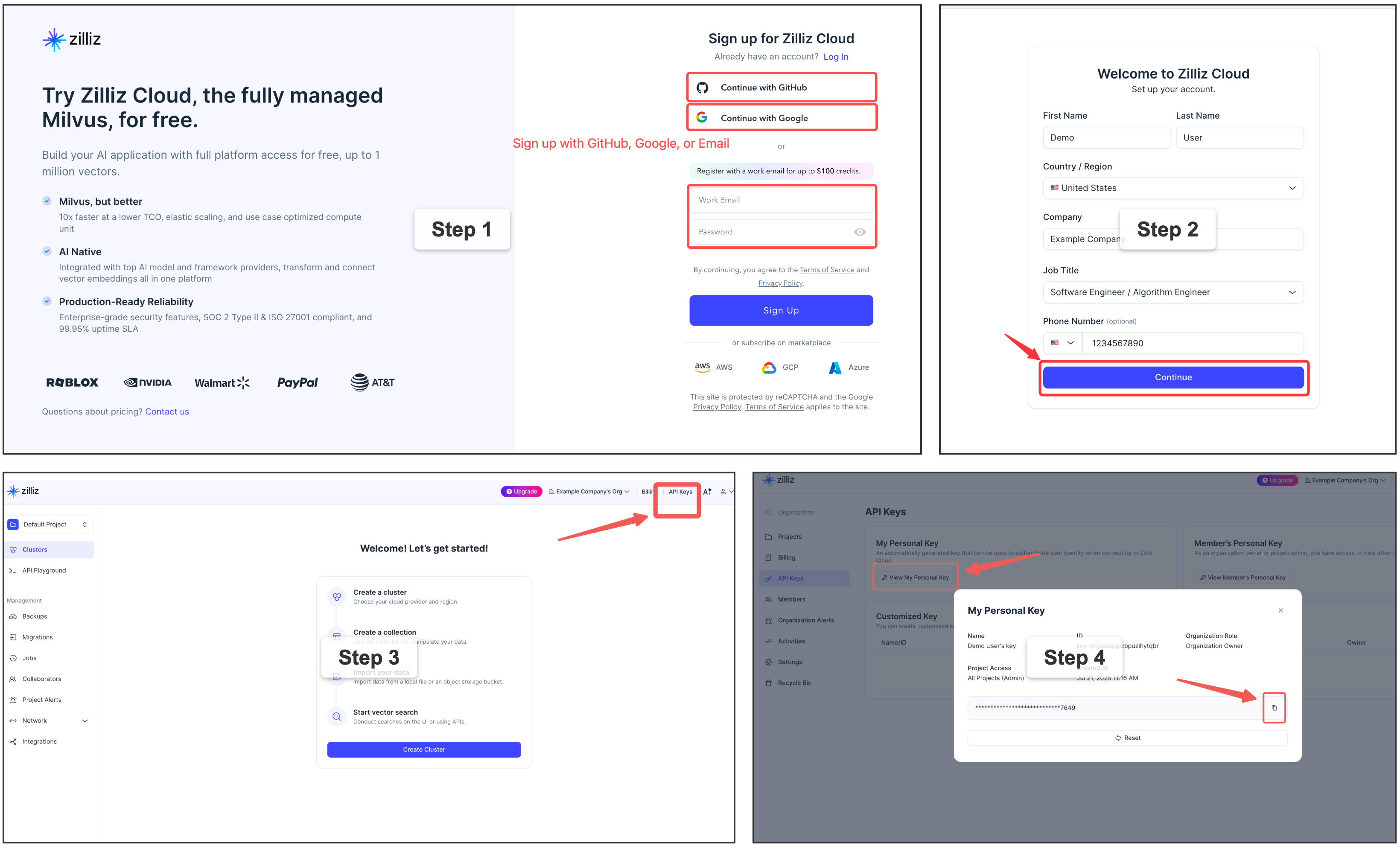
If you need a dedicated Milvus instance for multi-user or team environments, you can deploy Milvus standalone with Docker Compose. This requires Docker and some infrastructure knowledge. See the official installation guide for detailed steps.
rag = VectorGraphRAG(milvus_uri="http://localhost:19530")
Vector Graph RAG includes a React-based frontend for interactive graph visualization and a FastAPI backend.
# Backend
uv sync --extra api
uv run uvicorn vector_graph_rag.api.app:app --host 0.0.0.0 --port 8000

# Frontend
cd frontend && npm install && npm run dev
| Endpoint | Method | Description |
|---|---|---|
/api/health | GET | Health check |
/api/graphs | GET | List available graphs |
/api/graph/{name}/stats | GET | Get graph statistics |
/api/query | POST | Query the knowledge graph |
/api/documents | POST | Add documents |
/api/import | POST | Import from URLs/paths |
/api/upload | POST | Upload files |
See API docs at http://localhost:8000/docs after starting the server.
📖 Full endpoint reference → REST API docs · Frontend guide
Bug reports, feature requests, and pull requests are welcome! For questions and discussions, join us on Discord.
40 followers · starred May 2026
57 followers · starred Apr 2026
1 followers · starred Sep 2026
Graph RAG with pure vector search, achieving SOTA performance in multi-hop reasoning scenarios.
See the codeGraph RAG with pure vector search — no graph database needed.
💡 Encode entities and relations as vectors in Milvus, retrieve multi-hop evidence with single-pass generative reranking or two-stage Jev scoring, without an iterative search loop.
pip install vector-graph-rag
# or
uv add vector-graph-rag
pip install "vector-graph-rag[loaders]"
# or
uv add "vector-graph-rag[loaders]"
pip install "vector-graph-rag[hf]"       # HuggingFace transformers
pip install "vector-graph-rag[ollama]"   # Ollama
pip install "vector-graph-rag[jina]"     # Jina AI
pip install "vector-graph-rag[all]"      # all optional providers
# or
uv add "vector-graph-rag[all]"
pip install "vector-graph-rag[observability]"
# or
uv add "vector-graph-rag[observability]"
from vector_graph_rag import VectorGraphRAG

rag = VectorGraphRAG()  # reads OPENAI_API_KEY from environment

rag.rebuild_texts([
    "Albert Einstein developed the theory of relativity.",
    "The theory of relativity revolutionized our understanding of space and time.",
])

result = rag.query("What did Einstein develop?")
print(result.answer)
Note: Set
OPENAI_API_KEYenvironment variable before running.
Skip LLM extraction if you already have knowledge graph triplets:
rag.rebuild_documents_with_triplets([
    {
        "passage": "Einstein developed relativity at Princeton.",
        "triplets": [
            ["Einstein", "developed", "relativity"],
            ["Einstein", "worked at", "Princeton"],
        ],
    },
])
Use upsert_documents_by_source() when a source file, message, or page is
created or modified. In Vector Graph RAG, a Document is a passage/chunk; the
source object is identified by metadata["source"] or the explicit source
argument. The method replaces only that source's chunks and graph references.
Source-level writes are not transactionally atomic, but the same upsert/delete
operation can be retried after an interruption to converge the source back to a
consistent state.
See the Incremental Updates guide for parser
integration, source key design, and retry recommendations.
from langchain_core.documents import Document

rag.upsert_documents_by_source(
    documents=[
        Document(
            page_content="Einstein developed relativity at Princeton.",
            metadata={
                "source": "file:file-123",
                "triplets": [
                    ["Einstein", "developed", "relativity"],
                    ["Einstein", "worked at", "Princeton"],
                ],
            },
        ),
    ],
    extract_triplets=False,
)

rag.delete_documents_by_source("file:file-123")
Migration note: v0.1.5 exposed
upsert_documents(document_id=...)anddelete_documents(document_id). These names were removed in v0.2.0 becauseDocumentmeans passage/chunk in this project. Use the*_by_source()APIs shown above.
The legacy add_* ingestion helpers rebuild the full knowledge base and are planned
for removal in v1.0.0. For explicit full refreshes, use rebuild_texts(),
rebuild_documents(), or rebuild_documents_with_triplets().
Vector Graph RAG can emit OpenTelemetry spans for ingestion, loaders, embeddings, Milvus operations, retrieval, and generation. Configure the OpenTelemetry SDK/exporter in your application, then attach request context around RAG calls:
from vector_graph_rag import VectorGraphRAG, observability_context

rag = VectorGraphRAG(collection_prefix="my_project")

with observability_context(
    request_id="req-123",
    tenant_id="tenant-a",
    graph_name="my_project",
    source="file-123",
):
    rag.upsert_documents_by_source(chunks, source="file-123")
The built-in spans avoid document text, prompts, query text, generated answers, filters, and full URLs by default. See the Observability guide for setup details.
from vector_graph_rag import VectorGraphRAG
from vector_graph_rag.loaders import DocumentImporter

# Import from URLs, PDFs, DOCX, etc. (with automatic chunking)
importer = DocumentImporter(chunk_size=1000, chunk_overlap=200)
result = importer.import_sources([
    "https://en.wikipedia.org/wiki/Albert_Einstein",
    "/path/to/document.pdf",
    "/path/to/report.docx",
])

rag = VectorGraphRAG(milvus_uri="./my_graph.db")
rag.rebuild_documents(result.documents, extract_triplets=True)

result = rag.query("What did Einstein discover?")
print(result.answer)
rag = VectorGraphRAG(
    milvus_uri="./my_data.db",          # or remote Milvus / Zilliz Cloud
    llm_model="gpt-4o",
    embedding_provider="openai",
    embedding_model="text-embedding-3-large",
    collection_prefix="my_project",     # isolate multiple datasets
)
All settings can also be configured via environment variables with VGRAG_ prefix or a .env file:
VGRAG_LLM_MODEL=gpt-4o
VGRAG_EMBEDDING_PROVIDER=openai
VGRAG_EMBEDDING_MODEL=text-embedding-3-large
VGRAG_MILVUS_URI=http://localhost:19530
📖 Full Python API reference → Python API docs
Indexing:
Documents → Triplet Extraction (LLM) → Entities + Relations → Embedding → Milvus
Query:
Question → Entity Extraction → Vector Search → Subgraph Expansion → LLM Reranking → Answer
Example: "What did Einstein develop?"
Einstein📖 Detailed pipeline walkthrough with diagrams → How It Works · Design Philosophy
Before introducing Jev, we evaluated Vector Graph RAG on three multi-hop QA benchmarks (Recall@5):
| Method | MuSiQue | HotpotQA | 2WikiMultiHopQA | Average |
|---|---|---|---|---|
| Naive RAG | 55.6% | 90.8% | 73.7% | 73.4% |
| IRCoT + HippoRAG¹ | 57.6% | 83.0% | 93.9% | 78.2% |
| HippoRAG 2² | 74.7% | 96.3% | 90.4% | 87.1% |
| Vector Graph RAG | 73.0% | 96.3% | 94.1% | 87.8% |
¹ HippoRAG (NeurIPS 2024) ² HippoRAG 2 (2025)
📖 Detailed analysis and reproduction steps → Evaluation
Two-stage Jev reaches the quality–latency Pareto frontier.
86.07% average Recall@5, the highest among the compared methods, with 3.13 seconds of additional model-call latency. On MuSiQue and 2Wiki (1,000 questions each), two-stage Jev reaches the Pareto frontier using the displayed timings. This two-dataset result is separate from the historical three-dataset average above.
See Evaluation Results for the gains over relation-only Jev and other baselines, timing details and reproduction instructions.
Just change milvus_uri to switch between deployment modes:
Milvus Lite (default) — zero config, single-process, data stored in a local file. Great for prototyping and small datasets:
rag = VectorGraphRAG(milvus_uri="./my_graph.db") # just works
⭐ Zilliz Cloud — fully managed, free tier available — sign up 👇:
rag = VectorGraphRAG(
    milvus_uri="https://in03-xxx.api.gcp-us-west1.zillizcloud.com",
    milvus_token="your-api-key",
)
You can sign up on Zilliz Cloud to get a free cluster and API key.
If you need a dedicated Milvus instance for multi-user or team environments, you can deploy Milvus standalone with Docker Compose. This requires Docker and some infrastructure knowledge. See the official installation guide for detailed steps.
rag = VectorGraphRAG(milvus_uri="http://localhost:19530")
Vector Graph RAG includes a React-based frontend for interactive graph visualization and a FastAPI backend.
# Backend
uv sync --extra api
uv run uvicorn vector_graph_rag.api.app:app --host 0.0.0.0 --port 8000

# Frontend
cd frontend && npm install && npm run dev
| Endpoint | Method | Description |
|---|---|---|
/api/health | GET | Health check |
/api/graphs | GET | List available graphs |
/api/graph/{name}/stats | GET | Get graph statistics |
/api/query | POST | Query the knowledge graph |
/api/documents | POST | Add documents |
/api/import | POST | Import from URLs/paths |
/api/upload | POST | Upload files |
See API docs at http://localhost:8000/docs after starting the server.
📖 Full endpoint reference → REST API docs · Frontend guide
Bug reports, feature requests, and pull requests are welcome! For questions and discussions, join us on Discord.
40 followers · starred May 2026
57 followers · starred Apr 2026
1 followers · starred Sep 2026



