Benchmark for vector databases.
See the code
VDBBench is not just an offering of benchmark results for mainstream vector databases and cloud services, it's your go-to tool for the ultimate performance and cost-effectiveness comparison. Designed with ease-of-use in mind, VDBBench is devised to help users, even non-professionals, reproduce results or test new systems, making the hunt for the optimal choice amongst a plethora of cloud services and open-source vector databases a breeze.
Understanding the importance of user experience, we provide an intuitive visual interface. This not only empowers users to initiate benchmarks at ease, but also to view comparative result reports, thereby reproducing benchmark results effortlessly. To add more relevance and practicality, we provide cost-effectiveness reports particularly for cloud services. This allows for a more realistic and applicable benchmarking process.
VectorDBBench provides repeatable workloads for insertion, vector search, filtered search, and full-text search. Its registered vector datasets range from classic SIFT and GIST corpora to Cohere embeddings, OpenAI embeddings generated from the public C4 dataset, and the VIBE and VDBBench multimodal datasets hosted on Hugging Face. Together, these datasets cover different corpus sizes, dimensions, modalities, distance metrics, and query distributions.
Prepare to delve into the world of VDBBench, and let it guide you in uncovering your perfect vector database match.
VDBBench is sponsored by Zilliz,the leading opensource vectorDB company behind Milvus. Choose smarter with VDBBench - start your free test on zilliz cloud today!
Leaderboard: https://zilliz.com/benchmark
June 2026 update: Full Text Search has landed in VectorDBBench. We now benchmark BM25-style retrieval across supported backends, starting with MS MARCO and HotpotQA datasets, payload profiles, recall, QPS, and load metrics ready to compare. See the VectorDBBench Full Text Search Release Note for the full rollout details and caveats.
September 2026 update: VectorDBBench can now run registered datasets hosted
on Hugging Face through the existing Performance case. The initial catalog
includes all 24 VIBE HDF5 datasets and VDBBench multimodal Parquet datasets at
1M, 10M, and 100M corpus vectors.
vectordbbench milvushnsw \
  --case-type Performance \
  --dataset-name glove-200-cosine \
  --k 100
See the Hugging Face datasets release note for the complete catalog, data flow, provenance, constraints, and configuration details.
python >= 3.11
Install vectordb-bench with only PyMilvus
pip install vectordb-bench
Install the specific database client
pip install 'vectordb-bench[pinecone]'
All the database client supported
| Optional database client | install command |
|---|---|
| pymilvus, zilliz_cloud (default) | pip install vectordb-bench |
| qdrant | pip install vectordb-bench[qdrant] |
| pinecone | pip install vectordb-bench[pinecone] |
| weaviate | pip install vectordb-bench[weaviate] |
| elastic, aliyun_elasticsearch | pip install vectordb-bench[elastic] |
| pgvector, pgvectorscale, pgdiskann, alloydb, vectorchord, lakebase_vector | pip install vectordb-bench[pgvector] |
| pgvecto.rs | pip install vectordb-bench[pgvecto_rs] |
| redis | pip install vectordb-bench[redis] |
| memorydb | pip install vectordb-bench[memorydb] |
| chromadb | pip install vectordb-bench[chromadb] |
| cockroachdb | pip install vectordb-bench[cockroachdb] |
| awsopensearch | pip install vectordb-bench[opensearch] |
| aliyun_opensearch | pip install vectordb-bench[aliyun_opensearch] |
| mongodb | pip install vectordb-bench[mongodb] |
| tidb | pip install vectordb-bench[tidb] |
| vespa | pip install vectordb-bench[vespa] |
| oceanbase | pip install vectordb-bench[oceanbase] |
| hologres | pip install vectordb-bench[hologres] |
| tencent_es | pip install vectordb-bench[tencent_es] |
| alisql | pip install vectordb-bench[alisql] |
| polardb | pip install vectordb-bench[polardb] |
| doris | pip install vectordb-bench[doris] |
| zvec | pip install vectordb-bench[zvec] |
| endee | pip install vectordb-bench[endee] |
| lindorm | pip install vectordb-bench[lindorm] |
| volc_mysql | pip install vectordb-bench[volc_mysql] |
| adbpg | pip install vectordb-bench[adbpg] |
init_bench
OR:
vectordbbench [OPTIONS] COMMAND [ARGS]...
To list the clients that are runnable via the commandline option, execute: vectordbbench --help
$ vectordbbench --help
Usage: vectordbbench [OPTIONS] COMMAND [ARGS]...

Options:
  --help  Show this message and exit.

Commands:
  pgvectorhnsw
  pgvectorivfflat
  vectorchordrq
  volcmysqlhnsw
  test
  weaviate
To list the options for each command, execute vectordbbench [command] --help
milvusautoindex and zillizautoindex accept --level from 1 to 10 (YAML:
level) on servers that support AutoIndex search levels. If omitted, Milvus
sends no level, preserving the server's default behavior; Zilliz Cloud keeps
its existing default of 1 and always sends it. Results record the value in
task_config.db_case_config.level.
vectordbbench milvusautoindex \
  --uri http://localhost:19530 \
  --level 2 \
  <other options>
Use --nq (default: 1) to set the number of query vectors per concurrent search request.
Milvus and Zilliz Cloud support batching for single-tenant vector performance cases,
including filtered searches. This example reuses a collection containing the selected
dataset and a matching HNSW index:
vectordbbench milvushnsw \
  --uri http://localhost:19530 --collection-name VDBBench \
  --case-type Performance768D1M --m 16 --ef-construction 128 --ef-search 128 \
  --k 10 --nq 2 \
  --skip-drop-old --skip-load
YAML uses nq: 2. The value is saved in task_config.case_config.nq in result JSON.
Result views distinguish non-default NQ values in case names so different batch sizes stay separate.
Omitting --num-concurrency uses the configured concurrency list. Each request contains
exactly nq vectors, wrapping through the query dataset as needed.
qps and conc_qps_list count successful query vectors per second. Successful request throughput
is QPS divided by nq. Failed batches or responses missing a query's result list contribute zero.conc_latency_* measures the whole successful batch request.serial_latency_* and recall use NQ=1 and concurrency=1.Other backends and streaming, full-text, cold-latency and multi-tenant cases reject
nq > 1 before data loading.
Use --note or --note-file to preserve deployment, resource, client, network, and constraint context in each result JSON under task_config.db_config.note. The options are mutually exclusive. Prefer --note-file for structured or multiline context, and never include credentials, tokens, or sensitive connection details.
vectordbbench zillizautoindex \
  --note-file ./run-context.json \
  <other options>
$ vectordbbench pgvectorhnsw --help
Usage: vectordbbench pgvectorhnsw [OPTIONS]

Options:
  --config-file PATH              Read configuration from yaml file
  --drop-old / --skip-drop-old    Drop old or skip  [default: drop-old]
  --load / --skip-load            Load or skip  [default: load]
  --search-serial / --skip-search-serial
                                  Search serial or skip  [default: search-
                                  serial]
  --search-concurrent / --skip-search-concurrent
                                  Search concurrent or skip  [default: search-
                                  concurrent]
  --case-type [CapacityDim128|CapacityDim960|Performance768D100M|Performance768D10M|Performance768D1M|Performance768D10M1P|Performance768D1M1P|Performance768D10M99P|Performance768D1M99P|Performance1536D500K|Performance1536D5M|Performance1536D500K1P|Performance1536D5M1P|Performance1536D500K99P|Performance1536D5M99P|Performance1536D50K]
                                  Case type
  --db-label TEXT                 Db label, default: date in ISO format
                                  [default: 2024-05-20T20:26:31.113290]
  --note TEXT                     Run context stored with each result
                                  [default: ""]
  --note-file FILE                Read run context from a UTF-8 text file
  --dry-run                       Print just the configuration and exit
                                  without running the tasks
  --k INTEGER                     K value for number of nearest neighbors to
                                  search  [default: 100]
  --concurrency-duration INTEGER  Adjusts the duration in seconds of each
                                  concurrency search  [default: 30]
  --num-concurrency TEXT          Comma-separated list of concurrency values
                                  to test during concurrent search  [default:
                                  1,10,20]
  --concurrency-timeout INTEGER   Timeout (in seconds) to wait for a
                                  concurrency slot before failing. Set to a
                                  negative value to wait indefinitely.
                                  [default: 3600]
  --user-name TEXT                Db username  [required]
  --password TEXT                 Db password  [required]
  --host TEXT                     Db host  [required]
  --db-name TEXT                  Db name  [required]
  --maintenance-work-mem TEXT     Sets the maximum memory to be used for
                                  maintenance operations (index creation). Can
                                  be entered as string with unit like '64GB'
                                  or as an integer number of KB.This will set
                                  the parameters:
                                  max_parallel_maintenance_workers,
                                  max_parallel_workers &
                                  table(parallel_workers)
  --max-parallel-workers INTEGER  Sets the maximum number of parallel
                                  processes per maintenance operation (index
                                  creation)
  --m INTEGER                     hnsw m
  --ef-construction INTEGER       hnsw ef-construction
  --ef-search INTEGER             hnsw ef-search
  --quantization-type [none|bit|halfvec]
                                  quantization type for vectors (in index)
  --table-quantization-type [none|bit|halfvec]
                                  quantization type for vectors (in table). If
                                  equal to bit, the parameter
                                  quantization_type will be set to bit too.
  --reranking / --skip-reranking  Enable reranking for HNSW search for binary
                                  quantization
  --reranking-metric [L2|COSINE|IP|DP]
                                  Distance metric for reranking  [default:
                                  COSINE]
  --quantized-fetch-limit INTEGER
                                  Limit of fetching quantized vector ranked by
                                  distance for reranking                 --
                                  bound by ef_search
  --custom-case-name TEXT         Custom case name i.e. PerformanceCase1536D50K
  --custom-case-description TEXT  Custom name description
  --custom-case-load-timeout INTEGER
                                  Custom case load timeout [default: 36000]
  --custom-case-optimize-timeout INTEGER
                                  Custom case optimize timeout [default: 36000]
  --custom-dataset-name TEXT
                                  Dataset name i.e OpenAI
  --custom-dataset-dir TEXT       Dataset directory i.e. openai_medium_500k
  --custom-dataset-size INTEGER   Dataset size i.e. 500000
  --custom-dataset-dim INTEGER    Dataset dimension
  --custom-dataset-metric-type TEXT
                                  Dataset distance metric [default: COSINE]
  --custom-dataset-file-count INTEGER
                                  Dataset file count
  --custom-dataset-use-shuffled / --skip-custom-dataset-use-shuffled
                                  Use shuffled custom dataset or skip  [default: custom-dataset-
                                  use-shuffled]
  --custom-dataset-with-gt / --skip-custom-dataset-with-gt
                                  Custom dataset with ground truth or skip  [default: custom-dataset-
                                  with-gt]
  --help                          Show this message and exit.
VectorChord is a PostgreSQL extension for scalable vector similarity search using IVF + RaBitQ indexing. It is fully compatible with pgvector data types and provides faster queries and index builds.
vectordbbench vectorchordrq \
  --user-name postgres --password '<password>' \
  --host localhost --port 5432 --db-name vectordb \
  --case-type Performance1536D50K \
  --lists 1000 --probes 10 --epsilon 1.9 \
  --spherical-centroids --build-threads 8 \
  --max-parallel-workers 15
Key VectorChord-specific options:
| Option | Description |
|---|---|
--lists | Number of IVF lists for vchordrq index |
--probes | Number of probes during search (default: 10) |
--epsilon | Reranking precision factor, 0.0-4.0 (default: 1.9) |
--residual-quantization | Enable residual quantization |
--spherical-centroids | L2-normalize centroids (recommended for cosine/IP) |
--build-threads | Number of threads for index building (1-255) |
--degree-of-parallelism | Degree of parallelism for index build (1-256) |
--max-parallel-workers | Sets max_parallel_workers & max_parallel_maintenance_workers |
--max-scan-tuples | Max tuples to scan before stopping (-1 for unlimited) |
vectordbbench awsopensearch --db-label awsopensearch \
--m 16 --ef-construction 256 \
--host search-vector-db-prod-h4f6m4of6x7yp2rz7gdmots7w4.us-west-2.es.amazonaws.com --port 443 \
--user vector --password '<password>' \
--case-type Performance1536D5M --number-of-indexing-clients 10  \
--skip-load --num-concurrency 75
To list the options for awsopensearch, execute vectordbbench awsopensearch --help
$ vectordbbench awsopensearch --help
Usage: vectordbbench awsopensearch [OPTIONS]

Options:
  # Sharding and Replication
  --number-of-shards INTEGER      Number of primary shards for the index
  --number-of-replicas INTEGER    Number of replica copies for each primary
                                  shard
  # Indexing Performance
  --index-thread-qty INTEGER      Thread count for native engine indexing
  --index-thread-qty-during-force-merge INTEGER
                                  Thread count during force merge operations
  --number-of-indexing-clients INTEGER
                                  Number of concurrent indexing clients
  # Index Management
  --number-of-segments INTEGER    Target number of segments after merging
  --refresh-interval TEXT         How often to make new data available for
                                  search
  --force-merge-enabled BOOLEAN   Whether to perform force merge operation
  --flush-threshold-size TEXT     Size threshold for flushing the transaction
                                  log
  --engine TEXT                   type of engine to use valid values [faiss, lucene, s3vector]
  # Memory Management
  --cb-threshold TEXT             k-NN Memory circuit breaker threshold

  --ondisk                        Ondisk mode with binary quantization(32x compression)
  --oversample-factor             Controls the degree of oversampling applied to minority classes in imbalanced datasets to improve model performance by balancing class distributions.(default 1.0)

  # Quantization Type
  --quantization-type TEXT        which type of quantization to use valid values [fp32, fp16, bq]
  --help                          Show this message and exit.
OpenSearch Serverless (AOSS) is a serverless deployment option for Amazon OpenSearch Service. VDBBench supports AOSS with the --serverless flag, which uses AWS SigV4 authentication and automatically skips unsupported operations (cluster settings, force merge, manual refresh, warmup API).
Prerequisites:
~/.aws/credentials, environment variables, or IAM role)opensearch extra): pip install 'vectordb-bench[opensearch]'. This installs opensearch-py, boto3, and requests-aws4auth.aoss:APIAccessAll on the collectionExample: Run performance test on OpenSearch Serverless
vectordbbench awsopensearch --db-label aoss --insert-batch-size 100 \
  --serverless --aws-region us-east-1 \
  --host <collection-id>.aoss.us-east-1.on.aws --port 443 \
  --case-type Performance768D1M \
  --m 16 --ef-construction 200 --ef-search 40 \
  --number-of-shards 8 --number-of-replicas 0 \
  --engine faiss --metric-type cosine \
  --num-concurrency 80,100,120
OpenSearch Serverless-specific options:
| Option | Description |
|---|---|
--serverless | Enable OpenSearch Serverless mode (uses AWS SigV4 auth) |
--aws-region | AWS region for the AOSS collection (default: us-east-1) |
--insert-batch-size | Number of vectors per Serverless bulk request (default: 100) |
Notes:
--userand--passwordare not needed for Serverless mode--engineis accepted but ignored internally (AOSS manages the engine)--force-merge-enabled,--refresh-interval,--flush-threshold-size, and--cb-thresholdare ignored for Serverless- Keep
--insert-batch-sizesmall enough for the Serverless bulk API request limits
Elastic Cloud supports multiple index types: HNSW, HNSW_INT8, HNSW_INT4, and HNSW_BBQ.
Example: Run HNSW index test
vectordbbench elasticcloudhnsw --db-label elastic-cloud-test \
--cloud-id <your-cloud-id> --password '<your-password>' \
--m 16 --ef-construction 100 --num-candidates 100 \
--case-type Performance768D1M --number-of-shards 1 \
--number-of-replicas 0 --refresh-interval 30s
Example: Run HNSW_INT8 index test
vectordbbench elasticcloudhnswint8 --db-label elastic-cloud-int8 \
--cloud-id <your-cloud-id> --password '<your-password>' \
--m 16 --ef-construction 200 --num-candidates 200 \
--case-type Performance1536D50K --element-type float
Example: Run HNSW_INT4 index test
vectordbbench elasticcloudhnswint4 --db-label elastic-cloud-int4 \
--cloud-id <your-cloud-id> --password '<your-password>' \
--m 16 --ef-construction 200 --num-candidates 200 \
--case-type Performance768D10M --use-rescore --oversample-ratio 2.0
Example: Run HNSW_BBQ index test
vectordbbench elasticcloudhnswbbq --db-label elastic-cloud-bbq \
--cloud-id <your-cloud-id> --password '<your-password>' \
--m 16 --ef-construction 200 --num-candidates 200 \
--case-type Performance1536D5M --use-routing --use-force-merge
Example: Run Label Filter Performance test
vectordbbench elasticcloudhnsw --db-label elastic-cloud-label-filter \
--cloud-id <your-cloud-id> --password '<your-password>' \
--case-type LabelFilterPerformanceCase \
--dataset-with-size-type "Medium OpenAI (1536dim, 500K)" \
--label-percentage 0.001 \
--m 16 --ef-construction 128 --num-candidates 100 \
--num-concurrency 1,5 --number-of-shards 1
To list all options for Elastic Cloud, execute vectordbbench elasticcloudhnsw --help. The following are Elastic Cloud-specific command-line options:
$ vectordbbench elasticcloudhnsw --help
Usage: vectordbbench elasticcloudhnsw [OPTIONS]

Options:
  # Connection
  --cloud-id TEXT                 Elastic Cloud ID  [required]
  --password TEXT                 Elastic Cloud password  [required]

  # HNSW Index Parameters
  --m INTEGER                     HNSW M parameter  [default: 16]
  --ef-construction INTEGER       HNSW efConstruction parameter  [default: 100]
  --num-candidates INTEGER        Number of candidates for search  [default: 100]
  --element-type [float|byte]     Element type for vectors (float: 4 bytes, byte: 1 byte)  [default: float]

  # Index Configuration
  --number-of-shards INTEGER      Number of shards  [default: 1]
  --number-of-replicas INTEGER    Number of replicas  [default: 0]
  --refresh-interval TEXT         Index refresh interval  [default: 30s]
  --merge-max-thread-count INTEGER
                                  Maximum thread count for merge  [default: 8]
  --use-force-merge BOOLEAN       Whether to use force merge  [default: True]
  --use-routing BOOLEAN           Whether to use routing  [default: False]
  --use-rescore BOOLEAN           Whether to use rescore  [default: False]
  --oversample-ratio FLOAT        Oversample ratio for rescore  [default: 2.0]

  # Common Options
  --case-type [CapacityDim128|CapacityDim960|Performance768D100M|...]
                                  Case type
  --db-label TEXT                 Db label, default: date in ISO format
  --k INTEGER                     K value for number of nearest neighbors to search  [default: 100]
  --num-concurrency TEXT          Comma-separated list of concurrency values  [default: 1,5,10,20,30,40,60,80]
  --help                          Show this message and exit.
Execute tests for the index types: HNSW, HNSW_SQ, or HNSW_BQ.
vectordbbench oceanbasehnsw --host xxx --port xxx --user root@mysql_tenant --database test \
--m 16 --ef-construction 200 --case-type Performance1536D50K \
--index-type HNSW --ef-search 100
To list the options for oceanbase, execute vectordbbench oceanbasehnsw --help, The following are some OceanBase-specific command-line options.
$ vectordbbench oceanbasehnsw --help
Usage: vectordbbench oceanbasehnsw [OPTIONS]

Options:
  [...]
  --host TEXT                     OceanBase host
  --user TEXT                     OceanBase username  [required]
  --password TEXT                 OceanBase database password
  --database TEXT                 DataBase name  [required]
  --port INTEGER                  OceanBase port  [required]
  --m INTEGER                     hnsw m  [required]
  --ef-construction INTEGER       hnsw ef-construction  [required]
  --ef-search INTEGER             hnsw ef-search  [required]
  --index-type [HNSW|HNSW_SQ|HNSW_BQ]
                                  Type of index to use. Supported values:
                                  HNSW, HNSW_SQ, HNSW_BQ  [required]
  --help                          Show this message and exit.
Execute tests for the index types: IVF_FLAT, IVF_SQ8, or IVF_PQ.
vectordbbench oceanbaseivf --host xxx --port xxx --user root@mysql_tenant --database test \
--nlist 1000 --sample_per_nlist 256 --case-type Performance768D1M \
--index-type IVF_FLAT --ivf_nprobes 100
To list the options for oceanbase, execute vectordbbench oceanbaseivf --help, The following are some OceanBase-specific command-line options.
$ vectordbbench oceanbaseivf --help
Usage: vectordbbench oceanbaseivf [OPTIONS]

Options:
  [...]
  --host TEXT                     OceanBase host
  --user TEXT                     OceanBase username  [required]
  --password TEXT                 OceanBase database password
  --database TEXT                 DataBase name  [required]
  --port INTEGER                  OceanBase port  [required]
  --index-type [IVF_FLAT|IVF_SQ8|IVF_PQ]
                                  Type of index to use. Supported values:
                                  IVF_FLAT, IVF_SQ8, IVF_PQ  [required]
  --nlist INTEGER                 Number of cluster centers  [required]
  --sample_per_nlist INTEGER      The cluster centers are calculated by total
                                  sampling sample_per_nlist * nlist vectors
                                  [required]
  --ivf_nprobes TEXT              How many clustering centers to search during
                                  the query  [required]
  --m INTEGER                     The number of sub-vectors that each data
                                  vector is divided into during IVF-PQ
  --help                          Show this message and exit.                       Show this message and exit.
It is recommended to use the following code for installation.
pip install 'vectordb-bench[hologres]' 'psycopg[binary]' pgvector
Execute tests for the index types: HGraph.
vectordbbench hologreshgraph --host Hologres_Endpoint --port 80 --insert-batch-size 10000 \
--user ACCESS_ID --password ACCESS_KEY --database DATABASE_NAME \
--m 64 --ef-construction 400 --case-type Performance768D10M \
--index-type HGraph --ef-search 400 --k 10 --num-concurrency 1,60,70,75,80,90,95,100,105,110,115,120,125,130 \
--serial-cooldown 3
To list the options for Hologres, execute vectordbbench hologreshgraph --help, The following are some Hologres-specific command-line options.
$ vectordbbench hologreshgraph --help
Usage: vectordbbench hologreshgraph [OPTIONS]

Options:
  [...]
  --host TEXT                     Hologres host
  --user TEXT                     Hologres username  [required]
  --password TEXT                 Hologres database password
  --database TEXT                 Hologres database name  [required]
  --port INTEGER                  Hologres port  [required]
  --m INTEGER                     hnsw m  [required]
  --ef-construction INTEGER       hnsw ef-construction  [required]
  --ef-search INTEGER             hnsw ef-search  [required]
  --index-type [HGraph]           Type of index to use. Supported values:
                                  HGraph [required]
  --help                          Show this message and exit.
vectordbbench zvec --path Performance768D10M --db-label 16c64g-v0.1 \
    --case-type Performance768D10M --num-concurrency 12,14,16,18,20 \
    --quantize-type int8 --ef-search 118 --is-using-refiner
To list the options for zvec, execute vectordbbench zvec --help
  --path TEXT                     collection path  [required]
  --m INTEGER                     HNSW index parameter m.
  --ef-construction INTEGER       HNSW index parameter ef_construction
  --ef-search INTEGER             HNSW index parameter ef for search
  --quantize-type TEXT            HNSW index quantize type, fp16/int8
                                  supported
  --is-using-refiner              is using refiner, suitable for quantized
                                  index, recall `ef-search` results then
                                  refine with unquantized vector to `topk`
                                  results
Doris supports ann index with type hnsw from version 4.0.x
vectordbbench doris --http-port=8030 --port=9030 --db-name=vector_test --case-type=Performance768D1M --insert-batch-size=1000000 --stream-load-rows-per-batch=500000
Using flag --session-var, if you want to test doris with some customized session variables. For example:
vectordbbench doris --http-port=8030 --port=9030 --db-name=vector_test --case-type=Performance768D1M --insert-batch-size=1000000 --stream-load-rows-per-batch=500000 --session-var enable_profile=True
Mote options:
--m INTEGER                     hnsw m
--ef-construction INTEGER       hnsw ef-construction
--username TEXT                 Username  [default: root; required]
--password TEXT                 Password  [default: ""]
--host TEXT                     Db host  [default: 127.0.0.1; required]
--port INTEGER                  Query Port  [default: 9030; required]
--http-port INTEGER             Http Port  [default: 8030; required]
--db-name TEXT                  Db name  [default: test; required]
--ssl / --no-ssl                Enable or disable SSL, for Doris Serverless
                                SSL must be enabled  [default: no-ssl]
--index-prop TEXT               Extra index PROPERTY as key=value
                                (repeatable)
--session-var TEXT              Session variable key=value applied to each
                                SQL session (repeatable)
--stream-load-rows-per-batch INTEGER
                                Rows per Doris stream-load request; when
                                omitted, the Doris client default is used
--no-index                      Create table without ANN index
Lindorm supports index types: hnsw, ivfpq, or ivfbq.
Example: Run hnsw index test
vectordbbench lindormhnsw --case-type Performance768D10M --index-name <index_name> --k 10 \
--host <lindorm_host> --port <lindorm_port> --user <username> --password <password> --m 32 \
--ef-construction 400 --ef-search 150 --reorder-factor 2
Example: Run ivfpq index test
vectordbbench lindormivfpq --case-type Performance768D10M \
--index-name <index_name> --k 10 --host <lindorm_host> --port <lindorm_port> \
--user <username> --password <password> --lists <nlist> --probes <nprobe> \
--m 32 --ef-construction 500 --ef-search 200 --reorder-factor 2
Example: Run ivfbq index test
vectordbbench lindormivfbq --case-type Performance768D10M --index-name <index_name> \
--k 10 --host <index_name> --port <lindorm_port> \
--user <username> --password <password> --lists <nlist> --probes <nprobe> \
--exbits 2 --m 32 --ef-construction 500 --ef-search 200 --reorder-factor 2
To list the options for Lindorm, execute vectordbbench lindormhnsw --help, The following are some Lindorm-specific command-line options.
  --host TEXT                     host connection string  [required]
  --port INTEGER                  Db Port  [required]
  --user TEXT                     Db username  [required]
  --password TEXT                 Db password  [required]
  --index-name TEXT               Db index name  [required]
  --filter-type TEXT              post_filter|pre_filter|efficient_filter
  --number-of-regions INTEGER     Vector number of regions
  --m INTEGER                     hnsw m  [required]
  --ef-construction INTEGER       hnsw ef-construction  [required]
  --ef-search INTEGER             hnsw ef-search  [required]
  --reorder-factor INTEGER        reorder factor
ADBPG Nova uses the fastann/Nova vector index engine with USING ann syntax.
Example: Run novamr index benchmark (BioASQ 1M, 1024-dim)
vectordbbench adbpgnova --case-type Performance1024D1M --k 10 \
--host <adbpg_host> --port 5432 --db-name postgres \
--user-name <username> --password <password> \
--algorithm novamr --hnsw-m 48 --ef-construction 600 \
--ef-search 130 --max-scan-points 5000 --quantize-rescore-amp 2.0
Example: Run from config file
vectordbbench adbpgnova --config-file adbpg_bioasq1m_novamr.yml
To list the options for ADBPG, execute vectordbbench adbpgnova --help. The following are some ADBPG-specific command-line options.
  --user-name TEXT                Db username  [required]
  --password TEXT                 Postgres database password  [$POSTGRES_PASSWORD]
  --host TEXT                     Db host  [required]
  --port INTEGER                  Postgres database port  [default: 5432]
  --db-name TEXT                  Db name  [required]
  --algorithm TEXT                algorithm  [default: novamr]
  --hnsw-m INTEGER                hnsw_m  [default: 16]
  --ef-construction INTEGER       ef_construction  [default: 200]
  --ef-search INTEGER             ef_search  [default: 100]
  --max-scan-points INTEGER       max scan points  [default: 2000]
  --quantize-rescore-amp FLOAT    fastann.quantize_rescore_amp  [default: 1.0]
  --nova-adaptive-gamma FLOAT     fastann.nova_adaptive_gamma  [default: 0.0]
  --auto-reduction/--no-auto-reduction  Index WITH auto_reduction=on  [default: False]
PolarDB supports index types: faiss_hnsw_flat, faiss_hnsw_pq, and faiss_hnsw_sq.
Example: Run faiss_hnsw_flat benchmark
vectordbbench polardbhnswflat \
  --case-type Performance768D1M \
  --username <db_user> \
  --password '<db_password>' \
  --host <db_host> \
  --port 3306 \
  --m 16 \
  --ef-construction 256 \
  --ef-search 256 \
  --insert-workers 64 \
  --num-concurrency '10,20,40,60,80' \
  --concurrency-duration 60 \
  --task-label <task_label> \
  --db-label <db_label> \
  --skip-search-serial \
  --post-load-index
To list the options for PolarDB, execute vectordbbench polardbhnswflat --help. The following are some PolarDB-specific command-line options.
  --username TEXT                  Username  [required]
  --password TEXT                  Password
  --host TEXT                      Db host  [default: 127.0.0.1]
  --port INTEGER                   Db Port  [default: 3306]
  --database TEXT                  Database name  [default: vectordbbench]
  --m INTEGER                      M parameter (max_degree) in HNSW
  --ef-construction INTEGER        ef_construction parameter in HNSW
  --ef-search INTEGER              polar_vector_index_hnsw_ef_search session variable
  --insert-workers INTEGER         Number of concurrent threads for data insertion
  --post-load-index / --inline-index
                                   Create index after load or inline at table creation
VolcMySQL is a MySQL-compatible service with a native VECTOR type and an HNSW vector index (created via SECONDARY_ENGINE_ATTRIBUTE). Optional quantization is configurable through --quant-algorithm (NONE, SQ, PQ) and --quant-type (16_bit, 8_bit, 4_bit, binary).
vectordbbench volcmysqlhnsw \
  --case-type Performance1536D50K \
  --username <db_user> \
  --password '<db_password>' \
  --host <db_host> \
  --port 3306 \
  --m 16 \
  --ef-construction 128 \
  --ef-search 100 \
  --quant-algorithm SQ \
  --quant-type 16_bit \
  --num-concurrency '10,20,40,60,80' \
  --concurrency-duration 30 \
  --task-label <task_label> \
  --db-label <db_label>
To list the options for VolcMySQL, execute vectordbbench volcmysqlhnsw --help. The following are some VolcMySQL-specific command-line options.
  --username TEXT                  Username  [required]
  --password TEXT                  Password  [required]
  --host TEXT                      Db host  [default: 127.0.0.1]
  --port INTEGER                   DB Port  [default: 3306]
  --m INTEGER                      M parameter in HNSW vector indexing
  --ef-search INTEGER              Session variable loose_hnsw_ef_search
  --ef-construction INTEGER        HNSW ef_construction
  --quant-algorithm [NONE|SQ|PQ]   Quantization algorithm
  --quant-type [16_bit|8_bit|4_bit|binary]
                                   Quantization type
Note: vectors are loaded and queried over the raw-binary
VECTORpath by default; the client auto-probes server support and falls back toto_vector()text when unavailable. SetVDB_BINARY_VEC=0to force the text path or1to force binary.
The vectordbbench command can optionally read some or all the options from a yaml formatted configuration file.
By default, configuration files are expected to be in vectordb_bench/config-files/, this can be overridden by setting the environment variable CONFIG_LOCAL_DIR or by passing the full path to the file.
The required format is:
commandname:
   parameter_name: parameter_value
   parameter_name: parameter_value
Example:
pgvectorhnsw:
  db_label: pgConfigTest
  user_name: vectordbbench
  password: vectordbbench
  db_name:  vectordbbench
  host: localhost
  m: 16
  ef_construction: 128
  ef_search: 128
milvushnsw:
  skip_search_serial: True
  case_type: Performance1536D50K
  uri: http://localhost:19530
  m: 16
  ef_construction: 128
  ef_search: 128
  drop_old: False
  load: False
elasticcloudhnsw:
  db_label: elastic-cloud-hnsw
  cloud_id: <your-cloud-id>
  password: <your-password>
  case_type: Performance768D1M
  m: 16
  ef_construction: 100
  num_candidates: 100
  number_of_shards: 1
  number_of_replicas: 0
  refresh_interval: 30s
  element_type: float
Notes:
- Options passed on the command line will override the configuration file*
- Parameter names use an _ not -
- For
LabelFilterPerformanceCaseandNewIntFilterPerformanceCase, you must specifydataset_with_size_typein addition tocase_type
The vectordbbench command can read a batch configuration file to run all the test cases in the yaml formatted configuration file.
By default, configuration files are expected to be in vectordb_bench/config-files/, this can be overridden by setting the environment variable CONFIG_LOCAL_DIR or by passing the full path to the file.
The required format is:
commandname:
  - parameter_name: parameter_value
    another_parameter_name: parameter_value
Example:
pgvectorhnsw:
  - db_label: pgConfigTest
    user_name: vectordbbench
    password: vectordbbench
    db_name:  vectordbbench
    host: localhost
    m: 16
    ef_construction: 128
    ef_search: 128
milvushnsw:
  - skip_search_serial: True
    case_type: Performance1536D50K
    uri: http://localhost:19530
    m: 16
    ef_construction: 128
    ef_search: 128
    drop_old: False
    load: False
elasticcloudhnsw:
  - db_label: elastic-cloud-hnsw-test-1
    cloud_id: <your-cloud-id>
    password: <your-password>
    case_type: Performance768D1M
    m: 16
    ef_construction: 100
    num_candidates: 100
  - db_label: elastic-cloud-label-filter-0.1
    cloud_id: <your-cloud-id>
    password: <your-password>
    case_type: LabelFilterPerformanceCase
    dataset_with_size_type: "Medium OpenAI (1536dim, 500K)"
    label_percentage: 0.001
    m: 16
    ef_construction: 128
    num_candidates: 100
    num_concurrency: "1,5"
Notes:
- Options can only be passed through configuration files
- Parameter names use an _ not -
- For
LabelFilterPerformanceCaseandNewIntFilterPerformanceCase, you must specifydataset_with_size_typein addition tocase_type
How to use?
vectordbbench batchcli --batch-config-file <your-yaml-configuration-file>
To facilitate the presentation of test results and provide a comprehensive performance analysis report, we offer a leaderboard page. It allows us to choose from QPS, QP$, and latency metrics, and provides a comprehensive assessment of a system's performance based on the test results of various cases and a set of scoring mechanisms (to be introduced later). On this leaderboard, we can select the systems and models to be compared, and filter out cases we do not want to consider. Comprehensive scores are always ranked from best to worst, and the specific test results of each query will be presented in the list below.
VectorDBBench now includes Cloud Leaderboard cases for production-oriented cloud vector database evaluation. These cases complement the original raw-performance leaderboard by measuring behaviors that matter for managed services:
CloudInsertCase: insert throughput plus searchable and indexed readiness delays.CloudPayloadSearchCase: search performance when responses return IDs only, scalar metadata, or vectors.CloudMultiTenantSearchCase: tenant-routed search for SaaS-shaped workloads.CloudColdLatencyCase: cold and warm serial latency for first-query and cache-sensitive serving paths.The May 2026 release note explains why the Cloud Leaderboard was added, what changed, which systems were tested this round, and how to run each new case: docs/release/2026-05-cloud-leaderboard.md.
For each case, select a base value and score each system based on relative values.
base_QPS or base_QP$, and the score of each system is (QPS/base_QPS) * 100 or (QP$/base_QP$) * 100.base_Latency, and the score of each system is (base_Latency + 10ms)/(Latency + 10ms) * 100.We want to give equal weight to different cases, and not let a case with high absolute result values become the sole reason for the overall scoring. Therefore, when scoring different systems in each case, we need to use relative values.
Also, for Latency, we add 10ms to the numerator and denominator to ensure that if every system performs particularly well in a case, its advantage will not be infinitely magnified when latency tends to 0.
For systems that fail or timeout in a particular case, we will give them a score based on a value worse than the worst result by a factor of two. For example, in QPS or QP$, it would be half the lowest value. For Latency, it would be twice the maximum value.
For each system, we will take the geometric mean of its scores in all cases as its comprehensive score for a particular metric.
pip install -e '.[test]'

pip install -e '.[pinecone]'
python -m vectordb_bench
OR:
init_bench
OR:
If you are using dev container, create the following dataset directory first:
# Mount local ~/vectordb_bench/dataset to contain's /tmp/vectordb_bench/dataset.
# If you are not comfortable with the path name, feel free to change it in devcontainer.json
mkdir -p ~/vectordb_bench/dataset
After reopen the repository in container, run python -m vectordb_bench in the container's bash.
make lint
To fix the coding styles automatically
make format
This is the main page of VDBBench, which displays the standard benchmark results we provide. Additionally, results of all tests performed by users themselves will also be shown here. We also offer the ability to select and compare results from multiple tests simultaneously.
The standard benchmark results displayed here include all 15 cases that we currently support for 6 of our clients (Milvus, Zilliz Cloud, Elastic Search, Qdrant Cloud, Weaviate Cloud and PgVector). However, as some systems may not be able to complete all the tests successfully due to issues like Out of Memory (OOM) or timeouts, not all clients are included in every case.
All standard benchmark results are generated by a client running on an 8 core, 32 GB host, which is located in the same region as the server being tested. The client host is equipped with an Intel(R) Xeon(R) Platinum 8375C CPU @ 2.90GHz processor. Also all the servers for the open-source systems tested in our benchmarks run on hosts with the same type of processor.
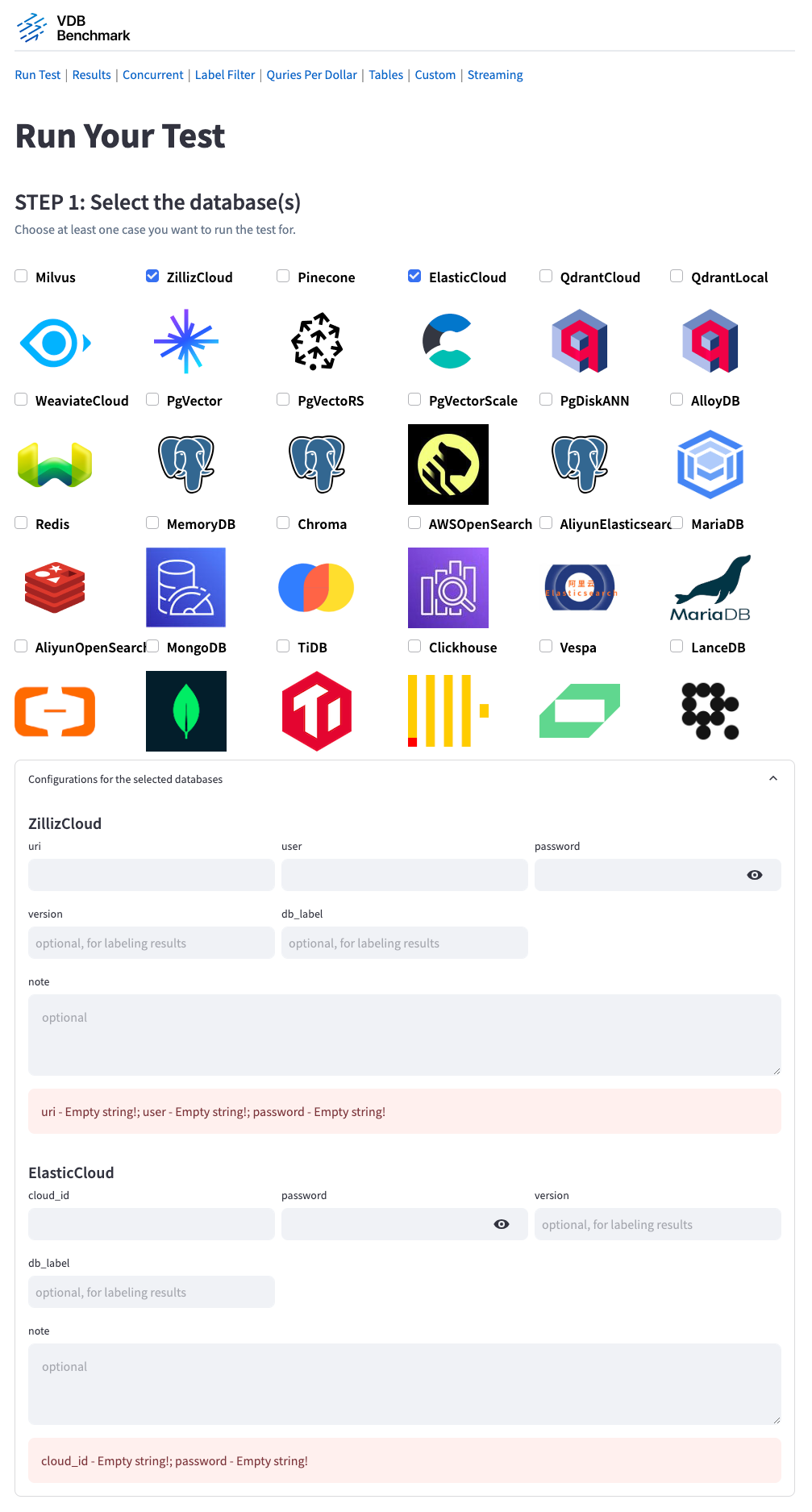
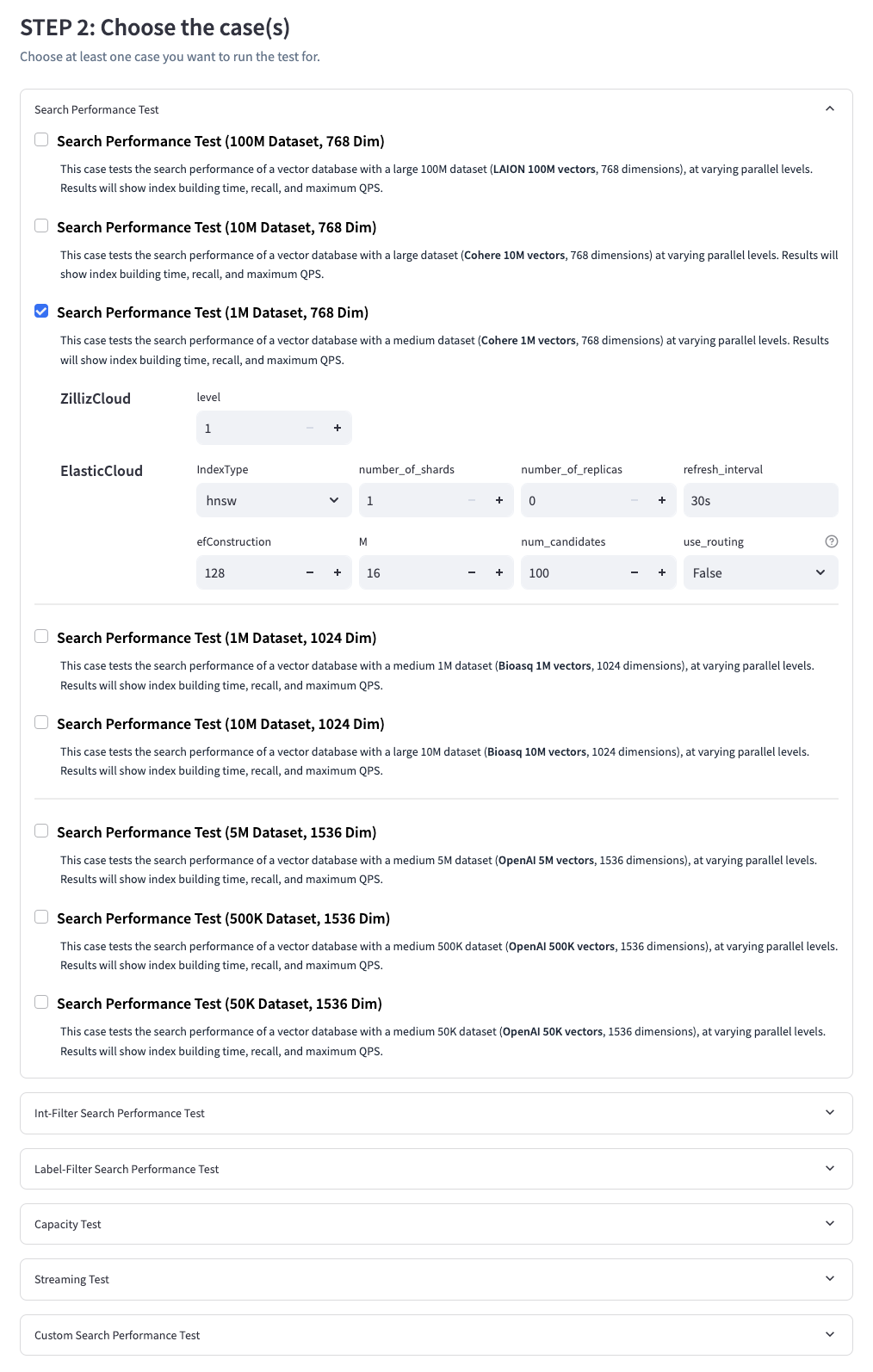
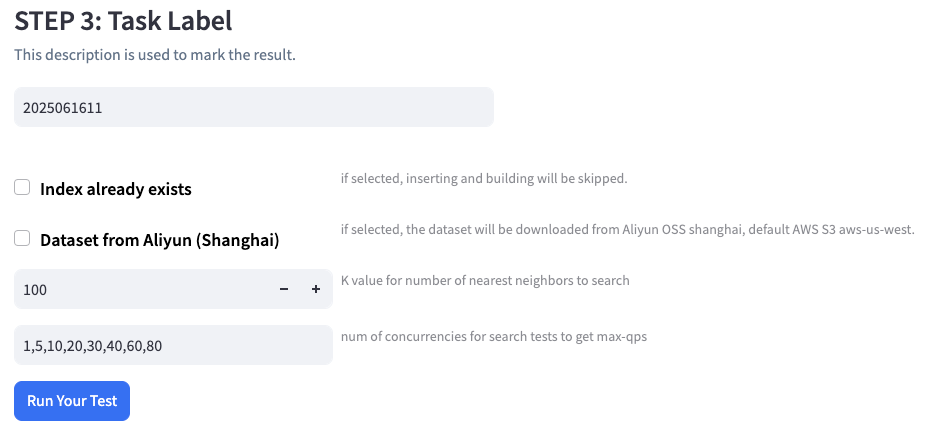
Our client module is designed with flexibility and extensibility in mind, aiming to integrate APIs from different systems seamlessly. As of now, it supports Milvus, Zilliz Cloud, Elastic Search, Pinecone, Qdrant Cloud, Weaviate Cloud, PgVector, VectorChord, Redis, Chroma, CockroachDB, VolcMySQL, etc. Stay tuned for more options, as we are consistently working on extending our reach to other systems.
We've developed lots of comprehensive benchmark cases to test vector databases' various capabilities, each designed to give you a different piece of the puzzle. These cases are categorized into several main types:
Performance768D100M selects its query and ground-truth files from --k:
| Requested K | Query file | Ground-truth file | Queries | GT width |
|---|---|---|---|---|
1..1,000 | test.parquet | neighbors.parquet | 1,000 | 1,000 |
1,001..100,000 | test_nq200.parquet | neighbors_top100k_nq200.parquet | 200 | 100,000 |
100,001..1,000,000 | test_nq200.parquet | neighbors_top1m_nq200.parquet | 200 | 1,000,000 |
K must be positive, and LAION-100M rejects values above 1,000,000. Integer-filter runs use the smallest published GT width that covers K:
| Integer filter rate | Published GT widths | Maximum K |
|---|---|---|
| 50%, 60%, 70%, 80%, 90%, 95%, 98%, 99% | 100K, 1M | 1M |
| 99.5% | 100K, 500K | 500K |
| 99.8% | 100K, 200K | 200K |
| 99.9% | 100K | 100K |
K up to 1,000 keeps the original 1,000-query filtered artifacts; larger K uses test_nq200.parquet. Other integer filter rates and label-filter runs above K=1,000 are rejected before database initialization. VDBBench validates query IDs, row counts, and GT width before issuing a search.
vectordbbench milvusautoindex --uri http://localhost:19530 --case-type NewIntFilterPerformanceCase --dataset-with-size-type "Large LAION (768dim, 100M)" --filter-rate 0.99 --k 1000000
Wide GT remains in Parquet/Arrow form and is opened inside the serial-search subprocess one query row at a time. Results include primary recall@K, recall_at for the available cutoffs among 100, 1K, 10K, 100K, and 1M, plus serial and concurrent p50/p95/p99 latency. Concurrent throughput continues to use the configured fixed-duration phase.
For Milvus and Zilliz Cloud performance runs with K above 16,384, VDBBench automatically creates new collections with query_mode=large_topk before creating the vector index. Reused collections are validated and rejected when that property is missing or incompatible. The target database, selected mode, and requested K are written to the run log. Self-hosted Milvus must be 2.6.14 or later, the release that introduced the query_mode=large_topk collection property; earlier servers accept the property without honoring it. Other backends must already permit the requested K; VDBBench forwards K unchanged and does not alter their collection properties.
Every vector search performance case can be configured for either an IDs-only response or a response that also includes each result vector. IDs only remains the default. Run the scenarios separately from the CLI:
vectordbbench milvusautoindex --uri http://localhost:19530 --case-type Performance768D100M --k 1000000 --payload-profile ids_only
vectordbbench milvusautoindex --uri http://localhost:19530 --case-type Performance768D100M --k 1000000 --payload-profile vector
The frontend can select one or both scenarios for Milvus and Zilliz Cloud. Each scenario produces independent P99 latency, QPS, and recall metrics. qps remains the highest observed QPS among the configured concurrency levels; VDBBench does not discover a backend concurrency limit.
ir_datasets.Each case provides an in-depth examination of a vector database's abilities, providing you a comprehensive view of the database's performance.
Use the Performance case with --dataset-name to select a registered
dataset. The catalog includes the existing VectorDBBench datasets, all 24 VIBE
HDF5 datasets, and the VDBBench multimodal Parquet datasets at 1M, 10M, and
100M corpus vectors. Source and storage-format handling are internal to the
registration. See the
Hugging Face datasets release note
for the complete new catalog, constraints, and data-loading behavior.
Through the /custom page, users can customize their own performance case using local datasets. After saving, the corresponding case can be selected from the /run_test page to perform the test.
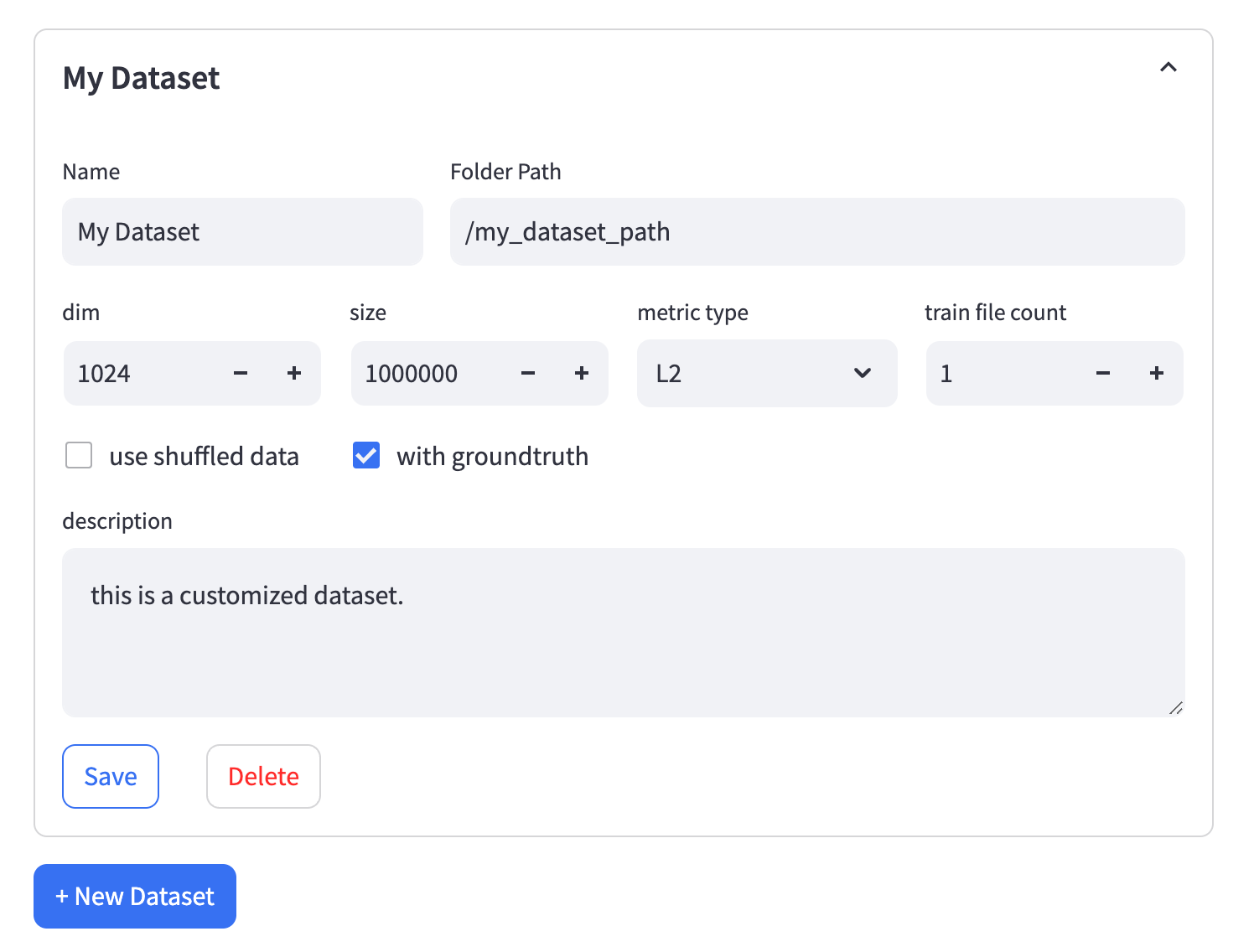
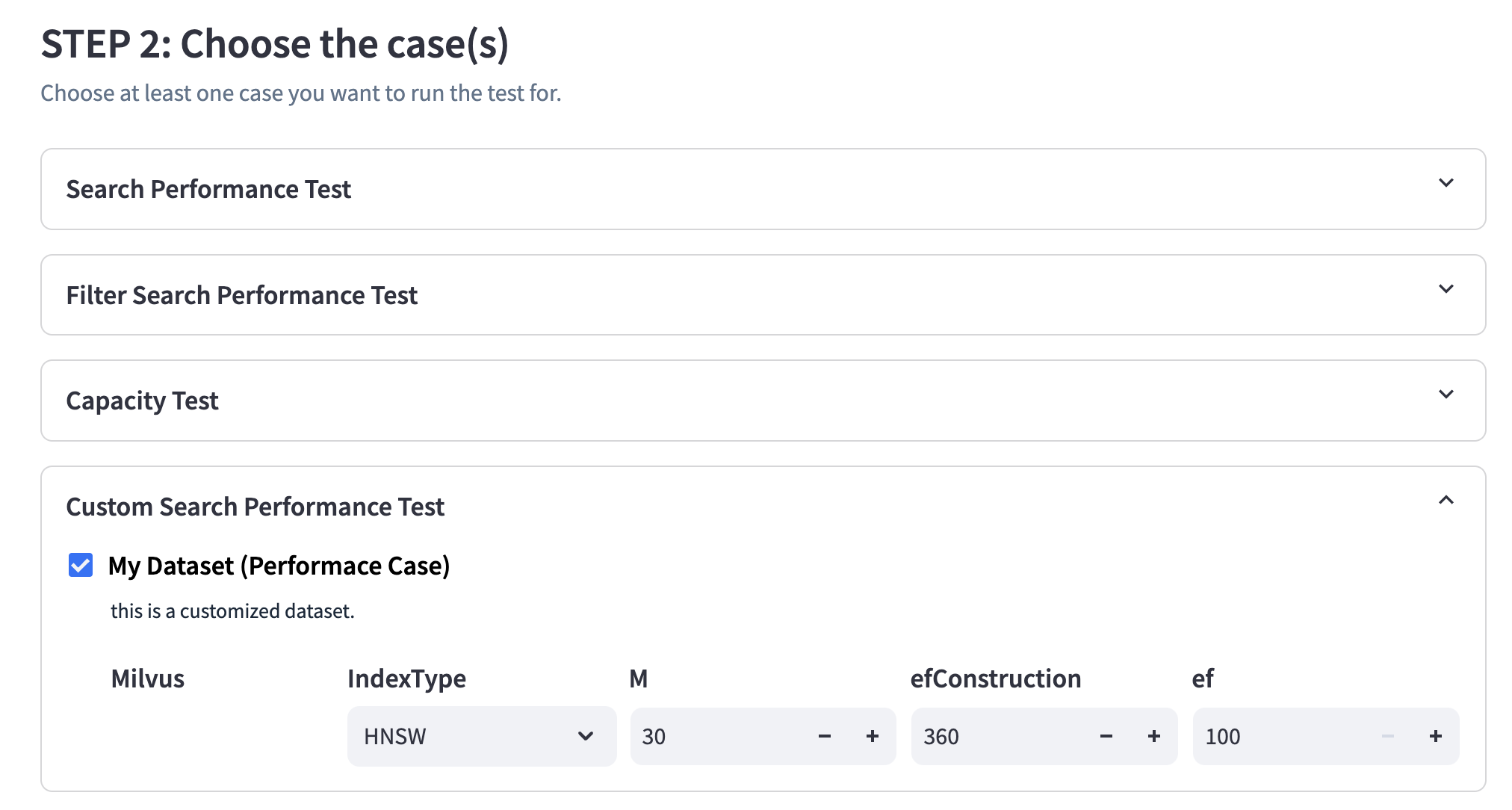
We have strict requirements for the data set format, please follow them.
Folder Path - The path to the folder containing all the files. Please ensure that all files in the folder are in the Parquet format.
train.parquet and should have two columns: id as an incrementing int and emb as an array of float32.test.parquet and should have two columns: id as an incrementing int and emb as an array of float32.
neighbors.parquet and should have two columns: id corresponding to query vectors and neighbors_id as an array of int.Train File Count - If the vector file is too large, you can consider splitting it into multiple files. The naming format for the split files should be train-[index]-of-[file_count].parquet. For example, train-01-of-10.parquet represents the second file (0-indexed) among 10 split files.
Use Shuffled Data - If you check this option, the vector data files need to be modified. VDBBench will load the data labeled with shuffle. For example, use shuffle_train.parquet instead of train.parquet and shuffle_train-04-of-10.parquet instead of train-04-of-10.parquet. The id column in the shuffled data can be in any order.
Our goals of this benchmark are:
One of the primary goals of VDBBench is to enable users to reproduce benchmark results swiftly and easily, or to test their customized scenarios. We believe that lowering the barriers to entry for conducting these tests will enhance the community's understanding and improvement of vector databases. We aim to create an environment where any user, regardless of their technical expertise, can quickly set up and run benchmarks, and view and analyze results in an intuitive manner.
VDBBench aims to provide a more comprehensive, multi-faceted testing environment that accurately represents the complexity of vector databases. By moving beyond a simple speed test for algorithms, we hope to contribute to a better understanding of vector databases in real-world scenarios. By incorporating as many complex scenarios as possible, including a variety of test cases and datasets, we aim to reflect realistic conditions and offer tangible significance to our community. Our goal is to deliver benchmarking results that can drive tangible improvements in the development and usage of vector databases.
Step 1: Creating New Client Files
Step 2: Implement new_client.py and config.py
from ..api import VectorDB
class NewClient(VectorDB):
    # Implement the abstract methods defined in the VectorDB class
    # ...
from pydantic import SecretStr
from clients.api import DBConfig, DBCaseConfig

class NewDBConfig(DBConfig):
    # Implement the required configuration fields for the database connection
    # ...
    token: SecretStr
    uri: str

class NewDBCaseConfig(DBCaseConfig):
    # Implement optional case-specific configuration fields
    # ...
Step 3: Importing the DB Client and Updating Initialization
In this final step, you will import your DB client into clients/init.py and update the initialization process.
#clients/__init__.py

# Add NewClient to the DB enum
class DB(Enum):
    ...
    DB.NewClient = "NewClient"

    @property
    def init_cls(self) -> Type[VectorDB]:
        ...
        if self == DB.NewClient:
            from .new_client.new_client import NewClient
            return NewClient
        ...

    @property
    def config_cls(self) -> Type[DBConfig]:
        ...
        if self == DB.NewClient:
            from .new_client.config import NewClientConfig
            return NewClientConfig
        ...

    def case_config_cls(self, ...)
        if self == DB.NewClient:
            from .new_client.config import NewClientCaseConfig
            return NewClientCaseConfig
Step 4: Implement new_client/cli.py and vectordb_bench/cli/vectordbbench.py
In this (optional, but encouraged) step you will enable the test to be run from the command line.
from typing import Annotated, Unpack

import click
import os
from pydantic import SecretStr

from vectordb_bench.cli.cli import (
    CommonTypedDict,
    cli,
    click_parameter_decorators_from_typed_dict,
    run,
)
from vectordb_bench.backend.clients import DB


class ZillizTypedDict(CommonTypedDict):
    uri: Annotated[
        str, click.option("--uri", type=str, help="uri connection string", required=True)
    ]
    user_name: Annotated[
        str, click.option("--user-name", type=str, help="Db username", required=True)
    ]
    password: Annotated[
        str,
        click.option("--password",
                     type=str,
                     help="Zilliz password",
                     default=lambda: os.environ.get("ZILLIZ_PASSWORD", ""),
                     show_default="$ZILLIZ_PASSWORD",
                     ),
    ]
    level: Annotated[
        str,
        click.option("--level", type=str, help="Zilliz index level", required=False),
    ]


@cli.command()
@click_parameter_decorators_from_typed_dict(ZillizTypedDict)
def ZillizAutoIndex(**parameters: Unpack[ZillizTypedDict]):
    from .config import ZillizCloudConfig, AutoIndexConfig

    run(
        db=DB.ZillizCloud,
        db_config=ZillizCloudConfig(
            db_label=parameters["db_label"],
            uri=SecretStr(parameters["uri"]),
            user=parameters["user_name"],
            password=SecretStr(parameters["password"]),
        ),
        db_case_config=AutoIndexConfig(
            params={parameters["level"]},
        ),
        **parameters,
    )
get_custom_case_config function from vectordb_bench/cli/cli.py and use it to add a new key custom_case to the parameters variable within the command.cli modules with multiple index configs:
- pgvector: vectordb_bench/backend/clients/pgvector/cli.py
- milvus: vectordb_bench/backend/clients/milvus/cli.py
That's it! You have successfully added a new DB client to the vectordb_bench project.
The system under test can be installed in any form to achieve optimal performance. This includes but is not limited to binary deployment, Docker, and cloud services.
For the system under test, we use the default server-side configuration to maintain the authenticity and representativeness of our results. For the Client, we welcome any parameter tuning to obtain better results.
Many databases may not be able to complete all test cases due to issues such as Out of Memory (OOM), crashes, or timeouts. In these scenarios, we will clearly state these occurrences in the test results.
We strive for accuracy in learning and supporting various vector databases, yet there might be oversights or misapplications. For any such occurrences, feel free to raise an issue or make amendments on our GitHub page.
In our pursuit to ensure that our benchmark reflects the reality of a production environment while guaranteeing the practicality of the system, we have implemented a timeout plan based on our experiences for various tests.
1. Capacity Case:
2. Other Cases:
For other cases, we have set two timeouts:
Data Loading Timeout: This timeout is designed to filter out systems that are too slow in inserting data, thus ensuring that we are only considering systems that is able to cope with the demands of a real-world production environment within a reasonable time frame.
Optimization Preparation Timeout: This timeout is established to avoid excessive optimization strategies that might work for benchmarks but fail to deliver in real production environments. By doing this, we ensure that the systems we consider are not only suitable for testing environments but also applicable and efficient in production scenarios.
This multi-tiered timeout approach allows our benchmark to be more representative of actual production environments and assists us in identifying systems that can truly perform in real-world scenarios.
| Case | Data Size | Timeout Type | Value |
|---|---|---|---|
| Capacity Case | N/A | Loading timeout | 24 hours |
| Other Cases | 1M vectors, 768 dimensions 500K vectors, 1536 dimensions | Loading timeout | 2.5 hours |
| Optimization timeout | 15 mins | ||
| Other Cases | 10M vectors, 768 dimensions 5M vectors, 1536 dimensions | Loading timeout | 25 hours |
| Optimization timeout | 2.5 hours | ||
| Other Cases | 100M vectors, 768 dimensions | Loading timeout | 250 hours |
| Optimization timeout | 25 hours |
Note: Some datapoints in the standard benchmark results that violate this timeout will be kept for now for reference. We will remove them in the future.
(top 24 of 26)
1,004 followers · starred Jan 2026
145 followers · starred Aug 2023
260 followers · starred Dec 2024
1,178 followers · starred Apr 2025
Benchmark for vector databases.
See the code
VDBBench is not just an offering of benchmark results for mainstream vector databases and cloud services, it's your go-to tool for the ultimate performance and cost-effectiveness comparison. Designed with ease-of-use in mind, VDBBench is devised to help users, even non-professionals, reproduce results or test new systems, making the hunt for the optimal choice amongst a plethora of cloud services and open-source vector databases a breeze.
Understanding the importance of user experience, we provide an intuitive visual interface. This not only empowers users to initiate benchmarks at ease, but also to view comparative result reports, thereby reproducing benchmark results effortlessly. To add more relevance and practicality, we provide cost-effectiveness reports particularly for cloud services. This allows for a more realistic and applicable benchmarking process.
VectorDBBench provides repeatable workloads for insertion, vector search, filtered search, and full-text search. Its registered vector datasets range from classic SIFT and GIST corpora to Cohere embeddings, OpenAI embeddings generated from the public C4 dataset, and the VIBE and VDBBench multimodal datasets hosted on Hugging Face. Together, these datasets cover different corpus sizes, dimensions, modalities, distance metrics, and query distributions.
Prepare to delve into the world of VDBBench, and let it guide you in uncovering your perfect vector database match.
VDBBench is sponsored by Zilliz,the leading opensource vectorDB company behind Milvus. Choose smarter with VDBBench - start your free test on zilliz cloud today!
Leaderboard: https://zilliz.com/benchmark
June 2026 update: Full Text Search has landed in VectorDBBench. We now benchmark BM25-style retrieval across supported backends, starting with MS MARCO and HotpotQA datasets, payload profiles, recall, QPS, and load metrics ready to compare. See the VectorDBBench Full Text Search Release Note for the full rollout details and caveats.
September 2026 update: VectorDBBench can now run registered datasets hosted
on Hugging Face through the existing Performance case. The initial catalog
includes all 24 VIBE HDF5 datasets and VDBBench multimodal Parquet datasets at
1M, 10M, and 100M corpus vectors.
vectordbbench milvushnsw \
  --case-type Performance \
  --dataset-name glove-200-cosine \
  --k 100
See the Hugging Face datasets release note for the complete catalog, data flow, provenance, constraints, and configuration details.
python >= 3.11
Install vectordb-bench with only PyMilvus
pip install vectordb-bench
Install the specific database client
pip install 'vectordb-bench[pinecone]'
All the database client supported
| Optional database client | install command |
|---|---|
| pymilvus, zilliz_cloud (default) | pip install vectordb-bench |
| qdrant | pip install vectordb-bench[qdrant] |
| pinecone | pip install vectordb-bench[pinecone] |
| weaviate | pip install vectordb-bench[weaviate] |
| elastic, aliyun_elasticsearch | pip install vectordb-bench[elastic] |
| pgvector, pgvectorscale, pgdiskann, alloydb, vectorchord, lakebase_vector | pip install vectordb-bench[pgvector] |
| pgvecto.rs | pip install vectordb-bench[pgvecto_rs] |
| redis | pip install vectordb-bench[redis] |
| memorydb | pip install vectordb-bench[memorydb] |
| chromadb | pip install vectordb-bench[chromadb] |
| cockroachdb | pip install vectordb-bench[cockroachdb] |
| awsopensearch | pip install vectordb-bench[opensearch] |
| aliyun_opensearch | pip install vectordb-bench[aliyun_opensearch] |
| mongodb | pip install vectordb-bench[mongodb] |
| tidb | pip install vectordb-bench[tidb] |
| vespa | pip install vectordb-bench[vespa] |
| oceanbase | pip install vectordb-bench[oceanbase] |
| hologres | pip install vectordb-bench[hologres] |
| tencent_es | pip install vectordb-bench[tencent_es] |
| alisql | pip install vectordb-bench[alisql] |
| polardb | pip install vectordb-bench[polardb] |
| doris | pip install vectordb-bench[doris] |
| zvec | pip install vectordb-bench[zvec] |
| endee | pip install vectordb-bench[endee] |
| lindorm | pip install vectordb-bench[lindorm] |
| volc_mysql | pip install vectordb-bench[volc_mysql] |
| adbpg | pip install vectordb-bench[adbpg] |
init_bench
OR:
vectordbbench [OPTIONS] COMMAND [ARGS]...
To list the clients that are runnable via the commandline option, execute: vectordbbench --help
$ vectordbbench --help
Usage: vectordbbench [OPTIONS] COMMAND [ARGS]...

Options:
  --help  Show this message and exit.

Commands:
  pgvectorhnsw
  pgvectorivfflat
  vectorchordrq
  volcmysqlhnsw
  test
  weaviate
To list the options for each command, execute vectordbbench [command] --help
milvusautoindex and zillizautoindex accept --level from 1 to 10 (YAML:
level) on servers that support AutoIndex search levels. If omitted, Milvus
sends no level, preserving the server's default behavior; Zilliz Cloud keeps
its existing default of 1 and always sends it. Results record the value in
task_config.db_case_config.level.
vectordbbench milvusautoindex \
  --uri http://localhost:19530 \
  --level 2 \
  <other options>
Use --nq (default: 1) to set the number of query vectors per concurrent search request.
Milvus and Zilliz Cloud support batching for single-tenant vector performance cases,
including filtered searches. This example reuses a collection containing the selected
dataset and a matching HNSW index:
vectordbbench milvushnsw \
  --uri http://localhost:19530 --collection-name VDBBench \
  --case-type Performance768D1M --m 16 --ef-construction 128 --ef-search 128 \
  --k 10 --nq 2 \
  --skip-drop-old --skip-load
YAML uses nq: 2. The value is saved in task_config.case_config.nq in result JSON.
Result views distinguish non-default NQ values in case names so different batch sizes stay separate.
Omitting --num-concurrency uses the configured concurrency list. Each request contains
exactly nq vectors, wrapping through the query dataset as needed.
qps and conc_qps_list count successful query vectors per second. Successful request throughput
is QPS divided by nq. Failed batches or responses missing a query's result list contribute zero.conc_latency_* measures the whole successful batch request.serial_latency_* and recall use NQ=1 and concurrency=1.Other backends and streaming, full-text, cold-latency and multi-tenant cases reject
nq > 1 before data loading.
Use --note or --note-file to preserve deployment, resource, client, network, and constraint context in each result JSON under task_config.db_config.note. The options are mutually exclusive. Prefer --note-file for structured or multiline context, and never include credentials, tokens, or sensitive connection details.
vectordbbench zillizautoindex \
  --note-file ./run-context.json \
  <other options>
$ vectordbbench pgvectorhnsw --help
Usage: vectordbbench pgvectorhnsw [OPTIONS]

Options:
  --config-file PATH              Read configuration from yaml file
  --drop-old / --skip-drop-old    Drop old or skip  [default: drop-old]
  --load / --skip-load            Load or skip  [default: load]
  --search-serial / --skip-search-serial
                                  Search serial or skip  [default: search-
                                  serial]
  --search-concurrent / --skip-search-concurrent
                                  Search concurrent or skip  [default: search-
                                  concurrent]
  --case-type [CapacityDim128|CapacityDim960|Performance768D100M|Performance768D10M|Performance768D1M|Performance768D10M1P|Performance768D1M1P|Performance768D10M99P|Performance768D1M99P|Performance1536D500K|Performance1536D5M|Performance1536D500K1P|Performance1536D5M1P|Performance1536D500K99P|Performance1536D5M99P|Performance1536D50K]
                                  Case type
  --db-label TEXT                 Db label, default: date in ISO format
                                  [default: 2024-05-20T20:26:31.113290]
  --note TEXT                     Run context stored with each result
                                  [default: ""]
  --note-file FILE                Read run context from a UTF-8 text file
  --dry-run                       Print just the configuration and exit
                                  without running the tasks
  --k INTEGER                     K value for number of nearest neighbors to
                                  search  [default: 100]
  --concurrency-duration INTEGER  Adjusts the duration in seconds of each
                                  concurrency search  [default: 30]
  --num-concurrency TEXT          Comma-separated list of concurrency values
                                  to test during concurrent search  [default:
                                  1,10,20]
  --concurrency-timeout INTEGER   Timeout (in seconds) to wait for a
                                  concurrency slot before failing. Set to a
                                  negative value to wait indefinitely.
                                  [default: 3600]
  --user-name TEXT                Db username  [required]
  --password TEXT                 Db password  [required]
  --host TEXT                     Db host  [required]
  --db-name TEXT                  Db name  [required]
  --maintenance-work-mem TEXT     Sets the maximum memory to be used for
                                  maintenance operations (index creation). Can
                                  be entered as string with unit like '64GB'
                                  or as an integer number of KB.This will set
                                  the parameters:
                                  max_parallel_maintenance_workers,
                                  max_parallel_workers &
                                  table(parallel_workers)
  --max-parallel-workers INTEGER  Sets the maximum number of parallel
                                  processes per maintenance operation (index
                                  creation)
  --m INTEGER                     hnsw m
  --ef-construction INTEGER       hnsw ef-construction
  --ef-search INTEGER             hnsw ef-search
  --quantization-type [none|bit|halfvec]
                                  quantization type for vectors (in index)
  --table-quantization-type [none|bit|halfvec]
                                  quantization type for vectors (in table). If
                                  equal to bit, the parameter
                                  quantization_type will be set to bit too.
  --reranking / --skip-reranking  Enable reranking for HNSW search for binary
                                  quantization
  --reranking-metric [L2|COSINE|IP|DP]
                                  Distance metric for reranking  [default:
                                  COSINE]
  --quantized-fetch-limit INTEGER
                                  Limit of fetching quantized vector ranked by
                                  distance for reranking                 --
                                  bound by ef_search
  --custom-case-name TEXT         Custom case name i.e. PerformanceCase1536D50K
  --custom-case-description TEXT  Custom name description
  --custom-case-load-timeout INTEGER
                                  Custom case load timeout [default: 36000]
  --custom-case-optimize-timeout INTEGER
                                  Custom case optimize timeout [default: 36000]
  --custom-dataset-name TEXT
                                  Dataset name i.e OpenAI
  --custom-dataset-dir TEXT       Dataset directory i.e. openai_medium_500k
  --custom-dataset-size INTEGER   Dataset size i.e. 500000
  --custom-dataset-dim INTEGER    Dataset dimension
  --custom-dataset-metric-type TEXT
                                  Dataset distance metric [default: COSINE]
  --custom-dataset-file-count INTEGER
                                  Dataset file count
  --custom-dataset-use-shuffled / --skip-custom-dataset-use-shuffled
                                  Use shuffled custom dataset or skip  [default: custom-dataset-
                                  use-shuffled]
  --custom-dataset-with-gt / --skip-custom-dataset-with-gt
                                  Custom dataset with ground truth or skip  [default: custom-dataset-
                                  with-gt]
  --help                          Show this message and exit.
VectorChord is a PostgreSQL extension for scalable vector similarity search using IVF + RaBitQ indexing. It is fully compatible with pgvector data types and provides faster queries and index builds.
vectordbbench vectorchordrq \
  --user-name postgres --password '<password>' \
  --host localhost --port 5432 --db-name vectordb \
  --case-type Performance1536D50K \
  --lists 1000 --probes 10 --epsilon 1.9 \
  --spherical-centroids --build-threads 8 \
  --max-parallel-workers 15
Key VectorChord-specific options:
| Option | Description |
|---|---|
--lists | Number of IVF lists for vchordrq index |
--probes | Number of probes during search (default: 10) |
--epsilon | Reranking precision factor, 0.0-4.0 (default: 1.9) |
--residual-quantization | Enable residual quantization |
--spherical-centroids | L2-normalize centroids (recommended for cosine/IP) |
--build-threads | Number of threads for index building (1-255) |
--degree-of-parallelism | Degree of parallelism for index build (1-256) |
--max-parallel-workers | Sets max_parallel_workers & max_parallel_maintenance_workers |
--max-scan-tuples | Max tuples to scan before stopping (-1 for unlimited) |
vectordbbench awsopensearch --db-label awsopensearch \
--m 16 --ef-construction 256 \
--host search-vector-db-prod-h4f6m4of6x7yp2rz7gdmots7w4.us-west-2.es.amazonaws.com --port 443 \
--user vector --password '<password>' \
--case-type Performance1536D5M --number-of-indexing-clients 10  \
--skip-load --num-concurrency 75
To list the options for awsopensearch, execute vectordbbench awsopensearch --help
$ vectordbbench awsopensearch --help
Usage: vectordbbench awsopensearch [OPTIONS]

Options:
  # Sharding and Replication
  --number-of-shards INTEGER      Number of primary shards for the index
  --number-of-replicas INTEGER    Number of replica copies for each primary
                                  shard
  # Indexing Performance
  --index-thread-qty INTEGER      Thread count for native engine indexing
  --index-thread-qty-during-force-merge INTEGER
                                  Thread count during force merge operations
  --number-of-indexing-clients INTEGER
                                  Number of concurrent indexing clients
  # Index Management
  --number-of-segments INTEGER    Target number of segments after merging
  --refresh-interval TEXT         How often to make new data available for
                                  search
  --force-merge-enabled BOOLEAN   Whether to perform force merge operation
  --flush-threshold-size TEXT     Size threshold for flushing the transaction
                                  log
  --engine TEXT                   type of engine to use valid values [faiss, lucene, s3vector]
  # Memory Management
  --cb-threshold TEXT             k-NN Memory circuit breaker threshold

  --ondisk                        Ondisk mode with binary quantization(32x compression)
  --oversample-factor             Controls the degree of oversampling applied to minority classes in imbalanced datasets to improve model performance by balancing class distributions.(default 1.0)

  # Quantization Type
  --quantization-type TEXT        which type of quantization to use valid values [fp32, fp16, bq]
  --help                          Show this message and exit.
OpenSearch Serverless (AOSS) is a serverless deployment option for Amazon OpenSearch Service. VDBBench supports AOSS with the --serverless flag, which uses AWS SigV4 authentication and automatically skips unsupported operations (cluster settings, force merge, manual refresh, warmup API).
Prerequisites:
~/.aws/credentials, environment variables, or IAM role)opensearch extra): pip install 'vectordb-bench[opensearch]'. This installs opensearch-py, boto3, and requests-aws4auth.aoss:APIAccessAll on the collectionExample: Run performance test on OpenSearch Serverless
vectordbbench awsopensearch --db-label aoss --insert-batch-size 100 \
  --serverless --aws-region us-east-1 \
  --host <collection-id>.aoss.us-east-1.on.aws --port 443 \
  --case-type Performance768D1M \
  --m 16 --ef-construction 200 --ef-search 40 \
  --number-of-shards 8 --number-of-replicas 0 \
  --engine faiss --metric-type cosine \
  --num-concurrency 80,100,120
OpenSearch Serverless-specific options:
| Option | Description |
|---|---|
--serverless | Enable OpenSearch Serverless mode (uses AWS SigV4 auth) |
--aws-region | AWS region for the AOSS collection (default: us-east-1) |
--insert-batch-size | Number of vectors per Serverless bulk request (default: 100) |
Notes:
--userand--passwordare not needed for Serverless mode--engineis accepted but ignored internally (AOSS manages the engine)--force-merge-enabled,--refresh-interval,--flush-threshold-size, and--cb-thresholdare ignored for Serverless- Keep
--insert-batch-sizesmall enough for the Serverless bulk API request limits
Elastic Cloud supports multiple index types: HNSW, HNSW_INT8, HNSW_INT4, and HNSW_BBQ.
Example: Run HNSW index test
vectordbbench elasticcloudhnsw --db-label elastic-cloud-test \
--cloud-id <your-cloud-id> --password '<your-password>' \
--m 16 --ef-construction 100 --num-candidates 100 \
--case-type Performance768D1M --number-of-shards 1 \
--number-of-replicas 0 --refresh-interval 30s
Example: Run HNSW_INT8 index test
vectordbbench elasticcloudhnswint8 --db-label elastic-cloud-int8 \
--cloud-id <your-cloud-id> --password '<your-password>' \
--m 16 --ef-construction 200 --num-candidates 200 \
--case-type Performance1536D50K --element-type float
Example: Run HNSW_INT4 index test
vectordbbench elasticcloudhnswint4 --db-label elastic-cloud-int4 \
--cloud-id <your-cloud-id> --password '<your-password>' \
--m 16 --ef-construction 200 --num-candidates 200 \
--case-type Performance768D10M --use-rescore --oversample-ratio 2.0
Example: Run HNSW_BBQ index test
vectordbbench elasticcloudhnswbbq --db-label elastic-cloud-bbq \
--cloud-id <your-cloud-id> --password '<your-password>' \
--m 16 --ef-construction 200 --num-candidates 200 \
--case-type Performance1536D5M --use-routing --use-force-merge
Example: Run Label Filter Performance test
vectordbbench elasticcloudhnsw --db-label elastic-cloud-label-filter \
--cloud-id <your-cloud-id> --password '<your-password>' \
--case-type LabelFilterPerformanceCase \
--dataset-with-size-type "Medium OpenAI (1536dim, 500K)" \
--label-percentage 0.001 \
--m 16 --ef-construction 128 --num-candidates 100 \
--num-concurrency 1,5 --number-of-shards 1
To list all options for Elastic Cloud, execute vectordbbench elasticcloudhnsw --help. The following are Elastic Cloud-specific command-line options:
$ vectordbbench elasticcloudhnsw --help
Usage: vectordbbench elasticcloudhnsw [OPTIONS]

Options:
  # Connection
  --cloud-id TEXT                 Elastic Cloud ID  [required]
  --password TEXT                 Elastic Cloud password  [required]

  # HNSW Index Parameters
  --m INTEGER                     HNSW M parameter  [default: 16]
  --ef-construction INTEGER       HNSW efConstruction parameter  [default: 100]
  --num-candidates INTEGER        Number of candidates for search  [default: 100]
  --element-type [float|byte]     Element type for vectors (float: 4 bytes, byte: 1 byte)  [default: float]

  # Index Configuration
  --number-of-shards INTEGER      Number of shards  [default: 1]
  --number-of-replicas INTEGER    Number of replicas  [default: 0]
  --refresh-interval TEXT         Index refresh interval  [default: 30s]
  --merge-max-thread-count INTEGER
                                  Maximum thread count for merge  [default: 8]
  --use-force-merge BOOLEAN       Whether to use force merge  [default: True]
  --use-routing BOOLEAN           Whether to use routing  [default: False]
  --use-rescore BOOLEAN           Whether to use rescore  [default: False]
  --oversample-ratio FLOAT        Oversample ratio for rescore  [default: 2.0]

  # Common Options
  --case-type [CapacityDim128|CapacityDim960|Performance768D100M|...]
                                  Case type
  --db-label TEXT                 Db label, default: date in ISO format
  --k INTEGER                     K value for number of nearest neighbors to search  [default: 100]
  --num-concurrency TEXT          Comma-separated list of concurrency values  [default: 1,5,10,20,30,40,60,80]
  --help                          Show this message and exit.
Execute tests for the index types: HNSW, HNSW_SQ, or HNSW_BQ.
vectordbbench oceanbasehnsw --host xxx --port xxx --user root@mysql_tenant --database test \
--m 16 --ef-construction 200 --case-type Performance1536D50K \
--index-type HNSW --ef-search 100
To list the options for oceanbase, execute vectordbbench oceanbasehnsw --help, The following are some OceanBase-specific command-line options.
$ vectordbbench oceanbasehnsw --help
Usage: vectordbbench oceanbasehnsw [OPTIONS]

Options:
  [...]
  --host TEXT                     OceanBase host
  --user TEXT                     OceanBase username  [required]
  --password TEXT                 OceanBase database password
  --database TEXT                 DataBase name  [required]
  --port INTEGER                  OceanBase port  [required]
  --m INTEGER                     hnsw m  [required]
  --ef-construction INTEGER       hnsw ef-construction  [required]
  --ef-search INTEGER             hnsw ef-search  [required]
  --index-type [HNSW|HNSW_SQ|HNSW_BQ]
                                  Type of index to use. Supported values:
                                  HNSW, HNSW_SQ, HNSW_BQ  [required]
  --help                          Show this message and exit.
Execute tests for the index types: IVF_FLAT, IVF_SQ8, or IVF_PQ.
vectordbbench oceanbaseivf --host xxx --port xxx --user root@mysql_tenant --database test \
--nlist 1000 --sample_per_nlist 256 --case-type Performance768D1M \
--index-type IVF_FLAT --ivf_nprobes 100
To list the options for oceanbase, execute vectordbbench oceanbaseivf --help, The following are some OceanBase-specific command-line options.
$ vectordbbench oceanbaseivf --help
Usage: vectordbbench oceanbaseivf [OPTIONS]

Options:
  [...]
  --host TEXT                     OceanBase host
  --user TEXT                     OceanBase username  [required]
  --password TEXT                 OceanBase database password
  --database TEXT                 DataBase name  [required]
  --port INTEGER                  OceanBase port  [required]
  --index-type [IVF_FLAT|IVF_SQ8|IVF_PQ]
                                  Type of index to use. Supported values:
                                  IVF_FLAT, IVF_SQ8, IVF_PQ  [required]
  --nlist INTEGER                 Number of cluster centers  [required]
  --sample_per_nlist INTEGER      The cluster centers are calculated by total
                                  sampling sample_per_nlist * nlist vectors
                                  [required]
  --ivf_nprobes TEXT              How many clustering centers to search during
                                  the query  [required]
  --m INTEGER                     The number of sub-vectors that each data
                                  vector is divided into during IVF-PQ
  --help                          Show this message and exit.                       Show this message and exit.
It is recommended to use the following code for installation.
pip install 'vectordb-bench[hologres]' 'psycopg[binary]' pgvector
Execute tests for the index types: HGraph.
vectordbbench hologreshgraph --host Hologres_Endpoint --port 80 --insert-batch-size 10000 \
--user ACCESS_ID --password ACCESS_KEY --database DATABASE_NAME \
--m 64 --ef-construction 400 --case-type Performance768D10M \
--index-type HGraph --ef-search 400 --k 10 --num-concurrency 1,60,70,75,80,90,95,100,105,110,115,120,125,130 \
--serial-cooldown 3
To list the options for Hologres, execute vectordbbench hologreshgraph --help, The following are some Hologres-specific command-line options.
$ vectordbbench hologreshgraph --help
Usage: vectordbbench hologreshgraph [OPTIONS]

Options:
  [...]
  --host TEXT                     Hologres host
  --user TEXT                     Hologres username  [required]
  --password TEXT                 Hologres database password
  --database TEXT                 Hologres database name  [required]
  --port INTEGER                  Hologres port  [required]
  --m INTEGER                     hnsw m  [required]
  --ef-construction INTEGER       hnsw ef-construction  [required]
  --ef-search INTEGER             hnsw ef-search  [required]
  --index-type [HGraph]           Type of index to use. Supported values:
                                  HGraph [required]
  --help                          Show this message and exit.
vectordbbench zvec --path Performance768D10M --db-label 16c64g-v0.1 \
    --case-type Performance768D10M --num-concurrency 12,14,16,18,20 \
    --quantize-type int8 --ef-search 118 --is-using-refiner
To list the options for zvec, execute vectordbbench zvec --help
  --path TEXT                     collection path  [required]
  --m INTEGER                     HNSW index parameter m.
  --ef-construction INTEGER       HNSW index parameter ef_construction
  --ef-search INTEGER             HNSW index parameter ef for search
  --quantize-type TEXT            HNSW index quantize type, fp16/int8
                                  supported
  --is-using-refiner              is using refiner, suitable for quantized
                                  index, recall `ef-search` results then
                                  refine with unquantized vector to `topk`
                                  results
Doris supports ann index with type hnsw from version 4.0.x
vectordbbench doris --http-port=8030 --port=9030 --db-name=vector_test --case-type=Performance768D1M --insert-batch-size=1000000 --stream-load-rows-per-batch=500000
Using flag --session-var, if you want to test doris with some customized session variables. For example:
vectordbbench doris --http-port=8030 --port=9030 --db-name=vector_test --case-type=Performance768D1M --insert-batch-size=1000000 --stream-load-rows-per-batch=500000 --session-var enable_profile=True
Mote options:
--m INTEGER                     hnsw m
--ef-construction INTEGER       hnsw ef-construction
--username TEXT                 Username  [default: root; required]
--password TEXT                 Password  [default: ""]
--host TEXT                     Db host  [default: 127.0.0.1; required]
--port INTEGER                  Query Port  [default: 9030; required]
--http-port INTEGER             Http Port  [default: 8030; required]
--db-name TEXT                  Db name  [default: test; required]
--ssl / --no-ssl                Enable or disable SSL, for Doris Serverless
                                SSL must be enabled  [default: no-ssl]
--index-prop TEXT               Extra index PROPERTY as key=value
                                (repeatable)
--session-var TEXT              Session variable key=value applied to each
                                SQL session (repeatable)
--stream-load-rows-per-batch INTEGER
                                Rows per Doris stream-load request; when
                                omitted, the Doris client default is used
--no-index                      Create table without ANN index
Lindorm supports index types: hnsw, ivfpq, or ivfbq.
Example: Run hnsw index test
vectordbbench lindormhnsw --case-type Performance768D10M --index-name <index_name> --k 10 \
--host <lindorm_host> --port <lindorm_port> --user <username> --password <password> --m 32 \
--ef-construction 400 --ef-search 150 --reorder-factor 2
Example: Run ivfpq index test
vectordbbench lindormivfpq --case-type Performance768D10M \
--index-name <index_name> --k 10 --host <lindorm_host> --port <lindorm_port> \
--user <username> --password <password> --lists <nlist> --probes <nprobe> \
--m 32 --ef-construction 500 --ef-search 200 --reorder-factor 2
Example: Run ivfbq index test
vectordbbench lindormivfbq --case-type Performance768D10M --index-name <index_name> \
--k 10 --host <index_name> --port <lindorm_port> \
--user <username> --password <password> --lists <nlist> --probes <nprobe> \
--exbits 2 --m 32 --ef-construction 500 --ef-search 200 --reorder-factor 2
To list the options for Lindorm, execute vectordbbench lindormhnsw --help, The following are some Lindorm-specific command-line options.
  --host TEXT                     host connection string  [required]
  --port INTEGER                  Db Port  [required]
  --user TEXT                     Db username  [required]
  --password TEXT                 Db password  [required]
  --index-name TEXT               Db index name  [required]
  --filter-type TEXT              post_filter|pre_filter|efficient_filter
  --number-of-regions INTEGER     Vector number of regions
  --m INTEGER                     hnsw m  [required]
  --ef-construction INTEGER       hnsw ef-construction  [required]
  --ef-search INTEGER             hnsw ef-search  [required]
  --reorder-factor INTEGER        reorder factor
ADBPG Nova uses the fastann/Nova vector index engine with USING ann syntax.
Example: Run novamr index benchmark (BioASQ 1M, 1024-dim)
vectordbbench adbpgnova --case-type Performance1024D1M --k 10 \
--host <adbpg_host> --port 5432 --db-name postgres \
--user-name <username> --password <password> \
--algorithm novamr --hnsw-m 48 --ef-construction 600 \
--ef-search 130 --max-scan-points 5000 --quantize-rescore-amp 2.0
Example: Run from config file
vectordbbench adbpgnova --config-file adbpg_bioasq1m_novamr.yml
To list the options for ADBPG, execute vectordbbench adbpgnova --help. The following are some ADBPG-specific command-line options.
  --user-name TEXT                Db username  [required]
  --password TEXT                 Postgres database password  [$POSTGRES_PASSWORD]
  --host TEXT                     Db host  [required]
  --port INTEGER                  Postgres database port  [default: 5432]
  --db-name TEXT                  Db name  [required]
  --algorithm TEXT                algorithm  [default: novamr]
  --hnsw-m INTEGER                hnsw_m  [default: 16]
  --ef-construction INTEGER       ef_construction  [default: 200]
  --ef-search INTEGER             ef_search  [default: 100]
  --max-scan-points INTEGER       max scan points  [default: 2000]
  --quantize-rescore-amp FLOAT    fastann.quantize_rescore_amp  [default: 1.0]
  --nova-adaptive-gamma FLOAT     fastann.nova_adaptive_gamma  [default: 0.0]
  --auto-reduction/--no-auto-reduction  Index WITH auto_reduction=on  [default: False]
PolarDB supports index types: faiss_hnsw_flat, faiss_hnsw_pq, and faiss_hnsw_sq.
Example: Run faiss_hnsw_flat benchmark
vectordbbench polardbhnswflat \
  --case-type Performance768D1M \
  --username <db_user> \
  --password '<db_password>' \
  --host <db_host> \
  --port 3306 \
  --m 16 \
  --ef-construction 256 \
  --ef-search 256 \
  --insert-workers 64 \
  --num-concurrency '10,20,40,60,80' \
  --concurrency-duration 60 \
  --task-label <task_label> \
  --db-label <db_label> \
  --skip-search-serial \
  --post-load-index
To list the options for PolarDB, execute vectordbbench polardbhnswflat --help. The following are some PolarDB-specific command-line options.
  --username TEXT                  Username  [required]
  --password TEXT                  Password
  --host TEXT                      Db host  [default: 127.0.0.1]
  --port INTEGER                   Db Port  [default: 3306]
  --database TEXT                  Database name  [default: vectordbbench]
  --m INTEGER                      M parameter (max_degree) in HNSW
  --ef-construction INTEGER        ef_construction parameter in HNSW
  --ef-search INTEGER              polar_vector_index_hnsw_ef_search session variable
  --insert-workers INTEGER         Number of concurrent threads for data insertion
  --post-load-index / --inline-index
                                   Create index after load or inline at table creation
VolcMySQL is a MySQL-compatible service with a native VECTOR type and an HNSW vector index (created via SECONDARY_ENGINE_ATTRIBUTE). Optional quantization is configurable through --quant-algorithm (NONE, SQ, PQ) and --quant-type (16_bit, 8_bit, 4_bit, binary).
vectordbbench volcmysqlhnsw \
  --case-type Performance1536D50K \
  --username <db_user> \
  --password '<db_password>' \
  --host <db_host> \
  --port 3306 \
  --m 16 \
  --ef-construction 128 \
  --ef-search 100 \
  --quant-algorithm SQ \
  --quant-type 16_bit \
  --num-concurrency '10,20,40,60,80' \
  --concurrency-duration 30 \
  --task-label <task_label> \
  --db-label <db_label>
To list the options for VolcMySQL, execute vectordbbench volcmysqlhnsw --help. The following are some VolcMySQL-specific command-line options.
  --username TEXT                  Username  [required]
  --password TEXT                  Password  [required]
  --host TEXT                      Db host  [default: 127.0.0.1]
  --port INTEGER                   DB Port  [default: 3306]
  --m INTEGER                      M parameter in HNSW vector indexing
  --ef-search INTEGER              Session variable loose_hnsw_ef_search
  --ef-construction INTEGER        HNSW ef_construction
  --quant-algorithm [NONE|SQ|PQ]   Quantization algorithm
  --quant-type [16_bit|8_bit|4_bit|binary]
                                   Quantization type
Note: vectors are loaded and queried over the raw-binary
VECTORpath by default; the client auto-probes server support and falls back toto_vector()text when unavailable. SetVDB_BINARY_VEC=0to force the text path or1to force binary.
The vectordbbench command can optionally read some or all the options from a yaml formatted configuration file.
By default, configuration files are expected to be in vectordb_bench/config-files/, this can be overridden by setting the environment variable CONFIG_LOCAL_DIR or by passing the full path to the file.
The required format is:
commandname:
   parameter_name: parameter_value
   parameter_name: parameter_value
Example:
pgvectorhnsw:
  db_label: pgConfigTest
  user_name: vectordbbench
  password: vectordbbench
  db_name:  vectordbbench
  host: localhost
  m: 16
  ef_construction: 128
  ef_search: 128
milvushnsw:
  skip_search_serial: True
  case_type: Performance1536D50K
  uri: http://localhost:19530
  m: 16
  ef_construction: 128
  ef_search: 128
  drop_old: False
  load: False
elasticcloudhnsw:
  db_label: elastic-cloud-hnsw
  cloud_id: <your-cloud-id>
  password: <your-password>
  case_type: Performance768D1M
  m: 16
  ef_construction: 100
  num_candidates: 100
  number_of_shards: 1
  number_of_replicas: 0
  refresh_interval: 30s
  element_type: float
Notes:
- Options passed on the command line will override the configuration file*
- Parameter names use an _ not -
- For
LabelFilterPerformanceCaseandNewIntFilterPerformanceCase, you must specifydataset_with_size_typein addition tocase_type
The vectordbbench command can read a batch configuration file to run all the test cases in the yaml formatted configuration file.
By default, configuration files are expected to be in vectordb_bench/config-files/, this can be overridden by setting the environment variable CONFIG_LOCAL_DIR or by passing the full path to the file.
The required format is:
commandname:
  - parameter_name: parameter_value
    another_parameter_name: parameter_value
Example:
pgvectorhnsw:
  - db_label: pgConfigTest
    user_name: vectordbbench
    password: vectordbbench
    db_name:  vectordbbench
    host: localhost
    m: 16
    ef_construction: 128
    ef_search: 128
milvushnsw:
  - skip_search_serial: True
    case_type: Performance1536D50K
    uri: http://localhost:19530
    m: 16
    ef_construction: 128
    ef_search: 128
    drop_old: False
    load: False
elasticcloudhnsw:
  - db_label: elastic-cloud-hnsw-test-1
    cloud_id: <your-cloud-id>
    password: <your-password>
    case_type: Performance768D1M
    m: 16
    ef_construction: 100
    num_candidates: 100
  - db_label: elastic-cloud-label-filter-0.1
    cloud_id: <your-cloud-id>
    password: <your-password>
    case_type: LabelFilterPerformanceCase
    dataset_with_size_type: "Medium OpenAI (1536dim, 500K)"
    label_percentage: 0.001
    m: 16
    ef_construction: 128
    num_candidates: 100
    num_concurrency: "1,5"
Notes:
- Options can only be passed through configuration files
- Parameter names use an _ not -
- For
LabelFilterPerformanceCaseandNewIntFilterPerformanceCase, you must specifydataset_with_size_typein addition tocase_type
How to use?
vectordbbench batchcli --batch-config-file <your-yaml-configuration-file>
To facilitate the presentation of test results and provide a comprehensive performance analysis report, we offer a leaderboard page. It allows us to choose from QPS, QP$, and latency metrics, and provides a comprehensive assessment of a system's performance based on the test results of various cases and a set of scoring mechanisms (to be introduced later). On this leaderboard, we can select the systems and models to be compared, and filter out cases we do not want to consider. Comprehensive scores are always ranked from best to worst, and the specific test results of each query will be presented in the list below.
VectorDBBench now includes Cloud Leaderboard cases for production-oriented cloud vector database evaluation. These cases complement the original raw-performance leaderboard by measuring behaviors that matter for managed services:
CloudInsertCase: insert throughput plus searchable and indexed readiness delays.CloudPayloadSearchCase: search performance when responses return IDs only, scalar metadata, or vectors.CloudMultiTenantSearchCase: tenant-routed search for SaaS-shaped workloads.CloudColdLatencyCase: cold and warm serial latency for first-query and cache-sensitive serving paths.The May 2026 release note explains why the Cloud Leaderboard was added, what changed, which systems were tested this round, and how to run each new case: docs/release/2026-05-cloud-leaderboard.md.
For each case, select a base value and score each system based on relative values.
base_QPS or base_QP$, and the score of each system is (QPS/base_QPS) * 100 or (QP$/base_QP$) * 100.base_Latency, and the score of each system is (base_Latency + 10ms)/(Latency + 10ms) * 100.We want to give equal weight to different cases, and not let a case with high absolute result values become the sole reason for the overall scoring. Therefore, when scoring different systems in each case, we need to use relative values.
Also, for Latency, we add 10ms to the numerator and denominator to ensure that if every system performs particularly well in a case, its advantage will not be infinitely magnified when latency tends to 0.
For systems that fail or timeout in a particular case, we will give them a score based on a value worse than the worst result by a factor of two. For example, in QPS or QP$, it would be half the lowest value. For Latency, it would be twice the maximum value.
For each system, we will take the geometric mean of its scores in all cases as its comprehensive score for a particular metric.
pip install -e '.[test]'

pip install -e '.[pinecone]'
python -m vectordb_bench
OR:
init_bench
OR:
If you are using dev container, create the following dataset directory first:
# Mount local ~/vectordb_bench/dataset to contain's /tmp/vectordb_bench/dataset.
# If you are not comfortable with the path name, feel free to change it in devcontainer.json
mkdir -p ~/vectordb_bench/dataset
After reopen the repository in container, run python -m vectordb_bench in the container's bash.
make lint
To fix the coding styles automatically
make format
This is the main page of VDBBench, which displays the standard benchmark results we provide. Additionally, results of all tests performed by users themselves will also be shown here. We also offer the ability to select and compare results from multiple tests simultaneously.
The standard benchmark results displayed here include all 15 cases that we currently support for 6 of our clients (Milvus, Zilliz Cloud, Elastic Search, Qdrant Cloud, Weaviate Cloud and PgVector). However, as some systems may not be able to complete all the tests successfully due to issues like Out of Memory (OOM) or timeouts, not all clients are included in every case.
All standard benchmark results are generated by a client running on an 8 core, 32 GB host, which is located in the same region as the server being tested. The client host is equipped with an Intel(R) Xeon(R) Platinum 8375C CPU @ 2.90GHz processor. Also all the servers for the open-source systems tested in our benchmarks run on hosts with the same type of processor.
Our client module is designed with flexibility and extensibility in mind, aiming to integrate APIs from different systems seamlessly. As of now, it supports Milvus, Zilliz Cloud, Elastic Search, Pinecone, Qdrant Cloud, Weaviate Cloud, PgVector, VectorChord, Redis, Chroma, CockroachDB, VolcMySQL, etc. Stay tuned for more options, as we are consistently working on extending our reach to other systems.
We've developed lots of comprehensive benchmark cases to test vector databases' various capabilities, each designed to give you a different piece of the puzzle. These cases are categorized into several main types:
Performance768D100M selects its query and ground-truth files from --k:
| Requested K | Query file | Ground-truth file | Queries | GT width |
|---|---|---|---|---|
1..1,000 | test.parquet | neighbors.parquet | 1,000 | 1,000 |
1,001..100,000 | test_nq200.parquet | neighbors_top100k_nq200.parquet | 200 | 100,000 |
100,001..1,000,000 | test_nq200.parquet | neighbors_top1m_nq200.parquet | 200 | 1,000,000 |
K must be positive, and LAION-100M rejects values above 1,000,000. Integer-filter runs use the smallest published GT width that covers K:
| Integer filter rate | Published GT widths | Maximum K |
|---|---|---|
| 50%, 60%, 70%, 80%, 90%, 95%, 98%, 99% | 100K, 1M | 1M |
| 99.5% | 100K, 500K | 500K |
| 99.8% | 100K, 200K | 200K |
| 99.9% | 100K | 100K |
K up to 1,000 keeps the original 1,000-query filtered artifacts; larger K uses test_nq200.parquet. Other integer filter rates and label-filter runs above K=1,000 are rejected before database initialization. VDBBench validates query IDs, row counts, and GT width before issuing a search.
vectordbbench milvusautoindex --uri http://localhost:19530 --case-type NewIntFilterPerformanceCase --dataset-with-size-type "Large LAION (768dim, 100M)" --filter-rate 0.99 --k 1000000
Wide GT remains in Parquet/Arrow form and is opened inside the serial-search subprocess one query row at a time. Results include primary recall@K, recall_at for the available cutoffs among 100, 1K, 10K, 100K, and 1M, plus serial and concurrent p50/p95/p99 latency. Concurrent throughput continues to use the configured fixed-duration phase.
For Milvus and Zilliz Cloud performance runs with K above 16,384, VDBBench automatically creates new collections with query_mode=large_topk before creating the vector index. Reused collections are validated and rejected when that property is missing or incompatible. The target database, selected mode, and requested K are written to the run log. Self-hosted Milvus must be 2.6.14 or later, the release that introduced the query_mode=large_topk collection property; earlier servers accept the property without honoring it. Other backends must already permit the requested K; VDBBench forwards K unchanged and does not alter their collection properties.
Every vector search performance case can be configured for either an IDs-only response or a response that also includes each result vector. IDs only remains the default. Run the scenarios separately from the CLI:
vectordbbench milvusautoindex --uri http://localhost:19530 --case-type Performance768D100M --k 1000000 --payload-profile ids_only
vectordbbench milvusautoindex --uri http://localhost:19530 --case-type Performance768D100M --k 1000000 --payload-profile vector
The frontend can select one or both scenarios for Milvus and Zilliz Cloud. Each scenario produces independent P99 latency, QPS, and recall metrics. qps remains the highest observed QPS among the configured concurrency levels; VDBBench does not discover a backend concurrency limit.
ir_datasets.Each case provides an in-depth examination of a vector database's abilities, providing you a comprehensive view of the database's performance.
Use the Performance case with --dataset-name to select a registered
dataset. The catalog includes the existing VectorDBBench datasets, all 24 VIBE
HDF5 datasets, and the VDBBench multimodal Parquet datasets at 1M, 10M, and
100M corpus vectors. Source and storage-format handling are internal to the
registration. See the
Hugging Face datasets release note
for the complete new catalog, constraints, and data-loading behavior.
Through the /custom page, users can customize their own performance case using local datasets. After saving, the corresponding case can be selected from the /run_test page to perform the test.
We have strict requirements for the data set format, please follow them.
Folder Path - The path to the folder containing all the files. Please ensure that all files in the folder are in the Parquet format.
train.parquet and should have two columns: id as an incrementing int and emb as an array of float32.test.parquet and should have two columns: id as an incrementing int and emb as an array of float32.
neighbors.parquet and should have two columns: id corresponding to query vectors and neighbors_id as an array of int.Train File Count - If the vector file is too large, you can consider splitting it into multiple files. The naming format for the split files should be train-[index]-of-[file_count].parquet. For example, train-01-of-10.parquet represents the second file (0-indexed) among 10 split files.
Use Shuffled Data - If you check this option, the vector data files need to be modified. VDBBench will load the data labeled with shuffle. For example, use shuffle_train.parquet instead of train.parquet and shuffle_train-04-of-10.parquet instead of train-04-of-10.parquet. The id column in the shuffled data can be in any order.
Our goals of this benchmark are:
One of the primary goals of VDBBench is to enable users to reproduce benchmark results swiftly and easily, or to test their customized scenarios. We believe that lowering the barriers to entry for conducting these tests will enhance the community's understanding and improvement of vector databases. We aim to create an environment where any user, regardless of their technical expertise, can quickly set up and run benchmarks, and view and analyze results in an intuitive manner.
VDBBench aims to provide a more comprehensive, multi-faceted testing environment that accurately represents the complexity of vector databases. By moving beyond a simple speed test for algorithms, we hope to contribute to a better understanding of vector databases in real-world scenarios. By incorporating as many complex scenarios as possible, including a variety of test cases and datasets, we aim to reflect realistic conditions and offer tangible significance to our community. Our goal is to deliver benchmarking results that can drive tangible improvements in the development and usage of vector databases.
Step 1: Creating New Client Files
Step 2: Implement new_client.py and config.py
from ..api import VectorDB
class NewClient(VectorDB):
    # Implement the abstract methods defined in the VectorDB class
    # ...
from pydantic import SecretStr
from clients.api import DBConfig, DBCaseConfig

class NewDBConfig(DBConfig):
    # Implement the required configuration fields for the database connection
    # ...
    token: SecretStr
    uri: str

class NewDBCaseConfig(DBCaseConfig):
    # Implement optional case-specific configuration fields
    # ...
Step 3: Importing the DB Client and Updating Initialization
In this final step, you will import your DB client into clients/init.py and update the initialization process.
#clients/__init__.py

# Add NewClient to the DB enum
class DB(Enum):
    ...
    DB.NewClient = "NewClient"

    @property
    def init_cls(self) -> Type[VectorDB]:
        ...
        if self == DB.NewClient:
            from .new_client.new_client import NewClient
            return NewClient
        ...

    @property
    def config_cls(self) -> Type[DBConfig]:
        ...
        if self == DB.NewClient:
            from .new_client.config import NewClientConfig
            return NewClientConfig
        ...

    def case_config_cls(self, ...)
        if self == DB.NewClient:
            from .new_client.config import NewClientCaseConfig
            return NewClientCaseConfig
Step 4: Implement new_client/cli.py and vectordb_bench/cli/vectordbbench.py
In this (optional, but encouraged) step you will enable the test to be run from the command line.
from typing import Annotated, Unpack

import click
import os
from pydantic import SecretStr

from vectordb_bench.cli.cli import (
    CommonTypedDict,
    cli,
    click_parameter_decorators_from_typed_dict,
    run,
)
from vectordb_bench.backend.clients import DB


class ZillizTypedDict(CommonTypedDict):
    uri: Annotated[
        str, click.option("--uri", type=str, help="uri connection string", required=True)
    ]
    user_name: Annotated[
        str, click.option("--user-name", type=str, help="Db username", required=True)
    ]
    password: Annotated[
        str,
        click.option("--password",
                     type=str,
                     help="Zilliz password",
                     default=lambda: os.environ.get("ZILLIZ_PASSWORD", ""),
                     show_default="$ZILLIZ_PASSWORD",
                     ),
    ]
    level: Annotated[
        str,
        click.option("--level", type=str, help="Zilliz index level", required=False),
    ]


@cli.command()
@click_parameter_decorators_from_typed_dict(ZillizTypedDict)
def ZillizAutoIndex(**parameters: Unpack[ZillizTypedDict]):
    from .config import ZillizCloudConfig, AutoIndexConfig

    run(
        db=DB.ZillizCloud,
        db_config=ZillizCloudConfig(
            db_label=parameters["db_label"],
            uri=SecretStr(parameters["uri"]),
            user=parameters["user_name"],
            password=SecretStr(parameters["password"]),
        ),
        db_case_config=AutoIndexConfig(
            params={parameters["level"]},
        ),
        **parameters,
    )
get_custom_case_config function from vectordb_bench/cli/cli.py and use it to add a new key custom_case to the parameters variable within the command.cli modules with multiple index configs:
- pgvector: vectordb_bench/backend/clients/pgvector/cli.py
- milvus: vectordb_bench/backend/clients/milvus/cli.py
That's it! You have successfully added a new DB client to the vectordb_bench project.
The system under test can be installed in any form to achieve optimal performance. This includes but is not limited to binary deployment, Docker, and cloud services.
For the system under test, we use the default server-side configuration to maintain the authenticity and representativeness of our results. For the Client, we welcome any parameter tuning to obtain better results.
Many databases may not be able to complete all test cases due to issues such as Out of Memory (OOM), crashes, or timeouts. In these scenarios, we will clearly state these occurrences in the test results.
We strive for accuracy in learning and supporting various vector databases, yet there might be oversights or misapplications. For any such occurrences, feel free to raise an issue or make amendments on our GitHub page.
In our pursuit to ensure that our benchmark reflects the reality of a production environment while guaranteeing the practicality of the system, we have implemented a timeout plan based on our experiences for various tests.
1. Capacity Case:
2. Other Cases:
For other cases, we have set two timeouts:
Data Loading Timeout: This timeout is designed to filter out systems that are too slow in inserting data, thus ensuring that we are only considering systems that is able to cope with the demands of a real-world production environment within a reasonable time frame.
Optimization Preparation Timeout: This timeout is established to avoid excessive optimization strategies that might work for benchmarks but fail to deliver in real production environments. By doing this, we ensure that the systems we consider are not only suitable for testing environments but also applicable and efficient in production scenarios.
This multi-tiered timeout approach allows our benchmark to be more representative of actual production environments and assists us in identifying systems that can truly perform in real-world scenarios.
| Case | Data Size | Timeout Type | Value |
|---|---|---|---|
| Capacity Case | N/A | Loading timeout | 24 hours |
| Other Cases | 1M vectors, 768 dimensions 500K vectors, 1536 dimensions | Loading timeout | 2.5 hours |
| Optimization timeout | 15 mins | ||
| Other Cases | 10M vectors, 768 dimensions 5M vectors, 1536 dimensions | Loading timeout | 25 hours |
| Optimization timeout | 2.5 hours | ||
| Other Cases | 100M vectors, 768 dimensions | Loading timeout | 250 hours |
| Optimization timeout | 25 hours |
Note: Some datapoints in the standard benchmark results that violate this timeout will be kept for now for reference. We will remove them in the future.
(top 24 of 26)
1,004 followers · starred Jan 2026
145 followers · starred Aug 2023
260 followers · starred Dec 2024
1,178 followers · starred Apr 2025