Raspberry Pi Voice Chatbot backed by local or cloud LLM, with Robot Arm gestures
Python
22
18 commits
updated Oct 30, 2024
Picture generated by AI (Doubao).
An initial attempt for exploring the possibilities of Voice + LLM + Robotics, this is a voice chatbot running on Raspberry Pi 5 backed by local or cloud-based LLM, allowing the user to control robot arm gestures through natural voice interactions.
faster_whisper) and TTS (piper).NOTE: This project is still very preliminary and subject to major refactor/enhancements.
To be added...
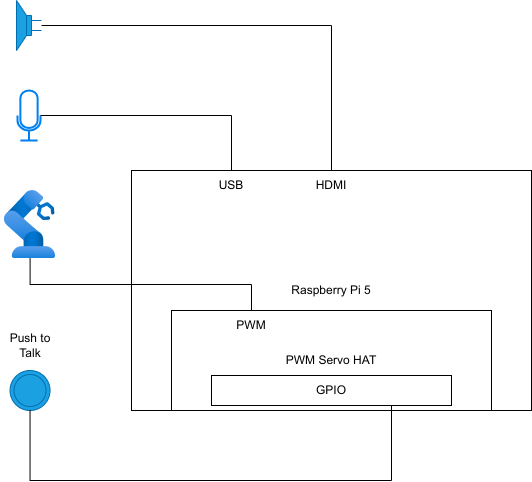
Hardware:
Software:
Create a virtual environment.
mkdir ~/.virtualenvs/
python3 -m venv ~/.virtualenvs/llamapi
source ~/.virtualenvs/llamapi/bin/activate
Install system packages:
sudo apt install portaudio19-dev
sudo apt install libopenblas-dev libopenblas-pthread-dev libopenblas-openmp-dev libopenblas0 libopenblas0-pthread libopenblas0-openmp
sudo apt install libopenblas64-0 libopenblas64-dev libopenblas64-pthread-dev libopenblas64-openmp-dev
sudo apt install ccache build-essential cmake
Install Python modules:
pip install pyaudio wave soundfile
pip install faster_whisper numpy

# RPi.GPIO doesn't work, use rpi-lgpio as a drop-in replacement
pip uninstall RPi.GPIO
pip install rpi-lgpio

pip install opencc
pip install smbus

# For use with OpenBLAS:
CMAKE_ARGS="-DGGML_BLAS=ON -DGGML_BLAS_VENDOR=OpenBLAS" pip install llama-cpp-python
CMAKE_ARGS="-DGGML_BLAS=ON -DGGML_BLAS_VENDOR=OpenBLAS" pip install 'llama-cpp-python[server]'
pip install openai
Checkout the LlamaPi code:
git clone https://github.com/zhoupingjay/LlamaPi.git
[NEW] Language model (Llama-3.2 3B Instruct):
llm folder under LlamaPi, and download the quantized model (.gguf file) under this folder.Language model (Llama-3.1 8B Instruct):
llm folder under LlamaPi, and download the 4-bit quantized model (.gguf file) under this folder.
E.g. llm/meta-llama-3.1-8b-instruct-q4_k_m.gguf.tts folder under LlamaPi, download and extract piper in this folder.cd tts
wget https://github.com/rhasspy/piper/releases/download/v1.2.0/piper_arm64.tar.gz
tar zxf piper_arm64.tar.gz
.onnx file and .json file for each voice.
For example: en_US-amy-medium.onnx and en_US-amy-medium.onnx.json.
Create a voices folder under LlamaPi/tts, and put voice files under this folder.The directory structure should look like this:
LlamaPi
├── llm
|   └── (model .gguf file)
└── tts
    ├── piper
    |   └── (piper binaries)
    └── voices
        └── (voice files)
To be added
In your virtual environment, run the LlamaPi_local.py script:
python LlamaPi_local.py
You'll see a window with big blue button and a text box showing the conversation.
The robot uses a "push-to-talk" mode for interaction: Hold the button, talk, and release the button after you finish. The robot will respond with text and voice.
The robot will also generate simple robot arm commands based on the context of your conversation:
$greet command;$smile command;$pat command.$retrieve command to mimic the "retrieve" action.These simple commands will result in different gestures from the robot arm.
The biggest challenge is the performance of running LLM on a low-power edge device like Raspberry Pi. With 4-bit quantization, I was able to fit Llama-3.1 8B on the device, but the generation speed was about 1.8 tokens/second (using llama.cpp + OpenBLAS).
Llama-3.2 3B model is a bit faster (~3.3 tokens/second with 5-bit quantization), so this is the default choice now.
Some of the future works in my mind:
Raspberry Pi Voice Chatbot backed by local or cloud LLM, with Robot Arm gestures
Python
22
18 commits
updated Oct 30, 2024
Picture generated by AI (Doubao).
An initial attempt for exploring the possibilities of Voice + LLM + Robotics, this is a voice chatbot running on Raspberry Pi 5 backed by local or cloud-based LLM, allowing the user to control robot arm gestures through natural voice interactions.
faster_whisper) and TTS (piper).NOTE: This project is still very preliminary and subject to major refactor/enhancements.
To be added...
Hardware:
Software:
Create a virtual environment.
mkdir ~/.virtualenvs/
python3 -m venv ~/.virtualenvs/llamapi
source ~/.virtualenvs/llamapi/bin/activate
Install system packages:
sudo apt install portaudio19-dev
sudo apt install libopenblas-dev libopenblas-pthread-dev libopenblas-openmp-dev libopenblas0 libopenblas0-pthread libopenblas0-openmp
sudo apt install libopenblas64-0 libopenblas64-dev libopenblas64-pthread-dev libopenblas64-openmp-dev
sudo apt install ccache build-essential cmake
Install Python modules:
pip install pyaudio wave soundfile
pip install faster_whisper numpy

# RPi.GPIO doesn't work, use rpi-lgpio as a drop-in replacement
pip uninstall RPi.GPIO
pip install rpi-lgpio

pip install opencc
pip install smbus

# For use with OpenBLAS:
CMAKE_ARGS="-DGGML_BLAS=ON -DGGML_BLAS_VENDOR=OpenBLAS" pip install llama-cpp-python
CMAKE_ARGS="-DGGML_BLAS=ON -DGGML_BLAS_VENDOR=OpenBLAS" pip install 'llama-cpp-python[server]'
pip install openai
Checkout the LlamaPi code:
git clone https://github.com/zhoupingjay/LlamaPi.git
[NEW] Language model (Llama-3.2 3B Instruct):
llm folder under LlamaPi, and download the quantized model (.gguf file) under this folder.Language model (Llama-3.1 8B Instruct):
llm folder under LlamaPi, and download the 4-bit quantized model (.gguf file) under this folder.
E.g. llm/meta-llama-3.1-8b-instruct-q4_k_m.gguf.tts folder under LlamaPi, download and extract piper in this folder.cd tts
wget https://github.com/rhasspy/piper/releases/download/v1.2.0/piper_arm64.tar.gz
tar zxf piper_arm64.tar.gz
.onnx file and .json file for each voice.
For example: en_US-amy-medium.onnx and en_US-amy-medium.onnx.json.
Create a voices folder under LlamaPi/tts, and put voice files under this folder.The directory structure should look like this:
LlamaPi
├── llm
|   └── (model .gguf file)
└── tts
    ├── piper
    |   └── (piper binaries)
    └── voices
        └── (voice files)
To be added
In your virtual environment, run the LlamaPi_local.py script:
python LlamaPi_local.py
You'll see a window with big blue button and a text box showing the conversation.
The robot uses a "push-to-talk" mode for interaction: Hold the button, talk, and release the button after you finish. The robot will respond with text and voice.
The robot will also generate simple robot arm commands based on the context of your conversation:
$greet command;$smile command;$pat command.$retrieve command to mimic the "retrieve" action.These simple commands will result in different gestures from the robot arm.
The biggest challenge is the performance of running LLM on a low-power edge device like Raspberry Pi. With 4-bit quantization, I was able to fit Llama-3.1 8B on the device, but the generation speed was about 1.8 tokens/second (using llama.cpp + OpenBLAS).
Llama-3.2 3B model is a bit faster (~3.3 tokens/second with 5-bit quantization), so this is the default choice now.
Some of the future works in my mind:



