
See what people are saying
README
zerobrew
English · 中文



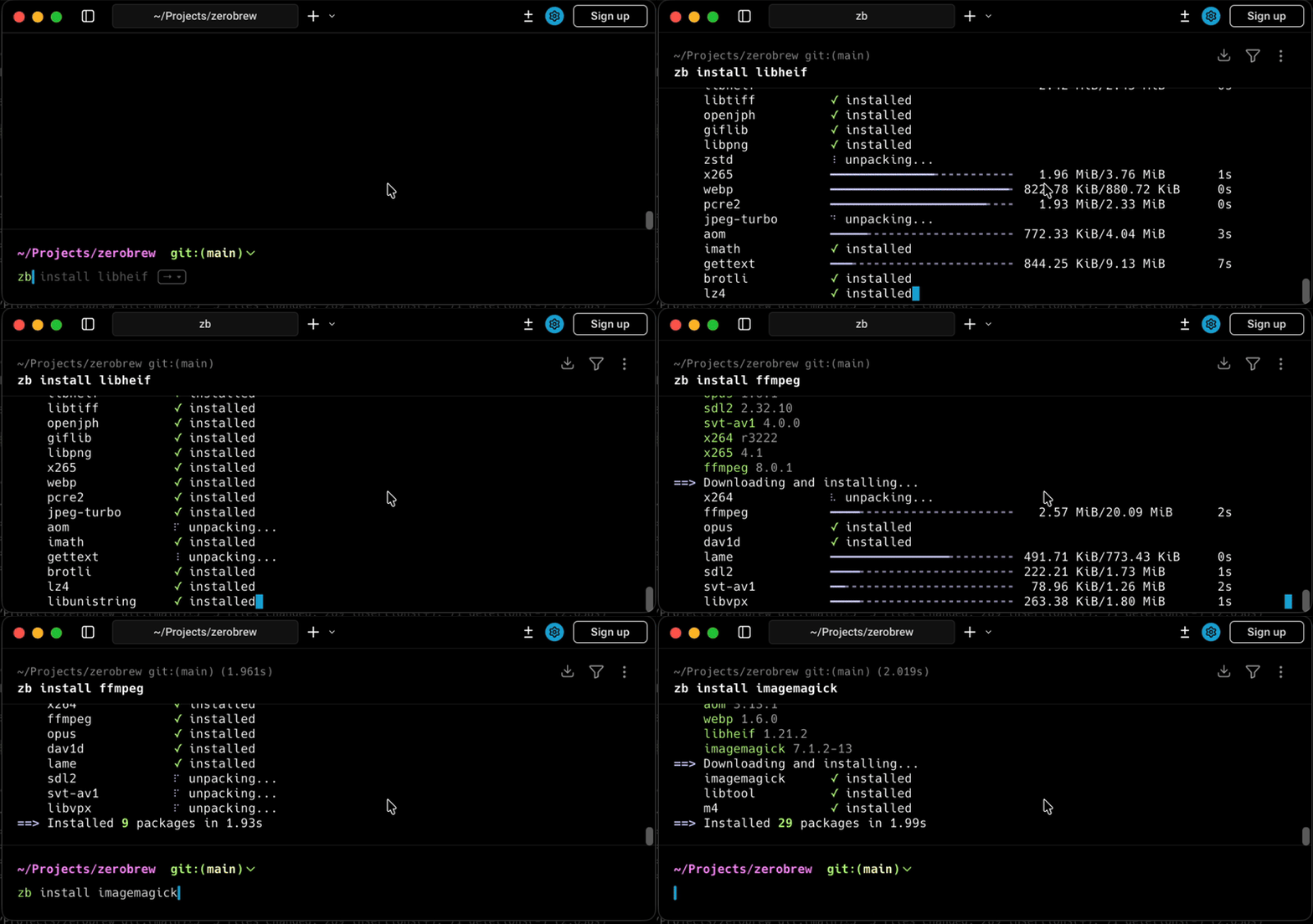
zerobrew brings uv-style architecture to Homebrew packages on macOS and Linux.
Install
curl -fsSL https://zerobrew.rs/install | bash
The installer updates your shell config. After it finishes, restart your terminal
or run the source command it prints.
Or via Homebrew:
brew install zerobrewhq/zerobrew/zerobrew
Update zerobrew
If you used the standalone installer, rerun it:
curl -fsSL https://zerobrew.rs/install | bash
zb --version
If you installed with Homebrew:
brew update && brew upgrade zerobrew
If you installed from the old lucasgelfond/zerobrew tap, it's no longer updated. Switch to the new one:
brew uninstall zerobrew
brew untap lucasgelfond/zerobrew
brew install zerobrewhq/zerobrew/zerobrew
Quick start
zb install jq                   # install one package
zb install wget git             # install multiple
zb bundle                       # install from Brewfile
zb bundle install -f myfile     # install from custom file
zb bundle dump                  # export installed packages to Brewfile
zb bundle dump -f out --force   # dump to custom file (overwrite)
zb uninstall jq                 # uninstall one package
zb outdated                     # list packages with newer versions
zb upgrade                      # upgrade all outdated packages
zb upgrade jq wget              # upgrade specific packages
zb reset                        # uninstall everything
zb gc                           # garbage collect unused store entries
zbx jq --version                # run without linking
Performance snapshot
| Package | Homebrew (cold) | ZB (cold) | Cold speedup | Homebrew (warm) | ZB (warm) | Warm speedup |
|---|---|---|---|---|---|---|
| Overall (100 packages) | 776s | 117s | 6.6x | 638s | 9.3s | 68x |
| python@3.14 | 16.99s | 1.97s | 8.6x | 14.37s | 207ms | 69.4x |
| node | 29.31s | 3.16s | 9.3x | 28.24s | 232ms | 121.7x |
| tesseract | 34.63s | 2.16s | 16.0x | 32.37s | 476ms | 68.0x |
| openjdk | 32.09s | 5.17s | 6.2x | 26.86s | 448ms | 60.0x |
| llvm | 18.22s | 9.14s | 2.0x | 9.66s | 183ms | 52.8x |
Measured on 2026-10-08 with zerobrew 0.3.5 (development release) and Homebrew 7.0.8 on macOS 26.6.2, MacBook Pro (M3 Pro, 18 GB RAM), ~318 Mbit/s download bandwidth. Homebrew started with nothing installed.
- Cold: the package and all of its dependencies uninstalled, empty download cache.
- Warm: the package and all of its dependencies uninstalled, downloads from the cold run still cached.
- The median package was 5.3x faster cold and 56x faster warm. Per package, cold ranged from 1.6x (go) to 20x (ca-certificates) and warm from 18x (go) to 252x (ca-certificates). 24 of the 100 packages installed 100x faster or more warm, which is what the asterisk on the tagline refers to.
- Cold installs are bound by the link. The same run on a ~69 Mbit/s connection (results/2026-10-07) came out at 3.3x cold and 69x warm. Big bottles like go and llvm spend nearly all of their cold time downloading, so both tools land close together there.
Full results
| Package | Homebrew (cold) | ZB (cold) | Cold speedup | Homebrew (warm) | ZB (warm) | Warm speedup |
|---|---|---|---|---|---|---|
| Overall (100 packages) | 775.60s | 117.43s | 6.60x | 637.50s | 9.33s | 68.31x |
| ca-certificates | 7.65s | 376ms | 20.35x | 6.55s | 26ms | 252.12x |
| openssl@3 | 11.02s | 1.30s | 8.46x | 9.18s | 64ms | 143.47x |
| xz | 2.39s | 454ms | 5.26x | 1.46s | 29ms | 50.31x |
| sqlite | 2.99s | 591ms | 5.06x | 2.04s | 27ms | 75.67x |
| readline | 2.48s | 494ms | 5.02x | 1.46s | 26ms | 56.08x |
| icu4c@78 | 3.32s | 1.57s | 2.11x | 1.96s | 33ms | 59.42x |
| python@3.14 | 16.99s | 1.97s | 8.62x | 14.37s | 207ms | 69.41x |
| awscli | 27.22s | 3.37s | 8.08x | 25.56s | 483ms | 52.92x |
| node | 29.31s | 3.16s | 9.28x | 28.24s | 232ms | 121.72x |
| harfbuzz | 29.34s | 2.20s | 13.34x | 22.35s | 364ms | 61.41x |
| ncurses | 3.13s | 1.04s | 3.01x | 2.04s | 69ms | 29.59x |
| gh | 2.60s | 903ms | 2.87x | 1.35s | 38ms | 35.58x |
| pcre2 | 2.58s | 631ms | 4.08x | 1.57s | 35ms | 44.94x |
| libpng | 2.49s | 854ms | 2.92x | 1.50s | 27ms | 55.70x |
| zstd | 4.12s | 672ms | 6.13x | 2.74s | 34ms | 80.50x |
| glib | 7.02s | 1.72s | 4.08x | 5.24s | 94ms | 55.76x |
| lz4 | 2.89s | 635ms | 4.54x | 1.48s | 27ms | 54.74x |
| gettext | 4.72s | 1.30s | 3.61x | 3.25s | 64ms | 50.81x |
| libngtcp2 | 10.79s | 1.40s | 7.73x | 9.20s | 66ms | 139.36x |
| libnghttp3 | 2.38s | 436ms | 5.47x | 1.47s | 27ms | 54.44x |
| pkgconf | 2.35s | 469ms | 5.02x | 1.47s | 27ms | 54.59x |
| libunistring | 2.57s | 981ms | 2.62x | 1.49s | 26ms | 57.12x |
| mpdecimal | 2.53s | 705ms | 3.59x | 1.47s | 27ms | 54.33x |
| brotli | 2.65s | 776ms | 3.41x | 1.48s | 27ms | 54.67x |
| jpeg-turbo | 2.55s | 889ms | 2.87x | 1.48s | 27ms | 54.78x |
| xorgproto | 2.21s | 484ms | 4.57x | 1.21s | 29ms | 41.59x |
| ffmpeg | 18.57s | 1.76s | 10.54x | 17.62s | 164ms | 107.41x |
| cmake | 4.04s | 1.66s | 2.44x | 1.73s | 80ms | 21.64x |
| libnghttp2 | 2.63s | 635ms | 4.14x | 1.46s | 26ms | 56.31x |
| go | 5.43s | 3.36s | 1.61x | 3.40s | 190ms | 17.92x |
| uv | 2.90s | 1.37s | 2.12x | 1.27s | 28ms | 45.43x |
| gmp | 2.62s | 543ms | 4.83x | 1.47s | 26ms | 56.42x |
| libtiff | 7.08s | 821ms | 8.62x | 6.11s | 53ms | 115.19x |
| fontconfig | 9.35s | 982ms | 9.52x | 8.13s | 77ms | 105.61x |
| python@3.13 | 14.28s | 1.76s | 8.12x | 13.15s | 186ms | 70.71x |
| git | 6.46s | 1.67s | 3.88x | 4.98s | 101ms | 49.33x |
| little-cms2 | 7.85s | 792ms | 9.91x | 6.83s | 55ms | 124.16x |
| dav1d | 2.49s | 544ms | 4.58x | 1.47s | 26ms | 56.42x |
| openexr | 9.95s | 712ms | 13.98x | 8.83s | 59ms | 149.59x |
| c-ares | 2.51s | 513ms | 4.90x | 1.51s | 32ms | 47.34x |
| tesseract | 34.63s | 2.16s | 16.01x | 32.37s | 476ms | 68.01x |
| p11-kit | 9.26s | 996ms | 9.30x | 7.95s | 32ms | 248.53x |
| imagemagick | 14.51s | 1.21s | 12.00x | 13.20s | 82ms | 160.95x |
| zlib | 2.36s | 430ms | 5.48x | 1.46s | 25ms | 58.44x |
| libx11 | 5.70s | 932ms | 6.11x | 4.71s | 174ms | 27.05x |
| freetype | 3.51s | 585ms | 5.99x | 2.21s | 32ms | 69.22x |
| protobuf | 4.06s | 725ms | 5.60x | 3.09s | 57ms | 54.21x |
| gnupg | 21.97s | 1.36s | 16.16x | 20.63s | 192ms | 107.44x |
| openjph | 7.88s | 697ms | 11.31x | 6.80s | 54ms | 126.02x |
| libtasn1 | 2.30s | 461ms | 4.99x | 1.49s | 28ms | 53.25x |
| ruby | 16.01s | 3.83s | 4.18x | 14.56s | 801ms | 18.18x |
| gnutls | 14.93s | 1.19s | 12.52x | 13.93s | 134ms | 103.96x |
| expat | 2.40s | 442ms | 5.42x | 1.48s | 26ms | 56.88x |
| libsodium | 2.44s | 884ms | 2.76x | 1.48s | 27ms | 54.96x |
| simdjson | 2.52s | 619ms | 4.08x | 1.49s | 26ms | 57.12x |
| gemini-cli | 29.98s | 2.23s | 13.43x | 27.64s | 235ms | 117.60x |
| libarchive | 5.02s | 594ms | 8.45x | 4.04s | 35ms | 115.31x |
| pyenv | 12.61s | 1.39s | 9.06x | 11.44s | 135ms | 84.76x |
| pixman | 2.44s | 487ms | 5.01x | 1.49s | 26ms | 57.19x |
| curl | 16.37s | 1.47s | 11.12x | 15.20s | 173ms | 87.88x |
| opus | 2.37s | 497ms | 4.76x | 1.47s | 27ms | 54.59x |
| unbound | 12.24s | 1.35s | 9.07x | 11.03s | 113ms | 97.58x |
| cairo | 19.28s | 1.48s | 12.99x | 17.74s | 370ms | 47.95x |
| pango | 24.48s | 1.69s | 14.46x | 23.06s | 411ms | 56.10x |
| leptonica | 9.48s | 914ms | 10.37x | 8.39s | 66ms | 127.18x |
| libxcb | 4.88s | 887ms | 5.50x | 3.89s | 132ms | 29.45x |
| jpeg-xl | 12.96s | 997ms | 13.00x | 11.92s | 70ms | 170.31x |
| coreutils | 3.31s | 760ms | 4.35x | 2.24s | 38ms | 58.97x |
| certifi | 7.81s | 461ms | 16.95x | 6.98s | 31ms | 225.06x |
| krb5 | 10.49s | 1.34s | 7.85x | 9.28s | 68ms | 136.44x |
| docker | 2.26s | 734ms | 3.08x | 1.21s | 29ms | 41.83x |
| libheif | 10.88s | 961ms | 11.32x | 9.59s | 63ms | 152.24x |
| webp | 4.31s | 578ms | 7.46x | 3.37s | 35ms | 96.40x |
| libxext | 6.45s | 982ms | 6.57x | 5.42s | 182ms | 29.80x |
| libxau | 2.74s | 512ms | 5.35x | 1.85s | 33ms | 56.06x |
| gcc | 12.23s | 3.55s | 3.45x | 8.58s | 67ms | 128.00x |
| bzip2 | 2.09s | 368ms | 5.69x | 1.14s | 26ms | 43.65x |
| libxdmcp | 2.74s | 540ms | 5.08x | 1.86s | 33ms | 56.42x |
| abseil | 3.05s | 800ms | 3.82x | 1.90s | 50ms | 38.04x |
| xcbeautify | 2.22s | 481ms | 4.62x | 1.15s | 26ms | 44.35x |
| libuv | 2.51s | 482ms | 5.20x | 1.47s | 26ms | 56.65x |
| giflib | 2.31s | 673ms | 3.44x | 1.46s | 26ms | 56.12x |
| utf8proc | 2.36s | 452ms | 5.23x | 1.46s | 27ms | 54.15x |
| libxrender | 6.35s | 976ms | 6.51x | 5.42s | 179ms | 30.25x |
| m4 | 2.00s | 431ms | 4.65x | 1.13s | 25ms | 45.28x |
| graphite2 | 2.47s | 428ms | 5.78x | 1.46s | 26ms | 56.23x |
| openjdk | 32.09s | 5.17s | 6.21x | 26.86s | 448ms | 59.96x |
| uvwasi | 2.95s | 483ms | 6.10x | 2.11s | 29ms | 72.66x |
| libffi | 2.56s | 575ms | 4.46x | 1.43s | 26ms | 55.08x |
| libdeflate | 2.44s | 458ms | 5.33x | 1.46s | 26ms | 56.12x |
| llvm | 18.22s | 9.14s | 1.99x | 9.66s | 183ms | 52.79x |
| aom | 3.25s | 699ms | 4.65x | 2.16s | 32ms | 67.50x |
| lzo | 2.38s | 449ms | 5.31x | 1.46s | 26ms | 56.00x |
| libevent | 10.66s | 1.33s | 7.99x | 9.19s | 71ms | 129.42x |
| libgpg-error | 5.06s | 1.11s | 4.56x | 3.84s | 70ms | 54.81x |
| libidn2 | 4.97s | 1.09s | 4.56x | 3.87s | 69ms | 56.12x |
| berkeley-db@5 | 4.05s | 1.96s | 2.06x | 2.60s | 56ms | 46.45x |
| deno | 10.57s | 1.46s | 7.23x | 9.24s | 57ms | 162.09x |
| libedit | 2.35s | 442ms | 5.33x | 1.45s | 26ms | 55.65x |
| oniguruma | 2.37s | 508ms | 4.67x | 1.46s | 26ms | 56.19x |
To reproduce, run just bench --full results/ on a machine with nothing installed in Homebrew. It resets zerobrew, uninstalls everything it installed in Homebrew, and writes a table to results/benchmark.md.
A smaller version runs in CI: the parity workflow installs a fixed set of formulae with both tools on the same runner and compares the resulting prefixes byte for byte, and the timing workflow times those formulae plus node and python@3.14, cold and warm, with both tools and with the last zerobrew release.
The nightly timing run fails if zerobrew is less than 1.5x faster than Homebrew cold or 3x warm on any of them, or more than 20% slower than the last release overall.
A note on how we are achieving these speeds
WRT Homebrew, I want it to be clear that both brew and zerobrew install the same bottles from Homebrew's build farm.
The difference is what happens after the download: Homebrew runs Ruby to evaluate the formula, unpacks, rewrites paths with install_name_tool, and re-signs each binary one at a time, while zerobrew does the relocation in-process and links from a content-addressed store, so it pays for the download once and almost nothing after.
I want it to be clear that we are basically nothing without Homebrew's bottle build farm. Every package zerobrew installs is one they built, tested and published. We don't compile anything, we don't maintain formulae, and none of these numbers exist without that work. The speed comes from how the artifacts are installed, not from what's in them.
This is a good read, if you're interested in what zerobrew is and isn't: Standing on the shoulders of Homebrew by Andrew Nesbitt. It makes the point better than I can.
nanobrew:
nanobrew’s published numbers time a “warm install” of a package that is already installed, which is an early exit, not an install, and compare against zerobrew 0.1.0.
Every number above is a real install from an uninstalled state, with the script and the full log in this repo, so you can run it yourself.
Relationship with Homebrew
zerobrew is more of a performance-optimized client for the Homebrew ecosystem. We rely on:
- Homebrew's formula definitions (homebrew-core)
- Homebrew's pre-built bottles when available
- Homebrew's package metadata and infrastructure
Our innovations focus on:
- Content-addressable storage for deduplication
- APFS clonefiles for zero-overhead copying
- Source build fallback using Homebrew's Ruby DSL
zerobrew is experimental. We recommend running it alongside Homebrew rather than as a replacement, and do not recommend purging homebrew and replacing it with zerobrew unless you are absolutely sure about the implications of doing so.
Project status
- Status: Experimental, but quite useful. I (@cachebag) daily drive it myself.
- Feedback: If you hit incompatibilities, please open an issue or PR.
- License: Dual-licensed under Apache 2.0 OR MIT, at your choice.
Significant stargazers

1,157 followers · starred Feb 2026

921 followers · starred Jan 2026

86 followers · starred Jan 2026

30 followers · starred May 2026
Similar repos


See what people are saying
README
zerobrew
English · 中文
zerobrew brings uv-style architecture to Homebrew packages on macOS and Linux.
Install
curl -fsSL https://zerobrew.rs/install | bash
The installer updates your shell config. After it finishes, restart your terminal
or run the source command it prints.
Or via Homebrew:
brew install zerobrewhq/zerobrew/zerobrew
Update zerobrew
If you used the standalone installer, rerun it:
curl -fsSL https://zerobrew.rs/install | bash
zb --version
If you installed with Homebrew:
brew update && brew upgrade zerobrew
If you installed from the old lucasgelfond/zerobrew tap, it's no longer updated. Switch to the new one:
brew uninstall zerobrew
brew untap lucasgelfond/zerobrew
brew install zerobrewhq/zerobrew/zerobrew
Quick start
zb install jq                   # install one package
zb install wget git             # install multiple
zb bundle                       # install from Brewfile
zb bundle install -f myfile     # install from custom file
zb bundle dump                  # export installed packages to Brewfile
zb bundle dump -f out --force   # dump to custom file (overwrite)
zb uninstall jq                 # uninstall one package
zb outdated                     # list packages with newer versions
zb upgrade                      # upgrade all outdated packages
zb upgrade jq wget              # upgrade specific packages
zb reset                        # uninstall everything
zb gc                           # garbage collect unused store entries
zbx jq --version                # run without linking
Performance snapshot
| Package | Homebrew (cold) | ZB (cold) | Cold speedup | Homebrew (warm) | ZB (warm) | Warm speedup |
|---|---|---|---|---|---|---|
| Overall (100 packages) | 776s | 117s | 6.6x | 638s | 9.3s | 68x |
| python@3.14 | 16.99s | 1.97s | 8.6x | 14.37s | 207ms | 69.4x |
| node | 29.31s | 3.16s | 9.3x | 28.24s | 232ms | 121.7x |
| tesseract | 34.63s | 2.16s | 16.0x | 32.37s | 476ms | 68.0x |
| openjdk | 32.09s | 5.17s | 6.2x | 26.86s | 448ms | 60.0x |
| llvm | 18.22s | 9.14s | 2.0x | 9.66s | 183ms | 52.8x |
Measured on 2026-10-08 with zerobrew 0.3.5 (development release) and Homebrew 7.0.8 on macOS 26.6.2, MacBook Pro (M3 Pro, 18 GB RAM), ~318 Mbit/s download bandwidth. Homebrew started with nothing installed.
- Cold: the package and all of its dependencies uninstalled, empty download cache.
- Warm: the package and all of its dependencies uninstalled, downloads from the cold run still cached.
- The median package was 5.3x faster cold and 56x faster warm. Per package, cold ranged from 1.6x (go) to 20x (ca-certificates) and warm from 18x (go) to 252x (ca-certificates). 24 of the 100 packages installed 100x faster or more warm, which is what the asterisk on the tagline refers to.
- Cold installs are bound by the link. The same run on a ~69 Mbit/s connection (results/2026-10-07) came out at 3.3x cold and 69x warm. Big bottles like go and llvm spend nearly all of their cold time downloading, so both tools land close together there.
Full results
| Package | Homebrew (cold) | ZB (cold) | Cold speedup | Homebrew (warm) | ZB (warm) | Warm speedup |
|---|---|---|---|---|---|---|
| Overall (100 packages) | 775.60s | 117.43s | 6.60x | 637.50s | 9.33s | 68.31x |
| ca-certificates | 7.65s | 376ms | 20.35x | 6.55s | 26ms | 252.12x |
| openssl@3 | 11.02s | 1.30s | 8.46x | 9.18s | 64ms | 143.47x |
| xz | 2.39s | 454ms | 5.26x | 1.46s | 29ms | 50.31x |
| sqlite | 2.99s | 591ms | 5.06x | 2.04s | 27ms | 75.67x |
| readline | 2.48s | 494ms | 5.02x | 1.46s | 26ms | 56.08x |
| icu4c@78 | 3.32s | 1.57s | 2.11x | 1.96s | 33ms | 59.42x |
| python@3.14 | 16.99s | 1.97s | 8.62x | 14.37s | 207ms | 69.41x |
| awscli | 27.22s | 3.37s | 8.08x | 25.56s | 483ms | 52.92x |
| node | 29.31s | 3.16s | 9.28x | 28.24s | 232ms | 121.72x |
| harfbuzz | 29.34s | 2.20s | 13.34x | 22.35s | 364ms | 61.41x |
| ncurses | 3.13s | 1.04s | 3.01x | 2.04s | 69ms | 29.59x |
| gh | 2.60s | 903ms | 2.87x | 1.35s | 38ms | 35.58x |
| pcre2 | 2.58s | 631ms | 4.08x | 1.57s | 35ms | 44.94x |
| libpng | 2.49s | 854ms | 2.92x | 1.50s | 27ms | 55.70x |
| zstd | 4.12s | 672ms | 6.13x | 2.74s | 34ms | 80.50x |
| glib | 7.02s | 1.72s | 4.08x | 5.24s | 94ms | 55.76x |
| lz4 | 2.89s | 635ms | 4.54x | 1.48s | 27ms | 54.74x |
| gettext | 4.72s | 1.30s | 3.61x | 3.25s | 64ms | 50.81x |
| libngtcp2 | 10.79s | 1.40s | 7.73x | 9.20s | 66ms | 139.36x |
| libnghttp3 | 2.38s | 436ms | 5.47x | 1.47s | 27ms | 54.44x |
| pkgconf | 2.35s | 469ms | 5.02x | 1.47s | 27ms | 54.59x |
| libunistring | 2.57s | 981ms | 2.62x | 1.49s | 26ms | 57.12x |
| mpdecimal | 2.53s | 705ms | 3.59x | 1.47s | 27ms | 54.33x |
| brotli | 2.65s | 776ms | 3.41x | 1.48s | 27ms | 54.67x |
| jpeg-turbo | 2.55s | 889ms | 2.87x | 1.48s | 27ms | 54.78x |
| xorgproto | 2.21s | 484ms | 4.57x | 1.21s | 29ms | 41.59x |
| ffmpeg | 18.57s | 1.76s | 10.54x | 17.62s | 164ms | 107.41x |
| cmake | 4.04s | 1.66s | 2.44x | 1.73s | 80ms | 21.64x |
| libnghttp2 | 2.63s | 635ms | 4.14x | 1.46s | 26ms | 56.31x |
| go | 5.43s | 3.36s | 1.61x | 3.40s | 190ms | 17.92x |
| uv | 2.90s | 1.37s | 2.12x | 1.27s | 28ms | 45.43x |
| gmp | 2.62s | 543ms | 4.83x | 1.47s | 26ms | 56.42x |
| libtiff | 7.08s | 821ms | 8.62x | 6.11s | 53ms | 115.19x |
| fontconfig | 9.35s | 982ms | 9.52x | 8.13s | 77ms | 105.61x |
| python@3.13 | 14.28s | 1.76s | 8.12x | 13.15s | 186ms | 70.71x |
| git | 6.46s | 1.67s | 3.88x | 4.98s | 101ms | 49.33x |
| little-cms2 | 7.85s | 792ms | 9.91x | 6.83s | 55ms | 124.16x |
| dav1d | 2.49s | 544ms | 4.58x | 1.47s | 26ms | 56.42x |
| openexr | 9.95s | 712ms | 13.98x | 8.83s | 59ms | 149.59x |
| c-ares | 2.51s | 513ms | 4.90x | 1.51s | 32ms | 47.34x |
| tesseract | 34.63s | 2.16s | 16.01x | 32.37s | 476ms | 68.01x |
| p11-kit | 9.26s | 996ms | 9.30x | 7.95s | 32ms | 248.53x |
| imagemagick | 14.51s | 1.21s | 12.00x | 13.20s | 82ms | 160.95x |
| zlib | 2.36s | 430ms | 5.48x | 1.46s | 25ms | 58.44x |
| libx11 | 5.70s | 932ms | 6.11x | 4.71s | 174ms | 27.05x |
| freetype | 3.51s | 585ms | 5.99x | 2.21s | 32ms | 69.22x |
| protobuf | 4.06s | 725ms | 5.60x | 3.09s | 57ms | 54.21x |
| gnupg | 21.97s | 1.36s | 16.16x | 20.63s | 192ms | 107.44x |
| openjph | 7.88s | 697ms | 11.31x | 6.80s | 54ms | 126.02x |
| libtasn1 | 2.30s | 461ms | 4.99x | 1.49s | 28ms | 53.25x |
| ruby | 16.01s | 3.83s | 4.18x | 14.56s | 801ms | 18.18x |
| gnutls | 14.93s | 1.19s | 12.52x | 13.93s | 134ms | 103.96x |
| expat | 2.40s | 442ms | 5.42x | 1.48s | 26ms | 56.88x |
| libsodium | 2.44s | 884ms | 2.76x | 1.48s | 27ms | 54.96x |
| simdjson | 2.52s | 619ms | 4.08x | 1.49s | 26ms | 57.12x |
| gemini-cli | 29.98s | 2.23s | 13.43x | 27.64s | 235ms | 117.60x |
| libarchive | 5.02s | 594ms | 8.45x | 4.04s | 35ms | 115.31x |
| pyenv | 12.61s | 1.39s | 9.06x | 11.44s | 135ms | 84.76x |
| pixman | 2.44s | 487ms | 5.01x | 1.49s | 26ms | 57.19x |
| curl | 16.37s | 1.47s | 11.12x | 15.20s | 173ms | 87.88x |
| opus | 2.37s | 497ms | 4.76x | 1.47s | 27ms | 54.59x |
| unbound | 12.24s | 1.35s | 9.07x | 11.03s | 113ms | 97.58x |
| cairo | 19.28s | 1.48s | 12.99x | 17.74s | 370ms | 47.95x |
| pango | 24.48s | 1.69s | 14.46x | 23.06s | 411ms | 56.10x |
| leptonica | 9.48s | 914ms | 10.37x | 8.39s | 66ms | 127.18x |
| libxcb | 4.88s | 887ms | 5.50x | 3.89s | 132ms | 29.45x |
| jpeg-xl | 12.96s | 997ms | 13.00x | 11.92s | 70ms | 170.31x |
| coreutils | 3.31s | 760ms | 4.35x | 2.24s | 38ms | 58.97x |
| certifi | 7.81s | 461ms | 16.95x | 6.98s | 31ms | 225.06x |
| krb5 | 10.49s | 1.34s | 7.85x | 9.28s | 68ms | 136.44x |
| docker | 2.26s | 734ms | 3.08x | 1.21s | 29ms | 41.83x |
| libheif | 10.88s | 961ms | 11.32x | 9.59s | 63ms | 152.24x |
| webp | 4.31s | 578ms | 7.46x | 3.37s | 35ms | 96.40x |
| libxext | 6.45s | 982ms | 6.57x | 5.42s | 182ms | 29.80x |
| libxau | 2.74s | 512ms | 5.35x | 1.85s | 33ms | 56.06x |
| gcc | 12.23s | 3.55s | 3.45x | 8.58s | 67ms | 128.00x |
| bzip2 | 2.09s | 368ms | 5.69x | 1.14s | 26ms | 43.65x |
| libxdmcp | 2.74s | 540ms | 5.08x | 1.86s | 33ms | 56.42x |
| abseil | 3.05s | 800ms | 3.82x | 1.90s | 50ms | 38.04x |
| xcbeautify | 2.22s | 481ms | 4.62x | 1.15s | 26ms | 44.35x |
| libuv | 2.51s | 482ms | 5.20x | 1.47s | 26ms | 56.65x |
| giflib | 2.31s | 673ms | 3.44x | 1.46s | 26ms | 56.12x |
| utf8proc | 2.36s | 452ms | 5.23x | 1.46s | 27ms | 54.15x |
| libxrender | 6.35s | 976ms | 6.51x | 5.42s | 179ms | 30.25x |
| m4 | 2.00s | 431ms | 4.65x | 1.13s | 25ms | 45.28x |
| graphite2 | 2.47s | 428ms | 5.78x | 1.46s | 26ms | 56.23x |
| openjdk | 32.09s | 5.17s | 6.21x | 26.86s | 448ms | 59.96x |
| uvwasi | 2.95s | 483ms | 6.10x | 2.11s | 29ms | 72.66x |
| libffi | 2.56s | 575ms | 4.46x | 1.43s | 26ms | 55.08x |
| libdeflate | 2.44s | 458ms | 5.33x | 1.46s | 26ms | 56.12x |
| llvm | 18.22s | 9.14s | 1.99x | 9.66s | 183ms | 52.79x |
| aom | 3.25s | 699ms | 4.65x | 2.16s | 32ms | 67.50x |
| lzo | 2.38s | 449ms | 5.31x | 1.46s | 26ms | 56.00x |
| libevent | 10.66s | 1.33s | 7.99x | 9.19s | 71ms | 129.42x |
| libgpg-error | 5.06s | 1.11s | 4.56x | 3.84s | 70ms | 54.81x |
| libidn2 | 4.97s | 1.09s | 4.56x | 3.87s | 69ms | 56.12x |
| berkeley-db@5 | 4.05s | 1.96s | 2.06x | 2.60s | 56ms | 46.45x |
| deno | 10.57s | 1.46s | 7.23x | 9.24s | 57ms | 162.09x |
| libedit | 2.35s | 442ms | 5.33x | 1.45s | 26ms | 55.65x |
| oniguruma | 2.37s | 508ms | 4.67x | 1.46s | 26ms | 56.19x |
To reproduce, run just bench --full results/ on a machine with nothing installed in Homebrew. It resets zerobrew, uninstalls everything it installed in Homebrew, and writes a table to results/benchmark.md.
A smaller version runs in CI: the parity workflow installs a fixed set of formulae with both tools on the same runner and compares the resulting prefixes byte for byte, and the timing workflow times those formulae plus node and python@3.14, cold and warm, with both tools and with the last zerobrew release.
The nightly timing run fails if zerobrew is less than 1.5x faster than Homebrew cold or 3x warm on any of them, or more than 20% slower than the last release overall.
A note on how we are achieving these speeds
WRT Homebrew, I want it to be clear that both brew and zerobrew install the same bottles from Homebrew's build farm.
The difference is what happens after the download: Homebrew runs Ruby to evaluate the formula, unpacks, rewrites paths with install_name_tool, and re-signs each binary one at a time, while zerobrew does the relocation in-process and links from a content-addressed store, so it pays for the download once and almost nothing after.
I want it to be clear that we are basically nothing without Homebrew's bottle build farm. Every package zerobrew installs is one they built, tested and published. We don't compile anything, we don't maintain formulae, and none of these numbers exist without that work. The speed comes from how the artifacts are installed, not from what's in them.
This is a good read, if you're interested in what zerobrew is and isn't: Standing on the shoulders of Homebrew by Andrew Nesbitt. It makes the point better than I can.
nanobrew:
nanobrew’s published numbers time a “warm install” of a package that is already installed, which is an early exit, not an install, and compare against zerobrew 0.1.0.
Every number above is a real install from an uninstalled state, with the script and the full log in this repo, so you can run it yourself.
Relationship with Homebrew
zerobrew is more of a performance-optimized client for the Homebrew ecosystem. We rely on:
- Homebrew's formula definitions (homebrew-core)
- Homebrew's pre-built bottles when available
- Homebrew's package metadata and infrastructure
Our innovations focus on:
- Content-addressable storage for deduplication
- APFS clonefiles for zero-overhead copying
- Source build fallback using Homebrew's Ruby DSL
zerobrew is experimental. We recommend running it alongside Homebrew rather than as a replacement, and do not recommend purging homebrew and replacing it with zerobrew unless you are absolutely sure about the implications of doing so.
Project status
- Status: Experimental, but quite useful. I (@cachebag) daily drive it myself.
- Feedback: If you hit incompatibilities, please open an issue or PR.
- License: Dual-licensed under Apache 2.0 OR MIT, at your choice.
Significant stargazers
1,157 followers · starred Feb 2026
921 followers · starred Jan 2026
86 followers · starred Jan 2026
30 followers · starred May 2026