
See what people are saying
README
AgentEmpire
A town-building game where your villagers are real AI agents.
AgentEmpire plays like Age of Empires, in the fantasy world of Aurelhaven. The difference: the agents you summon at the Keep are real AI coding agents (Claude Code, Codex, or any other model through pi). They build their homes and workshops, your townsfolk carry their tasks to them, a bell rings when they need your permission, and the town grows on the work you accept.
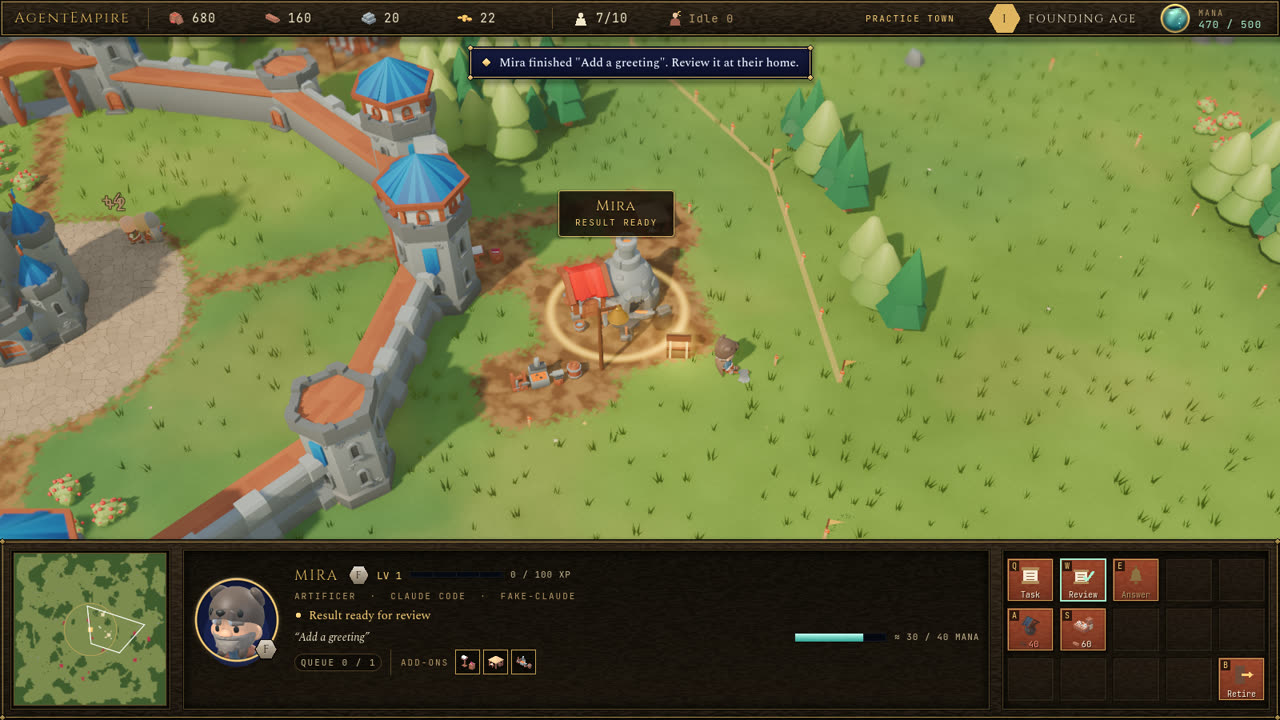
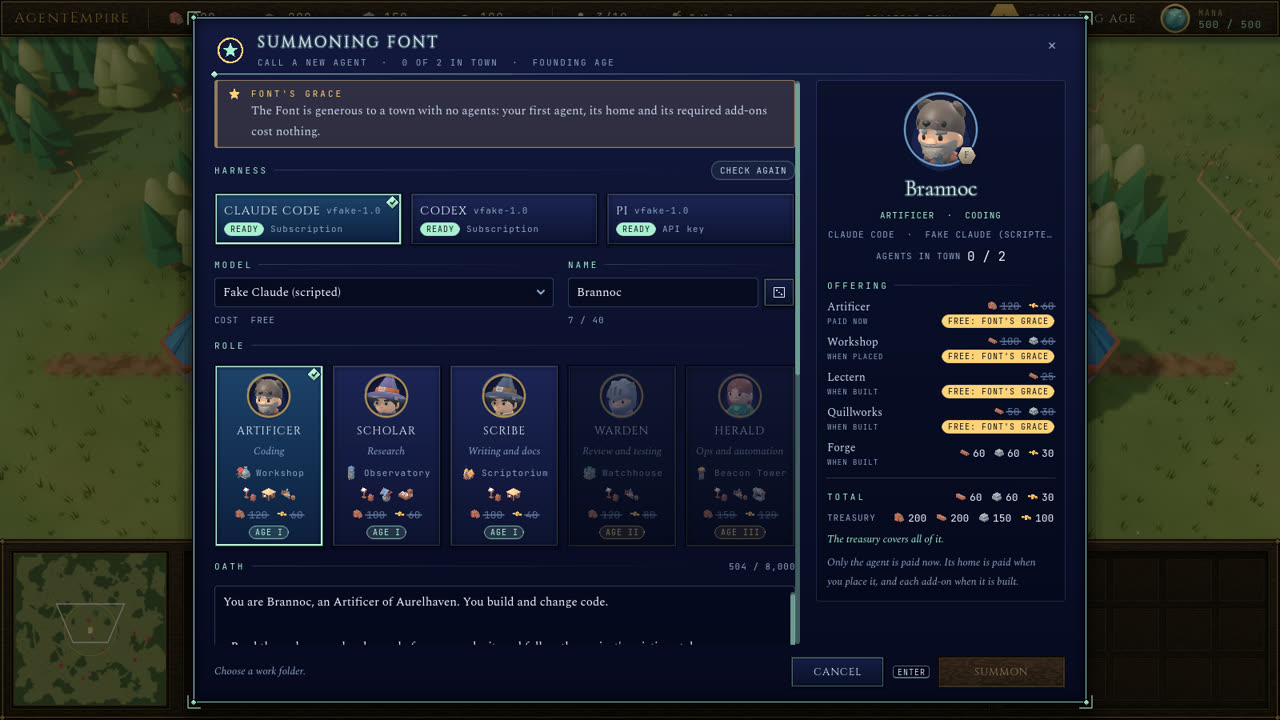
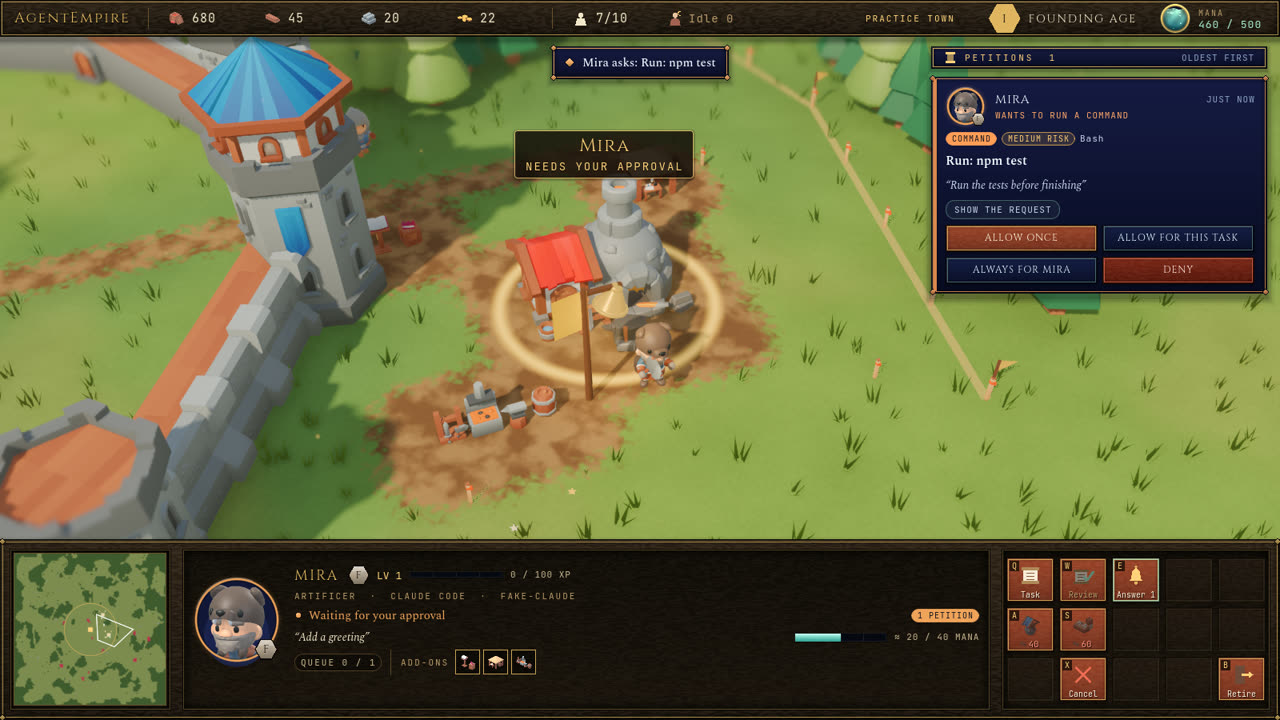
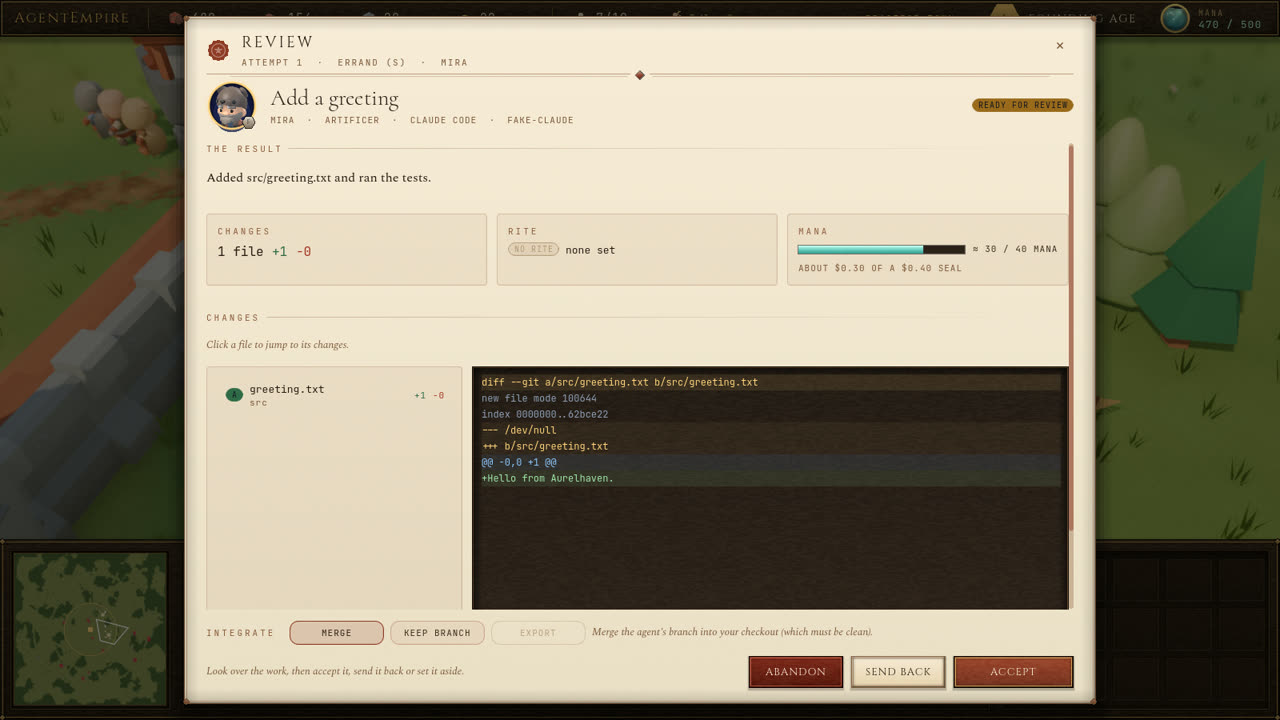
| Summoning an agent | Answering its request | Reviewing its work |
|---|---|---|
 |  |  |
Download and play
Get the newest version from the Releases page and download the file for your computer:
| Your computer | File |
|---|---|
| Windows 10 or 11 | AgentEmpire-<version>-windows.zip |
| Mac with Apple Silicon (M1 or newer) | AgentEmpire-<version>-macos-arm64.zip |
| Mac with an Intel processor | AgentEmpire-<version>-macos-x64.zip |
| Linux (64-bit) | AgentEmpire-<version>-linux.zip |
Not sure which Mac you have? Open the Apple menu and choose About This Mac: "Chip: Apple M..." means Apple Silicon, "Processor: ... Intel" means Intel.
Windows
- Right-click the downloaded file and choose Extract All, then Extract.
- Open the new folder and double-click AgentEmpire.exe.
- If Windows shows "Windows protected your PC", click More info, then Run anyway. The game is not signed with a paid certificate yet, so Windows does not recognise it.
macOS
- Double-click the downloaded file to unzip it.
- macOS blocks apps from developers it does not know. Open Terminal (in Applications, then
Utilities), type
xattr -dr com.apple.quarantine(with the space at the end), drag the unzipped AgentEmpire folder onto the Terminal window, and press Return. - Double-click AgentEmpire.app in that folder.
Linux
- Unzip the file:
unzip AgentEmpire-*-linux.zip - Start the game: double-click AgentEmpire.x86_64 in the new folder, or run
./AgentEmpire.x86_64in it.
Keep the unzipped folder together: the game needs the townhall, runtime and protocol
folders next to it. There is nothing else to install.
The first start takes a few seconds while the game starts its Town Hall, the part that runs
the agents. You begin with practice agents: a stand-in plays the agents' part through tasks,
approvals and reviews, so you can learn the game while nothing real runs and nothing is spent.
Your towns are kept in your user folder (%APPDATA%\AgentEmpire on Windows,
~/Library/Application Support/AgentEmpire on macOS, ~/.local/share/AgentEmpire on Linux), so
deleting or updating the game folder does not touch them.
Real agents
- Install at least one agent program and sign in to it once:
- Claude Code (how to install): then
run
claudein a terminal and sign in. - Codex CLI (how to install): then run
codex login. - pi comes with the game and works with many other model providers; it needs a sign-in with the provider you choose.
- Claude Code (how to install): then
run
- In the game, click PRACTICE TOWN in the top bar and choose Real agents. The game closes the practice Town Hall and opens your real town; practice and real towns are kept apart.
- Summon an agent at the Keep (select the Keep with H, then press W), choose its work folder, and send it a task.
What keeps real agents in check:
- Tools come from buildings. An agent can only read files once it has a Lectern, write them with a Quillworks, run commands with a Forge, and so on.
- You approve what matters. Anything outside the agent's trusted rules waits for you: a bell rings at its home and a card appears at the top right.
- Your files stay yours until you accept. In a git project each task works on its own branch; your checkout changes only when you accept the work, and only if it is clean.
- Mana is your real budget. 1 Mana = $0.01. Set it with F4; every task has its own cap, and agents pause when the budget runs out. Your controls never cost anything.
The Town Hall keeps running after you close the game, so agents can finish their tasks. To stop it, click the Town Hall chip in the top bar and choose Close the Town Hall.
How to play
- Grow the town. Townsfolk gather food and wood and build cottages (more population), farms and storehouses. Select them and right-click a bush or a tree, or press Q, W or E to build.
- Summon agents at the Keep, the way you train villagers. Each one walks out, builds its home on a plot you choose, then builds its add-on buildings, the tools it is allowed to use.
- Give tasks. Select an agent and press Q to write a task. A townsperson carries the scroll from the Keep to the agent's home; the work starts when it arrives.
- Answer the bells. When an agent asks to do something, approve it once, for the task, or always for that agent, or deny it. Space jumps to the oldest bell.
- Review and accept. When a task is done, read the changes and accept, send back with notes, or abandon it. Accepted work pays the town in food, wood, stone and gold, and the agent gains experience and rank.
| Input | Action |
|---|---|
| Left click, drag | Select, box-select (Shift adds) |
| Double-click | Select everything of that type on screen |
| Right click | Move, gather, build, carry a scroll to an agent's home, set a rally point |
| Q W E R T, A S D F G, Z X C V B | The 5 x 3 command card at the bottom right |
| Ctrl+1 to 9, then 1 to 9 | Assign and recall control groups (double tap to centre the camera) |
| . (period) | Next idle townsperson |
| H | Select the Keep |
| Space | Jump to the oldest ringing bell |
| F4 | Mana budget |
| Delete | Cancel the selected construction or the last unit in training |
| Arrow keys, screen edge, middle-drag | Move the camera |
| Mouse wheel | Zoom |
| Ctrl+Left / Right, Alt+middle-drag | Rotate the camera |
| F2, F3 | Toggle night, show frames per second |
| F5, F9 | Save, load an offline town |
| Pause | Pause |
| Esc | Cancel, or close the top window |
Build it yourself
You can build the game from this project's files without any programming:
- Install Node.js, the LTS version, from nodejs.org.
- Download this project: click the green Code button at the top of this page, choose Download ZIP, and unzip it.
- Start the build:
- Windows: double-click build.cmd.
- macOS: double-click build.command. The first time, macOS may refuse it; right-click it and choose Open instead.
- Linux: run
./build.shin a terminal in the project folder.
- Wait. The first build downloads the Godot game engine and its export templates (about 1.4 GB) and takes a while; later builds are much quicker.
- When it finishes, the game is in the dist folder, ready to play as described above.
Packages for every platform at once: node scripts/setup.mjs --all-templates, then
node scripts/package-release.mjs --targets all.
Status
AgentEmpire is an early preview. Tested on Windows 11; every release package is also started automatically on Windows, Linux and macOS (Apple Silicon) before it is published.
| Phase | Scope | State |
|---|---|---|
| 0 | Tools and experiments: the agent programs, git worktrees on Windows, the web version | Done |
| 1 | The Town Hall: tasks, approvals, Mana, the resource ledger and rewards, with practice agents | Done |
| 2 | The town: map, camera, units, gathering, construction, the controls | Done |
| 3 | Agents as villagers: summoning, homes and add-ons, couriers, approvals, review and rewards | Done |
| 4 | Real agents on Claude Code, Codex and pi | Done |
| 5 | Ages and walls, menus and onboarding, sound | In progress. Done: the Town Hall side (practice and real towns, switching and closing the Town Hall, party leads, usage limits), the four town walls with the wall-rise animation, the wanderer, sound and music. Still to come: the menus, the onboarding, and the Age and Quartermaster windows (until then the town stays in its first age) |
For developers
Godot client (desktop or web) <-- WebSocket on 127.0.0.1 --> Town Hall (TypeScript, Node 22)
  the town: map, units, gathering,                             agents, tasks, approvals, parties,
  construction, HUD                                            Mana, resource ledger, ages, saves
                                                               |
                                    Claude Code CLI, Codex CLI (app-server), pi (RPC mode)
                                                               |
                                              git worktrees in your work folders
The Town Hall (townhall/) is a small local service that owns everything real: agents,
tasks, approvals, Mana, the resource ledger and saved towns. It runs each agent on an existing
agent program as a child process and sends every permission request to the player. The
client (client/) is the Godot 4.7.2 game; it simulates the town and mirrors the Town
Hall's state.
Running from source, after node scripts/setup.mjs:
- Open
client/project.godotin Godot 4.7.2 (in.tools/godot/) and press Play; the game starts the Town Hall fromtownhall/by itself. Add-- --offlineto play without it. - Or run the Town Hall yourself in
townhall/withnpm start(AURELHAVEN_PROVIDER=realfor real agents). - The web version:
node scripts/build-game.mjs --web-only, then open theWeb client:address the Town Hall prints.
| Path | Contents |
|---|---|
client/ | The Godot project (GDScript): simulation, world, HUD, networking, tests |
townhall/ | The Town Hall (TypeScript, Node 22); see townhall/README.md |
protocol/ | The contract between them: PROTOCOL.md, economy.json (every game constant), pricing.json, generated GDScript |
scripts/ | Setup, build, release packaging, end-to-end and asset scripts |
art_src/ | The Blender pipeline that builds models, characters and icons from the KayKit kits |
docs/ | Architecture, development guide, experiment notes, README images |
.github/workflows/ | The release workflow |
design_handoff_aurelhaven/ | The original design handoff: lore, colours, fonts, the wall animation |
- docs/architecture.md: how the Town Hall and the client work and talk.
- docs/development.md: tools, tests, builds, releases, conventions and troubleshooting.
- townhall/README.md: running and configuring the Town Hall.
- protocol/PROTOCOL.md: the WebSocket protocol.
- docs/spikes.md: findings from the agent-program, worktree and web experiments.
Releases are built by .github/workflows/release.yml: pushing a
tag such as v0.5.0 builds the Windows, Linux and macOS packages, starts each one on its own
system, and publishes them on the Releases page.
Credits
Art by Kay Lousberg (KayKit, CC0); sound from Kenney, OpenGameArt.org and Freesound (CC0) plus bells made for the game; fonts under the SIL Open Font License; built with Godot. The full list is in CREDITS.md.
Similar repos


Languages
GDScript
60.1%
TypeScript
27.2%
JavaScript
7.2%
Python
3.8%
HTML
1.2%
See what people are saying
README
AgentEmpire
A town-building game where your villagers are real AI agents.
AgentEmpire plays like Age of Empires, in the fantasy world of Aurelhaven. The difference: the agents you summon at the Keep are real AI coding agents (Claude Code, Codex, or any other model through pi). They build their homes and workshops, your townsfolk carry their tasks to them, a bell rings when they need your permission, and the town grows on the work you accept.
| Summoning an agent | Answering its request | Reviewing its work |
|---|---|---|
| | |
Download and play
Get the newest version from the Releases page and download the file for your computer:
| Your computer | File |
|---|---|
| Windows 10 or 11 | AgentEmpire-<version>-windows.zip |
| Mac with Apple Silicon (M1 or newer) | AgentEmpire-<version>-macos-arm64.zip |
| Mac with an Intel processor | AgentEmpire-<version>-macos-x64.zip |
| Linux (64-bit) | AgentEmpire-<version>-linux.zip |
Not sure which Mac you have? Open the Apple menu and choose About This Mac: "Chip: Apple M..." means Apple Silicon, "Processor: ... Intel" means Intel.
Windows
- Right-click the downloaded file and choose Extract All, then Extract.
- Open the new folder and double-click AgentEmpire.exe.
- If Windows shows "Windows protected your PC", click More info, then Run anyway. The game is not signed with a paid certificate yet, so Windows does not recognise it.
macOS
- Double-click the downloaded file to unzip it.
- macOS blocks apps from developers it does not know. Open Terminal (in Applications, then
Utilities), type
xattr -dr com.apple.quarantine(with the space at the end), drag the unzipped AgentEmpire folder onto the Terminal window, and press Return. - Double-click AgentEmpire.app in that folder.
Linux
- Unzip the file:
unzip AgentEmpire-*-linux.zip - Start the game: double-click AgentEmpire.x86_64 in the new folder, or run
./AgentEmpire.x86_64in it.
Keep the unzipped folder together: the game needs the townhall, runtime and protocol
folders next to it. There is nothing else to install.
The first start takes a few seconds while the game starts its Town Hall, the part that runs
the agents. You begin with practice agents: a stand-in plays the agents' part through tasks,
approvals and reviews, so you can learn the game while nothing real runs and nothing is spent.
Your towns are kept in your user folder (%APPDATA%\AgentEmpire on Windows,
~/Library/Application Support/AgentEmpire on macOS, ~/.local/share/AgentEmpire on Linux), so
deleting or updating the game folder does not touch them.
Real agents
- Install at least one agent program and sign in to it once:
- Claude Code (how to install): then
run
claudein a terminal and sign in. - Codex CLI (how to install): then run
codex login. - pi comes with the game and works with many other model providers; it needs a sign-in with the provider you choose.
- Claude Code (how to install): then
run
- In the game, click PRACTICE TOWN in the top bar and choose Real agents. The game closes the practice Town Hall and opens your real town; practice and real towns are kept apart.
- Summon an agent at the Keep (select the Keep with H, then press W), choose its work folder, and send it a task.
What keeps real agents in check:
- Tools come from buildings. An agent can only read files once it has a Lectern, write them with a Quillworks, run commands with a Forge, and so on.
- You approve what matters. Anything outside the agent's trusted rules waits for you: a bell rings at its home and a card appears at the top right.
- Your files stay yours until you accept. In a git project each task works on its own branch; your checkout changes only when you accept the work, and only if it is clean.
- Mana is your real budget. 1 Mana = $0.01. Set it with F4; every task has its own cap, and agents pause when the budget runs out. Your controls never cost anything.
The Town Hall keeps running after you close the game, so agents can finish their tasks. To stop it, click the Town Hall chip in the top bar and choose Close the Town Hall.
How to play
- Grow the town. Townsfolk gather food and wood and build cottages (more population), farms and storehouses. Select them and right-click a bush or a tree, or press Q, W or E to build.
- Summon agents at the Keep, the way you train villagers. Each one walks out, builds its home on a plot you choose, then builds its add-on buildings, the tools it is allowed to use.
- Give tasks. Select an agent and press Q to write a task. A townsperson carries the scroll from the Keep to the agent's home; the work starts when it arrives.
- Answer the bells. When an agent asks to do something, approve it once, for the task, or always for that agent, or deny it. Space jumps to the oldest bell.
- Review and accept. When a task is done, read the changes and accept, send back with notes, or abandon it. Accepted work pays the town in food, wood, stone and gold, and the agent gains experience and rank.
| Input | Action |
|---|---|
| Left click, drag | Select, box-select (Shift adds) |
| Double-click | Select everything of that type on screen |
| Right click | Move, gather, build, carry a scroll to an agent's home, set a rally point |
| Q W E R T, A S D F G, Z X C V B | The 5 x 3 command card at the bottom right |
| Ctrl+1 to 9, then 1 to 9 | Assign and recall control groups (double tap to centre the camera) |
| . (period) | Next idle townsperson |
| H | Select the Keep |
| Space | Jump to the oldest ringing bell |
| F4 | Mana budget |
| Delete | Cancel the selected construction or the last unit in training |
| Arrow keys, screen edge, middle-drag | Move the camera |
| Mouse wheel | Zoom |
| Ctrl+Left / Right, Alt+middle-drag | Rotate the camera |
| F2, F3 | Toggle night, show frames per second |
| F5, F9 | Save, load an offline town |
| Pause | Pause |
| Esc | Cancel, or close the top window |
Build it yourself
You can build the game from this project's files without any programming:
- Install Node.js, the LTS version, from nodejs.org.
- Download this project: click the green Code button at the top of this page, choose Download ZIP, and unzip it.
- Start the build:
- Windows: double-click build.cmd.
- macOS: double-click build.command. The first time, macOS may refuse it; right-click it and choose Open instead.
- Linux: run
./build.shin a terminal in the project folder.
- Wait. The first build downloads the Godot game engine and its export templates (about 1.4 GB) and takes a while; later builds are much quicker.
- When it finishes, the game is in the dist folder, ready to play as described above.
Packages for every platform at once: node scripts/setup.mjs --all-templates, then
node scripts/package-release.mjs --targets all.
Status
AgentEmpire is an early preview. Tested on Windows 11; every release package is also started automatically on Windows, Linux and macOS (Apple Silicon) before it is published.
| Phase | Scope | State |
|---|---|---|
| 0 | Tools and experiments: the agent programs, git worktrees on Windows, the web version | Done |
| 1 | The Town Hall: tasks, approvals, Mana, the resource ledger and rewards, with practice agents | Done |
| 2 | The town: map, camera, units, gathering, construction, the controls | Done |
| 3 | Agents as villagers: summoning, homes and add-ons, couriers, approvals, review and rewards | Done |
| 4 | Real agents on Claude Code, Codex and pi | Done |
| 5 | Ages and walls, menus and onboarding, sound | In progress. Done: the Town Hall side (practice and real towns, switching and closing the Town Hall, party leads, usage limits), the four town walls with the wall-rise animation, the wanderer, sound and music. Still to come: the menus, the onboarding, and the Age and Quartermaster windows (until then the town stays in its first age) |
For developers
Godot client (desktop or web) <-- WebSocket on 127.0.0.1 --> Town Hall (TypeScript, Node 22)
  the town: map, units, gathering,                             agents, tasks, approvals, parties,
  construction, HUD                                            Mana, resource ledger, ages, saves
                                                               |
                                    Claude Code CLI, Codex CLI (app-server), pi (RPC mode)
                                                               |
                                              git worktrees in your work folders
The Town Hall (townhall/) is a small local service that owns everything real: agents,
tasks, approvals, Mana, the resource ledger and saved towns. It runs each agent on an existing
agent program as a child process and sends every permission request to the player. The
client (client/) is the Godot 4.7.2 game; it simulates the town and mirrors the Town
Hall's state.
Running from source, after node scripts/setup.mjs:
- Open
client/project.godotin Godot 4.7.2 (in.tools/godot/) and press Play; the game starts the Town Hall fromtownhall/by itself. Add-- --offlineto play without it. - Or run the Town Hall yourself in
townhall/withnpm start(AURELHAVEN_PROVIDER=realfor real agents). - The web version:
node scripts/build-game.mjs --web-only, then open theWeb client:address the Town Hall prints.
| Path | Contents |
|---|---|
client/ | The Godot project (GDScript): simulation, world, HUD, networking, tests |
townhall/ | The Town Hall (TypeScript, Node 22); see townhall/README.md |
protocol/ | The contract between them: PROTOCOL.md, economy.json (every game constant), pricing.json, generated GDScript |
scripts/ | Setup, build, release packaging, end-to-end and asset scripts |
art_src/ | The Blender pipeline that builds models, characters and icons from the KayKit kits |
docs/ | Architecture, development guide, experiment notes, README images |
.github/workflows/ | The release workflow |
design_handoff_aurelhaven/ | The original design handoff: lore, colours, fonts, the wall animation |
- docs/architecture.md: how the Town Hall and the client work and talk.
- docs/development.md: tools, tests, builds, releases, conventions and troubleshooting.
- townhall/README.md: running and configuring the Town Hall.
- protocol/PROTOCOL.md: the WebSocket protocol.
- docs/spikes.md: findings from the agent-program, worktree and web experiments.
Releases are built by .github/workflows/release.yml: pushing a
tag such as v0.5.0 builds the Windows, Linux and macOS packages, starts each one on its own
system, and publishes them on the Releases page.
Credits
Art by Kay Lousberg (KayKit, CC0); sound from Kenney, OpenGameArt.org and Freesound (CC0) plus bells made for the game; fonts under the SIL Open Font License; built with Godot. The full list is in CREDITS.md.
Similar repos
Languages
GDScript
60.1%
TypeScript
27.2%
JavaScript
7.2%
Python
3.8%
HTML
1.2%