
Windows desktop app for voice cloning with Chatterbox TTS: record or import a voice, write a (multi-speaker) script, render a WAV.
Python
1
17 commits
updated Sep 30, 2026
See what people are saying
README

Lyrebird

A small Windows desktop app for voice cloning with Chatterbox TTS by Resemble AI.
- Record 10 s of your voice, or Import a clip of someone who has agreed to be cloned.
- Type some text. It can be a dialogue between several saved voices, with
[laugh]-style sound tags. - Click Render. You get a
.wavfile.
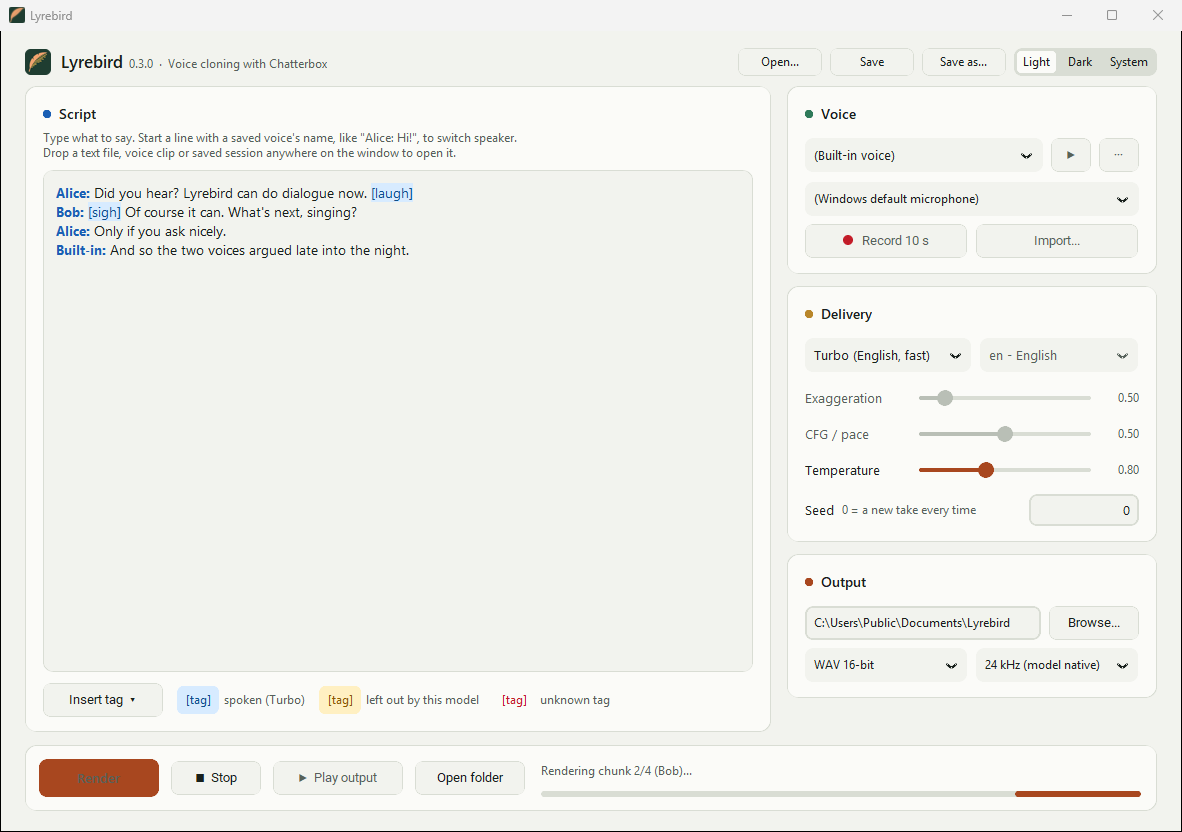
Everything runs locally on your PC. Step-by-step guide with screenshots: HOWTO.md.
The name comes from the lyrebird, an Australian bird that can copy almost any sound it hears.
Quick start
- Download
Lyrebird-win64.zip(about 33 MB) from the Releases page and unzip it anywhere. - Run
Lyrebird\Lyrebird.exe. The exe isn't code-signed yet, so if Windows SmartScreen appears, click More info → Run anyway. - First launch only: a setup window downloads Python, PyTorch and Chatterbox into
%LOCALAPPDATA%\Lyrebird. That's about a 3 GB download with an NVIDIA GPU, and much less without one. It needs about 6 GB of free disk space once unpacked. The window shows the current step, how much is on disk so far and how long it has taken. Setup took under 2 minutes on a fast connection. Later launches start straight away. - First render with each model: Lyrebird downloads that model, roughly 3 to 4 GB, to your Hugging Face cache. The status line shows the progress.
Requirements: 64-bit Windows 10 or 11 and an internet connection for the first run. An NVIDIA GPU is strongly recommended: about 6 GB of VRAM, since the models use 3 to 4 GB while rendering. Setup picks the PyTorch build that matches your NVIDIA driver. Without an NVIDIA GPU, Lyrebird installs the CPU build and runs on the CPU. That works, but slowly: expect tens of seconds or more per sentence.
Features
- Voice library: record 10 s from any source or import wav/mp3/flac/ogg, give it a name, and it stays in the Voice list. Voices are stored in
Documents\Lyrebird\voices. The ··· menu next to the voice renames and deletes voices. - Trim before saving: each new recording or import opens a waveform view. Drag the start and end handles to keep only the clean speech. Auto-trim finds the speech for you, and Play selection lets you hear the result. With a long clip, you can cut out just the 10 seconds you want.
- Per-voice settings: give any voice its own exaggeration, CFG/pace or temperature (··· → Voice settings...). They apply whenever that voice speaks, so each character in a dialogue can have its own delivery.
- Recording sources: every microphone, plus What you hear for each output device, which records whatever the PC is playing (for example a video of someone who has agreed to be cloned). Newly plugged-in devices show up the next time you open the list.
- Multi-speaker dialogue: start a line with a saved voice's name to switch speaker:
A line only switches speaker when the name matches a saved voice (ignoring capitals).Alice: Did you hear the news? Bob: No, what happened? Built-in: I'm the narrator.Built-inis the model's own voice. Lines without a name continue with the current speaker, and text before the first name uses the voice selected in the Voice list. - Sound tags (Turbo model): type or insert tags such as
[laugh],[sigh]and[whispering]. They're highlighted blue when the selected model supports them. With other models they turn amber and are left out when rendering, so they aren't read aloud. Unknown tags are underlined in red. - Three models: Standard (English), Turbo (English, fast) and Multilingual (23 languages).
- Sessions: Save (Ctrl+S) stores the script and every setting in a
.lyrebirdfile, and Open... (Ctrl+O) brings it all back. It also opens.txtand.mdscripts. - Drag and drop: drop a script, a session or an audio clip anywhere on the window. An audio clip starts adding it as a voice.
- Calm, readable interface in light or dark, following your Windows theme or set by hand.
- Output formats: WAV 16-bit, WAV 32-bit float or FLAC 24-bit, at the model's native 24 kHz or resampled to 44.1 or 48 kHz, ready for a DAW.
- Stop: cancels a render after the current chunk.
- Remembers your setup: model, language, sliders, seed, output folder, format, voice, source, window size and light or dark mode are restored on the next launch.
- Any length of text: text is split at sentence ends and line breaks into chunks of up to 300 characters (100 for Chinese, Japanese and Korean). The chunks are rendered one by one and joined with a 0.2 s gap. Splitting is needed because the models stop at about 40 s of audio per chunk.
Options
| Option | Range (default) | Models | Effect |
|---|---|---|---|
| Voice | saved voices or (Built-in voice) | all | Who speaks. It's also the speaker for any text before the first Name: line. The ··· menu renames or deletes it, or opens Voice settings to give it its own slider values. |
| Source | microphones and "What you hear" outputs (Windows default microphone) | all | Used by Record 10 s. Microphones record at the device's own sample rate and keep the loudest channel. If a mic won't open through WASAPI, Lyrebird retries it through MME and DirectSound. "What you hear" records the output device at 48 kHz and mixes it to mono. A silent recording is rejected rather than saved as a voice. |
| Model | Standard / Turbo / Multilingual (Standard) | all | Standard: the original 0.5B English model. Best quality, and supports every option. Turbo: a smaller 350M English model that's much faster and understands sound tags. Multilingual: the 0.5B model for 23 languages. Only one model is kept in memory; switching models unloads the previous one. |
| Language | 23 languages (en) | Multilingual | The language of the text. The voice sample can be in any language, but one in the same language as the text sounds most natural. Supported: Arabic, Chinese, Danish, Dutch, English, Finnish, French, German, Greek, Hebrew, Hindi, Italian, Japanese, Korean, Malay, Norwegian, Polish, Portuguese, Russian, Spanish, Swahili, Swedish, Turkish. |
| Exaggeration | 0.25 – 2.0 (0.5) | Standard, Multilingual | Emotional intensity. At 0.5 the delivery is neutral. At 0.7 and above it becomes more dramatic and tends to speed up. Very high values can become unstable. |
| CFG / pace | 0.0 – 1.0 (0.5) | Standard, Multilingual | Classifier-free guidance weight, i.e. how closely the output follows the voice sample's style. Lower values give slower, more deliberate speech. Try about 0.3 when you raise Exaggeration, or when the voice sample talks fast. With Multilingual, set it to 0 when the voice sample is in a different language from the text, to reduce accent carry-over. On Standard, 0 is treated as 0.001 because Chatterbox 0.1.7 crashes at exactly 0. |
| Temperature | 0.05 – 2.0 (0.8) | all | Sampling randomness. Lower values give flatter, more consistent speech. Higher values give more variety but also more mistakes. |
| Seed | 0 – 2³¹−1 (0) | all | 0 gives a different take on every render. Any other number makes a render repeatable: same seed, text, voice, settings and hardware give the same result. |
| Save to | folder (Documents\Lyrebird) | all | Where renders are written, as lyrebird_<YYYYmmdd_HHMMSS>.wav (or .flac). The folder is created if it doesn't exist. |
| Format | WAV 16-bit / WAV 32-bit float / FLAC 24-bit (WAV 16-bit) | all | File type of the render. Play output plays 16-bit WAV directly; other formats open in your default player. |
| Sample rate | 24 kHz (model native) / 44.1 kHz / 48 kHz (24 kHz) | all | The models produce 24 kHz. The other rates resample the result, which doesn't add detail but saves converting it later. |
| Voice settings | per voice: Exaggeration, CFG / pace, Temperature (off) | all | Settings switched on replace the main sliders whenever that voice speaks. They're saved as voices\<name>.json next to the sample. Turbo only uses Temperature. |
Exaggeration and CFG are greyed out for Turbo because the Turbo model doesn't support them. Language is greyed out except for Multilingual.
Output is mono. Every setting above is saved when you render or close the window, and restored on the next launch.
Sound tags
Only the Turbo model supports these tags. They're from the Turbo model's own tokenizer:
[laugh] [chuckle] [sigh] [gasp] [cough] [clear throat] [sniff] [groan] [shush] [whispering] [angry] [happy] [sarcastic] [surprised] [fear] [crying] [dramatic] [narration] [advertisement]
Where things are stored
| Path | What's there |
|---|---|
%LOCALAPPDATA%\Lyrebird\ | The Python runtime, PyTorch and Chatterbox (env, python, uv-cache), plus settings.json, setup.log and lyrebird.log. |
Documents\Lyrebird\ | Your renders. Voices are in voices\: one audio file per voice, plus <name>.json if the voice has its own settings. |
%USERPROFILE%\.cache\huggingface\ | Model weights, about 3 to 4 GB per model used. |
%USERPROFILE%\.pkuseg\ | The Chinese word-segmentation model, downloaded from GitHub the first time Multilingual loads. |
Uninstall: delete the unzipped Lyrebird folder and %LOCALAPPDATA%\Lyrebird. To also free the model space, delete the models--ResembleAI--chatterbox* folders in the Hugging Face cache. If you used Multilingual, also delete %USERPROFILE%\.pkuseg. Your voices and renders in Documents\Lyrebird stay unless you delete them.
Network use:
- First run: setup downloads its packages from PyPI and the PyTorch index.
- First use of each model: the weights come from Hugging Face. Multilingual also downloads the segmentation model from GitHub.
- Every model load: Lyrebird checks Hugging Face for updates. Set
HF_HUB_OFFLINE=1to stop this.
Nothing you record or render leaves your PC.
Environment variables
| Variable | Effect |
|---|---|
HF_HOME | Moves the Hugging Face cache somewhere other than %USERPROFILE%\.cache\huggingface. |
HF_TOKEN | Hugging Face access token. It isn't needed for the public Chatterbox models, but it avoids anonymous rate limits. |
HF_HUB_OFFLINE=1 | Never contacts Hugging Face. The models must already be cached. |
PKUSEG_HOME | Where Multilingual stores its Chinese segmentation model (default %USERPROFILE%\.pkuseg). To use Multilingual offline, this folder must already be there. |
Logs
Lyrebird has no console window, so its output goes to log files in %LOCALAPPDATA%\Lyrebird:
setup.log: the first-run setup.lyrebird.log: the app itself. It's overwritten on each launch.
Please attach these to bug reports.
How the release works
Lyrebird.exe is a small launcher (launcher.py) frozen with PyInstaller. It bundles uv along with lyrebird.py and requirements.txt. On first run it does the following:
uv venv --managed-python --python 3.12downloads a standalone Python that includes tkinter.uv pip install -r requirements.txt --torch-backend autoinstalls PyTorch 2.7.1 in the CUDA build that matches the NVIDIA driver, or the CPU build if there's no GPU. If no CUDA build fits, for example because the driver is too old, it retries with the CPU build. A network error doesn't trigger this fallback: setup stops and resumes the next time Lyrebird starts, so a GPU PC is never quietly left on the CPU build.uv pip install --no-deps chatterbox-tts==0.1.7. Chatterbox pinstorch==2.6.0, which has no RTX 50-series (Blackwell) support, sorequirements.txtlists its dependencies directly.
A marker file stores a hash of requirements.txt. When a new release changes the dependencies, setup runs again; otherwise the launcher starts the app immediately. This keeps the download at about 33 MB instead of about 5 GB. Almost all of that 5 GB is PyTorch's CUDA libraries, which are now downloaded to the user's PC instead.
Build from source
You need Windows, Git and uv (winget install astral-sh.uv).
git clone https://github.com/zebadrabbit/Lyrebird.git
cd Lyrebird
powershell -ExecutionPolicy Bypass -File build.ps1
build.ps1 does the following:
- Creates a small
.venvwith PyInstaller, uv and the packages the tests import (numpy, CustomTkinter, tkinterdnd2). - Runs the tests.
- Builds the launcher in
%TEMP%\lyrebird-build. It builds there because OneDrive/Dropbox-synced folders lock freshly written files. - Writes
dist\Lyrebird-win64.zip.
Pushing a v* tag makes GitHub Actions build the zip and attach it to a GitHub Release.
Run from source (uses the same first-run setup as the release):
uv run --no-project --managed-python --python 3.12 --with customtkinter==6.0.0 launcher.py
Tests (no model or GPU needed):
uv run --no-project --managed-python --python 3.12 --with "numpy<2" --with customtkinter==6.0.0 --with tkinterdnd2==0.6.3 test_lyrebird.py
Project layout
lyrebird.py        the app: tkinter GUI + Chatterbox wrapper
launcher.py        Lyrebird.exe: first-run setup window, then starts lyrebird.py
test_lyrebird.py   tests for the text chunker and dialogue parser
requirements.txt   runtime dependencies installed by the launcher
build.ps1          builds dist\Lyrebird-win64.zip
HOWTO.md           usage guide with screenshots (docs/images/)
examples/          dialogue scripts to try (Turbo + sound tags)
brand/             logo, wordmarks and app icon (lyrebird.ico, SVG, PNG)
Code signing policy
Free code signing provided by SignPath.io, certificate by SignPath Foundation.
- What is signed:
Lyrebird.exein each GitHub release, built by this repository's GitHub Actions workflow from the tagged commit. Bundled upstream files (uv, the Python runtime) are included as their authors published them and aren't re-signed. - Team roles:
- Authors (committers): @zebadrabbit
- Reviewers (approve pull requests): @zebadrabbit
- Approvers (approve each signing request): @zebadrabbit
- Everyone in these roles uses multi-factor authentication on GitHub and SignPath.
- How signing is set up for maintainers: docs/signing.md.
Privacy
Lyrebird has no accounts, telemetry or analytics. Your recordings, voices, scripts and renders stay on your PC. It connects to other systems only to download what it needs to run:
- First launch: Python (from GitHub, via uv) and packages such as PyTorch and Chatterbox (from PyPI and download.pytorch.org).
- First use of each model: the model weights from Hugging Face. When a model loads later, Hugging Face is checked for updates; set
HF_HUB_OFFLINE=1to turn that off. - First use of Multilingual: a Chinese word-segmentation model from GitHub.
Those services see the requests like any download (your IP address, for example), under their own privacy policies. Nothing you record or type is sent anywhere.
Responsible use
Only clone voices you have permission to use. Every file Chatterbox generates carries Resemble AI's Perth watermark: an imperceptible mark that detection tools can find. Lyrebird doesn't remove it. Don't use this software to impersonate people, commit fraud or deceive anyone.
Credits and license
- Lyrebird: MIT License, see LICENSE.
- Chatterbox: TTS models and code © Resemble AI, MIT License.
- Brand kit (
brand/, see its README): logo and icon are part of Lyrebird (MIT). The fonts inbrand/fonts/(Bricolage Grotesque, Atkinson Hyperlegible Next, IBM Plex Mono) are under the SIL Open Font License 1.1; the license texts are next to them. - The release zip contains the Lyrebird launcher, a Python runtime (PSF License), Tcl/Tk (BSD-style), CustomTkinter (MIT) with its Roboto fonts (Apache-2.0), darkdetect (BSD-3-Clause), packaging (Apache-2.0/BSD) and uv (MIT/Apache-2.0).
- Packages downloaded during setup come from PyPI and the PyTorch index under their own licenses, for example PyTorch (BSD-3-Clause) and pykakasi (GPL-3.0-or-later). Setup installs them on your PC; the release zip doesn't contain them.
Similar repos


Languages
Python
83.4%
HTML
7.9%
CSS
4.8%
PowerShell
3.9%
Windows desktop app for voice cloning with Chatterbox TTS: record or import a voice, write a (multi-speaker) script, render a WAV.
Python
1
17 commits
updated Sep 30, 2026
See what people are saying
README
Lyrebird
A small Windows desktop app for voice cloning with Chatterbox TTS by Resemble AI.
- Record 10 s of your voice, or Import a clip of someone who has agreed to be cloned.
- Type some text. It can be a dialogue between several saved voices, with
[laugh]-style sound tags. - Click Render. You get a
.wavfile.
Everything runs locally on your PC. Step-by-step guide with screenshots: HOWTO.md.
The name comes from the lyrebird, an Australian bird that can copy almost any sound it hears.
Quick start
- Download
Lyrebird-win64.zip(about 33 MB) from the Releases page and unzip it anywhere. - Run
Lyrebird\Lyrebird.exe. The exe isn't code-signed yet, so if Windows SmartScreen appears, click More info → Run anyway. - First launch only: a setup window downloads Python, PyTorch and Chatterbox into
%LOCALAPPDATA%\Lyrebird. That's about a 3 GB download with an NVIDIA GPU, and much less without one. It needs about 6 GB of free disk space once unpacked. The window shows the current step, how much is on disk so far and how long it has taken. Setup took under 2 minutes on a fast connection. Later launches start straight away. - First render with each model: Lyrebird downloads that model, roughly 3 to 4 GB, to your Hugging Face cache. The status line shows the progress.
Requirements: 64-bit Windows 10 or 11 and an internet connection for the first run. An NVIDIA GPU is strongly recommended: about 6 GB of VRAM, since the models use 3 to 4 GB while rendering. Setup picks the PyTorch build that matches your NVIDIA driver. Without an NVIDIA GPU, Lyrebird installs the CPU build and runs on the CPU. That works, but slowly: expect tens of seconds or more per sentence.
Features
- Voice library: record 10 s from any source or import wav/mp3/flac/ogg, give it a name, and it stays in the Voice list. Voices are stored in
Documents\Lyrebird\voices. The ··· menu next to the voice renames and deletes voices. - Trim before saving: each new recording or import opens a waveform view. Drag the start and end handles to keep only the clean speech. Auto-trim finds the speech for you, and Play selection lets you hear the result. With a long clip, you can cut out just the 10 seconds you want.
- Per-voice settings: give any voice its own exaggeration, CFG/pace or temperature (··· → Voice settings...). They apply whenever that voice speaks, so each character in a dialogue can have its own delivery.
- Recording sources: every microphone, plus What you hear for each output device, which records whatever the PC is playing (for example a video of someone who has agreed to be cloned). Newly plugged-in devices show up the next time you open the list.
- Multi-speaker dialogue: start a line with a saved voice's name to switch speaker:
A line only switches speaker when the name matches a saved voice (ignoring capitals).Alice: Did you hear the news? Bob: No, what happened? Built-in: I'm the narrator.Built-inis the model's own voice. Lines without a name continue with the current speaker, and text before the first name uses the voice selected in the Voice list. - Sound tags (Turbo model): type or insert tags such as
[laugh],[sigh]and[whispering]. They're highlighted blue when the selected model supports them. With other models they turn amber and are left out when rendering, so they aren't read aloud. Unknown tags are underlined in red. - Three models: Standard (English), Turbo (English, fast) and Multilingual (23 languages).
- Sessions: Save (Ctrl+S) stores the script and every setting in a
.lyrebirdfile, and Open... (Ctrl+O) brings it all back. It also opens.txtand.mdscripts. - Drag and drop: drop a script, a session or an audio clip anywhere on the window. An audio clip starts adding it as a voice.
- Calm, readable interface in light or dark, following your Windows theme or set by hand.
- Output formats: WAV 16-bit, WAV 32-bit float or FLAC 24-bit, at the model's native 24 kHz or resampled to 44.1 or 48 kHz, ready for a DAW.
- Stop: cancels a render after the current chunk.
- Remembers your setup: model, language, sliders, seed, output folder, format, voice, source, window size and light or dark mode are restored on the next launch.
- Any length of text: text is split at sentence ends and line breaks into chunks of up to 300 characters (100 for Chinese, Japanese and Korean). The chunks are rendered one by one and joined with a 0.2 s gap. Splitting is needed because the models stop at about 40 s of audio per chunk.
Options
| Option | Range (default) | Models | Effect |
|---|---|---|---|
| Voice | saved voices or (Built-in voice) | all | Who speaks. It's also the speaker for any text before the first Name: line. The ··· menu renames or deletes it, or opens Voice settings to give it its own slider values. |
| Source | microphones and "What you hear" outputs (Windows default microphone) | all | Used by Record 10 s. Microphones record at the device's own sample rate and keep the loudest channel. If a mic won't open through WASAPI, Lyrebird retries it through MME and DirectSound. "What you hear" records the output device at 48 kHz and mixes it to mono. A silent recording is rejected rather than saved as a voice. |
| Model | Standard / Turbo / Multilingual (Standard) | all | Standard: the original 0.5B English model. Best quality, and supports every option. Turbo: a smaller 350M English model that's much faster and understands sound tags. Multilingual: the 0.5B model for 23 languages. Only one model is kept in memory; switching models unloads the previous one. |
| Language | 23 languages (en) | Multilingual | The language of the text. The voice sample can be in any language, but one in the same language as the text sounds most natural. Supported: Arabic, Chinese, Danish, Dutch, English, Finnish, French, German, Greek, Hebrew, Hindi, Italian, Japanese, Korean, Malay, Norwegian, Polish, Portuguese, Russian, Spanish, Swahili, Swedish, Turkish. |
| Exaggeration | 0.25 – 2.0 (0.5) | Standard, Multilingual | Emotional intensity. At 0.5 the delivery is neutral. At 0.7 and above it becomes more dramatic and tends to speed up. Very high values can become unstable. |
| CFG / pace | 0.0 – 1.0 (0.5) | Standard, Multilingual | Classifier-free guidance weight, i.e. how closely the output follows the voice sample's style. Lower values give slower, more deliberate speech. Try about 0.3 when you raise Exaggeration, or when the voice sample talks fast. With Multilingual, set it to 0 when the voice sample is in a different language from the text, to reduce accent carry-over. On Standard, 0 is treated as 0.001 because Chatterbox 0.1.7 crashes at exactly 0. |
| Temperature | 0.05 – 2.0 (0.8) | all | Sampling randomness. Lower values give flatter, more consistent speech. Higher values give more variety but also more mistakes. |
| Seed | 0 – 2³¹−1 (0) | all | 0 gives a different take on every render. Any other number makes a render repeatable: same seed, text, voice, settings and hardware give the same result. |
| Save to | folder (Documents\Lyrebird) | all | Where renders are written, as lyrebird_<YYYYmmdd_HHMMSS>.wav (or .flac). The folder is created if it doesn't exist. |
| Format | WAV 16-bit / WAV 32-bit float / FLAC 24-bit (WAV 16-bit) | all | File type of the render. Play output plays 16-bit WAV directly; other formats open in your default player. |
| Sample rate | 24 kHz (model native) / 44.1 kHz / 48 kHz (24 kHz) | all | The models produce 24 kHz. The other rates resample the result, which doesn't add detail but saves converting it later. |
| Voice settings | per voice: Exaggeration, CFG / pace, Temperature (off) | all | Settings switched on replace the main sliders whenever that voice speaks. They're saved as voices\<name>.json next to the sample. Turbo only uses Temperature. |
Exaggeration and CFG are greyed out for Turbo because the Turbo model doesn't support them. Language is greyed out except for Multilingual.
Output is mono. Every setting above is saved when you render or close the window, and restored on the next launch.
Sound tags
Only the Turbo model supports these tags. They're from the Turbo model's own tokenizer:
[laugh] [chuckle] [sigh] [gasp] [cough] [clear throat] [sniff] [groan] [shush] [whispering] [angry] [happy] [sarcastic] [surprised] [fear] [crying] [dramatic] [narration] [advertisement]
Where things are stored
| Path | What's there |
|---|---|
%LOCALAPPDATA%\Lyrebird\ | The Python runtime, PyTorch and Chatterbox (env, python, uv-cache), plus settings.json, setup.log and lyrebird.log. |
Documents\Lyrebird\ | Your renders. Voices are in voices\: one audio file per voice, plus <name>.json if the voice has its own settings. |
%USERPROFILE%\.cache\huggingface\ | Model weights, about 3 to 4 GB per model used. |
%USERPROFILE%\.pkuseg\ | The Chinese word-segmentation model, downloaded from GitHub the first time Multilingual loads. |
Uninstall: delete the unzipped Lyrebird folder and %LOCALAPPDATA%\Lyrebird. To also free the model space, delete the models--ResembleAI--chatterbox* folders in the Hugging Face cache. If you used Multilingual, also delete %USERPROFILE%\.pkuseg. Your voices and renders in Documents\Lyrebird stay unless you delete them.
Network use:
- First run: setup downloads its packages from PyPI and the PyTorch index.
- First use of each model: the weights come from Hugging Face. Multilingual also downloads the segmentation model from GitHub.
- Every model load: Lyrebird checks Hugging Face for updates. Set
HF_HUB_OFFLINE=1to stop this.
Nothing you record or render leaves your PC.
Environment variables
| Variable | Effect |
|---|---|
HF_HOME | Moves the Hugging Face cache somewhere other than %USERPROFILE%\.cache\huggingface. |
HF_TOKEN | Hugging Face access token. It isn't needed for the public Chatterbox models, but it avoids anonymous rate limits. |
HF_HUB_OFFLINE=1 | Never contacts Hugging Face. The models must already be cached. |
PKUSEG_HOME | Where Multilingual stores its Chinese segmentation model (default %USERPROFILE%\.pkuseg). To use Multilingual offline, this folder must already be there. |
Logs
Lyrebird has no console window, so its output goes to log files in %LOCALAPPDATA%\Lyrebird:
setup.log: the first-run setup.lyrebird.log: the app itself. It's overwritten on each launch.
Please attach these to bug reports.
How the release works
Lyrebird.exe is a small launcher (launcher.py) frozen with PyInstaller. It bundles uv along with lyrebird.py and requirements.txt. On first run it does the following:
uv venv --managed-python --python 3.12downloads a standalone Python that includes tkinter.uv pip install -r requirements.txt --torch-backend autoinstalls PyTorch 2.7.1 in the CUDA build that matches the NVIDIA driver, or the CPU build if there's no GPU. If no CUDA build fits, for example because the driver is too old, it retries with the CPU build. A network error doesn't trigger this fallback: setup stops and resumes the next time Lyrebird starts, so a GPU PC is never quietly left on the CPU build.uv pip install --no-deps chatterbox-tts==0.1.7. Chatterbox pinstorch==2.6.0, which has no RTX 50-series (Blackwell) support, sorequirements.txtlists its dependencies directly.
A marker file stores a hash of requirements.txt. When a new release changes the dependencies, setup runs again; otherwise the launcher starts the app immediately. This keeps the download at about 33 MB instead of about 5 GB. Almost all of that 5 GB is PyTorch's CUDA libraries, which are now downloaded to the user's PC instead.
Build from source
You need Windows, Git and uv (winget install astral-sh.uv).
git clone https://github.com/zebadrabbit/Lyrebird.git
cd Lyrebird
powershell -ExecutionPolicy Bypass -File build.ps1
build.ps1 does the following:
- Creates a small
.venvwith PyInstaller, uv and the packages the tests import (numpy, CustomTkinter, tkinterdnd2). - Runs the tests.
- Builds the launcher in
%TEMP%\lyrebird-build. It builds there because OneDrive/Dropbox-synced folders lock freshly written files. - Writes
dist\Lyrebird-win64.zip.
Pushing a v* tag makes GitHub Actions build the zip and attach it to a GitHub Release.
Run from source (uses the same first-run setup as the release):
uv run --no-project --managed-python --python 3.12 --with customtkinter==6.0.0 launcher.py
Tests (no model or GPU needed):
uv run --no-project --managed-python --python 3.12 --with "numpy<2" --with customtkinter==6.0.0 --with tkinterdnd2==0.6.3 test_lyrebird.py
Project layout
lyrebird.py        the app: tkinter GUI + Chatterbox wrapper
launcher.py        Lyrebird.exe: first-run setup window, then starts lyrebird.py
test_lyrebird.py   tests for the text chunker and dialogue parser
requirements.txt   runtime dependencies installed by the launcher
build.ps1          builds dist\Lyrebird-win64.zip
HOWTO.md           usage guide with screenshots (docs/images/)
examples/          dialogue scripts to try (Turbo + sound tags)
brand/             logo, wordmarks and app icon (lyrebird.ico, SVG, PNG)
Code signing policy
Free code signing provided by SignPath.io, certificate by SignPath Foundation.
- What is signed:
Lyrebird.exein each GitHub release, built by this repository's GitHub Actions workflow from the tagged commit. Bundled upstream files (uv, the Python runtime) are included as their authors published them and aren't re-signed. - Team roles:
- Authors (committers): @zebadrabbit
- Reviewers (approve pull requests): @zebadrabbit
- Approvers (approve each signing request): @zebadrabbit
- Everyone in these roles uses multi-factor authentication on GitHub and SignPath.
- How signing is set up for maintainers: docs/signing.md.
Privacy
Lyrebird has no accounts, telemetry or analytics. Your recordings, voices, scripts and renders stay on your PC. It connects to other systems only to download what it needs to run:
- First launch: Python (from GitHub, via uv) and packages such as PyTorch and Chatterbox (from PyPI and download.pytorch.org).
- First use of each model: the model weights from Hugging Face. When a model loads later, Hugging Face is checked for updates; set
HF_HUB_OFFLINE=1to turn that off. - First use of Multilingual: a Chinese word-segmentation model from GitHub.
Those services see the requests like any download (your IP address, for example), under their own privacy policies. Nothing you record or type is sent anywhere.
Responsible use
Only clone voices you have permission to use. Every file Chatterbox generates carries Resemble AI's Perth watermark: an imperceptible mark that detection tools can find. Lyrebird doesn't remove it. Don't use this software to impersonate people, commit fraud or deceive anyone.
Credits and license
- Lyrebird: MIT License, see LICENSE.
- Chatterbox: TTS models and code © Resemble AI, MIT License.
- Brand kit (
brand/, see its README): logo and icon are part of Lyrebird (MIT). The fonts inbrand/fonts/(Bricolage Grotesque, Atkinson Hyperlegible Next, IBM Plex Mono) are under the SIL Open Font License 1.1; the license texts are next to them. - The release zip contains the Lyrebird launcher, a Python runtime (PSF License), Tcl/Tk (BSD-style), CustomTkinter (MIT) with its Roboto fonts (Apache-2.0), darkdetect (BSD-3-Clause), packaging (Apache-2.0/BSD) and uv (MIT/Apache-2.0).
- Packages downloaded during setup come from PyPI and the PyTorch index under their own licenses, for example PyTorch (BSD-3-Clause) and pykakasi (GPL-3.0-or-later). Setup installs them on your PC; the release zip doesn't contain them.
Similar repos
Languages
Python
83.4%
HTML
7.9%
CSS
4.8%
PowerShell
3.9%