Fully automated and offline manga translation pipeline. Detects speech bubbles, extracts Japanese text with OCR, translates to English, and renders translated text back with proper sizing and customizable fonts. Supports both single images and batch folder processing with GPU acceleration.
Python
0
39 commits
updated Oct 15, 2026
Fully automated and offline manga translation pipeline. Intelligently detects speech bubbles, extracts Japanese text with OCR, translates to English, and seamlessly renders translated text back onto pages with proper alignment and customizable fonts. Supports both single images and batch folder processing with GPU acceleration.
| Original | Detection | Cleaned | Translated |
|---|---|---|---|
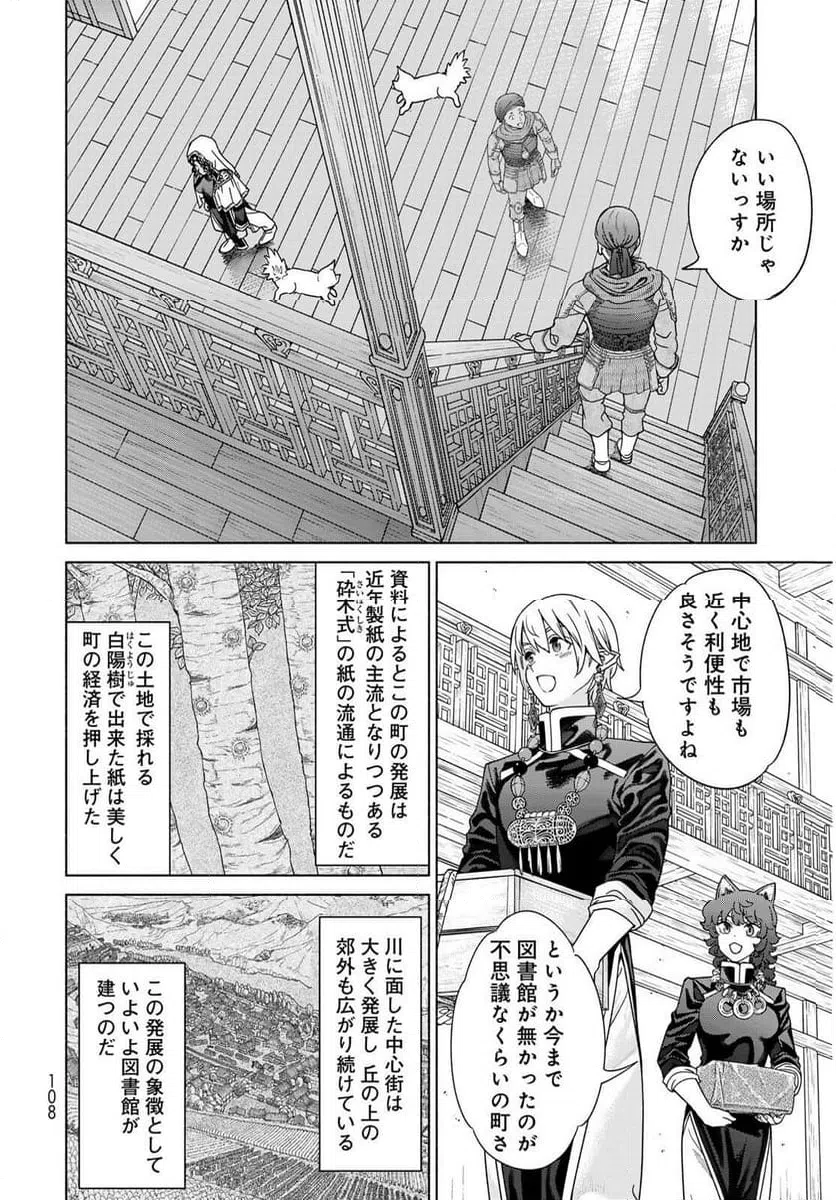 | 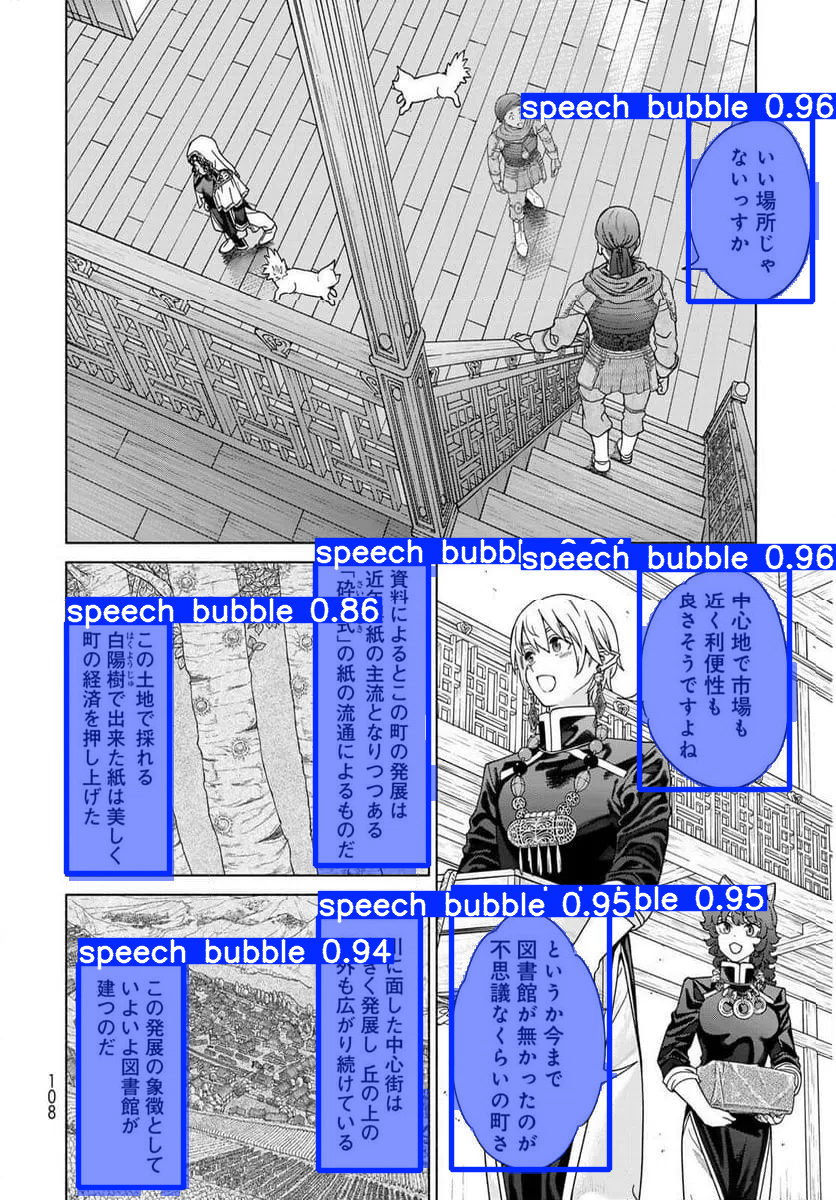 | 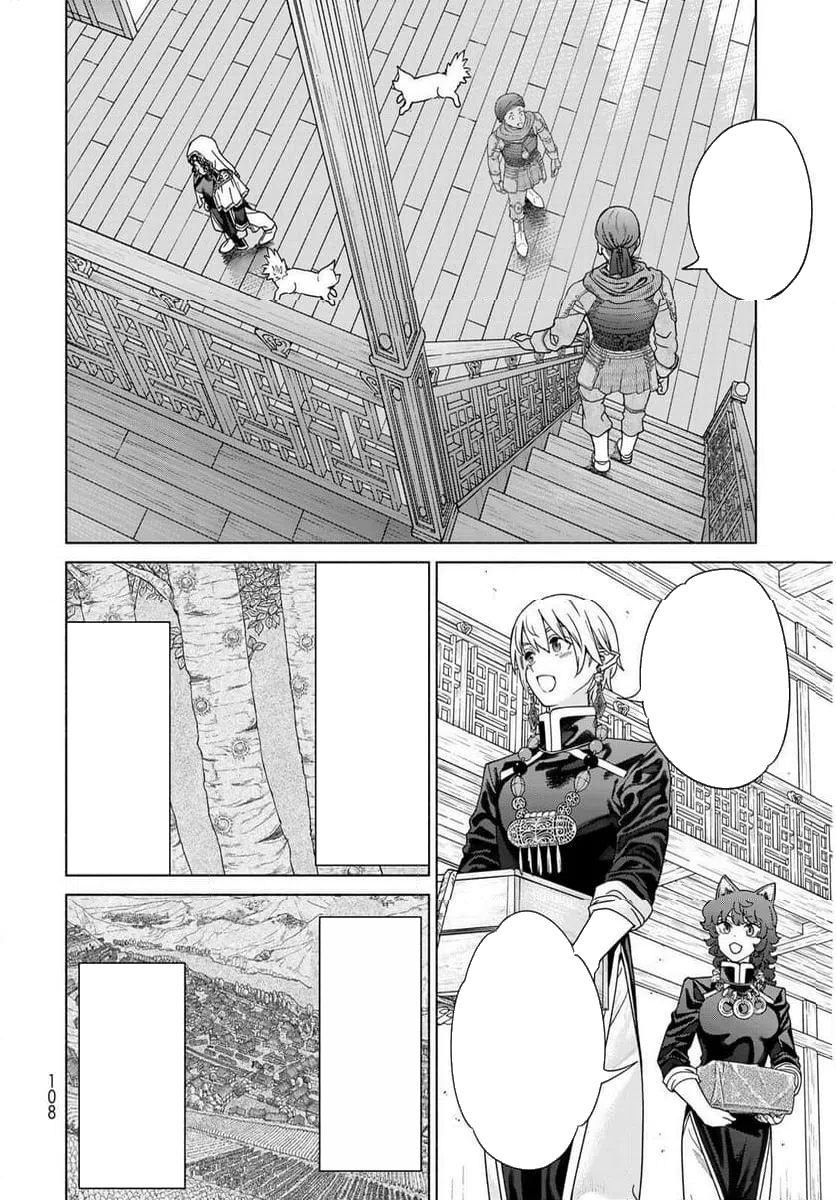 | 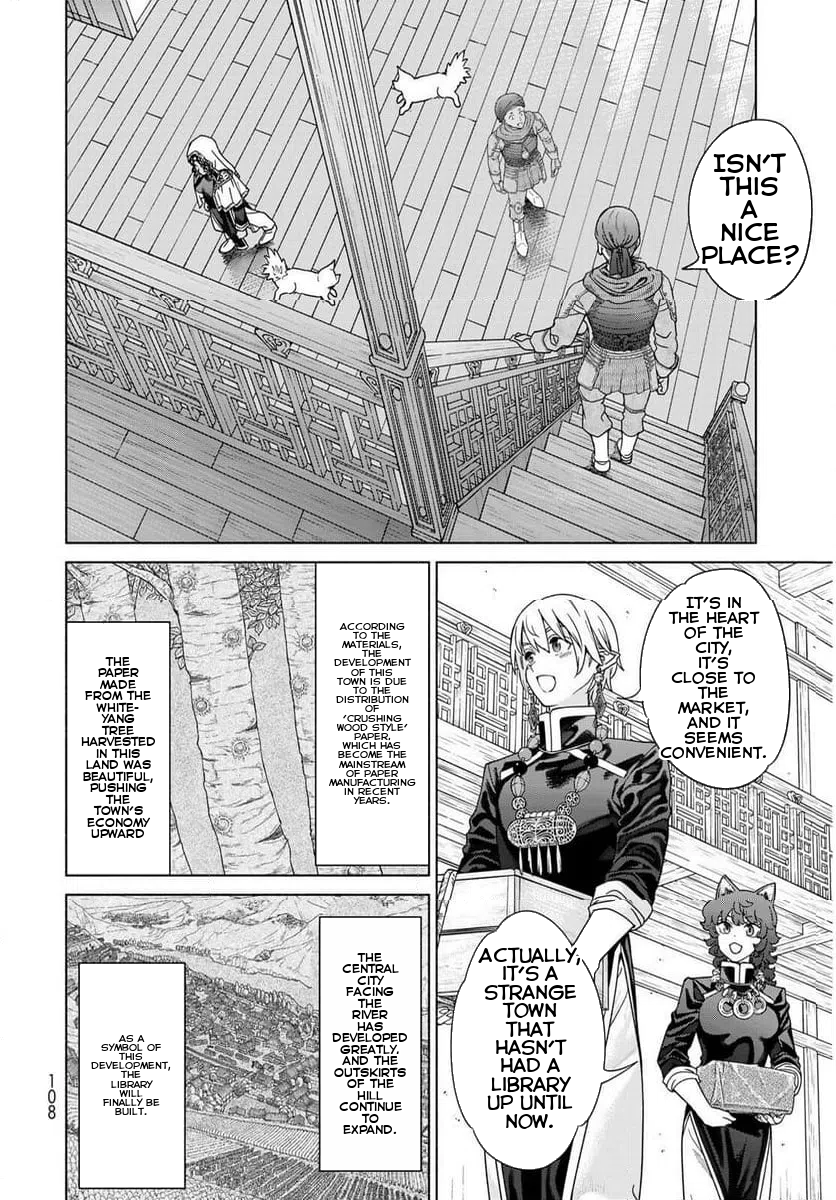 |
Source: Magus of the Library
| Original | Translated |
|---|---|
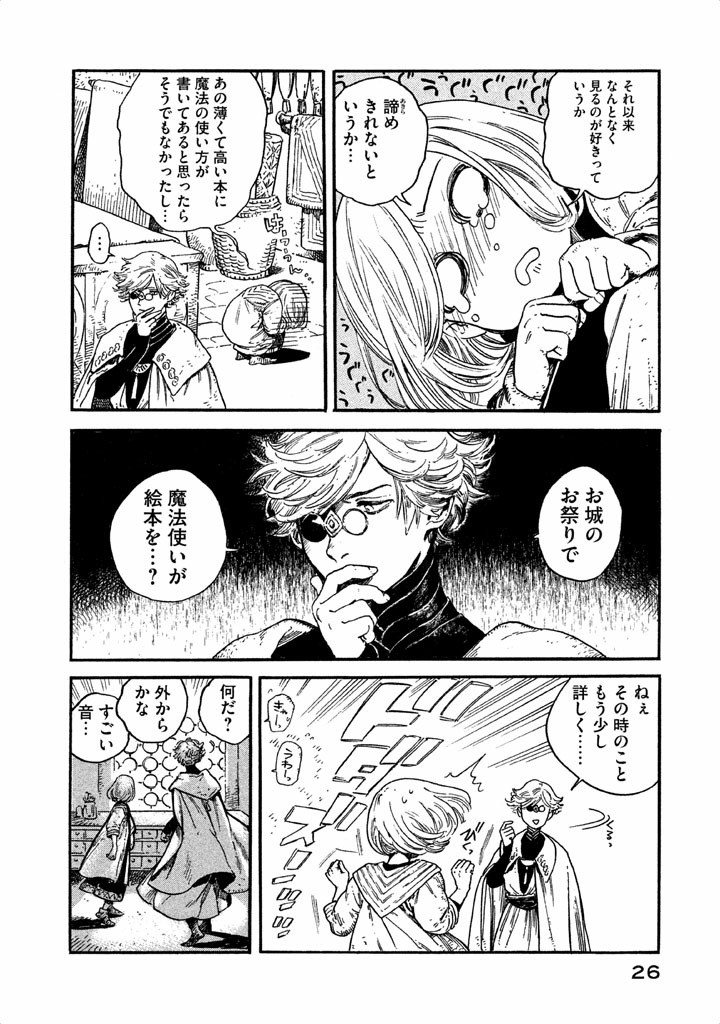 | 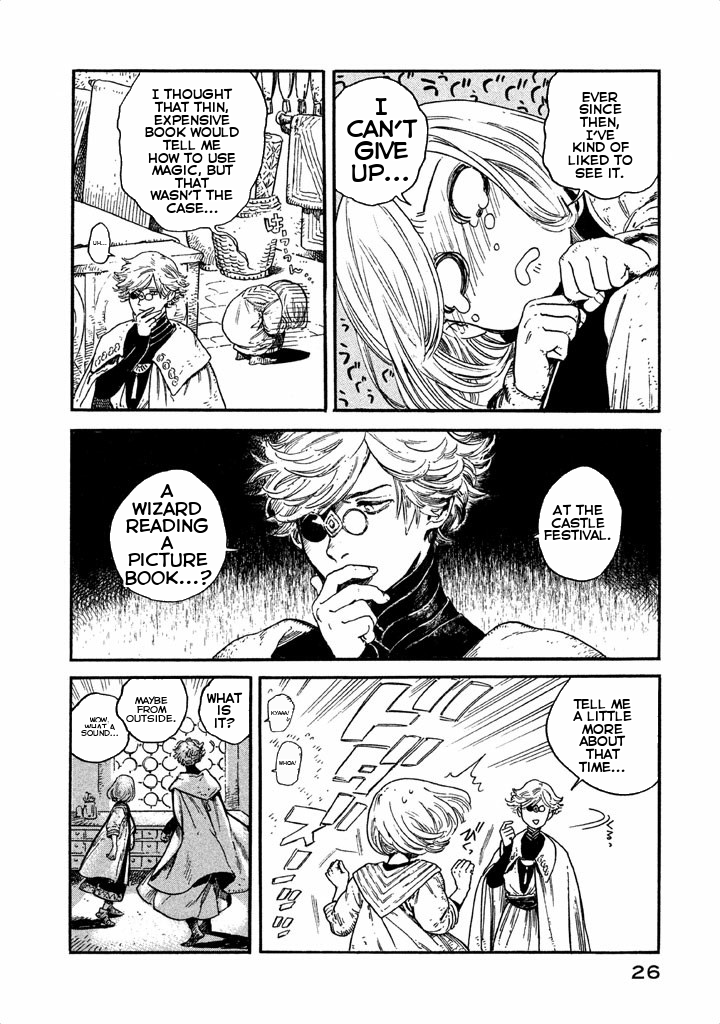 |
Source: Witch Hat Atelier
| Original | Translated |
|---|---|
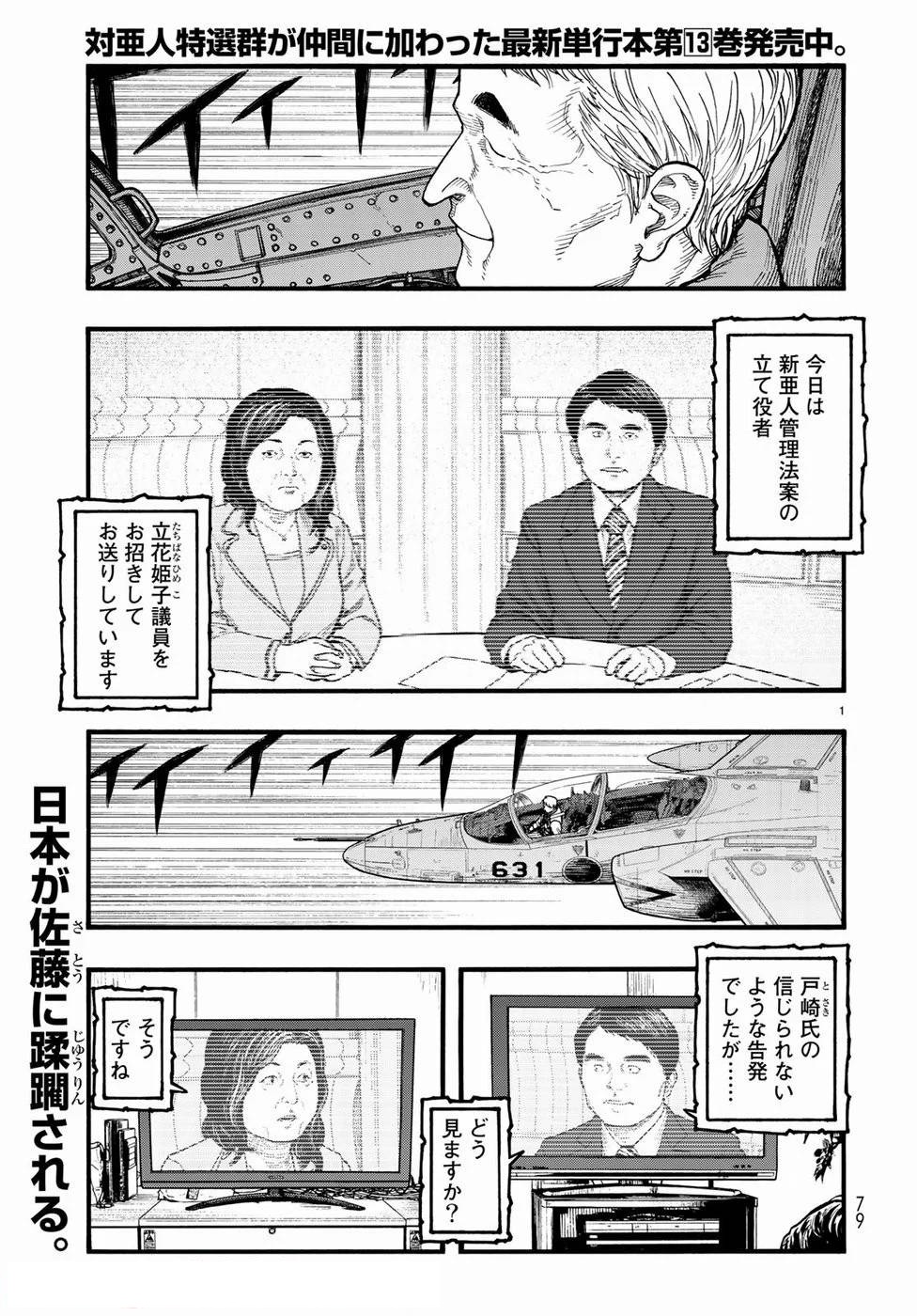 | 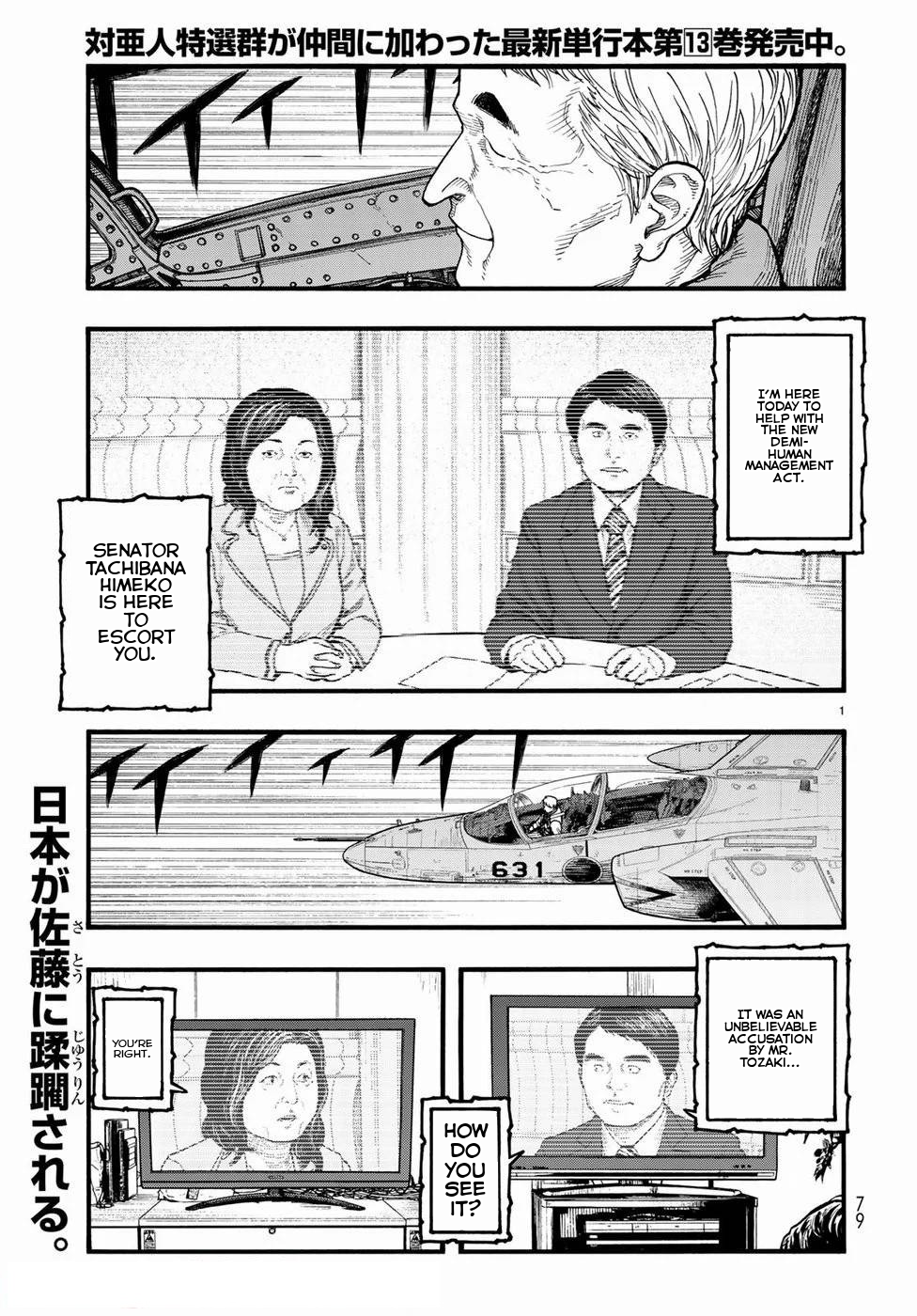 |
Source: Ajin: Demi-Human
| Original | Translated |
|---|---|
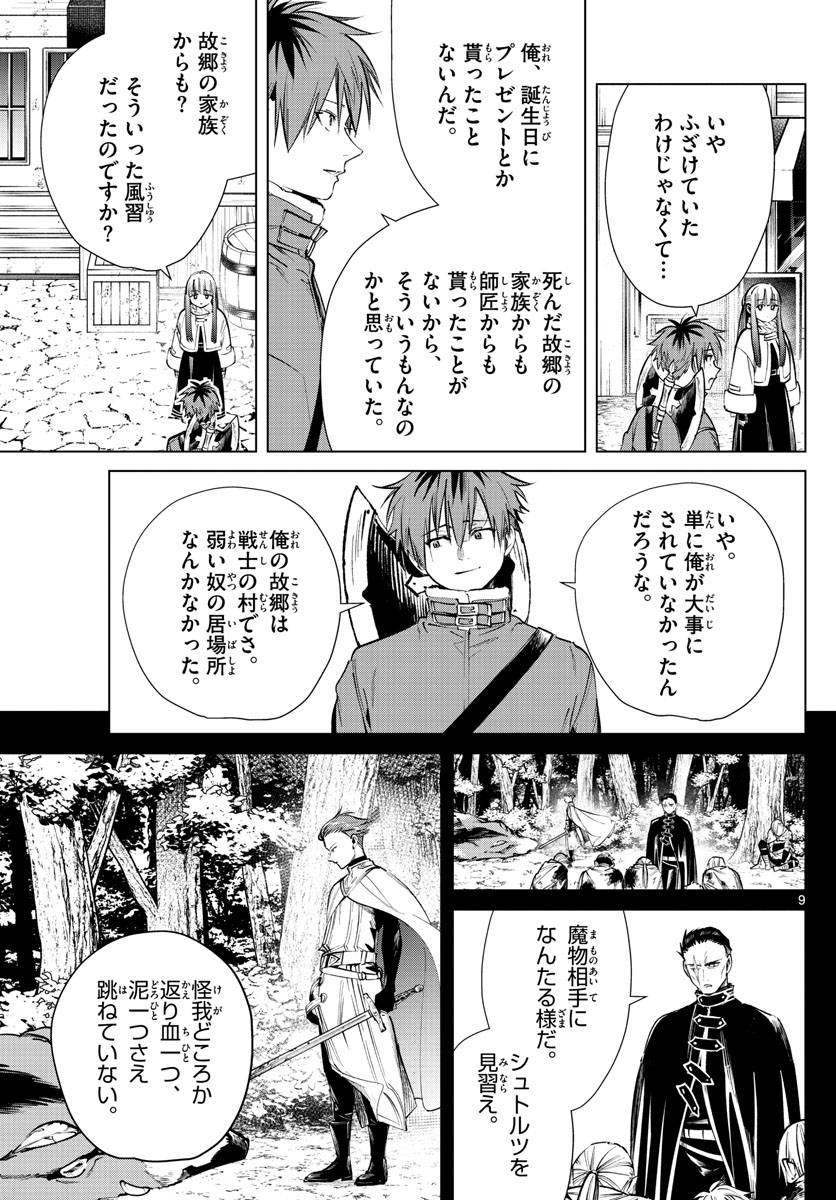 | 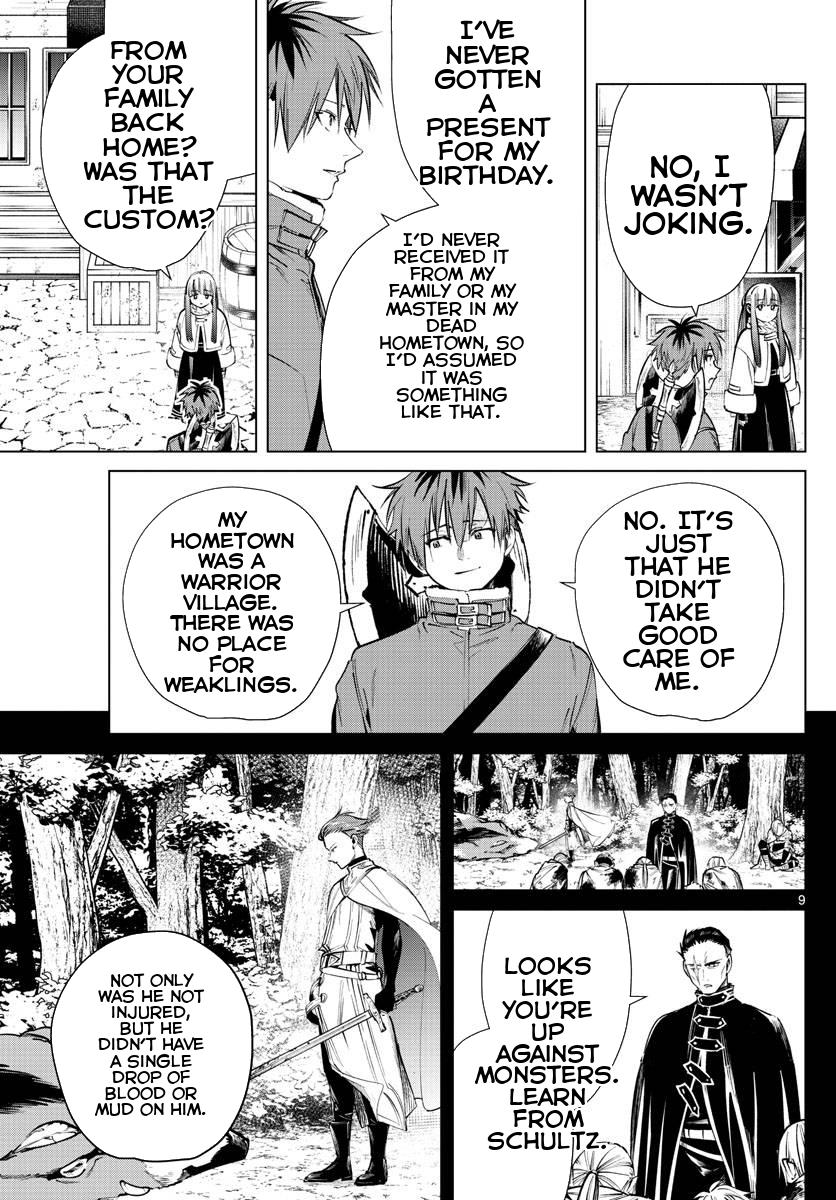 |
Source: Frieren: Beyond Journey's End
Pipeline stages:
Disclaimer: Example images are from published manga and used for demonstration purposes only. All rights belong to their respective copyright holders. This tool is intended for personal use with legally obtained content.
For uv installation, visit: https://github.com/astral-sh/uv
Installs with CUDA support for GPU acceleration. Requires CUDA-compatible NVIDIA GPU.
Using uv (recommended):
uv tool install manga-translator-cli[cuda] --index https://download.pytorch.org/whl/cu128 --index-strategy unsafe-best-match
Using pip:
pip install manga-translator-cli[cuda] --extra-index-url https://download.pytorch.org/whl/cu128
For systems without a GPU or to save disk space.
Using uv (recommended):
uv tool install manga-translator-cli[cpu] --index https://download.pytorch.org/whl/cpu --index-strategy unsafe-best-match
Using pip:
pip install manga-translator-cli[cpu] --extra-index-url https://download.pytorch.org/whl/cpu
For development or to use the latest unreleased changes.
git clone https://github.com/zbu1/manga-translator-cli.git
cd manga-translator-cli
GPU (CUDA 12.8):
uv sync --extra cuda
CPU-only:
uv sync --extra cpu
Models will be automatically downloaded on first use:
manga-translate input/page1.png
manga-translate input/ --batch
Change output folder:
manga-translate input/page1.png --output folder --save-all
Save all intermediate outputs:
manga-translate input/page1.png --save-all
Use custom font:
manga-translate input/page1.png --font "fonts/CC Astro City Int Regular.ttf"
Adjust detection sensitivity:
manga-translate input/page1.png --conf-threshold 0.3 --iou-threshold 0.5
Force CPU mode (GPU is used by default if available):
manga-translate input/page1.png --device cpu
Quiet mode:
manga-translate input/page1.png --quiet
--output, -o: Output folder path (default: output)--folder, -f: Process entire folder instead of single file--conf-threshold: Confidence threshold for bubble detection (0-1, default: 0.25)--iou-threshold: IoU threshold for NMS (0-1, default: 0.45)--font: Path to font file for translated text--device: Device for OCR and translation (cpu or cuda, default: auto-detect, uses cuda if available). Controls which device is used for both text extraction and translation.--save-all: Save all intermediate outputs--save-speech-bubbles: Save annotated detection images--save-bubble-interiors: Save bubble interior visualizations--save-cleaned: Save cleaned images before text drawing--quiet, -q: Suppress progress messages--stop-on-error: Stop processing on first error (folder mode)For complete list of options:
manga-translate --help
When processing files, outputs are organized in subdirectories:
translated/: Final translated images (always saved)speech_bubbles/: Annotated images with detected bubbles (enabled with --save-speech-bubbles)bubble_interiors/: Visualization of bubble interiors (enabled with --save-bubble-interiors)cleaned/: Images with bubbles filled before text rendering (enabled with --save-cleaned)Use --save-all to enable all intermediate outputs at once.
Example output structure:
output/
├── translated/
│   ├── page1.png
│   └── page2.png
├── speech_bubbles/      # if --save-speech-bubbles or --save-all
│   ├── page1.png
│   └── page2.png
├── bubble_interiors/    # if --save-bubble-interiors or --save-all
│   ├── page1.png
│   └── page2.png
└── cleaned/             # if --save-cleaned or --save-all
    ├── page1.png
    └── page2.png
Please open an issue if you encounter problems.
Contributions welcome! To contribute:
git checkout -b feature/improvement)git commit -m "Add feature")git push origin feature/improvement)Development setup:
git clone <your-fork>
cd manga-translator-cli
uv sync --extra cuda  # GPU (or use --extra cpu for CPU-only)
uv tool install .[cuda] # GPU
Areas for contribution:
Models:
Libraries:
--device controls both OCR and translation device[cuda] or [cpu] extra as shown in Installation sectionFully automated and offline manga translation pipeline. Detects speech bubbles, extracts Japanese text with OCR, translates to English, and renders translated text back with proper sizing and customizable fonts. Supports both single images and batch folder processing with GPU acceleration.
Python
0
39 commits
updated Oct 15, 2026
Fully automated and offline manga translation pipeline. Intelligently detects speech bubbles, extracts Japanese text with OCR, translates to English, and seamlessly renders translated text back onto pages with proper alignment and customizable fonts. Supports both single images and batch folder processing with GPU acceleration.
| Original | Detection | Cleaned | Translated |
|---|---|---|---|
| | | |
Source: Magus of the Library
| Original | Translated |
|---|---|
| |
Source: Witch Hat Atelier
| Original | Translated |
|---|---|
| |
Source: Ajin: Demi-Human
| Original | Translated |
|---|---|
| |
Source: Frieren: Beyond Journey's End
Pipeline stages:
Disclaimer: Example images are from published manga and used for demonstration purposes only. All rights belong to their respective copyright holders. This tool is intended for personal use with legally obtained content.
For uv installation, visit: https://github.com/astral-sh/uv
Installs with CUDA support for GPU acceleration. Requires CUDA-compatible NVIDIA GPU.
Using uv (recommended):
uv tool install manga-translator-cli[cuda] --index https://download.pytorch.org/whl/cu128 --index-strategy unsafe-best-match
Using pip:
pip install manga-translator-cli[cuda] --extra-index-url https://download.pytorch.org/whl/cu128
For systems without a GPU or to save disk space.
Using uv (recommended):
uv tool install manga-translator-cli[cpu] --index https://download.pytorch.org/whl/cpu --index-strategy unsafe-best-match
Using pip:
pip install manga-translator-cli[cpu] --extra-index-url https://download.pytorch.org/whl/cpu
For development or to use the latest unreleased changes.
git clone https://github.com/zbu1/manga-translator-cli.git
cd manga-translator-cli
GPU (CUDA 12.8):
uv sync --extra cuda
CPU-only:
uv sync --extra cpu
Models will be automatically downloaded on first use:
manga-translate input/page1.png
manga-translate input/ --batch
Change output folder:
manga-translate input/page1.png --output folder --save-all
Save all intermediate outputs:
manga-translate input/page1.png --save-all
Use custom font:
manga-translate input/page1.png --font "fonts/CC Astro City Int Regular.ttf"
Adjust detection sensitivity:
manga-translate input/page1.png --conf-threshold 0.3 --iou-threshold 0.5
Force CPU mode (GPU is used by default if available):
manga-translate input/page1.png --device cpu
Quiet mode:
manga-translate input/page1.png --quiet
--output, -o: Output folder path (default: output)--folder, -f: Process entire folder instead of single file--conf-threshold: Confidence threshold for bubble detection (0-1, default: 0.25)--iou-threshold: IoU threshold for NMS (0-1, default: 0.45)--font: Path to font file for translated text--device: Device for OCR and translation (cpu or cuda, default: auto-detect, uses cuda if available). Controls which device is used for both text extraction and translation.--save-all: Save all intermediate outputs--save-speech-bubbles: Save annotated detection images--save-bubble-interiors: Save bubble interior visualizations--save-cleaned: Save cleaned images before text drawing--quiet, -q: Suppress progress messages--stop-on-error: Stop processing on first error (folder mode)For complete list of options:
manga-translate --help
When processing files, outputs are organized in subdirectories:
translated/: Final translated images (always saved)speech_bubbles/: Annotated images with detected bubbles (enabled with --save-speech-bubbles)bubble_interiors/: Visualization of bubble interiors (enabled with --save-bubble-interiors)cleaned/: Images with bubbles filled before text rendering (enabled with --save-cleaned)Use --save-all to enable all intermediate outputs at once.
Example output structure:
output/
├── translated/
│   ├── page1.png
│   └── page2.png
├── speech_bubbles/      # if --save-speech-bubbles or --save-all
│   ├── page1.png
│   └── page2.png
├── bubble_interiors/    # if --save-bubble-interiors or --save-all
│   ├── page1.png
│   └── page2.png
└── cleaned/             # if --save-cleaned or --save-all
    ├── page1.png
    └── page2.png
Please open an issue if you encounter problems.
Contributions welcome! To contribute:
git checkout -b feature/improvement)git commit -m "Add feature")git push origin feature/improvement)Development setup:
git clone <your-fork>
cd manga-translator-cli
uv sync --extra cuda  # GPU (or use --extra cpu for CPU-only)
uv tool install .[cuda] # GPU
Areas for contribution:
Models:
Libraries:
--device controls both OCR and translation device[cuda] or [cpu] extra as shown in Installation section


