Cross-platform tool for downloading Samsung mobile device firmware.
Kotlin
1,639
1,721 commits
updated Sep 26, 2026
This is yet another firmware downloader for Samsung devices, but it has some special features.
For one, it's cross-platform. Bifrost runs on Windows, Linux, macOS, and even Android!
Bifrost is also a graphical program, with a shared UI across all supported platforms.
Most of the functionality in Bifrost is based on Samloader. The Python code has been converted to Kotlin and tweaked to take advantage of some of Kotlin's features.
Bifrost uses Jetpack Compose, JetBrains Compose for Desktop, and Kotlin Multiplatform to create a shared codebase for all supported platforms.
Enjoying the app? Donate here.
For Windows, macOS, and Linux, you can download from https://bifrost.zwander.dev.
For macOS and Linux, you can also install using Homebrew:
brew install --cask bifrost
Alternatively, check the Releases page for binaries.
If you want to run this on iOS or use the iOS version on macOS, you can sign up for the TestFlight version here. Note that this version may not receive the same frequency of updates as the rest.
| x86 | x86_64 | ARMv7 | ARM64 | |
|---|---|---|---|---|
| Windows | ❌ | ✅ | ❌ | ✅ |
| macOS | ❌ | ✅ | ❌ | ✅ |
| Android | ✅ | ✅ | ✅ | ✅ |
| Debian-Based | ❌ | ✅ | ❌ | ✅ |
| Generic Linux | ❌ | ✅ | ❌ | ✅ |
| iOS | ❌ | ❌ | ❌ | ✅ |
Make sure you have at least one of the following font families from each category installed.
Release notes are available in CHANGELOG.md.
Unfortunately, Samsung doesn't serve the full firmware files for watches, so Bifrost can't download them.
These errors are on Samsung's end. If you can, try using a different region/CSC.
These errors are on Samsung's end. Samsung may no longer be serving firmware for your device or may not have started serving firmware yet. Try a different region/CSC if possible and check to make sure your model number is correct.
On certain GPUs, Jetpack Compose/Skia has trouble rendering. Try running the program as an administrator.
If you have switchable graphics, try using a different GPU.
Samsung's servers sometimes throttle downloads to about 3MiB/s. For older devices, you may see even slower speeds. Different regions/CSCs may have faster downloads.
On your device, do the following:
The first three letters there are your current CSC. The last three letters are the original/firmware CSC of your device.
Using the above examples, the first has a current CSC of XAA and a firmware CSC of TMB. The second has a current CSC of XAR and a firmware CSC of XAR.
Use the CSC picker dialog (the button that looks like a list inside the "Region" text field).
You can search for your country or region in there and see the different CSCs used. If there are specific carriers associated with a CSC, they'll also be shown.
Certain antivirus programs may flag Bifrost as malware. This is (hopefully obviously) a false positive.
There's a trojan horse malware family named Bifrost, which is part of the greater Bifrose family.
Antivirus programs flagging Bifrost (this app) seem to be doing it solely based on this app having the same name as the malware.
Bifrost (the malware) only affects Windows systems and has limited functionality after Windows XP. For more information, see this Wikipedia article.
Bifrost (this app) does not contain malware. You can verify this by browsing through the source code or by compiling it yourself using the instructions below.
Building this project should be fairly easy.
Bifrost makes use of Conveyor to create binaries for different desktop platforms.
Conveyor can build for Windows and Linux from any host OS, but macOS is required to build for macOS.
./gradlew :desktop:build (.\gradlew.bat :desktop:build on Windows).conveyor -Kapp.machines=windows.amd64 make windows-zip.conveyor -Kapp.machines=windows.arm64 make windows-zip.conveyor -Kapp.machines=linux.amd64 make debian-package.conveyor -Kapp.machines=linux.arm64 make debian-package.conveyor -Kapp.machines=linux.amd64 make linux-tarball.conveyor -Kapp.machines=linux.arm64 make linux-tarball.conveyor -Kapp.machines=mac.amd64 make unnotarized-mac-zip.conveyor -Kapp.machines=mac.arm64 make unnotarized-mac-zip.output folder in the root of the project for the binary.Alternatively, you can run a debug binary by executing the :desktop:run task.
./gradlew :desktop:run (.\gradlew :desktop:run on Windows).
gradlew :android:build on Windows or ./gradlew :android:build on macOS and Linux.android/build/outputs/apk/debug and install android-debug.apk.android/build/outputs/apk/debug and install android-debug.apk.Download bifrost_android_<VERSION>.apk and install it.
windows-amd64.windows-aarch64.mac-amd64.mac-aarch64..deb file..tar.gz file.For Intel or AMD devices, download the amd64 variant. For ARM64 devices, choose aarch64 or arm64.
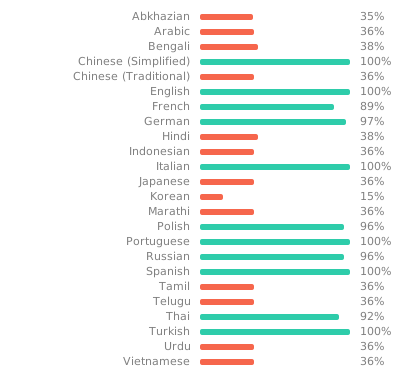
Bifrost uses Weblate for translations.
Help translate Bifrost to your language on the project page!


Bifrost uses Bugsnag for error reporting.

82 followers · starred Apr 2024
220 followers · starred Jan 2026
19 followers · starred Apr 2026
53 followers · starred May 2025
Cross-platform tool for downloading Samsung mobile device firmware.
Kotlin
1,639
1,721 commits
updated Sep 26, 2026
This is yet another firmware downloader for Samsung devices, but it has some special features.
For one, it's cross-platform. Bifrost runs on Windows, Linux, macOS, and even Android!
Bifrost is also a graphical program, with a shared UI across all supported platforms.
Most of the functionality in Bifrost is based on Samloader. The Python code has been converted to Kotlin and tweaked to take advantage of some of Kotlin's features.
Bifrost uses Jetpack Compose, JetBrains Compose for Desktop, and Kotlin Multiplatform to create a shared codebase for all supported platforms.
Enjoying the app? Donate here.
For Windows, macOS, and Linux, you can download from https://bifrost.zwander.dev.
For macOS and Linux, you can also install using Homebrew:
brew install --cask bifrost
Alternatively, check the Releases page for binaries.
If you want to run this on iOS or use the iOS version on macOS, you can sign up for the TestFlight version here. Note that this version may not receive the same frequency of updates as the rest.
| x86 | x86_64 | ARMv7 | ARM64 | |
|---|---|---|---|---|
| Windows | ❌ | ✅ | ❌ | ✅ |
| macOS | ❌ | ✅ | ❌ | ✅ |
| Android | ✅ | ✅ | ✅ | ✅ |
| Debian-Based | ❌ | ✅ | ❌ | ✅ |
| Generic Linux | ❌ | ✅ | ❌ | ✅ |
| iOS | ❌ | ❌ | ❌ | ✅ |
Make sure you have at least one of the following font families from each category installed.
Release notes are available in CHANGELOG.md.
Unfortunately, Samsung doesn't serve the full firmware files for watches, so Bifrost can't download them.
These errors are on Samsung's end. If you can, try using a different region/CSC.
These errors are on Samsung's end. Samsung may no longer be serving firmware for your device or may not have started serving firmware yet. Try a different region/CSC if possible and check to make sure your model number is correct.
On certain GPUs, Jetpack Compose/Skia has trouble rendering. Try running the program as an administrator.
If you have switchable graphics, try using a different GPU.
Samsung's servers sometimes throttle downloads to about 3MiB/s. For older devices, you may see even slower speeds. Different regions/CSCs may have faster downloads.
On your device, do the following:
The first three letters there are your current CSC. The last three letters are the original/firmware CSC of your device.
Using the above examples, the first has a current CSC of XAA and a firmware CSC of TMB. The second has a current CSC of XAR and a firmware CSC of XAR.
Use the CSC picker dialog (the button that looks like a list inside the "Region" text field).
You can search for your country or region in there and see the different CSCs used. If there are specific carriers associated with a CSC, they'll also be shown.
Certain antivirus programs may flag Bifrost as malware. This is (hopefully obviously) a false positive.
There's a trojan horse malware family named Bifrost, which is part of the greater Bifrose family.
Antivirus programs flagging Bifrost (this app) seem to be doing it solely based on this app having the same name as the malware.
Bifrost (the malware) only affects Windows systems and has limited functionality after Windows XP. For more information, see this Wikipedia article.
Bifrost (this app) does not contain malware. You can verify this by browsing through the source code or by compiling it yourself using the instructions below.
Building this project should be fairly easy.
Bifrost makes use of Conveyor to create binaries for different desktop platforms.
Conveyor can build for Windows and Linux from any host OS, but macOS is required to build for macOS.
./gradlew :desktop:build (.\gradlew.bat :desktop:build on Windows).conveyor -Kapp.machines=windows.amd64 make windows-zip.conveyor -Kapp.machines=windows.arm64 make windows-zip.conveyor -Kapp.machines=linux.amd64 make debian-package.conveyor -Kapp.machines=linux.arm64 make debian-package.conveyor -Kapp.machines=linux.amd64 make linux-tarball.conveyor -Kapp.machines=linux.arm64 make linux-tarball.conveyor -Kapp.machines=mac.amd64 make unnotarized-mac-zip.conveyor -Kapp.machines=mac.arm64 make unnotarized-mac-zip.output folder in the root of the project for the binary.Alternatively, you can run a debug binary by executing the :desktop:run task.
./gradlew :desktop:run (.\gradlew :desktop:run on Windows).
gradlew :android:build on Windows or ./gradlew :android:build on macOS and Linux.android/build/outputs/apk/debug and install android-debug.apk.android/build/outputs/apk/debug and install android-debug.apk.Download bifrost_android_<VERSION>.apk and install it.
windows-amd64.windows-aarch64.mac-amd64.mac-aarch64..deb file..tar.gz file.For Intel or AMD devices, download the amd64 variant. For ARM64 devices, choose aarch64 or arm64.
Bifrost uses Weblate for translations.
Help translate Bifrost to your language on the project page!
Bifrost uses Bugsnag for error reporting.
82 followers · starred Apr 2024
220 followers · starred Jan 2026
19 followers · starred Apr 2026
53 followers · starred May 2025



