SQL static analyzer - validates queries against schema definitions without database connection
See the code




Schema-aware static analysis for SQL. No database needed.
Think of it as a type checker for your SQL: sqlsift replays your migrations into an in-memory schema and checks every query against it — in .sql files, sqlc and aiosql query files, sql`...` templates in TypeScript / JavaScript, sqlx queries in Rust, and SQL strings passed to database calls in Python and Go. It runs offline in milliseconds, so it fits in your editor, pre-commit hooks and CI.
▶ Try it in your browser — no install; the playground runs sqlsift locally via WebAssembly, so your SQL never leaves the page. 📖 Read the user guide for everything else.
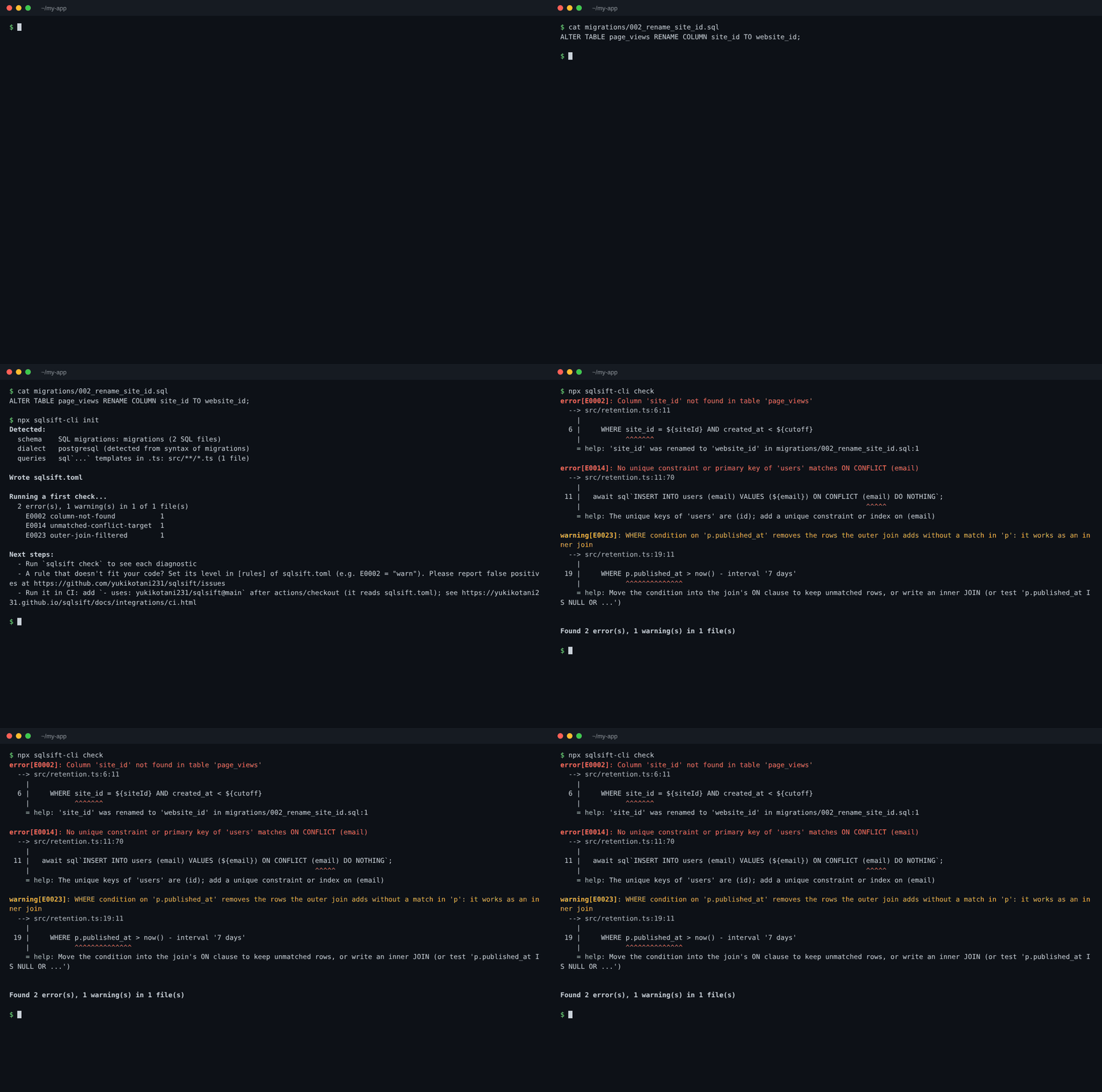
$ npx sqlsift-cli init     # finds your migrations, dialect and queries, writes sqlsift.toml
$ npx sqlsift-cli check
error[E0002]: Column 'site_id' not found in table 'page_views'
  --> src/retention.ts:6:11
    |
  6 |     WHERE site_id = ${siteId} AND created_at < ${cutoff}
    |           ^^^^^^^
    = help: 'site_id' was renamed to 'website_id' in migrations/002_rename_site_id.sql:1

error[E0014]: No unique constraint or primary key of 'users' matches ON CONFLICT (email)
  --> src/retention.ts:11:70
    |
 11 |   await sql`INSERT INTO users (email) VALUES (${email}) ON CONFLICT (email) DO NOTHING`;
    |                                                                      ^^^^^
    = help: The unique keys of 'users' are (id); add a unique constraint or index on (email)

warning[E0023]: WHERE condition on 'p.published_at' removes the rows the outer join adds without a match in 'p': it works as an inner join
  --> src/retention.ts:19:11
    |
 19 |     WHERE p.published_at > now() - interval '7 days'
    |           ^^^^^^^^^^^^^^
    = help: Move the condition into the join's ON clause to keep unmatched rows, or write an inner JOIN (or test 'p.published_at IS NULL OR ...')


Found 2 error(s), 1 warning(s) in 1 file(s)
28 rules cover what the schema alone can tell you: missing tables and columns, type mismatches, NOT NULL columns left out, ON CONFLICT targets with no unique key, GROUP BY errors, values out of range, and warnings for queries that are valid but probably not what you meant. Anything sqlsift can't work out is left unreported: on 16 open-source apps (687 files) it reports zero false positives.
Status: early development (alpha). Diagnostics may change between versions. Feedback, bug reports and real-world SQL that sqlsift gets wrong are very welcome — please open an issue.
Raw SQL is usually only checked when it runs. Rename a column in a migration and a query in some other file breaks silently until it hits staging — or production. sqlsift closes that gap:
.sql files.CREATE TABLE, ALTER TABLE, views, enums and migration directories, and keeps track of what each query can see (CTEs, subqueries, LATERAL, aliases).| Tool | What it checks | Needs a running DB? |
|---|---|---|
| sqlsift | Queries against your schema (tables, columns, types) | No |
| SQLFluff | Style and formatting | No — but does not know your schema |
| Squawk | Migration safety (locking, backwards compatibility) | No — lints DDL, not queries |
sqlx query! | Queries in Rust code, at compile time | Yes (or a cache prepared from one) |
| sqlc | Queries it generates code from | No — but you adopt its codegen workflow |
sqlsift complements these tools: keep your formatter and migration linter, and add sqlsift to make sure the queries still match the schema.
# npm (prebuilt binaries for macOS, Linux and Windows)
npm install -g sqlsift-cli
# or run without installing
npx sqlsift-cli check --schema schema.sql queries/*.sql

# From source (Rust toolchain required)
cargo install --git https://github.com/yukikotani231/sqlsift sqlsift-cli
Prebuilt binaries are also available on the Releases page, or try it without installing in the Playground.
In an existing project, start with:
sqlsift init
It finds your schema (sqlc config, Prisma / Supabase / Drizzle / Flyway / golang-migrate / goose / dbmate migrations, structure.sql or schema.sql dumps, dbt), your queries (.sql files, Prisma TypedSQL, dbt models, sql`...` templates in TypeScript / JavaScript, sqlx queries in Rust, database calls in Python and Go) and the dialect, writes a commented sqlsift.toml, runs a first check and prints the next steps. It never overwrites an existing sqlsift.toml without --force; --dry-run only prints the configuration. See sqlsift init.
Or pass everything on the command line:
# Validate queries against a schema file
sqlsift check --schema schema.sql queries/*.sql

# Use multiple schema files
sqlsift check -s users.sql -s orders.sql queries/*.sql

# Use a migrations directory (all *.sql files, recursively, in filename order;
# rollback files such as *.down.sql are skipped)
sqlsift check --schema-dir ./migrations queries/*.sql

# Other dialects
sqlsift check --dialect mysql --schema schema.sql queries/*.sql

# Read a query from stdin (e.g. the staged version in a pre-commit hook)
git show :queries/users.sql | sqlsift check -s schema.sql --stdin-filename queries/users.sql -

# SQL in TypeScript / JavaScript (and Vue / Svelte <script>) tagged templates
# (sql`...`; node_modules and dist are skipped; more tags with
# `embedded_sql_tags` in sqlsift.toml)
sqlsift check -s schema.sql 'src/**/*.ts'

# SQL strings passed to database/sql, sqlx and pgx calls in Go
# (db.QueryContext(ctx, "..."); vendor is skipped; more calls with
# `embedded_sql_go_functions` in sqlsift.toml)
sqlsift check -s schema.sql 'internal/**/*.go'
To avoid repeating flags, add a sqlsift.toml to your project root:
schema_dir = "db/migrations"     # or: schema = ["db/schema.sql"]
files = ["queries/**/*.sql"]
dialect = "postgresql"

[rules]
ambiguous-column = "warn"        # report, but don't fail the check
Then just run sqlsift check. See the configuration reference for every key, and sqlsift schema to inspect what sqlsift loaded from your schema.
sqlsift only needs SQL files for the schema, so it works with whatever produces them.
| Stack | Schema source |
|---|---|
| Prisma | sqlsift check --schema-dir prisma/migrations queries/*.sql |
Rails (schema_format = :sql) | sqlsift check --schema db/structure.sql queries/*.sql |
| sqlx / golang-migrate / goose / Flyway / dbmate | sqlsift check --schema-dir migrations queries/*.sql |
pg_dump --schema-only | sqlsift check --schema schema.sql queries/*.sql |
| Hand-written DDL | sqlsift check --schema schema/*.sql queries/**/*.sql |
aiosql / HugSQL (named queries in .sql files) | sqlsift check --schema-dir migrations queries/*.sql (:param placeholders; diagnostics name the -- name: / -- :name query) |
| dbt (Postgres, MySQL, SQLite; Snowflake, BigQuery, Redshift, Databricks in alpha) | sqlsift check --schema sources.sql models/**/*.sql (Jinja is masked automatically next to dbt_project.yml; after dbt docs generate, ref() / source() columns come from target/catalog.json and --schema is optional — alpha) |
Rollback migrations are skipped automatically; see Loading your schema.
Example projects, each with a ready-to-copy sqlsift.toml and checked in CI: sqlc (Go), database/sql, sqlx and pgx (Go), Prisma TypedSQL, aiosql (Python), postgres.js, sqlx (Rust), plain SQL + migrations (a migration renames a column that a query still uses), MySQL and dbt on PostgreSQL. See examples/.
sqlsift ships a language server (sqlsift-lsp) that shows diagnostics as you type. Install the sqlsift VS Code extension (sqlsift.sqlsift), which bundles the server, or set it up in Neovim, Helix and other editors.
# .github/workflows/sqlsift.yml
name: SQL Lint
on: [push, pull_request]
jobs:
  sqlsift:
    runs-on: ubuntu-latest
    steps:
      - uses: actions/checkout@v4
      - uses: yukikotani231/sqlsift@main  # or pin a release tag
        with:
          schema: db/schema.sql           # or schema-dir: db/migrations
          files: queries/**/*.sql
The action is also listed on the GitHub Marketplace. Errors are shown as annotations on the pull request diff. Add diff-base: ${{ github.base_ref }} to report only the diagnostics a pull request introduces (the action checks the base commit too, so no baseline file is needed). The CI guide covers the action's inputs, re-checking every query when the schema changes, GitHub Code Scanning (SARIF), --format github / json for other setups, --max-warnings for rolling out a rule gradually, and a baseline for adopting sqlsift on an existing codebase (sqlsift check --write-baseline records the current diagnostics in sqlsift-baseline.json; with baseline = "sqlsift-baseline.json" in sqlsift.toml only new ones are reported). There is also a pre-commit recipe.
| Code | Name | Description |
|---|---|---|
| E0001 | table-not-found | Referenced table does not exist in schema |
| E0002 | column-not-found | Referenced column does not exist in table |
| E0003 | type-mismatch | Type incompatibility in expressions (comparisons, arithmetic, INSERT/UPDATE values, enums) |
| E0004 | potential-null-violation | Potential NOT NULL violation (explicit NULL assignment) |
| E0005 | column-count-mismatch | Column count doesn't match (INSERT values, column alias lists, subqueries, row comparisons) |
| E0006 | ambiguous-column | Column reference is ambiguous across tables |
| E0007 | join-type-mismatch | JOIN condition compares incompatible types |
| E0008 | missing-required-column | INSERT omits a NOT NULL column that has no default |
| E0009 | duplicate-name | Table alias or CTE name given twice in one query |
| E0010 | duplicate-target-column | Column given twice in an INSERT column list or UPDATE SET |
| E0011 | position-out-of-range | ORDER BY / GROUP BY position is not in the select list |
| E0012 | misplaced-aggregate | Aggregate or window function where it is not allowed |
| E0013 | generated-column-write | INSERT or UPDATE gives a value to a generated column |
| E0014 | unmatched-conflict-target | ON CONFLICT columns match no unique constraint |
| E0015 | distinct-order-by | SELECT DISTINCT ordered by a column it doesn't select |
| E0016 | grouping-error | Column must appear in GROUP BY or be used in an aggregate |
| E0017 | value-out-of-range | Literal too long or out of range for the column type |
| E0018 | null-comparison | Comparison with NULL using = or <> is never true |
| E0019 | not-in-with-nulls | NOT IN over a nullable subquery column |
| E0020 | outer-column-in-subquery | IN subquery selects a column of the outer query |
| E0021 | missing-join-condition | Tables in FROM with no condition linking them |
| E0022 | constant-condition | Condition that is always or never true from the schema |
| E0023 | outer-join-filtered | WHERE condition turns an outer join into an inner join |
| E0024 | unfiltered-write | UPDATE or DELETE without WHERE |
| E0025 | insert-without-columns | INSERT without a column list |
| E0026 | select-star | SELECT * in a query's result columns |
| E0027 | wrong-argument-type | Function or operator given an argument type it doesn't take |
| E0028 | limit-without-order-by | LIMIT or OFFSET without ORDER BY |
| E0029 | implicit-conversion | Type mismatch MySQL or SQLite converts implicitly |
| E0030 | foreign-key-join-mismatch | JOIN condition doesn't follow the foreign key between the tables |
| E0031 | join-fan-out | Aggregate over rows that another one-to-many join multiplies |
| E0032 | integer-division | Division of integer columns truncates toward zero |
E0001-E0017 and E0027 report queries the database rejects and are errors by default; E0018-E0023 and E0029-E0031 (suspicious) report valid queries that almost certainly don't do what was meant and are warnings by default; E0024-E0026 and E0028 (restriction) and E0032 (pedantic) are off until enabled (-W restriction, -W pedantic).
Every rule can be set to off, warn or error per project ([rules] in sqlsift.toml) or per run (-A / -W / -D), and silenced for a line or a file with -- sqlsift:disable / -- sqlsift:disable-file comments, or for a whole existing backlog with a baseline (--write-baseline / --baseline). See Rules and levels and Suppressing diagnostics.
The user guide covers:
Configuration file (sqlsift.toml)
MySQL dialect support
SQLite dialect support
Type inference for expressions (WHERE, JOIN, arithmetic, INSERT/UPDATE)
LSP server for editor integration (VS Code extension)
CASE expression type consistency checking
Subquery/CTE/VIEW column type inference
Per-rule and per-category levels (off / warn / error)
Baseline of known diagnostics (--write-baseline, baseline in sqlsift.toml)
SQL embedded in application code (sqlc, aiosql and HugSQL query names and parameters, TypeScript tagged templates, sqlx in Rust, database calls in Python and Go)
sqlsift init, example projects per stack, and a GitHub Action that reports only what a pull request introduces
28 rules, including suspicious warnings and opt-in restriction rules
Snowflake, BigQuery, Redshift and Databricks dialects and dbt catalog.json (alpha)
See ROADMAP.md for what comes next.
Contributions are welcome! The most useful things right now are:
To work on the code:
git clone https://github.com/yukikotani231/sqlsift && cd sqlsift
git config core.hooksPath .githooks   # fmt + clippy pre-commit checks
cargo test
cargo run -- check --schema tests/fixtures/schema.sql tests/fixtures/invalid_query.sql
See CONTRIBUTING.md for the development setup, repository layout and how to add a rule. Commits follow Conventional Commits (feat:, fix:, docs: …), which drive automated releases.
This project is licensed under the MIT License - see the LICENSE file for details.
SQL static analyzer - validates queries against schema definitions without database connection
See the code
Schema-aware static analysis for SQL. No database needed.
Think of it as a type checker for your SQL: sqlsift replays your migrations into an in-memory schema and checks every query against it — in .sql files, sqlc and aiosql query files, sql`...` templates in TypeScript / JavaScript, sqlx queries in Rust, and SQL strings passed to database calls in Python and Go. It runs offline in milliseconds, so it fits in your editor, pre-commit hooks and CI.
▶ Try it in your browser — no install; the playground runs sqlsift locally via WebAssembly, so your SQL never leaves the page. 📖 Read the user guide for everything else.
$ npx sqlsift-cli init     # finds your migrations, dialect and queries, writes sqlsift.toml
$ npx sqlsift-cli check
error[E0002]: Column 'site_id' not found in table 'page_views'
  --> src/retention.ts:6:11
    |
  6 |     WHERE site_id = ${siteId} AND created_at < ${cutoff}
    |           ^^^^^^^
    = help: 'site_id' was renamed to 'website_id' in migrations/002_rename_site_id.sql:1

error[E0014]: No unique constraint or primary key of 'users' matches ON CONFLICT (email)
  --> src/retention.ts:11:70
    |
 11 |   await sql`INSERT INTO users (email) VALUES (${email}) ON CONFLICT (email) DO NOTHING`;
    |                                                                      ^^^^^
    = help: The unique keys of 'users' are (id); add a unique constraint or index on (email)

warning[E0023]: WHERE condition on 'p.published_at' removes the rows the outer join adds without a match in 'p': it works as an inner join
  --> src/retention.ts:19:11
    |
 19 |     WHERE p.published_at > now() - interval '7 days'
    |           ^^^^^^^^^^^^^^
    = help: Move the condition into the join's ON clause to keep unmatched rows, or write an inner JOIN (or test 'p.published_at IS NULL OR ...')


Found 2 error(s), 1 warning(s) in 1 file(s)
28 rules cover what the schema alone can tell you: missing tables and columns, type mismatches, NOT NULL columns left out, ON CONFLICT targets with no unique key, GROUP BY errors, values out of range, and warnings for queries that are valid but probably not what you meant. Anything sqlsift can't work out is left unreported: on 16 open-source apps (687 files) it reports zero false positives.
Status: early development (alpha). Diagnostics may change between versions. Feedback, bug reports and real-world SQL that sqlsift gets wrong are very welcome — please open an issue.
Raw SQL is usually only checked when it runs. Rename a column in a migration and a query in some other file breaks silently until it hits staging — or production. sqlsift closes that gap:
.sql files.CREATE TABLE, ALTER TABLE, views, enums and migration directories, and keeps track of what each query can see (CTEs, subqueries, LATERAL, aliases).| Tool | What it checks | Needs a running DB? |
|---|---|---|
| sqlsift | Queries against your schema (tables, columns, types) | No |
| SQLFluff | Style and formatting | No — but does not know your schema |
| Squawk | Migration safety (locking, backwards compatibility) | No — lints DDL, not queries |
sqlx query! | Queries in Rust code, at compile time | Yes (or a cache prepared from one) |
| sqlc | Queries it generates code from | No — but you adopt its codegen workflow |
sqlsift complements these tools: keep your formatter and migration linter, and add sqlsift to make sure the queries still match the schema.
# npm (prebuilt binaries for macOS, Linux and Windows)
npm install -g sqlsift-cli
# or run without installing
npx sqlsift-cli check --schema schema.sql queries/*.sql

# From source (Rust toolchain required)
cargo install --git https://github.com/yukikotani231/sqlsift sqlsift-cli
Prebuilt binaries are also available on the Releases page, or try it without installing in the Playground.
In an existing project, start with:
sqlsift init
It finds your schema (sqlc config, Prisma / Supabase / Drizzle / Flyway / golang-migrate / goose / dbmate migrations, structure.sql or schema.sql dumps, dbt), your queries (.sql files, Prisma TypedSQL, dbt models, sql`...` templates in TypeScript / JavaScript, sqlx queries in Rust, database calls in Python and Go) and the dialect, writes a commented sqlsift.toml, runs a first check and prints the next steps. It never overwrites an existing sqlsift.toml without --force; --dry-run only prints the configuration. See sqlsift init.
Or pass everything on the command line:
# Validate queries against a schema file
sqlsift check --schema schema.sql queries/*.sql

# Use multiple schema files
sqlsift check -s users.sql -s orders.sql queries/*.sql

# Use a migrations directory (all *.sql files, recursively, in filename order;
# rollback files such as *.down.sql are skipped)
sqlsift check --schema-dir ./migrations queries/*.sql

# Other dialects
sqlsift check --dialect mysql --schema schema.sql queries/*.sql

# Read a query from stdin (e.g. the staged version in a pre-commit hook)
git show :queries/users.sql | sqlsift check -s schema.sql --stdin-filename queries/users.sql -

# SQL in TypeScript / JavaScript (and Vue / Svelte <script>) tagged templates
# (sql`...`; node_modules and dist are skipped; more tags with
# `embedded_sql_tags` in sqlsift.toml)
sqlsift check -s schema.sql 'src/**/*.ts'

# SQL strings passed to database/sql, sqlx and pgx calls in Go
# (db.QueryContext(ctx, "..."); vendor is skipped; more calls with
# `embedded_sql_go_functions` in sqlsift.toml)
sqlsift check -s schema.sql 'internal/**/*.go'
To avoid repeating flags, add a sqlsift.toml to your project root:
schema_dir = "db/migrations"     # or: schema = ["db/schema.sql"]
files = ["queries/**/*.sql"]
dialect = "postgresql"

[rules]
ambiguous-column = "warn"        # report, but don't fail the check
Then just run sqlsift check. See the configuration reference for every key, and sqlsift schema to inspect what sqlsift loaded from your schema.
sqlsift only needs SQL files for the schema, so it works with whatever produces them.
| Stack | Schema source |
|---|---|
| Prisma | sqlsift check --schema-dir prisma/migrations queries/*.sql |
Rails (schema_format = :sql) | sqlsift check --schema db/structure.sql queries/*.sql |
| sqlx / golang-migrate / goose / Flyway / dbmate | sqlsift check --schema-dir migrations queries/*.sql |
pg_dump --schema-only | sqlsift check --schema schema.sql queries/*.sql |
| Hand-written DDL | sqlsift check --schema schema/*.sql queries/**/*.sql |
aiosql / HugSQL (named queries in .sql files) | sqlsift check --schema-dir migrations queries/*.sql (:param placeholders; diagnostics name the -- name: / -- :name query) |
| dbt (Postgres, MySQL, SQLite; Snowflake, BigQuery, Redshift, Databricks in alpha) | sqlsift check --schema sources.sql models/**/*.sql (Jinja is masked automatically next to dbt_project.yml; after dbt docs generate, ref() / source() columns come from target/catalog.json and --schema is optional — alpha) |
Rollback migrations are skipped automatically; see Loading your schema.
Example projects, each with a ready-to-copy sqlsift.toml and checked in CI: sqlc (Go), database/sql, sqlx and pgx (Go), Prisma TypedSQL, aiosql (Python), postgres.js, sqlx (Rust), plain SQL + migrations (a migration renames a column that a query still uses), MySQL and dbt on PostgreSQL. See examples/.
sqlsift ships a language server (sqlsift-lsp) that shows diagnostics as you type. Install the sqlsift VS Code extension (sqlsift.sqlsift), which bundles the server, or set it up in Neovim, Helix and other editors.
# .github/workflows/sqlsift.yml
name: SQL Lint
on: [push, pull_request]
jobs:
  sqlsift:
    runs-on: ubuntu-latest
    steps:
      - uses: actions/checkout@v4
      - uses: yukikotani231/sqlsift@main  # or pin a release tag
        with:
          schema: db/schema.sql           # or schema-dir: db/migrations
          files: queries/**/*.sql
The action is also listed on the GitHub Marketplace. Errors are shown as annotations on the pull request diff. Add diff-base: ${{ github.base_ref }} to report only the diagnostics a pull request introduces (the action checks the base commit too, so no baseline file is needed). The CI guide covers the action's inputs, re-checking every query when the schema changes, GitHub Code Scanning (SARIF), --format github / json for other setups, --max-warnings for rolling out a rule gradually, and a baseline for adopting sqlsift on an existing codebase (sqlsift check --write-baseline records the current diagnostics in sqlsift-baseline.json; with baseline = "sqlsift-baseline.json" in sqlsift.toml only new ones are reported). There is also a pre-commit recipe.
| Code | Name | Description |
|---|---|---|
| E0001 | table-not-found | Referenced table does not exist in schema |
| E0002 | column-not-found | Referenced column does not exist in table |
| E0003 | type-mismatch | Type incompatibility in expressions (comparisons, arithmetic, INSERT/UPDATE values, enums) |
| E0004 | potential-null-violation | Potential NOT NULL violation (explicit NULL assignment) |
| E0005 | column-count-mismatch | Column count doesn't match (INSERT values, column alias lists, subqueries, row comparisons) |
| E0006 | ambiguous-column | Column reference is ambiguous across tables |
| E0007 | join-type-mismatch | JOIN condition compares incompatible types |
| E0008 | missing-required-column | INSERT omits a NOT NULL column that has no default |
| E0009 | duplicate-name | Table alias or CTE name given twice in one query |
| E0010 | duplicate-target-column | Column given twice in an INSERT column list or UPDATE SET |
| E0011 | position-out-of-range | ORDER BY / GROUP BY position is not in the select list |
| E0012 | misplaced-aggregate | Aggregate or window function where it is not allowed |
| E0013 | generated-column-write | INSERT or UPDATE gives a value to a generated column |
| E0014 | unmatched-conflict-target | ON CONFLICT columns match no unique constraint |
| E0015 | distinct-order-by | SELECT DISTINCT ordered by a column it doesn't select |
| E0016 | grouping-error | Column must appear in GROUP BY or be used in an aggregate |
| E0017 | value-out-of-range | Literal too long or out of range for the column type |
| E0018 | null-comparison | Comparison with NULL using = or <> is never true |
| E0019 | not-in-with-nulls | NOT IN over a nullable subquery column |
| E0020 | outer-column-in-subquery | IN subquery selects a column of the outer query |
| E0021 | missing-join-condition | Tables in FROM with no condition linking them |
| E0022 | constant-condition | Condition that is always or never true from the schema |
| E0023 | outer-join-filtered | WHERE condition turns an outer join into an inner join |
| E0024 | unfiltered-write | UPDATE or DELETE without WHERE |
| E0025 | insert-without-columns | INSERT without a column list |
| E0026 | select-star | SELECT * in a query's result columns |
| E0027 | wrong-argument-type | Function or operator given an argument type it doesn't take |
| E0028 | limit-without-order-by | LIMIT or OFFSET without ORDER BY |
| E0029 | implicit-conversion | Type mismatch MySQL or SQLite converts implicitly |
| E0030 | foreign-key-join-mismatch | JOIN condition doesn't follow the foreign key between the tables |
| E0031 | join-fan-out | Aggregate over rows that another one-to-many join multiplies |
| E0032 | integer-division | Division of integer columns truncates toward zero |
E0001-E0017 and E0027 report queries the database rejects and are errors by default; E0018-E0023 and E0029-E0031 (suspicious) report valid queries that almost certainly don't do what was meant and are warnings by default; E0024-E0026 and E0028 (restriction) and E0032 (pedantic) are off until enabled (-W restriction, -W pedantic).
Every rule can be set to off, warn or error per project ([rules] in sqlsift.toml) or per run (-A / -W / -D), and silenced for a line or a file with -- sqlsift:disable / -- sqlsift:disable-file comments, or for a whole existing backlog with a baseline (--write-baseline / --baseline). See Rules and levels and Suppressing diagnostics.
The user guide covers:
Configuration file (sqlsift.toml)
MySQL dialect support
SQLite dialect support
Type inference for expressions (WHERE, JOIN, arithmetic, INSERT/UPDATE)
LSP server for editor integration (VS Code extension)
CASE expression type consistency checking
Subquery/CTE/VIEW column type inference
Per-rule and per-category levels (off / warn / error)
Baseline of known diagnostics (--write-baseline, baseline in sqlsift.toml)
SQL embedded in application code (sqlc, aiosql and HugSQL query names and parameters, TypeScript tagged templates, sqlx in Rust, database calls in Python and Go)
sqlsift init, example projects per stack, and a GitHub Action that reports only what a pull request introduces
28 rules, including suspicious warnings and opt-in restriction rules
Snowflake, BigQuery, Redshift and Databricks dialects and dbt catalog.json (alpha)
See ROADMAP.md for what comes next.
Contributions are welcome! The most useful things right now are:
To work on the code:
git clone https://github.com/yukikotani231/sqlsift && cd sqlsift
git config core.hooksPath .githooks   # fmt + clippy pre-commit checks
cargo test
cargo run -- check --schema tests/fixtures/schema.sql tests/fixtures/invalid_query.sql
See CONTRIBUTING.md for the development setup, repository layout and how to add a rule. Commits follow Conventional Commits (feat:, fix:, docs: …), which drive automated releases.
This project is licensed under the MIT License - see the LICENSE file for details.



