
See what people are saying
README
OpenPhoto
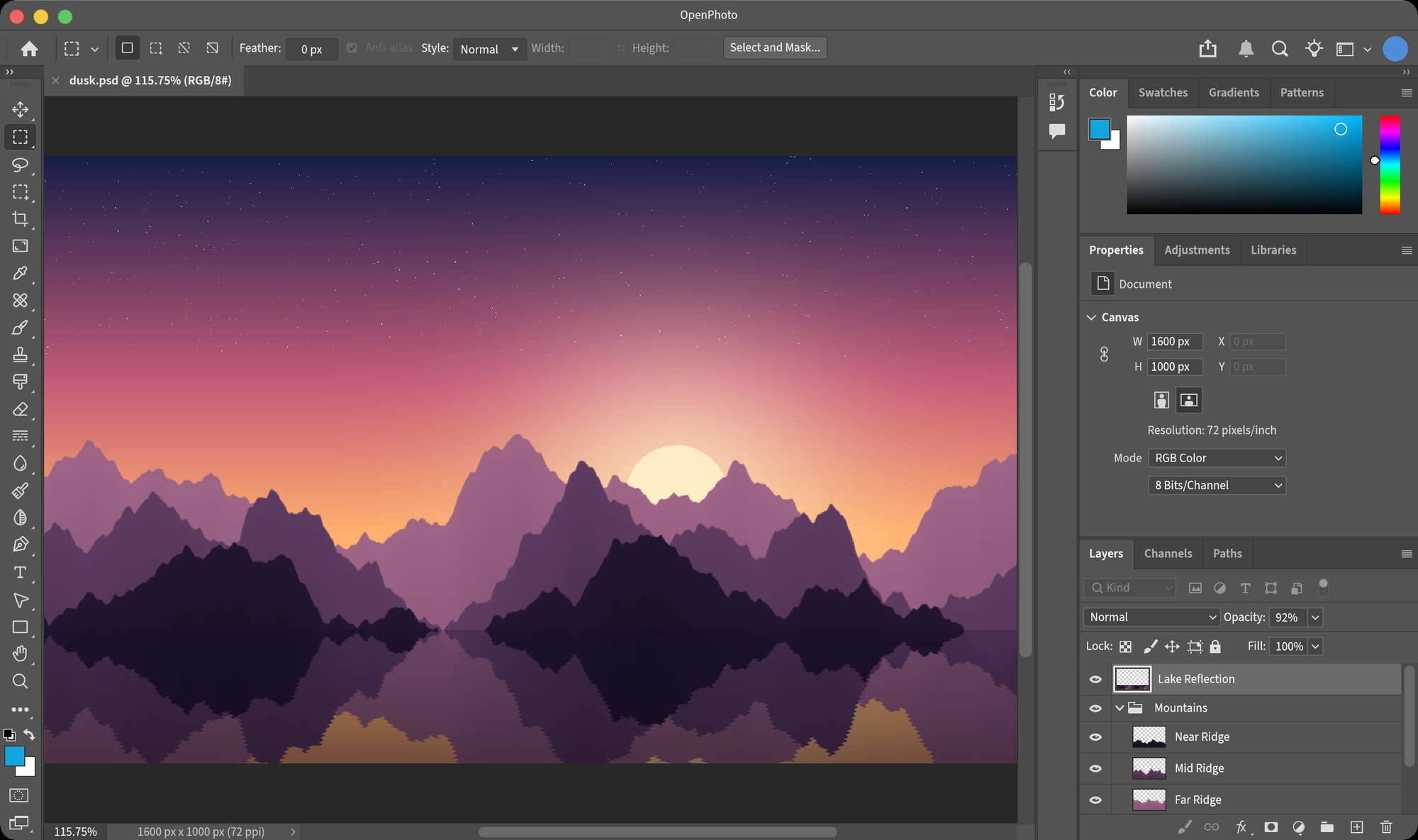
An open-source image editor that works the way Photoshop does — written in Rust.
The same layout, menus, shortcuts and dialogs as Photoshop 2026, measured point by point,
with image algorithms calibrated against Photoshop's own output.




English · 简体中文
Why OpenPhoto
Millions of people have years of Photoshop in their hands: where every panel is, what every shortcut does, how each dialog responds. OpenPhoto aims to be a free editor where all of that carries over unchanged.
- Pixel-faithful interface. Windows, panels, option bars and dialogs are measured from a running Photoshop 2026 at 1:1 and compared side by side, down to field sizes, slider scales and font tracking.
- Your muscle memory works. Menus, item order and default shortcuts match Photoshop. Dialogs remember what Photoshop remembers and forget what it forgets.
- Calibrated algorithms. Adjustments and filters are fitted to Photoshop's own output using probe images: kernel by kernel, lookup table by lookup table. Fixtures captured from Photoshop are checked into the repository and tested on every change.
- Native and fast. Pure Rust with a GPU-composited canvas (wgpu), tiled copy-on-write pixel storage and no runtime dependencies.
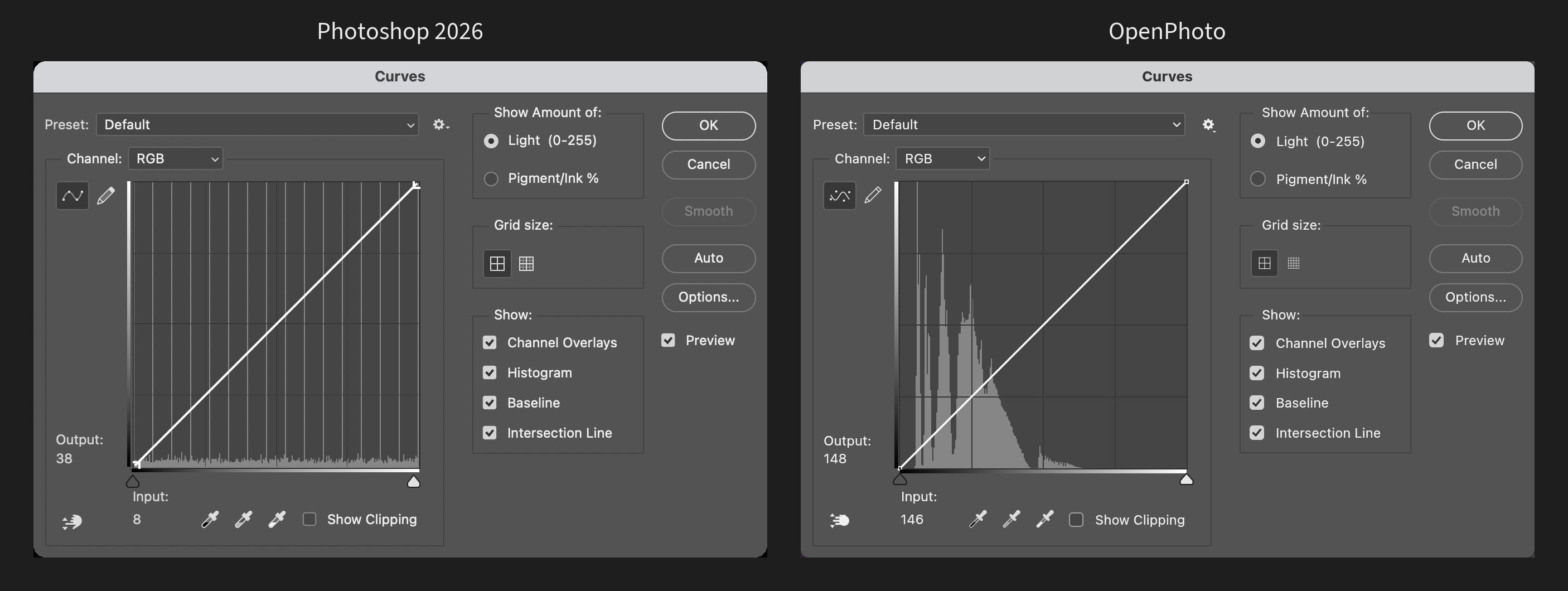
The Curves dialog: Photoshop 2026 on the left, OpenPhoto on the right.
Features
OpenPhoto is in early development. What is listed here works today; the roadmap covers what is still missing.
Documents and files
- Opens and saves layered PSD files (layers, groups, blend modes, opacity and fill, masks, locks, links, color labels), checked field by field against files saved by Photoshop
- Opens PNG, JPEG, WebP, TIFF, BMP and GIF; exports PNG and JPEG
- Tabbed documents, unlimited undo with a History panel, drag and drop to open
Layers
- All 27 Photoshop blend modes, opacity and fill opacity, layer groups with pass-through
- Layer masks, five kinds of locks, linking, color labels, merging and flattening
- Multi-selection, drag to reorder, align and distribute
Selection and transformation
- Rectangular, elliptical, single-row and single-column marquees, lasso, polygonal lasso and magic wand
- Select › Modify (border, smooth, expand, contract, feather), Transform Selection
- Free Transform with skew, distort, perspective and warp; Image Size, Canvas Size, rotation, Crop with Photoshop's overlays and straightening
Painting and retouching
- Brush, pencil, eraser, gradient, paint bucket, clone stamp and history brush
- Blur, sharpen, dodge, burn and sponge; shapes and type; eyedropper with Photoshop's Color Picker
Adjustments — every dialog rebuilt after Photoshop 2026
Levels · Curves · Brightness/Contrast · Exposure · Vibrance · Hue/Saturation · Color Balance · Black & White · Photo Filter · Channel Mixer · Selective Color · Gradient Map · Threshold · Posterize · Invert · Desaturate · Equalize · Auto Tone / Contrast / Color
Filters — matched to Photoshop's output, most within one level
Gaussian Blur · Box Blur · Surface Blur · Motion Blur · Blur / Blur More · Unsharp Mask · Sharpen / More / Edges · Add Noise · Despeckle · Dust & Scratches · Median · Minimum · Maximum · High Pass · Offset · Custom · Mosaic · Fragment · Twirl · Pinch · Spherize · Polar Coordinates · Emboss · Find Edges · Solarize · Trace Contour · Wind
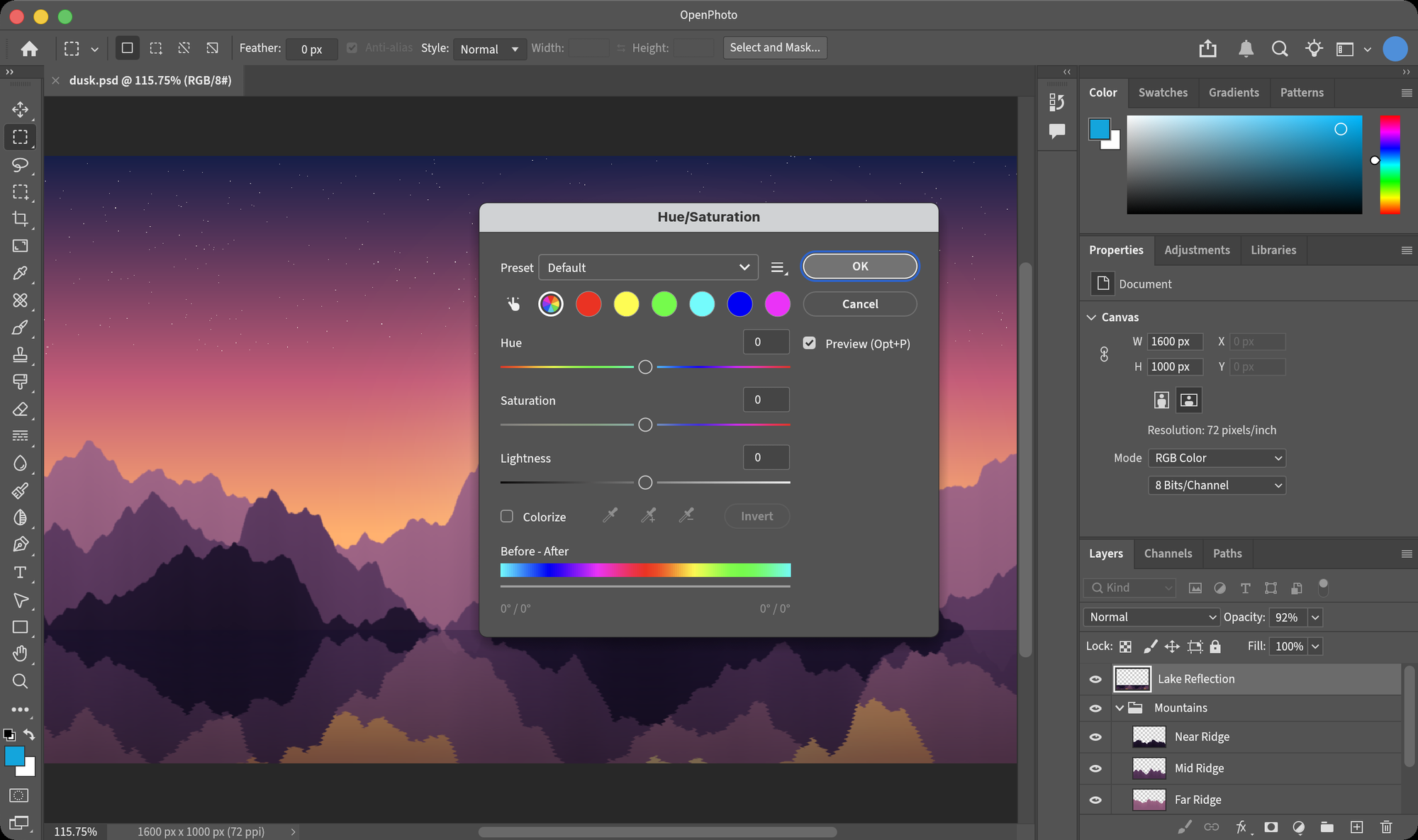 | 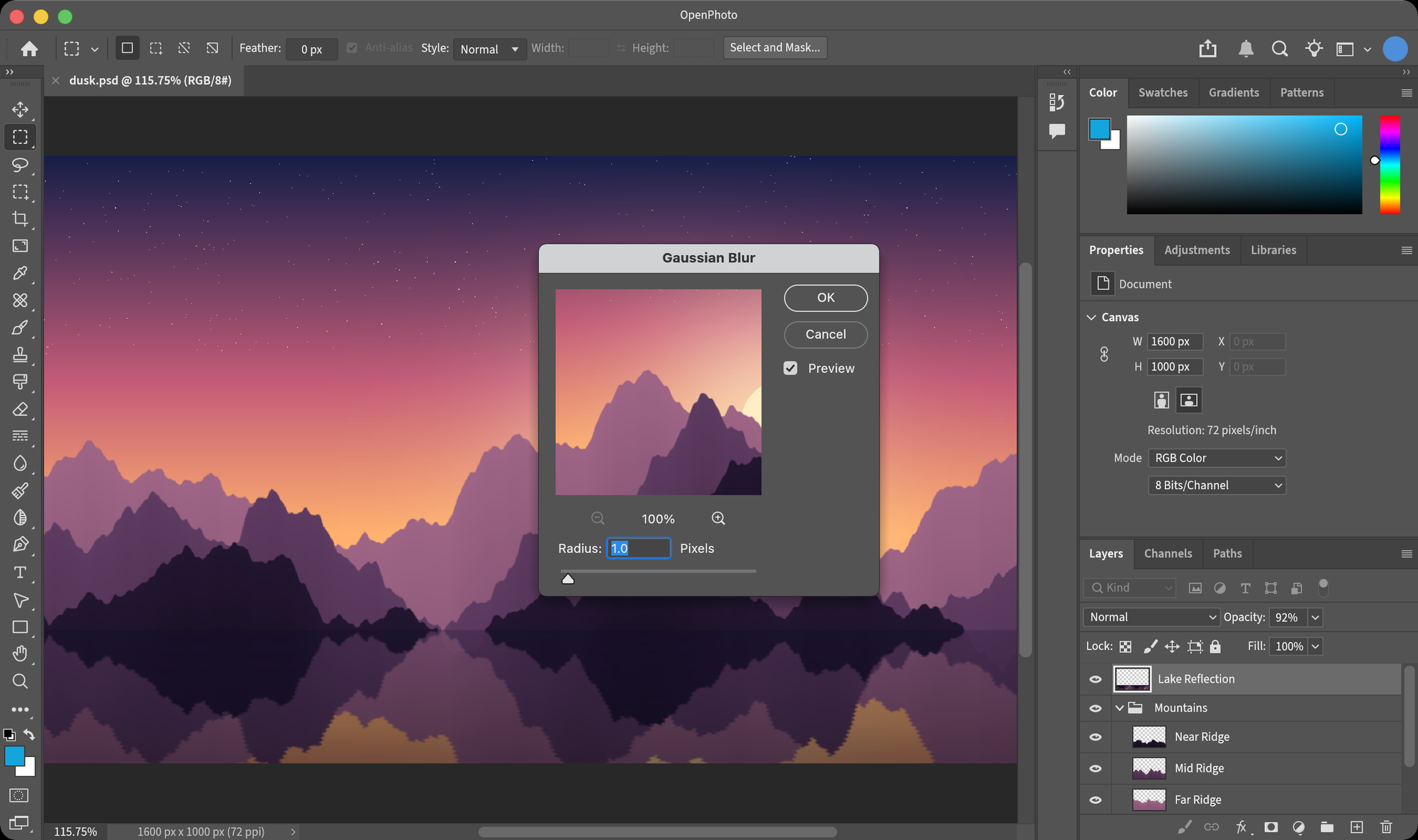 |
| Hue/Saturation | Gaussian Blur, with its live preview |
Getting started
OpenPhoto is developed and tested on macOS, where it uses the native menu bar.
git clone https://github.com/yuanzhixiang/openphoto.git
cd openphoto
cargo run --release -- path/to/image.psd
The Rust toolchain is pinned in rust-toolchain.toml and installed automatically by rustup. Without a file argument, OpenPhoto opens a blank document. Files can also be dropped onto the window.
Shortcuts
The default Photoshop shortcuts apply. A few of the most used:
| Action | Shortcut |
|---|---|
| New · Open · Save · Save As | ⌘N · ⌘O · ⌘S · ⇧⌘S |
| Undo · Redo · Toggle last state | ⌘Z · ⇧⌘Z · ⌥⌘Z |
| Free Transform | ⌘T |
| Levels · Curves · Hue/Saturation | ⌘L · ⌘M · ⌘U |
| New layer · Group · Merge down | ⇧⌘N · ⌘G · ⌘E |
| Zoom in · Zoom out · Fit · 100% | ⌘= · ⌘- · ⌘0 · ⌘1 |
| Tools | V M L W C I B S Y E G O T U H Z |
| Default colors · Swap colors | D · X |
Architecture
OpenPhoto is a Cargo workspace. The document model knows nothing about the interface, so every editing operation can be tested without a window.
| Crate | Responsibility |
|---|---|
op-core | Document model: layer tree, 256×256 tiled copy-on-write pixels, blend modes, selections, history, adjustments, filters, transforms, painting |
op-render | wgpu canvas: zoom, mipmaps, checkerboard and pixel grid, embedded in egui through paint callbacks |
op-io | File I/O: a dependency-free PSD reader and writer, plus bitmap formats through image |
op-color | Color models and conversions |
op-tools | Tool definitions and their shortcuts |
op-ui | The egui interface: menus, option bar, toolbar, panels, dialogs and tool interaction |
app | The executable |
Testing
cargo test --workspace
About 350 tests guard both halves of the goal:
- Photoshop parity. Fixtures in
crates/op-core/fixtureshold Photoshop 2026's output for a probe image under each adjustment and filter. Tests fail if a result drifts by more than the tolerance it was measured to meet, usually one level. - Interface behavior. UI tests drive the real application headlessly through
egui_kittest: open a dialog from the menu, type into fields, press Enter, and check the document and its history.
Roadmap
Major areas that are not there yet, roughly in priority order:
- Pixel calibration of the remaining option bars, panels and dialogs
- More tools: brush presets and pressure, healing brushes, quick selection, magnetic lasso
- Remaining adjustments and filters: Shadows/Highlights, Replace Color, Smart Sharpen, Render, Distort
- Editable type and vector shapes, layer styles, adjustment and fill layers
- Channels and Paths panels, snapping, smart guides
- Color modes beyond 8-bit RGB, ICC color management
- Smart objects, actions and automation
Contributing
Issues and pull requests are welcome. The guiding rule for any change is simple: a running Photoshop 2026 is the reference. If OpenPhoto looks or behaves differently from it, that is a bug. Please run cargo fmt, cargo clippy --workspace --all-targets and cargo test --workspace before sending a pull request, and add a test for any behavior you change.
License
Licensed under either of
- Apache License, Version 2.0 (LICENSE-APACHE)
- MIT license (LICENSE-MIT)
at your option.
Third-party assets: the interface font is Source Sans 3 (SIL Open Font License, see OFL.txt); icons come from Phosphor Icons (MIT).
OpenPhoto is an independent project. It is not affiliated with, endorsed by or sponsored by Adobe Inc. Adobe and Photoshop are trademarks of Adobe Inc., used here only to describe compatibility.


See what people are saying
README
OpenPhoto
An open-source image editor that works the way Photoshop does — written in Rust.
The same layout, menus, shortcuts and dialogs as Photoshop 2026, measured point by point,
with image algorithms calibrated against Photoshop's own output.
English · 简体中文
Why OpenPhoto
Millions of people have years of Photoshop in their hands: where every panel is, what every shortcut does, how each dialog responds. OpenPhoto aims to be a free editor where all of that carries over unchanged.
- Pixel-faithful interface. Windows, panels, option bars and dialogs are measured from a running Photoshop 2026 at 1:1 and compared side by side, down to field sizes, slider scales and font tracking.
- Your muscle memory works. Menus, item order and default shortcuts match Photoshop. Dialogs remember what Photoshop remembers and forget what it forgets.
- Calibrated algorithms. Adjustments and filters are fitted to Photoshop's own output using probe images: kernel by kernel, lookup table by lookup table. Fixtures captured from Photoshop are checked into the repository and tested on every change.
- Native and fast. Pure Rust with a GPU-composited canvas (wgpu), tiled copy-on-write pixel storage and no runtime dependencies.
The Curves dialog: Photoshop 2026 on the left, OpenPhoto on the right.
Features
OpenPhoto is in early development. What is listed here works today; the roadmap covers what is still missing.
Documents and files
- Opens and saves layered PSD files (layers, groups, blend modes, opacity and fill, masks, locks, links, color labels), checked field by field against files saved by Photoshop
- Opens PNG, JPEG, WebP, TIFF, BMP and GIF; exports PNG and JPEG
- Tabbed documents, unlimited undo with a History panel, drag and drop to open
Layers
- All 27 Photoshop blend modes, opacity and fill opacity, layer groups with pass-through
- Layer masks, five kinds of locks, linking, color labels, merging and flattening
- Multi-selection, drag to reorder, align and distribute
Selection and transformation
- Rectangular, elliptical, single-row and single-column marquees, lasso, polygonal lasso and magic wand
- Select › Modify (border, smooth, expand, contract, feather), Transform Selection
- Free Transform with skew, distort, perspective and warp; Image Size, Canvas Size, rotation, Crop with Photoshop's overlays and straightening
Painting and retouching
- Brush, pencil, eraser, gradient, paint bucket, clone stamp and history brush
- Blur, sharpen, dodge, burn and sponge; shapes and type; eyedropper with Photoshop's Color Picker
Adjustments — every dialog rebuilt after Photoshop 2026
Levels · Curves · Brightness/Contrast · Exposure · Vibrance · Hue/Saturation · Color Balance · Black & White · Photo Filter · Channel Mixer · Selective Color · Gradient Map · Threshold · Posterize · Invert · Desaturate · Equalize · Auto Tone / Contrast / Color
Filters — matched to Photoshop's output, most within one level
Gaussian Blur · Box Blur · Surface Blur · Motion Blur · Blur / Blur More · Unsharp Mask · Sharpen / More / Edges · Add Noise · Despeckle · Dust & Scratches · Median · Minimum · Maximum · High Pass · Offset · Custom · Mosaic · Fragment · Twirl · Pinch · Spherize · Polar Coordinates · Emboss · Find Edges · Solarize · Trace Contour · Wind
| |
| Hue/Saturation | Gaussian Blur, with its live preview |
Getting started
OpenPhoto is developed and tested on macOS, where it uses the native menu bar.
git clone https://github.com/yuanzhixiang/openphoto.git
cd openphoto
cargo run --release -- path/to/image.psd
The Rust toolchain is pinned in rust-toolchain.toml and installed automatically by rustup. Without a file argument, OpenPhoto opens a blank document. Files can also be dropped onto the window.
Shortcuts
The default Photoshop shortcuts apply. A few of the most used:
| Action | Shortcut |
|---|---|
| New · Open · Save · Save As | ⌘N · ⌘O · ⌘S · ⇧⌘S |
| Undo · Redo · Toggle last state | ⌘Z · ⇧⌘Z · ⌥⌘Z |
| Free Transform | ⌘T |
| Levels · Curves · Hue/Saturation | ⌘L · ⌘M · ⌘U |
| New layer · Group · Merge down | ⇧⌘N · ⌘G · ⌘E |
| Zoom in · Zoom out · Fit · 100% | ⌘= · ⌘- · ⌘0 · ⌘1 |
| Tools | V M L W C I B S Y E G O T U H Z |
| Default colors · Swap colors | D · X |
Architecture
OpenPhoto is a Cargo workspace. The document model knows nothing about the interface, so every editing operation can be tested without a window.
| Crate | Responsibility |
|---|---|
op-core | Document model: layer tree, 256×256 tiled copy-on-write pixels, blend modes, selections, history, adjustments, filters, transforms, painting |
op-render | wgpu canvas: zoom, mipmaps, checkerboard and pixel grid, embedded in egui through paint callbacks |
op-io | File I/O: a dependency-free PSD reader and writer, plus bitmap formats through image |
op-color | Color models and conversions |
op-tools | Tool definitions and their shortcuts |
op-ui | The egui interface: menus, option bar, toolbar, panels, dialogs and tool interaction |
app | The executable |
Testing
cargo test --workspace
About 350 tests guard both halves of the goal:
- Photoshop parity. Fixtures in
crates/op-core/fixtureshold Photoshop 2026's output for a probe image under each adjustment and filter. Tests fail if a result drifts by more than the tolerance it was measured to meet, usually one level. - Interface behavior. UI tests drive the real application headlessly through
egui_kittest: open a dialog from the menu, type into fields, press Enter, and check the document and its history.
Roadmap
Major areas that are not there yet, roughly in priority order:
- Pixel calibration of the remaining option bars, panels and dialogs
- More tools: brush presets and pressure, healing brushes, quick selection, magnetic lasso
- Remaining adjustments and filters: Shadows/Highlights, Replace Color, Smart Sharpen, Render, Distort
- Editable type and vector shapes, layer styles, adjustment and fill layers
- Channels and Paths panels, snapping, smart guides
- Color modes beyond 8-bit RGB, ICC color management
- Smart objects, actions and automation
Contributing
Issues and pull requests are welcome. The guiding rule for any change is simple: a running Photoshop 2026 is the reference. If OpenPhoto looks or behaves differently from it, that is a bug. Please run cargo fmt, cargo clippy --workspace --all-targets and cargo test --workspace before sending a pull request, and add a test for any behavior you change.
License
Licensed under either of
- Apache License, Version 2.0 (LICENSE-APACHE)
- MIT license (LICENSE-MIT)
at your option.
Third-party assets: the interface font is Source Sans 3 (SIL Open Font License, see OFL.txt); icons come from Phosphor Icons (MIT).
OpenPhoto is an independent project. It is not affiliated with, endorsed by or sponsored by Adobe Inc. Adobe and Photoshop are trademarks of Adobe Inc., used here only to describe compatibility.