Manage multiple installations of JDK on a Windows computer. JVMS, Download Now!
There are situations where the ability to switch between different versions of JDK can be very useful. For example, if you want to test a project you're developing with the latest bleeding edge version without uninstalling the stable version of JDK, this utility can help.
jvms.exe injvms.exe init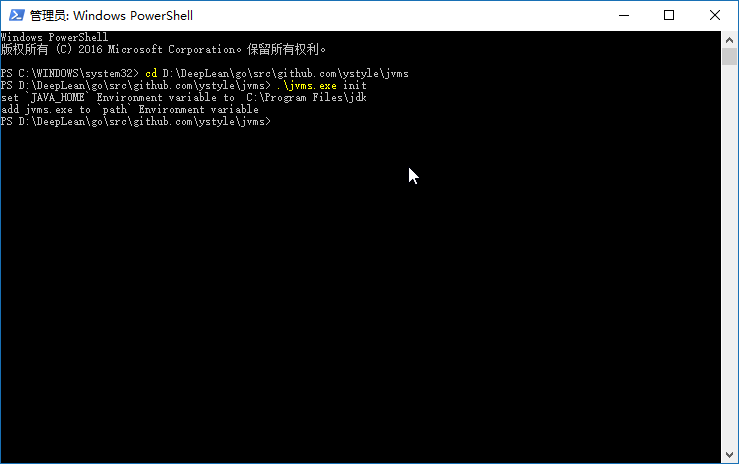
NAME:
   jvms - JDK Version Manager (JVMS) for Windows

USAGE:
   jvms.exe [global options] command [command options] [arguments...]

VERSION:
   2.1.17

COMMANDS:
   tui, tui       Run the interactive TUI interface
   init           Initialize config file
   list, ls       List current JDK installations.
   install, i     Install available remote jdk
   switch, s      Activate an installed JDK by version or explicit index (#N).
   use, u         Switch to use the specified version and install it if not installed.
   remove, rm     Remove a specific version.
   rls            Show a list of versions available for download.
   config         Show or update configuration.
   proxy          Set a proxy to use for downloads.
   help, h        Shows a list of commands or help for one command

GLOBAL OPTIONS:
   --help, -h     show help
   --version, -v  print the version
how to install and switch jdk. see:
jvms rls list available jdk version for downloadjvms install 1.8.0_31 install jdk 1.8.0_31jvms ls list installed jdkjvms switch 1.8.0_31 switch jdk version to 1.8.0_31jvms use 21.0.4 install (if missing) and switch to jdk 21.0.4jvms tui launch interactive TUI pickerjvms tui -i launch TUI install pickerjvms tui -s launch TUI switch picker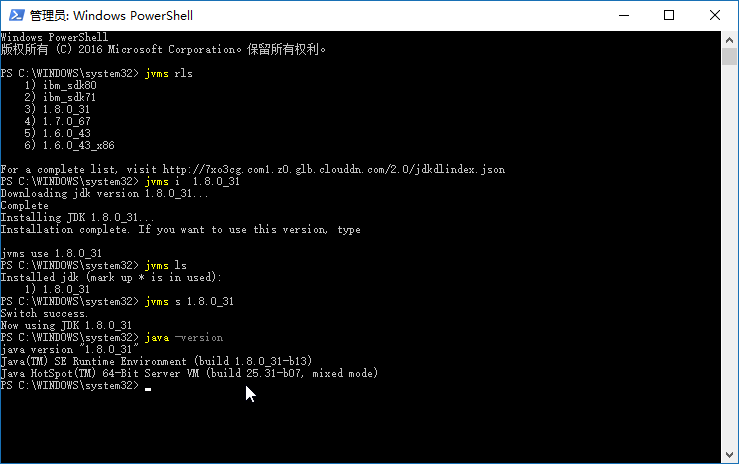
JVMS supports multiple JDK distributions to give you flexibility in choosing your preferred JDK:
The default jdkdlindex.json only includes LTS (Long-Term Support) versions:
Non-LTS versions (Java 9, 10, 12, 13, 14, 15, 16, 18, 19, 20, 22, 23, 24, etc.) are not included in the default index as they reach end-of-life in 6 months.
However, you can still install non-LTS versions if needed:
jvms rls to see all available versions (including non-LTS from Adoptium and Azul)First and foremost, this version of jvms has no dependency on other lib. It's written in Go, which is a much more structured
approach than hacking around a limited .bat file. It does not rely on having an existing jdk installation.
The control mechanism is also quite different. There are two general ways to support multiple jdk installations with hot switching capabilities.
The first is to modify the system PATH any time you switch versions, or bypass it by using a .bat file to mimic the jdk executable and redirect
accordingly. This always seemed a little hackish to me, and there are some quirks as a result of this implementation.
The second option is to use a symlink. This concept requires putting the symlink in the system PATH, then updating its target to
the jdk installation directory you want to use. This is a straightforward approach, and seems to be what people recommend.... until they
realize just how much of a pain symlinks are on Windows. This is why it hasn't happened before.
In order to create/modify a symlink, you must be running as an admin, and you must get around Windows UAC (that annoying prompt). As a result, JVMS for Windows
maintains a single symlink that is put in the system PATH during jvms init only. Switching to different versions of JDK is a matter of
switching the symlink target. As a result, this utility does not require you to run jvms switch x.x.x every time you open a console window.
When you do run jvms switch x.x.x, the active version of jdk is automatically updated across all open console windows. It also persists
between system reboots, so you only need to use jvms when you want to make a change.
Overall, this project brings together some ideas, a few battle-hardened pieces of other modules, and support for newer versions of JDK.
I also wrote a simple data feed containing a list of jdk versions. It's free for anyone to use.
Use the same java_home and originalpath names with init and config:
jvms config --java_home="C:/Program Files/jdk"
jvms config --originalpath=https://example.com/index.json
jvms config --cache_toggle=true --cache_ttl=24h
jvms switch --as_path "C:/Java/jdk-21"
jvms config displays the current settings. jvms rls refreshes the provider's
catalog before listing available versions.
Bare values, including numbers such as 17, are always version identifiers.
Use jvms install "#17" or jvms use "#17" to select row 17 from jvms rls.
switch uses the installed list: jvms switch "#1" selects its first row.
Quote explicit indexes so PowerShell passes them as arguments.
Older configuration files containing resolution_priority still load. The
retired setting is ignored and omitted when the configuration is saved.
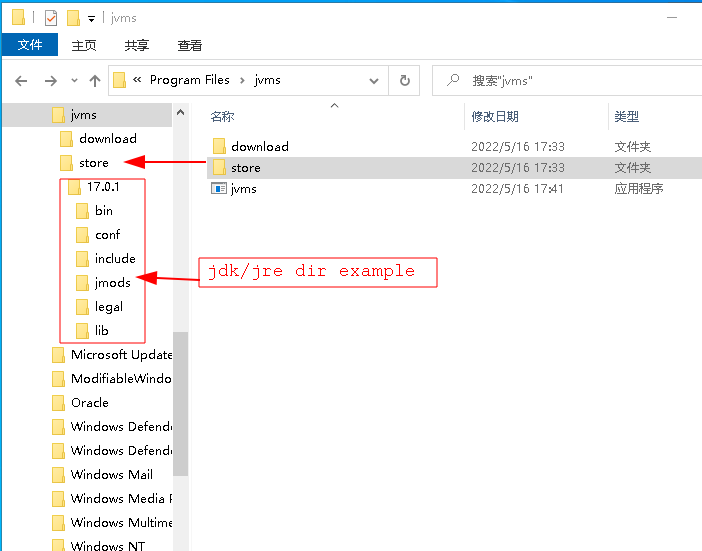
e.g: add the jdk 17.0.1
jvms/store17.0.1jvms list check thisjvms switch 17.0.1java -version check jdk verisonExisting folder names containing spaces also work: quote the name, for example
jvms switch "jdk 17" or jvms rm "jdk 17", or switch by its explicit installed index.
index.json[
{
"version":"1.9.0",
"url":"http://192.168.1.101/files/jdk/1.9.0.zip"
}
]
jvms init --originalpath http://192.168.1.101/files/index.json by the way, jvms init --java_home can modify default JAVA_HOMEjvms rls or jvms install x will list or install your jdk version*.zip fileFrom the repository root, tell Git to use the hooks included in this checkout:
git config --local core.hooksPath .githooks
On macOS or Linux, ensure the hook is executable:
chmod +x .githooks/pre-commit
MIT.
162 followers · starred Jun 2023
34 followers · starred Aug 2021
2 followers · starred Feb 2023
Manage multiple installations of JDK on a Windows computer. JVMS, Download Now!
There are situations where the ability to switch between different versions of JDK can be very useful. For example, if you want to test a project you're developing with the latest bleeding edge version without uninstalling the stable version of JDK, this utility can help.
jvms.exe injvms.exe init
NAME:
   jvms - JDK Version Manager (JVMS) for Windows

USAGE:
   jvms.exe [global options] command [command options] [arguments...]

VERSION:
   2.1.17

COMMANDS:
   tui, tui       Run the interactive TUI interface
   init           Initialize config file
   list, ls       List current JDK installations.
   install, i     Install available remote jdk
   switch, s      Activate an installed JDK by version or explicit index (#N).
   use, u         Switch to use the specified version and install it if not installed.
   remove, rm     Remove a specific version.
   rls            Show a list of versions available for download.
   config         Show or update configuration.
   proxy          Set a proxy to use for downloads.
   help, h        Shows a list of commands or help for one command

GLOBAL OPTIONS:
   --help, -h     show help
   --version, -v  print the version
how to install and switch jdk. see:
jvms rls list available jdk version for downloadjvms install 1.8.0_31 install jdk 1.8.0_31jvms ls list installed jdkjvms switch 1.8.0_31 switch jdk version to 1.8.0_31jvms use 21.0.4 install (if missing) and switch to jdk 21.0.4jvms tui launch interactive TUI pickerjvms tui -i launch TUI install pickerjvms tui -s launch TUI switch picker
JVMS supports multiple JDK distributions to give you flexibility in choosing your preferred JDK:
The default jdkdlindex.json only includes LTS (Long-Term Support) versions:
Non-LTS versions (Java 9, 10, 12, 13, 14, 15, 16, 18, 19, 20, 22, 23, 24, etc.) are not included in the default index as they reach end-of-life in 6 months.
However, you can still install non-LTS versions if needed:
jvms rls to see all available versions (including non-LTS from Adoptium and Azul)First and foremost, this version of jvms has no dependency on other lib. It's written in Go, which is a much more structured
approach than hacking around a limited .bat file. It does not rely on having an existing jdk installation.
The control mechanism is also quite different. There are two general ways to support multiple jdk installations with hot switching capabilities.
The first is to modify the system PATH any time you switch versions, or bypass it by using a .bat file to mimic the jdk executable and redirect
accordingly. This always seemed a little hackish to me, and there are some quirks as a result of this implementation.
The second option is to use a symlink. This concept requires putting the symlink in the system PATH, then updating its target to
the jdk installation directory you want to use. This is a straightforward approach, and seems to be what people recommend.... until they
realize just how much of a pain symlinks are on Windows. This is why it hasn't happened before.
In order to create/modify a symlink, you must be running as an admin, and you must get around Windows UAC (that annoying prompt). As a result, JVMS for Windows
maintains a single symlink that is put in the system PATH during jvms init only. Switching to different versions of JDK is a matter of
switching the symlink target. As a result, this utility does not require you to run jvms switch x.x.x every time you open a console window.
When you do run jvms switch x.x.x, the active version of jdk is automatically updated across all open console windows. It also persists
between system reboots, so you only need to use jvms when you want to make a change.
Overall, this project brings together some ideas, a few battle-hardened pieces of other modules, and support for newer versions of JDK.
I also wrote a simple data feed containing a list of jdk versions. It's free for anyone to use.
Use the same java_home and originalpath names with init and config:
jvms config --java_home="C:/Program Files/jdk"
jvms config --originalpath=https://example.com/index.json
jvms config --cache_toggle=true --cache_ttl=24h
jvms switch --as_path "C:/Java/jdk-21"
jvms config displays the current settings. jvms rls refreshes the provider's
catalog before listing available versions.
Bare values, including numbers such as 17, are always version identifiers.
Use jvms install "#17" or jvms use "#17" to select row 17 from jvms rls.
switch uses the installed list: jvms switch "#1" selects its first row.
Quote explicit indexes so PowerShell passes them as arguments.
Older configuration files containing resolution_priority still load. The
retired setting is ignored and omitted when the configuration is saved.
e.g: add the jdk 17.0.1
jvms/store17.0.1jvms list check thisjvms switch 17.0.1java -version check jdk verisonExisting folder names containing spaces also work: quote the name, for example
jvms switch "jdk 17" or jvms rm "jdk 17", or switch by its explicit installed index.
index.json[
{
"version":"1.9.0",
"url":"http://192.168.1.101/files/jdk/1.9.0.zip"
}
]
jvms init --originalpath http://192.168.1.101/files/index.json by the way, jvms init --java_home can modify default JAVA_HOMEjvms rls or jvms install x will list or install your jdk version*.zip fileFrom the repository root, tell Git to use the hooks included in this checkout:
git config --local core.hooksPath .githooks
On macOS or Linux, ensure the hook is executable:
chmod +x .githooks/pre-commit
MIT.
162 followers · starred Jun 2023
34 followers · starred Aug 2021
2 followers · starred Feb 2023



