ynotbit — why not bit? A compact encrypted desktop Bitmessage client based on notbit.
C++
7
185 commits
updated Oct 12, 2026
English | 日本語 | 한국어 | 简体中文 | 繁體中文 | Русский | Українська
A compact desktop Bitmessage client based on notbit, by yshurik. Current release: 0.7.0.
ynotbit keeps identity keys in a password-protected vault and correspondence in a separate encrypted mailbox document. Its keyless relay continues collecting network objects while the vault is locked. Unlocking inspects retained objects and saves matching letters to the mailbox.
| Chats | Subscriptions | Pictures in a letter | Replying |
|---|---|---|---|
 |  |  |  |
| Chans | Contacts | Writing to a contact |
|---|---|---|
 |  |  |
v0.7.0 release — prebuilt, CI-tested downloads for Linux (x86_64), macOS (Apple Silicon), and Windows (x86_64). See Current boundaries below for what each build does and doesn't guarantee.
macOS: the app is ad-hoc signed and not notarized, so macOS keeps the downloaded
copy quarantined. After moving ynotbit.app to /Applications, clear that once:
sudo xattr -cr /Applications/ynotbit.app
.bmvault file. File → Create vault… (or Create vault on the
lock screen) opens one dialog that makes the vault and its first identity, from random
keys or a secret phrase, with an optional search for a shorter address.
Identity → Create identity… uses the same dialog; you can also import keys.dat
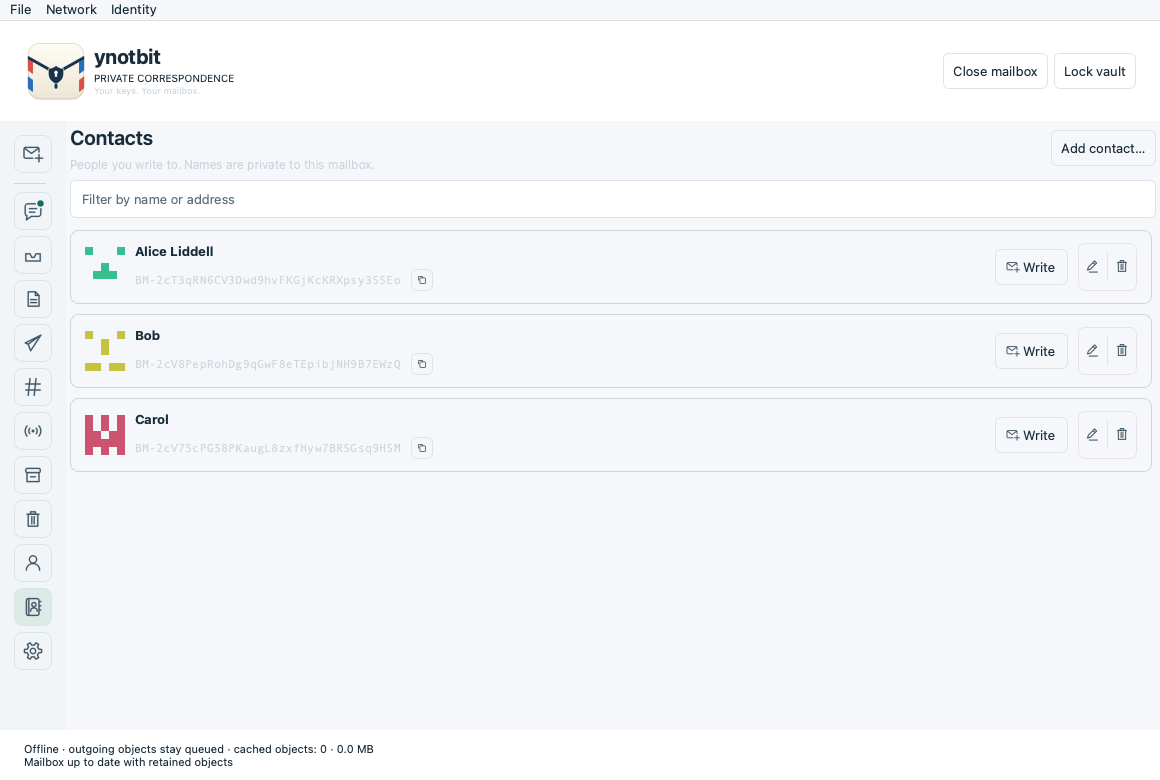
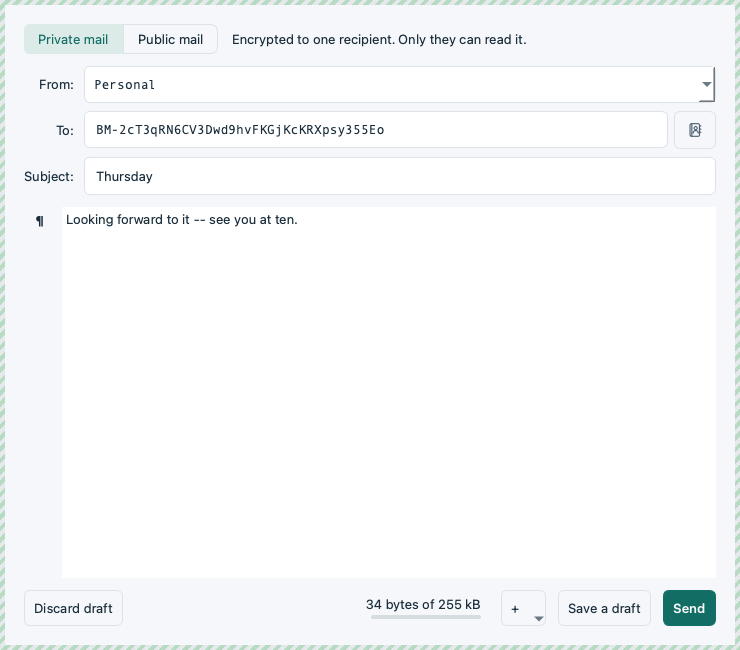
or join a chan using its shared phrase and expected address..bmmail document in Documents or another writable folder.To name someone, click the person-plus button beside their address in a letter, or use Contacts → Add contact…. Names then appear in the message list, the reader and the composer, always next to the full address.
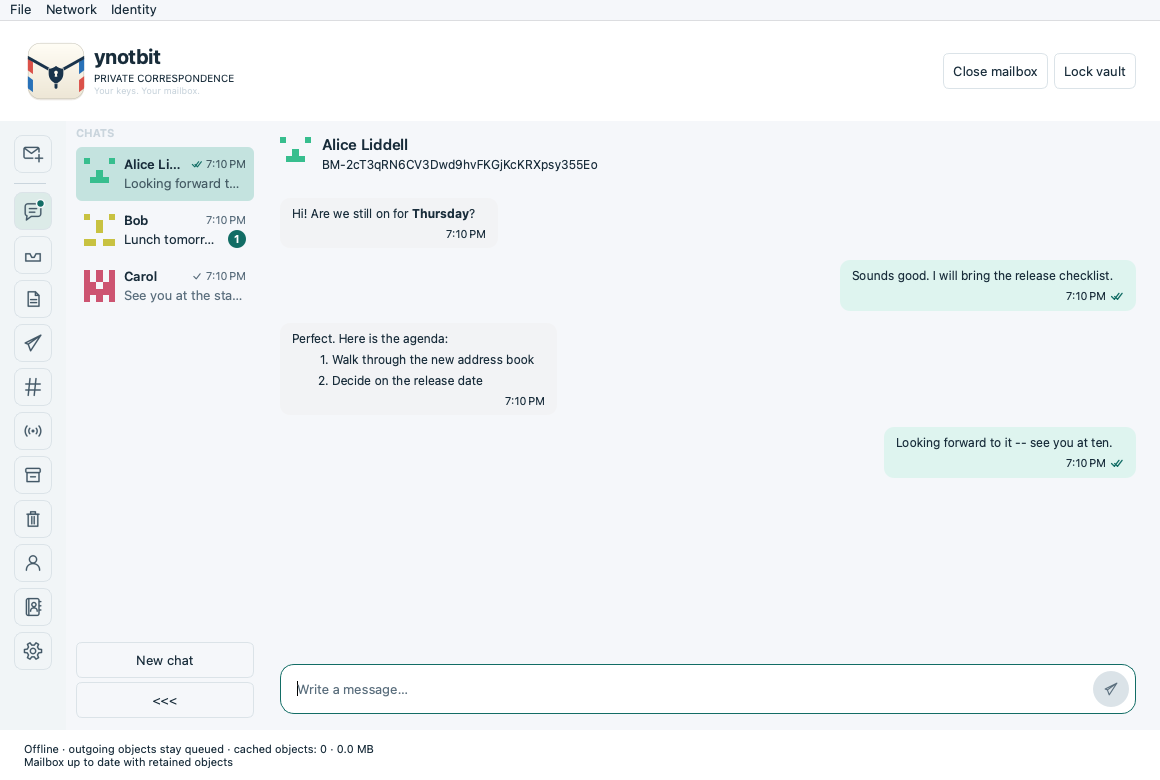
To chat, open Chats in the rail and choose New chat: type a contact's name or a BM-address, and pick the identity to chat as when you have several. Messages are Markdown; Enter sends and Shift+Enter starts a new line. A chat keeps its identity, so the same person under two identities is two chats. The tick under your message shows how far it has got: waiting, sent to the network, delivered (the recipient's acknowledgment, not a read receipt). A chat message is deleted after 24 hours; chats stay out of the Inbox and of backups.
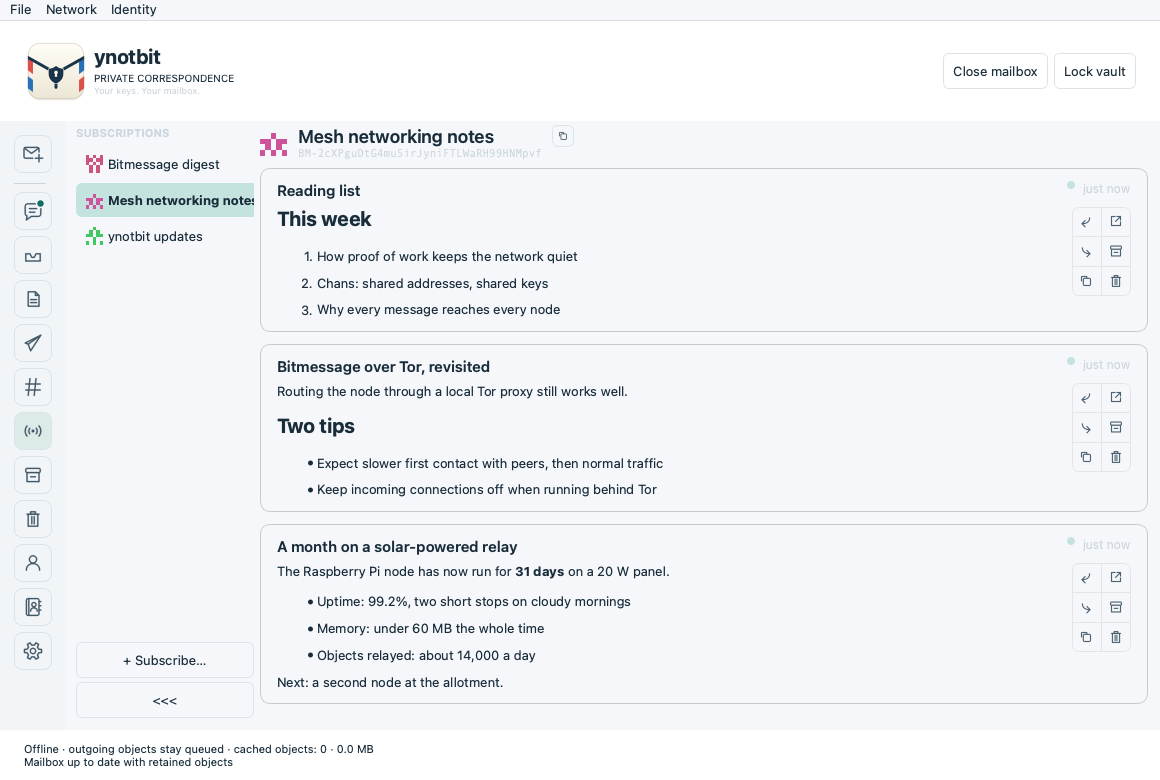
To follow a sender's broadcasts, open Subscriptions and choose + Subscribe… (or Identity → Subscribe to broadcasts…); their posts appear as a feed. New mailboxes already follow the Bitmessage digest, and ynotbit's own update notices.
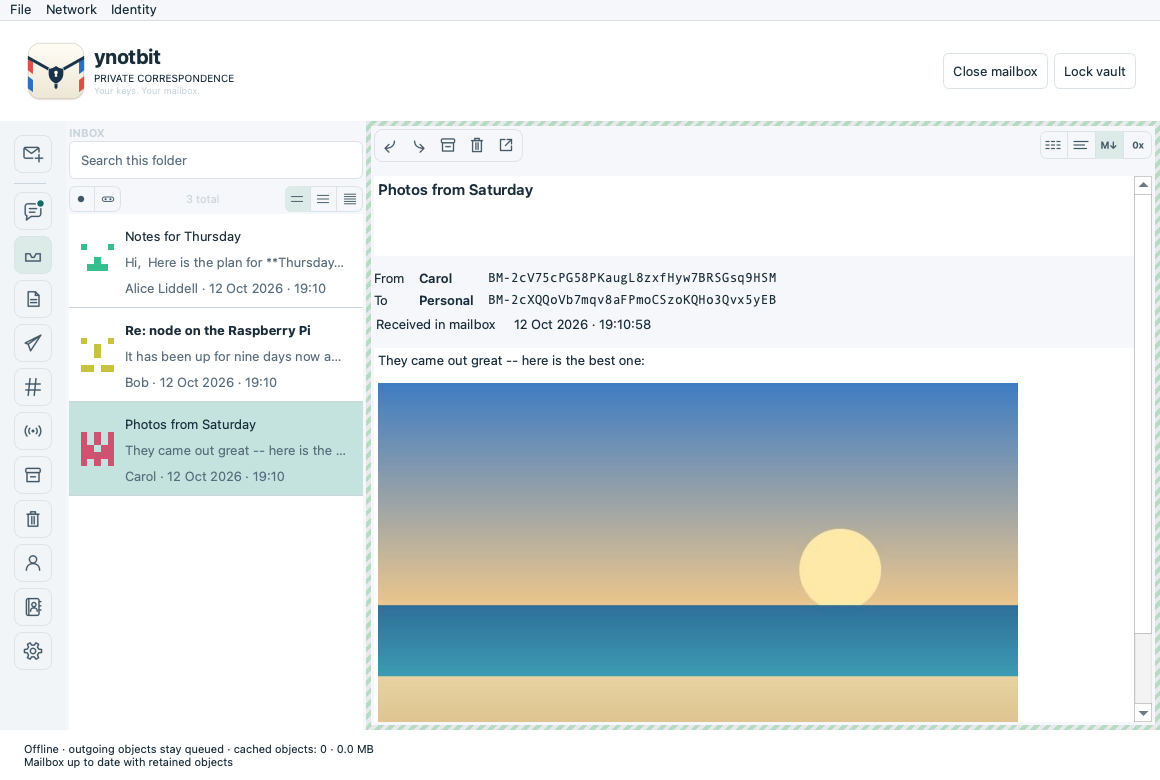
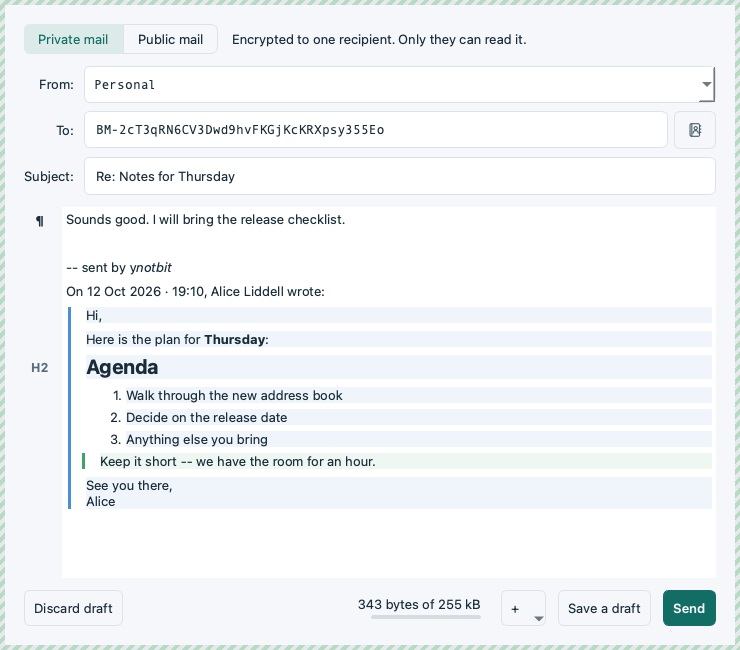
To add a picture to a letter, use the + button in the composer, the right-click menu, or drop image files on the letter.
File → Back up mailbox and vault saves both documents. Keep both: a mailbox
alone cannot recover its encryption key. Changing a password does not invalidate
old vault copies or backups. Import preserves the original plaintext keys.dat.
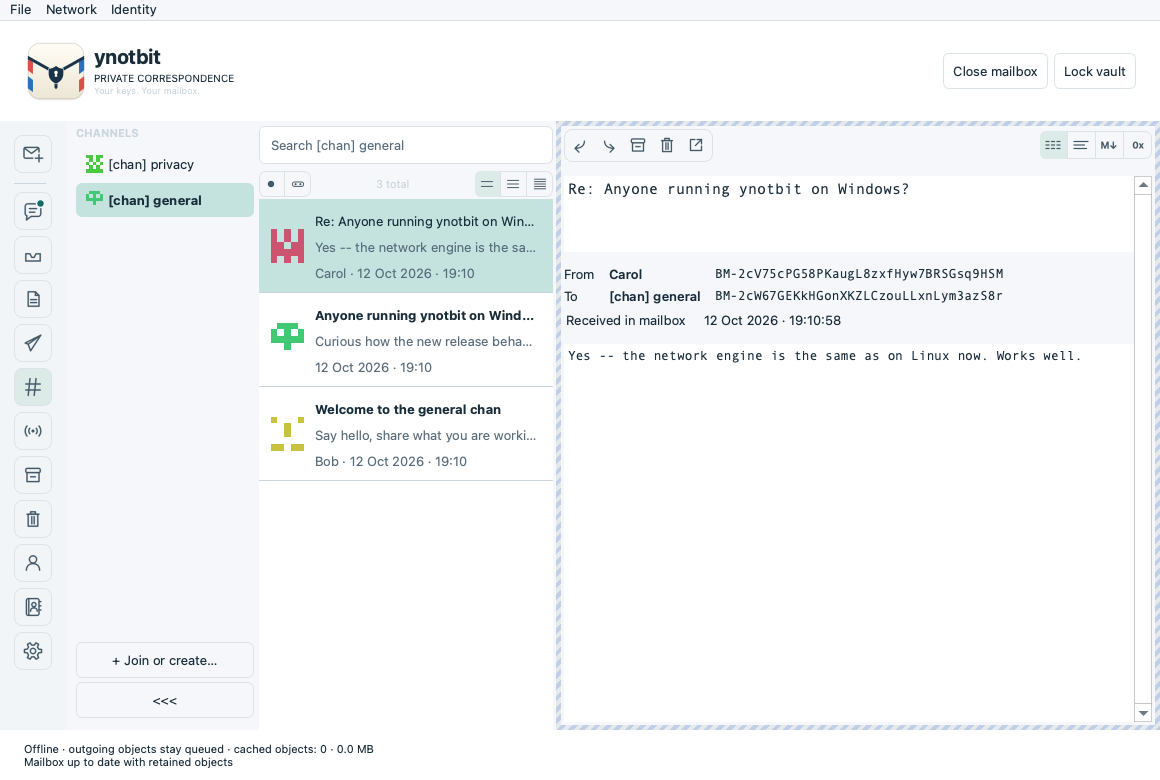
[chan] <phrase>, as in
PyBitmessage), separate message lists and search, and a Write to channel
action. The chan list collapses to a column of identicons with unread dots.
BM-addresses use a fixed-width font; each address has a GitHub-style identicon.https. A chat message is an ordinary Bitmessage message with an
empty subject and a small JSON body, kept 24 hours; it uses a letter's proof of work,
publishing and acknowledgment, stays out of the Inbox and is left out of backups.BM-2666hf5eAbjCJMaPwC7eG3Um55QJGM) show a banner when a newer version is out,
without subscribing; Settings → Notifications turns them off./ynotbit:<version>/. Its bounded local
queue accepts network objects, validates proof of work, and records acceptance,
rejection, and offers to connected peers. Receipt state survives restarts.objects.sqlite, which the relay writes
and prunes to the retention limits and the app reads, so new objects reach the
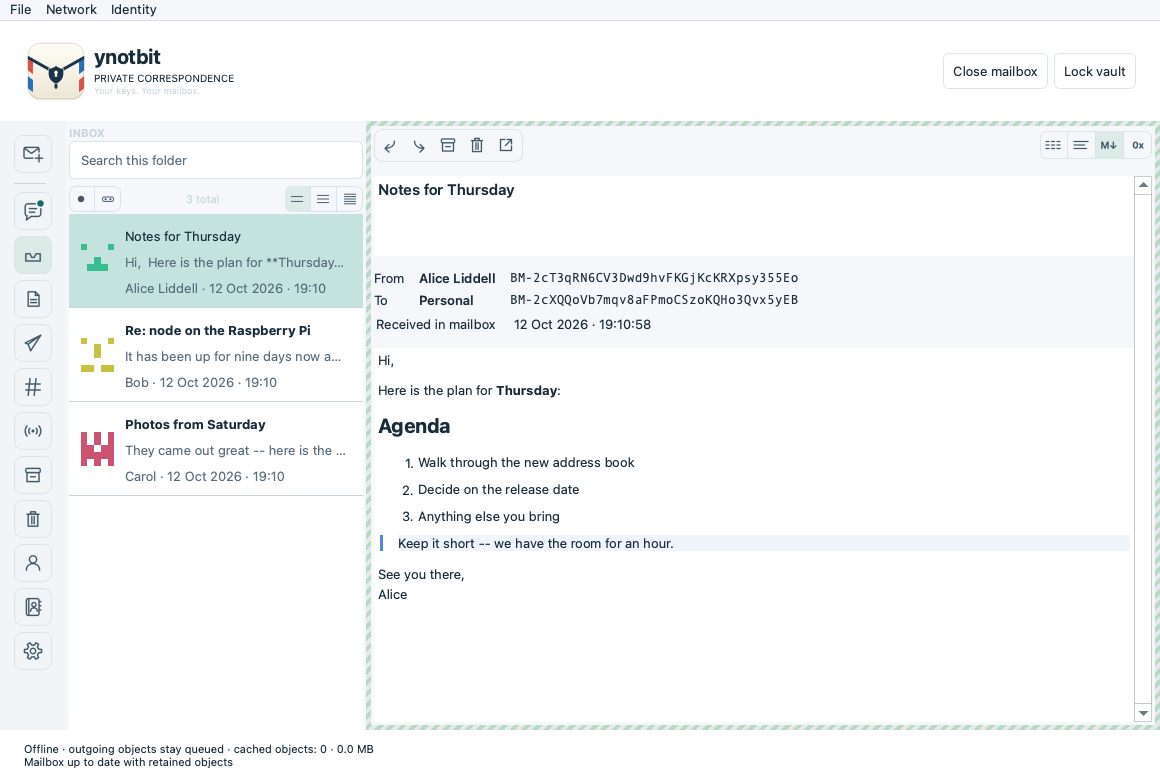
mailbox on the next refresh.> in the same editor: quoted text can be edited but stays
quoted, and the reader shows quote levels as coloured bars. Letters can be
forwarded.data: URLs, shrunk to
fit one letter, since Bitmessage has no attachments. The reader shows them, and
PyBitmessage's inline pictures too; only PNG, JPEG, GIF and WebP load.
Rendered messages use a safe Markdown document that does not fetch local files
or remote images. Appearance follows the system color scheme by default and can
be set to light or dark.Delivery distinguishes queued → requesting key → preparing receipt → proof of work → waiting for peers → awaiting acknowledgment → acknowledged. Broadcasts and chan messages can finish as published, without a recipient receipt. An offer to peers is not proof that every peer or the final recipient received it.
Requirements: CMake 3.22+, C++20, Qt 6.8+ (Core, Gui, Widgets, Network, Test), OpenSSL, libsodium, SQLCipher, pkg-config, Ninja. Python 3 runs the loopback relay tests. Autoconf, Automake, make and Tcl are needed when building the pinned storage dependencies from source.
scripts/build-dependencies.sh /absolute/scratch /absolute/deps
export PKG_CONFIG_PATH=/absolute/deps/lib/pkgconfig
cmake -S . -B build -G Ninja \
  -DCMAKE_PREFIX_PATH=/absolute/Qt/6.8.3/macos \
  -DCMAKE_BUILD_TYPE=Release
cmake --build build --parallel 4
ctest --test-dir build --output-on-failure
On Linux, use your Qt installation's gcc_64 directory. The executable target
is ynotbit; macOS produces ynotbit.app. Tests use temporary documents and
loopback peers, never public-network messages. The independent wire fixtures can
be regenerated with tests/generate_wire_fixtures.py using Python cryptography
50.0.1; the normal test suite does not need that package.
On Windows, build with MSVC and Ninja; get OpenSSL, libsodium, and SQLCipher via
vcpkg (vcpkg.json manifest, x64-windows
triplet) instead of build-dependencies.sh, and pass
-DCMAKE_TOOLCHAIN_FILE=<vcpkg>/scripts/buildsystems/vcpkg.cmake. See
.github/workflows/release.yml for the exact, CI-verified sequence on all three
platforms.
Translations live in translations/ynotbit_<lang>.ts and can be edited with Qt
Linguist or any text editor. After changing user-visible strings in the code,
run cmake --build build --target update_translations to refresh the files;
scripts/check-translations.py (also a test) fails on untranslated entries or
broken %1 placeholders. Error messages from the storage and protocol layers are
collected by scripts/update-error-catalog.py.
The README screenshots come from demo data, not a real mailbox. Regenerate them
with cmake --build build --target readme_screenshots and
QT_QPA_PLATFORM=offscreen build/readme_screenshots docs/images; each translated
set, with demo letters in its language, with ... docs/images/<lang> <lang> for ja, ko,
zh_CN, zh_TW, ru and uk.
To package a build for redistribution, with Qt's runtime libraries bundled in:
# macOS
scripts/package-macos.sh /absolute/build /absolute/ynotbit-macos-arm64.zip /absolute/Qt/6.8.3/macos
# Linux — builds a single self-contained AppImage with linuxdeploy
scripts/package-linux.sh /absolute/build /absolute/ynotbit-x86_64.AppImage /absolute/Qt/6.8.3/gcc_64
# Windows
scripts/package-windows.ps1 -BuildDir C:\absolute\build -OutputZip C:\absolute\ynotbit-windows-x86_64.zip `
  -QtBinDir C:\absolute\Qt\6.8.3\msvc2022_64\bin -VcpkgBinDir C:\absolute\build\vcpkg_installed\x64-windows\bin
Vault and mailbox documents live wherever you choose. The node/cache directory
uses Qt's application-data location. Its internal application identifier remains
NotbitDesktop/Notbit Desktop for compatibility with the earlier alpha's cache.
--data-dir /absolute/path overrides the node folder. --portable uses
./notbit-data/node relative to the launch directory. --offline starts without
network connections. The relay stops when the application exits. The relay accepts
incoming connections on port 8444 (never when a proxy is set) and asks the router to open
that port with UPnP; Settings → Network turns either off.
Default network retention is 2 GiB / 90 days, kept by the relay in objects.sqlite
in the node folder; change it under Settings → Storage.
Local retention can outlive protocol expiry, allowing later unlocked inspection.
Discarding a retained object can prevent later recovery; already saved mailbox
letters are unaffected. Proof of work runs on every CPU core but one, and on the
GPU when there is one; YNOTBIT_NO_GPU=1 leaves it to the CPU.
This remains development software. Local tests cover document migration, malformed objects, protocol fixtures, real proof of work, controller delivery, lock/reopen, desktop actions, and real loopback relay publication. This is not an independent security audit or a public-network interoperability certification. Lock releases guarded keys and closes access; Qt/OS copies of displayed plaintext are not guaranteed erased from all memory, swap, crash dumps or screenshots.
The packaged macOS build targets Apple Silicon, macOS 15.6+ and bundles its
runtime dependencies. It is ad-hoc signed, not Developer ID signed or notarized.
Since 0.5.0 the Windows build runs the notbit engine too, through a small
Winsock layer (third_party/notbit/src/ntb-win32.c). Windows has no signal the
app can send the node to stop cleanly, so the node is terminated on exit; work
the store had queued but not yet written is dropped.
The Linux download is a single AppImage. File attachments (other than pictures
carried inside a letter) and configurable CPU parallelism are not implemented.
.github/workflows/release.yml builds, tests, and packages Linux, macOS, and
Windows on every v* tag push (or manual dispatch), then attaches the three
archives to a GitHub Release. docs/ci/build.yml is an older, unused template
for a lighter continuous build-and-test workflow (every push/PR, no packaging);
it's not wired into .github/workflows/ yet.
See verification, architecture, implementation plan, and third-party attribution. Original ynotbit code is MIT licensed; vendored components retain their own licenses.
ynotbit — why not bit? A compact encrypted desktop Bitmessage client based on notbit.
C++
7
185 commits
updated Oct 12, 2026
English | 日本語 | 한국어 | 简体中文 | 繁體中文 | Русский | Українська
A compact desktop Bitmessage client based on notbit, by yshurik. Current release: 0.7.0.
ynotbit keeps identity keys in a password-protected vault and correspondence in a separate encrypted mailbox document. Its keyless relay continues collecting network objects while the vault is locked. Unlocking inspects retained objects and saves matching letters to the mailbox.
| Chats | Subscriptions | Pictures in a letter | Replying |
|---|---|---|---|
| | | |
| Chans | Contacts | Writing to a contact |
|---|---|---|
| | |
v0.7.0 release — prebuilt, CI-tested downloads for Linux (x86_64), macOS (Apple Silicon), and Windows (x86_64). See Current boundaries below for what each build does and doesn't guarantee.
macOS: the app is ad-hoc signed and not notarized, so macOS keeps the downloaded
copy quarantined. After moving ynotbit.app to /Applications, clear that once:
sudo xattr -cr /Applications/ynotbit.app
.bmvault file. File → Create vault… (or Create vault on the
lock screen) opens one dialog that makes the vault and its first identity, from random
keys or a secret phrase, with an optional search for a shorter address.
Identity → Create identity… uses the same dialog; you can also import keys.dat
or join a chan using its shared phrase and expected address..bmmail document in Documents or another writable folder.To name someone, click the person-plus button beside their address in a letter, or use Contacts → Add contact…. Names then appear in the message list, the reader and the composer, always next to the full address.
To chat, open Chats in the rail and choose New chat: type a contact's name or a BM-address, and pick the identity to chat as when you have several. Messages are Markdown; Enter sends and Shift+Enter starts a new line. A chat keeps its identity, so the same person under two identities is two chats. The tick under your message shows how far it has got: waiting, sent to the network, delivered (the recipient's acknowledgment, not a read receipt). A chat message is deleted after 24 hours; chats stay out of the Inbox and of backups.
To follow a sender's broadcasts, open Subscriptions and choose + Subscribe… (or Identity → Subscribe to broadcasts…); their posts appear as a feed. New mailboxes already follow the Bitmessage digest, and ynotbit's own update notices.
To add a picture to a letter, use the + button in the composer, the right-click menu, or drop image files on the letter.
File → Back up mailbox and vault saves both documents. Keep both: a mailbox
alone cannot recover its encryption key. Changing a password does not invalidate
old vault copies or backups. Import preserves the original plaintext keys.dat.
[chan] <phrase>, as in
PyBitmessage), separate message lists and search, and a Write to channel
action. The chan list collapses to a column of identicons with unread dots.
BM-addresses use a fixed-width font; each address has a GitHub-style identicon.https. A chat message is an ordinary Bitmessage message with an
empty subject and a small JSON body, kept 24 hours; it uses a letter's proof of work,
publishing and acknowledgment, stays out of the Inbox and is left out of backups.BM-2666hf5eAbjCJMaPwC7eG3Um55QJGM) show a banner when a newer version is out,
without subscribing; Settings → Notifications turns them off./ynotbit:<version>/. Its bounded local
queue accepts network objects, validates proof of work, and records acceptance,
rejection, and offers to connected peers. Receipt state survives restarts.objects.sqlite, which the relay writes
and prunes to the retention limits and the app reads, so new objects reach the
mailbox on the next refresh.> in the same editor: quoted text can be edited but stays
quoted, and the reader shows quote levels as coloured bars. Letters can be
forwarded.data: URLs, shrunk to
fit one letter, since Bitmessage has no attachments. The reader shows them, and
PyBitmessage's inline pictures too; only PNG, JPEG, GIF and WebP load.
Rendered messages use a safe Markdown document that does not fetch local files
or remote images. Appearance follows the system color scheme by default and can
be set to light or dark.Delivery distinguishes queued → requesting key → preparing receipt → proof of work → waiting for peers → awaiting acknowledgment → acknowledged. Broadcasts and chan messages can finish as published, without a recipient receipt. An offer to peers is not proof that every peer or the final recipient received it.
Requirements: CMake 3.22+, C++20, Qt 6.8+ (Core, Gui, Widgets, Network, Test), OpenSSL, libsodium, SQLCipher, pkg-config, Ninja. Python 3 runs the loopback relay tests. Autoconf, Automake, make and Tcl are needed when building the pinned storage dependencies from source.
scripts/build-dependencies.sh /absolute/scratch /absolute/deps
export PKG_CONFIG_PATH=/absolute/deps/lib/pkgconfig
cmake -S . -B build -G Ninja \
  -DCMAKE_PREFIX_PATH=/absolute/Qt/6.8.3/macos \
  -DCMAKE_BUILD_TYPE=Release
cmake --build build --parallel 4
ctest --test-dir build --output-on-failure
On Linux, use your Qt installation's gcc_64 directory. The executable target
is ynotbit; macOS produces ynotbit.app. Tests use temporary documents and
loopback peers, never public-network messages. The independent wire fixtures can
be regenerated with tests/generate_wire_fixtures.py using Python cryptography
50.0.1; the normal test suite does not need that package.
On Windows, build with MSVC and Ninja; get OpenSSL, libsodium, and SQLCipher via
vcpkg (vcpkg.json manifest, x64-windows
triplet) instead of build-dependencies.sh, and pass
-DCMAKE_TOOLCHAIN_FILE=<vcpkg>/scripts/buildsystems/vcpkg.cmake. See
.github/workflows/release.yml for the exact, CI-verified sequence on all three
platforms.
Translations live in translations/ynotbit_<lang>.ts and can be edited with Qt
Linguist or any text editor. After changing user-visible strings in the code,
run cmake --build build --target update_translations to refresh the files;
scripts/check-translations.py (also a test) fails on untranslated entries or
broken %1 placeholders. Error messages from the storage and protocol layers are
collected by scripts/update-error-catalog.py.
The README screenshots come from demo data, not a real mailbox. Regenerate them
with cmake --build build --target readme_screenshots and
QT_QPA_PLATFORM=offscreen build/readme_screenshots docs/images; each translated
set, with demo letters in its language, with ... docs/images/<lang> <lang> for ja, ko,
zh_CN, zh_TW, ru and uk.
To package a build for redistribution, with Qt's runtime libraries bundled in:
# macOS
scripts/package-macos.sh /absolute/build /absolute/ynotbit-macos-arm64.zip /absolute/Qt/6.8.3/macos
# Linux — builds a single self-contained AppImage with linuxdeploy
scripts/package-linux.sh /absolute/build /absolute/ynotbit-x86_64.AppImage /absolute/Qt/6.8.3/gcc_64
# Windows
scripts/package-windows.ps1 -BuildDir C:\absolute\build -OutputZip C:\absolute\ynotbit-windows-x86_64.zip `
  -QtBinDir C:\absolute\Qt\6.8.3\msvc2022_64\bin -VcpkgBinDir C:\absolute\build\vcpkg_installed\x64-windows\bin
Vault and mailbox documents live wherever you choose. The node/cache directory
uses Qt's application-data location. Its internal application identifier remains
NotbitDesktop/Notbit Desktop for compatibility with the earlier alpha's cache.
--data-dir /absolute/path overrides the node folder. --portable uses
./notbit-data/node relative to the launch directory. --offline starts without
network connections. The relay stops when the application exits. The relay accepts
incoming connections on port 8444 (never when a proxy is set) and asks the router to open
that port with UPnP; Settings → Network turns either off.
Default network retention is 2 GiB / 90 days, kept by the relay in objects.sqlite
in the node folder; change it under Settings → Storage.
Local retention can outlive protocol expiry, allowing later unlocked inspection.
Discarding a retained object can prevent later recovery; already saved mailbox
letters are unaffected. Proof of work runs on every CPU core but one, and on the
GPU when there is one; YNOTBIT_NO_GPU=1 leaves it to the CPU.
This remains development software. Local tests cover document migration, malformed objects, protocol fixtures, real proof of work, controller delivery, lock/reopen, desktop actions, and real loopback relay publication. This is not an independent security audit or a public-network interoperability certification. Lock releases guarded keys and closes access; Qt/OS copies of displayed plaintext are not guaranteed erased from all memory, swap, crash dumps or screenshots.
The packaged macOS build targets Apple Silicon, macOS 15.6+ and bundles its
runtime dependencies. It is ad-hoc signed, not Developer ID signed or notarized.
Since 0.5.0 the Windows build runs the notbit engine too, through a small
Winsock layer (third_party/notbit/src/ntb-win32.c). Windows has no signal the
app can send the node to stop cleanly, so the node is terminated on exit; work
the store had queued but not yet written is dropped.
The Linux download is a single AppImage. File attachments (other than pictures
carried inside a letter) and configurable CPU parallelism are not implemented.
.github/workflows/release.yml builds, tests, and packages Linux, macOS, and
Windows on every v* tag push (or manual dispatch), then attaches the three
archives to a GitHub Release. docs/ci/build.yml is an older, unused template
for a lighter continuous build-and-test workflow (every push/PR, no packaging);
it's not wired into .github/workflows/ yet.
See verification, architecture, implementation plan, and third-party attribution. Original ynotbit code is MIT licensed; vendored components retain their own licenses.



