
See what people are saying (1)
README
tally


A personal, read-only net-worth MCP server for Claude. It aggregates brokerages, banks, cards and multi-currency balances into one CAD picture and exposes it to Claude as MCP tools. Ask Claude "how am I doing?" and it answers from your own accounts.
There is also an optional web UI — sign-in, provider credentials, Plaid Link, and an overview with charts — but it exists to run the server, not to replace Claude. Everything the UI shows is available as a tool.
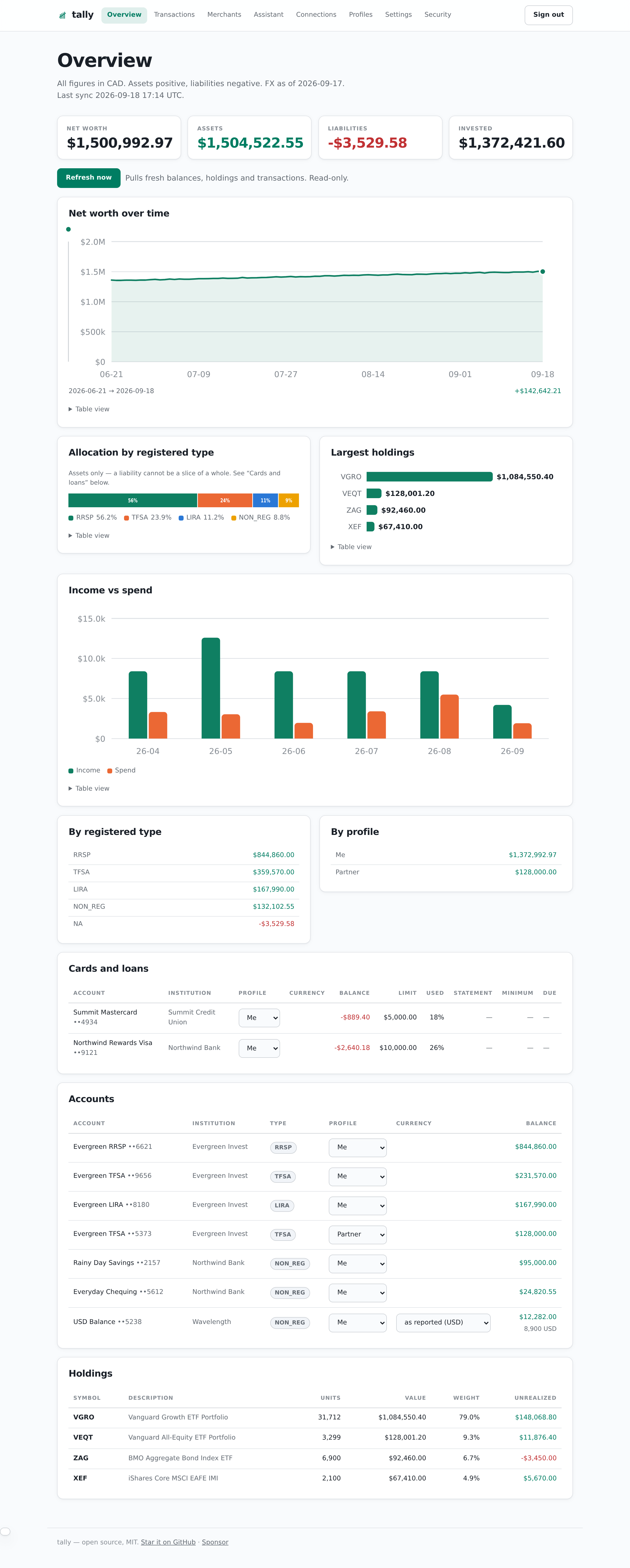
Try it in two minutes, with no credentials
Plaid Production access takes days and a signed agreement. So the repo ships a demo: a household's worth of invented accounts, holdings and six months of transactions, with nothing touching the network.
git clone https://github.com/yrameshk26/Tally.git && cd Tally
npm install
npm run demo        # writes data/demo.db and prints the command to start it
Every institution, merchant and figure in it is fictional, and it refuses to run against a database that already holds real accounts.
More screenshots
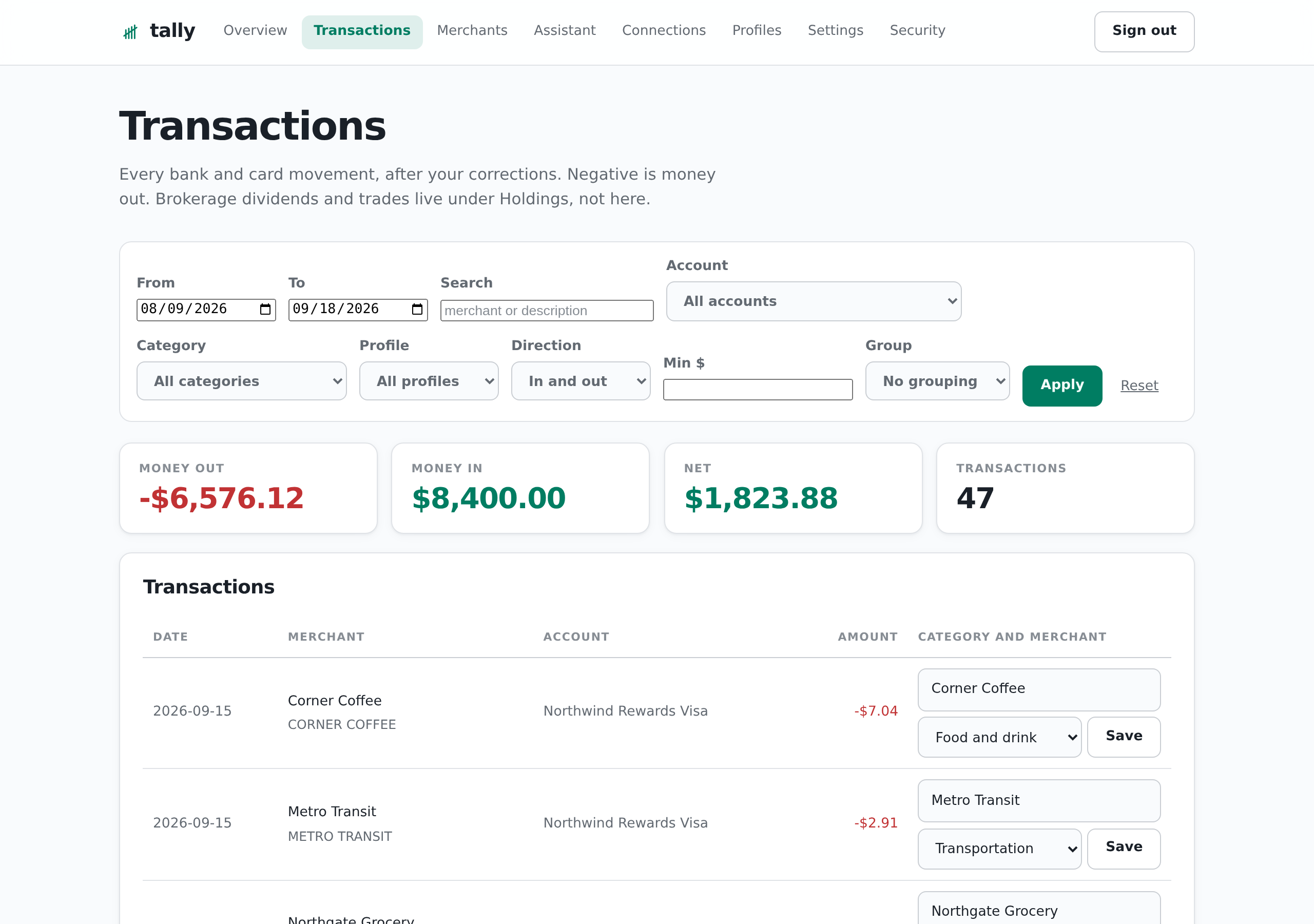
Transactions — filter, group, and correct what the bank got wrong.
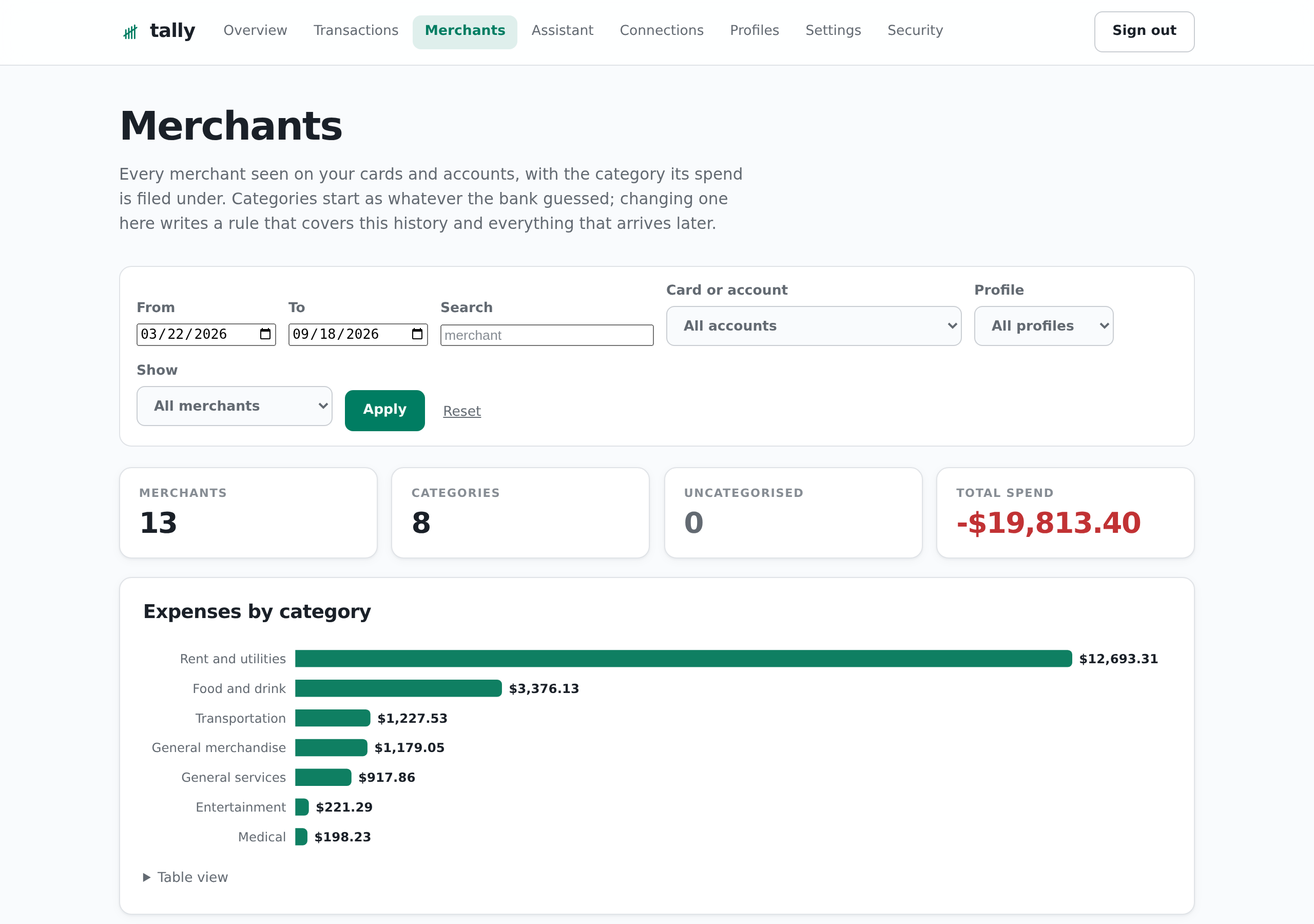
Merchants — every merchant, its category, and where the money goes.
| Source | What it covers | Auth | Cost |
|---|---|---|---|
| SnapTrade Personal | Wealthsimple (RRSP, LIRA, TFSA, DPSP, group plans), Questrade, Coinbase — balances, positions, activity | clientId + consumerKey | free |
| Plaid (Trial plan) | Banks and cards, US + Canada, 10 Items max — balances, transactions, card statement details | client_id + secret, one access_token per bank | free |
| Wise | Multi-currency balances and jars | read-only API token | free |
| Bank of Canada Valet | FX rates for CAD reporting | none | free |
Why self-host this
Every app that does this asks you to hand your bank logins to a company whose business model you don't control. This one runs on your own box: you hold the provider keys, the sqlite file is yours, and nothing leaves except the API calls you configured. It is read-only by construction — there is no code path that can place a trade or move money, and that is enforced as a project rule rather than an intention.
It is also a genuinely small program: no ORM, no charting library, no auth framework, ~320 tests, and a dependency list you can read in one screen.
If this is useful to you, a ⭐ on the repo helps more people find it — that is the only distribution this project has.
Before you start
Two things gate how far you get:
- Plaid Production access is the hard part. Plaid grants it to companies under a signed agreement, and the Trial plan is an evaluation tier capped at 10 Items. If you cannot get your own Plaid access, the bank and card half of this will not work for you.
- SnapTrade Personal keys are for personal use. They identify you. Do not use them to hold anyone else's data.
The SnapTrade, Wise and Bank of Canada halves work immediately with credentials anyone can create. This is self-hosted, single-household software: you run it, you hold the tokens, you agree to your own providers' terms. See SECURITY.md before deploying it anywhere.
Tools
Start with get_financial_summary — it answers a broad question in one call
instead of six, and narrows to exactly what you asked for:
// the headline picture
{ }
// everything, two years of it
{ "sections": ["all"], "months": 24 }
// just one thing, for one person
{ "sections": ["cashflow"], "profile": "spouse", "start": "2026-01-01", "end": "2026-06-30" }
Its sections: net_worth, profiles, accounts, cards, holdings,
holdings_by_account, activities, cashflow, transactions, history,
contribution_room, connections, fx, sync. Omit sections and you get
the headline set; the response names what it left out so nothing is hidden, and
row sections are capped and say when they truncated.
The narrow tools are still there, and are the right call for a specific question:
| Tool | Does |
|---|---|
get_financial_summary | The whole picture in one call, sections to narrow it |
get_net_worth | Total in CAD, split by profile, registered type, source, institution |
get_net_worth_history | Daily snapshots |
list_accounts | Every account with balance, currency, registered type, profile, card details |
get_holdings | Positions by symbol with concentration % and unrealized P&L, or by_account |
get_transactions | Bank and card transactions — negative is money out |
get_activities | Brokerage movements: dividends, interest, buys, sells, fees, contributions |
get_cashflow | Income vs spend by month, category, merchant, profile |
get_contribution_room | Remaining RRSP/TFSA/FHSA room per person |
set_contributed, set_room_limit | Correct the room figures by hand |
list_profiles, create_profile, rename_profile, delete_profile | Manage profiles |
move_account | Re-attribute an account to another profile |
get_spend_by_merchant | Rollup by merchant or category — where duplicate spellings show up |
set_transaction_category | Correct one transaction's merchant or category |
set_merchant_rule, list_merchant_rules, delete_merchant_rule | Rewrite every match, past and future |
set_merchant_category | File one merchant under a category, creating it if needed |
list_categories, add_category, delete_category | Categories beyond the bank's taxonomy |
set_account_currency | Reinterpret an account a bank labelled in the wrong currency |
plaid_status, plaid_relink_url | Item health, per-profile Item allowance, one-click repair |
sync_now, sync_report | Refresh on demand; tell the user how stale data is |
list_statements | Monthly statements Plaid can fetch, per bank and account |
get_statement | One statement PDF, streamed through memory and never stored |
backup_now | A consistent sqlite snapshot, safe against a live server |
fx_rates | The rates every balance was converted at |
Statements are off by default. Add statements to PLAID_OPTIONAL_PRODUCTS,
and anything linked afterwards that supports them will serve them. Plaid fixes
the consented product set when an Item is linked, so a bank connected earlier
returns ADDITIONAL_CONSENT_REQUIRED and can only be fixed by disconnecting and
adding it again. Support is per institution and thin outside the large US banks;
plaid_status reports supports_statements per connection, so check there
before enabling anything. The PDF is streamed through memory and handed to the caller:
it is never written to disk, cached, or stored in the database. SnapTrade has no
statements endpoint, so brokerage statements stay a manual download.
The built-in assistant
Off unless you configure it, and worth understanding before you do.
Everything else here keeps your data on this server: Claude reaches it through MCP, with your consent, one request at a time. A built-in assistant inverts that — it sends balances and transactions to whichever provider holds the API key, on every message. If you already use Claude, the MCP connector gives you the same answers without a second copy of your data leaving the box. This exists for people who would rather not, or who want a different model.
| Setting | Value |
|---|---|
LLM_PROVIDER | anthropic, openai, openrouter, or custom |
LLM_API_KEY | secret, encrypted at rest like every other provider key |
LLM_MODEL | blank uses the provider default |
LLM_BASE_URL | only for a custom or self-hosted OpenAI-compatible endpoint |
Set them under Settings (on the default profile — the assistant is install-level, not per profile) and use Test all providers to prove the key, base URL and model name together.
It runs the same tool registry as MCP, so it cannot reach a capability MCP does not have and cannot move money. Tool results are not replayed into later requests — they are large, they go stale the moment a sync runs, and the model can call the tool again; what it keeps is which tools it already used.
Correcting what the bank got wrong
Institutions send bad data, and a nightly sync overwrites anything written back into the synced rows. So corrections live in their own tables and are applied on read — which also makes a rule retroactive over all history the moment it exists.
| Correction | Fixes |
|---|---|
| Merchant rule | One company arriving under several spellings. A pattern rewrites the merchant and/or category of every match, past and future. |
| Transaction override | A single row no rule should generalise. |
| Account currency | A card the bank labels in the wrong currency, which silently inflates every figure on it by the FX rate. Recomputes the balance and every transaction on that account. |
| Category | A taxonomy of your own. Categories exist in their own right, so one can be created and then assigned — not merely observed in use. |
A rule matches one of four ways. contains, prefix and exact test the
institution's raw text (merchant field and description joined), which is what
merges misspellings. merchant tests the single name the Merchants tab groups
under, which is what makes "file this merchant under X" precise — a contains
rule for Amazon would also capture Amazon Web Services.
Precedence is narrowest first: transaction override, then the first matching
rule, then what the institution said. Corrections reach get_cashflow as well
as the transaction list, and the transfer/loan exclusion runs after them, so a
rule that recategorises something as a transfer really does drop it out of spend.
Before overriding a currency, check a statement: a US-issued card used in Canada genuinely is billed in USD, and the conversion back to CAD is then correct.
Two conventions worth knowing before reading a number:
- Assets are positive, liabilities negative in every balance. In
get_transactionsandget_cashflowa negative amount means money left the account; inget_activitiesthe brokerage's own sign is kept, so a dividend is positive. - Invested can sit below balance. A managed portfolio reports its value
without breaking out positions, so its money shows up in net worth but not in
holdings.
get_holdingswithby_account: trueshows both side by side.
Nothing here can move money. See rule 1 in CLAUDE.md.
Quick start
npm install
cp .env.example .env
sed -i "s/^MCP_SECRET=$/MCP_SECRET=$(openssl rand -hex 32)/" .env
sed -i "s/^TOKEN_ENC_KEY=$/TOKEN_ENC_KEY=$(openssl rand -hex 32)/" .env

npm run db:init     # creates data/finmcp.db, seeds room.json if present
npm run sync        # unconfigured sources report {skipped}; FX rates are fetched
npm run dev         # server on :8787
curl localhost:8787/health
curl -X POST localhost:8787/mcp/$MCP_SECRET \
  -H 'content-type: application/json' \
  -H 'accept: application/json, text/event-stream' \
  -d '{"jsonrpc":"2.0","id":1,"method":"tools/list"}'
Connecting the sources
Full walkthrough: docs/SETUP.md — every provider step by step, plus hashing the admin password, enabling two-factor, and the rules for keeping credentials out of git. The summary follows.
SnapTrade. Dashboard → enable 2FA → create a Personal API key → set
SNAPTRADE_CLIENT_ID and SNAPTRADE_CONSUMER_KEY. Connect Wealthsimple,
Questrade and Coinbase in the SnapTrade dashboard itself. Personal keys
identify the user by the key, so userId/userSecret are not sent — see
DECISIONS.md. Chase cards arrive through SnapTrade with $0 balances and are
deactivated by EXCLUDE_SNAPTRADE_CARDS=true; Plaid owns cards.
Plaid. Create a team at dashboard.plaid.com with an email that has never had
Production or Limited Production access, apply for the Trial plan, then set
PLAID_CLIENT_ID, PLAID_SECRET, PLAID_ENV=production. Add
http://localhost:8788/oauth-return under Allowed redirect URIs. Then:
npm run link # http://localhost:8788 — local only
Connect up to 10 Items per profile — the Trial cap is per Plaid team, and
each profile has its own credentials, so the same bank under two profiles is two
connections rather than a duplicate. Each successful link writes a row to
plaid_items; plaid_status shows their health and the per-profile allowance,
and plaid_relink_url repairs one that goes login_required.
Plaid behaviour is set by these variables:
| Variable | Default | Notes |
|---|---|---|
PLAID_PRODUCTS | transactions | Required products. Every one listed narrows which institutions Link will offer, so keep it minimal. |
PLAID_OPTIONAL_PRODUCTS | liabilities | Fetched best-effort; never blocks Item creation. Add statements here to enable statement downloads. |
PLAID_COUNTRY_CODES | US,CA | |
PLAID_TRANSACTION_DAYS | 730 | |
PLAID_STATEMENT_MONTHS | 24 | Statement window requested at link time. Plaid's own cap is 24. |
Wise. Settings → API tokens → create a read-only token → WISE_API_TOKEN.
Contribution room
Seed limits from a CRA notice of assessment:
cp room.example.json room.json   # edit, then:
npm run db:init
Detection is conservative on purpose. Brokerage activity tagged
CONTRIBUTION/DEPOSIT is attributable to a specific registered account and
counts. A bank transfer into Wealthsimple cannot be split across RRSP and TFSA
from the bank side, so it is reported as
unattributed_brokerage_transfers_cad and never silently subtracted. Set the
real number with set_contributed and it wins over detection.
Profiles
Plaid caps Items at 10 per team, so a single set of credentials means at most 10 linked banks. A profile is both a person or bucket and its own set of provider keys, so five profiles means up to 50.
Two fields keep this honest:
- a connection's source profile is fixed — an account cannot be re-homed to a different Plaid team without re-linking it, and a sync only ever deactivates accounts belonging to the credentials it just used;
- an account's profile is attribution, and is movable, so a card linked under one profile's Plaid team can still count towards another's net worth.
Sync runs every source once per profile. A profile with no credentials reports
{skipped} and costs nothing.
Web UI (optional)
Off by default — with UI_ENABLED=false the server is a bare MCP endpoint with
no login surface at all. Turn it on to onboard credentials and link banks
without copying a database around:
npm run hash-password # prints ADMIN_PASSWORD_HASH; the password is never stored
The hash contains $. In .env it is read literally, but anywhere a shell
reads it — docker run -e, an inline VAR=... command — wrap it in single
quotes, or the shell expands it to an empty value and locks you out.
UI_ENABLED=true
ADMIN_USERNAME=you
ADMIN_PASSWORD_HASH=$argon2id$v=19$m=19456,p=1,t=2$...
TOKEN_ENC_KEY=...              # required: encrypts stored secrets and the TOTP seed
Five pages:
- Overview — net worth, assets, liabilities and invested; net worth over time; allocation by registered type; largest holdings; income vs spend by month; cards and loans with limit, utilisation, statement, minimum and due date; every account and every position. Each chart has a table view, so no number is gated behind a hover. Accounts and cards carry a currency control where the institution's label could be wrong.
- Transactions — filter by date, account, category, profile, direction,
minimum and free text; money out / in / net for the filtered set; group by
merchant or category. Edit a row's merchant and category inline, or "apply to
all" on a merchant group to write a rule. Filters live in the query string, so
a view is a URL you can bookmark. Categories display as ordinary text
(
Food and drink, notFOOD_AND_DRINK); the stored value is unchanged. - Merchants — every merchant seen on your cards, the category its spend is filed under, which cards paid it, and when. Set a category per merchant from a picker, filter to uncategorised only, and add categories of your own. Above it, expenses by category as a ranked bar chart plus a totals table with each category's share.
- Assistant (optional, off by default) — a built-in chat that answers from your accounts using the same read-only tools the MCP server exposes. Replies render as Markdown with tables and charts, every answer shows which tools it called and what they returned, and ⌘P prints a clean transcript.
- Connections — Plaid Link to add banks and cards, Item health, one-click repair, disconnect.
- Profiles — up to 5, each with its own provider credentials; move an account between them.
- Settings — provider credentials, stored encrypted in the database and overriding the environment without a redeploy, with a "test all providers" check.
- Security — two-factor enrolment, active sessions, authorized MCP clients, sign out everywhere.
Signed out when idle. The browser session ends after 30 minutes without
activity, and a week after sign-in however much it is used. Set
SESSION_IDLE_MINUTES to change the idle window, or 0 to keep only the
weekly one. The page reports activity back while you are reading it and signs
itself out on screen when you are not, so an abandoned tab stops showing
balances. Claude is unaffected: a connector authenticates with an OAuth token,
not this cookie.
Turn on two-factor authentication, straight after your first sign-in. A single password is otherwise the only thing between the public internet and every balance, transaction and stored bank token. Security → start enrolment → add the secret to any authenticator app → confirm with a code. The secret is not saved until a code proves your app holds it, so a half-finished enrolment cannot lock you out. There are no printed backup codes — keep the secret in your password manager. Full steps and the recovery path are in docs/SETUP.md.
Deploying
See DEPLOY.md — Docker image, Dokploy application, persistent
volume at /data, HTTPS domain, and adding the server to Claude.ai as a custom
connector.
Connecting Claude
With the web UI on, the MCP endpoint is https://<host>/mcp — no secret in
the URL. Add it as a custom connector; Claude sends you to sign in (password
plus authenticator code) and asks you to allow access. Authorized apps are
listed on the Security page and can be revoked there.
Under the hood it is OAuth 2.1 with dynamic client registration and mandatory
PKCE; tokens are stored only as hashes. The legacy /mcp/<MCP_SECRET> route
stays on until you set MCP_ALLOW_PATH_SECRET=false.
Security
Read SECURITY.md before deploying. The short version:
- Prefer the OAuth endpoint. The legacy secret-in-URL route leaks the way URLs leak — including into reverse-proxy access logs — so turn it off once the connector has been re-added.
- Set
TRUST_PROXYto the number of proxy hops in front of the app, or the per-IP rate limiter degrades into a single shared bucket. - Back up
TOKEN_ENC_KEYsomewhere other than the server. Losing it means re-linking every bank. - Leave the idle timeout on.
SESSION_IDLE_MINUTES=0means a tab you forgot about stays signed in for a week. - Report vulnerabilities privately via GitHub Security Advisories, not issues.
Development
| Command | Does |
|---|---|
npm run demo | Seed a fictional database to try it without credentials |
npm run dev | Run the server from TypeScript |
npm run check | Typecheck + 323 tests |
npm run sync | One-shot sync; exits non-zero if a source errored |
npm run db:init | Create the database, seeding room.json if present |
npm run hash-password | Print an ADMIN_PASSWORD_HASH |
npm run link | Plaid Link helper on :8788 — local machine only |
npm run backup | Manual sqlite backup + prune |
npm run check
Tests cover FX sign and rounding, the registered-type classifier, Plaid sign
normalisation, token encryption, SnapTrade request signing and holdings
mapping, fixture-based net-worth aggregation against a fixed household
shape, profiles and the schema migrations, the OAuth authorization server
(PKCE, code replay, token rotation), the rendered pages (escaping, no inline
handlers under the CSP), the summary's section selection, correction precedence
and reach, category assignment and its match precision, the Markdown renderer
against hostile input, the per-profile Plaid
Item allowance, both session clocks (idle and absolute, and that neither
extends the other), the guarantee that statement
PDFs are never persisted (asserted against the source), and the HTTP endpoint
end to end (auth, 405 on GET, rate limiting, tools/list, a tool call).
Contributing
Issues and pull requests are welcome. Fork the repository, branch, and open a
pull request against main — there is no other way in, and it is the way this
project expects changes to arrive. CONTRIBUTING.md has the
exact commands and the rules that are non-negotiable (read-only forever,
statement PDFs never persisted, docs ship in the same commit as the change).
Run npm run check before you open it. Source adapters for other institutions
and other countries' registered-account types are the most useful thing anyone
could add.
Please report vulnerabilities privately — see SECURITY.md.
Good places to start, roughly by usefulness:
- A source adapter for an institution this does not reach. The contract is
small —
src/sources/*.tsfetch, map to the shared row shapes insrc/store.ts, and report per-source status. Read-only, always. - Registered-account types for another tax regime. The classifier in
src/lib/registered.tsknows RRSP, TFSA, LIRA, DPSP and FHSA — it is Canada-shaped, and an ISA or a 401(k) would each be a small patch. - A bug you hit against a real bank. These are the hardest to find and the most valuable to report, because nobody can test every institution.
sync_nowtimes out in MCP clients: the Plaid loop is strictly sequential and takes ~150s for a dozen banks. Bounded concurrency plus returning early would fix it.
CLAUDE.md is the architecture document — the layout tree, and the rules that
exist because breaking one caused a real outage.
Supporting the project
This is maintained by one person, in evenings, for free.
- ⭐ Star the repo. Free, and it is how anyone else finds this.
- Fork it and send a pull request. A fix you carry in your own fork helps one person; the same fix as a PR helps everyone who connects that bank.
- Report what breaks. A good bug report against a real institution is worth more than a donation — nobody can test every bank.
- Sponsor if it saved you the subscription you were otherwise going to pay for. Entirely optional, and it changes nothing about the software: no paid tier, no telemetry, no feature held back.
License
MIT — see LICENSE. Provided as is, with no warranty. You are responsible for your own credentials and for complying with the terms of every data provider you connect. Nothing here is financial advice, and the numbers it reports are only as correct as what your institutions return.
Contributors

13 commits
Similar repos


Languages
TypeScript
98.7%
HTML
1.1%
See what people are saying (1)
README
tally
A personal, read-only net-worth MCP server for Claude. It aggregates brokerages, banks, cards and multi-currency balances into one CAD picture and exposes it to Claude as MCP tools. Ask Claude "how am I doing?" and it answers from your own accounts.
There is also an optional web UI — sign-in, provider credentials, Plaid Link, and an overview with charts — but it exists to run the server, not to replace Claude. Everything the UI shows is available as a tool.
Try it in two minutes, with no credentials
Plaid Production access takes days and a signed agreement. So the repo ships a demo: a household's worth of invented accounts, holdings and six months of transactions, with nothing touching the network.
git clone https://github.com/yrameshk26/Tally.git && cd Tally
npm install
npm run demo        # writes data/demo.db and prints the command to start it
Every institution, merchant and figure in it is fictional, and it refuses to run against a database that already holds real accounts.
More screenshots
Transactions — filter, group, and correct what the bank got wrong.
Merchants — every merchant, its category, and where the money goes.
| Source | What it covers | Auth | Cost |
|---|---|---|---|
| SnapTrade Personal | Wealthsimple (RRSP, LIRA, TFSA, DPSP, group plans), Questrade, Coinbase — balances, positions, activity | clientId + consumerKey | free |
| Plaid (Trial plan) | Banks and cards, US + Canada, 10 Items max — balances, transactions, card statement details | client_id + secret, one access_token per bank | free |
| Wise | Multi-currency balances and jars | read-only API token | free |
| Bank of Canada Valet | FX rates for CAD reporting | none | free |
Why self-host this
Every app that does this asks you to hand your bank logins to a company whose business model you don't control. This one runs on your own box: you hold the provider keys, the sqlite file is yours, and nothing leaves except the API calls you configured. It is read-only by construction — there is no code path that can place a trade or move money, and that is enforced as a project rule rather than an intention.
It is also a genuinely small program: no ORM, no charting library, no auth framework, ~320 tests, and a dependency list you can read in one screen.
If this is useful to you, a ⭐ on the repo helps more people find it — that is the only distribution this project has.
Before you start
Two things gate how far you get:
- Plaid Production access is the hard part. Plaid grants it to companies under a signed agreement, and the Trial plan is an evaluation tier capped at 10 Items. If you cannot get your own Plaid access, the bank and card half of this will not work for you.
- SnapTrade Personal keys are for personal use. They identify you. Do not use them to hold anyone else's data.
The SnapTrade, Wise and Bank of Canada halves work immediately with credentials anyone can create. This is self-hosted, single-household software: you run it, you hold the tokens, you agree to your own providers' terms. See SECURITY.md before deploying it anywhere.
Tools
Start with get_financial_summary — it answers a broad question in one call
instead of six, and narrows to exactly what you asked for:
// the headline picture
{ }
// everything, two years of it
{ "sections": ["all"], "months": 24 }
// just one thing, for one person
{ "sections": ["cashflow"], "profile": "spouse", "start": "2026-01-01", "end": "2026-06-30" }
Its sections: net_worth, profiles, accounts, cards, holdings,
holdings_by_account, activities, cashflow, transactions, history,
contribution_room, connections, fx, sync. Omit sections and you get
the headline set; the response names what it left out so nothing is hidden, and
row sections are capped and say when they truncated.
The narrow tools are still there, and are the right call for a specific question:
| Tool | Does |
|---|---|
get_financial_summary | The whole picture in one call, sections to narrow it |
get_net_worth | Total in CAD, split by profile, registered type, source, institution |
get_net_worth_history | Daily snapshots |
list_accounts | Every account with balance, currency, registered type, profile, card details |
get_holdings | Positions by symbol with concentration % and unrealized P&L, or by_account |
get_transactions | Bank and card transactions — negative is money out |
get_activities | Brokerage movements: dividends, interest, buys, sells, fees, contributions |
get_cashflow | Income vs spend by month, category, merchant, profile |
get_contribution_room | Remaining RRSP/TFSA/FHSA room per person |
set_contributed, set_room_limit | Correct the room figures by hand |
list_profiles, create_profile, rename_profile, delete_profile | Manage profiles |
move_account | Re-attribute an account to another profile |
get_spend_by_merchant | Rollup by merchant or category — where duplicate spellings show up |
set_transaction_category | Correct one transaction's merchant or category |
set_merchant_rule, list_merchant_rules, delete_merchant_rule | Rewrite every match, past and future |
set_merchant_category | File one merchant under a category, creating it if needed |
list_categories, add_category, delete_category | Categories beyond the bank's taxonomy |
set_account_currency | Reinterpret an account a bank labelled in the wrong currency |
plaid_status, plaid_relink_url | Item health, per-profile Item allowance, one-click repair |
sync_now, sync_report | Refresh on demand; tell the user how stale data is |
list_statements | Monthly statements Plaid can fetch, per bank and account |
get_statement | One statement PDF, streamed through memory and never stored |
backup_now | A consistent sqlite snapshot, safe against a live server |
fx_rates | The rates every balance was converted at |
Statements are off by default. Add statements to PLAID_OPTIONAL_PRODUCTS,
and anything linked afterwards that supports them will serve them. Plaid fixes
the consented product set when an Item is linked, so a bank connected earlier
returns ADDITIONAL_CONSENT_REQUIRED and can only be fixed by disconnecting and
adding it again. Support is per institution and thin outside the large US banks;
plaid_status reports supports_statements per connection, so check there
before enabling anything. The PDF is streamed through memory and handed to the caller:
it is never written to disk, cached, or stored in the database. SnapTrade has no
statements endpoint, so brokerage statements stay a manual download.
The built-in assistant
Off unless you configure it, and worth understanding before you do.
Everything else here keeps your data on this server: Claude reaches it through MCP, with your consent, one request at a time. A built-in assistant inverts that — it sends balances and transactions to whichever provider holds the API key, on every message. If you already use Claude, the MCP connector gives you the same answers without a second copy of your data leaving the box. This exists for people who would rather not, or who want a different model.
| Setting | Value |
|---|---|
LLM_PROVIDER | anthropic, openai, openrouter, or custom |
LLM_API_KEY | secret, encrypted at rest like every other provider key |
LLM_MODEL | blank uses the provider default |
LLM_BASE_URL | only for a custom or self-hosted OpenAI-compatible endpoint |
Set them under Settings (on the default profile — the assistant is install-level, not per profile) and use Test all providers to prove the key, base URL and model name together.
It runs the same tool registry as MCP, so it cannot reach a capability MCP does not have and cannot move money. Tool results are not replayed into later requests — they are large, they go stale the moment a sync runs, and the model can call the tool again; what it keeps is which tools it already used.
Correcting what the bank got wrong
Institutions send bad data, and a nightly sync overwrites anything written back into the synced rows. So corrections live in their own tables and are applied on read — which also makes a rule retroactive over all history the moment it exists.
| Correction | Fixes |
|---|---|
| Merchant rule | One company arriving under several spellings. A pattern rewrites the merchant and/or category of every match, past and future. |
| Transaction override | A single row no rule should generalise. |
| Account currency | A card the bank labels in the wrong currency, which silently inflates every figure on it by the FX rate. Recomputes the balance and every transaction on that account. |
| Category | A taxonomy of your own. Categories exist in their own right, so one can be created and then assigned — not merely observed in use. |
A rule matches one of four ways. contains, prefix and exact test the
institution's raw text (merchant field and description joined), which is what
merges misspellings. merchant tests the single name the Merchants tab groups
under, which is what makes "file this merchant under X" precise — a contains
rule for Amazon would also capture Amazon Web Services.
Precedence is narrowest first: transaction override, then the first matching
rule, then what the institution said. Corrections reach get_cashflow as well
as the transaction list, and the transfer/loan exclusion runs after them, so a
rule that recategorises something as a transfer really does drop it out of spend.
Before overriding a currency, check a statement: a US-issued card used in Canada genuinely is billed in USD, and the conversion back to CAD is then correct.
Two conventions worth knowing before reading a number:
- Assets are positive, liabilities negative in every balance. In
get_transactionsandget_cashflowa negative amount means money left the account; inget_activitiesthe brokerage's own sign is kept, so a dividend is positive. - Invested can sit below balance. A managed portfolio reports its value
without breaking out positions, so its money shows up in net worth but not in
holdings.
get_holdingswithby_account: trueshows both side by side.
Nothing here can move money. See rule 1 in CLAUDE.md.
Quick start
npm install
cp .env.example .env
sed -i "s/^MCP_SECRET=$/MCP_SECRET=$(openssl rand -hex 32)/" .env
sed -i "s/^TOKEN_ENC_KEY=$/TOKEN_ENC_KEY=$(openssl rand -hex 32)/" .env

npm run db:init     # creates data/finmcp.db, seeds room.json if present
npm run sync        # unconfigured sources report {skipped}; FX rates are fetched
npm run dev         # server on :8787
curl localhost:8787/health
curl -X POST localhost:8787/mcp/$MCP_SECRET \
  -H 'content-type: application/json' \
  -H 'accept: application/json, text/event-stream' \
  -d '{"jsonrpc":"2.0","id":1,"method":"tools/list"}'
Connecting the sources
Full walkthrough: docs/SETUP.md — every provider step by step, plus hashing the admin password, enabling two-factor, and the rules for keeping credentials out of git. The summary follows.
SnapTrade. Dashboard → enable 2FA → create a Personal API key → set
SNAPTRADE_CLIENT_ID and SNAPTRADE_CONSUMER_KEY. Connect Wealthsimple,
Questrade and Coinbase in the SnapTrade dashboard itself. Personal keys
identify the user by the key, so userId/userSecret are not sent — see
DECISIONS.md. Chase cards arrive through SnapTrade with $0 balances and are
deactivated by EXCLUDE_SNAPTRADE_CARDS=true; Plaid owns cards.
Plaid. Create a team at dashboard.plaid.com with an email that has never had
Production or Limited Production access, apply for the Trial plan, then set
PLAID_CLIENT_ID, PLAID_SECRET, PLAID_ENV=production. Add
http://localhost:8788/oauth-return under Allowed redirect URIs. Then:
npm run link # http://localhost:8788 — local only
Connect up to 10 Items per profile — the Trial cap is per Plaid team, and
each profile has its own credentials, so the same bank under two profiles is two
connections rather than a duplicate. Each successful link writes a row to
plaid_items; plaid_status shows their health and the per-profile allowance,
and plaid_relink_url repairs one that goes login_required.
Plaid behaviour is set by these variables:
| Variable | Default | Notes |
|---|---|---|
PLAID_PRODUCTS | transactions | Required products. Every one listed narrows which institutions Link will offer, so keep it minimal. |
PLAID_OPTIONAL_PRODUCTS | liabilities | Fetched best-effort; never blocks Item creation. Add statements here to enable statement downloads. |
PLAID_COUNTRY_CODES | US,CA | |
PLAID_TRANSACTION_DAYS | 730 | |
PLAID_STATEMENT_MONTHS | 24 | Statement window requested at link time. Plaid's own cap is 24. |
Wise. Settings → API tokens → create a read-only token → WISE_API_TOKEN.
Contribution room
Seed limits from a CRA notice of assessment:
cp room.example.json room.json   # edit, then:
npm run db:init
Detection is conservative on purpose. Brokerage activity tagged
CONTRIBUTION/DEPOSIT is attributable to a specific registered account and
counts. A bank transfer into Wealthsimple cannot be split across RRSP and TFSA
from the bank side, so it is reported as
unattributed_brokerage_transfers_cad and never silently subtracted. Set the
real number with set_contributed and it wins over detection.
Profiles
Plaid caps Items at 10 per team, so a single set of credentials means at most 10 linked banks. A profile is both a person or bucket and its own set of provider keys, so five profiles means up to 50.
Two fields keep this honest:
- a connection's source profile is fixed — an account cannot be re-homed to a different Plaid team without re-linking it, and a sync only ever deactivates accounts belonging to the credentials it just used;
- an account's profile is attribution, and is movable, so a card linked under one profile's Plaid team can still count towards another's net worth.
Sync runs every source once per profile. A profile with no credentials reports
{skipped} and costs nothing.
Web UI (optional)
Off by default — with UI_ENABLED=false the server is a bare MCP endpoint with
no login surface at all. Turn it on to onboard credentials and link banks
without copying a database around:
npm run hash-password # prints ADMIN_PASSWORD_HASH; the password is never stored
The hash contains $. In .env it is read literally, but anywhere a shell
reads it — docker run -e, an inline VAR=... command — wrap it in single
quotes, or the shell expands it to an empty value and locks you out.
UI_ENABLED=true
ADMIN_USERNAME=you
ADMIN_PASSWORD_HASH=$argon2id$v=19$m=19456,p=1,t=2$...
TOKEN_ENC_KEY=...              # required: encrypts stored secrets and the TOTP seed
Five pages:
- Overview — net worth, assets, liabilities and invested; net worth over time; allocation by registered type; largest holdings; income vs spend by month; cards and loans with limit, utilisation, statement, minimum and due date; every account and every position. Each chart has a table view, so no number is gated behind a hover. Accounts and cards carry a currency control where the institution's label could be wrong.
- Transactions — filter by date, account, category, profile, direction,
minimum and free text; money out / in / net for the filtered set; group by
merchant or category. Edit a row's merchant and category inline, or "apply to
all" on a merchant group to write a rule. Filters live in the query string, so
a view is a URL you can bookmark. Categories display as ordinary text
(
Food and drink, notFOOD_AND_DRINK); the stored value is unchanged. - Merchants — every merchant seen on your cards, the category its spend is filed under, which cards paid it, and when. Set a category per merchant from a picker, filter to uncategorised only, and add categories of your own. Above it, expenses by category as a ranked bar chart plus a totals table with each category's share.
- Assistant (optional, off by default) — a built-in chat that answers from your accounts using the same read-only tools the MCP server exposes. Replies render as Markdown with tables and charts, every answer shows which tools it called and what they returned, and ⌘P prints a clean transcript.
- Connections — Plaid Link to add banks and cards, Item health, one-click repair, disconnect.
- Profiles — up to 5, each with its own provider credentials; move an account between them.
- Settings — provider credentials, stored encrypted in the database and overriding the environment without a redeploy, with a "test all providers" check.
- Security — two-factor enrolment, active sessions, authorized MCP clients, sign out everywhere.
Signed out when idle. The browser session ends after 30 minutes without
activity, and a week after sign-in however much it is used. Set
SESSION_IDLE_MINUTES to change the idle window, or 0 to keep only the
weekly one. The page reports activity back while you are reading it and signs
itself out on screen when you are not, so an abandoned tab stops showing
balances. Claude is unaffected: a connector authenticates with an OAuth token,
not this cookie.
Turn on two-factor authentication, straight after your first sign-in. A single password is otherwise the only thing between the public internet and every balance, transaction and stored bank token. Security → start enrolment → add the secret to any authenticator app → confirm with a code. The secret is not saved until a code proves your app holds it, so a half-finished enrolment cannot lock you out. There are no printed backup codes — keep the secret in your password manager. Full steps and the recovery path are in docs/SETUP.md.
Deploying
See DEPLOY.md — Docker image, Dokploy application, persistent
volume at /data, HTTPS domain, and adding the server to Claude.ai as a custom
connector.
Connecting Claude
With the web UI on, the MCP endpoint is https://<host>/mcp — no secret in
the URL. Add it as a custom connector; Claude sends you to sign in (password
plus authenticator code) and asks you to allow access. Authorized apps are
listed on the Security page and can be revoked there.
Under the hood it is OAuth 2.1 with dynamic client registration and mandatory
PKCE; tokens are stored only as hashes. The legacy /mcp/<MCP_SECRET> route
stays on until you set MCP_ALLOW_PATH_SECRET=false.
Security
Read SECURITY.md before deploying. The short version:
- Prefer the OAuth endpoint. The legacy secret-in-URL route leaks the way URLs leak — including into reverse-proxy access logs — so turn it off once the connector has been re-added.
- Set
TRUST_PROXYto the number of proxy hops in front of the app, or the per-IP rate limiter degrades into a single shared bucket. - Back up
TOKEN_ENC_KEYsomewhere other than the server. Losing it means re-linking every bank. - Leave the idle timeout on.
SESSION_IDLE_MINUTES=0means a tab you forgot about stays signed in for a week. - Report vulnerabilities privately via GitHub Security Advisories, not issues.
Development
| Command | Does |
|---|---|
npm run demo | Seed a fictional database to try it without credentials |
npm run dev | Run the server from TypeScript |
npm run check | Typecheck + 323 tests |
npm run sync | One-shot sync; exits non-zero if a source errored |
npm run db:init | Create the database, seeding room.json if present |
npm run hash-password | Print an ADMIN_PASSWORD_HASH |
npm run link | Plaid Link helper on :8788 — local machine only |
npm run backup | Manual sqlite backup + prune |
npm run check
Tests cover FX sign and rounding, the registered-type classifier, Plaid sign
normalisation, token encryption, SnapTrade request signing and holdings
mapping, fixture-based net-worth aggregation against a fixed household
shape, profiles and the schema migrations, the OAuth authorization server
(PKCE, code replay, token rotation), the rendered pages (escaping, no inline
handlers under the CSP), the summary's section selection, correction precedence
and reach, category assignment and its match precision, the Markdown renderer
against hostile input, the per-profile Plaid
Item allowance, both session clocks (idle and absolute, and that neither
extends the other), the guarantee that statement
PDFs are never persisted (asserted against the source), and the HTTP endpoint
end to end (auth, 405 on GET, rate limiting, tools/list, a tool call).
Contributing
Issues and pull requests are welcome. Fork the repository, branch, and open a
pull request against main — there is no other way in, and it is the way this
project expects changes to arrive. CONTRIBUTING.md has the
exact commands and the rules that are non-negotiable (read-only forever,
statement PDFs never persisted, docs ship in the same commit as the change).
Run npm run check before you open it. Source adapters for other institutions
and other countries' registered-account types are the most useful thing anyone
could add.
Please report vulnerabilities privately — see SECURITY.md.
Good places to start, roughly by usefulness:
- A source adapter for an institution this does not reach. The contract is
small —
src/sources/*.tsfetch, map to the shared row shapes insrc/store.ts, and report per-source status. Read-only, always. - Registered-account types for another tax regime. The classifier in
src/lib/registered.tsknows RRSP, TFSA, LIRA, DPSP and FHSA — it is Canada-shaped, and an ISA or a 401(k) would each be a small patch. - A bug you hit against a real bank. These are the hardest to find and the most valuable to report, because nobody can test every institution.
sync_nowtimes out in MCP clients: the Plaid loop is strictly sequential and takes ~150s for a dozen banks. Bounded concurrency plus returning early would fix it.
CLAUDE.md is the architecture document — the layout tree, and the rules that
exist because breaking one caused a real outage.
Supporting the project
This is maintained by one person, in evenings, for free.
- ⭐ Star the repo. Free, and it is how anyone else finds this.
- Fork it and send a pull request. A fix you carry in your own fork helps one person; the same fix as a PR helps everyone who connects that bank.
- Report what breaks. A good bug report against a real institution is worth more than a donation — nobody can test every bank.
- Sponsor if it saved you the subscription you were otherwise going to pay for. Entirely optional, and it changes nothing about the software: no paid tier, no telemetry, no feature held back.
License
MIT — see LICENSE. Provided as is, with no warranty. You are responsible for your own credentials and for complying with the terms of every data provider you connect. Nothing here is financial advice, and the numbers it reports are only as correct as what your institutions return.
Similar repos
Contributors
13 commits
Languages
TypeScript
98.7%
HTML
1.1%