Fix and remove annoying web elements such as sticky headers, floating boxes, floating videos, dickbars, social share bars and other distracting elements.
1,350
5,312 commits
updated May 3, 2024
Are you tired of not being able to use all of your screen real estate for the text that matters on a website because floating headers and other distracting elements are blocking your view? Reclaim your screen real estate with Web Annoyances Ultralist!
Block annoying web elements such as sticky headers, dickbars, floating headers, scrolling headers, fixed headers, scrolling videos, stickynavs, social icons, social share bars, smartphone app banners, app download prompts, cookie notices, GDPR warnings, scroll to top buttons, modal overlays, interstitial site overlays, removed or hidden overflow scroll bars, subscription nags, and generally distracting elements that have increasingly been turning the web into a user-hostile environment.
When possible, sticky headers, stickynavs, floating elements, scrolling videos and more will be pinned in place to prevent site breakage.
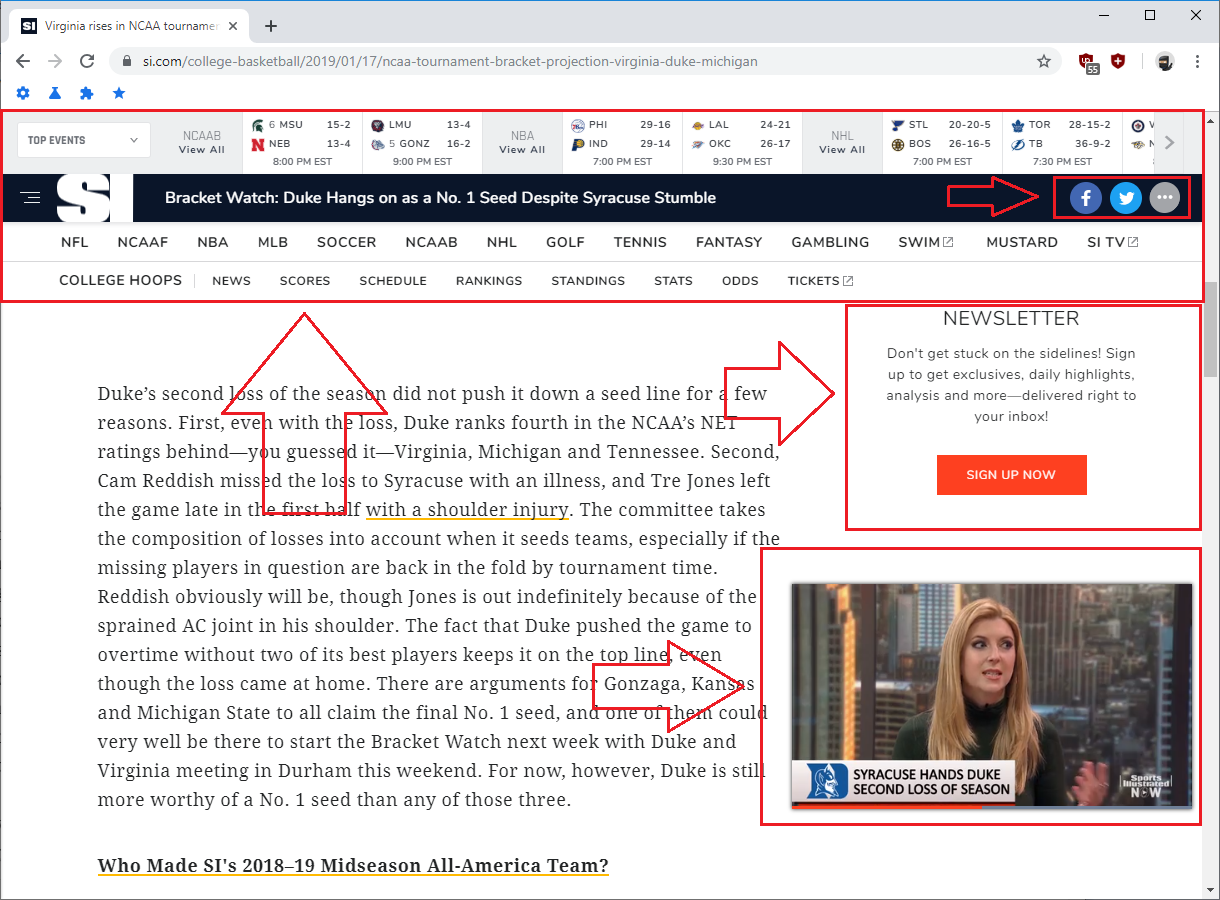
Above screenshot taken using uBlock Origin Default Filter Lists

Above screenshot taken using uBlock Origin Default Filter Lists + Web Annoyances Ultralist
Head over to the demonstration page for additional visual examples of Web Annoyances Ultralist in action.
This filter list aims to remove annoying web elements that block your view of the screen and is created and optimized using the uBlock Origin Extended Syntax.
For the best user experience, please use this filter list with  uBlock Origin,
 AdGuard for
  , or AdGuard for
  .
.
Browser specific download locations are located below:
uBlock Origin for  Google Chrome uBlock Origin for
  Mozilla FireFox uBlock Origin for
 Apple Safari uBlock Origin for
  Opera AdGuard for AdGuard for
 Click the following: Add Web Annoyances Ultralist to Custom uBlock Origin Filters.
After clicking the Link above, a warning box will appear asking you to confirm the installation - Click 'OK' to add the list to your Custom Filter Lists.
The warning box will look like the following:

After clicking 'OK' the filter list should be installed.
You can validate the list installed properly by navigating to your uBlock Origin Dashboard and clicking on the Filter lists tab. Scroll to the bottom of the screen and verify Web Annoyances Ultralist is showing up in your custom section.

Step-by-Step install instructions are available in the wiki.
Join the yourduskquibbles Discord Server @ https://discord.me/yourduskquibbles for faster reporting of issues and chat.
https://cdn.staticaly.com/gh/yourduskquibbles/webannoyances/master/ultralist.txt
https://cdn.jsdelivr.net/gh/yourduskquibbles/webannoyances/ultralist.txt
3,272 followers · starred Dec 2018
51 followers · starred Jan 2020
1,185 followers · starred Aug 2018
317 followers · starred Aug 2022
Fix and remove annoying web elements such as sticky headers, floating boxes, floating videos, dickbars, social share bars and other distracting elements.
1,350
5,312 commits
updated May 3, 2024
Are you tired of not being able to use all of your screen real estate for the text that matters on a website because floating headers and other distracting elements are blocking your view? Reclaim your screen real estate with Web Annoyances Ultralist!
Block annoying web elements such as sticky headers, dickbars, floating headers, scrolling headers, fixed headers, scrolling videos, stickynavs, social icons, social share bars, smartphone app banners, app download prompts, cookie notices, GDPR warnings, scroll to top buttons, modal overlays, interstitial site overlays, removed or hidden overflow scroll bars, subscription nags, and generally distracting elements that have increasingly been turning the web into a user-hostile environment.
When possible, sticky headers, stickynavs, floating elements, scrolling videos and more will be pinned in place to prevent site breakage.
Above screenshot taken using uBlock Origin Default Filter Lists
Above screenshot taken using uBlock Origin Default Filter Lists + Web Annoyances Ultralist
Head over to the demonstration page for additional visual examples of Web Annoyances Ultralist in action.
This filter list aims to remove annoying web elements that block your view of the screen and is created and optimized using the uBlock Origin Extended Syntax.
For the best user experience, please use this filter list with uBlock Origin,
AdGuard for , or AdGuard for .
Browser specific download locations are located below:
uBlock Origin for Google Chrome uBlock Origin for Mozilla FireFox uBlock Origin for
Apple Safari uBlock Origin for Opera AdGuard for AdGuard for Click the following: Add Web Annoyances Ultralist to Custom uBlock Origin Filters.
After clicking the Link above, a warning box will appear asking you to confirm the installation - Click 'OK' to add the list to your Custom Filter Lists.
The warning box will look like the following:
After clicking 'OK' the filter list should be installed.
You can validate the list installed properly by navigating to your uBlock Origin Dashboard and clicking on the Filter lists tab. Scroll to the bottom of the screen and verify Web Annoyances Ultralist is showing up in your custom section.
Step-by-Step install instructions are available in the wiki.
Join the yourduskquibbles Discord Server @ https://discord.me/yourduskquibbles for faster reporting of issues and chat.
https://cdn.staticaly.com/gh/yourduskquibbles/webannoyances/master/ultralist.txt
https://cdn.jsdelivr.net/gh/yourduskquibbles/webannoyances/ultralist.txt
3,272 followers · starred Dec 2018
51 followers · starred Jan 2020
1,185 followers · starred Aug 2018
317 followers · starred Aug 2022


 Android
 Kiwi Browser for