
MAGIC-TTS: Fine-Grained Controllable Speech Synthesis with Explicit Local Duration and Pause Control
Python
55
0 commits
updated Apr 28, 2026
README

MAGIC-TTS: Fine-Grained Controllable Speech Synthesis with Explicit Local Duration and Pause Control
Jialong Mai, Xiaofen Xing, Xiangmin Xu
华南理工大学数字孪生人重点实验室





News
- [2026-04-25] Inference release: code, pretrained checkpoint support, and online demos. 🚀
- [2026-04-28] Training release: local fine-tuning pipeline with dataset preparation scripts. 🛠️
- [2026-04-28] Dataset release: high-confidence public training split with standalone MFA word alignments. 📦
中文 | English
中文
- 在线 Demo: https://yongaifadian1.github.io/MAGIC-TTS/
- Hugging Face 模型: https://huggingface.co/maimai11/MAGIC-TTS
- Hugging Face 训练集: https://huggingface.co/datasets/maimai11/b150_official_train
- arXiv 论文: https://arxiv.org/abs/2604.21164
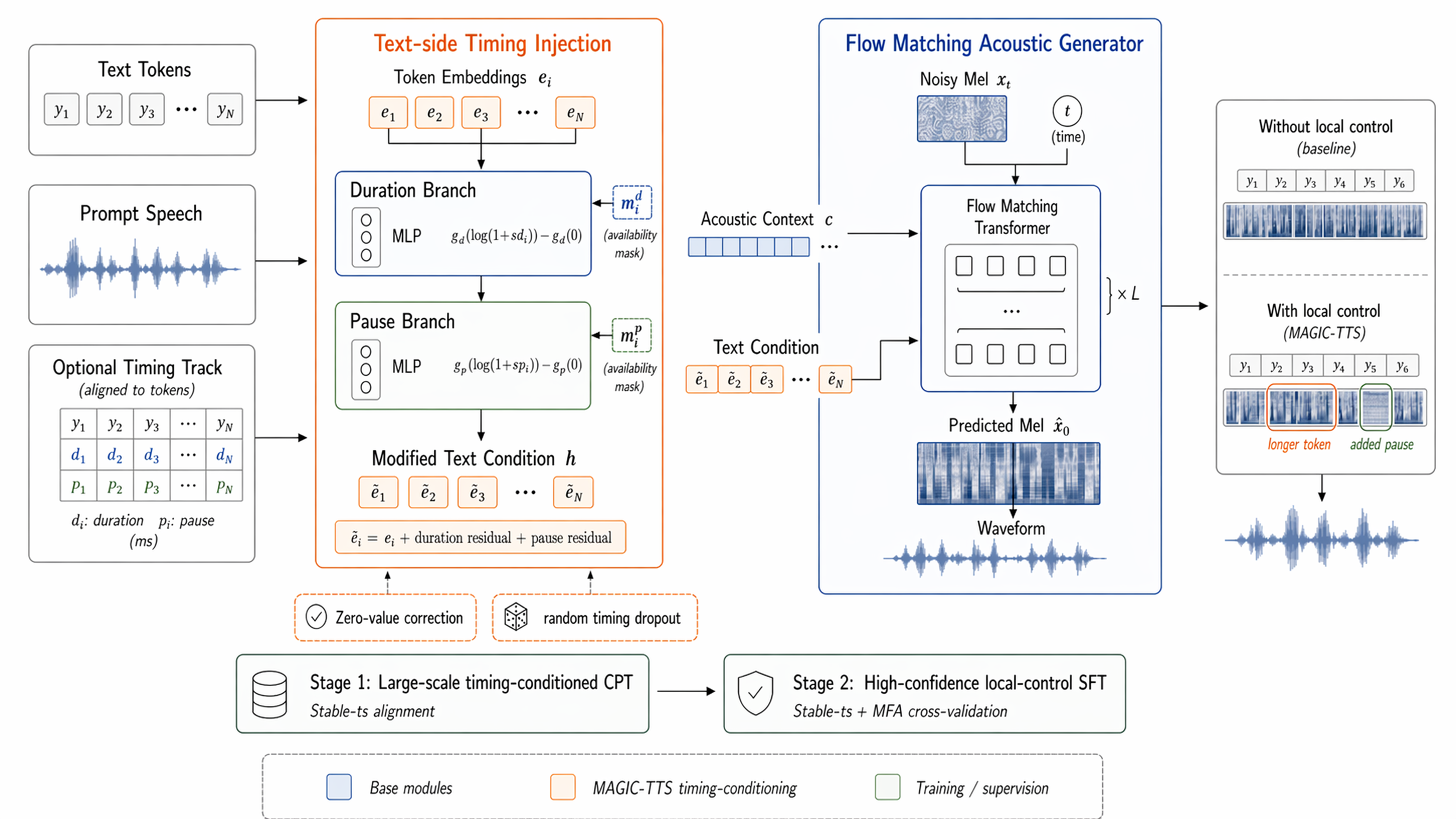
MAGIC-TTS 是一个支持细粒度局部时序控制的语音合成系统。它既可以对指定 token 的内容时长和停顿进行毫秒级控制,也可以在不提供任何显式时长的情况下自然生成语音。
这个仓库支持两种合成模式:
controlled:显式提供局部控制信号,可以直接写在命令行的target_text里,也可以整理成完整时序轨文件传入spontaneous:不提供 target-side text duration,由模型自发建模内部 duration 与停顿时长
环境准备
展开安装依赖与环境配置
conda create -n magictts python=3.10 -y
conda activate magictts
bash scripts/setup.sh
setup.sh 会安装 Python 依赖、ffmpeg / montreal-forced-aligner、fine-grained control 所需的中文依赖与 MFA 资源,并把 tokenizer / vocoder 下载到 pretrained/。
你仍需要从 Hugging Face 下载 MAGIC-TTS checkpoint,并放到 checkpoints/,例如 checkpoints/magictts_36k.pt。
如果你已经自己准备好了 Torch 环境,也可以直接:
python -m pip install -e .
复现 demo 页样本
python inference/run_paper_demos.py \
  --checkpoint /path/to/magictts_36k.pt \
  --output-dir outputs/controlled_demos/default_voice
复现四个 spontaneous 场景
python inference/run_spontaneous_suite.py \
  --checkpoint /path/to/magictts_36k.pt \
  --output-dir outputs/spontaneous_demos
用自己的 prompt 和文本
如果 target_text 不带任何控制标记,模型会自动进入 spontaneous 模式。--prompt-audio 和 --prompt-text 都是可选的;如果省略,就会自动回退到仓库内置默认音色。
python inference/run_magictts.py \
  --target-text "前方路口,左转。" \
  --checkpoint /path/to/magictts_36k.pt \
  --output-dir outputs/my_spontaneous_demo
英文也可以直接省略 prompt 参数,自动回退到仓库内置英文参考音色:
python inference/run_magictts.py \
  --language en \
  --target-text "After the meeting, please review the budget." \
  --checkpoint /path/to/magictts_36k.pt \
  --output-dir outputs/my_english_spontaneous_demo
如果 target_text 带控制标记,模型会自动进入 controlled 模式。这里同样可以不提供 --prompt-audio 和 --prompt-text。
python inference/run_magictts.py \
  --target-text "前方路口[260]左{300}转{300}。" \
  --checkpoint /path/to/magictts_36k.pt \
  --output-dir outputs/my_controlled_demo
命令行控制语法直接写在 target_text 里:
字{300}表示该字符目标时长为300 ms[260]表示在当前位置插入一个260 ms停顿- 未标注的内容字默认使用
170 ms - 英文 controlled 模式下,
word{T}会把该单词总时长T均分到各个字母;未标注英文内容默认按每个字母55 ms计算,因此总时长默认约为“字母数 × 55 ms”
用完整时序轨文件合成
仓库里提供了一份可直接参考的完整时序轨:
然后直接合成:
python inference/run_edit_from_json.py \
  --track-json /path/to/full_track.json \
  --checkpoint /path/to/your_checkpoint.pt \
  --output-dir outputs/release_manual_demo
单独准备 prompt-side duration
python inference/align_prompt_with_mfa.py \
  --prompt-audio /path/to/prompt.wav \
  --prompt-text "前方路口" \
  --language zh \
  --output-dir outputs/prompt_alignment
运行结束后,outputs/prompt_alignment 目录里会得到:
prompt_alignment_raw.jsonprompt_alignment_debug.jsonprompt_track.json
本地 Fine-Tune
如果希望训练,先额外安装训练依赖:
python -m pip install -e ".[train]"
完整训练数据已经公开在 Hugging Face:
这个训练集提供了高置信度 b150 训练划分、分片 raw audio,以及独立打包的 MFA 逐词对齐标注。也就是说,整套训练集的 MFA 已经提前做好;如果你把这些 mfa_sidecars 解压到仓库里的 data/prompt_sidecars/,本地准备 prepared dataset 时可以直接复用这些现成对齐结果,而不需要重新对全量训练集跑一遍 MFA。
如果你想先用一个很小的真实例子跑通完整链路,可以先下载 Hugging Face 上的 b150_official_test_100,然后用仓库内的 wrapper 在本地生成 prepared dataset:
假设你已经把数据集放在本地目录 /path/to/b150_official_test_100,其中包含:
selected_samples.exported.jsonlraw/audio/...
先生成训练可直接读取的 prepared dataset:
bash scripts/prepare_finetune_dataset.sh \
  --input-jsonl /path/to/b150_official_test_100/selected_samples.exported.jsonl \
  --audio-root /path/to/b150_official_test_100/raw \
  --output-dir data/smoke_eval100_prepared
这个命令会在 data/smoke_eval100_prepared 下生成训练所需的 raw.arrow、duration.json 和 vocab.txt。生成完成后,直接衔接微调脚本:
bash scripts/run_finetune.sh \
  --dataset data/smoke_eval100_prepared \
  --run-name smoke_eval100 \
  --max-updates 50
致谢
MAGIC-TTS 使用了 F5-TTS 提供的 backbone 实现,并以其公开 checkpoint 作为训练初始化起点。
引用
如果这个仓库对你的工作有帮助,可以按下面方式引用:
@misc{mai2026magicttsfinegrainedcontrollablespeech,
  title         = {MAGIC-TTS: Fine-Grained Controllable Speech Synthesis with Explicit Local Duration and Pause Control},
  author        = {Jialong Mai and Xiaofen Xing and Xiangmin Xu},
  year          = {2026},
  eprint        = {2604.21164},
  archivePrefix = {arXiv},
  primaryClass  = {cs.SD},
  url           = {https://arxiv.org/abs/2604.21164}
}
English
- Online demo: https://yongaifadian1.github.io/MAGIC-TTS/
- Hugging Face model: https://huggingface.co/maimai11/MAGIC-TTS
- Hugging Face training dataset: https://huggingface.co/datasets/maimai11/b150_official_train
- arXiv paper: https://arxiv.org/abs/2604.21164
MAGIC-TTS is a speech synthesis system with explicit fine-grained local timing control. It supports millisecond-level control over selected token durations and pauses, and it can also generate speech naturally without any explicit duration input.
This repository supports two synthesis modes:
controlled: explicit local control signals are provided either inline intarget_textor through a full timing-track filespontaneous: no target-side duration is provided and the model predicts internal duration and pause timing on its own
Environment Setup
Expand dependency installation and environment setup
conda create -n magictts python=3.10 -y
conda activate magictts
bash scripts/setup.sh
setup.sh installs the Python dependencies, ffmpeg / montreal-forced-aligner, the extra Chinese dependencies and MFA assets required by the controlled path, and downloads tokenizer / vocoder assets into pretrained/.
You still need to download the MAGIC-TTS checkpoint from Hugging Face and place it under checkpoints/, for example checkpoints/magictts_36k.pt.
If you already manage your own Torch environment, you can directly run:
python -m pip install -e .
Reproduce The Demo-Page Samples
python inference/run_paper_demos.py \
  --checkpoint /path/to/magictts_36k.pt \
  --output-dir outputs/controlled_demos/default_voice
Reproduce The 4 Spontaneous Demo Scenes
python inference/run_spontaneous_suite.py \
  --checkpoint /path/to/magictts_36k.pt \
  --output-dir outputs/spontaneous_demos
Use Your Own Prompt And Text
If target_text does not contain any control marker, the model automatically runs in spontaneous mode. --prompt-audio and --prompt-text are both optional; if omitted, MAGIC-TTS falls back to the built-in default voice.
python inference/run_magictts.py \
  --target-text "前方路口,左转。" \
  --checkpoint /path/to/magictts_36k.pt \
  --output-dir outputs/my_spontaneous_demo
For English synthesis, you can also omit the prompt arguments and use the built-in English reference prompt:
python inference/run_magictts.py \
  --language en \
  --target-text "After the meeting, please review the budget." \
  --checkpoint /path/to/magictts_36k.pt \
  --output-dir outputs/my_english_spontaneous_demo
If target_text contains control markers, the model automatically runs in controlled mode. --prompt-audio and --prompt-text are also optional here.
python inference/run_magictts.py \
  --target-text "前方路口[260]左{300}转{300}。" \
  --checkpoint /path/to/magictts_36k.pt \
  --output-dir outputs/my_controlled_demo
Inline control markers are written directly inside target_text:
char{300}sets that character to300 ms[260]inserts a260 mspause at that position- unmarked content characters use the default
170 ms - in English controlled mode,
word{T}treatsTas the total duration of that word and distributes it evenly across its letters; unmarked English content defaults to55 msper letter, so the default total is roughlynumber_of_letters × 55 ms
Synthesize From A Full Timing Track
You can reference the example timing track included in the repository:
Then synthesize directly:
python inference/run_edit_from_json.py \
  --track-json /path/to/full_track.json \
  --checkpoint /path/to/your_checkpoint.pt \
  --output-dir outputs/release_manual_demo
Prepare Prompt-Side Duration Only
python inference/align_prompt_with_mfa.py \
  --prompt-audio /path/to/prompt.wav \
  --prompt-text "前方路口" \
  --language zh \
  --output-dir outputs/prompt_alignment
After the script finishes, outputs/prompt_alignment will contain:
prompt_alignment_raw.jsonprompt_alignment_debug.jsonprompt_track.json
Fine-Tune Locally
If you want to fine-tune locally, install the extra training dependencies first:
python -m pip install -e ".[train]"
The full high-confidence training split is now public on Hugging Face:
This dataset includes the b150 train split, split raw-audio bundles, and standalone MFA word-level alignments. In other words, the MFA pass for the full training release has already been prepared; if you unpack those mfa_sidecars under data/prompt_sidecars/ inside this repository, the local preparation wrapper can reuse the existing alignments instead of rerunning MFA over the whole dataset.
For a concrete end-to-end example, first download the b150_official_test_100
smoke split from Hugging Face:
Assume the dataset is available locally at
/path/to/b150_official_test_100, with:
selected_samples.exported.jsonlraw/audio/...
Prepare a local training-ready dataset with the bundled wrapper:
bash scripts/prepare_finetune_dataset.sh \
  --input-jsonl /path/to/b150_official_test_100/selected_samples.exported.jsonl \
  --audio-root /path/to/b150_official_test_100/raw \
  --output-dir data/smoke_eval100_prepared
This produces a prepared dataset under data/smoke_eval100_prepared
containing raw.arrow, duration.json, and vocab.txt. Then launch a
fine-tuning smoke run:
bash scripts/run_finetune.sh \
  --dataset data/smoke_eval100_prepared \
  --run-name smoke_eval100 \
  --max-updates 50
Acknowledgement
MAGIC-TTS builds on the backbone implementation provided by F5-TTS and uses its public checkpoint as the initialization starting point for training.
Citation
If this repository is useful in your work, you can cite it as:
@misc{mai2026magicttsfinegrainedcontrollablespeech,
  title         = {MAGIC-TTS: Fine-Grained Controllable Speech Synthesis with Explicit Local Duration and Pause Control},
  author        = {Jialong Mai and Xiaofen Xing and Xiangmin Xu},
  year          = {2026},
  eprint        = {2604.21164},
  archivePrefix = {arXiv},
  primaryClass  = {cs.SD},
  url           = {https://arxiv.org/abs/2604.21164}
}
Similar repos



Languages
Python
82.7%
HTML
10.6%
Shell
3.7%
CSS
3.0%
MAGIC-TTS: Fine-Grained Controllable Speech Synthesis with Explicit Local Duration and Pause Control
Python
55
0 commits
updated Apr 28, 2026
README
MAGIC-TTS: Fine-Grained Controllable Speech Synthesis with Explicit Local Duration and Pause Control
Jialong Mai, Xiaofen Xing, Xiangmin Xu
华南理工大学数字孪生人重点实验室
News
- [2026-04-25] Inference release: code, pretrained checkpoint support, and online demos. 🚀
- [2026-04-28] Training release: local fine-tuning pipeline with dataset preparation scripts. 🛠️
- [2026-04-28] Dataset release: high-confidence public training split with standalone MFA word alignments. 📦
中文 | English
中文
- 在线 Demo: https://yongaifadian1.github.io/MAGIC-TTS/
- Hugging Face 模型: https://huggingface.co/maimai11/MAGIC-TTS
- Hugging Face 训练集: https://huggingface.co/datasets/maimai11/b150_official_train
- arXiv 论文: https://arxiv.org/abs/2604.21164
MAGIC-TTS 是一个支持细粒度局部时序控制的语音合成系统。它既可以对指定 token 的内容时长和停顿进行毫秒级控制,也可以在不提供任何显式时长的情况下自然生成语音。
这个仓库支持两种合成模式:
controlled:显式提供局部控制信号,可以直接写在命令行的target_text里,也可以整理成完整时序轨文件传入spontaneous:不提供 target-side text duration,由模型自发建模内部 duration 与停顿时长
环境准备
展开安装依赖与环境配置
conda create -n magictts python=3.10 -y
conda activate magictts
bash scripts/setup.sh
setup.sh 会安装 Python 依赖、ffmpeg / montreal-forced-aligner、fine-grained control 所需的中文依赖与 MFA 资源,并把 tokenizer / vocoder 下载到 pretrained/。
你仍需要从 Hugging Face 下载 MAGIC-TTS checkpoint,并放到 checkpoints/,例如 checkpoints/magictts_36k.pt。
如果你已经自己准备好了 Torch 环境,也可以直接:
python -m pip install -e .
复现 demo 页样本
python inference/run_paper_demos.py \
  --checkpoint /path/to/magictts_36k.pt \
  --output-dir outputs/controlled_demos/default_voice
复现四个 spontaneous 场景
python inference/run_spontaneous_suite.py \
  --checkpoint /path/to/magictts_36k.pt \
  --output-dir outputs/spontaneous_demos
用自己的 prompt 和文本
如果 target_text 不带任何控制标记,模型会自动进入 spontaneous 模式。--prompt-audio 和 --prompt-text 都是可选的;如果省略,就会自动回退到仓库内置默认音色。
python inference/run_magictts.py \
  --target-text "前方路口,左转。" \
  --checkpoint /path/to/magictts_36k.pt \
  --output-dir outputs/my_spontaneous_demo
英文也可以直接省略 prompt 参数,自动回退到仓库内置英文参考音色:
python inference/run_magictts.py \
  --language en \
  --target-text "After the meeting, please review the budget." \
  --checkpoint /path/to/magictts_36k.pt \
  --output-dir outputs/my_english_spontaneous_demo
如果 target_text 带控制标记,模型会自动进入 controlled 模式。这里同样可以不提供 --prompt-audio 和 --prompt-text。
python inference/run_magictts.py \
  --target-text "前方路口[260]左{300}转{300}。" \
  --checkpoint /path/to/magictts_36k.pt \
  --output-dir outputs/my_controlled_demo
命令行控制语法直接写在 target_text 里:
字{300}表示该字符目标时长为300 ms[260]表示在当前位置插入一个260 ms停顿- 未标注的内容字默认使用
170 ms - 英文 controlled 模式下,
word{T}会把该单词总时长T均分到各个字母;未标注英文内容默认按每个字母55 ms计算,因此总时长默认约为“字母数 × 55 ms”
用完整时序轨文件合成
仓库里提供了一份可直接参考的完整时序轨:
然后直接合成:
python inference/run_edit_from_json.py \
  --track-json /path/to/full_track.json \
  --checkpoint /path/to/your_checkpoint.pt \
  --output-dir outputs/release_manual_demo
单独准备 prompt-side duration
python inference/align_prompt_with_mfa.py \
  --prompt-audio /path/to/prompt.wav \
  --prompt-text "前方路口" \
  --language zh \
  --output-dir outputs/prompt_alignment
运行结束后,outputs/prompt_alignment 目录里会得到:
prompt_alignment_raw.jsonprompt_alignment_debug.jsonprompt_track.json
本地 Fine-Tune
如果希望训练,先额外安装训练依赖:
python -m pip install -e ".[train]"
完整训练数据已经公开在 Hugging Face:
这个训练集提供了高置信度 b150 训练划分、分片 raw audio,以及独立打包的 MFA 逐词对齐标注。也就是说,整套训练集的 MFA 已经提前做好;如果你把这些 mfa_sidecars 解压到仓库里的 data/prompt_sidecars/,本地准备 prepared dataset 时可以直接复用这些现成对齐结果,而不需要重新对全量训练集跑一遍 MFA。
如果你想先用一个很小的真实例子跑通完整链路,可以先下载 Hugging Face 上的 b150_official_test_100,然后用仓库内的 wrapper 在本地生成 prepared dataset:
假设你已经把数据集放在本地目录 /path/to/b150_official_test_100,其中包含:
selected_samples.exported.jsonlraw/audio/...
先生成训练可直接读取的 prepared dataset:
bash scripts/prepare_finetune_dataset.sh \
  --input-jsonl /path/to/b150_official_test_100/selected_samples.exported.jsonl \
  --audio-root /path/to/b150_official_test_100/raw \
  --output-dir data/smoke_eval100_prepared
这个命令会在 data/smoke_eval100_prepared 下生成训练所需的 raw.arrow、duration.json 和 vocab.txt。生成完成后,直接衔接微调脚本:
bash scripts/run_finetune.sh \
  --dataset data/smoke_eval100_prepared \
  --run-name smoke_eval100 \
  --max-updates 50
致谢
MAGIC-TTS 使用了 F5-TTS 提供的 backbone 实现,并以其公开 checkpoint 作为训练初始化起点。
引用
如果这个仓库对你的工作有帮助,可以按下面方式引用:
@misc{mai2026magicttsfinegrainedcontrollablespeech,
  title         = {MAGIC-TTS: Fine-Grained Controllable Speech Synthesis with Explicit Local Duration and Pause Control},
  author        = {Jialong Mai and Xiaofen Xing and Xiangmin Xu},
  year          = {2026},
  eprint        = {2604.21164},
  archivePrefix = {arXiv},
  primaryClass  = {cs.SD},
  url           = {https://arxiv.org/abs/2604.21164}
}
English
- Online demo: https://yongaifadian1.github.io/MAGIC-TTS/
- Hugging Face model: https://huggingface.co/maimai11/MAGIC-TTS
- Hugging Face training dataset: https://huggingface.co/datasets/maimai11/b150_official_train
- arXiv paper: https://arxiv.org/abs/2604.21164
MAGIC-TTS is a speech synthesis system with explicit fine-grained local timing control. It supports millisecond-level control over selected token durations and pauses, and it can also generate speech naturally without any explicit duration input.
This repository supports two synthesis modes:
controlled: explicit local control signals are provided either inline intarget_textor through a full timing-track filespontaneous: no target-side duration is provided and the model predicts internal duration and pause timing on its own
Environment Setup
Expand dependency installation and environment setup
conda create -n magictts python=3.10 -y
conda activate magictts
bash scripts/setup.sh
setup.sh installs the Python dependencies, ffmpeg / montreal-forced-aligner, the extra Chinese dependencies and MFA assets required by the controlled path, and downloads tokenizer / vocoder assets into pretrained/.
You still need to download the MAGIC-TTS checkpoint from Hugging Face and place it under checkpoints/, for example checkpoints/magictts_36k.pt.
If you already manage your own Torch environment, you can directly run:
python -m pip install -e .
Reproduce The Demo-Page Samples
python inference/run_paper_demos.py \
  --checkpoint /path/to/magictts_36k.pt \
  --output-dir outputs/controlled_demos/default_voice
Reproduce The 4 Spontaneous Demo Scenes
python inference/run_spontaneous_suite.py \
  --checkpoint /path/to/magictts_36k.pt \
  --output-dir outputs/spontaneous_demos
Use Your Own Prompt And Text
If target_text does not contain any control marker, the model automatically runs in spontaneous mode. --prompt-audio and --prompt-text are both optional; if omitted, MAGIC-TTS falls back to the built-in default voice.
python inference/run_magictts.py \
  --target-text "前方路口,左转。" \
  --checkpoint /path/to/magictts_36k.pt \
  --output-dir outputs/my_spontaneous_demo
For English synthesis, you can also omit the prompt arguments and use the built-in English reference prompt:
python inference/run_magictts.py \
  --language en \
  --target-text "After the meeting, please review the budget." \
  --checkpoint /path/to/magictts_36k.pt \
  --output-dir outputs/my_english_spontaneous_demo
If target_text contains control markers, the model automatically runs in controlled mode. --prompt-audio and --prompt-text are also optional here.
python inference/run_magictts.py \
  --target-text "前方路口[260]左{300}转{300}。" \
  --checkpoint /path/to/magictts_36k.pt \
  --output-dir outputs/my_controlled_demo
Inline control markers are written directly inside target_text:
char{300}sets that character to300 ms[260]inserts a260 mspause at that position- unmarked content characters use the default
170 ms - in English controlled mode,
word{T}treatsTas the total duration of that word and distributes it evenly across its letters; unmarked English content defaults to55 msper letter, so the default total is roughlynumber_of_letters × 55 ms
Synthesize From A Full Timing Track
You can reference the example timing track included in the repository:
Then synthesize directly:
python inference/run_edit_from_json.py \
  --track-json /path/to/full_track.json \
  --checkpoint /path/to/your_checkpoint.pt \
  --output-dir outputs/release_manual_demo
Prepare Prompt-Side Duration Only
python inference/align_prompt_with_mfa.py \
  --prompt-audio /path/to/prompt.wav \
  --prompt-text "前方路口" \
  --language zh \
  --output-dir outputs/prompt_alignment
After the script finishes, outputs/prompt_alignment will contain:
prompt_alignment_raw.jsonprompt_alignment_debug.jsonprompt_track.json
Fine-Tune Locally
If you want to fine-tune locally, install the extra training dependencies first:
python -m pip install -e ".[train]"
The full high-confidence training split is now public on Hugging Face:
This dataset includes the b150 train split, split raw-audio bundles, and standalone MFA word-level alignments. In other words, the MFA pass for the full training release has already been prepared; if you unpack those mfa_sidecars under data/prompt_sidecars/ inside this repository, the local preparation wrapper can reuse the existing alignments instead of rerunning MFA over the whole dataset.
For a concrete end-to-end example, first download the b150_official_test_100
smoke split from Hugging Face:
Assume the dataset is available locally at
/path/to/b150_official_test_100, with:
selected_samples.exported.jsonlraw/audio/...
Prepare a local training-ready dataset with the bundled wrapper:
bash scripts/prepare_finetune_dataset.sh \
  --input-jsonl /path/to/b150_official_test_100/selected_samples.exported.jsonl \
  --audio-root /path/to/b150_official_test_100/raw \
  --output-dir data/smoke_eval100_prepared
This produces a prepared dataset under data/smoke_eval100_prepared
containing raw.arrow, duration.json, and vocab.txt. Then launch a
fine-tuning smoke run:
bash scripts/run_finetune.sh \
  --dataset data/smoke_eval100_prepared \
  --run-name smoke_eval100 \
  --max-updates 50
Acknowledgement
MAGIC-TTS builds on the backbone implementation provided by F5-TTS and uses its public checkpoint as the initialization starting point for training.
Citation
If this repository is useful in your work, you can cite it as:
@misc{mai2026magicttsfinegrainedcontrollablespeech,
  title         = {MAGIC-TTS: Fine-Grained Controllable Speech Synthesis with Explicit Local Duration and Pause Control},
  author        = {Jialong Mai and Xiaofen Xing and Xiangmin Xu},
  year          = {2026},
  eprint        = {2604.21164},
  archivePrefix = {arXiv},
  primaryClass  = {cs.SD},
  url           = {https://arxiv.org/abs/2604.21164}
}
Similar repos
Languages
Python
82.7%
HTML
10.6%
Shell
3.7%
CSS
3.0%