
See what people are saying (1)
README
FeatureMap
FeatureMap maps your product’s features, workflows, and integrations, backed by evidence from the codebase, giving both you and your AI agents a clear, reliable overview of how the product works.
Install FeatureMap skill
Install skill with Vercel Skills CLI:
npx skills add yonathan06/featuremap --skill featuremap
Use FeatureMap
Open coding agent in Git repository and ask it to use FeatureMap:
Use FeatureMap to map this repository.
For an existing map:
Use FeatureMap to update this repository's feature map.
Visualize the results:
npx @yonatan.bendahan/featuremap@latest visualize
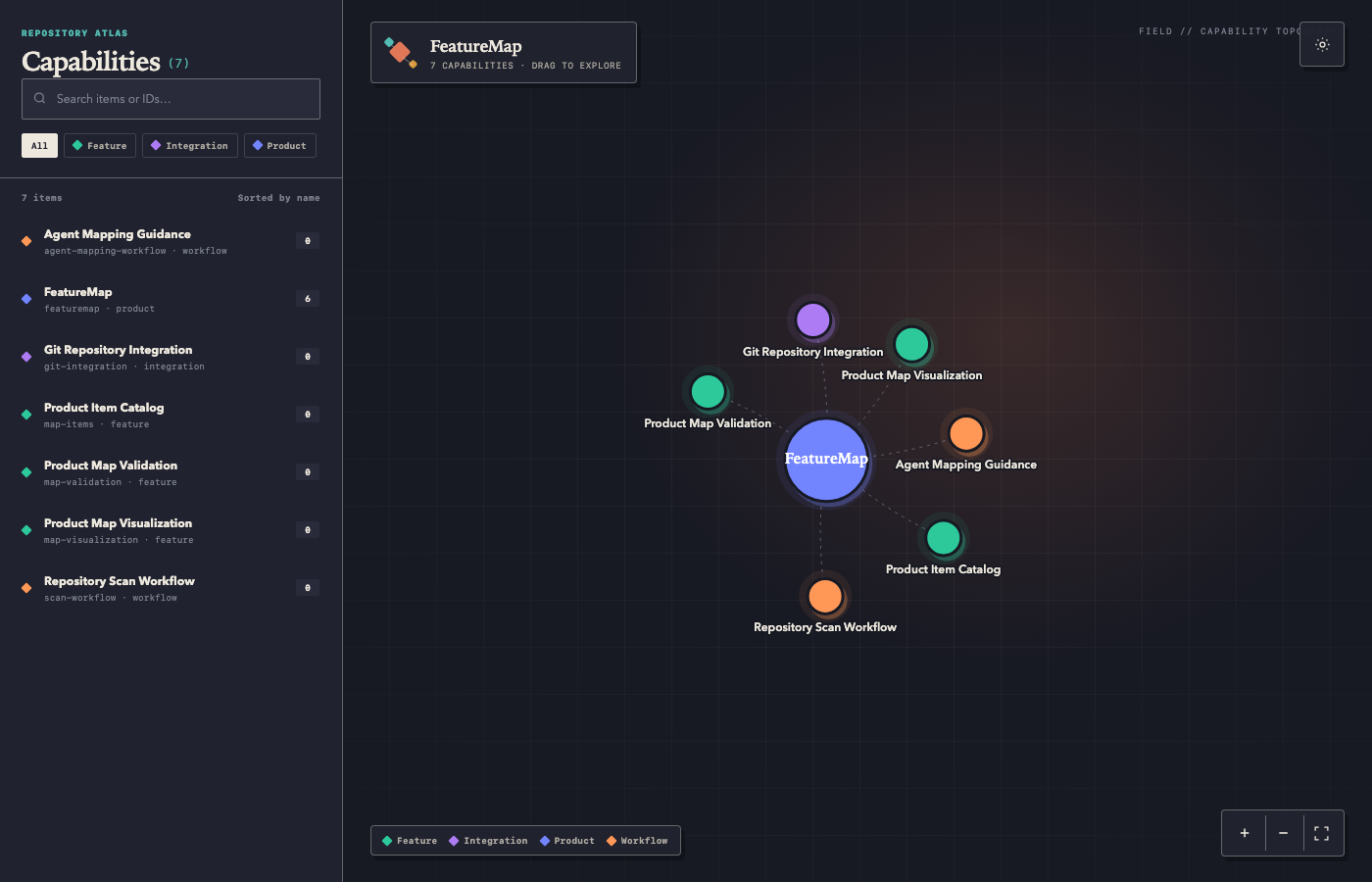
This will open a new browser tab with a chart showing all of the product items (features etc.) and their relations.
Installed skill guides agent through complete workflow. Agent runs CLI without adding FeatureMap to repository dependencies:
npx @yonatan.bendahan/featuremap@latest init
npx @yonatan.bendahan/featuremap@latest context
npx @yonatan.bendahan/featuremap@latest files
npx @yonatan.bendahan/featuremap@latest commits --all
npx @yonatan.bendahan/featuremap@latest tags
# Agspects repository and writes .featuremap/items/*
npx @yonatan.bendahan/featuremap@latest validate
npx @yonatan.bendahan/featuremap@latest finalize
Initialization creates:
.featuremap/
├── config.yml
├── state.json
└── items/
Commit .featuremap so agents and contributors share product map and scan state.
Update existing map
finalize saves current Git commit as next incremental baseline. Installed skill tells agent to inspect only affected areas during later updates:
npx @yonatan.bendahan/featuremap@latest context
npx @yonatan.bendahan/featuremap@latest changed
npx @yonatan.bendahan/featuremap@latest commits
# Agdates affected items
npx @yonatan.bendahan/featuremap@latest validate
npx @yonatan.bendahan/featuremap@latest finalize
Product items
Each item records stable ID, display name, configured type, description, optional parent IDs, and repository evidence:
id: captions
name: Captions
type: feature
description: Generate, edit, and style captions on videos.
parents:
  - editor
evidence:
  files:
    - apps/editor/src/captions
  commits:
    - abc123
See schema/product-item.schema.json for full format.
Inspect map manually when needed:
npx @yonatan.bendahan/featuremap@latest list
npx @yonatan.bendahan/featuremap@latest show captions
Create self-contained local bubble flow chart (bubble size reflects direct subfeatures):
npx @yonatan.bendahan/featuremap@latest visualize
npx @yonatan.bendahan/featuremap@latest visualize -o docs/featuremap.html
visualize also accepts alias graph. Commands accepting --json: init, files, changed, commits, tags, validate, finalize, list, show, and visualize. Use global -C, --cwd <directory> when running outside repository.
Contributing and local development
Clone repository, then install dependencies with pnpm:
git clone yonathan06/featuremap
cd featuremap
pnpm install
pnpm build
Install local skill through Vercel Skills CLI:
npx skills add . --skill featuremap
Run local CLI build against another repository:
pnpm run run -C /path/to/repository context
Before submitting changes, run tests, type checking, formatting, and linting:
pnpm test
pnpm check
Source lives in src/, tests in tests/, JSON Schema in schema/, and agent instructions in skill/. Add tests for CLI, Git, filtering, or validation behavior changed by contribution.
Contributors

10 commits
Similar repos


Languages
TypeScript
64.7%
HTML
35.2%
See what people are saying (1)
README
FeatureMap
FeatureMap maps your product’s features, workflows, and integrations, backed by evidence from the codebase, giving both you and your AI agents a clear, reliable overview of how the product works.
Install FeatureMap skill
Install skill with Vercel Skills CLI:
npx skills add yonathan06/featuremap --skill featuremap
Use FeatureMap
Open coding agent in Git repository and ask it to use FeatureMap:
Use FeatureMap to map this repository.
For an existing map:
Use FeatureMap to update this repository's feature map.
Visualize the results:
npx @yonatan.bendahan/featuremap@latest visualize
This will open a new browser tab with a chart showing all of the product items (features etc.) and their relations.
Installed skill guides agent through complete workflow. Agent runs CLI without adding FeatureMap to repository dependencies:
npx @yonatan.bendahan/featuremap@latest init
npx @yonatan.bendahan/featuremap@latest context
npx @yonatan.bendahan/featuremap@latest files
npx @yonatan.bendahan/featuremap@latest commits --all
npx @yonatan.bendahan/featuremap@latest tags
# Agspects repository and writes .featuremap/items/*
npx @yonatan.bendahan/featuremap@latest validate
npx @yonatan.bendahan/featuremap@latest finalize
Initialization creates:
.featuremap/
├── config.yml
├── state.json
└── items/
Commit .featuremap so agents and contributors share product map and scan state.
Update existing map
finalize saves current Git commit as next incremental baseline. Installed skill tells agent to inspect only affected areas during later updates:
npx @yonatan.bendahan/featuremap@latest context
npx @yonatan.bendahan/featuremap@latest changed
npx @yonatan.bendahan/featuremap@latest commits
# Agdates affected items
npx @yonatan.bendahan/featuremap@latest validate
npx @yonatan.bendahan/featuremap@latest finalize
Product items
Each item records stable ID, display name, configured type, description, optional parent IDs, and repository evidence:
id: captions
name: Captions
type: feature
description: Generate, edit, and style captions on videos.
parents:
  - editor
evidence:
  files:
    - apps/editor/src/captions
  commits:
    - abc123
See schema/product-item.schema.json for full format.
Inspect map manually when needed:
npx @yonatan.bendahan/featuremap@latest list
npx @yonatan.bendahan/featuremap@latest show captions
Create self-contained local bubble flow chart (bubble size reflects direct subfeatures):
npx @yonatan.bendahan/featuremap@latest visualize
npx @yonatan.bendahan/featuremap@latest visualize -o docs/featuremap.html
visualize also accepts alias graph. Commands accepting --json: init, files, changed, commits, tags, validate, finalize, list, show, and visualize. Use global -C, --cwd <directory> when running outside repository.
Contributing and local development
Clone repository, then install dependencies with pnpm:
git clone yonathan06/featuremap
cd featuremap
pnpm install
pnpm build
Install local skill through Vercel Skills CLI:
npx skills add . --skill featuremap
Run local CLI build against another repository:
pnpm run run -C /path/to/repository context
Before submitting changes, run tests, type checking, formatting, and linting:
pnpm test
pnpm check
Source lives in src/, tests in tests/, JSON Schema in schema/, and agent instructions in skill/. Add tests for CLI, Git, filtering, or validation behavior changed by contribution.
Similar repos
Contributors
10 commits
Languages
TypeScript
64.7%
HTML
35.2%