align source html element with target html element flexibly.




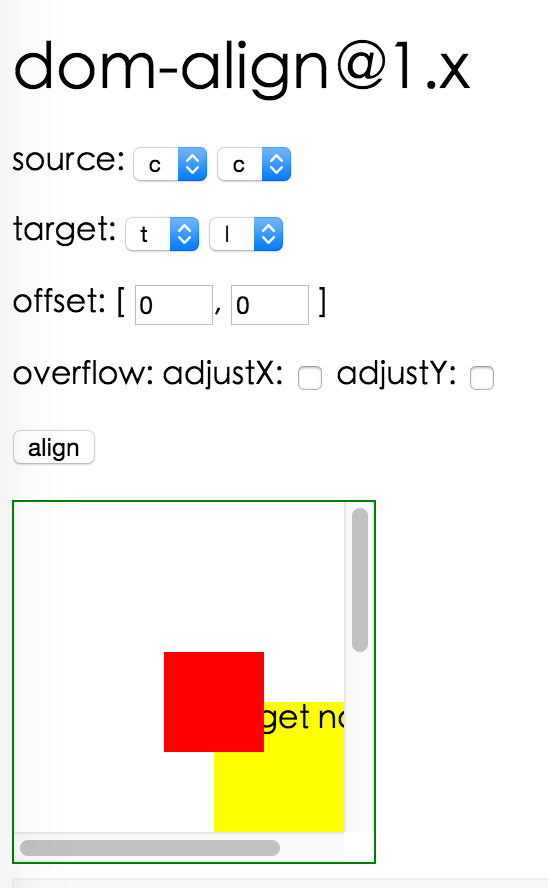

import domAlign from 'dom-align';

// use domAlign
// sourceNode's initial style should be position:absolute;left:-9999px;top:-9999px;

const alignConfig = {
  points: ['tl', 'tr'],        // align top left point of sourceNode with top right point of targetNode
  offset: [10, 20],            // the offset sourceNode by 10px in x and 20px in y,
  targetOffset: ['30%','40%'], // the offset targetNode by 30% of targetNode width in x and 40% of targetNode height in y,
  overflow: { adjustX: true, adjustY: true }, // auto adjust position when sourceNode is overflowed
};

domAlign(sourceNode, targetNode, alignConfig);
| name | type | description |
|---|---|---|
| points | String[2] | move point of source node to align with point of target node, such as ['tr','cc'], align top right point of source node with center point of target node. point can be 't'(top), 'b'(bottom), 'c'(center), 'l'(left), 'r'(right) |
| offset | Number[2] | offset source node by offset[0] in x and offset[1] in y. If offset contains percentage string value, it is relative to sourceNode region. |
| targetOffset | Number[2] | offset target node by offset[0] in x and offset[1] in y. If targetOffset contains percentage string value, it is relative to targetNode region. |
| overflow | Object: `{ adjustX: boolean, adjustY: boolean, alwaysByViewport:boolean }` | if adjustX field is true, then will adjust source node in x direction if source node is invisible. if adjustY field is true, then will adjust source node in y direction if source node is invisible. if alwaysByViewport is true, the it will adjust if node is not inside viewport |
| useCssRight | Boolean | whether use css right instead of left to position |
| useCssBottom | Boolean | whether use css bottom instead of top to position |
| useCssTransform | Boolean | whether use css transform instead of left/top/right/bottom to position if browser supports. Defaults to false. |
pnpm install
pnpm start
dom-align is released under the MIT license.
Overall
Maintained
Code review
npm
Latest release
Releases this year
align source html element with target html element flexibly.
import domAlign from 'dom-align';

// use domAlign
// sourceNode's initial style should be position:absolute;left:-9999px;top:-9999px;

const alignConfig = {
  points: ['tl', 'tr'],        // align top left point of sourceNode with top right point of targetNode
  offset: [10, 20],            // the offset sourceNode by 10px in x and 20px in y,
  targetOffset: ['30%','40%'], // the offset targetNode by 30% of targetNode width in x and 40% of targetNode height in y,
  overflow: { adjustX: true, adjustY: true }, // auto adjust position when sourceNode is overflowed
};

domAlign(sourceNode, targetNode, alignConfig);
| name | type | description |
|---|---|---|
| points | String[2] | move point of source node to align with point of target node, such as ['tr','cc'], align top right point of source node with center point of target node. point can be 't'(top), 'b'(bottom), 'c'(center), 'l'(left), 'r'(right) |
| offset | Number[2] | offset source node by offset[0] in x and offset[1] in y. If offset contains percentage string value, it is relative to sourceNode region. |
| targetOffset | Number[2] | offset target node by offset[0] in x and offset[1] in y. If targetOffset contains percentage string value, it is relative to targetNode region. |
| overflow | Object: `{ adjustX: boolean, adjustY: boolean, alwaysByViewport:boolean }` | if adjustX field is true, then will adjust source node in x direction if source node is invisible. if adjustY field is true, then will adjust source node in y direction if source node is invisible. if alwaysByViewport is true, the it will adjust if node is not inside viewport |
| useCssRight | Boolean | whether use css right instead of left to position |
| useCssBottom | Boolean | whether use css bottom instead of top to position |
| useCssTransform | Boolean | whether use css transform instead of left/top/right/bottom to position if browser supports. Defaults to false. |
pnpm install
pnpm start
dom-align is released under the MIT license.
Overall
Maintained
Code review
npm
Latest release
Releases this year





