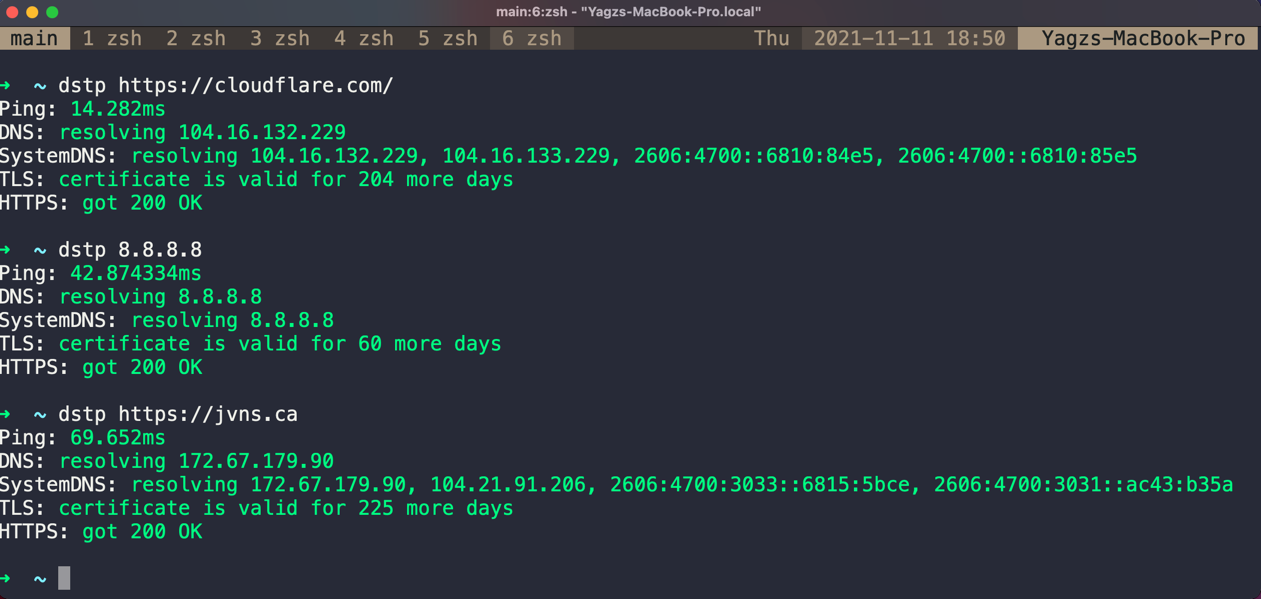
Usage: dstp [OPTIONS] [ARGS]
Options:
        -a, --addr   <string>  The URL or the IP address to run tests against      [REQUIRED]
        -o, --out    <string>  The type of the output, either json or plaintext    [Default: plaintext]
        -p           <int>     Number of ping packets                              [Default: 3]
        -t           <int>     Give up on ping after this many seconds             [Default: 2s per ping packet]
        --port       <string>  Port for testing TLS and HTTPS connectivity         [Default: 443]
        --dns        <string>  Custom DNS server to use for DNS resolution         [No default]
        -h, --help             Show this message and exit.
A comment on lobste.rs, in a thread about DNS gave a great idea and thought a robust tool like that might come in handy!
brew install dstp
go install github.com/ycd/dstp/cmd/dstp@latest
You can install dstp using one of these methods:
nix-shell or nix shell (recommended for trying it out):nix shell nixpkgs#dstp
# configuration.nix or home-manager configuration
{
  # ...
  environment.systemPackages = with pkgs; [
    dstp
  ];
}
nix profile (for individual user installation):nix profile install nixpkgs#dstp
git clone https://aur.archlinux.org/dstp.git
cd dstp
makepkg -sri
Binary downloads of example are available from the releases section on GitHub for 64-bit Windows, macOS, and Linux targets. They contain the compiled executable.
| platform |
|---|
| macOS ARM 64 Bit |
| macOS 64 Bit |
| Linux 32-Bit |
| Linux ARM 64 Bit |
| Linux 64 Bit |
| Windows 64 Bit |
| Windows 32 Bit |
| Windows ARM 64 Bit |
Verify that you have Go 1.17+ installed (The source code uses ( //go:build ) conditional compilation directives
that is introduced in Go 1.17.)
$ go version
If go is not installed, follow instructions on the Go website.
Clone this repository
$ git clone https://github.com/ycd/dstp
$ cd dstp
Build and install
# May require you to use sudo
$ go build cmd/dstp/dstp.go
$ cp dstp /usr/local/bin/dstp
# May require you to use sudo
$ make
$ cp dstp /usr/local/bin/dstp
Verify installation
$ dstp -h

Usage: dstp [OPTIONS] [ARGS]
Options:
      -a, --addr   <string>  The URL or the IP address to run tests against      [REQUIRED]
      -o, --out    <string>  The type of the output, either json or plaintext    [Default: plaintext]
      -p           <int>     Number of ping packets                              [Default: 3]
      -t           <int>     Give up on ping after this many seconds             [Default: 2s per ping packet]
      --port       <string>  Port for testing TLS and HTTPS connectivity         [Default: 443]
      -h, --help             Show this message and exit.
The command dstp may collide with docker stopcommand if you are using the docker plugin with oh-my-zsh.
To fix this, you can add the following command at the end of your .zshrc file:
unalias dstp
All kinds of Pull Requests and Feature Requests are welcomed!
dstp's source code is licenced under the MIT License.
162 followers · starred Jan 2025
58 followers · starred Nov 2021
443 followers · starred Nov 2021
167 followers · starred Sep 2025
Usage: dstp [OPTIONS] [ARGS]
Options:
        -a, --addr   <string>  The URL or the IP address to run tests against      [REQUIRED]
        -o, --out    <string>  The type of the output, either json or plaintext    [Default: plaintext]
        -p           <int>     Number of ping packets                              [Default: 3]
        -t           <int>     Give up on ping after this many seconds             [Default: 2s per ping packet]
        --port       <string>  Port for testing TLS and HTTPS connectivity         [Default: 443]
        --dns        <string>  Custom DNS server to use for DNS resolution         [No default]
        -h, --help             Show this message and exit.
A comment on lobste.rs, in a thread about DNS gave a great idea and thought a robust tool like that might come in handy!
brew install dstp
go install github.com/ycd/dstp/cmd/dstp@latest
You can install dstp using one of these methods:
nix-shell or nix shell (recommended for trying it out):nix shell nixpkgs#dstp
# configuration.nix or home-manager configuration
{
  # ...
  environment.systemPackages = with pkgs; [
    dstp
  ];
}
nix profile (for individual user installation):nix profile install nixpkgs#dstp
git clone https://aur.archlinux.org/dstp.git
cd dstp
makepkg -sri
Binary downloads of example are available from the releases section on GitHub for 64-bit Windows, macOS, and Linux targets. They contain the compiled executable.
| platform |
|---|
| macOS ARM 64 Bit |
| macOS 64 Bit |
| Linux 32-Bit |
| Linux ARM 64 Bit |
| Linux 64 Bit |
| Windows 64 Bit |
| Windows 32 Bit |
| Windows ARM 64 Bit |
Verify that you have Go 1.17+ installed (The source code uses ( //go:build ) conditional compilation directives
that is introduced in Go 1.17.)
$ go version
If go is not installed, follow instructions on the Go website.
Clone this repository
$ git clone https://github.com/ycd/dstp
$ cd dstp
Build and install
# May require you to use sudo
$ go build cmd/dstp/dstp.go
$ cp dstp /usr/local/bin/dstp
# May require you to use sudo
$ make
$ cp dstp /usr/local/bin/dstp
Verify installation
$ dstp -h

Usage: dstp [OPTIONS] [ARGS]
Options:
      -a, --addr   <string>  The URL or the IP address to run tests against      [REQUIRED]
      -o, --out    <string>  The type of the output, either json or plaintext    [Default: plaintext]
      -p           <int>     Number of ping packets                              [Default: 3]
      -t           <int>     Give up on ping after this many seconds             [Default: 2s per ping packet]
      --port       <string>  Port for testing TLS and HTTPS connectivity         [Default: 443]
      -h, --help             Show this message and exit.
The command dstp may collide with docker stopcommand if you are using the docker plugin with oh-my-zsh.
To fix this, you can add the following command at the end of your .zshrc file:
unalias dstp
All kinds of Pull Requests and Feature Requests are welcomed!
dstp's source code is licenced under the MIT License.
162 followers · starred Jan 2025
58 followers · starred Nov 2021
443 followers · starred Nov 2021
167 followers · starred Sep 2025