
This is a tensorflow-based rotation detection benchmark, also called AlphaRotate.
See the codeREADME
AlphaRotate: A Rotation Detection Benchmark using TensorFlow




:rocket::rocket::rocket: News: MMRotate has been released at https://github.com/open-mmlab/mmrotate 
Abstract
AlphaRotate is mainly maintained by Xue Yang with Shanghai Jiao Tong University supervised by Prof. Junchi Yan.
Papers and codes related to remote sensing/aerial image detection: DOTA-DOAI 
Techniques:
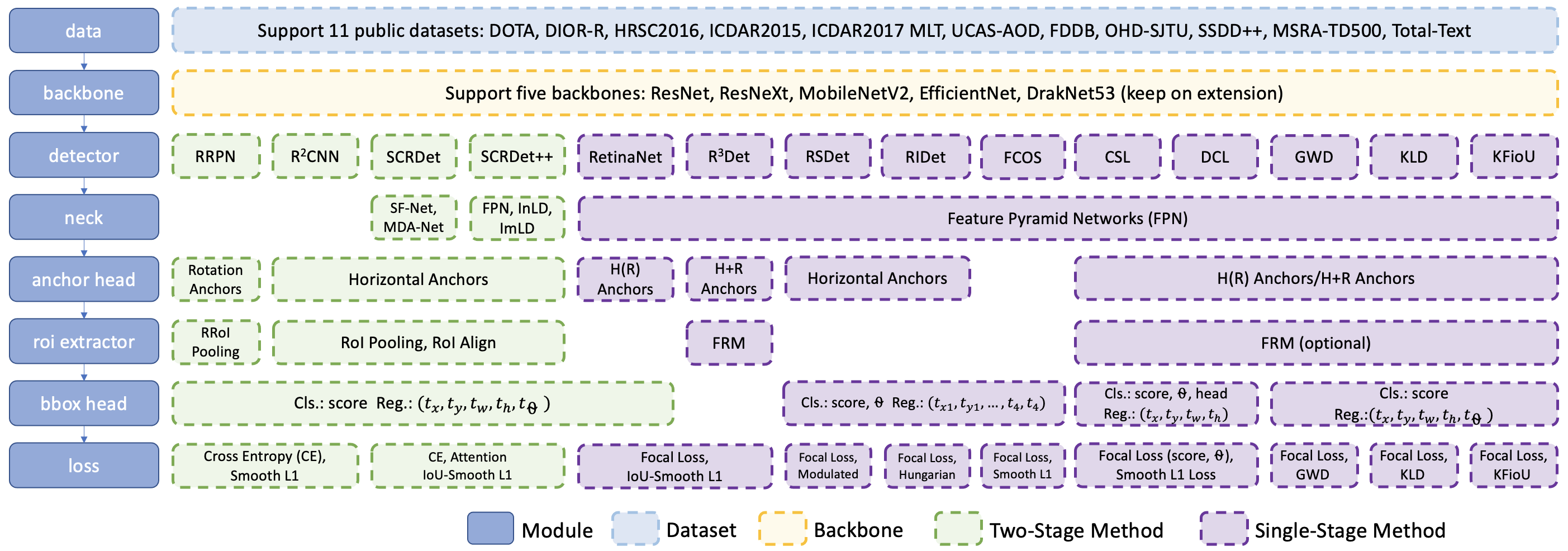
- Dataset: DOTA, HRSC2016, ICDAR2015, ICDAR2017 MLT, MSRA-TD500, UCAS-AOD, FDDB, OHD-SJTU, SSDD++, Total-Text
- Baackbone: ResNet, MobileNetV2, EfficientNet, DarkNet53
- Neck: FPN, BiFPN
- Detectors:
- R2CNN (Faster-RCNN-H): R2CNN_Faster-RCNN_Tensorflow
, DOTA-DOAI
- Double Head
- RRPN (Faster-RCNN-R): TF code
- SCRDet (ICCV19): R2CNN++
, IoU-Smooth L1 Loss
- RetinaNet-H, RetinaNet-R: TF code
- RefineRetinaNet (CascadeRetinaNet)
- ATSS
- FCOS
- RSDet (AAAI21): TF code
- RSDet++ (FCOS-RSDet)
- R3Det (AAAI21): TF code
, PyTorch code1
, PyTorch code2
, Pytorch code3
- Circular Smooth Label (CSL ECCV20): TF code
, PyTorch code
- Densely Coded Label (DCL CVPR21): TF code
- GWD (ICML21): PyTorch code
- BCD (TPAMI22): PyTorch code
- KLD (NeurIPS21): PyTorch code
- RIDet (GRSL): PyTorch code
- KFIoU (ICLR23): PyTorch code
- Mixed method: R3Det-DCL, R3Det-GWD, R3Det-BCD, R3Det-KLD, FCOS-RSDet, R2CNN-BCD, R2CNN-KF
- R2CNN (Faster-RCNN-H): R2CNN_Faster-RCNN_Tensorflow
- Loss: CE, Focal Loss, Smooth L1 Loss, IoU-Smooth L1 Loss, Modulated Loss
- Others: SWA, exportPb, MMdnn


The above-mentioned rotation detectors are all modified based on the following horizontal detectors:
- Faster RCNN: TF code
- R-FCN: TF code
- FPN: TF code1
, TF code2 (Deprecated)
- Cascade RCNN: TF code
- Cascade FPN RCNN: TF code
- RetinaNet: TF code
- RefineDet: MxNet code
- FCOS: TF code
, MxNet code


Projects
Latest Performance
All trained weights can also be downloaded from HuggingFace.
DOTA (Task1)
Baseline
| Backbone | Neck | Training/test dataset | Data Augmentation | Epoch | NMS |
|---|---|---|---|---|---|
| ResNet50_v1d 600->800 | FPN | trainval/test | × | 13 (AP50) or 17 (AP50:95) is enough for baseline (default is 13) | gpu nms (slightly worse <1% than cpu nms but faster) |
SOTA
| Method | Backbone | DOTA1.0 | Model | MS | Data Augmentation | Epoch | Configs |
|---|---|---|---|---|---|---|---|
| R2CNN-BCD | ResNet152_v1d-FPN | 79.54 | Baidu Drive (h2u1) | √ | √ | 34 | dota1.0 |
| RetinaNet-BCD | ResNet152_v1d-FPN | 78.52 | Baidu Drive (0puk) | √ | √ | 51 | dota1.0 |
| R3Det-BCD | ResNet50_v1d-FPN | 79.08 | Baidu Drive (v60g) | √ | √ | 51 | dota1.0 |
| R3Det-BCD | ResNet152_v1d-FPN | 79.95 | Baidu Drive (v60g) | √ | √ | 51 | dota1.0 |
Note:
- Single GPU training: SAVE_WEIGHTS_INTE = iter_epoch * 1 (DOTA1.0: iter_epoch=27000, DOTA1.5: iter_epoch=32000, DOTA2.0: iter_epoch=40000)
- Multi-GPU training (better): SAVE_WEIGHTS_INTE = iter_epoch * 2
My Development Environment
- python3.5 (anaconda recommend)
- cuda 10.0
- opencv-python 4.1.1.26 (important)
- tfplot 0.2.0 (optional)
- tensorflow-gpu 1.13
- tqdm 4.54.0
- Shapely 1.7.1
Installation
Manual configuration (cuda version < 11)
pip install -r requirements.txt
pip install -v -e .  # or "python setup.py develop"
Or, you can simply install AlphaRotate with the following command:
pip install alpharotate # Not suitable for dev.
Docker (cuda version < 11)
docker images: yangxue2docker/yx-tf-det:tensorflow1.13.1-cuda10-gpu-py3
Note: For 30xx series graphics cards (cuda version >= 11), I recommend this blog to install tf1.xx, or download image from tensorflow-release-notes according to your development environment, e.g. nvcr.io/nvidia/tensorflow:20.11-tf1-py3
cd alpharotate/libs/utils/cython_utils
rm *.so
rm *.c
rm *.cpp
python setup.py build_ext --inplace (or make)

cd alpharotate/libs/utils/
rm *.so
rm *.c
rm *.cpp
python setup.py build_ext --inplace
Download Model
Pretrain weights
Download a pretrain weight you need from the following three options, and then put it to $PATH_ROOT/dataloader/pretrained_weights.
- MxNet pretrain weights (recommend in this repo, default in NET_NAME): resnet_v1d, resnet_v1b, refer to gluon2TF.
- Tensorflow pretrain weights: resnet50_v1, resnet101_v1, resnet152_v1, efficientnet, mobilenet_v2, darknet53 (Baidu Drive (1jg2), Google Drive).
- PyTorch pretrain weights, refer to pretrain_zoo.py and Others.
Trained weights
- Please download trained models by this project, then put them to $PATH_ROOT/output/pretained_weights.
Train
-
If you want to train your own dataset, please note:
(1) Select the detector and dataset you want to use, and mark them as #DETECTOR and #DATASET (such as #DETECTOR=retinanet and #DATASET=DOTA) (2) Modify parameters (such as CLASS_NUM, DATASET_NAME, VERSION, etc.) in $PATH_ROO./configs/#DATASET/#DETECTOR/cfgs_xxx.py (3) Copy $PATH_ROO./configs/#DATASET/#DETECTOR/cfgs_xxx.py to $PATH_ROO./configs/cfgs.py (4) Add category information in $PATH_ROOT/libs/label_name_dict/label_dict.py (5) Add data_name to $PATH_ROOT/dataloader/dataset/read_tfrecord.py -
Make tfrecord
If image is very large (such as DOTA dataset), the image needs to be cropped. Take DOTA dataset as a example:cd $PATH_ROOT/dataloader/dataset/DOTA python data_crop.pyIf image does not need to be cropped, just convert the annotation file into xml format, refer to example.xml.
cd $PATH_ROOT/dataloader/dataset/ python convert_data_to_tfrecord.py --root_dir='/PATH/TO/DOTA/' --xml_dir='labeltxt' --image_dir='images' --save_name='train' --img_format='.png' --dataset='DOTA' -
Start training
cd $PATH_ROOT/tools/#DETECTOR
python train.py
Test
-
For large-scale image, take DOTA dataset as a example (the output file or visualization is in $PATH_ROOT/tools/#DETECTOR/test_dota/VERSION):
cd $PATH_ROOT/tools/#DETECTOR
python test_dota.py --test_dir='/PATH/TO/IMAGES/'
                    --gpus=0,1,2,3,4,5,6,7
                    -ms (multi-scale testing, optional)
                    -s (visualization, optional)

or (recommend in this repo, better than multi-scale testing)

python test_dota_sota.py --test_dir='/PATH/TO/IMAGES/'
                         --gpus=0,1,2,3,4,5,6,7
                         -s (visualization, optional)
Notice: In order to set the breakpoint conveniently, the read and write mode of the file is' a+'. If the model of the same #VERSION needs to be tested again, the original test results need to be deleted.
-
For small-scale image, take HRSC2016 dataset as a example:
cd $PATH_ROOT/tools/#DETECTOR
python test_hrsc2016.py --test_dir='/PATH/TO/IMAGES/'
                        --gpu=0
                        --image_ext='bmp'
                        --test_annotation_path='/PATH/TO/ANNOTATIONS'
                        -s (visualization, optional)
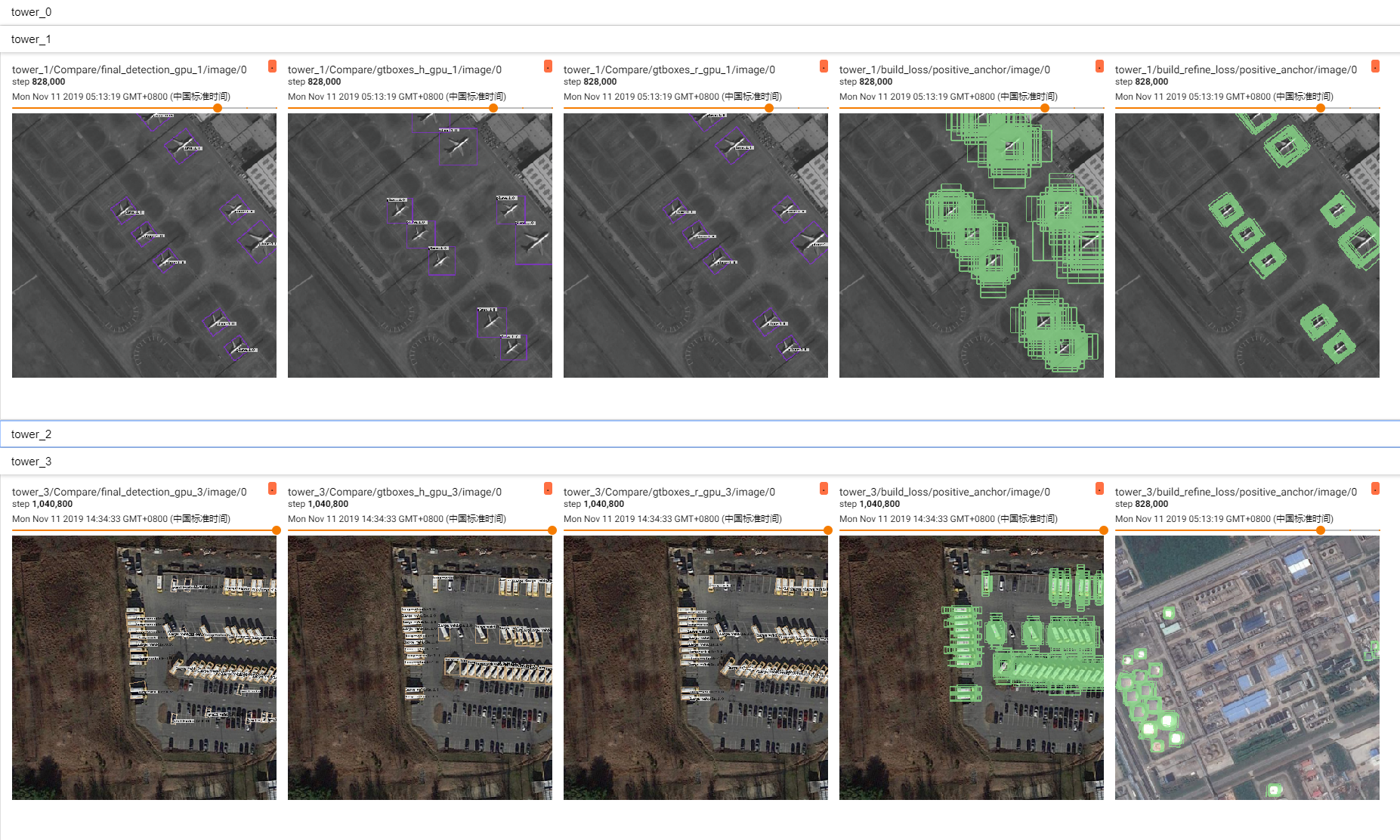
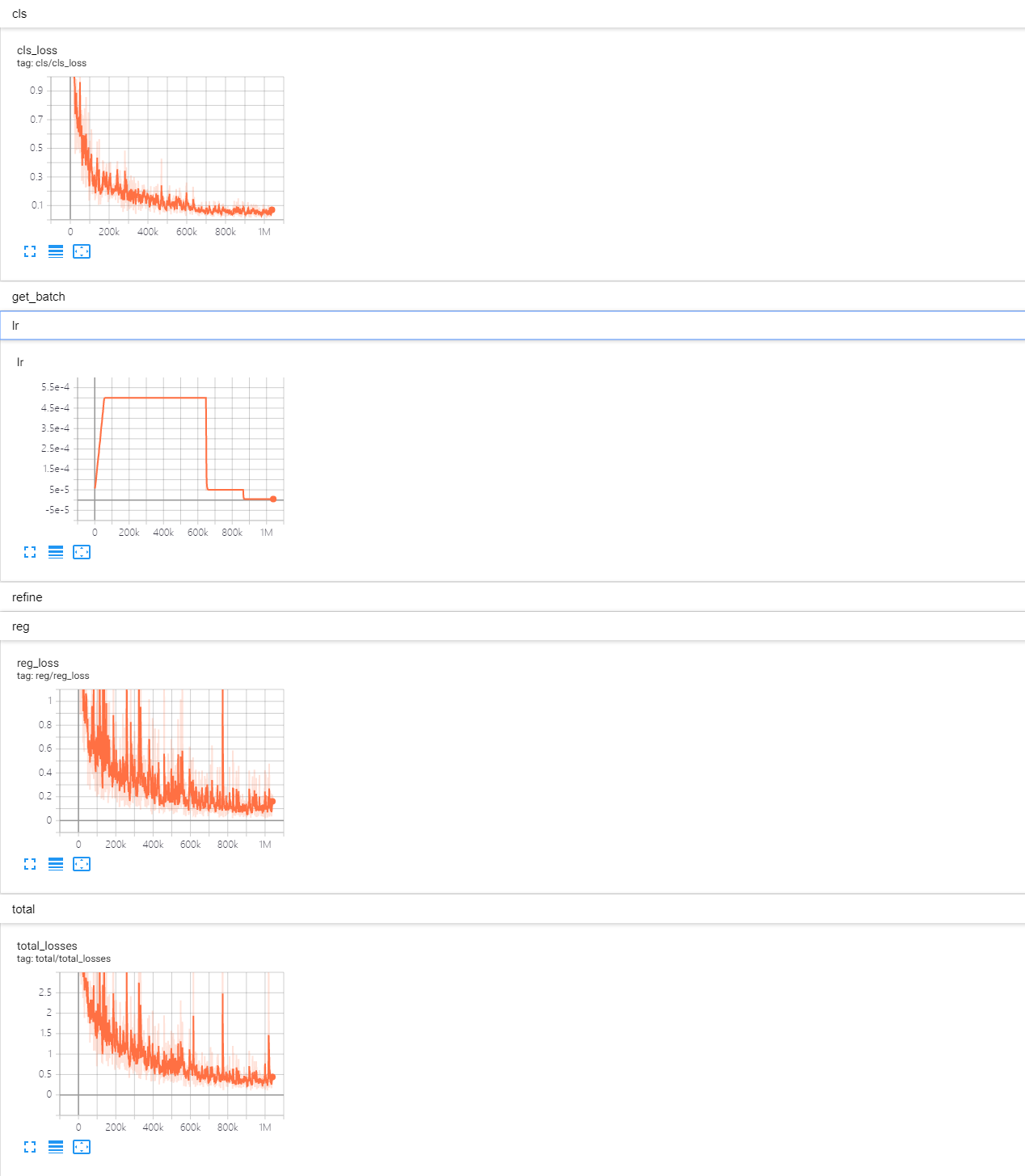
Tensorboard
cd $PATH_ROOT/output/summary
tensorboard --logdir=.
Citation
If you find our code useful for your research, please consider cite.
@article{yang2021alpharotate,
    author  = {Yang, Xue and Zhou, Yue and Yan, Junchi},
    title   = {AlphaRotate: A Rotation Detection Benchmark using TensorFlow},
    journal = {arXiv preprint arXiv:2111.06677},
    year    = {2021},
}
Reference
1、https://github.com/endernewton/tf-faster-rcnn
2、https://github.com/zengarden/light_head_rcnn
3、https://github.com/tensorflow/models/tree/master/research/object_detection
4、https://github.com/fizyr/keras-retinanet
Contributors

161 commits

3 commits
Similar repos


Languages
Python
98.8%
This is a tensorflow-based rotation detection benchmark, also called AlphaRotate.
See the codeREADME
AlphaRotate: A Rotation Detection Benchmark using TensorFlow
:rocket::rocket::rocket: News: MMRotate has been released at https://github.com/open-mmlab/mmrotate
Abstract
AlphaRotate is mainly maintained by Xue Yang with Shanghai Jiao Tong University supervised by Prof. Junchi Yan.
Papers and codes related to remote sensing/aerial image detection: DOTA-DOAI
Techniques:
- Dataset: DOTA, HRSC2016, ICDAR2015, ICDAR2017 MLT, MSRA-TD500, UCAS-AOD, FDDB, OHD-SJTU, SSDD++, Total-Text
- Baackbone: ResNet, MobileNetV2, EfficientNet, DarkNet53
- Neck: FPN, BiFPN
- Detectors:
- R2CNN (Faster-RCNN-H): R2CNN_Faster-RCNN_Tensorflow
- Double Head
- RRPN (Faster-RCNN-R): TF code
- SCRDet (ICCV19): R2CNN++
- RetinaNet-H, RetinaNet-R: TF code
- RefineRetinaNet (CascadeRetinaNet)
- ATSS
- FCOS
- RSDet (AAAI21): TF code
- RSDet++ (FCOS-RSDet)
- R3Det (AAAI21): TF code
- Circular Smooth Label (CSL ECCV20): TF code
- Densely Coded Label (DCL CVPR21): TF code
- GWD (ICML21): PyTorch code
- BCD (TPAMI22): PyTorch code
- KLD (NeurIPS21): PyTorch code
- RIDet (GRSL): PyTorch code
- KFIoU (ICLR23): PyTorch code
- Mixed method: R3Det-DCL, R3Det-GWD, R3Det-BCD, R3Det-KLD, FCOS-RSDet, R2CNN-BCD, R2CNN-KF
- R2CNN (Faster-RCNN-H): R2CNN_Faster-RCNN_Tensorflow
- Loss: CE, Focal Loss, Smooth L1 Loss, IoU-Smooth L1 Loss, Modulated Loss
- Others: SWA, exportPb, MMdnn
The above-mentioned rotation detectors are all modified based on the following horizontal detectors:
- Faster RCNN: TF code
- R-FCN: TF code
- FPN: TF code1
- Cascade RCNN: TF code
- Cascade FPN RCNN: TF code
- RetinaNet: TF code
- RefineDet: MxNet code
- FCOS: TF code
Projects
Latest Performance
All trained weights can also be downloaded from HuggingFace.
DOTA (Task1)
Baseline
| Backbone | Neck | Training/test dataset | Data Augmentation | Epoch | NMS |
|---|---|---|---|---|---|
| ResNet50_v1d 600->800 | FPN | trainval/test | × | 13 (AP50) or 17 (AP50:95) is enough for baseline (default is 13) | gpu nms (slightly worse <1% than cpu nms but faster) |
SOTA
| Method | Backbone | DOTA1.0 | Model | MS | Data Augmentation | Epoch | Configs |
|---|---|---|---|---|---|---|---|
| R2CNN-BCD | ResNet152_v1d-FPN | 79.54 | Baidu Drive (h2u1) | √ | √ | 34 | dota1.0 |
| RetinaNet-BCD | ResNet152_v1d-FPN | 78.52 | Baidu Drive (0puk) | √ | √ | 51 | dota1.0 |
| R3Det-BCD | ResNet50_v1d-FPN | 79.08 | Baidu Drive (v60g) | √ | √ | 51 | dota1.0 |
| R3Det-BCD | ResNet152_v1d-FPN | 79.95 | Baidu Drive (v60g) | √ | √ | 51 | dota1.0 |
Note:
- Single GPU training: SAVE_WEIGHTS_INTE = iter_epoch * 1 (DOTA1.0: iter_epoch=27000, DOTA1.5: iter_epoch=32000, DOTA2.0: iter_epoch=40000)
- Multi-GPU training (better): SAVE_WEIGHTS_INTE = iter_epoch * 2
My Development Environment
- python3.5 (anaconda recommend)
- cuda 10.0
- opencv-python 4.1.1.26 (important)
- tfplot 0.2.0 (optional)
- tensorflow-gpu 1.13
- tqdm 4.54.0
- Shapely 1.7.1
Installation
Manual configuration (cuda version < 11)
pip install -r requirements.txt
pip install -v -e .  # or "python setup.py develop"
Or, you can simply install AlphaRotate with the following command:
pip install alpharotate # Not suitable for dev.
Docker (cuda version < 11)
docker images: yangxue2docker/yx-tf-det:tensorflow1.13.1-cuda10-gpu-py3
Note: For 30xx series graphics cards (cuda version >= 11), I recommend this blog to install tf1.xx, or download image from tensorflow-release-notes according to your development environment, e.g. nvcr.io/nvidia/tensorflow:20.11-tf1-py3
cd alpharotate/libs/utils/cython_utils
rm *.so
rm *.c
rm *.cpp
python setup.py build_ext --inplace (or make)

cd alpharotate/libs/utils/
rm *.so
rm *.c
rm *.cpp
python setup.py build_ext --inplace
Download Model
Pretrain weights
Download a pretrain weight you need from the following three options, and then put it to $PATH_ROOT/dataloader/pretrained_weights.
- MxNet pretrain weights (recommend in this repo, default in NET_NAME): resnet_v1d, resnet_v1b, refer to gluon2TF.
- Tensorflow pretrain weights: resnet50_v1, resnet101_v1, resnet152_v1, efficientnet, mobilenet_v2, darknet53 (Baidu Drive (1jg2), Google Drive).
- PyTorch pretrain weights, refer to pretrain_zoo.py and Others.
Trained weights
- Please download trained models by this project, then put them to $PATH_ROOT/output/pretained_weights.
Train
-
If you want to train your own dataset, please note:
(1) Select the detector and dataset you want to use, and mark them as #DETECTOR and #DATASET (such as #DETECTOR=retinanet and #DATASET=DOTA) (2) Modify parameters (such as CLASS_NUM, DATASET_NAME, VERSION, etc.) in $PATH_ROO./configs/#DATASET/#DETECTOR/cfgs_xxx.py (3) Copy $PATH_ROO./configs/#DATASET/#DETECTOR/cfgs_xxx.py to $PATH_ROO./configs/cfgs.py (4) Add category information in $PATH_ROOT/libs/label_name_dict/label_dict.py (5) Add data_name to $PATH_ROOT/dataloader/dataset/read_tfrecord.py -
Make tfrecord
If image is very large (such as DOTA dataset), the image needs to be cropped. Take DOTA dataset as a example:cd $PATH_ROOT/dataloader/dataset/DOTA python data_crop.pyIf image does not need to be cropped, just convert the annotation file into xml format, refer to example.xml.
cd $PATH_ROOT/dataloader/dataset/ python convert_data_to_tfrecord.py --root_dir='/PATH/TO/DOTA/' --xml_dir='labeltxt' --image_dir='images' --save_name='train' --img_format='.png' --dataset='DOTA' -
Start training
cd $PATH_ROOT/tools/#DETECTOR
python train.py
Test
-
For large-scale image, take DOTA dataset as a example (the output file or visualization is in $PATH_ROOT/tools/#DETECTOR/test_dota/VERSION):
cd $PATH_ROOT/tools/#DETECTOR
python test_dota.py --test_dir='/PATH/TO/IMAGES/'
                    --gpus=0,1,2,3,4,5,6,7
                    -ms (multi-scale testing, optional)
                    -s (visualization, optional)

or (recommend in this repo, better than multi-scale testing)

python test_dota_sota.py --test_dir='/PATH/TO/IMAGES/'
                         --gpus=0,1,2,3,4,5,6,7
                         -s (visualization, optional)
Notice: In order to set the breakpoint conveniently, the read and write mode of the file is' a+'. If the model of the same #VERSION needs to be tested again, the original test results need to be deleted.
-
For small-scale image, take HRSC2016 dataset as a example:
cd $PATH_ROOT/tools/#DETECTOR
python test_hrsc2016.py --test_dir='/PATH/TO/IMAGES/'
                        --gpu=0
                        --image_ext='bmp'
                        --test_annotation_path='/PATH/TO/ANNOTATIONS'
                        -s (visualization, optional)
Tensorboard
cd $PATH_ROOT/output/summary
tensorboard --logdir=.
Citation
If you find our code useful for your research, please consider cite.
@article{yang2021alpharotate,
    author  = {Yang, Xue and Zhou, Yue and Yan, Junchi},
    title   = {AlphaRotate: A Rotation Detection Benchmark using TensorFlow},
    journal = {arXiv preprint arXiv:2111.06677},
    year    = {2021},
}
Reference
1、https://github.com/endernewton/tf-faster-rcnn
2、https://github.com/zengarden/light_head_rcnn
3、https://github.com/tensorflow/models/tree/master/research/object_detection
4、https://github.com/fizyr/keras-retinanet
Similar repos
Contributors
161 commits
3 commits
Languages
Python
98.8%