
Scrollable tiling for tmux, like niri and PaperWM: new columns scroll in from the right instead of squeezing your panes
Shell
2
3 commits
updated Oct 3, 2026
See what people are saying
README
tmux-scrollable
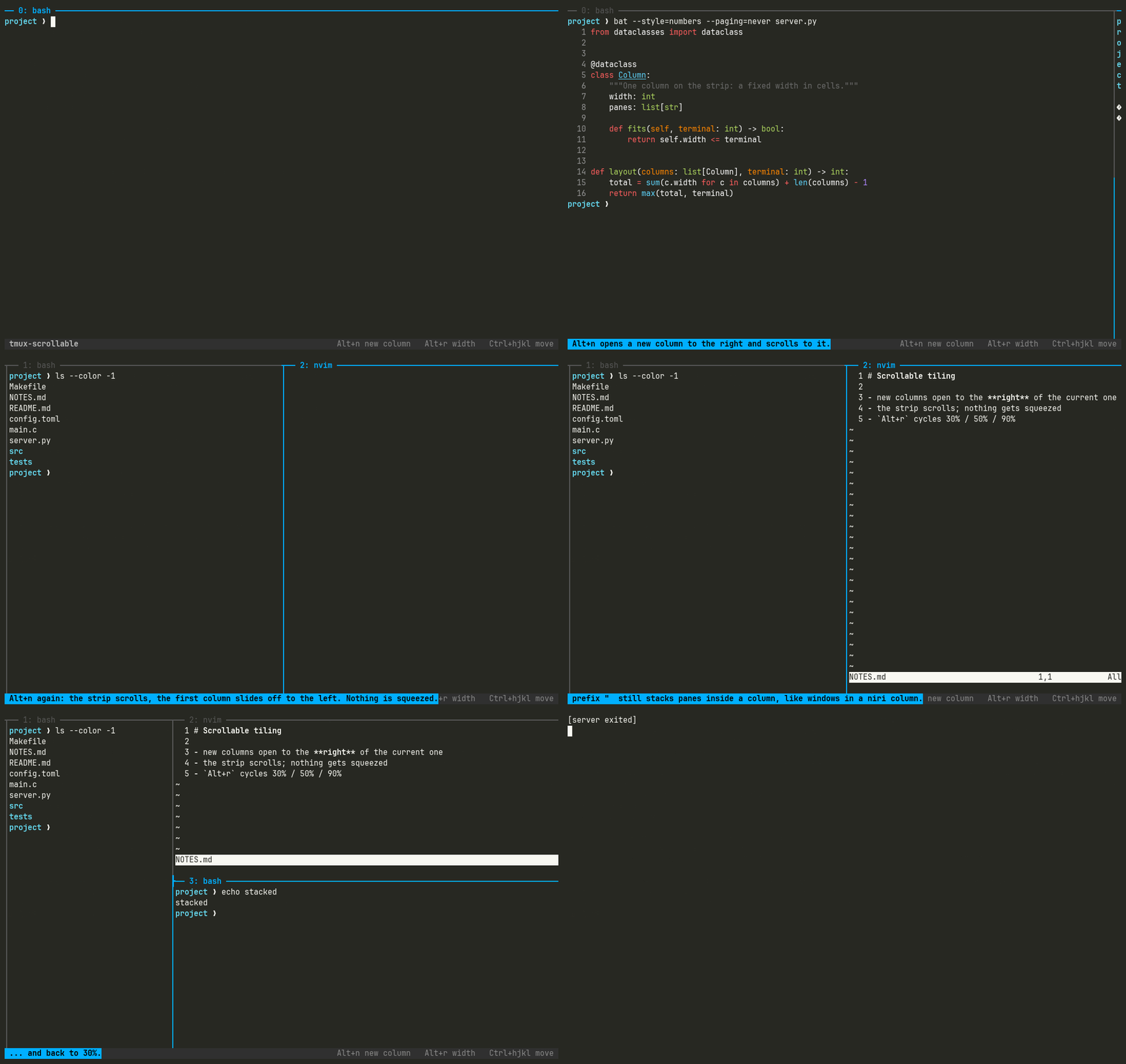
Scrollable tiling for tmux, like niri and PaperWM. New columns scroll in from the right instead of squeezing the panes you already have.
Why
tmux splits a fixed screen: every new pane makes the others smaller. Scrolling window managers lay windows out on an infinite horizontal strip and scroll the screen along it, so each window keeps a useful width and you move between them instead of resizing them. tmux-scrollable brings that model to tmux panes.
If you came from niri, PaperWM, Hyprscroller, Karousel or zellij, this is that idea inside tmux. tmux's own keys are untouched, and the two new keys work without the prefix.
| Key | Action |
|---|---|
Alt+n | Open a new column right of the current one and scroll to it |
Alt+r | Cycle the current column through 30%, 50% and 90% of the terminal, like niri's Mod+R |
| your usual pane keys | Moving focus scrolls the strip so the whole column is visible. Works with mouse clicks, select-pane, and vim-tmux-navigator's Ctrl+hjkl |
prefix " | Still a vertical split: panes stack inside a column, like windows in a niri column |
prefix % | Still tmux's horizontal split, inside the current column |
Column widths are fixed once set, like niri's fixed widths: resizing the terminal does
not resize your columns. If the columns are narrower than the terminal, the space after the
last one stays empty, as in niri. A single column always fills the terminal.
Install
With TPM:
set -g @plugin 'yanglited/tmux-scrollable'
then prefix I.
Requirements
- tmux 3.8 or newer. tmux 3.7 and older draw a window wider than the terminal with ghost borders and misplaced text, and can spin the server at 100% CPU for minutes (tmux issue 5664). The plugin refuses to load there.
cursor-offset.patchfrom this repo, until it is upstream. Without it tmux hides the cursor whenever the view is scrolled: its visibility check is given screen coordinates where it expects window coordinates.- python3 (for the layout maths) and
flock(util-linux).
Until 3.8 is released, build a release candidate:
git clone --depth 1 --branch 3.8-rc3 https://github.com/tmux/tmux.git && cd tmux
patch -p0 < ~/.config/tmux/plugins/tmux-scrollable/cursor-offset.patch
sh autogen.sh && ./configure --disable-debug && make -j"$(nproc)" && install -Dm755 tmux ~/.local/bin/tmux
tmux kill-server   # the running server must be restarted on the new binary
Try my whole tmux setup
My own config at yanglited/tmux is a small, readable
tmux.conf with this plugin plus tmux-sensible, tmux-resurrect, tmux-yank and
vim-tmux-navigator (so Ctrl+hjkl moves between vim splits and tmux columns alike), a clear
status bar and pane titles, Alt+hjkl to swap panes, and prefix v to open the pane's
scrollback in nvim. To try it without losing yours:
mv ~/.config/tmux ~/.config/tmux.bak 2>/dev/null; mv ~/.tmux.conf ~/.tmux.conf.bak 2>/dev/null
git clone https://github.com/yanglited/tmux.git ~/.config/tmux
git clone https://github.com/tmux-plugins/tpm ~/.config/tmux/plugins/tpm
tmux kill-server 2>/dev/null; tmux
Inside tmux press prefix I (Ctrl+b, then Shift+i) to let TPM install the plugins, then
Alt+n. To go back: tmux kill-server, delete ~/.config/tmux and restore the .bak copies.
Options
All optional; these are the defaults.
set -g @scrollable-split-key 'M-n'    # key (no prefix) that opens a new column
set -g @scrollable-preset-key 'M-r'   # key (no prefix) that cycles the column width
set -g @scrollable-width 50           # new column width, percent of the terminal
set -g @scrollable-presets '30 50 90' # widths Alt+r cycles through, like niri's preset-column-widths
set -g @scrollable-log ''             # path of a debug log of every layout change; empty = off
How it works
tmux already supports windows wider than the terminal (window-size manual and
resize-window) and can pan the visible part (refresh-client -L/-R). The plugin keeps
the window exactly as wide as its columns, remembers each column's width in a
@scrollable_w pane option, and re-applies the widths through one select-layout after
tmux rescales. Columns are read from tmux's own layout tree, so splits inside a column are
left alone.
Panning is explicit: on every focus change the plugin scrolls just enough to show the whole
active column (niri's center-focused-column "never"). tmux's own cursor tracking is not
used because it centres the cursor rather than the pane and jumps to the far left whenever
a program hides its cursor.
Hooks are registered under the array key [tmux-scrollable], so hooks you set yourself
are left alone.
Compared with
- tmux-tilish / tmux-tilit give tmux i3-style automatic layouts on one fixed screen. tmux-scrollable keeps tmux's manual splits and adds the scrolling strip.
- zellij is a different multiplexer. tmux-scrollable keeps tmux, your config and your
plugins;
Alt+nfor a new pane will feel familiar.
Limits
- Column widths come from the client that triggered the change; with several clients of different sizes attached to one session, the others get a scaled view.
- Columns resized by hand (mouse drag,
resize-pane) snap back to their stored width on the next split, close orAlt+r. - tmux-resurrect restores a scrolled window squeezed into the terminal; columns keep their relative sizes but you have to split again to get the wide layout back.
Tests and demo
test/e2e.sh drives a throwaway tmux server with a fake terminal attached and checks
window width, scroll offset and column positions after every operation.
demo/record.sh re-records demo.gif the same way, with asciinema and agg.
Similar repos


Languages
Shell
80.5%
Python
19.5%
Scrollable tiling for tmux, like niri and PaperWM: new columns scroll in from the right instead of squeezing your panes
Shell
2
3 commits
updated Oct 3, 2026
See what people are saying
README
tmux-scrollable
Scrollable tiling for tmux, like niri and PaperWM. New columns scroll in from the right instead of squeezing the panes you already have.
Why
tmux splits a fixed screen: every new pane makes the others smaller. Scrolling window managers lay windows out on an infinite horizontal strip and scroll the screen along it, so each window keeps a useful width and you move between them instead of resizing them. tmux-scrollable brings that model to tmux panes.
If you came from niri, PaperWM, Hyprscroller, Karousel or zellij, this is that idea inside tmux. tmux's own keys are untouched, and the two new keys work without the prefix.
| Key | Action |
|---|---|
Alt+n | Open a new column right of the current one and scroll to it |
Alt+r | Cycle the current column through 30%, 50% and 90% of the terminal, like niri's Mod+R |
| your usual pane keys | Moving focus scrolls the strip so the whole column is visible. Works with mouse clicks, select-pane, and vim-tmux-navigator's Ctrl+hjkl |
prefix " | Still a vertical split: panes stack inside a column, like windows in a niri column |
prefix % | Still tmux's horizontal split, inside the current column |
Column widths are fixed once set, like niri's fixed widths: resizing the terminal does
not resize your columns. If the columns are narrower than the terminal, the space after the
last one stays empty, as in niri. A single column always fills the terminal.
Install
With TPM:
set -g @plugin 'yanglited/tmux-scrollable'
then prefix I.
Requirements
- tmux 3.8 or newer. tmux 3.7 and older draw a window wider than the terminal with ghost borders and misplaced text, and can spin the server at 100% CPU for minutes (tmux issue 5664). The plugin refuses to load there.
cursor-offset.patchfrom this repo, until it is upstream. Without it tmux hides the cursor whenever the view is scrolled: its visibility check is given screen coordinates where it expects window coordinates.- python3 (for the layout maths) and
flock(util-linux).
Until 3.8 is released, build a release candidate:
git clone --depth 1 --branch 3.8-rc3 https://github.com/tmux/tmux.git && cd tmux
patch -p0 < ~/.config/tmux/plugins/tmux-scrollable/cursor-offset.patch
sh autogen.sh && ./configure --disable-debug && make -j"$(nproc)" && install -Dm755 tmux ~/.local/bin/tmux
tmux kill-server   # the running server must be restarted on the new binary
Try my whole tmux setup
My own config at yanglited/tmux is a small, readable
tmux.conf with this plugin plus tmux-sensible, tmux-resurrect, tmux-yank and
vim-tmux-navigator (so Ctrl+hjkl moves between vim splits and tmux columns alike), a clear
status bar and pane titles, Alt+hjkl to swap panes, and prefix v to open the pane's
scrollback in nvim. To try it without losing yours:
mv ~/.config/tmux ~/.config/tmux.bak 2>/dev/null; mv ~/.tmux.conf ~/.tmux.conf.bak 2>/dev/null
git clone https://github.com/yanglited/tmux.git ~/.config/tmux
git clone https://github.com/tmux-plugins/tpm ~/.config/tmux/plugins/tpm
tmux kill-server 2>/dev/null; tmux
Inside tmux press prefix I (Ctrl+b, then Shift+i) to let TPM install the plugins, then
Alt+n. To go back: tmux kill-server, delete ~/.config/tmux and restore the .bak copies.
Options
All optional; these are the defaults.
set -g @scrollable-split-key 'M-n'    # key (no prefix) that opens a new column
set -g @scrollable-preset-key 'M-r'   # key (no prefix) that cycles the column width
set -g @scrollable-width 50           # new column width, percent of the terminal
set -g @scrollable-presets '30 50 90' # widths Alt+r cycles through, like niri's preset-column-widths
set -g @scrollable-log ''             # path of a debug log of every layout change; empty = off
How it works
tmux already supports windows wider than the terminal (window-size manual and
resize-window) and can pan the visible part (refresh-client -L/-R). The plugin keeps
the window exactly as wide as its columns, remembers each column's width in a
@scrollable_w pane option, and re-applies the widths through one select-layout after
tmux rescales. Columns are read from tmux's own layout tree, so splits inside a column are
left alone.
Panning is explicit: on every focus change the plugin scrolls just enough to show the whole
active column (niri's center-focused-column "never"). tmux's own cursor tracking is not
used because it centres the cursor rather than the pane and jumps to the far left whenever
a program hides its cursor.
Hooks are registered under the array key [tmux-scrollable], so hooks you set yourself
are left alone.
Compared with
- tmux-tilish / tmux-tilit give tmux i3-style automatic layouts on one fixed screen. tmux-scrollable keeps tmux's manual splits and adds the scrolling strip.
- zellij is a different multiplexer. tmux-scrollable keeps tmux, your config and your
plugins;
Alt+nfor a new pane will feel familiar.
Limits
- Column widths come from the client that triggered the change; with several clients of different sizes attached to one session, the others get a scaled view.
- Columns resized by hand (mouse drag,
resize-pane) snap back to their stored width on the next split, close orAlt+r. - tmux-resurrect restores a scrolled window squeezed into the terminal; columns keep their relative sizes but you have to split again to get the wide layout back.
Tests and demo
test/e2e.sh drives a throwaway tmux server with a fake terminal attached and checks
window width, scroll offset and column positions after every operation.
demo/record.sh re-records demo.gif the same way, with asciinema and agg.
Similar repos
Languages
Shell
80.5%
Python
19.5%