A self-hosted, privacy-focused RAG (Retrieval-Augmented Generation) interface for intelligent document interaction. Turn any document into a knowledge base you can chat with.
Python
7
67 commits
updated Apr 24, 2025
A self-hosted, privacy-focused RAG (Retrieval-Augmented Generation) interface for intelligent document interaction. Turn any document into a knowledge base you can chat with.
A powerful and secure document interaction system that transforms any document into an interactive knowledge base. Using advanced AI models that run entirely on-premises, DocuChat allows you to have natural conversations with your documents while maintaining complete data privacy and security.
The system uses the following model configurations by default:
ibm-granite/granite-3.3-2b-instructibm-granite/granite-embedding-30m-englishYou can configure different models based on your needs:
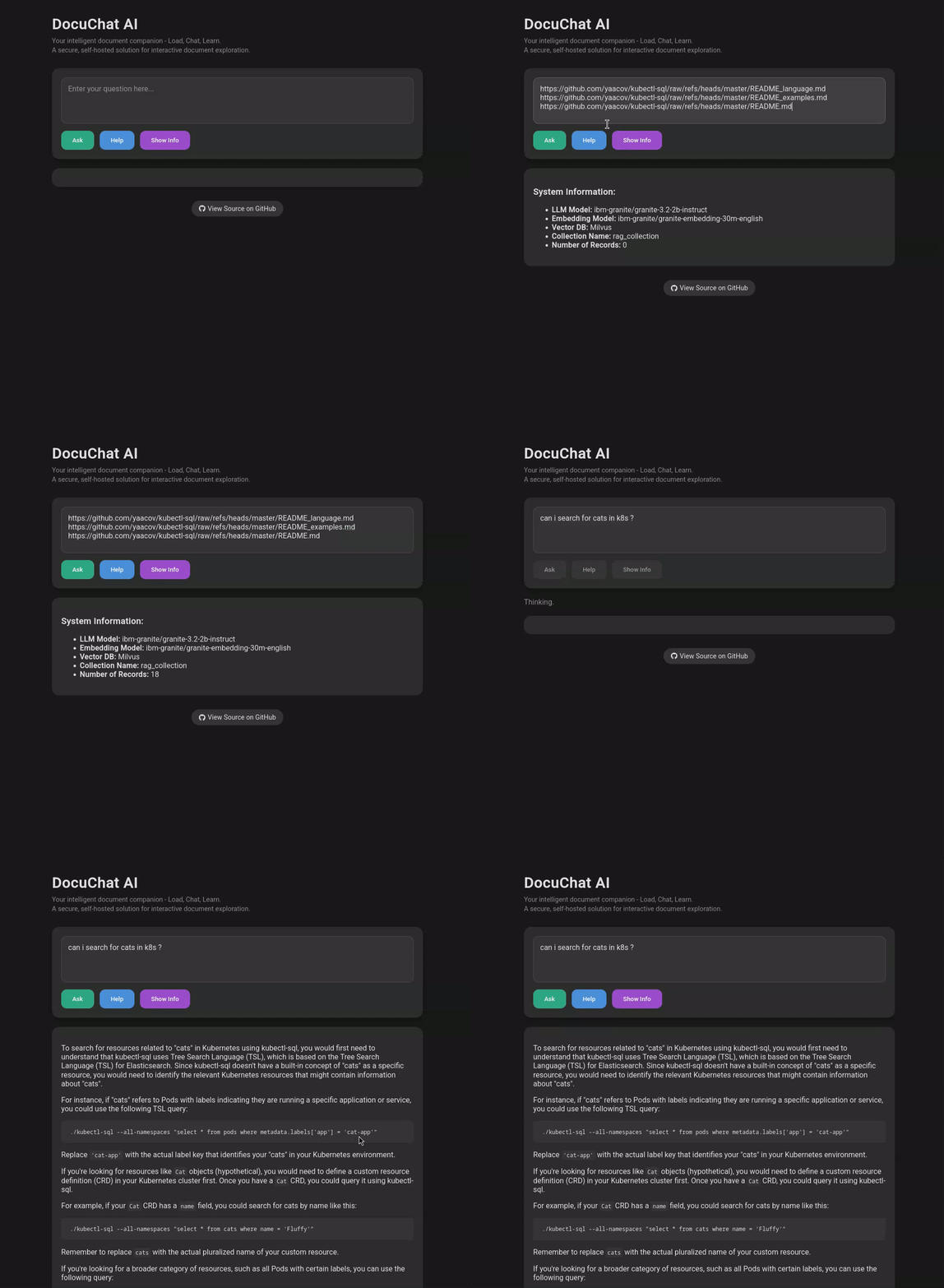
Clone the repository:
git clone https://github.com/yaacov/rag-chat-interface.git
cd rag-chat-interface
Install dependencies:
# Optional: set a virtual env
python3.13 -m venv .venv
source .venv/bin/activate

# Install dependencies
pip install -r requirements.txt
Start the server:
.venv/bin/python main.py \
    [--source INITIAL_SOURCE] \
    [--host HOST] \
    [--port PORT] \
    [--db-path DB_PATH] \
    [--models-cache-dir CACHE_DIR] \
    [--downloads-dir DOWNLOADS_DIR] \
    [--chunk_size CHUNK_SIZE] \
    [--chunk_overlap CHUNK_OVERLAP] \
    [--device GPU_DEVICE] \
    [--llm-model LLM_MODEL_NAME] \
    [--llm-api-url LLM_API_URL] \
    [--llm-api-key LLM_API_KEY] \
    [--embedding-api-url EMBEDDING_API_URL] \
    [--embedding-api-key EMBEDDING_API_KEY] \
    [--query-log-db QUERY_LOG_DB] \
    [--log-queries]
Example:
# Override LLM model and GPU device
.venv/bin/python main.py --llm-model ibm-granite/granite-3.2-8b-instruct --device cpu
Arguments:
--source: Initial source to load - can be a file, directory, or URL (optional)--host: Host to bind the server to (default: 0.0.0.0)--port: Port to bind the server to (default: 8000)--db-path: Path to the Milvus database file (default: ./rag_milvus.db)--models-cache-dir: Directory to store downloaded models (default: ./models_cache)--downloads-dir: Directory to store downloaded files (default: ./downloads)--chunk_size: Maximum size of each document chunk (default: 1000 characters)--chunk_overlap: Overlap between chunks (default: 200 characters)--device: Force a specific device (e.g., 'cuda', 'cpu', 'mps'). If not provided, best available device is automatically selected--llm-model: Override the default LLM model (default: ibm-granite/granite-3.2-2b-instruct)--llm-api-url: URL for the LLM API service (enables MAAS mode for LLM)--llm-api-key: API key for the LLM API service--embedding-model: Override the default embedding model (default: ibm-granite/granite-embedding-30m-english)--embedding-api-url: URL for the embedding API service (enables MAAS mode for embeddings)--embedding-api-key: API key for the embedding API service--query-log-db: Path to SQLite database for query logging (default: ./query_logs.db)--log-queries: Enable logging of queries and responses to SQLite databaseOpen your browser and navigate to http://localhost:8000
While RAG chat interface is designed to run models locally, you can also connect it to external Model-as-a-Service (MAAS) providers. This allows you to:
To use MAAS for language model (LLM) capabilities:
# Define environment variables
export LLM_API_URL="https://your-llm-service.com/api"
export LLM_API_KEY="your-api-key"
export LLM_MODEL="ibm-granite/granite-3-8b-instruct"
export EMBEDDING_API_URL="https://your-embedding-service.com/api"
export EMBEDDING_API_KEY="your-api-key"
export EMBEDDING_MODEL="ibm-granite/granite-embedding-30m-english"
export CHUNK_SIZE="1000"

# Run with environment variables
.venv/bin/python main.py \
    --llm-api-url "$LLM_API_URL" \
    --llm-api-key "$LLM_API_KEY" \
    --llm-model "$LLM_MODEL" \
    --embedding-api-url "$EMBEDDING_API_URL" \
    --embedding-api-key "$EMBEDDING_API_KEY" \
    --embedding-model "$EMBEDDING_MODEL" \
    --chunk_size $CHUNK_SIZE
You can mix local and remote models. For example, use a local embedding model with a remote LLM:
.venv/bin/python main.py \
     --llm-api-url "https://your-llm-service.com/api" \
     --llm-api-key "your-api-key" \
     --llm-model "granite-3-8b-instruct"
The MAAS APIs must be compatible with the following endpoints:
/v1/completions and /v1/chat/completions/v1/embeddingsThese endpoints should follow standard API formats similar to those used by MAAS providers.
Copy .env.example to .env and customize as needed:
cp .env.example .env
# edit .env to fill in your API URLs/keys, etc.
Create a Kubernetes Secret from your .env:
kubectl create secret generic rag-chat-secret --from-env-file=.env
Apply the deployment and service:
kubectl apply -f deployment.yaml
Verify and access:
kubectl get pods,svc
# visit the external IP or LoadBalancer address on port 80

# On Openshift you can also create an external route
oc expose svc/rag-chat-service

# The service is http:// only, you can ask Openshift, to redirect calls using internal tls
# to support https:// in the route object
#
# tls:
#   termination: edge
#   insecureEdgeTerminationPolicy: Redirect
Build the image:
podman build -t quay.io/yaacov/rag-chat-interface .
Run the container (bind port 8000):
podman run -it --rm \
  -p 8000:8000 \
  -e LLM_API_URL="$LLM_API_URL" \
  -e LLM_API_KEY="$LLM_API_KEY" \
  -e LLM_MODEL="$LLM_MODEL" \
  -e EMBEDDING_API_URL="$EMBEDDING_API_URL" \
  -e EMBEDDING_API_KEY="$EMBEDDING_API_KEY" \
  -e EMBEDDING_MODEL="$EMBEDDING_MODEL" \
  quay.io/yaacov/rag-chat-interface
Note: Podman containers may not have host GPU access by default.
To enable GPU support, pass appropriate flags (e.g.,--device /dev/nvidia0) or use a GPU‑enabled runtime.
Access the UI at http://localhost:8000
While RAG chat interface does not directly crawl over HTTP links, we provide a utility crawler that can extract URLs from a starting URL. This can be useful for discovering content you may want to process with the RAG system.
python utils/crawler.py https://example.com/docs/ --verbose
For more details about the crawler utility, see README_crawler.md.
ask_cli.py is a CLI tool for interacting with a rag-chat-interface server.
python utils/ask_cli.py --url https://example.com/ask
For more details about the CLI utility, see README_ask_cli.md.
MIT License
Contributions are welcome! Please feel free to submit a Pull Request.
A self-hosted, privacy-focused RAG (Retrieval-Augmented Generation) interface for intelligent document interaction. Turn any document into a knowledge base you can chat with.
Python
7
67 commits
updated Apr 24, 2025
A self-hosted, privacy-focused RAG (Retrieval-Augmented Generation) interface for intelligent document interaction. Turn any document into a knowledge base you can chat with.
A powerful and secure document interaction system that transforms any document into an interactive knowledge base. Using advanced AI models that run entirely on-premises, DocuChat allows you to have natural conversations with your documents while maintaining complete data privacy and security.
The system uses the following model configurations by default:
ibm-granite/granite-3.3-2b-instructibm-granite/granite-embedding-30m-englishYou can configure different models based on your needs:
Clone the repository:
git clone https://github.com/yaacov/rag-chat-interface.git
cd rag-chat-interface
Install dependencies:
# Optional: set a virtual env
python3.13 -m venv .venv
source .venv/bin/activate

# Install dependencies
pip install -r requirements.txt
Start the server:
.venv/bin/python main.py \
    [--source INITIAL_SOURCE] \
    [--host HOST] \
    [--port PORT] \
    [--db-path DB_PATH] \
    [--models-cache-dir CACHE_DIR] \
    [--downloads-dir DOWNLOADS_DIR] \
    [--chunk_size CHUNK_SIZE] \
    [--chunk_overlap CHUNK_OVERLAP] \
    [--device GPU_DEVICE] \
    [--llm-model LLM_MODEL_NAME] \
    [--llm-api-url LLM_API_URL] \
    [--llm-api-key LLM_API_KEY] \
    [--embedding-api-url EMBEDDING_API_URL] \
    [--embedding-api-key EMBEDDING_API_KEY] \
    [--query-log-db QUERY_LOG_DB] \
    [--log-queries]
Example:
# Override LLM model and GPU device
.venv/bin/python main.py --llm-model ibm-granite/granite-3.2-8b-instruct --device cpu
Arguments:
--source: Initial source to load - can be a file, directory, or URL (optional)--host: Host to bind the server to (default: 0.0.0.0)--port: Port to bind the server to (default: 8000)--db-path: Path to the Milvus database file (default: ./rag_milvus.db)--models-cache-dir: Directory to store downloaded models (default: ./models_cache)--downloads-dir: Directory to store downloaded files (default: ./downloads)--chunk_size: Maximum size of each document chunk (default: 1000 characters)--chunk_overlap: Overlap between chunks (default: 200 characters)--device: Force a specific device (e.g., 'cuda', 'cpu', 'mps'). If not provided, best available device is automatically selected--llm-model: Override the default LLM model (default: ibm-granite/granite-3.2-2b-instruct)--llm-api-url: URL for the LLM API service (enables MAAS mode for LLM)--llm-api-key: API key for the LLM API service--embedding-model: Override the default embedding model (default: ibm-granite/granite-embedding-30m-english)--embedding-api-url: URL for the embedding API service (enables MAAS mode for embeddings)--embedding-api-key: API key for the embedding API service--query-log-db: Path to SQLite database for query logging (default: ./query_logs.db)--log-queries: Enable logging of queries and responses to SQLite databaseOpen your browser and navigate to http://localhost:8000
While RAG chat interface is designed to run models locally, you can also connect it to external Model-as-a-Service (MAAS) providers. This allows you to:
To use MAAS for language model (LLM) capabilities:
# Define environment variables
export LLM_API_URL="https://your-llm-service.com/api"
export LLM_API_KEY="your-api-key"
export LLM_MODEL="ibm-granite/granite-3-8b-instruct"
export EMBEDDING_API_URL="https://your-embedding-service.com/api"
export EMBEDDING_API_KEY="your-api-key"
export EMBEDDING_MODEL="ibm-granite/granite-embedding-30m-english"
export CHUNK_SIZE="1000"

# Run with environment variables
.venv/bin/python main.py \
    --llm-api-url "$LLM_API_URL" \
    --llm-api-key "$LLM_API_KEY" \
    --llm-model "$LLM_MODEL" \
    --embedding-api-url "$EMBEDDING_API_URL" \
    --embedding-api-key "$EMBEDDING_API_KEY" \
    --embedding-model "$EMBEDDING_MODEL" \
    --chunk_size $CHUNK_SIZE
You can mix local and remote models. For example, use a local embedding model with a remote LLM:
.venv/bin/python main.py \
     --llm-api-url "https://your-llm-service.com/api" \
     --llm-api-key "your-api-key" \
     --llm-model "granite-3-8b-instruct"
The MAAS APIs must be compatible with the following endpoints:
/v1/completions and /v1/chat/completions/v1/embeddingsThese endpoints should follow standard API formats similar to those used by MAAS providers.
Copy .env.example to .env and customize as needed:
cp .env.example .env
# edit .env to fill in your API URLs/keys, etc.
Create a Kubernetes Secret from your .env:
kubectl create secret generic rag-chat-secret --from-env-file=.env
Apply the deployment and service:
kubectl apply -f deployment.yaml
Verify and access:
kubectl get pods,svc
# visit the external IP or LoadBalancer address on port 80

# On Openshift you can also create an external route
oc expose svc/rag-chat-service

# The service is http:// only, you can ask Openshift, to redirect calls using internal tls
# to support https:// in the route object
#
# tls:
#   termination: edge
#   insecureEdgeTerminationPolicy: Redirect
Build the image:
podman build -t quay.io/yaacov/rag-chat-interface .
Run the container (bind port 8000):
podman run -it --rm \
  -p 8000:8000 \
  -e LLM_API_URL="$LLM_API_URL" \
  -e LLM_API_KEY="$LLM_API_KEY" \
  -e LLM_MODEL="$LLM_MODEL" \
  -e EMBEDDING_API_URL="$EMBEDDING_API_URL" \
  -e EMBEDDING_API_KEY="$EMBEDDING_API_KEY" \
  -e EMBEDDING_MODEL="$EMBEDDING_MODEL" \
  quay.io/yaacov/rag-chat-interface
Note: Podman containers may not have host GPU access by default.
To enable GPU support, pass appropriate flags (e.g.,--device /dev/nvidia0) or use a GPU‑enabled runtime.
Access the UI at http://localhost:8000
While RAG chat interface does not directly crawl over HTTP links, we provide a utility crawler that can extract URLs from a starting URL. This can be useful for discovering content you may want to process with the RAG system.
python utils/crawler.py https://example.com/docs/ --verbose
For more details about the crawler utility, see README_crawler.md.
ask_cli.py is a CLI tool for interacting with a rag-chat-interface server.
python utils/ask_cli.py --url https://example.com/ask
For more details about the CLI utility, see README_ask_cli.md.
MIT License
Contributions are welcome! Please feel free to submit a Pull Request.



