
[ICLR 2025] Codebase for "CtrLoRA: An Extensible and Efficient Framework for Controllable Image Generation"
Python
271
88 commits
updated Mar 6, 2026
README
To create your customized ControlNet in an easy and low-cost manner 🎉
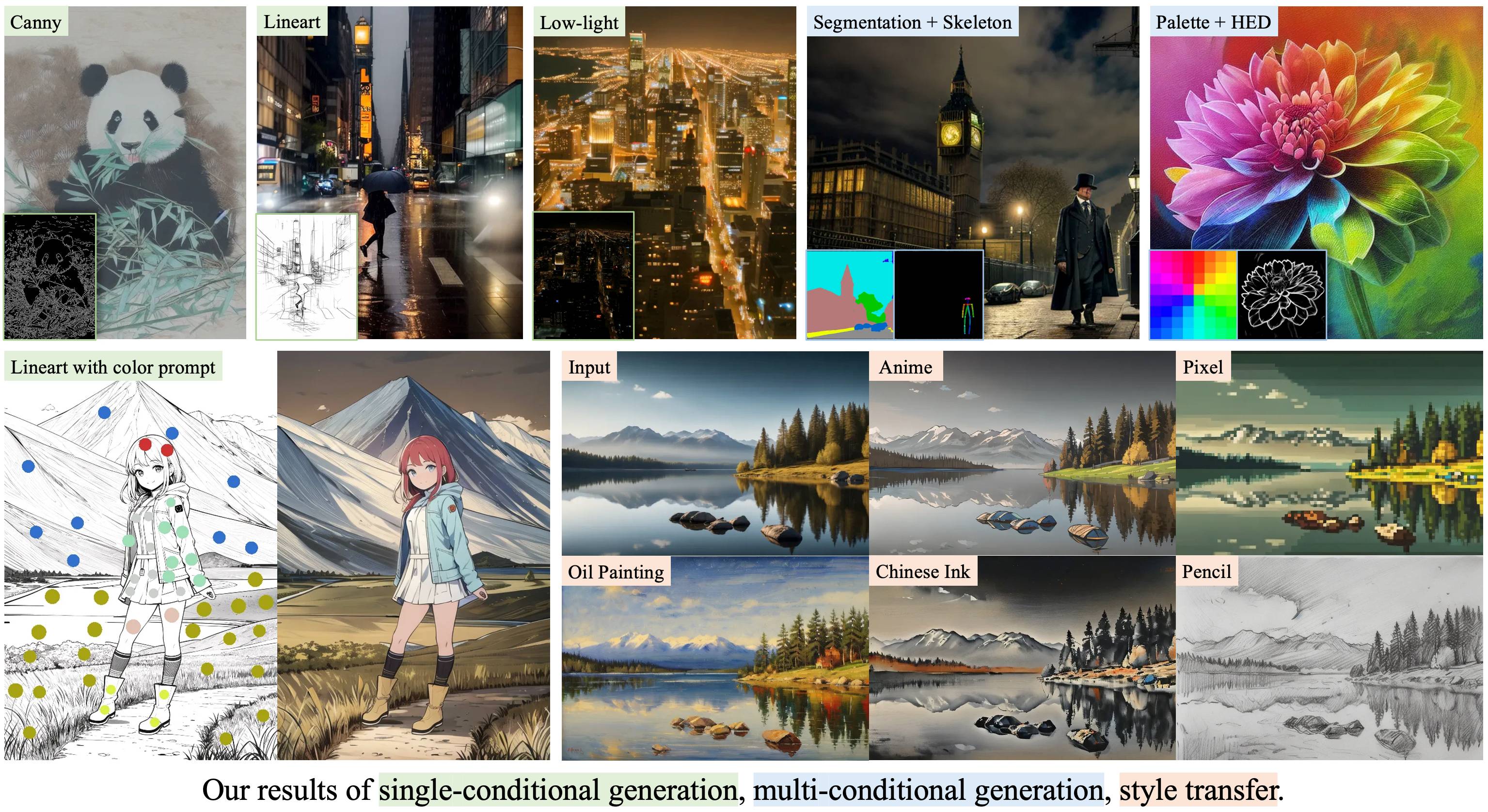

The images are compressed for loading speed.
CtrLoRA


CtrLoRA: An Extensible and Efficient Framework for Controllable Image Generation
Yifeng Xu1,2, Zhenliang He1, Shiguang Shan1,2, Xilin Chen1,2
1Key Lab of AI Safety, Institute of Computing Technology, CAS, China
2University of Chinese Academy of Sciences, China
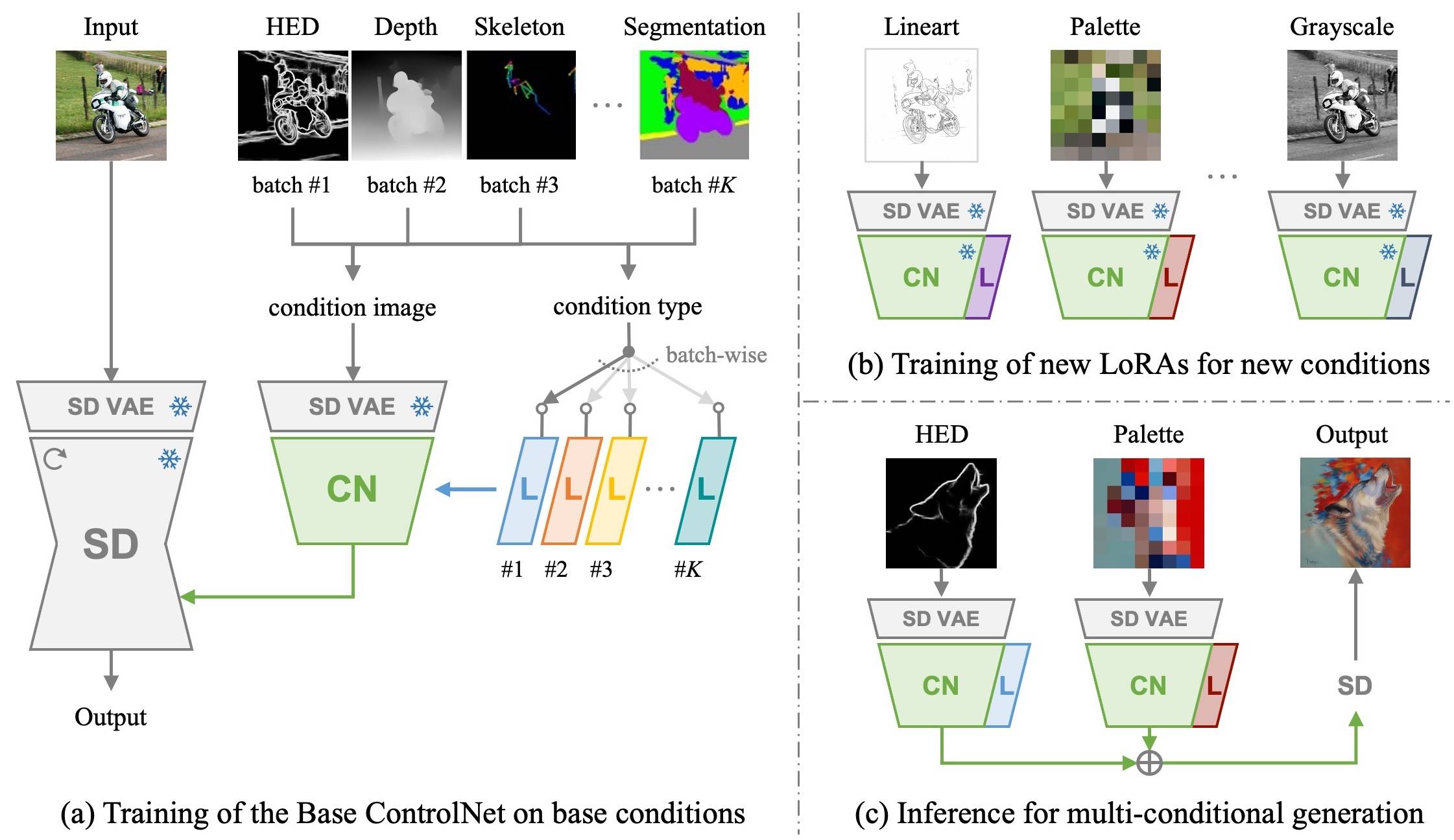
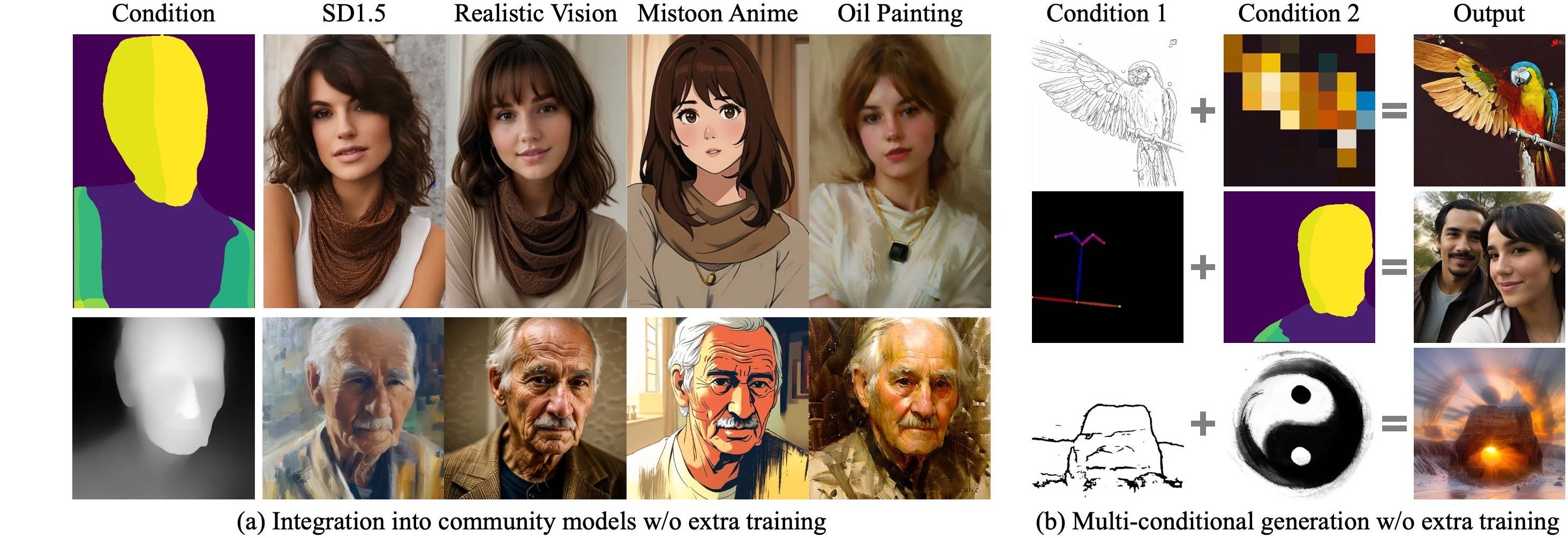
We first train a Base ControlNet along with condition-specific LoRAs on base conditions with a large-scale dataset. Then, our Base ControlNet can be efficiently adapted to novel conditions by new LoRAs with 10% parameters, as few as 1,000 images, and less than 1 hour training on a single GPU.
📜 Contents
- 🎨 Visual Results
- 🛠️ Installation
- 🤖️ Download Pretrained Models
- 🚀 Gradio Demo
- 🚗 Python API
- 🚢 ComfyUI Workflows
- 🔥 Train a LoRA for Your Custom Condition
- 📚 Detailed Instructions
🎨 Visual Results
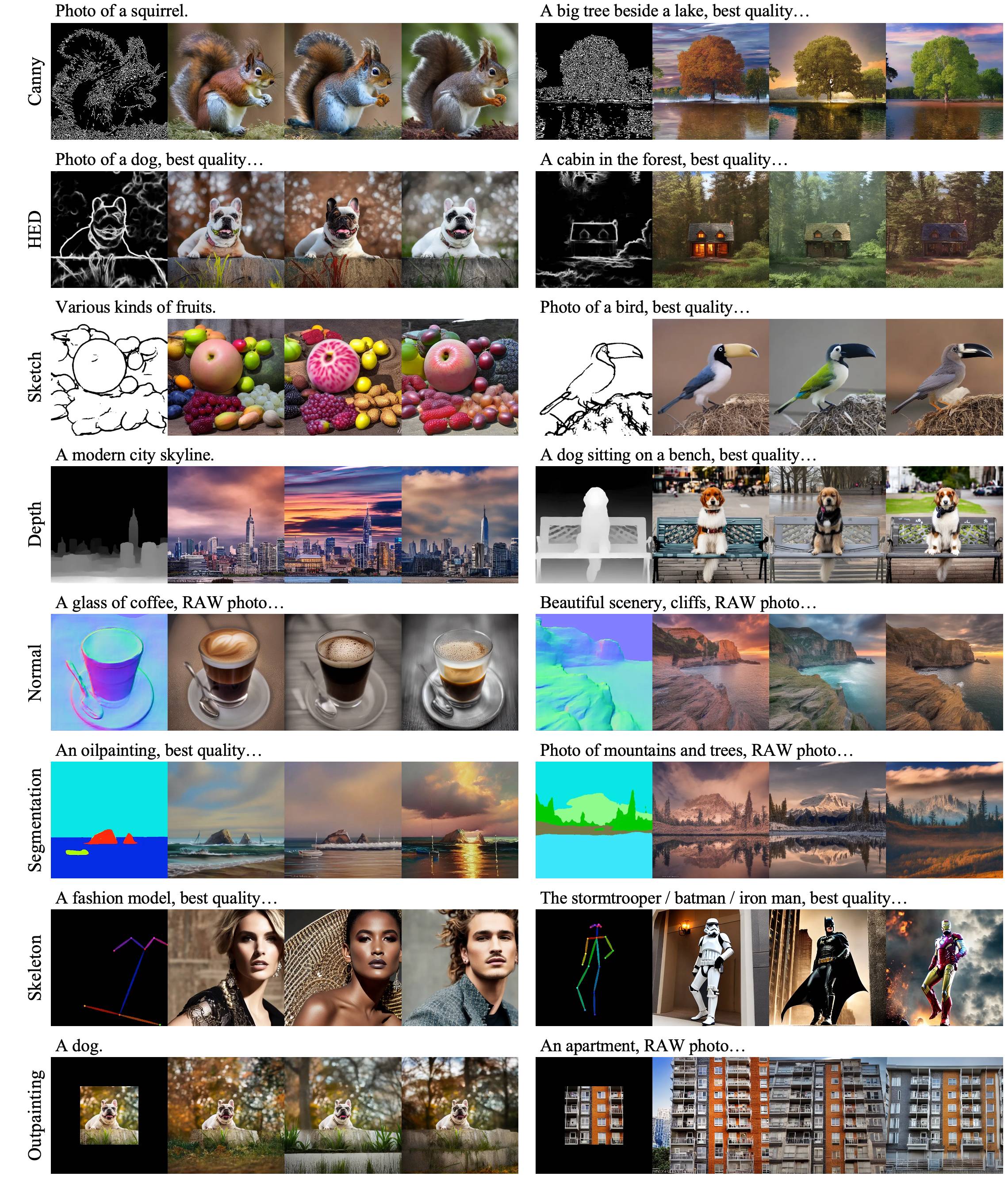
🎨 Controllable generation on "base conditions"
 |
|---|
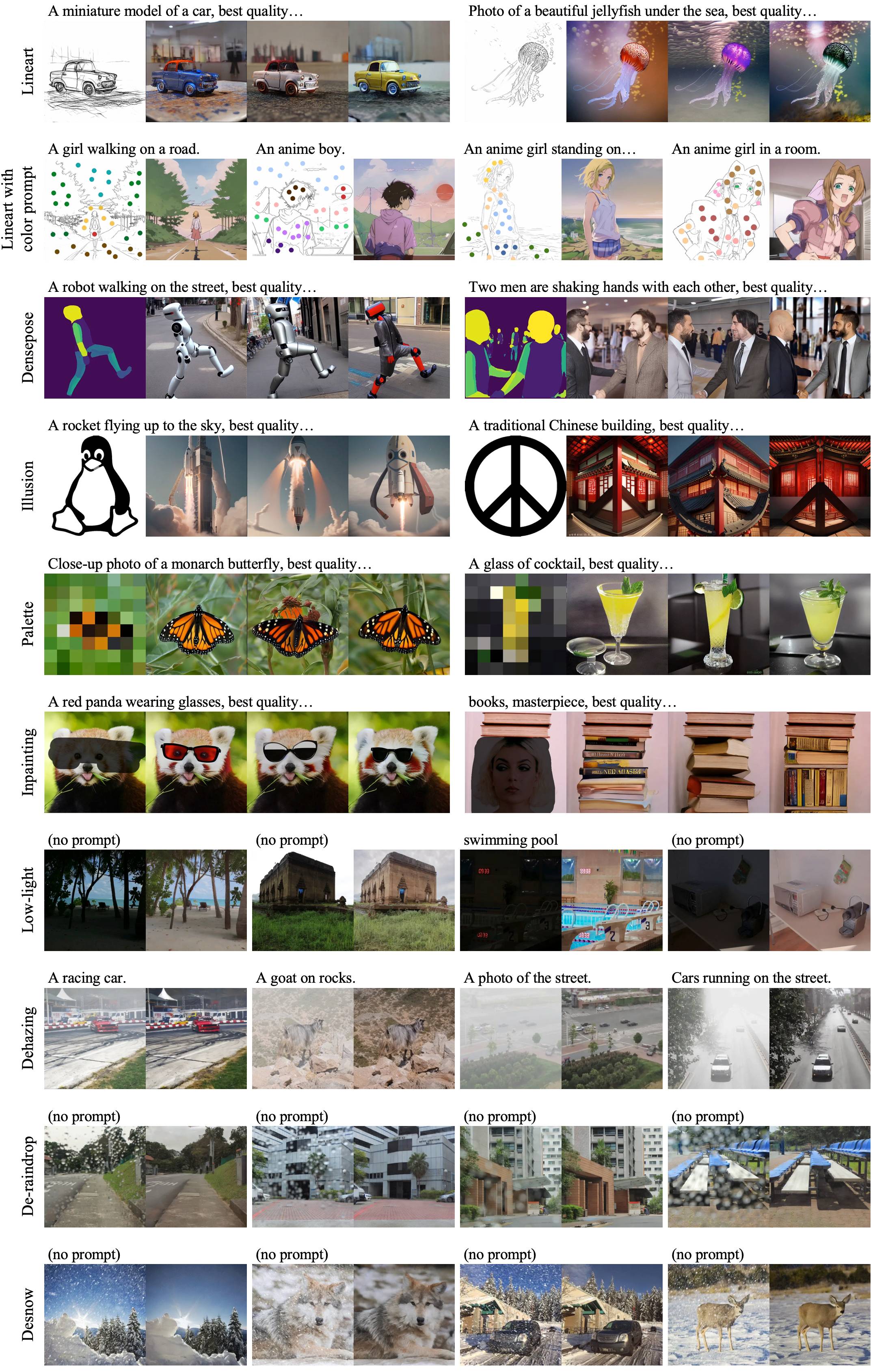
🎨 Controllable generation on "novel conditions"
 |
|---|
🎨 Integration into community models & Multi-conditional generation
 |
|---|
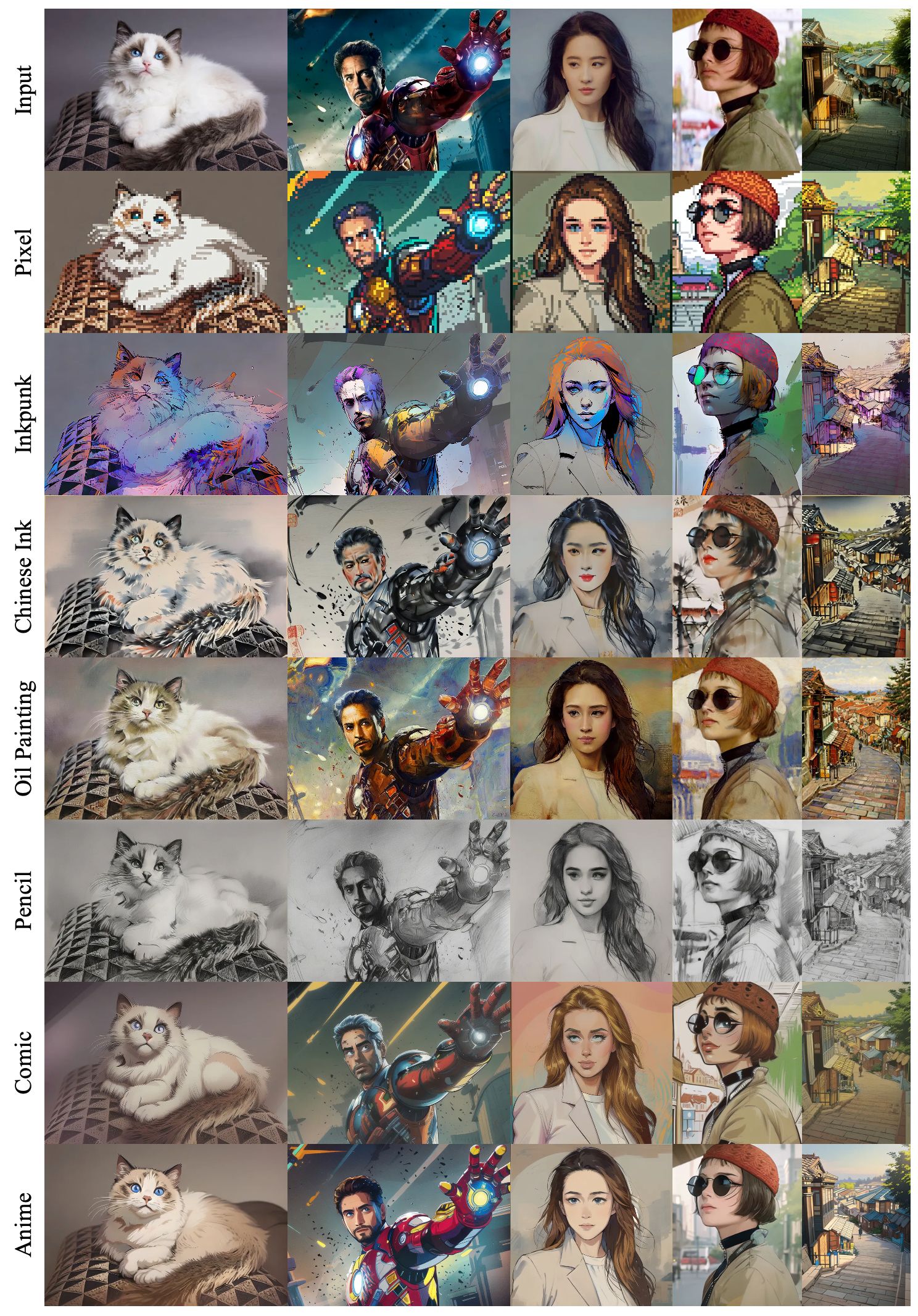
🎨 Application to style transfer
 |
|---|
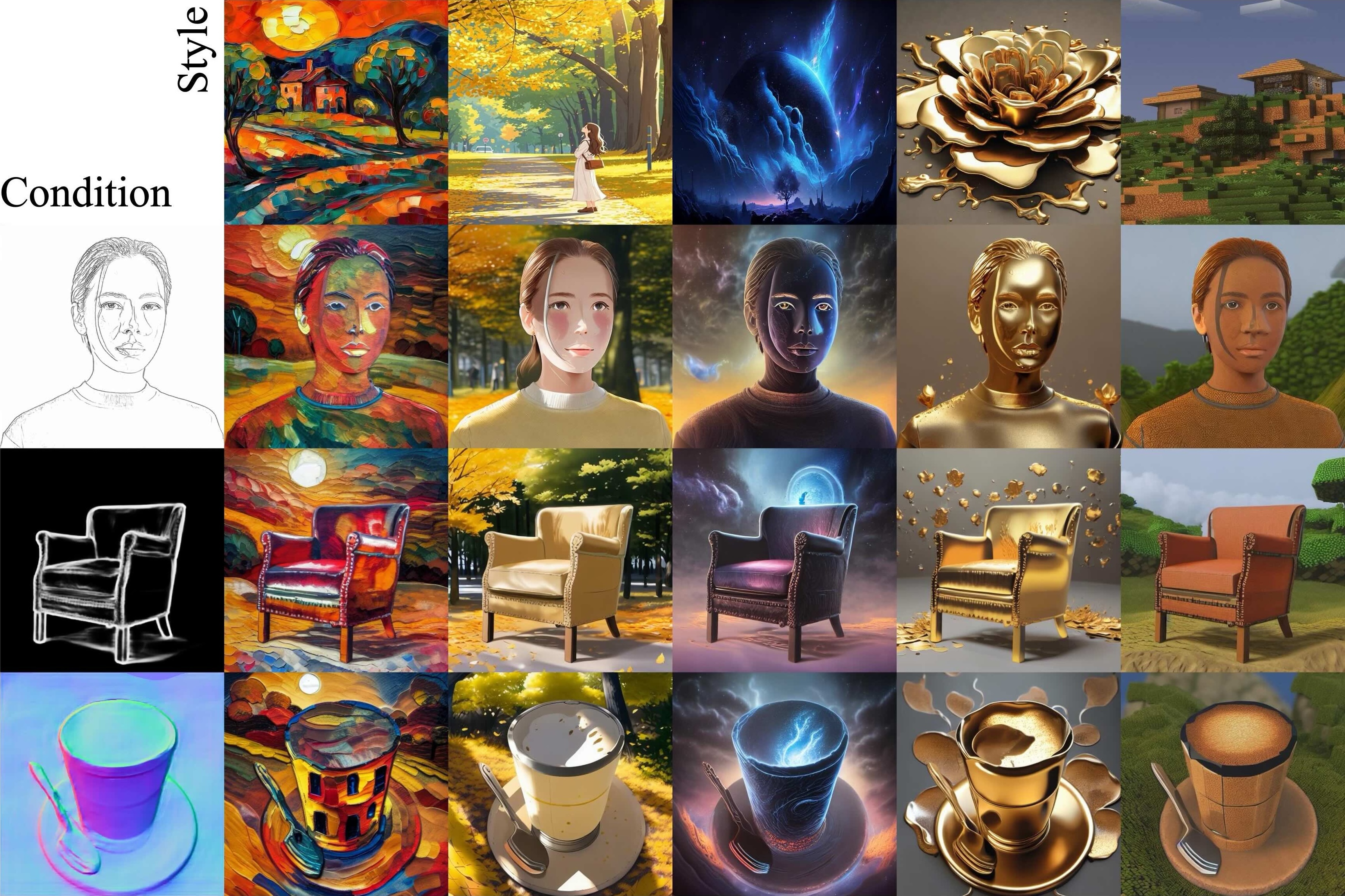
🎨 Spatial + style control (integrated with InstantStyle)
 |
|---|
🛠️ Installation
Clone this repo:
git clone --depth 1 https://github.com/xyfJASON/ctrlora.git
cd ctrlora
Create and activate a new conda environment:
conda create -n ctrlora python=3.10
conda activate ctrlora
Install pytorch and other dependencies:
pip install torch==1.13.1+cu117 torchvision==0.14.1+cu117 torchaudio==0.13.1 --extra-index-url https://download.pytorch.org/whl/cu117
pip install -r requirements.txt
🤖️ Download Pretrained Models
We provide our pretrained models here. Please put the Base ControlNet (ctrlora_sd15_basecn700k.ckpt) into ./ckpts/ctrlora-basecn and the LoRAs into ./ckpts/ctrlora-loras.
The naming convention of the LoRAs is ctrlora_sd15_<basecn>_<condition>.ckpt for base conditions and ctrlora_sd15_<basecn>_<condition>_<images>_<steps>.ckpt for novel conditions.
You also need to download the SD1.5-based Models and put them into ./ckpts/sd15. Models used in our work:
- Stable Diffusion v1.5 (
v1-5-pruned.ckpt): official / mirror - Realistic Vision
- Dreamshaper
- Mistoon Anime
- Comic Babes
- Oil Painting
- Inkpunk
- Chinese Ink Comic-strip
- Slate Pencil Mix
- Aziib Pixel Mix
🚀 Gradio Demo
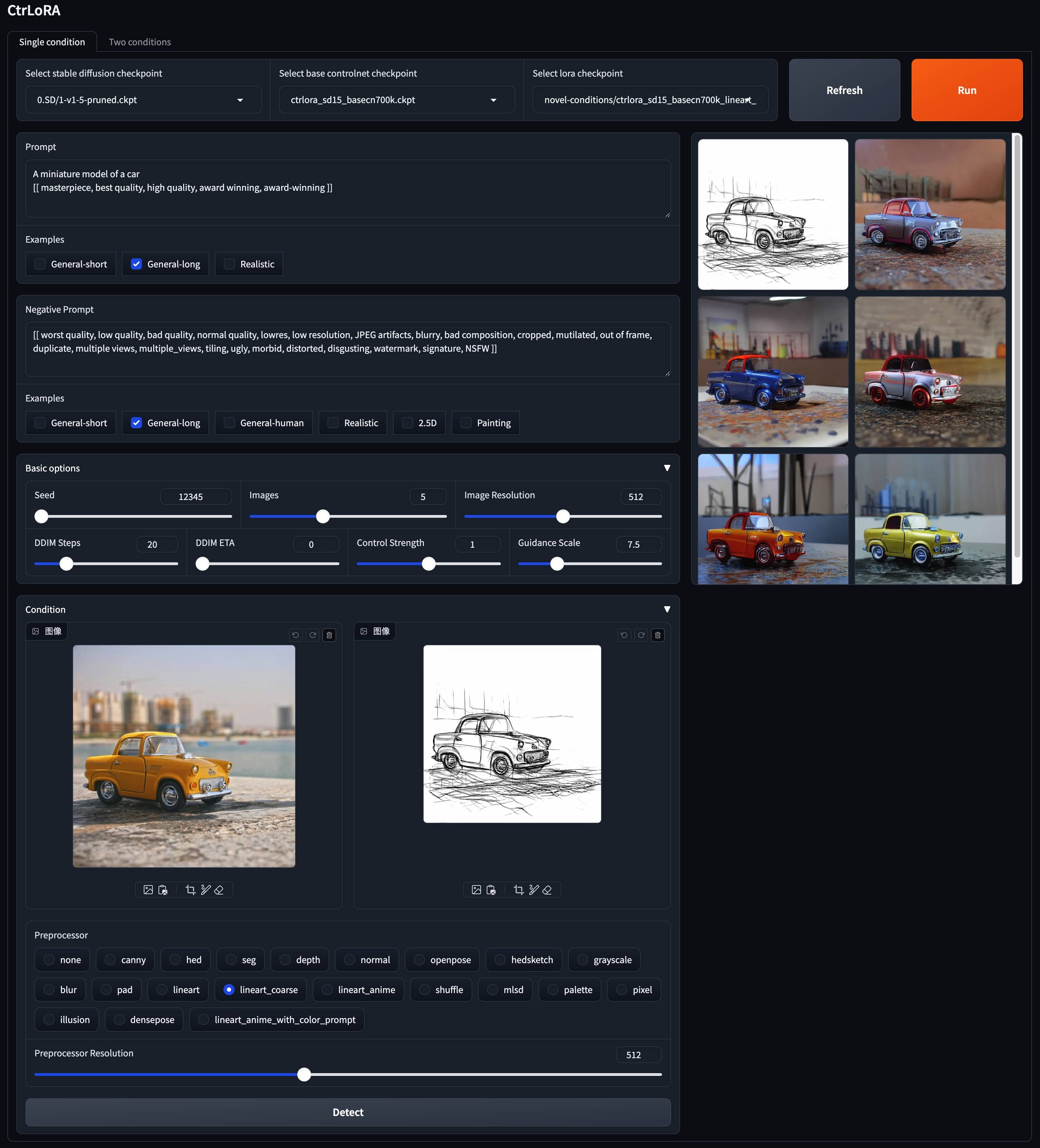
🚀 Spatial Control
python app/gradio_ctrlora.py
Requires at least 9GB/21GB GPU RAM to generate a batch of one/four 512x512 images.
Single-conditional generation
- select the Stable Diffusion checkpoint, Base Controlnet checkpoint and LoRA checkpoint.
- write prompts and negative prompts. We provide several commonly used prompts.
- prepare a condition image
- upload an image to the left of the "Condition" panel, select the preprocessor corresponding to the LoRA, and click "Detect".
- or upload the condition image directly, select the "none" preprocessor, and click "Detect".
- click "Run" to generate images.
- if you upload any new checkpoints, restart gradio or click "Refresh".
Multi-conditional generation
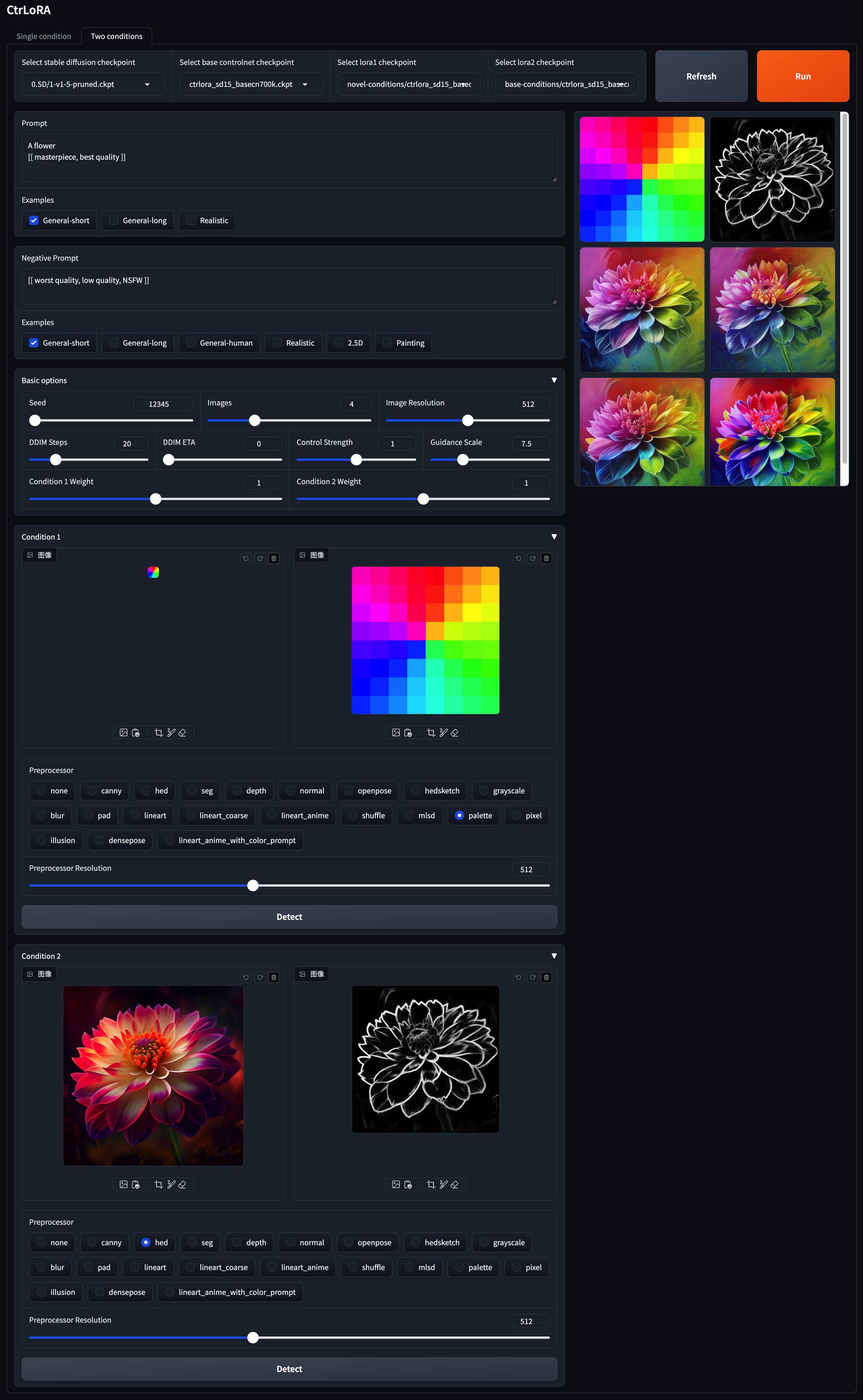
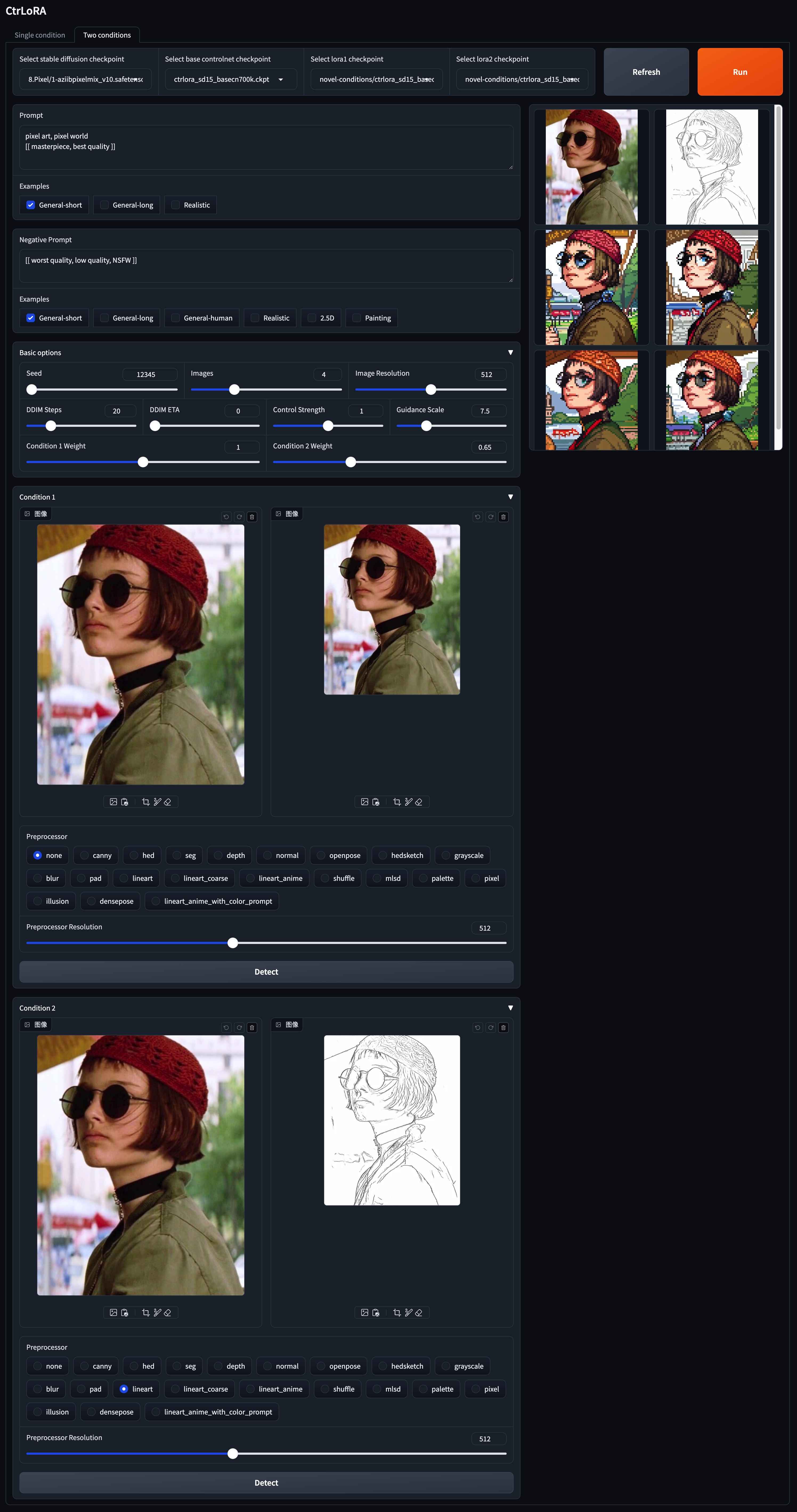
Application to style transfer
- select a stylized Stable Diffusion checkpoint to specify the target style, e.g., Pixel.
- select the Base ControlNet checkpoint.
- select palette for the LoRA1 checkpoint and lineart for the LoRA2 checkpoint.
- palette + canny or palette + hed also work, maybe there are more interesting combinations to be discovered
- write prompts and negative prompts.
- upload the source image to the "Condition 1" panel, select the "none" preprocessor, and click "Detect".
- upload the source image to the "Condition 2" panel, select the "lineart" preprocessor, and click "Detect".
- adjust the weights for the two conditions in the "Basic options" panel.
- click "Run" to generate images.
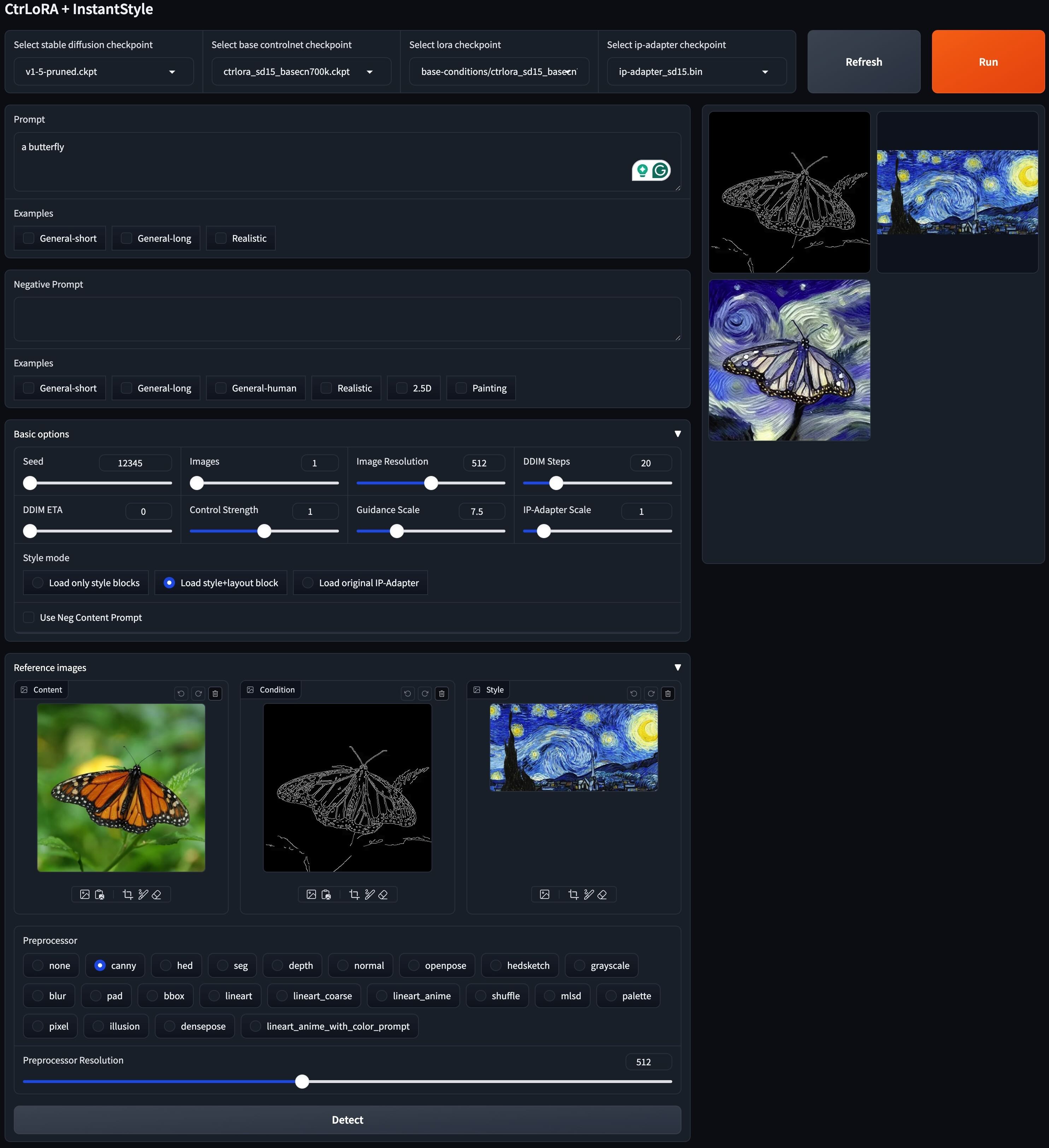
🚀 Spatial + Style Control
Many thanks to Lianchen-li for integrating InstantStyle with CtrLoRA to support "spatial + style" control!
To run the gradio demo, first download IP Adapter from this repo. You need to download the models directory, rename it to ip-adapter, and put it into ./ckpts/.
Then launch the gradio demo:
python app/gradio_ctrlora_style_transfer.py
Instructions
- select the Stable Diffusion, Base Controlnet, LoRA, and IP Adapter checkpoint.
- write prompts and negative prompts.
- prepare a condition image
- upload an image to the "Content" panel in the "Reference images" block, select the preprocessor corresponding to the LoRA, and click "Detect".
- or upload the condition image directly, select the "none" preprocessor, and click "Detect".
- upload a style image to the "Style" panel in the "Reference images" block.
- optionally, you can choose style mode and use negative content prompt.
- click "Run" to generate images.
🚗 Python API
Besides the Gradio demo, you can also sample images with the following Python code.
🚗 Single-conditional generation
from api import CtrLoRA

ctrlora = CtrLoRA(num_loras=1)
ctrlora.create_model(
    sd_file='ckpts/sd15/v1-5-pruned.ckpt',
    basecn_file='ckpts/ctrlora-basecn/ctrlora_sd15_basecn700k.ckpt',
    lora_files='ckpts/ctrlora-loras/novel-conditions/ctrlora_sd15_basecn700k_inpainting_brush_rank128_1kimgs_1ksteps.ckpt',
)
samples = ctrlora.sample(
    cond_image_paths='assets/test_images/inpaint_cat.png',
    prompt='A cat wearing a brown cowboy hat, best quality',
    n_prompt='worst quality',
    num_samples=1,
)
samples[0].show()
🚗 Multi-conditional generation
from api import CtrLoRA

ctrlora = CtrLoRA(num_loras=2)
ctrlora.create_model(
    sd_file='ckpts/sd15/v1-5-pruned.ckpt',
    basecn_file='ckpts/ctrlora-basecn/ctrlora_sd15_basecn700k.ckpt',
    lora_files=('ckpts/ctrlora-loras/novel-conditions/ctrlora_sd15_basecn700k_lineart_rank128_1kimgs_1ksteps.ckpt',
                'ckpts/ctrlora-loras/novel-conditions/ctrlora_sd15_basecn700k_palette_rank128_100kimgs_100ksteps.ckpt'),
)
samples = ctrlora.sample(
    cond_image_paths=('assets/test_images/lineart_bird.png',
                      'assets/test_images/palette_bird.png'),
    prompt='Photo of a parrot, best quality',
    n_prompt='worst quality',
    num_samples=1,
    lora_weights=(1.0, 1.0),
)
samples[0].show()
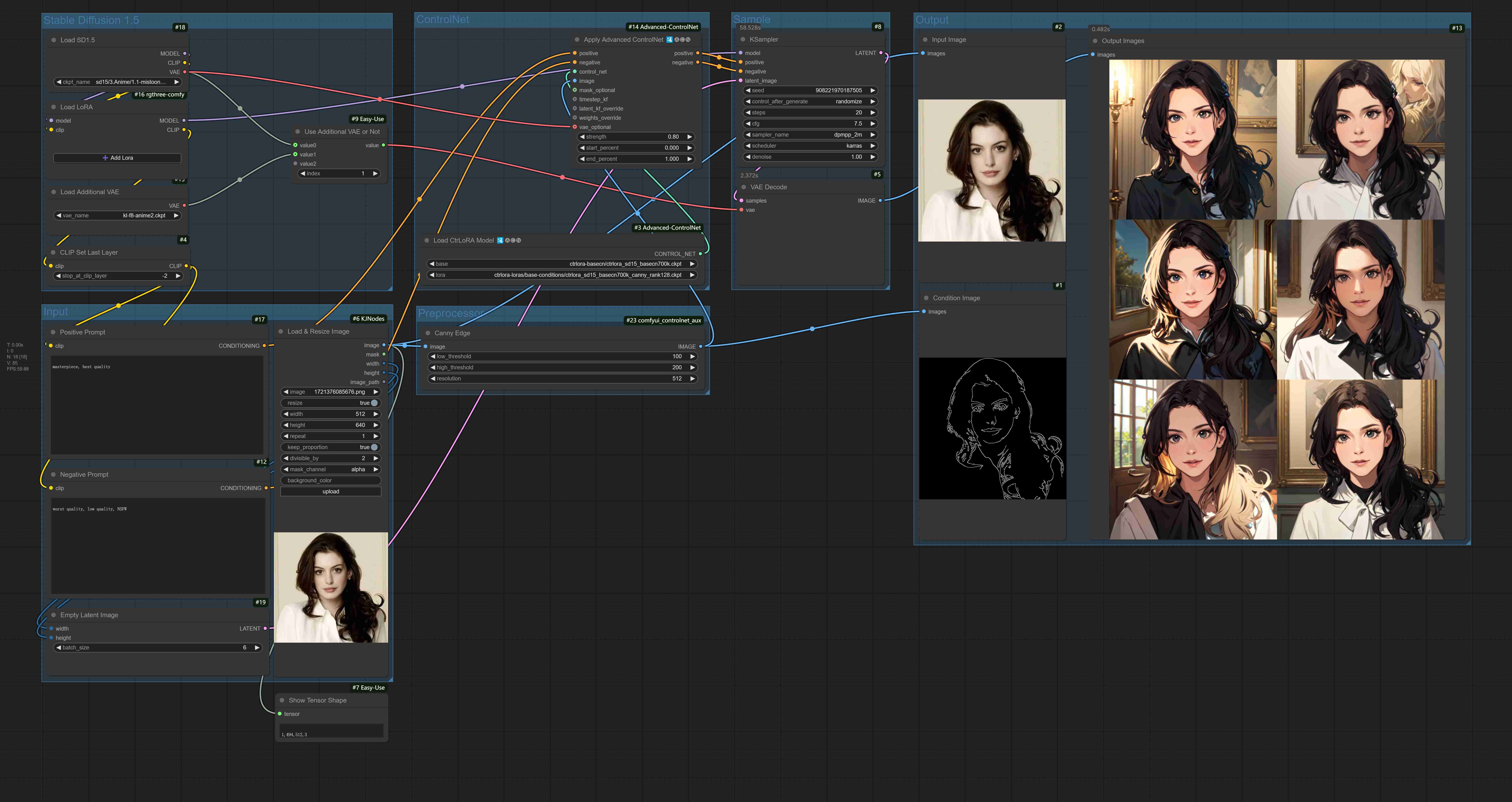
🚢 ComfyUI Workflows
Many thanks to Kosinkadink for his hard work to create the CtrLoRA node! Many thanks to toyxyz for sharing his workflow using CtrLoRA with AnimateDiff!
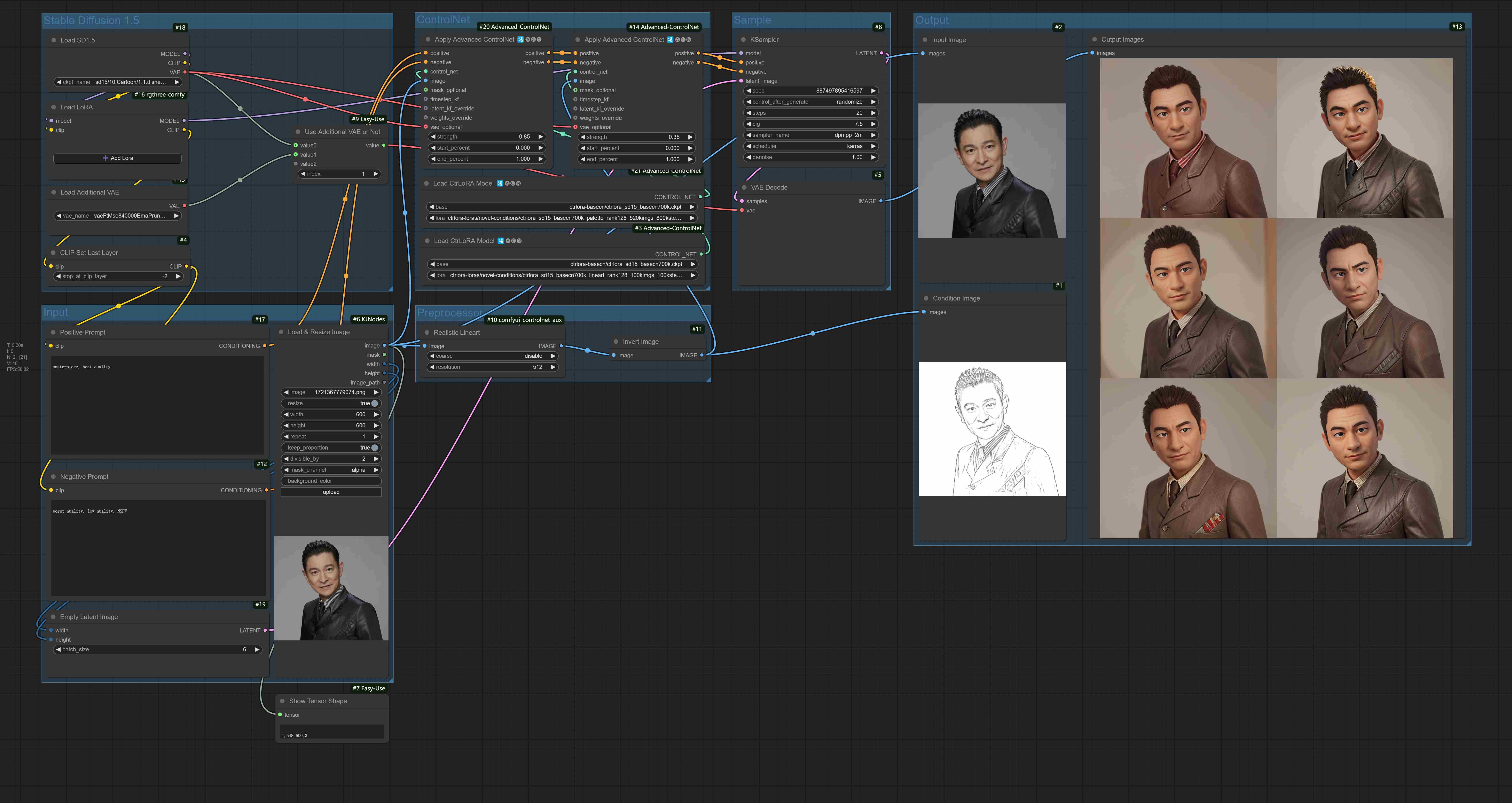
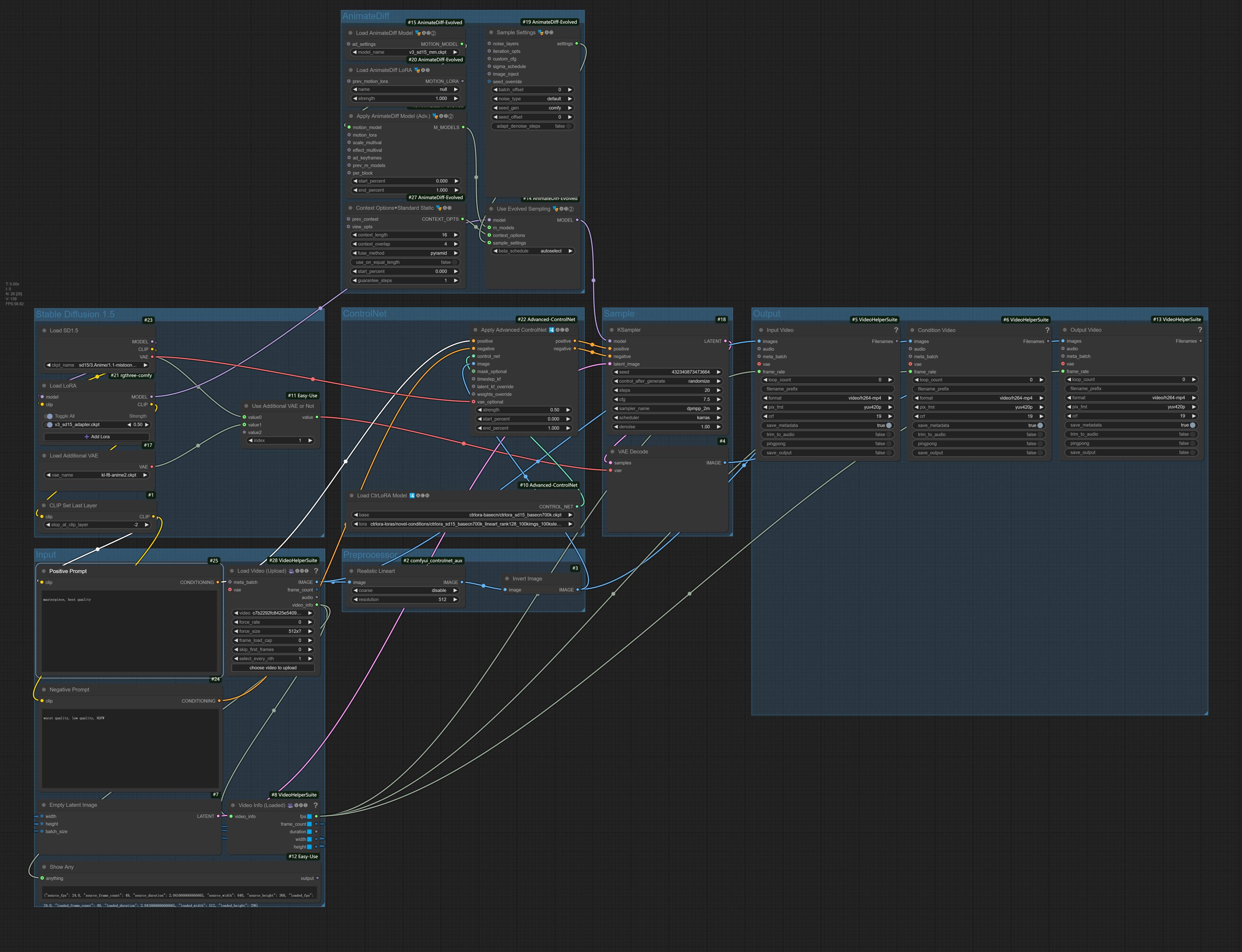
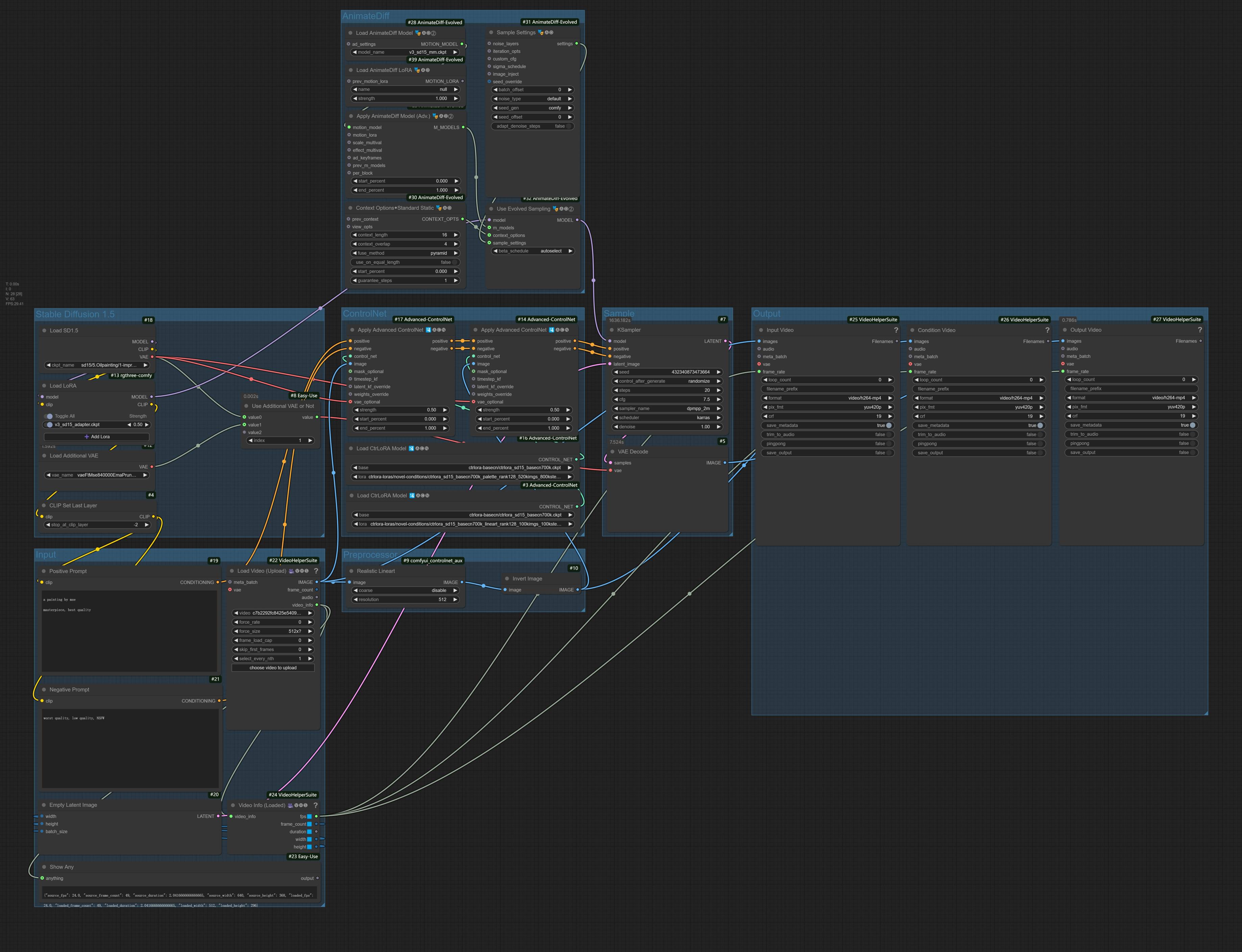
🔥 Train a LoRA for Your Custom Condition
Based on our Base ControlNet, you can train a LoRA for your custom condition with as few as 1,000 images and less than 1 hour on a single GPU (20GB).
First, download the Stable Diffusion v1.5 (v1-5-pruned.ckpt) into ./ckpts/sd15 and the Base ControlNet (ctrlora_sd15_basecn700k.ckpt) into ./ckpts/ctrlora-basecn as described above.
Second, put your custom data into ./data/<custom_data_name> with the following structure:
data
└── custom_data_name
    ├── prompt.json
    ├── source
    │   ├── 0000.jpg
    │   ├── 0001.jpg
    │   └── ...
    └── target
        ├── 0000.jpg
        ├── 0001.jpg
        └── ...
sourcecontains condition images, such as canny edges, segmentation maps, depth images, etc.targetcontains ground-truth images corresponding to the condition images.- each line of
prompt.jsonshould follow the format like{"source": "source/0000.jpg", "target": "target/0000.jpg", "prompt": "The quick brown fox jumps over the lazy dog."}.
Third, run the following command to train the LoRA for your custom condition:
python scripts/train_ctrlora_finetune.py \
    --dataroot ./data/<custom_data_name> \
    --config ./configs/ctrlora_finetune_sd15_rank128.yaml \
    --sd_ckpt ./ckpts/sd15/v1-5-pruned.ckpt \
    --cn_ckpt ./ckpts/ctrlora-basecn/ctrlora_sd15_basecn700k.ckpt \
    [--name NAME] \
    [--max_steps MAX_STEPS]
--dataroot: path to the custom data.--name: name of the experiment. The logging directory will be./runs/name. Default: current time.--max_steps: maximum number of training steps. Default:100000.
After training, extract the LoRA weights with the following command:
python scripts/tool_extract_weights.py -t lora --ckpt CHECKPOINT --save_path SAVE_PATH
--ckpt: path to the checkpoint produced by the above training.--save_path: path to save the extracted LoRA weights.
Finally, put the extracted LoRA into ./ckpts/ctrlora-loras and use it in the Gradio demo.
📚 Detailed Instructions
Please refer to the instructions here for more details of training, fine-tuning, and evaluation.
🪧 Acknowledgement
This project is built upon Stable Diffusion, ControlNet, and UniControl. Thanks for their great work!
- Stable Diffusion v1.5: https://github.com/runwayml/stable-diffusion
- ControlNet v1.0: https://github.com/lllyasviel/ControlNet
- ControlNet v1.1: https://github.com/lllyasviel/ControlNet-v1-1-nightly
- UniControl: https://github.com/salesforce/UniControl
🖋️ Citation
If you find this project helpful, please consider citing:
@inproceedings{xu2024ctrlora,
 title={CtrLoRA: An Extensible and Efficient Framework for Controllable Image Generation},
 author={Xu, Yifeng and He, Zhenliang and Shan, Shiguang and Chen, Xilin},
 journal={International Conference on Learning Representations (ICLR)},
 year={2025}
}
Significant stargazers

113 followers · starred Nov 2024

23 followers · starred Oct 2024
Similar repos





Languages
Python
92.9%
Cuda
2.6%
Java
1.8%
C++
1.4%
[ICLR 2025] Codebase for "CtrLoRA: An Extensible and Efficient Framework for Controllable Image Generation"
Python
271
88 commits
updated Mar 6, 2026
README
To create your customized ControlNet in an easy and low-cost manner 🎉
The images are compressed for loading speed.
CtrLoRA
CtrLoRA: An Extensible and Efficient Framework for Controllable Image Generation
Yifeng Xu1,2, Zhenliang He1, Shiguang Shan1,2, Xilin Chen1,2
1Key Lab of AI Safety, Institute of Computing Technology, CAS, China
2University of Chinese Academy of Sciences, China
We first train a Base ControlNet along with condition-specific LoRAs on base conditions with a large-scale dataset. Then, our Base ControlNet can be efficiently adapted to novel conditions by new LoRAs with 10% parameters, as few as 1,000 images, and less than 1 hour training on a single GPU.
📜 Contents
- 🎨 Visual Results
- 🛠️ Installation
- 🤖️ Download Pretrained Models
- 🚀 Gradio Demo
- 🚗 Python API
- 🚢 ComfyUI Workflows
- 🔥 Train a LoRA for Your Custom Condition
- 📚 Detailed Instructions
🎨 Visual Results
🎨 Controllable generation on "base conditions"
|
|---|
🎨 Controllable generation on "novel conditions"
|
|---|
🎨 Integration into community models & Multi-conditional generation
|
|---|
🎨 Application to style transfer
|
|---|
🎨 Spatial + style control (integrated with InstantStyle)
|
|---|
🛠️ Installation
Clone this repo:
git clone --depth 1 https://github.com/xyfJASON/ctrlora.git
cd ctrlora
Create and activate a new conda environment:
conda create -n ctrlora python=3.10
conda activate ctrlora
Install pytorch and other dependencies:
pip install torch==1.13.1+cu117 torchvision==0.14.1+cu117 torchaudio==0.13.1 --extra-index-url https://download.pytorch.org/whl/cu117
pip install -r requirements.txt
🤖️ Download Pretrained Models
We provide our pretrained models here. Please put the Base ControlNet (ctrlora_sd15_basecn700k.ckpt) into ./ckpts/ctrlora-basecn and the LoRAs into ./ckpts/ctrlora-loras.
The naming convention of the LoRAs is ctrlora_sd15_<basecn>_<condition>.ckpt for base conditions and ctrlora_sd15_<basecn>_<condition>_<images>_<steps>.ckpt for novel conditions.
You also need to download the SD1.5-based Models and put them into ./ckpts/sd15. Models used in our work:
- Stable Diffusion v1.5 (
v1-5-pruned.ckpt): official / mirror - Realistic Vision
- Dreamshaper
- Mistoon Anime
- Comic Babes
- Oil Painting
- Inkpunk
- Chinese Ink Comic-strip
- Slate Pencil Mix
- Aziib Pixel Mix
🚀 Gradio Demo
🚀 Spatial Control
python app/gradio_ctrlora.py
Requires at least 9GB/21GB GPU RAM to generate a batch of one/four 512x512 images.
Single-conditional generation
- select the Stable Diffusion checkpoint, Base Controlnet checkpoint and LoRA checkpoint.
- write prompts and negative prompts. We provide several commonly used prompts.
- prepare a condition image
- upload an image to the left of the "Condition" panel, select the preprocessor corresponding to the LoRA, and click "Detect".
- or upload the condition image directly, select the "none" preprocessor, and click "Detect".
- click "Run" to generate images.
- if you upload any new checkpoints, restart gradio or click "Refresh".
Multi-conditional generation
Application to style transfer
- select a stylized Stable Diffusion checkpoint to specify the target style, e.g., Pixel.
- select the Base ControlNet checkpoint.
- select palette for the LoRA1 checkpoint and lineart for the LoRA2 checkpoint.
- palette + canny or palette + hed also work, maybe there are more interesting combinations to be discovered
- write prompts and negative prompts.
- upload the source image to the "Condition 1" panel, select the "none" preprocessor, and click "Detect".
- upload the source image to the "Condition 2" panel, select the "lineart" preprocessor, and click "Detect".
- adjust the weights for the two conditions in the "Basic options" panel.
- click "Run" to generate images.
🚀 Spatial + Style Control
Many thanks to Lianchen-li for integrating InstantStyle with CtrLoRA to support "spatial + style" control!
To run the gradio demo, first download IP Adapter from this repo. You need to download the models directory, rename it to ip-adapter, and put it into ./ckpts/.
Then launch the gradio demo:
python app/gradio_ctrlora_style_transfer.py
Instructions
- select the Stable Diffusion, Base Controlnet, LoRA, and IP Adapter checkpoint.
- write prompts and negative prompts.
- prepare a condition image
- upload an image to the "Content" panel in the "Reference images" block, select the preprocessor corresponding to the LoRA, and click "Detect".
- or upload the condition image directly, select the "none" preprocessor, and click "Detect".
- upload a style image to the "Style" panel in the "Reference images" block.
- optionally, you can choose style mode and use negative content prompt.
- click "Run" to generate images.
🚗 Python API
Besides the Gradio demo, you can also sample images with the following Python code.
🚗 Single-conditional generation
from api import CtrLoRA

ctrlora = CtrLoRA(num_loras=1)
ctrlora.create_model(
    sd_file='ckpts/sd15/v1-5-pruned.ckpt',
    basecn_file='ckpts/ctrlora-basecn/ctrlora_sd15_basecn700k.ckpt',
    lora_files='ckpts/ctrlora-loras/novel-conditions/ctrlora_sd15_basecn700k_inpainting_brush_rank128_1kimgs_1ksteps.ckpt',
)
samples = ctrlora.sample(
    cond_image_paths='assets/test_images/inpaint_cat.png',
    prompt='A cat wearing a brown cowboy hat, best quality',
    n_prompt='worst quality',
    num_samples=1,
)
samples[0].show()
🚗 Multi-conditional generation
from api import CtrLoRA

ctrlora = CtrLoRA(num_loras=2)
ctrlora.create_model(
    sd_file='ckpts/sd15/v1-5-pruned.ckpt',
    basecn_file='ckpts/ctrlora-basecn/ctrlora_sd15_basecn700k.ckpt',
    lora_files=('ckpts/ctrlora-loras/novel-conditions/ctrlora_sd15_basecn700k_lineart_rank128_1kimgs_1ksteps.ckpt',
                'ckpts/ctrlora-loras/novel-conditions/ctrlora_sd15_basecn700k_palette_rank128_100kimgs_100ksteps.ckpt'),
)
samples = ctrlora.sample(
    cond_image_paths=('assets/test_images/lineart_bird.png',
                      'assets/test_images/palette_bird.png'),
    prompt='Photo of a parrot, best quality',
    n_prompt='worst quality',
    num_samples=1,
    lora_weights=(1.0, 1.0),
)
samples[0].show()
🚢 ComfyUI Workflows
Many thanks to Kosinkadink for his hard work to create the CtrLoRA node! Many thanks to toyxyz for sharing his workflow using CtrLoRA with AnimateDiff!
🔥 Train a LoRA for Your Custom Condition
Based on our Base ControlNet, you can train a LoRA for your custom condition with as few as 1,000 images and less than 1 hour on a single GPU (20GB).
First, download the Stable Diffusion v1.5 (v1-5-pruned.ckpt) into ./ckpts/sd15 and the Base ControlNet (ctrlora_sd15_basecn700k.ckpt) into ./ckpts/ctrlora-basecn as described above.
Second, put your custom data into ./data/<custom_data_name> with the following structure:
data
└── custom_data_name
    ├── prompt.json
    ├── source
    │   ├── 0000.jpg
    │   ├── 0001.jpg
    │   └── ...
    └── target
        ├── 0000.jpg
        ├── 0001.jpg
        └── ...
sourcecontains condition images, such as canny edges, segmentation maps, depth images, etc.targetcontains ground-truth images corresponding to the condition images.- each line of
prompt.jsonshould follow the format like{"source": "source/0000.jpg", "target": "target/0000.jpg", "prompt": "The quick brown fox jumps over the lazy dog."}.
Third, run the following command to train the LoRA for your custom condition:
python scripts/train_ctrlora_finetune.py \
    --dataroot ./data/<custom_data_name> \
    --config ./configs/ctrlora_finetune_sd15_rank128.yaml \
    --sd_ckpt ./ckpts/sd15/v1-5-pruned.ckpt \
    --cn_ckpt ./ckpts/ctrlora-basecn/ctrlora_sd15_basecn700k.ckpt \
    [--name NAME] \
    [--max_steps MAX_STEPS]
--dataroot: path to the custom data.--name: name of the experiment. The logging directory will be./runs/name. Default: current time.--max_steps: maximum number of training steps. Default:100000.
After training, extract the LoRA weights with the following command:
python scripts/tool_extract_weights.py -t lora --ckpt CHECKPOINT --save_path SAVE_PATH
--ckpt: path to the checkpoint produced by the above training.--save_path: path to save the extracted LoRA weights.
Finally, put the extracted LoRA into ./ckpts/ctrlora-loras and use it in the Gradio demo.
📚 Detailed Instructions
Please refer to the instructions here for more details of training, fine-tuning, and evaluation.
🪧 Acknowledgement
This project is built upon Stable Diffusion, ControlNet, and UniControl. Thanks for their great work!
- Stable Diffusion v1.5: https://github.com/runwayml/stable-diffusion
- ControlNet v1.0: https://github.com/lllyasviel/ControlNet
- ControlNet v1.1: https://github.com/lllyasviel/ControlNet-v1-1-nightly
- UniControl: https://github.com/salesforce/UniControl
🖋️ Citation
If you find this project helpful, please consider citing:
@inproceedings{xu2024ctrlora,
 title={CtrLoRA: An Extensible and Efficient Framework for Controllable Image Generation},
 author={Xu, Yifeng and He, Zhenliang and Shan, Shiguang and Chen, Xilin},
 journal={International Conference on Learning Representations (ICLR)},
 year={2025}
}
Similar repos
Significant stargazers
113 followers · starred Nov 2024
23 followers · starred Oct 2024
Languages
Python
92.9%
Cuda
2.6%
Java
1.8%
C++
1.4%