
Systematizing Unified Multimodal In-Context Learning through a Capability-Oriented Taxonomy
Python
55
16 commits
updated Jul 3, 2026
README
UniICL: Systematizing Unified Multimodal In-context Learning through a Capability-Oriented Taxonomy
Yicheng Xu1 · Jiangning Zhang1,*,† · Zhucun Xue1 · Teng Hu2 · Ran Yi2 · Xiaobin Hu3 · Yong Liu1,† · Dacheng Tao4
1Zhejiang University 2Shanghai Jiao Tong University 3National University of Singapore 4Nanyang Technological University
*Equal contribution †Corresponding authors




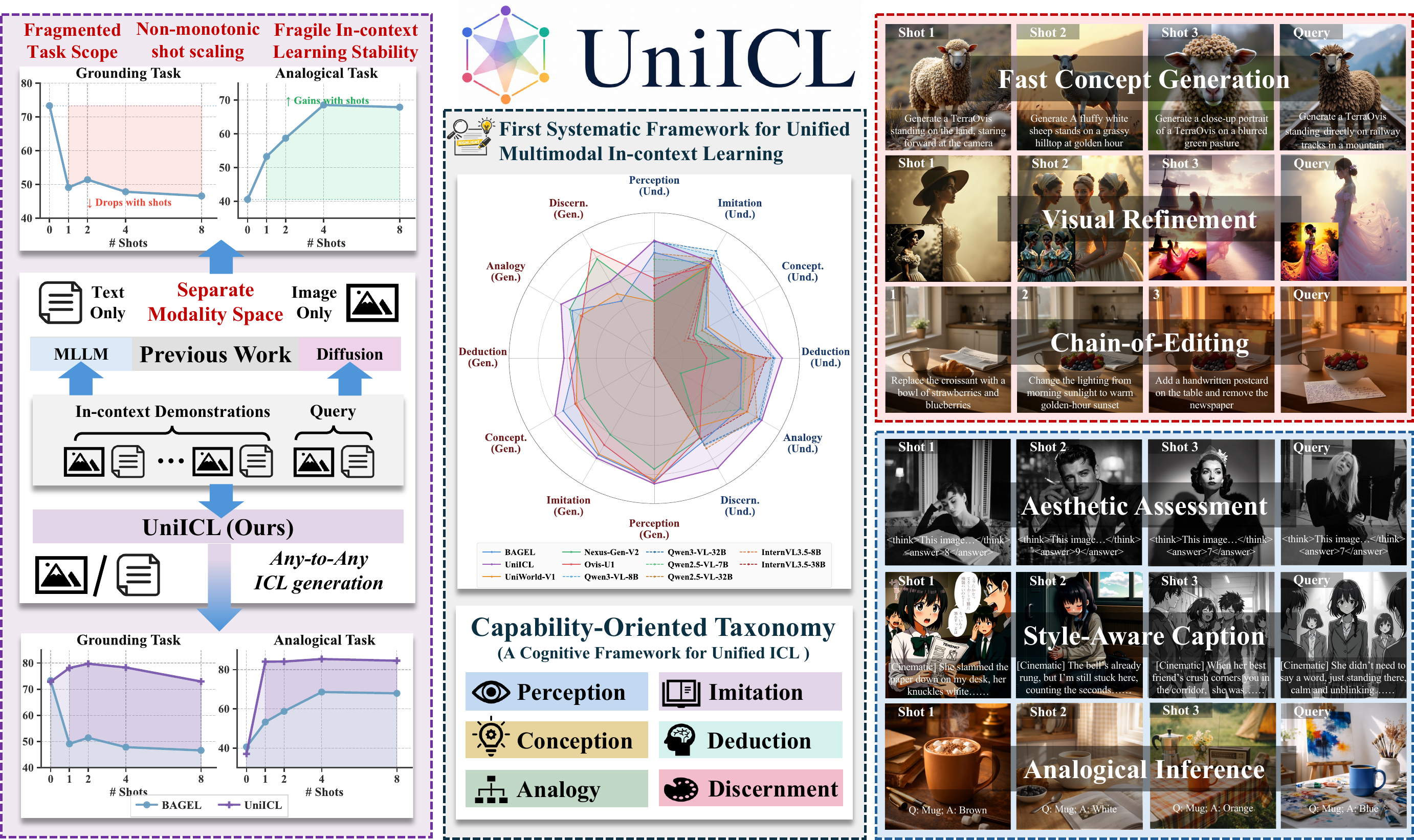
UniICL is a unified multimodal in-context learning framework for both visual understanding and generation. The release includes the UniICL model code, UniICL-760K data utilities, UniICL‑Bench evaluation scripts, and links to the public model and dataset assets.
💡 Highlights
 Capability-oriented organization of multimodal ICL into perception, imitation, conception, deduction, analogy, and discernment. |
 A large-scale training suite with curated demonstration contexts for both understanding and generation tasks. |
 UniICL‑Bench evaluates clean shot scaling and stability under context replacement, reordering, and noisy demonstrations. |
 Context-Adaptive Prototype Modulator extracts demonstration prototypes and injects task-aware modulation into the backbone. |
📦 Release
| Component | Contents |
|---|---|
UniICL/ | Model implementation, CAPM module, training code, and minimal inference entrypoint. |
UniICL-760K/ | Dataset documentation, conversion scripts, and Hugging Face packaging utilities. |
UniICL‑Bench/ | Benchmark annotations, task evaluators, scorer wrappers, and the shared evaluation entrypoint. |
Large annotations, image assets, and model weights are hosted on Hugging Face.
🧭 Overview
🏗️ Data Pipeline and Demonstration Assembly
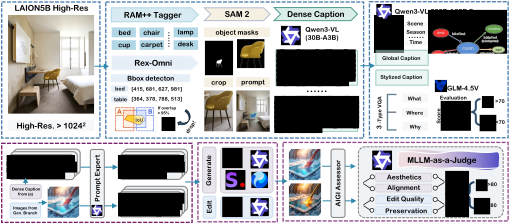
UniICL-760K is built through dense annotation, generative synthesis, quality filtering, and task-aligned demonstration assembly. | |
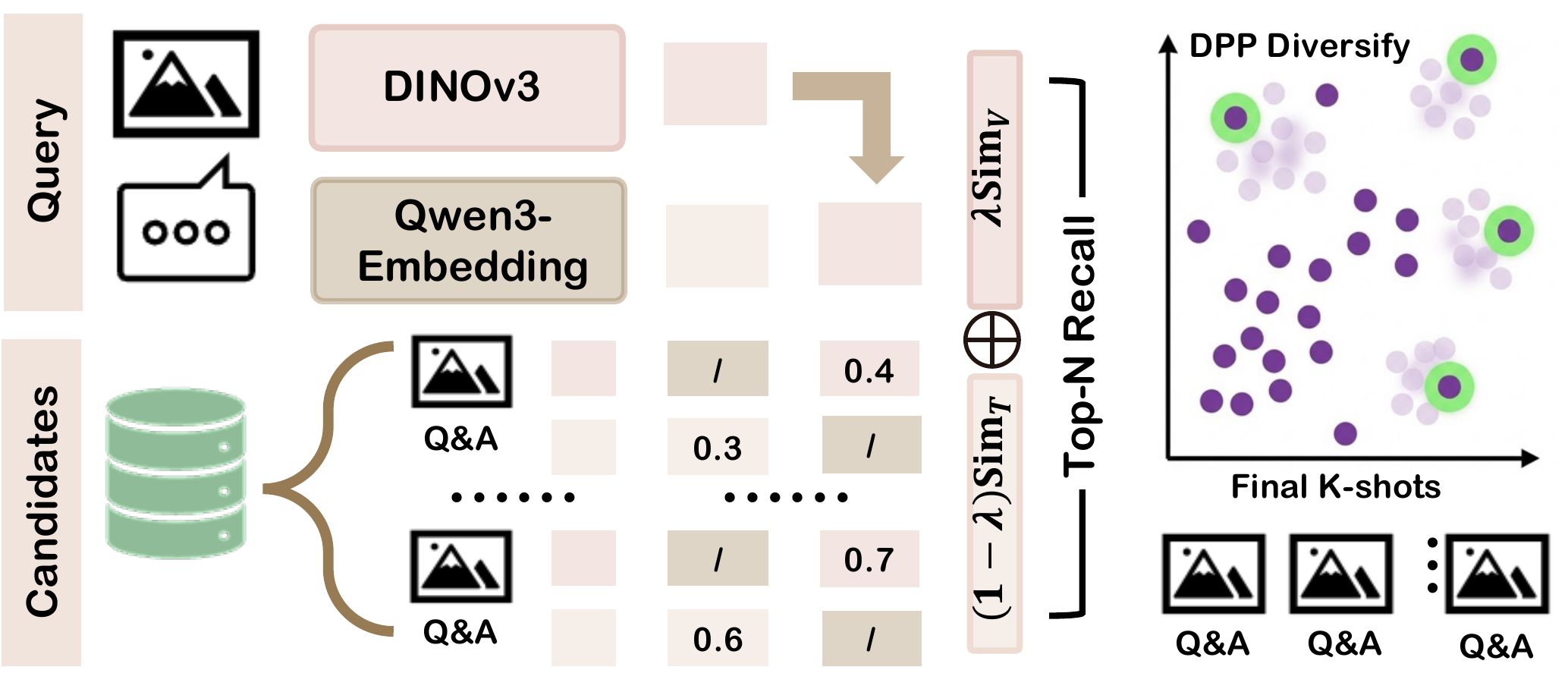
Feature-Based assembly retrieves relevant and diverse demonstrations in multimodal embedding space. |
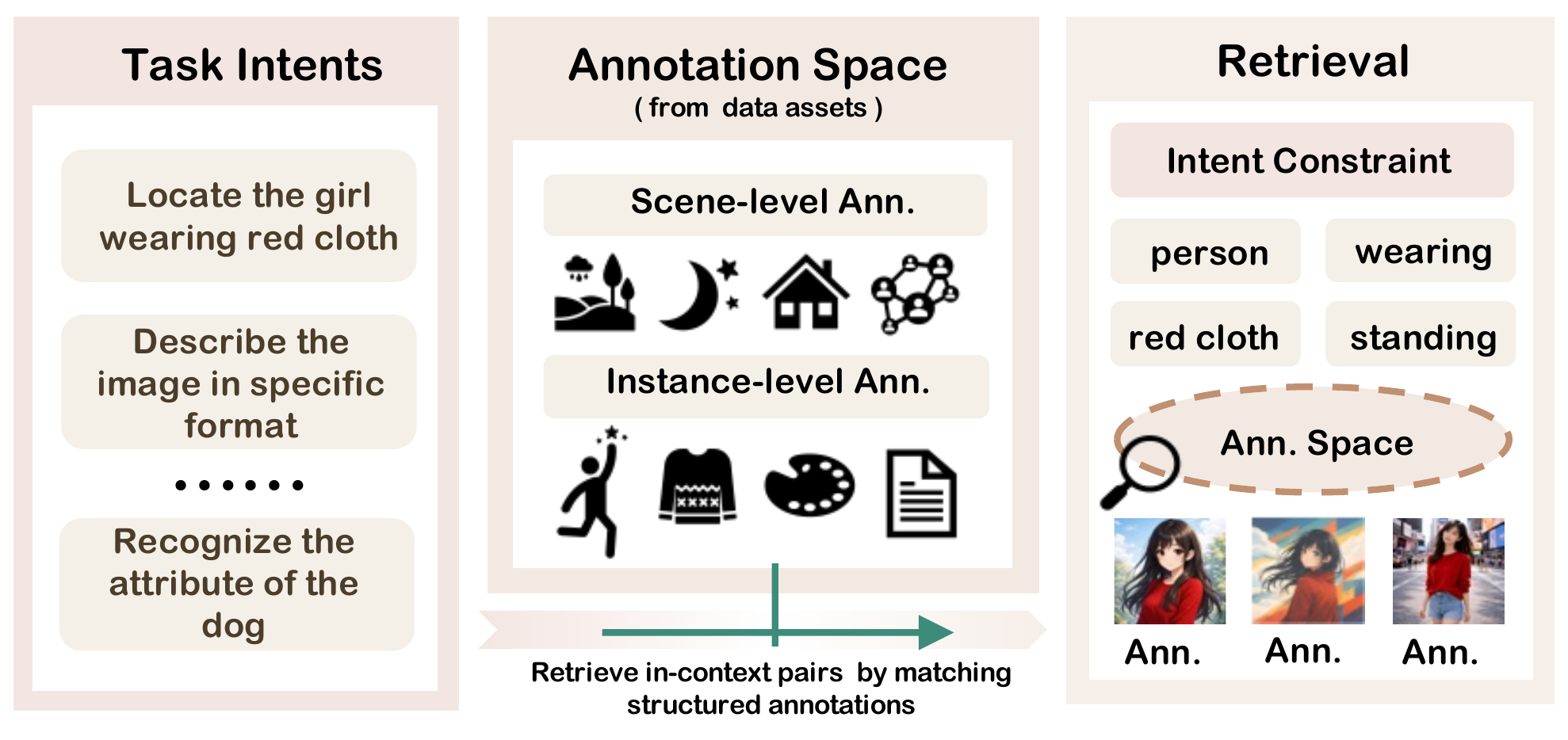
Intent-Based assembly matches structured task constraints against fine-grained annotations. |
📊 Dataset Statistics
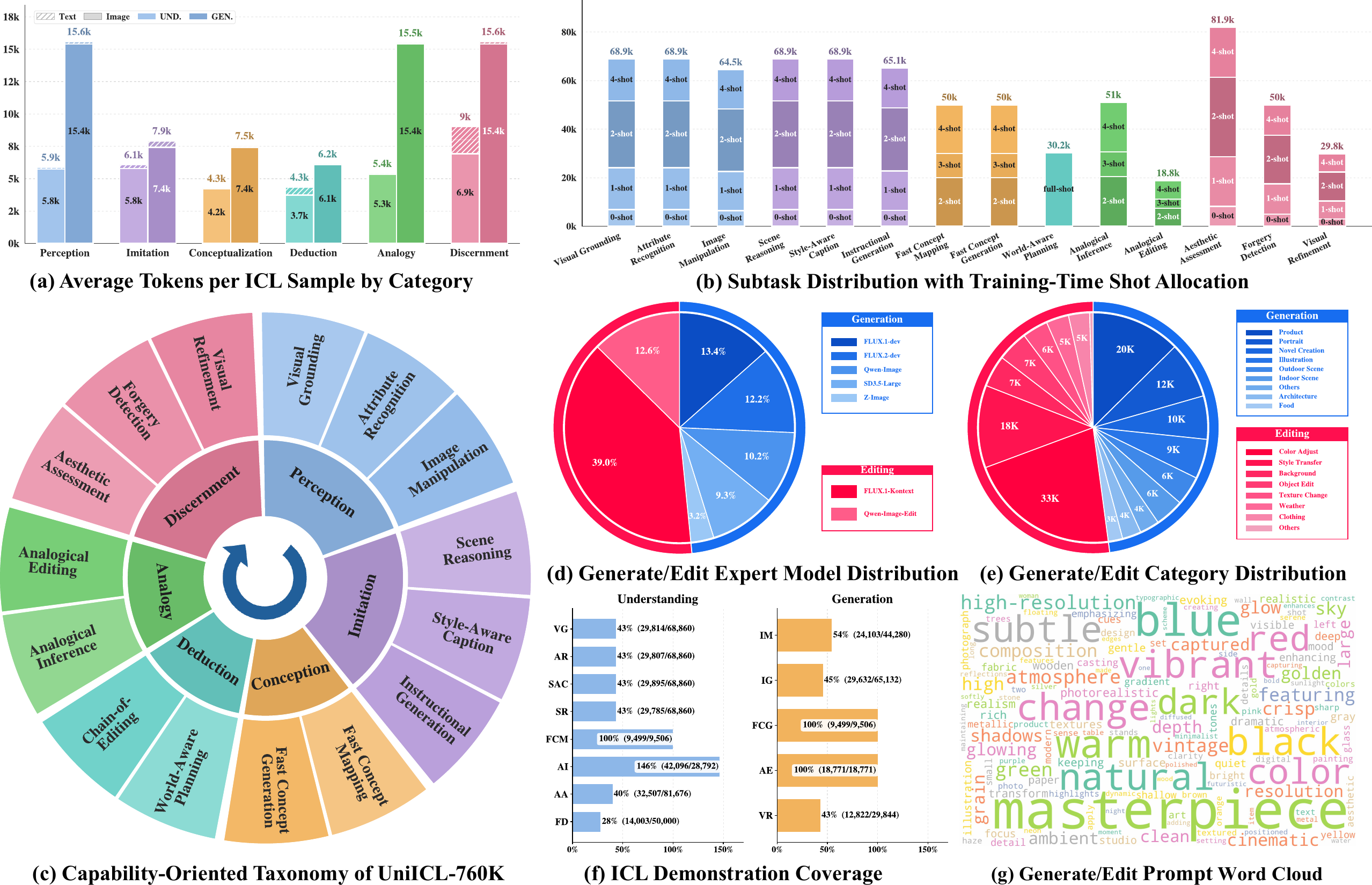
UniICL-760K covers 15 subtasks organized by a capability-oriented taxonomy.
🗂️ Dataset and Benchmark Composition
Assembly uses Feat. for Feature-Based retrieval and Intent for Intent-Based matching. Chain-of-Editing is benchmark-only and excluded from training.
| Level | Sub-task | Image Source | Mod. | Assembly | Train Pool | Bench Episodes |
|---|---|---|---|---|---|---|
| 1. Perception | Visual Grounding | LAION-HR | Und. | Feat. | 66,347 | 100 |
| Attribute Recognition | LAION-HR | Und. | Feat. | 64,338 | 100 | |
| Image Manipulation | Synthesis | Gen. | Feat. | 59,415 | 50 | |
| 2. Imitation | Style-Aware Caption | LAION-HR | Und. | Feat. | 67,225 | 100 |
| Scene Reasoning | LAION-HR | Und. | Feat. | 66,074 | 100 | |
| Instructional Generation | Synthesis | Gen. | Feat. | 60,990 | 50 | |
| 3. Conception | Fast Concept Mapping | Synthesis | Und. | Intent | 50,000 | 100 |
| Fast Concept Generation | Synthesis | Gen. | Intent | 50,000 | 100 | |
| 4. Deduction | World-Aware Planning | World-Aware Planning | Und. | Intent | 29,824 | 100 |
| Chain-of-Editing | Synthesis | Gen. | Intent | -- | 50 | |
| 5. Analogy | Analogical Inference | LAION-HR | Und. | Intent | 51,028 | 100 |
| Analogical Editing | Synthesis | Gen. | Intent | 18,710 | 50 | |
| 6. Discernment | Aesthetic Assessment | AVA | Und. | Feat. | 80,481 | 100 |
| Forgery Detection | AIGI-Holmes | Und. | Feat. | 40,661 | 100 | |
| Visual Refinement | Synthesis | Gen. | Feat. | 27,996 | 50 |
🧠 CAPM Architecture
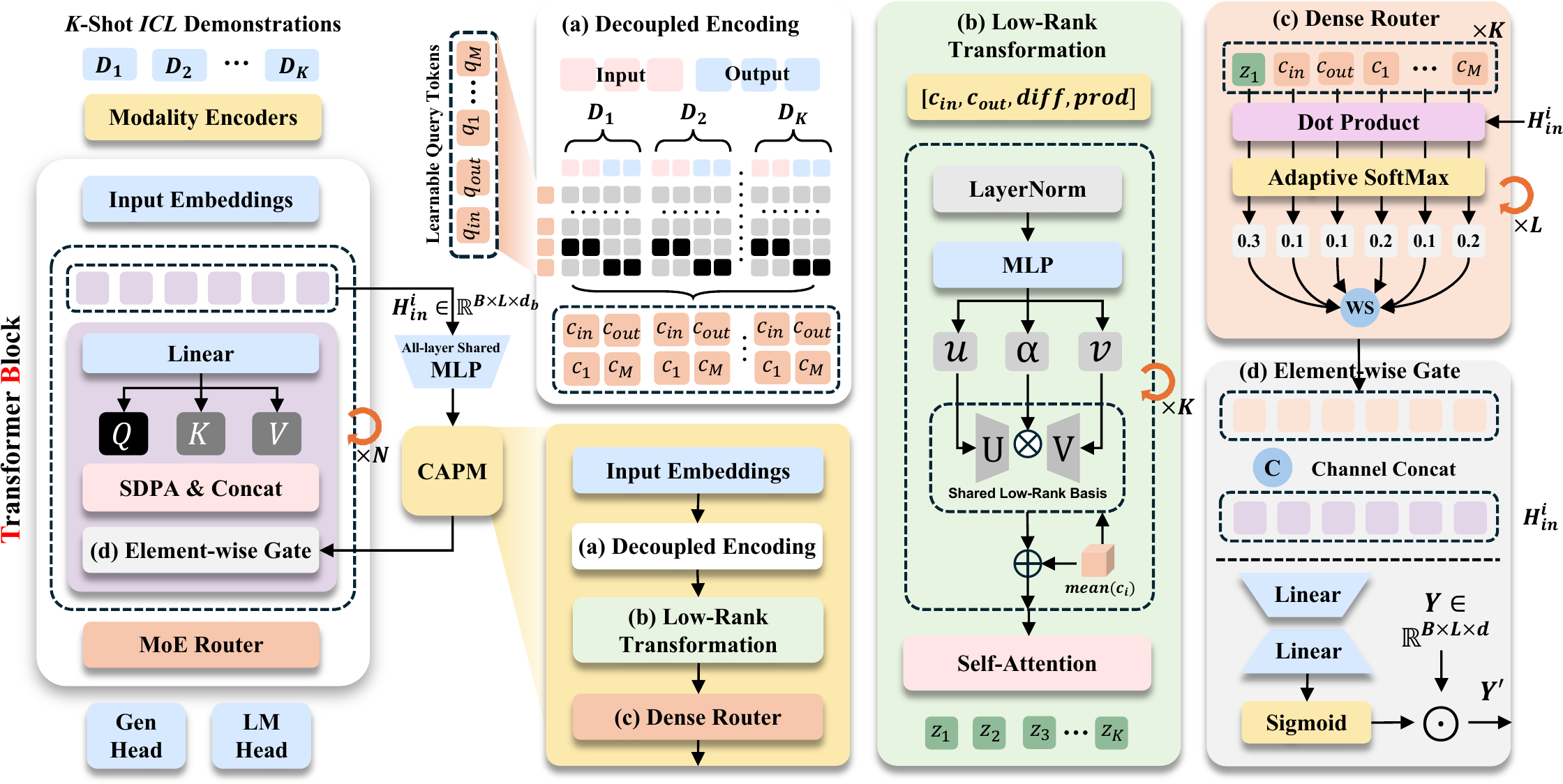
CAPM adapts the backbone by extracting contextual prototypes from demonstrations and injecting context-aware modulation into selected layers.
⚙️ Installation
1. Install Requirements
git clone https://github.com/xuyicheng-zju/UniICL.git
cd UniICL

conda create -n uniicl python=3.10 -y
conda activate uniicl

# Install core dependencies.
python -m pip install -r requirements.txt

# Optional acceleration kernels.
python -m pip install -r requirements-accelerator.txt
If the pinned PyTorch build does not match your CUDA driver, install a matching PyTorch wheel first and then install the remaining requirements.
⬇️ Download Models and Data
Install the Hugging Face CLI if it is not already available:
python -m pip install -U huggingface_hub
Download the released UniICL model weights:
# UniICL model checkpoint
huggingface-cli download xuyicheng-zju/UniICL --local-dir /path/to/UniICL-checkpoint
Download UniICL-760K annotations and image archives:
# UniICL-760K annotations and image archives
huggingface-cli download xuyicheng-zju/UniICL-760K --repo-type dataset --local-dir /path/to/UniICL-760K
After download, place or unpack the dataset so that the runtime layout is:
UniICL-760K/
  Aesthetic-Assessment/
  Analogical-Editing/
  ...
  images/
    AIGI-Holmes/
    AVA/
    World-Aware Planning/
    LAION-HR/
    T2I/
    I2I/
    degraded/
    Concept/
    Chain-of-Editing/
The dataset README contains the full file layout and release counts:
UniICL-760K/README.md.
🛠️ Configure Local Paths
Edit local_paths.py before training or evaluation:
UNIICL_BASE_MODEL = "/path/to/base-or-released-uniicl"
UNIICL_FINETUNED_MODEL = "/path/to/finetuned-uniicl"
UNIICL_TARGET_CHECKPOINT = "/path/to/evaluation-checkpoint"

HPSV3_CHECKPOINT = "/path/to/HPSv3.safetensors"
QALIGN_MODEL = "/path/to/qalign-or-hf-id"
JUDGE_MODEL = "your-judge-model-name"
JUDGE_API_BASE = "http://127.0.0.1:8000/v1"
UNIICL_760K_ROOT, UNIICL_BENCH_ROOT, and UNIICL_ROOT are inferred from the
repository layout by default. Keep them unchanged unless you move directories.
🧰 Prepare UniICL-760K for Training
Convert the downloaded annotations into the JSONL and Parquet artifacts consumed by the training dataloaders:
# convert all released training tasks
cd UniICL-760K
bash convert_unified.sh
Convert a subset of tasks during debugging:
# convert selected tasks during debugging
bash convert_unified.sh --tasks visual_grounding,scene_reasoning,instructional_generation
The conversion writes deterministic artifacts next to the released annotations:
- understanding tasks:
*_uniicl.jsonl - generation tasks:
parquet_*directories
🚀 Training
The training scripts read model and dataset locations from local_paths.py.
The default configuration is UniICL/data/configs/unified_icl.yaml.
Train the unified ICL model without CAPM:
# standard UniICL training
cd UniICL
NPROC_PER_NODE=8 TOTAL_STEPS=20000 bash scripts/train_uniicl.sh
Train with CAPM enabled:
# CAPM-enabled training
cd UniICL
NPROC_PER_NODE=8 TOTAL_STEPS=10000 bash scripts/train_uniicl_capm.sh
Useful environment overrides:
UNICL_DATASET_CONFIG=/path/to/config.yaml
UNICL_RESULTS_DIR=/path/to/run_outputs
UNICL_CHECKPOINT_DIR=/path/to/run_outputs/checkpoints
UNICL_RESUME_FROM=/path/to/checkpoint
WANDB_OFFLINE=True
After training, copy tokenizer, config, and autoencoder assets from the base model into the evaluation checkpoint directory:
cd UniICL
bash scripts/prepare_uniicl_checkpoint.sh
prepare_uniicl_checkpoint.sh uses UNIICL_BASE_MODEL and
UNIICL_TARGET_CHECKPOINT from local_paths.py.
🔍 Inference
Understanding example:
python UniICL/scripts/run_uniicl_inference.py \
  --model-path /path/to/finetuned-uniicl \
  --image /path/to/example.jpg \
  --prompt "Answer the question about this image." \
  --understanding-output
Generation example:
python UniICL/scripts/run_uniicl_inference.py \
  --model-path /path/to/finetuned-uniicl \
  --prompt "Generate an image of a lighthouse at dusk." \
  --output-image generated.png
Use --no-capm to disable CAPM at inference time for ablations.
🧪 UniICL‑Bench Evaluation
UniICL‑Bench contains 1,250 benchmark episodes across 15 subtasks. The shared
entrypoint is UniICL-Bench/run_eval.py.
Run one task at a fixed shot count:
cd UniICL-Bench
python run_eval.py --model uniicl --task visual_grounding --k-shot 2
Run the full shot sweep for one task:
cd UniICL-Bench
python run_eval.py --model uniicl --task visual_grounding --ablation
Run the benchmark task queues in parallel:
cd UniICL-Bench
python run_eval.py --model uniicl --parallel --ablation
The parallel mode uses the GPU task map in run_eval.py. For smaller machines,
run selected tasks with --task instead.
Generation and open-ended evaluation require external scorers or judge services:
JUDGE_MODELandJUDGE_API_BASE: OpenAI-compatible judge endpoint.HPSV3_CHECKPOINT: HPSv3 checkpoint for instruction-following generation.QALIGN_MODEL: Q-Align model path or id for visual refinement scoring.
Supported public task keys are listed in
UniICL-Bench/README.md.
📈 Results
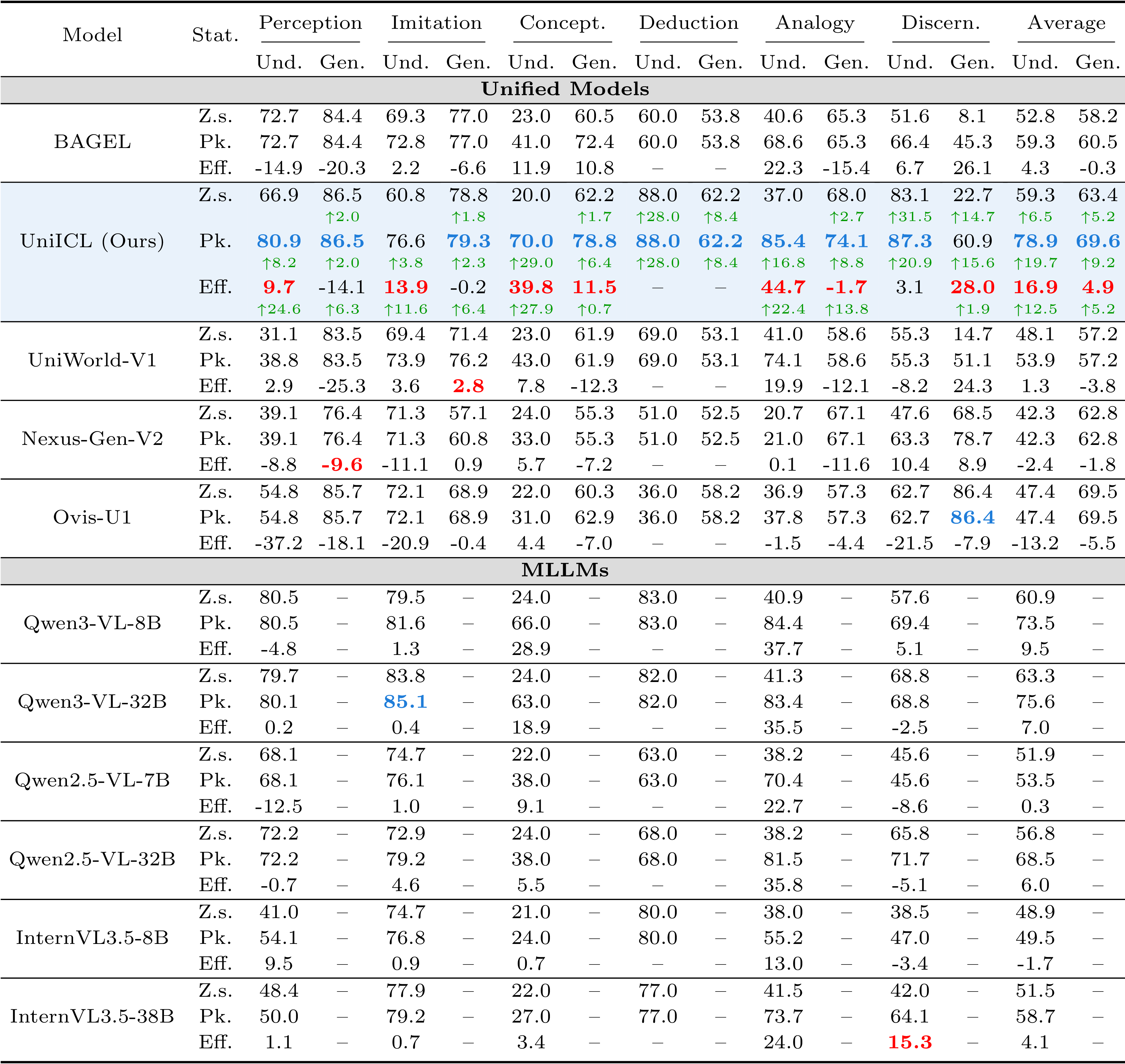
Main UniICL‑Bench results across capability categories. Z.s., Pk., and Eff. denote zero-shot, peak shot performance, and ICL efficiency.
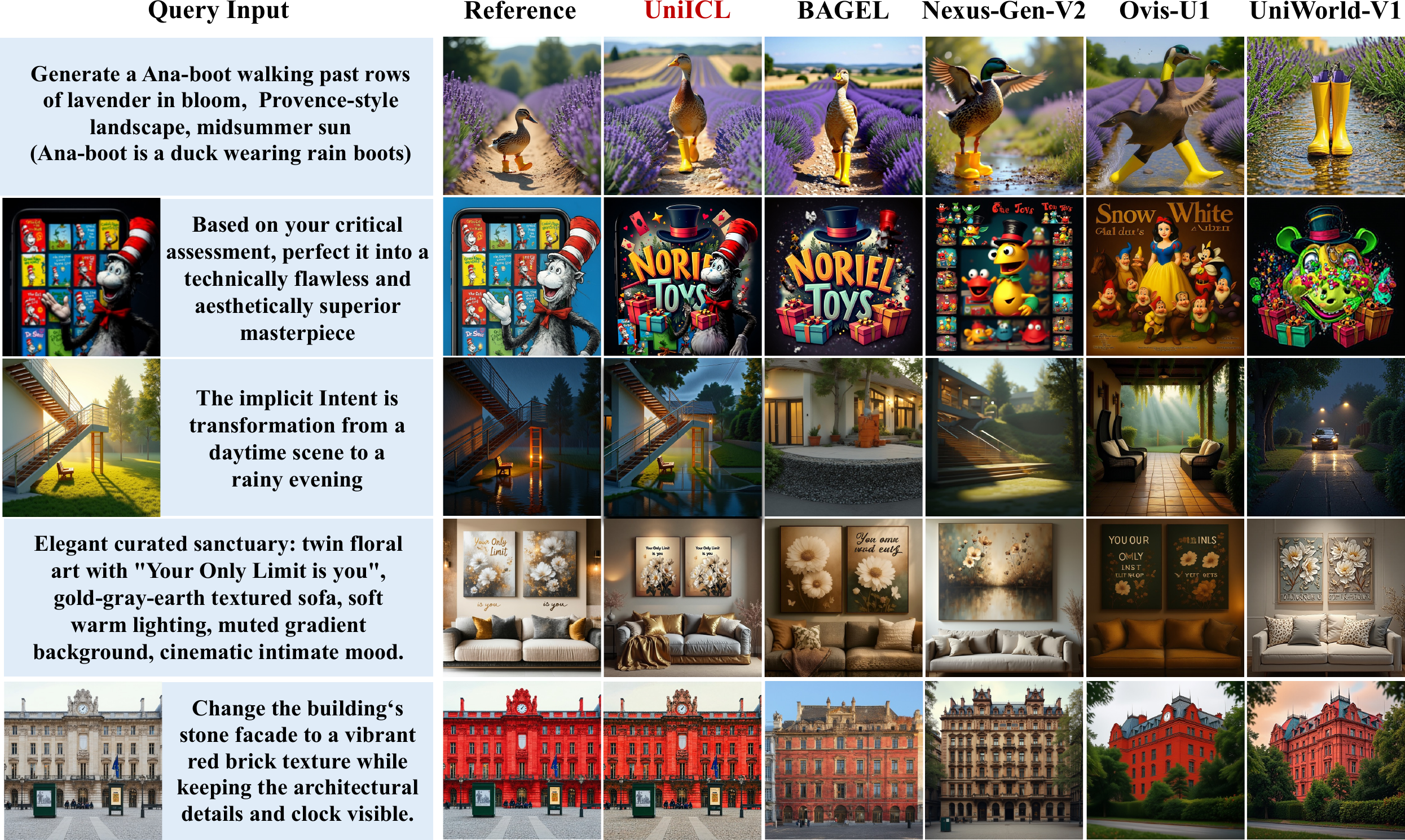
Qualitative comparison on generative in-context learning tasks.
📄 License
This project is released under the Apache-2.0 license.
🤗 Acknowledgement
- BAGEL: unified multimodal backbone of UniICL and codebase.
- LAION, AVA, AIGI-Holmes, and World-Aware Planning: data sources used to construct UniICL-760K.
- FLUX.1, FLUX.2, FLUX.1 Kontext, Stable Diffusion, Qwen-Image, Qwen-Image-Edit, Z-Image, and related variants: image generation and editing expert models used for synthetic data construction.
- RAM++, Rex-Omni, SAM 2, Qwen3-VL, GLM-4.5V, DINOv3, HPSv3, and Q-Align: models used for dataset construction and benchmark evaluation.
📚 Citation
If you find UniICL useful for your research, please cite:
@article{xu2026uniicl,
  title={UniICL: Systematizing Unified Multimodal In-context Learning through a Capability-Oriented Taxonomy},
  author={Xu, Yicheng and Zhang, Jiangning and Xue, Zhucun and Hu, Teng and Yi, Ran and Hu, Xiaobin and Liu, Yong and Tao, Dacheng},
  journal={arXiv preprint arXiv:2603.24690},
  year={2026}
}
Contributors

16 commits
Similar repos



Languages
Python
97.7%
Shell
2.3%
Systematizing Unified Multimodal In-Context Learning through a Capability-Oriented Taxonomy
Python
55
16 commits
updated Jul 3, 2026
README
UniICL: Systematizing Unified Multimodal In-context Learning through a Capability-Oriented Taxonomy
Yicheng Xu1 · Jiangning Zhang1,*,† · Zhucun Xue1 · Teng Hu2 · Ran Yi2 · Xiaobin Hu3 · Yong Liu1,† · Dacheng Tao4
1Zhejiang University 2Shanghai Jiao Tong University 3National University of Singapore 4Nanyang Technological University
*Equal contribution †Corresponding authors
UniICL is a unified multimodal in-context learning framework for both visual understanding and generation. The release includes the UniICL model code, UniICL-760K data utilities, UniICL‑Bench evaluation scripts, and links to the public model and dataset assets.
💡 Highlights
|
Capability-oriented organization of multimodal ICL into perception, imitation, conception, deduction, analogy, and discernment. |
A large-scale training suite with curated demonstration contexts for both understanding and generation tasks. |
UniICL‑Bench evaluates clean shot scaling and stability under context replacement, reordering, and noisy demonstrations. |
Context-Adaptive Prototype Modulator extracts demonstration prototypes and injects task-aware modulation into the backbone. |
📦 Release
| Component | Contents |
|---|---|
UniICL/ | Model implementation, CAPM module, training code, and minimal inference entrypoint. |
UniICL-760K/ | Dataset documentation, conversion scripts, and Hugging Face packaging utilities. |
UniICL‑Bench/ | Benchmark annotations, task evaluators, scorer wrappers, and the shared evaluation entrypoint. |
Large annotations, image assets, and model weights are hosted on Hugging Face.
🧭 Overview
🏗️ Data Pipeline and Demonstration Assembly
|
UniICL-760K is built through dense annotation, generative synthesis, quality filtering, and task-aligned demonstration assembly. | |
|
Feature-Based assembly retrieves relevant and diverse demonstrations in multimodal embedding space. |
Intent-Based assembly matches structured task constraints against fine-grained annotations. |
📊 Dataset Statistics
UniICL-760K covers 15 subtasks organized by a capability-oriented taxonomy.
🗂️ Dataset and Benchmark Composition
Assembly uses Feat. for Feature-Based retrieval and Intent for Intent-Based matching. Chain-of-Editing is benchmark-only and excluded from training.
| Level | Sub-task | Image Source | Mod. | Assembly | Train Pool | Bench Episodes |
|---|---|---|---|---|---|---|
| 1. Perception | Visual Grounding | LAION-HR | Und. | Feat. | 66,347 | 100 |
| Attribute Recognition | LAION-HR | Und. | Feat. | 64,338 | 100 | |
| Image Manipulation | Synthesis | Gen. | Feat. | 59,415 | 50 | |
| 2. Imitation | Style-Aware Caption | LAION-HR | Und. | Feat. | 67,225 | 100 |
| Scene Reasoning | LAION-HR | Und. | Feat. | 66,074 | 100 | |
| Instructional Generation | Synthesis | Gen. | Feat. | 60,990 | 50 | |
| 3. Conception | Fast Concept Mapping | Synthesis | Und. | Intent | 50,000 | 100 |
| Fast Concept Generation | Synthesis | Gen. | Intent | 50,000 | 100 | |
| 4. Deduction | World-Aware Planning | World-Aware Planning | Und. | Intent | 29,824 | 100 |
| Chain-of-Editing | Synthesis | Gen. | Intent | -- | 50 | |
| 5. Analogy | Analogical Inference | LAION-HR | Und. | Intent | 51,028 | 100 |
| Analogical Editing | Synthesis | Gen. | Intent | 18,710 | 50 | |
| 6. Discernment | Aesthetic Assessment | AVA | Und. | Feat. | 80,481 | 100 |
| Forgery Detection | AIGI-Holmes | Und. | Feat. | 40,661 | 100 | |
| Visual Refinement | Synthesis | Gen. | Feat. | 27,996 | 50 |
🧠 CAPM Architecture
CAPM adapts the backbone by extracting contextual prototypes from demonstrations and injecting context-aware modulation into selected layers.
⚙️ Installation
1. Install Requirements
git clone https://github.com/xuyicheng-zju/UniICL.git
cd UniICL

conda create -n uniicl python=3.10 -y
conda activate uniicl

# Install core dependencies.
python -m pip install -r requirements.txt

# Optional acceleration kernels.
python -m pip install -r requirements-accelerator.txt
If the pinned PyTorch build does not match your CUDA driver, install a matching PyTorch wheel first and then install the remaining requirements.
⬇️ Download Models and Data
Install the Hugging Face CLI if it is not already available:
python -m pip install -U huggingface_hub
Download the released UniICL model weights:
# UniICL model checkpoint
huggingface-cli download xuyicheng-zju/UniICL --local-dir /path/to/UniICL-checkpoint
Download UniICL-760K annotations and image archives:
# UniICL-760K annotations and image archives
huggingface-cli download xuyicheng-zju/UniICL-760K --repo-type dataset --local-dir /path/to/UniICL-760K
After download, place or unpack the dataset so that the runtime layout is:
UniICL-760K/
  Aesthetic-Assessment/
  Analogical-Editing/
  ...
  images/
    AIGI-Holmes/
    AVA/
    World-Aware Planning/
    LAION-HR/
    T2I/
    I2I/
    degraded/
    Concept/
    Chain-of-Editing/
The dataset README contains the full file layout and release counts:
UniICL-760K/README.md.
🛠️ Configure Local Paths
Edit local_paths.py before training or evaluation:
UNIICL_BASE_MODEL = "/path/to/base-or-released-uniicl"
UNIICL_FINETUNED_MODEL = "/path/to/finetuned-uniicl"
UNIICL_TARGET_CHECKPOINT = "/path/to/evaluation-checkpoint"

HPSV3_CHECKPOINT = "/path/to/HPSv3.safetensors"
QALIGN_MODEL = "/path/to/qalign-or-hf-id"
JUDGE_MODEL = "your-judge-model-name"
JUDGE_API_BASE = "http://127.0.0.1:8000/v1"
UNIICL_760K_ROOT, UNIICL_BENCH_ROOT, and UNIICL_ROOT are inferred from the
repository layout by default. Keep them unchanged unless you move directories.
🧰 Prepare UniICL-760K for Training
Convert the downloaded annotations into the JSONL and Parquet artifacts consumed by the training dataloaders:
# convert all released training tasks
cd UniICL-760K
bash convert_unified.sh
Convert a subset of tasks during debugging:
# convert selected tasks during debugging
bash convert_unified.sh --tasks visual_grounding,scene_reasoning,instructional_generation
The conversion writes deterministic artifacts next to the released annotations:
- understanding tasks:
*_uniicl.jsonl - generation tasks:
parquet_*directories
🚀 Training
The training scripts read model and dataset locations from local_paths.py.
The default configuration is UniICL/data/configs/unified_icl.yaml.
Train the unified ICL model without CAPM:
# standard UniICL training
cd UniICL
NPROC_PER_NODE=8 TOTAL_STEPS=20000 bash scripts/train_uniicl.sh
Train with CAPM enabled:
# CAPM-enabled training
cd UniICL
NPROC_PER_NODE=8 TOTAL_STEPS=10000 bash scripts/train_uniicl_capm.sh
Useful environment overrides:
UNICL_DATASET_CONFIG=/path/to/config.yaml
UNICL_RESULTS_DIR=/path/to/run_outputs
UNICL_CHECKPOINT_DIR=/path/to/run_outputs/checkpoints
UNICL_RESUME_FROM=/path/to/checkpoint
WANDB_OFFLINE=True
After training, copy tokenizer, config, and autoencoder assets from the base model into the evaluation checkpoint directory:
cd UniICL
bash scripts/prepare_uniicl_checkpoint.sh
prepare_uniicl_checkpoint.sh uses UNIICL_BASE_MODEL and
UNIICL_TARGET_CHECKPOINT from local_paths.py.
🔍 Inference
Understanding example:
python UniICL/scripts/run_uniicl_inference.py \
  --model-path /path/to/finetuned-uniicl \
  --image /path/to/example.jpg \
  --prompt "Answer the question about this image." \
  --understanding-output
Generation example:
python UniICL/scripts/run_uniicl_inference.py \
  --model-path /path/to/finetuned-uniicl \
  --prompt "Generate an image of a lighthouse at dusk." \
  --output-image generated.png
Use --no-capm to disable CAPM at inference time for ablations.
🧪 UniICL‑Bench Evaluation
UniICL‑Bench contains 1,250 benchmark episodes across 15 subtasks. The shared
entrypoint is UniICL-Bench/run_eval.py.
Run one task at a fixed shot count:
cd UniICL-Bench
python run_eval.py --model uniicl --task visual_grounding --k-shot 2
Run the full shot sweep for one task:
cd UniICL-Bench
python run_eval.py --model uniicl --task visual_grounding --ablation
Run the benchmark task queues in parallel:
cd UniICL-Bench
python run_eval.py --model uniicl --parallel --ablation
The parallel mode uses the GPU task map in run_eval.py. For smaller machines,
run selected tasks with --task instead.
Generation and open-ended evaluation require external scorers or judge services:
JUDGE_MODELandJUDGE_API_BASE: OpenAI-compatible judge endpoint.HPSV3_CHECKPOINT: HPSv3 checkpoint for instruction-following generation.QALIGN_MODEL: Q-Align model path or id for visual refinement scoring.
Supported public task keys are listed in
UniICL-Bench/README.md.
📈 Results
Main UniICL‑Bench results across capability categories. Z.s., Pk., and Eff. denote zero-shot, peak shot performance, and ICL efficiency.
Qualitative comparison on generative in-context learning tasks.
📄 License
This project is released under the Apache-2.0 license.
🤗 Acknowledgement
- BAGEL: unified multimodal backbone of UniICL and codebase.
- LAION, AVA, AIGI-Holmes, and World-Aware Planning: data sources used to construct UniICL-760K.
- FLUX.1, FLUX.2, FLUX.1 Kontext, Stable Diffusion, Qwen-Image, Qwen-Image-Edit, Z-Image, and related variants: image generation and editing expert models used for synthetic data construction.
- RAM++, Rex-Omni, SAM 2, Qwen3-VL, GLM-4.5V, DINOv3, HPSv3, and Q-Align: models used for dataset construction and benchmark evaluation.
📚 Citation
If you find UniICL useful for your research, please cite:
@article{xu2026uniicl,
  title={UniICL: Systematizing Unified Multimodal In-context Learning through a Capability-Oriented Taxonomy},
  author={Xu, Yicheng and Zhang, Jiangning and Xue, Zhucun and Hu, Teng and Yi, Ran and Hu, Xiaobin and Liu, Yong and Tao, Dacheng},
  journal={arXiv preprint arXiv:2603.24690},
  year={2026}
}
Similar repos
Contributors
16 commits
Languages
Python
97.7%
Shell
2.3%