
README
DIAL: Decoupling Intent and Action via Latent World Modeling for End-to-End VLA
Project Page | Paper | Model Weights
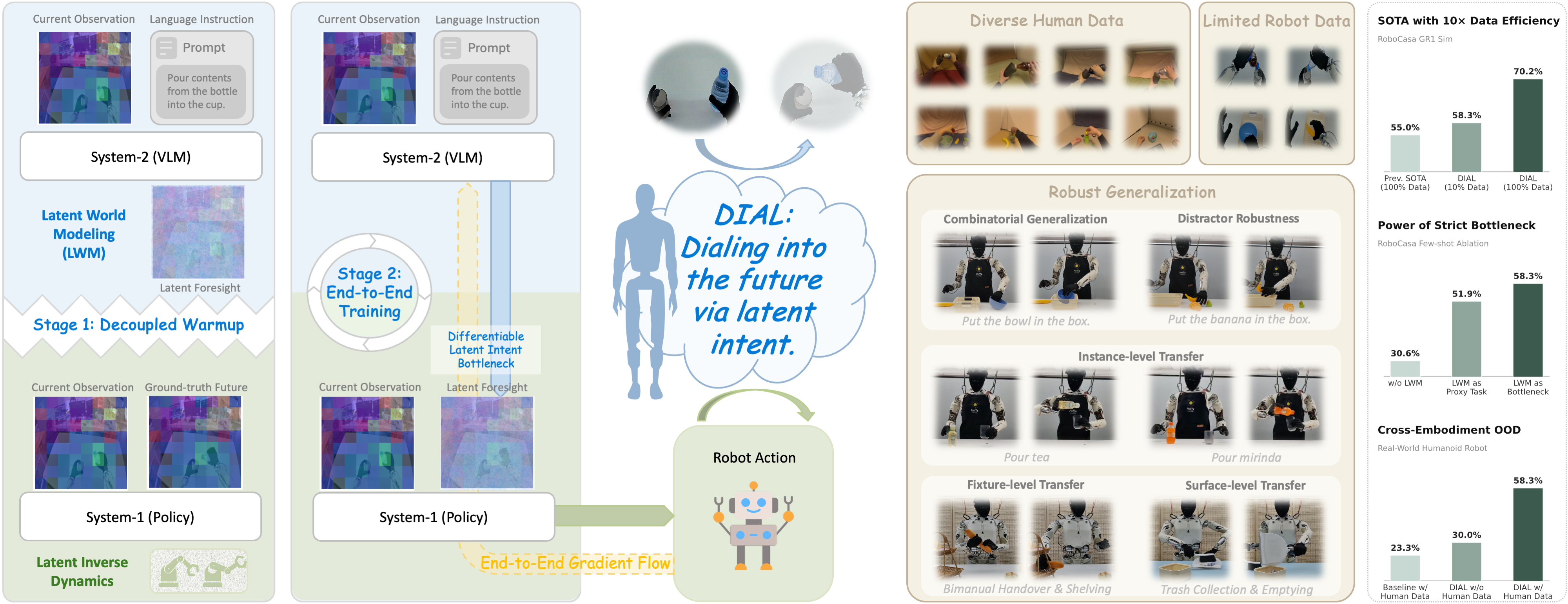
The development of Vision-Language-Action (VLA) models has been significantly accelerated by pre-trained Vision-Language Models (VLMs). However, most existing end-to-end VLAs treat the VLM primarily as a multimodal encoder, directly mapping vision-language features to low-level actions. This paradigm underutilizes the VLM’s potential role in high-level decision making and introduces training instability, frequently causing degradation of its rich semantic representations.
To address these limitations, we introduce DIAL (Decoupling Intent and Action via Latent World Modeling), a framework that bridges high-level decision making and low-level motor execution through a differentiable latent intent bottleneck. Specifically, a VLM-based System-2 performs latent world modeling by synthesizing the latent visual foresight within the native feature space of the VLM’s vision encoder; this foresight explicitly encodes the VLM’s intent and serves as the structural bottleneck. A lightweight System-1 policy then decodes this predicted intent together with the current observation into precise robot actions via latent inverse dynamics. To ensure optimization stability, we employ a two-stage training paradigm: a decoupled warmup phase in which System-2 learns to predict latent futures while System-1 learns motor control under ground-truth future guidance within a unified feature space, followed by seamless end-to-end joint optimization. This design enables action-aware gradients to refine the VLM backbone in a controlled manner while preserving its pre-trained knowledge.
Extensive experiments on the RoboCasa GR1 Tabletop benchmark demonstrate that DIAL establishes a new state of the art, achieving superior performance with 10× fewer demonstrations than prior methods. Furthermore, by leveraging heterogeneous human demonstrations, DIAL learns physically grounded manipulation priors and exhibits robust zero-shot generalization to unseen objects and novel configurations during real-world deployment on a humanoid robot.
Table of Contents
Installation
Training Environment
Training hardware: 8 × NVIDIA GPUs, per-GPU batch size 32, CUDA 12.x.
conda create -n dial python=3.10 -y
conda activate dial

# Install DIAL
cd DIAL
pip install -e .[base]

# Additional dependencies
pip install flash-attn==2.7.1.post4 --no-build-isolation
pip install qwen-vl-utils[decord]==0.0.8
pip install scikit-learn
The Qwen2.5-VL-3B-Instruct backbone is automatically loaded from HuggingFace at runtime (configured via vlm_path in the model config JSON).
Simulation Evaluation Environment
Requires the same base installation above, plus simulation dependencies:
# System dependencies
sudo apt-get install -y libegl1-mesa libegl1-mesa-dev libosmesa6-dev patchelf

# Install robosuite v1.5.1
git clone https://github.com/ARISE-Initiative/robosuite.git
cd robosuite
git checkout v1.5.1
pip install -e .
cd ..

# Install robocasa-gr1-tabletop-tasks
git clone https://github.com/robocasa/robocasa-gr1-tabletop-tasks.git
cd robocasa-gr1-tabletop-tasks
pip install -e .
cd ..

# IK solver for GR1 robot (required for simulation & data preprocessing)
pip install pin==3.9.0
pip install mink==0.0.5
Required patch: Apply the following fix to robocasa-gr1-tabletop-tasks/robocasa/models/objects/kitchen_object_utils.py.
In the sample_kitchen_object_helper() function, after the line reg_choices = reg_choices[split_th:] under elif split == "B":, add:
if "assets/objects/sketchfab/basket/" in reg_choices[0]:
    reg_choices = [c for c in reg_choices if not c.endswith('basket_4/model.xml')]
Download tabletop assets:
python robocasa-gr1-tabletop-tasks/robocasa/scripts/download_tabletop_assets.py -y
Data Preparation
RoboCasa GR1 Simulation Data
-
Download the raw data from nvidia/PhysicalAI-Robotics-GR00T-Teleop-Sim on HuggingFace. This provides HDF5 files and LeRobot-format datasets.
-
Augment with EEF poses. The raw data only contains joint angles. To add end-effector poses (3D position + 6D rotation) needed for cross-embodiment alignment, run two steps per task:
# Step 1: Extract EEF poses by replaying trajectories in the simulator
#   Input:  HDF5 file (e.g., HDF5/TaskName.hdf5)
#   Output: Replay parquet directory (e.g., Replay-Correct/TaskName/)
python preprocessing/extract_and_visualize_3d-pos_6d-rot_from_gr1.py \
    --dataset /path/to/HDF5/TaskName.hdf5 \
    --output_dir /path/to/Replay-Correct/TaskName \
    --render_image_names egoview \
    --verbose \
    --render_height 800 \
    --render_width 1280 \
    --num_parallel_jobs 10

# Step 2: Augment the LeRobot dataset with extracted poses
#   Input:  LeRobot dataset + Replay parquet from Step 1
#   Output: Augmented LeRobot dataset (LeRobot-AugPosRot-Correct/)
python preprocessing/aug_lerobot_data.py \
    --lerobot_base_path /path/to/LeRobot/gr1_unified.TaskName \
    --replay_base_path /path/to/Replay-Correct/TaskName/parquet/ \
    --output_base_path /path/to/LeRobot-AugPosRot-Correct/gr1_unified.TaskName
Repeat for all 24 tasks. The final augmented datasets under LeRobot-AugPosRot-Correct/ are used for training.
EgoDex Human Data
-
Download raw EgoDex data from apple/ml-egodex.
-
Install LeRobot (required for data format conversion only):
git clone https://github.com/huggingface/lerobot.git
cd lerobot
git checkout d602e8169cbad9e93a4a3b3ee1dd8b332af7ebf8
pip install -e .
pip install tyro h5py
cd ..
- Convert to LeRobot format (two steps per subset):
# Step 1: Convert raw EgoDex HDF5 to LeRobot v2.1 format
python preprocessing/convert_egodex_data_to_lerobot.py \
    --raw_dir /path/to/egodex/basic_pick_place \
    --repo_id /path/to/egodex_lerobot/part2/basic_pick_place

# Step 2: Convert from LeRobot v2.1 to v2.0 (GR00T-compatible format)
python preprocessing/convert_dataset_v21_to_v20_gr00t.py \
    --repo-id=part2/basic_pick_place \
    --root=/path/to/egodex_lerobot/part2/basic_pick_place
Training
DIAL training follows a multi-stage pipeline. Use examples/train.sh as the entry point:
bash examples/train.sh <decoupled|end2end> [training args...]
decoupled(Stage 1): Trains the latent world model with a golden bridge (bridge_type=golden)end2end(Stage 2): End-to-end fine-tuning with an end-to-end bridge (bridge_type=end2end)
Training Scenarios
Complete, ready-to-run commands for all scenarios are provided in examples/example_commands.sh. Below is a summary:
Scenario A: Co-training with Human Data (EgoDex + GR1 100-shot)
This is the full DIAL pipeline with human data co-training:
- Co-pretrain (decoupled): Train on mixed EgoDex + GR1 data with
bridge_type=golden - Co-finetune (end2end): Continue on mixed data with
bridge_type=end2end - Finetune (end2end): Fine-tune on GR1 data only with
--use_separate_projector_for_loss
Scenario B: Simulation Data Only (GR1 all data)
Train without human data:
- Pretrain (decoupled): Train on all GR1 data with
bridge_type=golden - Finetune (end2end): Fine-tune with
bridge_type=end2endand--use_separate_projector_for_loss
See examples/example_commands.sh for the exact dataset paths, data configs, embodiment tags, and data splits used in our experiments.
Evaluation
Online Evaluation
Evaluate trained models in the RoboCasa GR1 simulation environment:
bash examples/eval.sh <model_path> <eval_type>
Evaluation types:
| Type | Description | Tasks |
|---|---|---|
id | In-distribution | 24 (6 PnPClose + 18 PosttrainPnPNovel SplitA) |
ood_object_appearance | OOD unseen object appearances | 18 (EvalPnPNovel SplitB) |
ood_container_combination | OOD unseen source-target containers | 14 (PretrainPnPNovel SplitA) |
ood_object_type | OOD unseen object types | 32 (PretrainPnPBase SplitA) |
Example:
# In-distribution evaluation with 50 episodes per task
bash examples/eval.sh outputs/finetune-end2end-from-cofinetune/checkpoint-20000 id

# OOD unseen object appearance evaluation
bash examples/eval.sh outputs/finetune-end2end-from-cofinetune/checkpoint-20000 ood_object_appearance

# Customize port and episode count
PORT=8891 N_EPISODES=50 bash examples/eval.sh /path/to/checkpoint ood_object_type
The script automatically:
- Launches the inference server
- Runs simulation episodes for each task
- Computes and saves success rates to
<model_path>/<eval_subdir>/results.json
Offline Evaluation (Action & Goal Loss)
You can also evaluate checkpoints offline without the simulator by computing per-step action MSE and bridge goal loss on held-out trajectories, with optional PCA feature visualization:
bash examples/eval_loss.sh <model_path> [data_config] [embodiment_tag] [trajs]
Examples:
# Default settings (10 trajectories, GR1 arms+waist data config)
bash examples/eval_loss.sh checkpoints/DIAL-3B-fewshot

# Custom data config and trajectory count
bash examples/eval_loss.sh checkpoints/DIAL-3B-fulldata \
    fourier_gr1_arms_waist_aug_pos_rot_flip_wrist_only_gausNorm_crop gr1 10
Results (action MSE, bridge loss, trajectory plots, and PCA visualizations) are saved to <model_path>/eval_action_goal_loss/.
Note: The dataset paths in
examples/eval_loss.shpoint to augmented GR1 data (with EEF poses). Update them to match your local data directory if needed.
Citation
If you find this work useful, please cite:
@article{chen2026dial,
  title={DIAL: Decoupling Intent and Action via Latent World Modeling for End-to-End VLA},
  author={Chen, Yi and Ge, Yuying and Zhou, Hui and Ding, Mingyu and Ge, Yixiao and Liu, Xihui},
  journal={arXiv preprint arXiv:2603.29844},
  year={2026}
}
Acknowledgements
This codebase is built on top of NVIDIA Isaac GR00T N1.5, an open foundation model for generalized humanoid robot policies. We thank NVIDIA for open-sourcing the GR00T N1.5 model, data pipeline, and training infrastructure, which served as the foundation for our work. We also thank the authors of EgoDex, RoboCasa, and LeRobot for their open-source contributions.
License
This project is licensed under the Apache License 2.0.
Contributors

2 commits


README
DIAL: Decoupling Intent and Action via Latent World Modeling for End-to-End VLA
Project Page | Paper | Model Weights
The development of Vision-Language-Action (VLA) models has been significantly accelerated by pre-trained Vision-Language Models (VLMs). However, most existing end-to-end VLAs treat the VLM primarily as a multimodal encoder, directly mapping vision-language features to low-level actions. This paradigm underutilizes the VLM’s potential role in high-level decision making and introduces training instability, frequently causing degradation of its rich semantic representations.
To address these limitations, we introduce DIAL (Decoupling Intent and Action via Latent World Modeling), a framework that bridges high-level decision making and low-level motor execution through a differentiable latent intent bottleneck. Specifically, a VLM-based System-2 performs latent world modeling by synthesizing the latent visual foresight within the native feature space of the VLM’s vision encoder; this foresight explicitly encodes the VLM’s intent and serves as the structural bottleneck. A lightweight System-1 policy then decodes this predicted intent together with the current observation into precise robot actions via latent inverse dynamics. To ensure optimization stability, we employ a two-stage training paradigm: a decoupled warmup phase in which System-2 learns to predict latent futures while System-1 learns motor control under ground-truth future guidance within a unified feature space, followed by seamless end-to-end joint optimization. This design enables action-aware gradients to refine the VLM backbone in a controlled manner while preserving its pre-trained knowledge.
Extensive experiments on the RoboCasa GR1 Tabletop benchmark demonstrate that DIAL establishes a new state of the art, achieving superior performance with 10× fewer demonstrations than prior methods. Furthermore, by leveraging heterogeneous human demonstrations, DIAL learns physically grounded manipulation priors and exhibits robust zero-shot generalization to unseen objects and novel configurations during real-world deployment on a humanoid robot.
Table of Contents
Installation
Training Environment
Training hardware: 8 × NVIDIA GPUs, per-GPU batch size 32, CUDA 12.x.
conda create -n dial python=3.10 -y
conda activate dial

# Install DIAL
cd DIAL
pip install -e .[base]

# Additional dependencies
pip install flash-attn==2.7.1.post4 --no-build-isolation
pip install qwen-vl-utils[decord]==0.0.8
pip install scikit-learn
The Qwen2.5-VL-3B-Instruct backbone is automatically loaded from HuggingFace at runtime (configured via vlm_path in the model config JSON).
Simulation Evaluation Environment
Requires the same base installation above, plus simulation dependencies:
# System dependencies
sudo apt-get install -y libegl1-mesa libegl1-mesa-dev libosmesa6-dev patchelf

# Install robosuite v1.5.1
git clone https://github.com/ARISE-Initiative/robosuite.git
cd robosuite
git checkout v1.5.1
pip install -e .
cd ..

# Install robocasa-gr1-tabletop-tasks
git clone https://github.com/robocasa/robocasa-gr1-tabletop-tasks.git
cd robocasa-gr1-tabletop-tasks
pip install -e .
cd ..

# IK solver for GR1 robot (required for simulation & data preprocessing)
pip install pin==3.9.0
pip install mink==0.0.5
Required patch: Apply the following fix to robocasa-gr1-tabletop-tasks/robocasa/models/objects/kitchen_object_utils.py.
In the sample_kitchen_object_helper() function, after the line reg_choices = reg_choices[split_th:] under elif split == "B":, add:
if "assets/objects/sketchfab/basket/" in reg_choices[0]:
    reg_choices = [c for c in reg_choices if not c.endswith('basket_4/model.xml')]
Download tabletop assets:
python robocasa-gr1-tabletop-tasks/robocasa/scripts/download_tabletop_assets.py -y
Data Preparation
RoboCasa GR1 Simulation Data
-
Download the raw data from nvidia/PhysicalAI-Robotics-GR00T-Teleop-Sim on HuggingFace. This provides HDF5 files and LeRobot-format datasets.
-
Augment with EEF poses. The raw data only contains joint angles. To add end-effector poses (3D position + 6D rotation) needed for cross-embodiment alignment, run two steps per task:
# Step 1: Extract EEF poses by replaying trajectories in the simulator
#   Input:  HDF5 file (e.g., HDF5/TaskName.hdf5)
#   Output: Replay parquet directory (e.g., Replay-Correct/TaskName/)
python preprocessing/extract_and_visualize_3d-pos_6d-rot_from_gr1.py \
    --dataset /path/to/HDF5/TaskName.hdf5 \
    --output_dir /path/to/Replay-Correct/TaskName \
    --render_image_names egoview \
    --verbose \
    --render_height 800 \
    --render_width 1280 \
    --num_parallel_jobs 10

# Step 2: Augment the LeRobot dataset with extracted poses
#   Input:  LeRobot dataset + Replay parquet from Step 1
#   Output: Augmented LeRobot dataset (LeRobot-AugPosRot-Correct/)
python preprocessing/aug_lerobot_data.py \
    --lerobot_base_path /path/to/LeRobot/gr1_unified.TaskName \
    --replay_base_path /path/to/Replay-Correct/TaskName/parquet/ \
    --output_base_path /path/to/LeRobot-AugPosRot-Correct/gr1_unified.TaskName
Repeat for all 24 tasks. The final augmented datasets under LeRobot-AugPosRot-Correct/ are used for training.
EgoDex Human Data
-
Download raw EgoDex data from apple/ml-egodex.
-
Install LeRobot (required for data format conversion only):
git clone https://github.com/huggingface/lerobot.git
cd lerobot
git checkout d602e8169cbad9e93a4a3b3ee1dd8b332af7ebf8
pip install -e .
pip install tyro h5py
cd ..
- Convert to LeRobot format (two steps per subset):
# Step 1: Convert raw EgoDex HDF5 to LeRobot v2.1 format
python preprocessing/convert_egodex_data_to_lerobot.py \
    --raw_dir /path/to/egodex/basic_pick_place \
    --repo_id /path/to/egodex_lerobot/part2/basic_pick_place

# Step 2: Convert from LeRobot v2.1 to v2.0 (GR00T-compatible format)
python preprocessing/convert_dataset_v21_to_v20_gr00t.py \
    --repo-id=part2/basic_pick_place \
    --root=/path/to/egodex_lerobot/part2/basic_pick_place
Training
DIAL training follows a multi-stage pipeline. Use examples/train.sh as the entry point:
bash examples/train.sh <decoupled|end2end> [training args...]
decoupled(Stage 1): Trains the latent world model with a golden bridge (bridge_type=golden)end2end(Stage 2): End-to-end fine-tuning with an end-to-end bridge (bridge_type=end2end)
Training Scenarios
Complete, ready-to-run commands for all scenarios are provided in examples/example_commands.sh. Below is a summary:
Scenario A: Co-training with Human Data (EgoDex + GR1 100-shot)
This is the full DIAL pipeline with human data co-training:
- Co-pretrain (decoupled): Train on mixed EgoDex + GR1 data with
bridge_type=golden - Co-finetune (end2end): Continue on mixed data with
bridge_type=end2end - Finetune (end2end): Fine-tune on GR1 data only with
--use_separate_projector_for_loss
Scenario B: Simulation Data Only (GR1 all data)
Train without human data:
- Pretrain (decoupled): Train on all GR1 data with
bridge_type=golden - Finetune (end2end): Fine-tune with
bridge_type=end2endand--use_separate_projector_for_loss
See examples/example_commands.sh for the exact dataset paths, data configs, embodiment tags, and data splits used in our experiments.
Evaluation
Online Evaluation
Evaluate trained models in the RoboCasa GR1 simulation environment:
bash examples/eval.sh <model_path> <eval_type>
Evaluation types:
| Type | Description | Tasks |
|---|---|---|
id | In-distribution | 24 (6 PnPClose + 18 PosttrainPnPNovel SplitA) |
ood_object_appearance | OOD unseen object appearances | 18 (EvalPnPNovel SplitB) |
ood_container_combination | OOD unseen source-target containers | 14 (PretrainPnPNovel SplitA) |
ood_object_type | OOD unseen object types | 32 (PretrainPnPBase SplitA) |
Example:
# In-distribution evaluation with 50 episodes per task
bash examples/eval.sh outputs/finetune-end2end-from-cofinetune/checkpoint-20000 id

# OOD unseen object appearance evaluation
bash examples/eval.sh outputs/finetune-end2end-from-cofinetune/checkpoint-20000 ood_object_appearance

# Customize port and episode count
PORT=8891 N_EPISODES=50 bash examples/eval.sh /path/to/checkpoint ood_object_type
The script automatically:
- Launches the inference server
- Runs simulation episodes for each task
- Computes and saves success rates to
<model_path>/<eval_subdir>/results.json
Offline Evaluation (Action & Goal Loss)
You can also evaluate checkpoints offline without the simulator by computing per-step action MSE and bridge goal loss on held-out trajectories, with optional PCA feature visualization:
bash examples/eval_loss.sh <model_path> [data_config] [embodiment_tag] [trajs]
Examples:
# Default settings (10 trajectories, GR1 arms+waist data config)
bash examples/eval_loss.sh checkpoints/DIAL-3B-fewshot

# Custom data config and trajectory count
bash examples/eval_loss.sh checkpoints/DIAL-3B-fulldata \
    fourier_gr1_arms_waist_aug_pos_rot_flip_wrist_only_gausNorm_crop gr1 10
Results (action MSE, bridge loss, trajectory plots, and PCA visualizations) are saved to <model_path>/eval_action_goal_loss/.
Note: The dataset paths in
examples/eval_loss.shpoint to augmented GR1 data (with EEF poses). Update them to match your local data directory if needed.
Citation
If you find this work useful, please cite:
@article{chen2026dial,
  title={DIAL: Decoupling Intent and Action via Latent World Modeling for End-to-End VLA},
  author={Chen, Yi and Ge, Yuying and Zhou, Hui and Ding, Mingyu and Ge, Yixiao and Liu, Xihui},
  journal={arXiv preprint arXiv:2603.29844},
  year={2026}
}
Acknowledgements
This codebase is built on top of NVIDIA Isaac GR00T N1.5, an open foundation model for generalized humanoid robot policies. We thank NVIDIA for open-sourcing the GR00T N1.5 model, data pipeline, and training infrastructure, which served as the foundation for our work. We also thank the authors of EgoDex, RoboCasa, and LeRobot for their open-source contributions.
License
This project is licensed under the Apache License 2.0.
Similar repos
Contributors
2 commits
Languages
Python
100.0%