A lightweight web dashboard for viewing all your OpenClaw Bots/Agents/Models/Sessions status at a glance.
TypeScript
2,023
324 commits
updated Jul 18, 2026
A lightweight web dashboard for viewing all your OpenClaw Bots/Agents/Models/Sessions status at a glance.
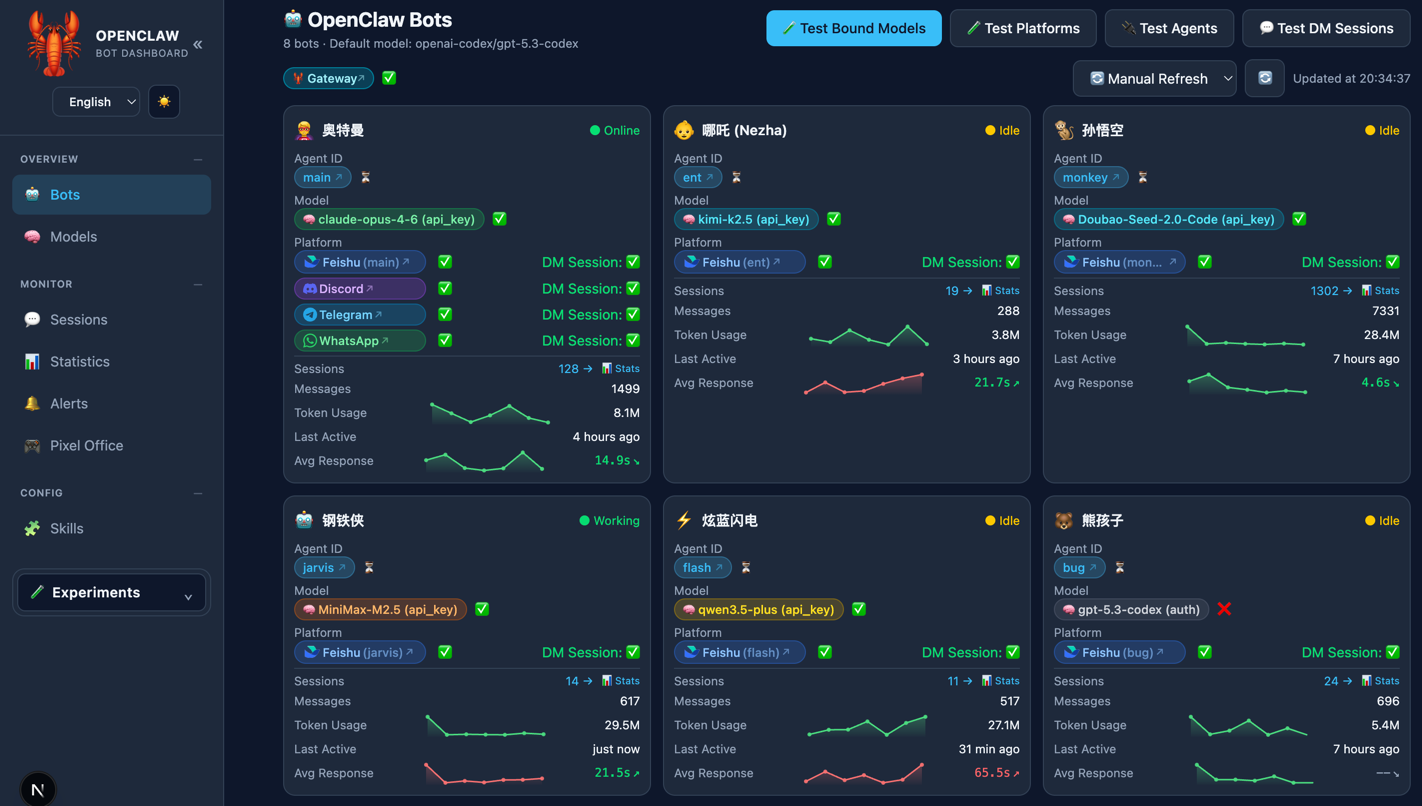
Bots Dashboard:
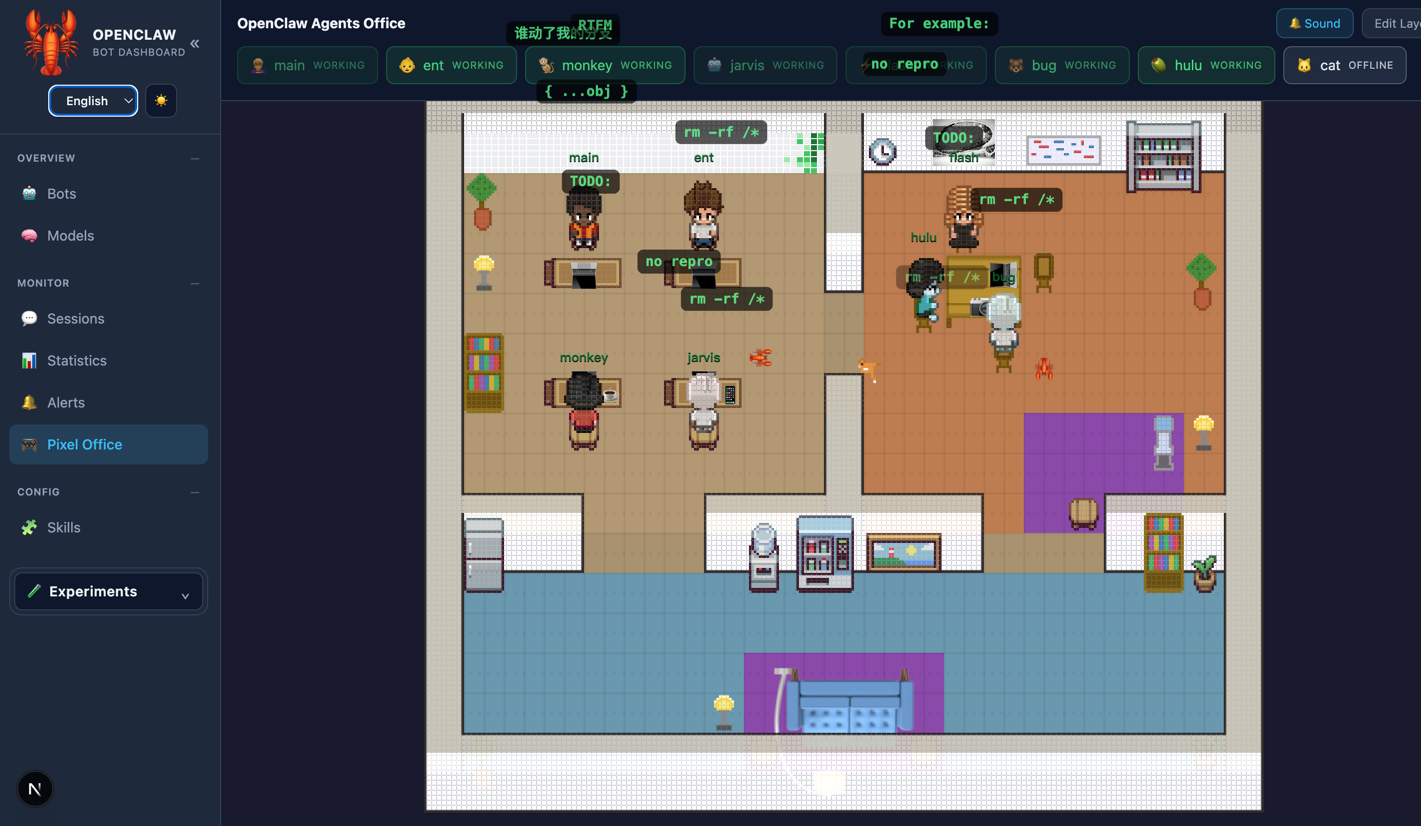
 Pixel Office:
When running multiple OpenClaw agents across different platforms (Feishu, Discord, etc.), managing and monitoring them becomes increasingly complex — which bot uses which model? Are the platforms connected? Is the gateway healthy? How are tokens being consumed?
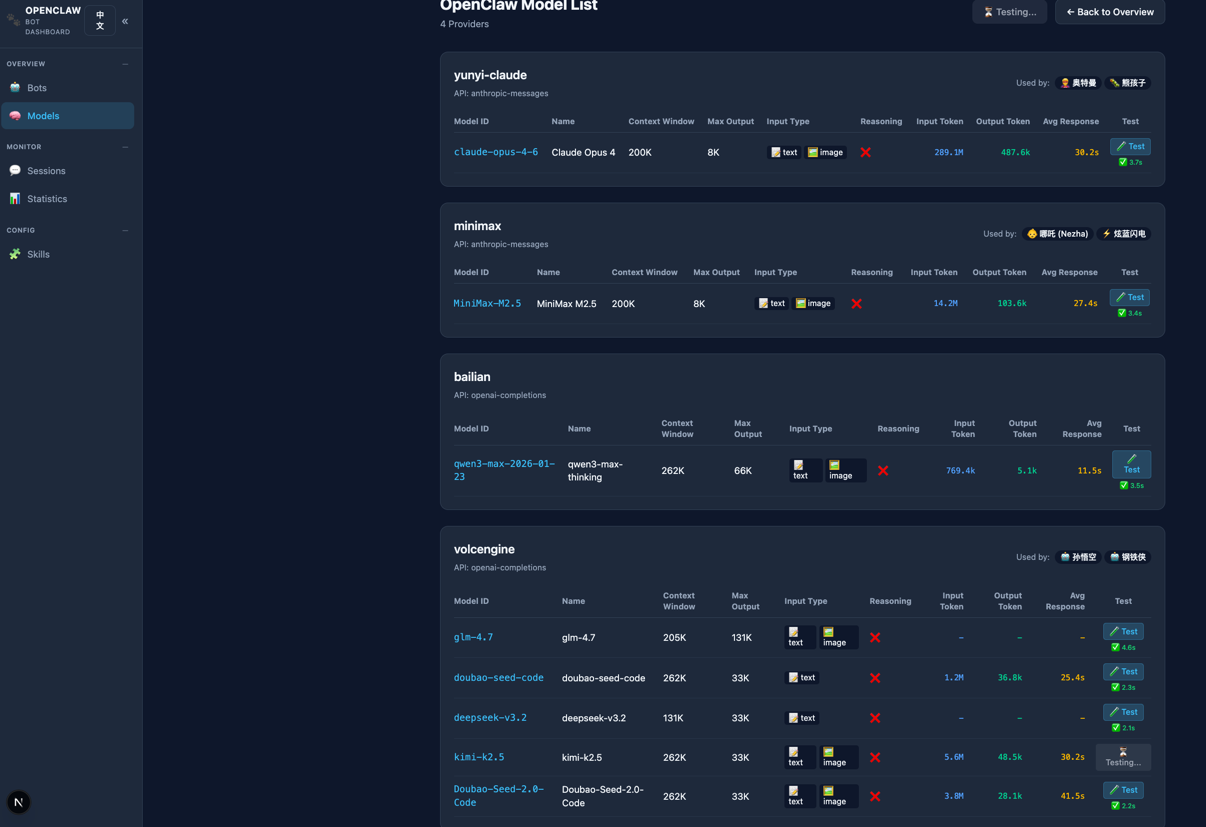
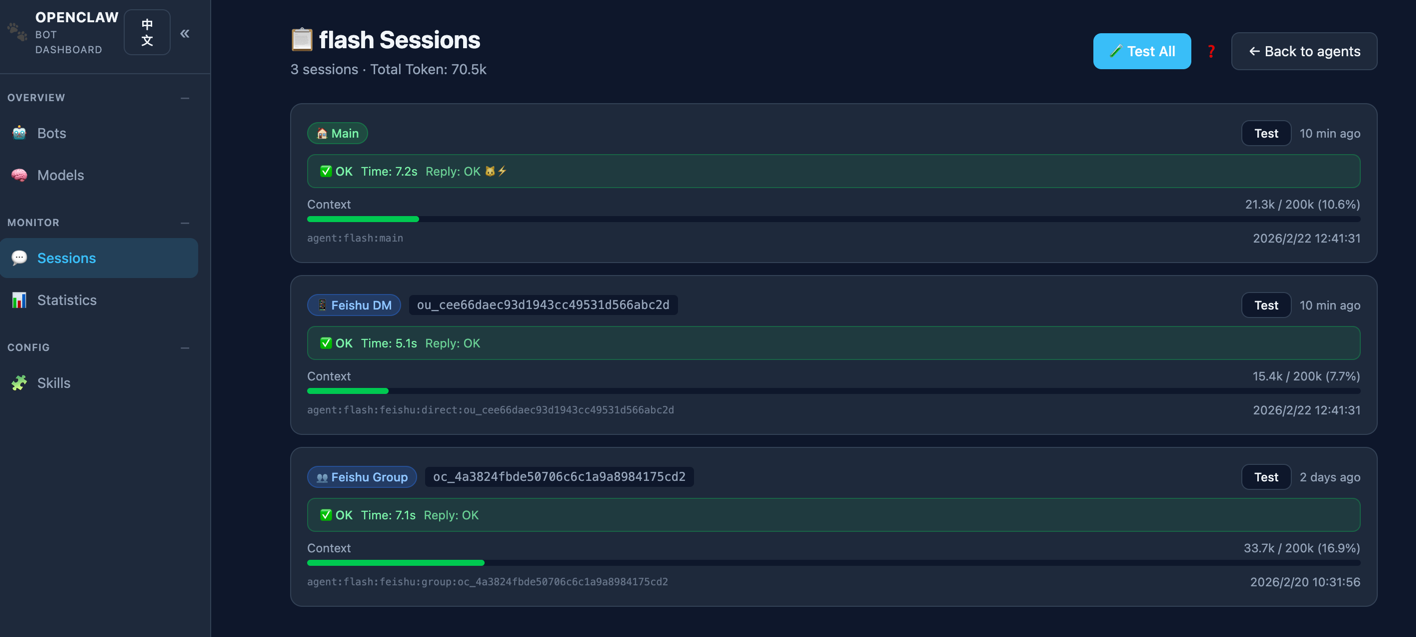
This dashboard reads your local OpenClaw configuration and session data, providing a unified web UI to monitor and test all your agents, models, platforms, and sessions in real time. No database required — everything is derived directly from ~/.openclaw/openclaw.json and local session files. Plus, a fun pixel-art office brings your agents to life as animated characters walking around, sitting at desks, and interacting with furniture.
~/.openclaw/openclaw.json and local session files, no database needed
See Quick Start Guide for prompt/git/skill startup options.
# Clone the repo
git clone https://github.com/xmanrui/OpenClaw-bot-review.git
cd OpenClaw-bot-review

# Install dependencies
npm install

# Build
npm run build

# Start dev server
npm run start
Open http://localhost:3000 in your browser.
~/.openclaw/openclaw.jsonBy default, the dashboard reads config from ~/.openclaw/openclaw.json. To use a custom path, set the OPENCLAW_HOME environment variable:
OPENCLAW_HOME=/opt/openclaw
npm run build
npm run start
The Self-Improvement and R&D Council actions can write local files such as rd-council-items.json, idea_ledger.json, decision logs, and local work-order handoff state. For safety, those operator APIs require an explicit token by default:
OPENCLAW_OPERATOR_TOKEN="replace-with-a-long-random-token" npm run start
Then set the same token in the browser console for the local dashboard origin:
localStorage.setItem("openclaw_operator_token", "replace-with-a-long-random-token")
For trusted local development only, you can opt out of token auth and rely on localhost checks:
OPENCLAW_ALLOW_UNAUTHENTICATED_LOCAL_OPERATOR_UI=true npm run start
Do not enable unauthenticated local mode on a dashboard exposed through a tunnel, shared host, reverse proxy, or public network.
The dashboard includes built-in metadata for the following LLM providers, enabling automatic enrichment of model details (context window, max output tokens, etc.) when they appear in your OpenClaw config:
| Provider | Models | API Type | Base URL |
|---|---|---|---|
| MiniMax | MiniMax-M2.7, MiniMax-M2.7-highspeed | OpenAI-compatible | https://api.minimax.io/v1 |
To use MiniMax with OpenClaw, add the following to your models.json:
{
  "providers": {
    "minimax": {
      "baseUrl": "https://api.minimax.io/v1",
      "api": "openai-completions",
      "apiKey": "your-minimax-api-key",
      "models": [
        { "id": "MiniMax-M2.7", "name": "MiniMax-M2.7" },
        { "id": "MiniMax-M2.7-highspeed", "name": "MiniMax-M2.7-highspeed" }
      ]
    }
  }
}
For more details, see the MiniMax API Reference.
You can also deploy the dashboard using Docker:
docker build -t openclaw-dashboard .
# Basic run
docker run -d -p 3000:3000 openclaw-dashboard

# With custom OpenClaw config path
docker run -d --name openclaw-dashboard -p 3000:3000 -e OPENCLAW_HOME=/opt/openclaw -v /path/to/openclaw:/opt/openclaw openclaw-dashboard
一个轻量级 Web 仪表盘,用于一览所有 OpenClaw 机器人/Agent/模型/会话的运行状态。
当你在多个平台(飞书、Discord 等)上运行多个 OpenClaw Agent 时,管理和监控会变得越来越复杂——哪个机器人用了哪个模型?平台连通性如何?Gateway 是否正常?Token 消耗了多少?
本仪表盘读取本地 OpenClaw 配置和会话数据,提供统一的 Web 界面来实时监控和测试所有 Agent、模型、平台和会话。无需数据库——所有数据直接来源于 ~/.openclaw/openclaw.json 和本地会话文件。此外,内置像素风动画办公室,让你的 Agent 化身像素角色在办公室里行走、就座、互动,为枯燥的运维增添一份趣味。
~/.openclaw/openclaw.json 和本地会话文件,无需数据库
更多启动方式请见:快速启动文档。
# 克隆仓库
git clone https://github.com/xmanrui/OpenClaw-bot-review.git
cd OpenClaw-bot-review

# 安装依赖
npm install

# 启动开发服务器
npm run start
浏览器打开 http://localhost:3000 即可。
~/.openclaw/openclaw.json默认读取 ~/.openclaw/openclaw.json,可通过环境变量指定自定义路径:
OPENCLAW_HOME=/opt/openclaw
npm run start
仪表盘内置以下 LLM Provider 的模型元数据,当它们出现在 OpenClaw 配置中时,会自动填充上下文窗口、最大输出等详细信息:
| Provider | 模型 | API 类型 | Base URL |
|---|---|---|---|
| MiniMax | MiniMax-M2.7, MiniMax-M2.7-highspeed | OpenAI 兼容 | https://api.minimax.io/v1 |
在 models.json 中添加 MiniMax 配置:
{
  "providers": {
    "minimax": {
      "baseUrl": "https://api.minimax.io/v1",
      "api": "openai-completions",
      "apiKey": "your-minimax-api-key",
      "models": [
        { "id": "MiniMax-M2.7", "name": "MiniMax-M2.7" },
        { "id": "MiniMax-M2.7-highspeed", "name": "MiniMax-M2.7-highspeed" }
      ]
    }
  }
}
更多信息请参考 MiniMax API 文档。
小红书:主页
微信:xmanr123
A lightweight web dashboard for viewing all your OpenClaw Bots/Agents/Models/Sessions status at a glance.
TypeScript
2,023
324 commits
updated Jul 18, 2026
A lightweight web dashboard for viewing all your OpenClaw Bots/Agents/Models/Sessions status at a glance.
Bots Dashboard:
Pixel Office:
When running multiple OpenClaw agents across different platforms (Feishu, Discord, etc.), managing and monitoring them becomes increasingly complex — which bot uses which model? Are the platforms connected? Is the gateway healthy? How are tokens being consumed?
This dashboard reads your local OpenClaw configuration and session data, providing a unified web UI to monitor and test all your agents, models, platforms, and sessions in real time. No database required — everything is derived directly from ~/.openclaw/openclaw.json and local session files. Plus, a fun pixel-art office brings your agents to life as animated characters walking around, sitting at desks, and interacting with furniture.
~/.openclaw/openclaw.json and local session files, no database needed
See Quick Start Guide for prompt/git/skill startup options.
# Clone the repo
git clone https://github.com/xmanrui/OpenClaw-bot-review.git
cd OpenClaw-bot-review

# Install dependencies
npm install

# Build
npm run build

# Start dev server
npm run start
Open http://localhost:3000 in your browser.
~/.openclaw/openclaw.jsonBy default, the dashboard reads config from ~/.openclaw/openclaw.json. To use a custom path, set the OPENCLAW_HOME environment variable:
OPENCLAW_HOME=/opt/openclaw
npm run build
npm run start
The Self-Improvement and R&D Council actions can write local files such as rd-council-items.json, idea_ledger.json, decision logs, and local work-order handoff state. For safety, those operator APIs require an explicit token by default:
OPENCLAW_OPERATOR_TOKEN="replace-with-a-long-random-token" npm run start
Then set the same token in the browser console for the local dashboard origin:
localStorage.setItem("openclaw_operator_token", "replace-with-a-long-random-token")
For trusted local development only, you can opt out of token auth and rely on localhost checks:
OPENCLAW_ALLOW_UNAUTHENTICATED_LOCAL_OPERATOR_UI=true npm run start
Do not enable unauthenticated local mode on a dashboard exposed through a tunnel, shared host, reverse proxy, or public network.
The dashboard includes built-in metadata for the following LLM providers, enabling automatic enrichment of model details (context window, max output tokens, etc.) when they appear in your OpenClaw config:
| Provider | Models | API Type | Base URL |
|---|---|---|---|
| MiniMax | MiniMax-M2.7, MiniMax-M2.7-highspeed | OpenAI-compatible | https://api.minimax.io/v1 |
To use MiniMax with OpenClaw, add the following to your models.json:
{
  "providers": {
    "minimax": {
      "baseUrl": "https://api.minimax.io/v1",
      "api": "openai-completions",
      "apiKey": "your-minimax-api-key",
      "models": [
        { "id": "MiniMax-M2.7", "name": "MiniMax-M2.7" },
        { "id": "MiniMax-M2.7-highspeed", "name": "MiniMax-M2.7-highspeed" }
      ]
    }
  }
}
For more details, see the MiniMax API Reference.
You can also deploy the dashboard using Docker:
docker build -t openclaw-dashboard .
# Basic run
docker run -d -p 3000:3000 openclaw-dashboard

# With custom OpenClaw config path
docker run -d --name openclaw-dashboard -p 3000:3000 -e OPENCLAW_HOME=/opt/openclaw -v /path/to/openclaw:/opt/openclaw openclaw-dashboard
一个轻量级 Web 仪表盘,用于一览所有 OpenClaw 机器人/Agent/模型/会话的运行状态。
当你在多个平台(飞书、Discord 等)上运行多个 OpenClaw Agent 时,管理和监控会变得越来越复杂——哪个机器人用了哪个模型?平台连通性如何?Gateway 是否正常?Token 消耗了多少?
本仪表盘读取本地 OpenClaw 配置和会话数据,提供统一的 Web 界面来实时监控和测试所有 Agent、模型、平台和会话。无需数据库——所有数据直接来源于 ~/.openclaw/openclaw.json 和本地会话文件。此外,内置像素风动画办公室,让你的 Agent 化身像素角色在办公室里行走、就座、互动,为枯燥的运维增添一份趣味。
~/.openclaw/openclaw.json 和本地会话文件,无需数据库
更多启动方式请见:快速启动文档。
# 克隆仓库
git clone https://github.com/xmanrui/OpenClaw-bot-review.git
cd OpenClaw-bot-review

# 安装依赖
npm install

# 启动开发服务器
npm run start
浏览器打开 http://localhost:3000 即可。
~/.openclaw/openclaw.json默认读取 ~/.openclaw/openclaw.json,可通过环境变量指定自定义路径:
OPENCLAW_HOME=/opt/openclaw
npm run start
仪表盘内置以下 LLM Provider 的模型元数据,当它们出现在 OpenClaw 配置中时,会自动填充上下文窗口、最大输出等详细信息:
| Provider | 模型 | API 类型 | Base URL |
|---|---|---|---|
| MiniMax | MiniMax-M2.7, MiniMax-M2.7-highspeed | OpenAI 兼容 | https://api.minimax.io/v1 |
在 models.json 中添加 MiniMax 配置:
{
  "providers": {
    "minimax": {
      "baseUrl": "https://api.minimax.io/v1",
      "api": "openai-completions",
      "apiKey": "your-minimax-api-key",
      "models": [
        { "id": "MiniMax-M2.7", "name": "MiniMax-M2.7" },
        { "id": "MiniMax-M2.7-highspeed", "name": "MiniMax-M2.7-highspeed" }
      ]
    }
  }
}
更多信息请参考 MiniMax API 文档。
小红书:主页
微信:xmanr123



