
README
MobileBench-OL: Online Evaluation Framework for Mobile GUI Agents
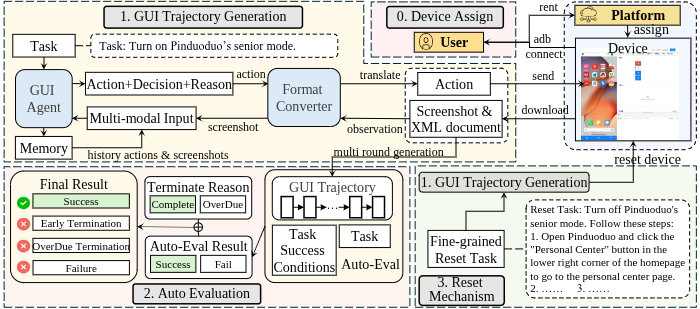
MobileBench-OL is a framework for evaluating mobile GUI agents on real Android devices. It supports multiple agents/models to collect task trajectories and automatically evaluate them using rule/xpath criteria.
- Real-device interaction: operate a physical device via
uiautomator2 - Unified agent interface: UI‑TARS, GPT‑4o, M3A/T3A, Qwen2.5‑VL, Mobile Agent V2
- Automated evaluation: consistent assessment with rule/xpath on recorded trajectories
- Reproducibility: tasks and outputs are persisted to disk, supporting resume and multi‑round retries
Environment & Installation
Tested under:
- Python 3.10
- Android device with Developer Options and USB debugging enabled (USB or Wi‑Fi ADB)
Core Python dependencies:
- uiautomator2
- Pillow (PIL)
- opencv-python (cv2)
- numpy
Install example:
pip install uiautomator2 pillow opencv-python numpy
Mobile Agent V2 Notes
If you plan to use Mobile Agent V2, follow the official environment setup guide: https://github.com/X-PLUG/MobileAgent/tree/main/Mobile-Agent-v2
Supported Agents/Models
| Model | model.name | Source |
|---|---|---|
| UI-TARS-1.5 | uitars_1_5 | ByteDance |
| GPT-4o | gpt4o | OpenAI |
| M3A (from AndroidWorld) | m3a | |
| T3A (text-only, powered by GPT‑4o) | t3a | - |
| Qwen2.5‑VL | qwen2_5vl | Qwen |
| Mobile Agent V2 | mobileagentv2 | Qwen |
Notes:
- M3A/T3A use Azure OpenAI/GPT‑4o and require
[azure]section in config. - Mobile Agent V2 requires API URL, Token, and image caption settings (Qwen VL).
Quick Start
1) Connect a device
- Enable Developer Options & USB debugging
- Run
adb devicesand put the serial into[device] idin config
2) Choose a config
Sample configs are provided under config/:
interact.conf(UI‑TARS sample)interact_uitars15_*.conf,interact_gpt4o_*.conf,interact_m3a_*.conf,interact_t3a_*.conf,interact_qwen2_5vl_*.conf,interact_mobileagentv2_*.conf- For evaluation:
evaluate.conf
3) Collect trajectories (interact mode)
python3 run.py --mode interact \
  --config config/interact.conf \
  --subset base \
  --output results/uitars1.5_1114
Parameters:
mode:interact(collect) orevaluate(assess existing trajectories)config: path to the config filesubset: task subset from the benchmark:[base, long-tail, long-horizon, gui-reasoning, noise-robust]output: output directory (e.g.,results/round1)
Runtime behavior (see run.py):
- Multi‑round retries: iterate
retry.retry_rounds, only retry unfinished tasks (run.py:51‑116) - Resume:
result_list.txtcache in output dir (task_executor.py:277‑314) - Noise robustness: if
subsetcontainsnoise, run four noise types sequentially (repeat / unexecuted / delay / popup) (run.py:117‑156)
4) Evaluate trajectories (evaluate mode)
python3 run.py --mode evaluate --config config/evaluate.conf
Config example (config/evaluate.conf):
[evaluation]
trajectory=results/round1
rule=data/top12.csv
reset=false
type=xpath
trajectory: directory containing collected trajectoriesrule: rule CSV (e.g.,data/top12.csv)reset: whether to run reset evaluationtype: currentlyxpath
Configuration
Example layout (varies by model):
[device]
id=<device serial>

[model]
name=<uitars_1_5 | gpt4o | m3a | t3a | qwen2_5vl | mobileagentv2>
url=<API endpoint>
# For mobileagentv2: also token / qwen_api / caption_model

[retry]
retry_rounds=<rounds>
connect_retry=<reconnect attempts>
fail_retry=<per-task retries>

[reset]
reset=<true|false>

[operation]
max_steps=<max steps>
back_times=
sleep_seconds_per_act=<seconds>

[task]
task_file=data/<tasks.csv>
output=results/<output-dir>
At runtime, these are combined as url|token|qwen_api|caption_model (run.py:78‑84, task_executor.py:211‑217).
Usage Examples per Model
Below are ready-to-run examples using the sample configs under config/. Fill in your device id and model service parameters first.
UI‑TARS‑1.5
python3 run.py --mode interact \
  --config config/interact_uitars15_base.conf \
  --subset base \
  --output results/uitars1.5_run
Tip: for noise‑robust evaluation, set --subset noise-robust to run repeat / unexecuted / delay / popup sequentially with the same output directory (run.py:117‑156).
Project Structure
.
├── assets/
│   └── pipeline.png
├── config/
│   ├── interact.conf
│   ├── interact_*.conf
│   └── evaluate.conf
├── data/
│   ├── top12.csv
│   ├── longtail.csv
│   ├── MobileBench-OL - Long-Horizon.csv
│   └── ...
├── mobilebench/
│   ├── eval/
│   │   ├── evaluator_xpath.py
│   │   └── evaluator_xpath_step_ratio.py
│   ├── models/
│   │   ├── llm_core_*.py
│   │   └── execute.py
│   └── utils/
│       ├── task_executor.py
│       ├── agent*.py
│       ├── adb_executor.py
│       └── ...
├── MobileAgent_new/
│   └── Mobile-Agent-v2/
├── run.py
├── README.md
└── README_EN.md
- assets/: images and diagrams
- config/: interaction/evaluation configs (samples for each agent)
- data/: benchmark task CSVs (base, long-tail, long-horizon, gui-reasoning, noise-robust)
- mobilebench/: core framework code
- eval/: evaluators (xpath/step-ratio)
- models/: LLM wrappers/calls
- utils/: device/execution/parsing helpers (e.g., task_executor, adb_executor)
- MobileAgent_new/Mobile-Agent-v2/: optional integration for Mobile Agent V2
- run.py: entry script (interact/evaluate)
- README.md (Chinese), README_EN.md (English)
Data & Outputs
-
Task CSV (required columns):
task_identifier,goal,adb_home_page,golden_steps,key_nodes- Optional:
reset_xpath,reset_query - Loader: see mobilebench/utils/task_executor.py:319‑337
-
Output directory layout:
results/<run_name>/result_list.txt: space‑separatedtask_id,successpairs (task_executor.py:305‑314)results/<run_name>/<task_id>/trajectory.json: per‑task details (action / image / response / summary / success) (task_executor.py:297‑304)
-
Pass rate: printed as
Overall pass rate: xx.xx%(run.py:114‑116)
Troubleshooting
-
Connection failures (
uiautomator2not available / cannot connect)- Ensure
adb deviceslists the device - Try different cable/port or Wi‑Fi ADB
- Automatic reconnects controlled by
connect_retry(task_executor.py:60‑77, 363‑379)
- Ensure
-
Missing tasks or CSV fields
- Check
task_filepoints to a valid CSV with required columns (task_executor.py:319‑337)
- Check
-
No evaluation results
- Ensure
evaluation.trajectorypoints to output dir andevaluation.ruleis a valid rule CSV
- Ensure
-
Noise robustness (
subsetcontainsnoise)- Runs sequentially with
repeat / unexecuted / delay / popup, output directory unchanged (run.py:117‑156)
- Runs sequentially with
License
Dataset: Creative Commons Attribution‑NonCommercial‑ShareAlike 4.0 International (CC BY‑NC‑SA 4.0)
Source code: Apache 2.0
Summary:
- Attribution: credit, license link, and indicate changes
- NonCommercial: no commercial use
- ShareAlike: derivatives must be released under the same license

Citation
@article{wu2026mobilebench,
  title={MobileBench-OL: A Comprehensive Chinese Benchmark for Evaluating Mobile GUI Agents in Real-World Environment},
  author={Wu, Qinzhuo and Yang, Zhizhuo and Li, Hanhao and Gao, Pengzhi and Liu, Wei and Luan, Jian},
  journal={arXiv preprint arXiv:2601.20335},
  year={2026}
}
Contributors

10 commits
Similar repos





Languages
Python
100.0%
README
MobileBench-OL: Online Evaluation Framework for Mobile GUI Agents
MobileBench-OL is a framework for evaluating mobile GUI agents on real Android devices. It supports multiple agents/models to collect task trajectories and automatically evaluate them using rule/xpath criteria.
- Real-device interaction: operate a physical device via
uiautomator2 - Unified agent interface: UI‑TARS, GPT‑4o, M3A/T3A, Qwen2.5‑VL, Mobile Agent V2
- Automated evaluation: consistent assessment with rule/xpath on recorded trajectories
- Reproducibility: tasks and outputs are persisted to disk, supporting resume and multi‑round retries
Environment & Installation
Tested under:
- Python 3.10
- Android device with Developer Options and USB debugging enabled (USB or Wi‑Fi ADB)
Core Python dependencies:
- uiautomator2
- Pillow (PIL)
- opencv-python (cv2)
- numpy
Install example:
pip install uiautomator2 pillow opencv-python numpy
Mobile Agent V2 Notes
If you plan to use Mobile Agent V2, follow the official environment setup guide: https://github.com/X-PLUG/MobileAgent/tree/main/Mobile-Agent-v2
Supported Agents/Models
| Model | model.name | Source |
|---|---|---|
| UI-TARS-1.5 | uitars_1_5 | ByteDance |
| GPT-4o | gpt4o | OpenAI |
| M3A (from AndroidWorld) | m3a | |
| T3A (text-only, powered by GPT‑4o) | t3a | - |
| Qwen2.5‑VL | qwen2_5vl | Qwen |
| Mobile Agent V2 | mobileagentv2 | Qwen |
Notes:
- M3A/T3A use Azure OpenAI/GPT‑4o and require
[azure]section in config. - Mobile Agent V2 requires API URL, Token, and image caption settings (Qwen VL).
Quick Start
1) Connect a device
- Enable Developer Options & USB debugging
- Run
adb devicesand put the serial into[device] idin config
2) Choose a config
Sample configs are provided under config/:
interact.conf(UI‑TARS sample)interact_uitars15_*.conf,interact_gpt4o_*.conf,interact_m3a_*.conf,interact_t3a_*.conf,interact_qwen2_5vl_*.conf,interact_mobileagentv2_*.conf- For evaluation:
evaluate.conf
3) Collect trajectories (interact mode)
python3 run.py --mode interact \
  --config config/interact.conf \
  --subset base \
  --output results/uitars1.5_1114
Parameters:
mode:interact(collect) orevaluate(assess existing trajectories)config: path to the config filesubset: task subset from the benchmark:[base, long-tail, long-horizon, gui-reasoning, noise-robust]output: output directory (e.g.,results/round1)
Runtime behavior (see run.py):
- Multi‑round retries: iterate
retry.retry_rounds, only retry unfinished tasks (run.py:51‑116) - Resume:
result_list.txtcache in output dir (task_executor.py:277‑314) - Noise robustness: if
subsetcontainsnoise, run four noise types sequentially (repeat / unexecuted / delay / popup) (run.py:117‑156)
4) Evaluate trajectories (evaluate mode)
python3 run.py --mode evaluate --config config/evaluate.conf
Config example (config/evaluate.conf):
[evaluation]
trajectory=results/round1
rule=data/top12.csv
reset=false
type=xpath
trajectory: directory containing collected trajectoriesrule: rule CSV (e.g.,data/top12.csv)reset: whether to run reset evaluationtype: currentlyxpath
Configuration
Example layout (varies by model):
[device]
id=<device serial>

[model]
name=<uitars_1_5 | gpt4o | m3a | t3a | qwen2_5vl | mobileagentv2>
url=<API endpoint>
# For mobileagentv2: also token / qwen_api / caption_model

[retry]
retry_rounds=<rounds>
connect_retry=<reconnect attempts>
fail_retry=<per-task retries>

[reset]
reset=<true|false>

[operation]
max_steps=<max steps>
back_times=
sleep_seconds_per_act=<seconds>

[task]
task_file=data/<tasks.csv>
output=results/<output-dir>
At runtime, these are combined as url|token|qwen_api|caption_model (run.py:78‑84, task_executor.py:211‑217).
Usage Examples per Model
Below are ready-to-run examples using the sample configs under config/. Fill in your device id and model service parameters first.
UI‑TARS‑1.5
python3 run.py --mode interact \
  --config config/interact_uitars15_base.conf \
  --subset base \
  --output results/uitars1.5_run
Tip: for noise‑robust evaluation, set --subset noise-robust to run repeat / unexecuted / delay / popup sequentially with the same output directory (run.py:117‑156).
Project Structure
.
├── assets/
│   └── pipeline.png
├── config/
│   ├── interact.conf
│   ├── interact_*.conf
│   └── evaluate.conf
├── data/
│   ├── top12.csv
│   ├── longtail.csv
│   ├── MobileBench-OL - Long-Horizon.csv
│   └── ...
├── mobilebench/
│   ├── eval/
│   │   ├── evaluator_xpath.py
│   │   └── evaluator_xpath_step_ratio.py
│   ├── models/
│   │   ├── llm_core_*.py
│   │   └── execute.py
│   └── utils/
│       ├── task_executor.py
│       ├── agent*.py
│       ├── adb_executor.py
│       └── ...
├── MobileAgent_new/
│   └── Mobile-Agent-v2/
├── run.py
├── README.md
└── README_EN.md
- assets/: images and diagrams
- config/: interaction/evaluation configs (samples for each agent)
- data/: benchmark task CSVs (base, long-tail, long-horizon, gui-reasoning, noise-robust)
- mobilebench/: core framework code
- eval/: evaluators (xpath/step-ratio)
- models/: LLM wrappers/calls
- utils/: device/execution/parsing helpers (e.g., task_executor, adb_executor)
- MobileAgent_new/Mobile-Agent-v2/: optional integration for Mobile Agent V2
- run.py: entry script (interact/evaluate)
- README.md (Chinese), README_EN.md (English)
Data & Outputs
-
Task CSV (required columns):
task_identifier,goal,adb_home_page,golden_steps,key_nodes- Optional:
reset_xpath,reset_query - Loader: see mobilebench/utils/task_executor.py:319‑337
-
Output directory layout:
results/<run_name>/result_list.txt: space‑separatedtask_id,successpairs (task_executor.py:305‑314)results/<run_name>/<task_id>/trajectory.json: per‑task details (action / image / response / summary / success) (task_executor.py:297‑304)
-
Pass rate: printed as
Overall pass rate: xx.xx%(run.py:114‑116)
Troubleshooting
-
Connection failures (
uiautomator2not available / cannot connect)- Ensure
adb deviceslists the device - Try different cable/port or Wi‑Fi ADB
- Automatic reconnects controlled by
connect_retry(task_executor.py:60‑77, 363‑379)
- Ensure
-
Missing tasks or CSV fields
- Check
task_filepoints to a valid CSV with required columns (task_executor.py:319‑337)
- Check
-
No evaluation results
- Ensure
evaluation.trajectorypoints to output dir andevaluation.ruleis a valid rule CSV
- Ensure
-
Noise robustness (
subsetcontainsnoise)- Runs sequentially with
repeat / unexecuted / delay / popup, output directory unchanged (run.py:117‑156)
- Runs sequentially with
License
Dataset: Creative Commons Attribution‑NonCommercial‑ShareAlike 4.0 International (CC BY‑NC‑SA 4.0)
Source code: Apache 2.0
Summary:
- Attribution: credit, license link, and indicate changes
- NonCommercial: no commercial use
- ShareAlike: derivatives must be released under the same license
Citation
@article{wu2026mobilebench,
  title={MobileBench-OL: A Comprehensive Chinese Benchmark for Evaluating Mobile GUI Agents in Real-World Environment},
  author={Wu, Qinzhuo and Yang, Zhizhuo and Li, Hanhao and Gao, Pengzhi and Liu, Wei and Luan, Jian},
  journal={arXiv preprint arXiv:2601.20335},
  year={2026}
}
Similar repos
Contributors
10 commits
Languages
Python
100.0%