
See what people are saying
README

org.nvim
Emacs Org mode, rebuilt for Neovim in pure Lua.
Outlines · TODOs · Agenda · Capture · Clocking · Spreadsheet tables · Babel · Export





Install · Tour · Features · Docs · Contributing
Org mode is one of the most loved tools in Emacs. It works as a plain-text outliner, planner, time tracker, spreadsheet, literate-programming notebook and publishing system. org.nvim puts all of that in Neovim. It isn't a syntax file with a few keymaps on top. It reimplements Org's behaviour: the agenda, capture templates, repeaters, clock tables, table formulas, Babel and export.
- 🪶 No dependencies. It's about 95k lines of Lua and needs no tree-sitter parser, external binary or companion plugin.
- 🔁 Works with Emacs. It reads and writes the same plain-text format, so you can edit a file in Emacs today and in Neovim tomorrow.
- ⌨️ Keys that fit Vim. Context-aware keys fall back to normal Vim
behaviour when they don't apply (
>>still indents,<C-a>still increments). Pressg?anywhere to see what's available. - 💤 Ready for LazyVim. It comes with which-key groups, a blink.cmp
source,
vim.ui.selectpickers and a lualine clock, and it works with any other setup too. - ✅ Tested. The headless test suite has 2,000+ tests across 76 specs.
🤔 Why another Org plugin?
There are already good ways to write Org files in Neovim, above all nvim-orgmode, which has been around for years and is used by many people. If it does what you need, keep using it. Neorg is another fine option, though it uses its own format rather than Org.
org.nvim exists because I wanted something those projects don't aim for:
- Full parity with Emacs Org. The goal is to behave like Org 9.8,
including the parts that are hard to port: Babel with sessions and
:var, a port of the export engine, clock tables,#+TBLFMformulas with a Calc-compatible evaluator, and image and LaTeX previews. Where org.nvim differs, it says so (Differences from Emacs Org mode and:h org-differences). - A different architecture. It's pure Lua with its own Org parser, where nvim-orgmode is built on a tree-sitter grammar. That's a foundational choice, not something a pull request could change.
- Speed. Adding everything above to an existing project would mean big design changes and a slow review cycle, so I built it separately.
- Keys that feel right in both worlds. The Emacs Org keys work as they do in Emacs, and the Vim-style keys fall back to normal Vim behaviour when they don't apply.
On AI: org.nvim is written with AI assistance
(Claude Code). To keep that honest, its
behaviour is checked against the Emacs Org source rather than guessed,
every feature comes with headless tests (make test, 2,000+ of them), and
I review and use every change myself. Bug reports are very welcome,
especially where it doesn't match Emacs.
⚡ Install in 30 seconds
With lazy.nvim / LazyVim:
-- ~/.config/nvim/lua/plugins/org.lua
return {
  "xheisenbugx/org.nvim",
  main = "org",
  lazy = false, -- startup cost is tiny: only :Org and a few global keymaps
  opts = {
    org_directory = "~/org",
    agenda_files = { "~/org/**/*.org" },
    default_notes_file = "~/org/refile.org",
  },
}
Restart Neovim and run :checkhealth org. Then open
examples/tutorial.org, a hands-on tour with a
section and exercises for every feature. To try it without touching your
config or your notes, run it from a checkout with the bundled init file:
nvim -u examples/minimal_init.lua examples/tutorial.org
To go deeper into one feature, open
examples/00-index.org. It links to one file per
feature area (outlines, TODOs, the agenda, tables, spreadsheet formulas,
Babel, export and more), each with many examples, exercises and the result
you should expect.
🎬 A quick tour
Everything below was recorded in a plain Neovim with only org.nvim
installed. The tapes that produce these GIFs live in
docs/media, so they can be re-recorded after every change.
In the newer demos, the box in the bottom-right corner shows the key being
pressed.
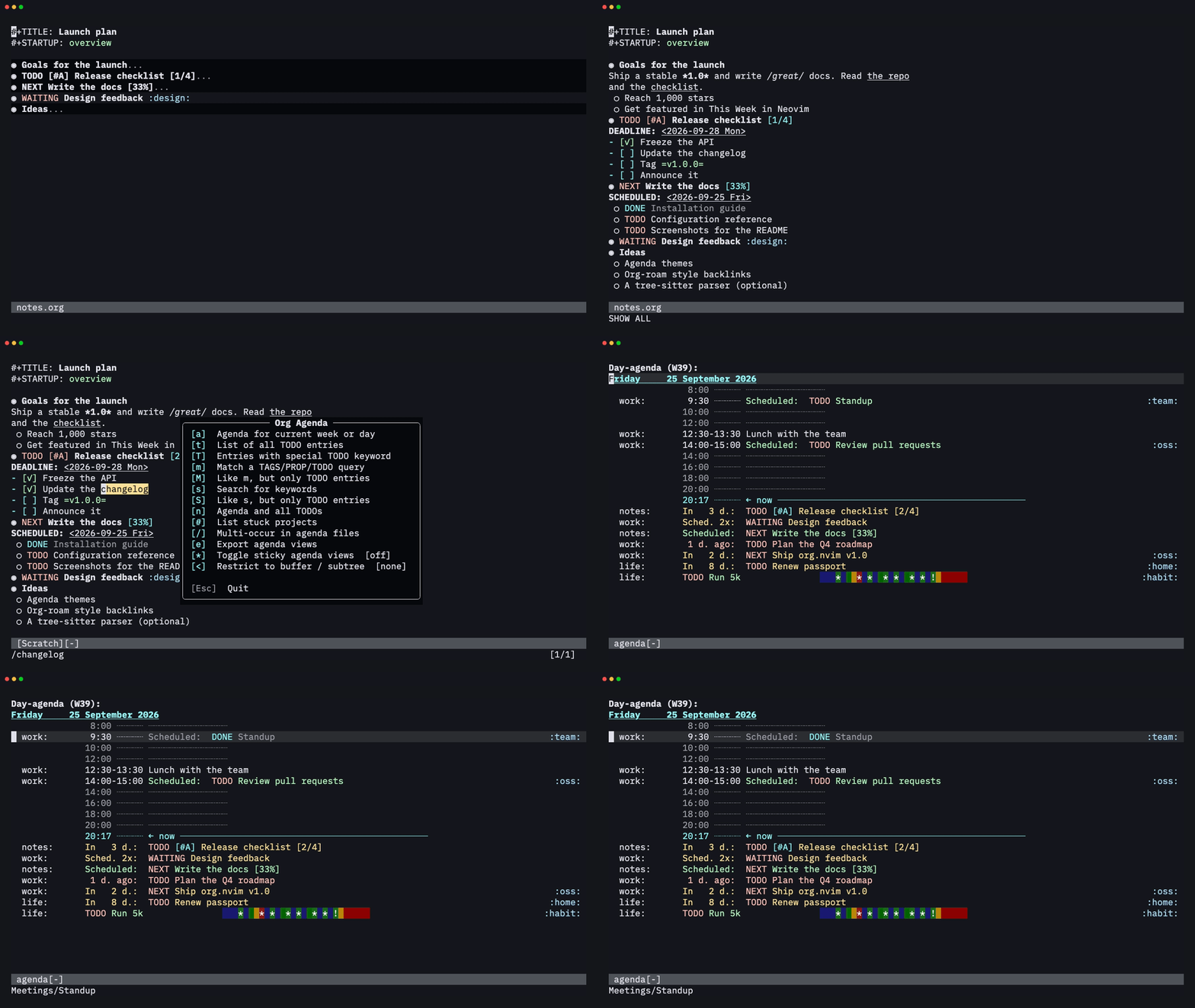
Outlines that fold like Emacs
TAB cycles a subtree through folded, children and everything.
S-TAB does the same for the whole file. You can move a subtree with all
of its children (<leader>oK / <leader>oJ or M-k / M-j), promote and
demote it, or cut, paste and sort it.
Structure editing
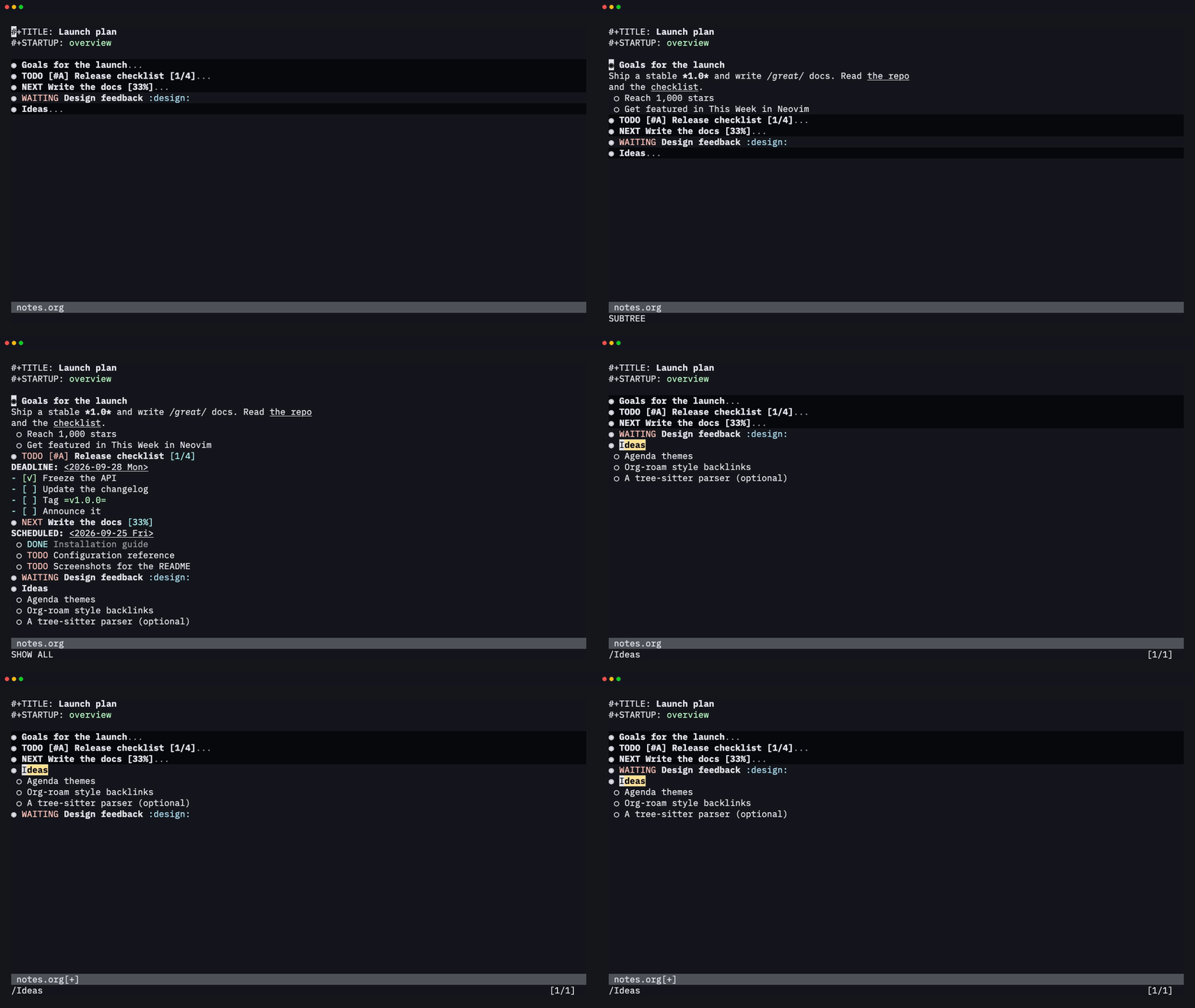
M-RET adds a heading (or an item, or a table row) at the right level,
and <leader>oit adds a TODO heading. M-h / M-l promote and demote.
<leader>ohs sorts the children (alphabetically, by TODO state, priority,
date and more), and <leader>ohn narrows to a subtree so you can edit it
on its own.
TODOs, checklists and priorities
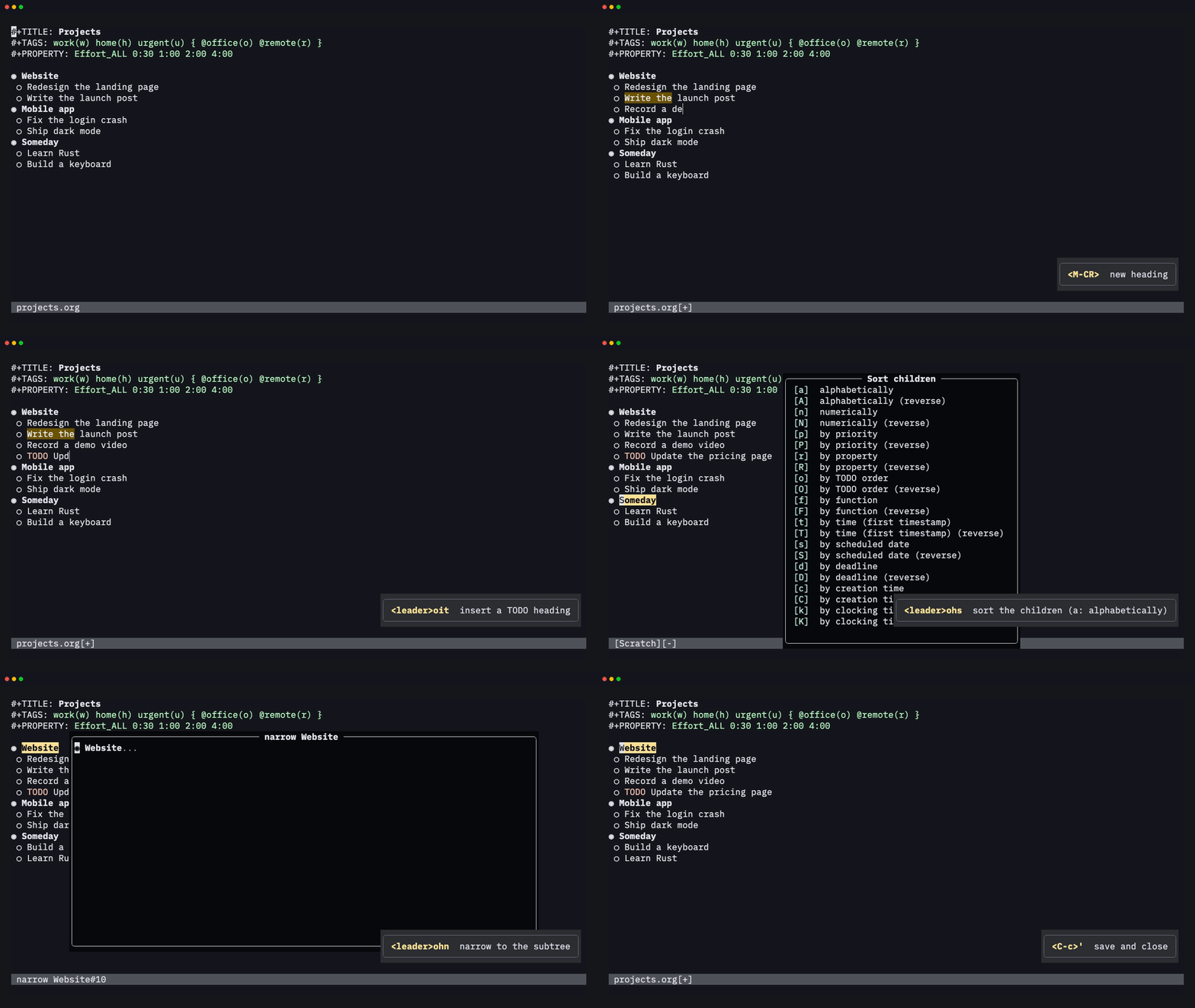
Ticking a checkbox updates the [2/4] and [50%] cookies of its parents.
Marking a task DONE logs a CLOSED: timestamp and updates its parent's
cookie. Set the state with cit or with the fast-selection menu
(<leader>oS), and the priority with <leader>o,.
Plain lists
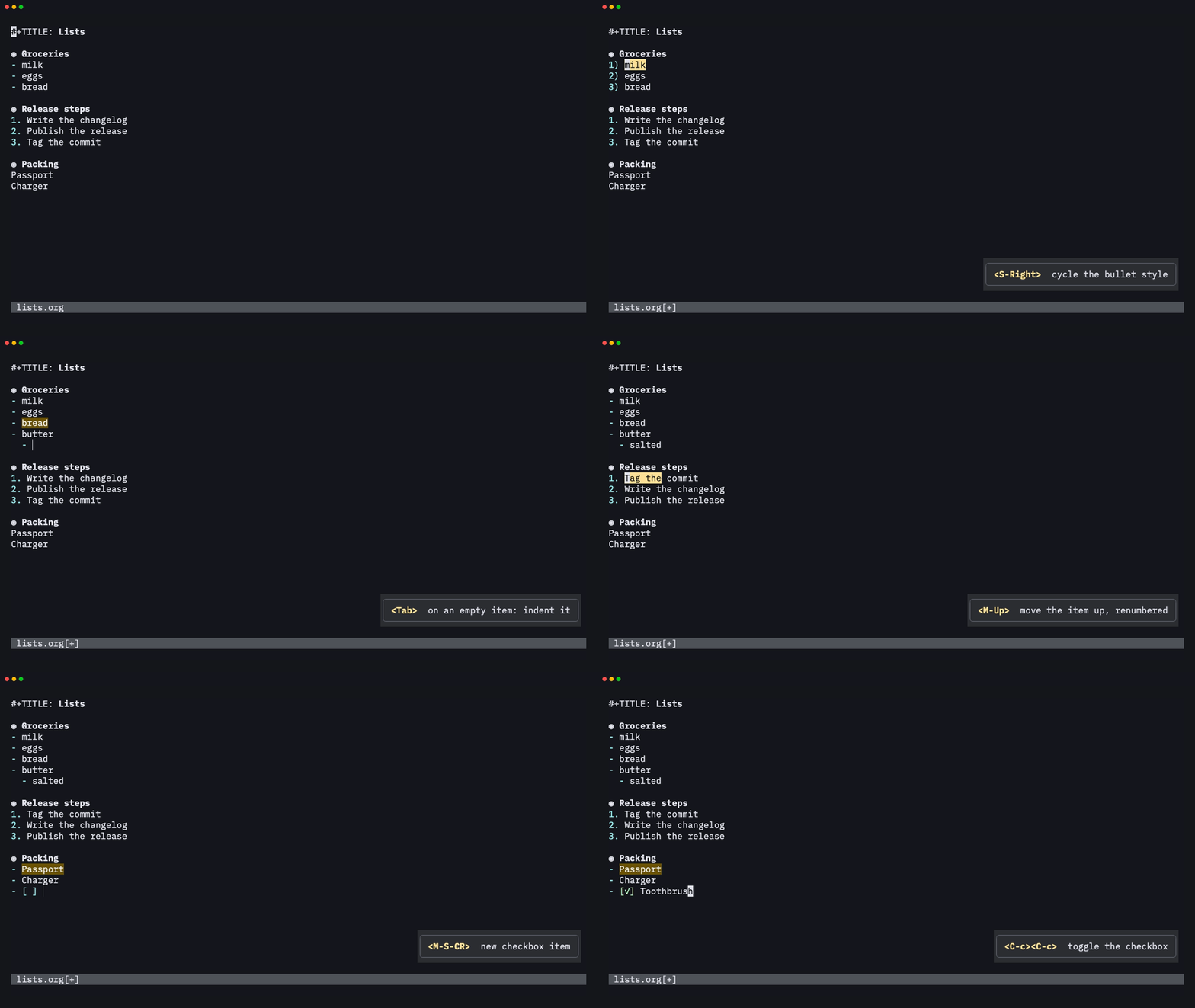
S-Right / S-Left on an item cycles the bullet style of the whole list:
-, +, 1. and 1). M-RET adds an item and M-S-RET adds a
checkbox item. TAB on a new empty item indents it. M-Up / M-Down move
an item with its children, and numbered lists are renumbered as you go.
<leader>o- turns plain lines into a list.
Tags and properties
<leader>ot opens fast tag selection: one key per tag, with mutually
exclusive groups like { @office @remote }. <leader>oxe sets the effort
from Effort_ALL, and <leader>op sets any property.

Dates with a real calendar
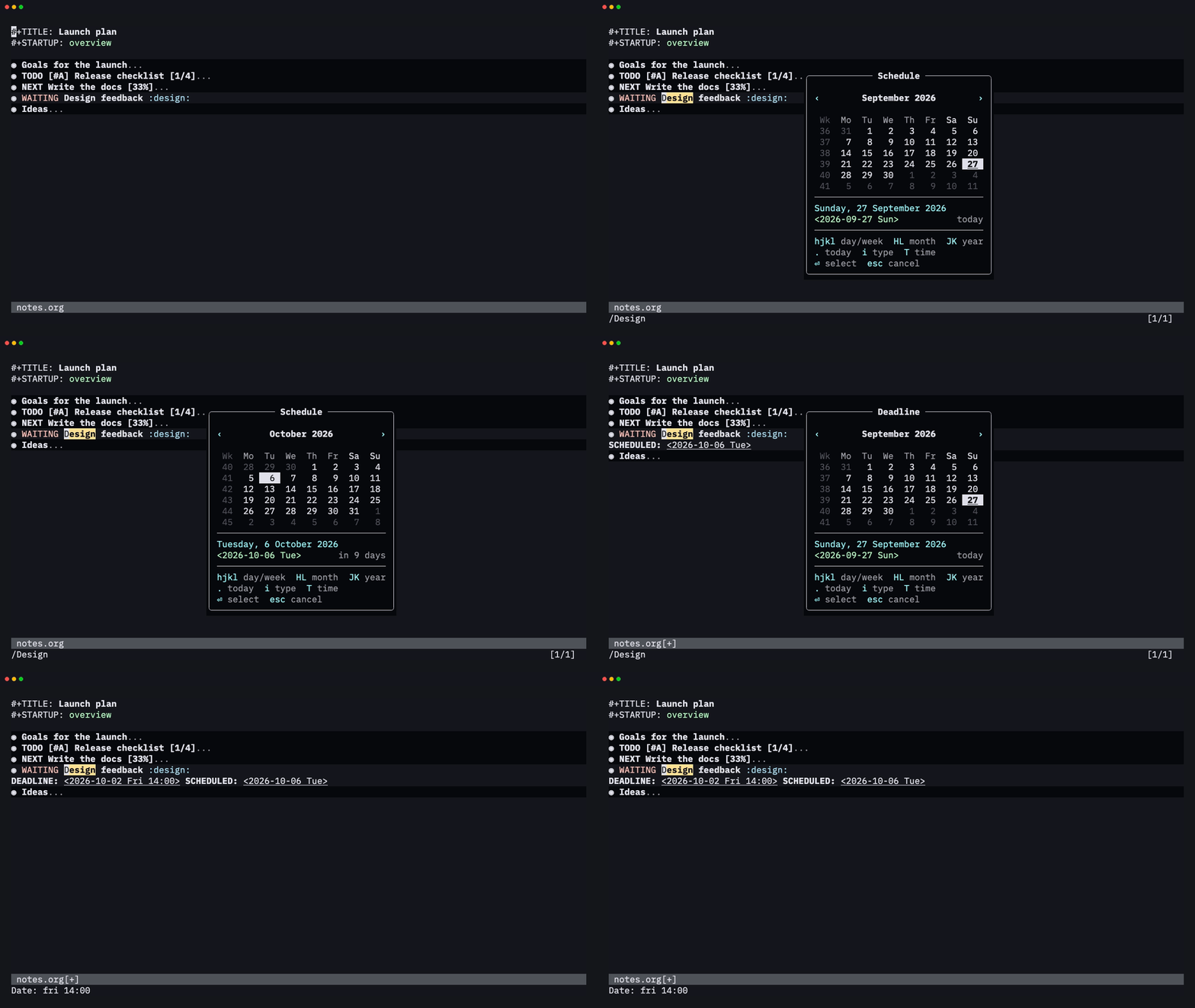
<leader>os (schedule) and <leader>od (deadline) open a floating
calendar with week numbers, today and weekends marked, and a preview of
the chosen date ("in 3 days"). Move around it with hjkl, or press i
and type a date the way you'd say it: fri 14:00, +2w, sep 15, w39.
Its colors are OrgCalendar* highlight groups (:h org-calendar).
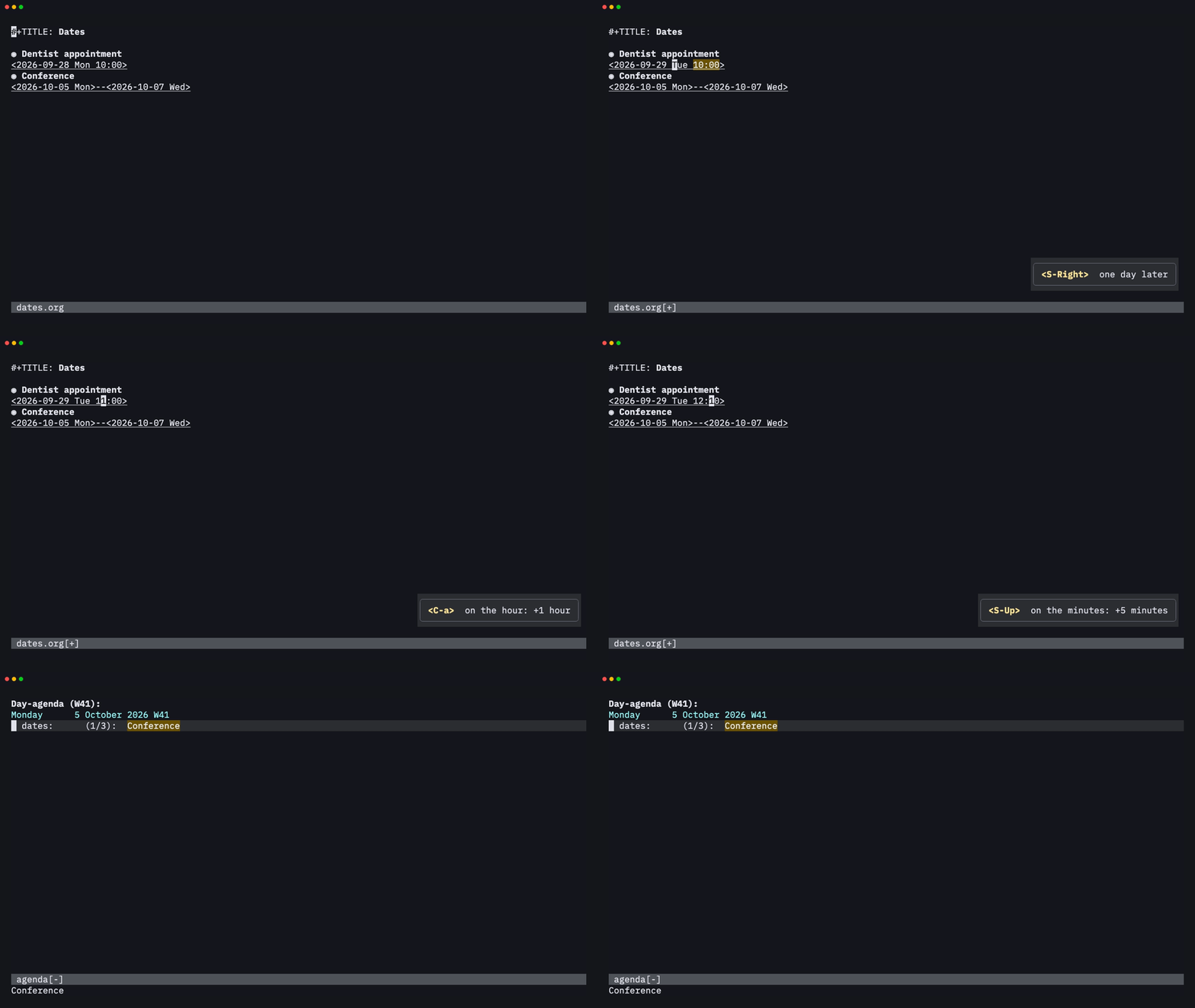
You don't need the calendar to change a date. S-Right / S-Left move it
by a day, <C-a> / <C-x> (or S-Up / S-Down) change the part under
the cursor (year, month, day, hour or minutes, rounded to 5), and <CR>
on a date opens the agenda for that day.
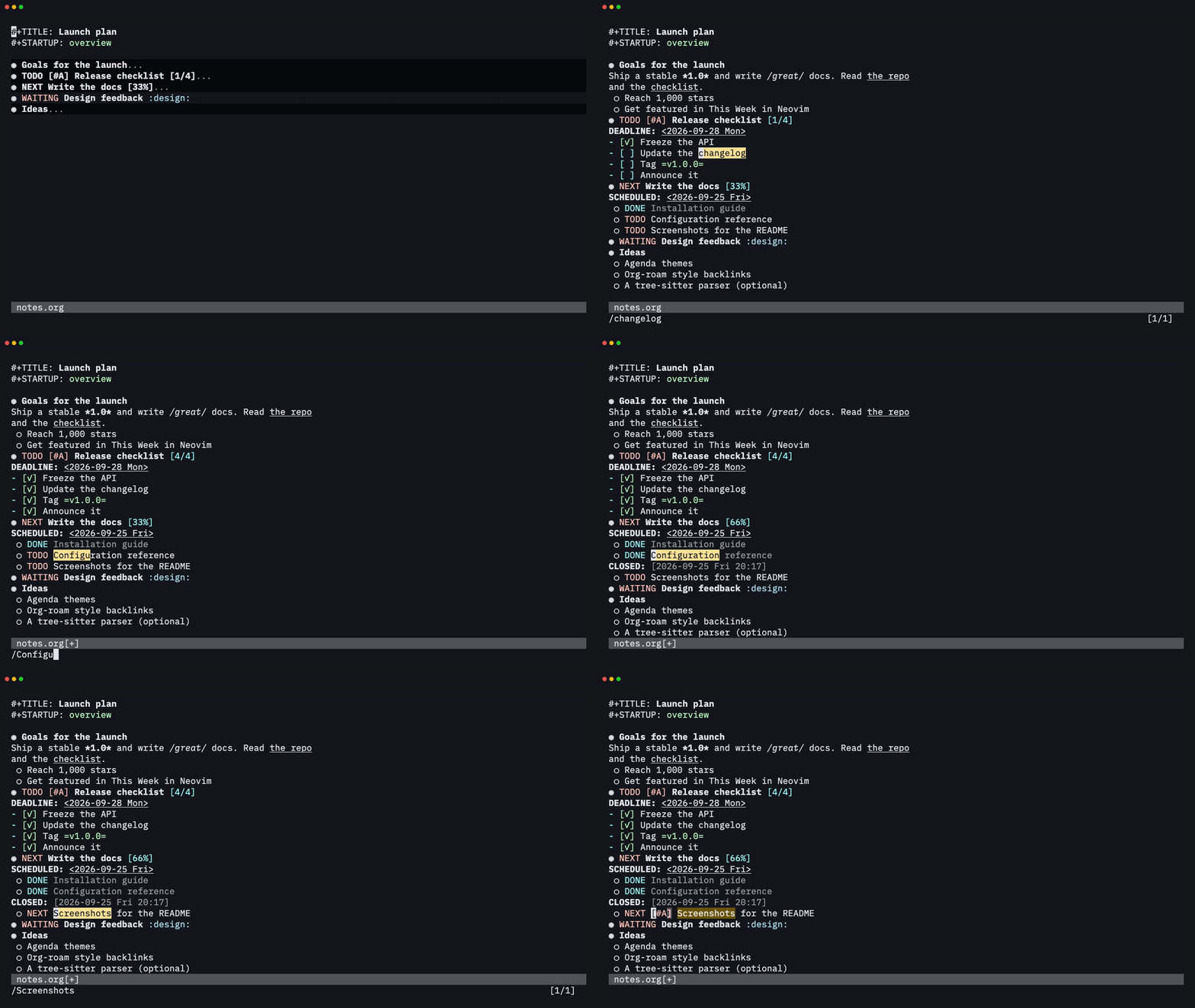
A real agenda
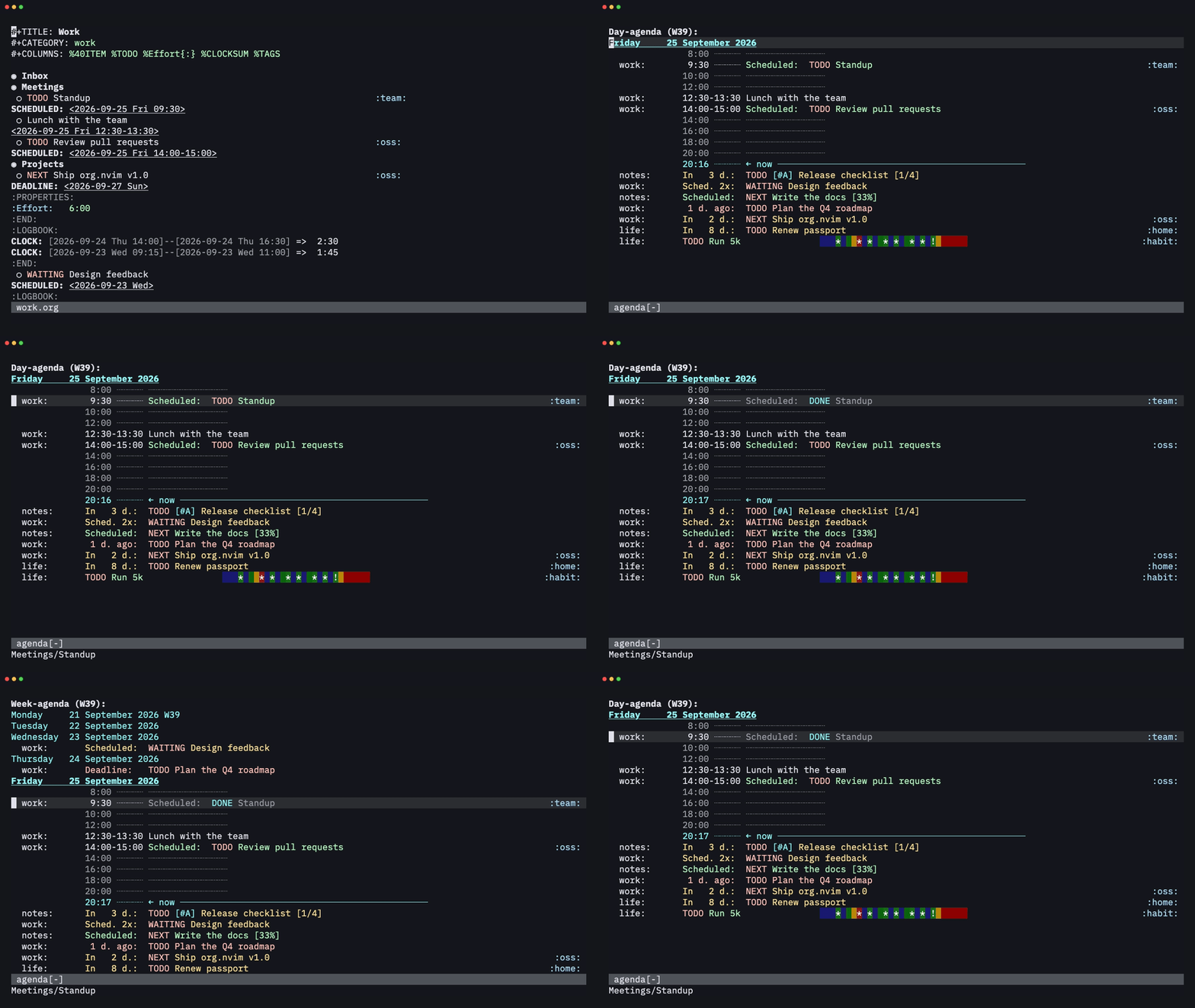
<leader>oa → a. The day view has a time grid, a current-time line,
deadline countdowns, overdue items and a habit consistency graph, the
same as in Emacs. From the agenda you can change states, reschedule, clock
in, refile, filter and run bulk actions. vw switches to the week.
The week view
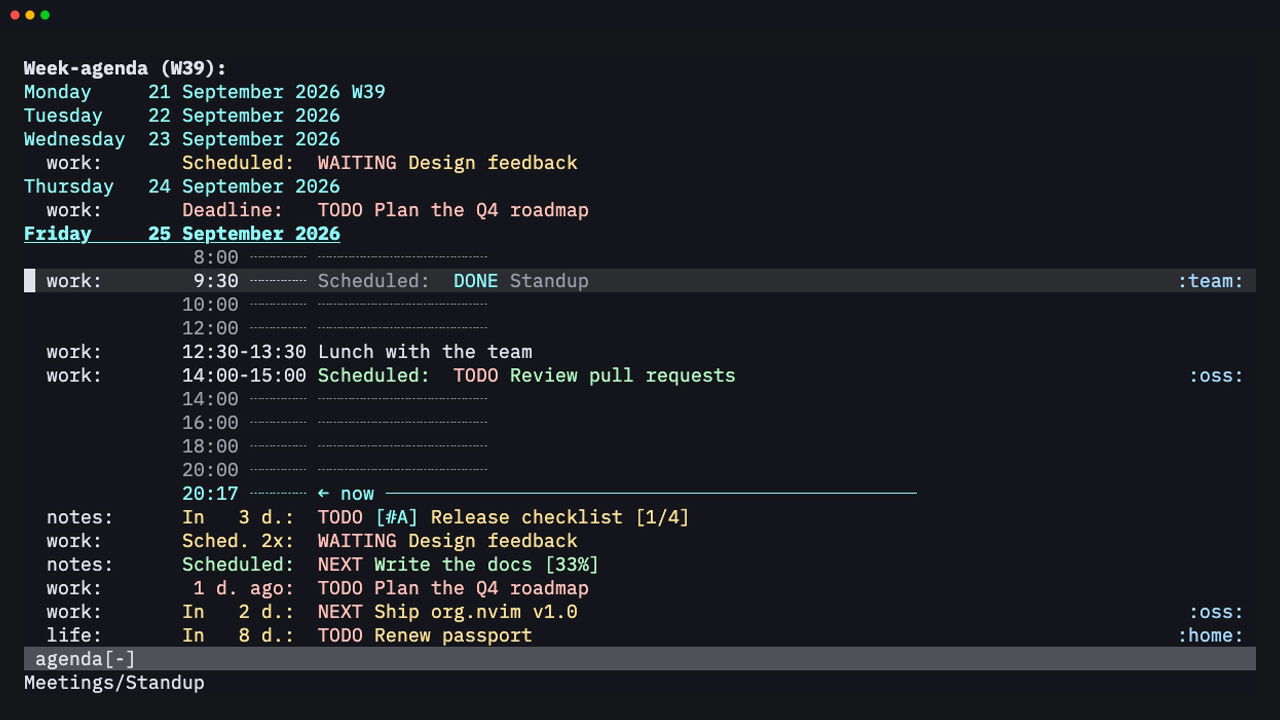
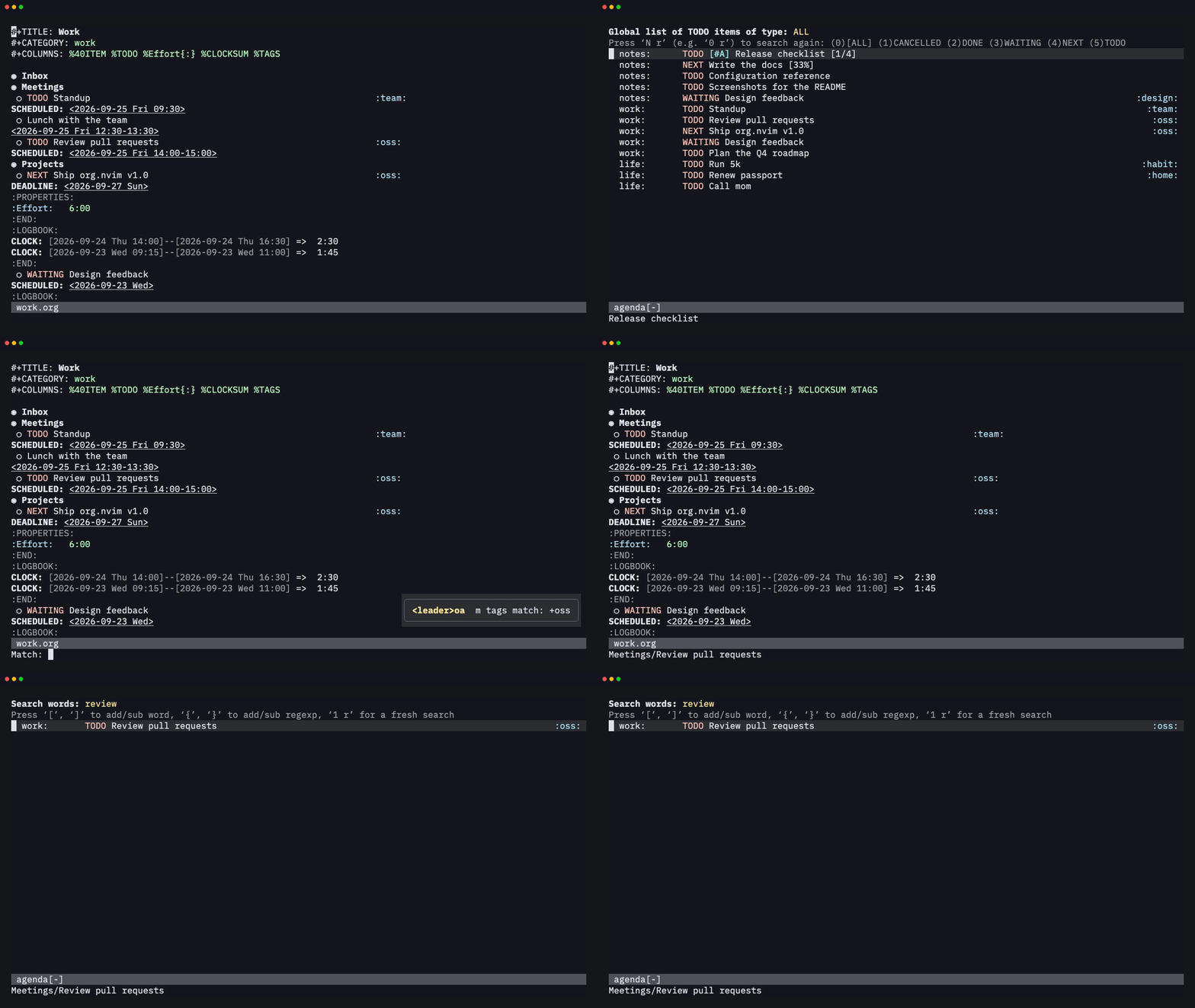
The dispatcher has the other Emacs views too: every TODO (t), a
tags/property match (m, here +oss) and a word search (s).
Capture from anywhere
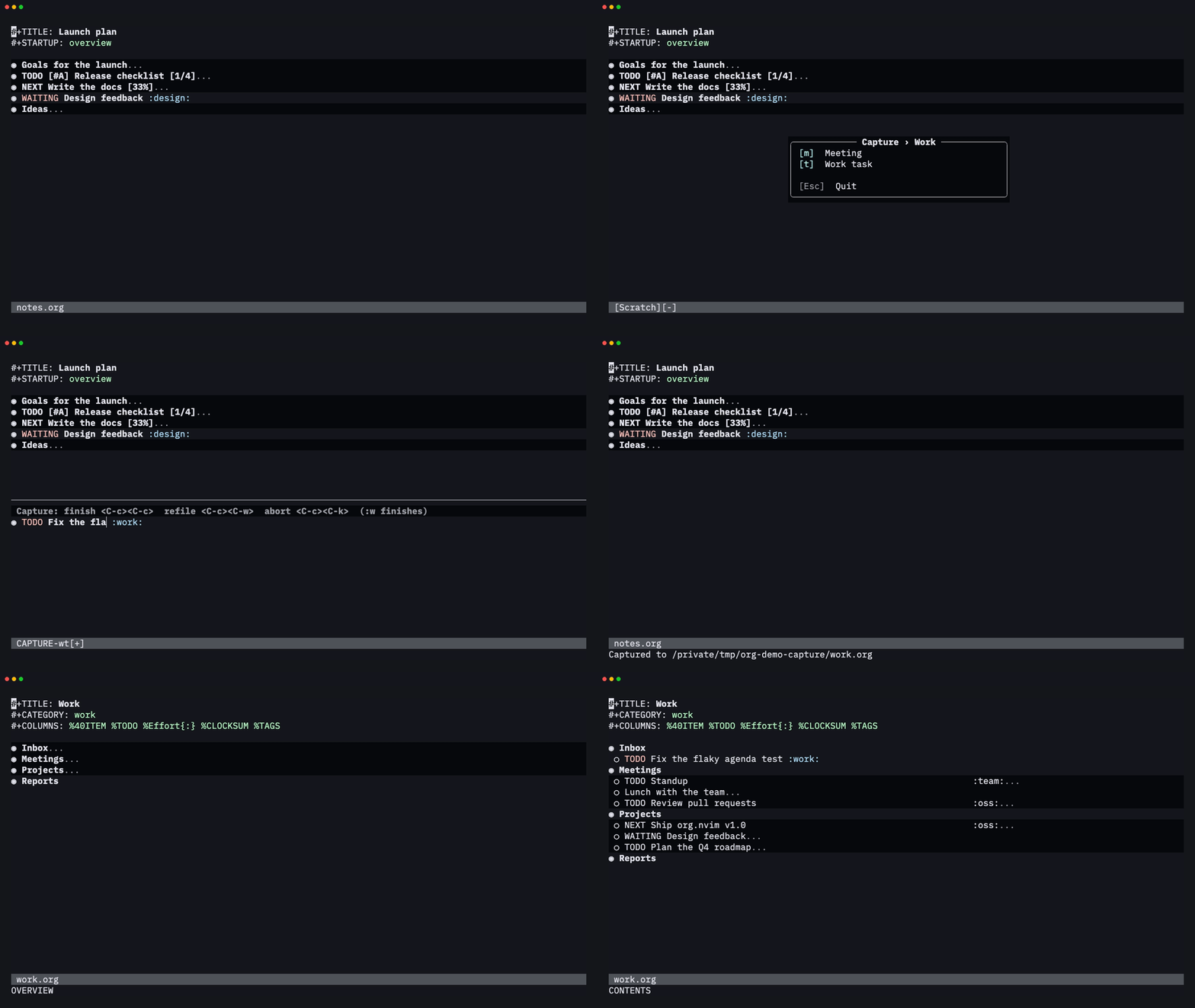
Press <leader>oc in any buffer and pick a template. Templates can be
grouped under a prefix key (w → t here). Type the task and finish with
<C-c><C-c> or :w. It's filed where the template says: under a
headline, an outline path or a date tree.
Refile and archive
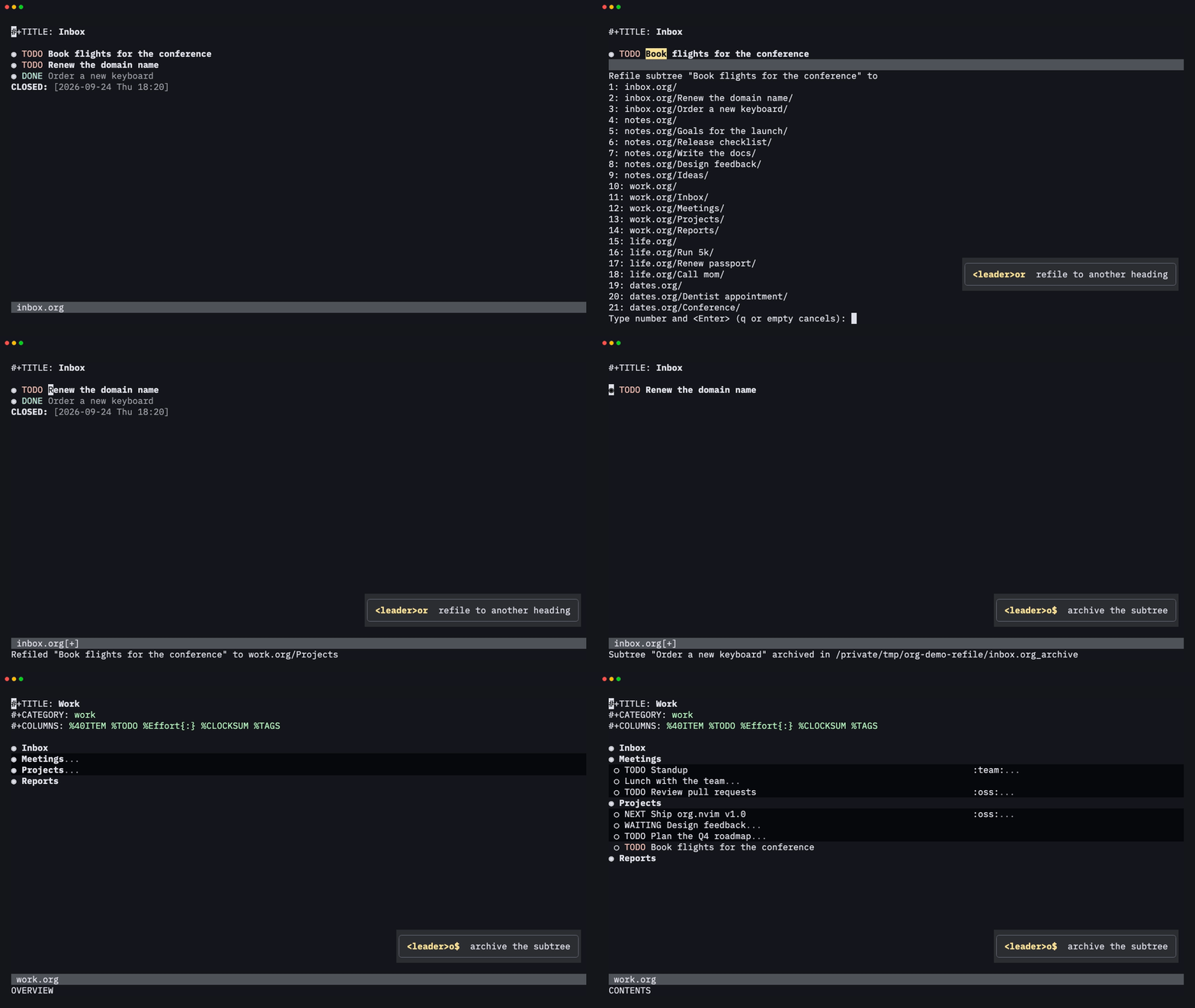
<leader>or moves a subtree under any heading in your agenda files (here
labelled with the file name). <leader>o$ archives a finished subtree to
<file>_archive and keeps its context in ARCHIVE_* properties.
Spreadsheet tables
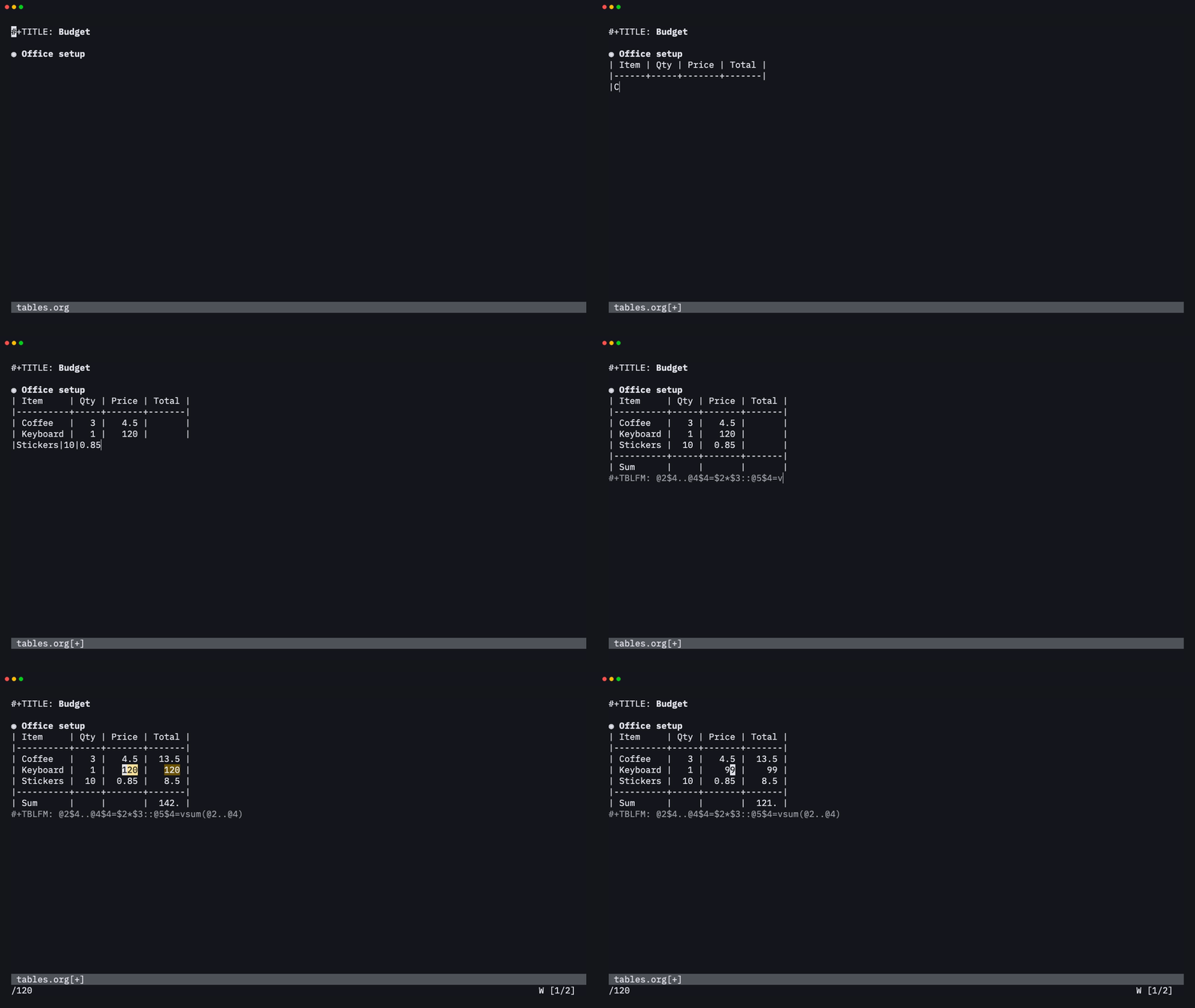
Type a rough table, press <C-c><C-c> on its #+TBLFM line, and it
aligns itself and evaluates its formulas with a Calc-compatible evaluator.
Change a value, recalculate with <leader>oTf, and the totals follow.
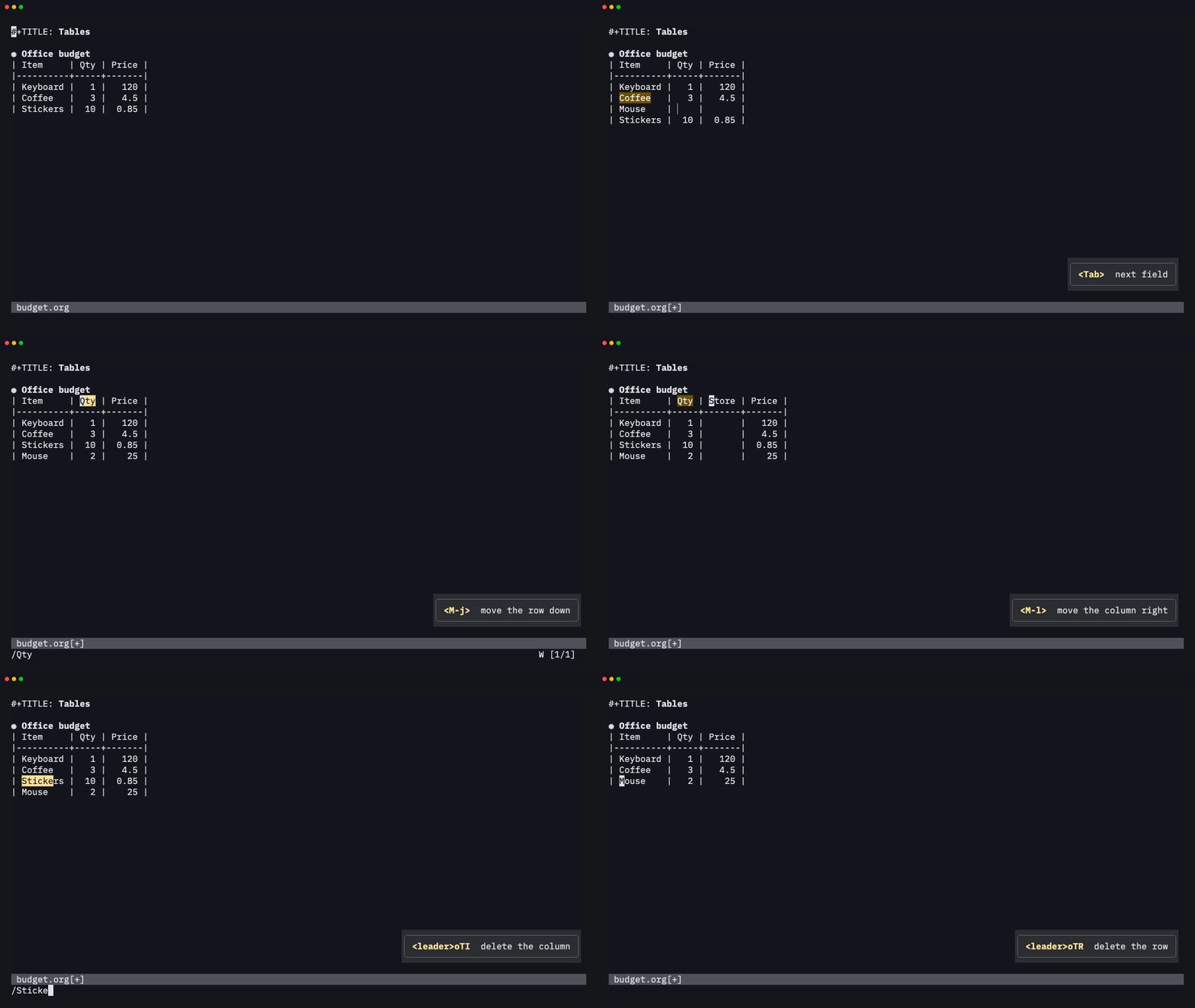
Rows and columns are easy to edit. <leader>oTr / <leader>oTi insert a
row or a column, M-j / M-k and M-h / M-l move them, and
<leader>oTR / <leader>oTI delete them. Formulas in #+TBLFM are
rewritten to follow the moves.
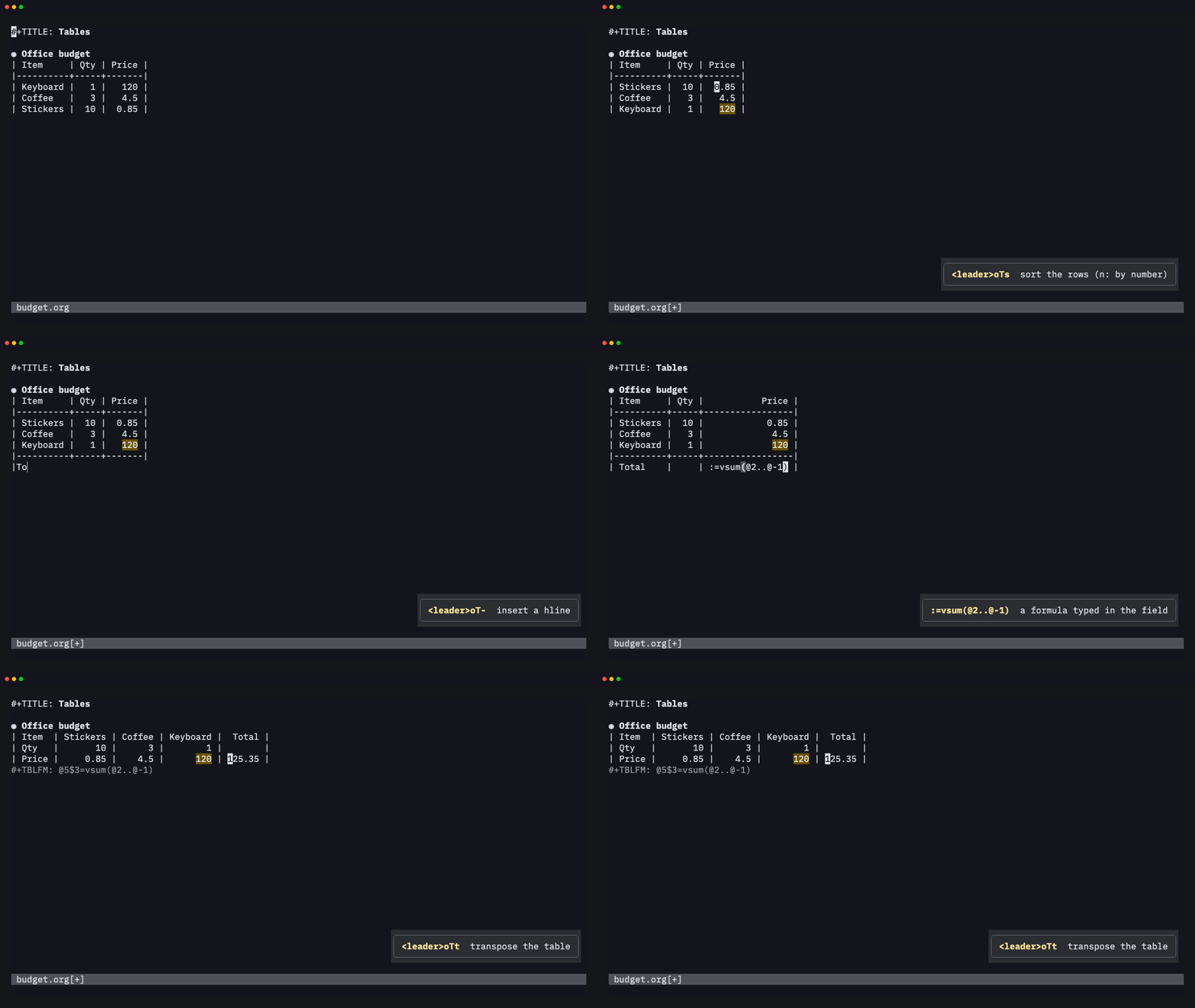
<leader>oTs sorts the rows (alphabetically, numerically, by date or with
a function), and <leader>oTt transposes the table. Type := followed by
a formula in a field to add a field formula to #+TBLFM.
Code that runs in your notes
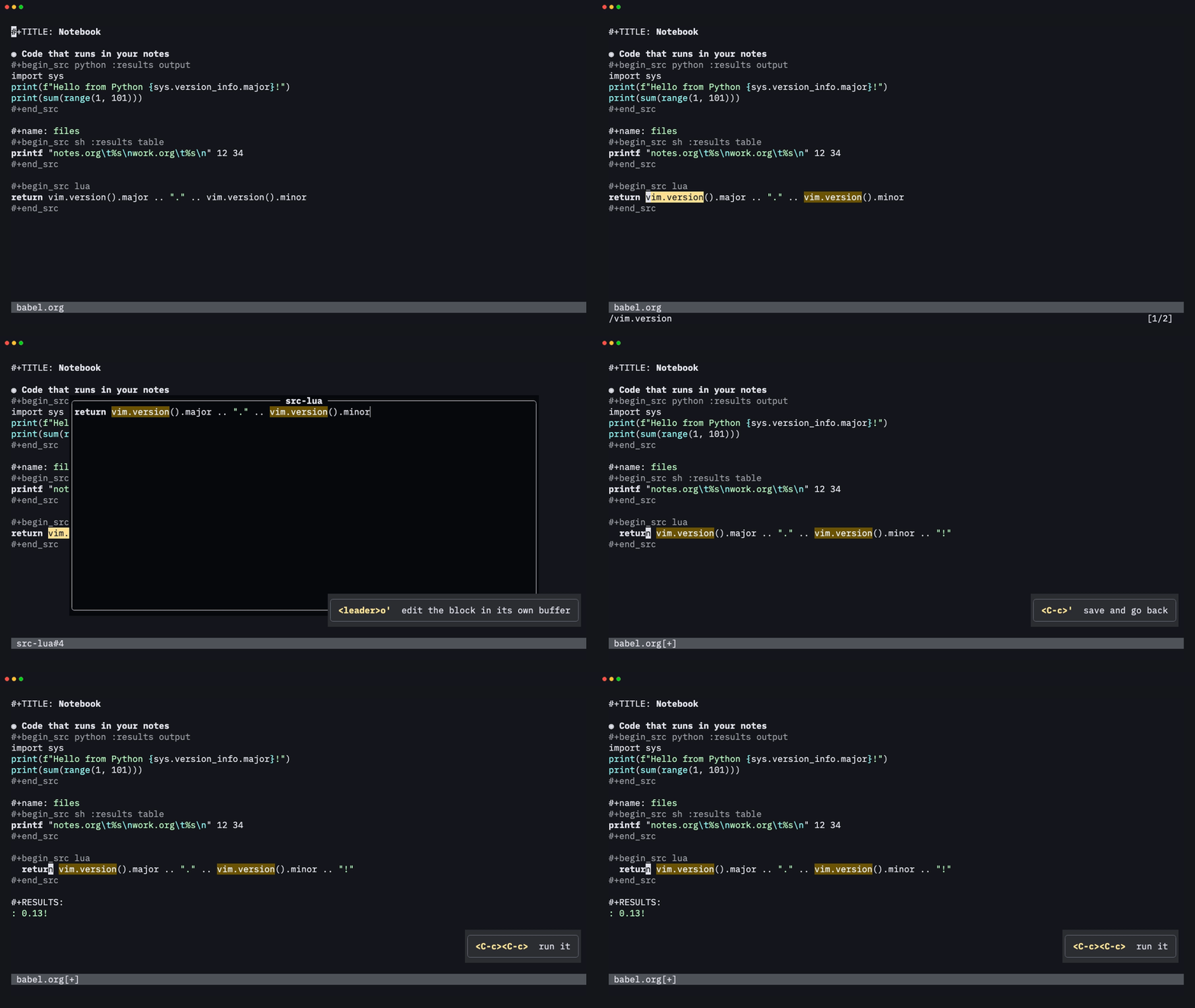
<C-c><C-c> on a source block runs it asynchronously and writes the
output back into the file:
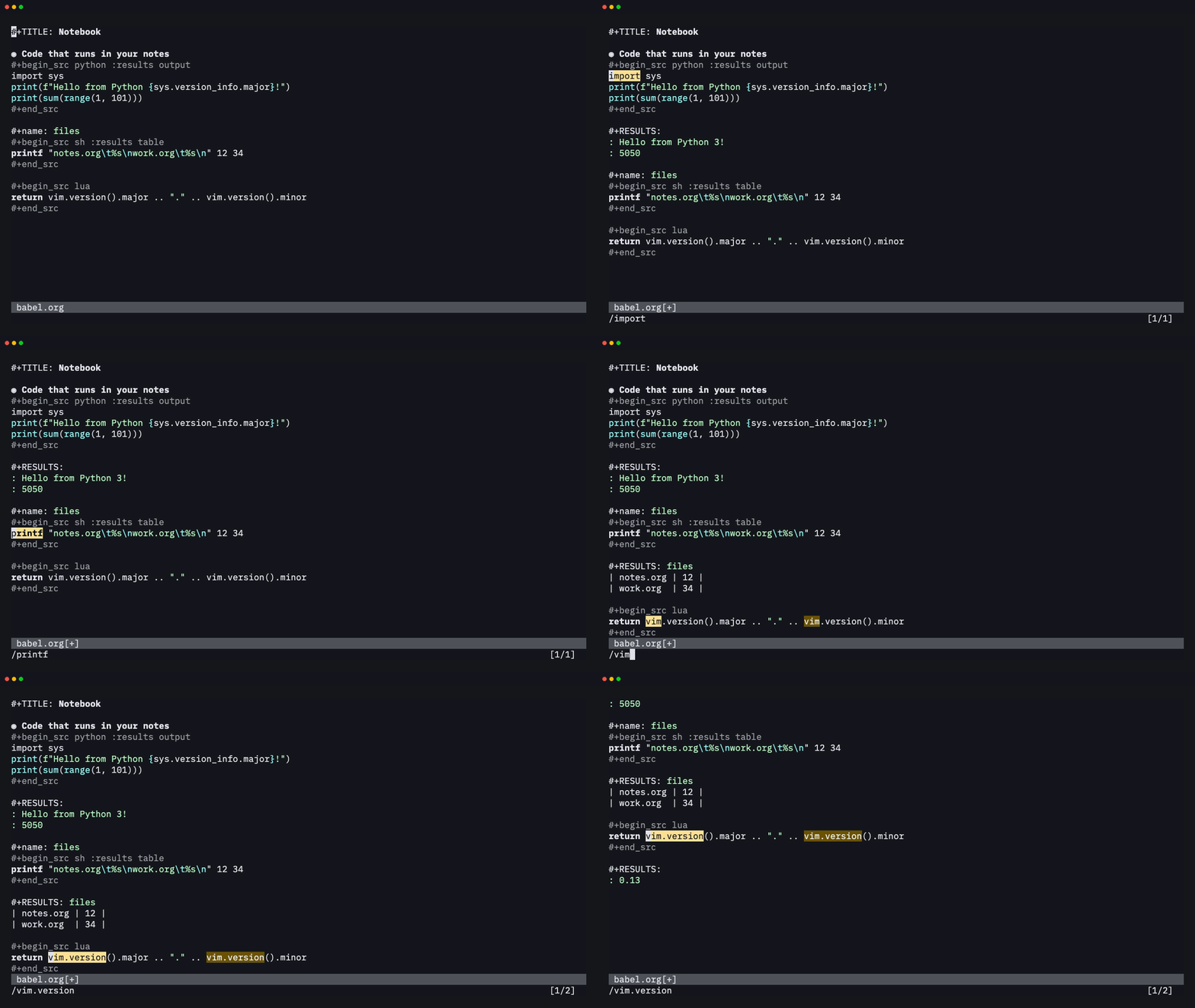
Python, shell, Lua (in-process), Node, Ruby, R, Go, SQLite and more are
supported, along with :var, :noweb, :wrap, :cache, #+CALL, inline
src_lang{…} blocks and tangling. Nothing blocks the editor while code
runs; :session keeps a live REPL between blocks (C-c C-v C-z opens it
so you can type into it), and
:session :async writes a placeholder result right away, as in Emacs.
<leader>o' opens a block in its own buffer with the language's filetype,
so it gets that language's highlighting, indentation and filetype plugins.
<C-c>' writes it back.
Clocking, clock tables and column view
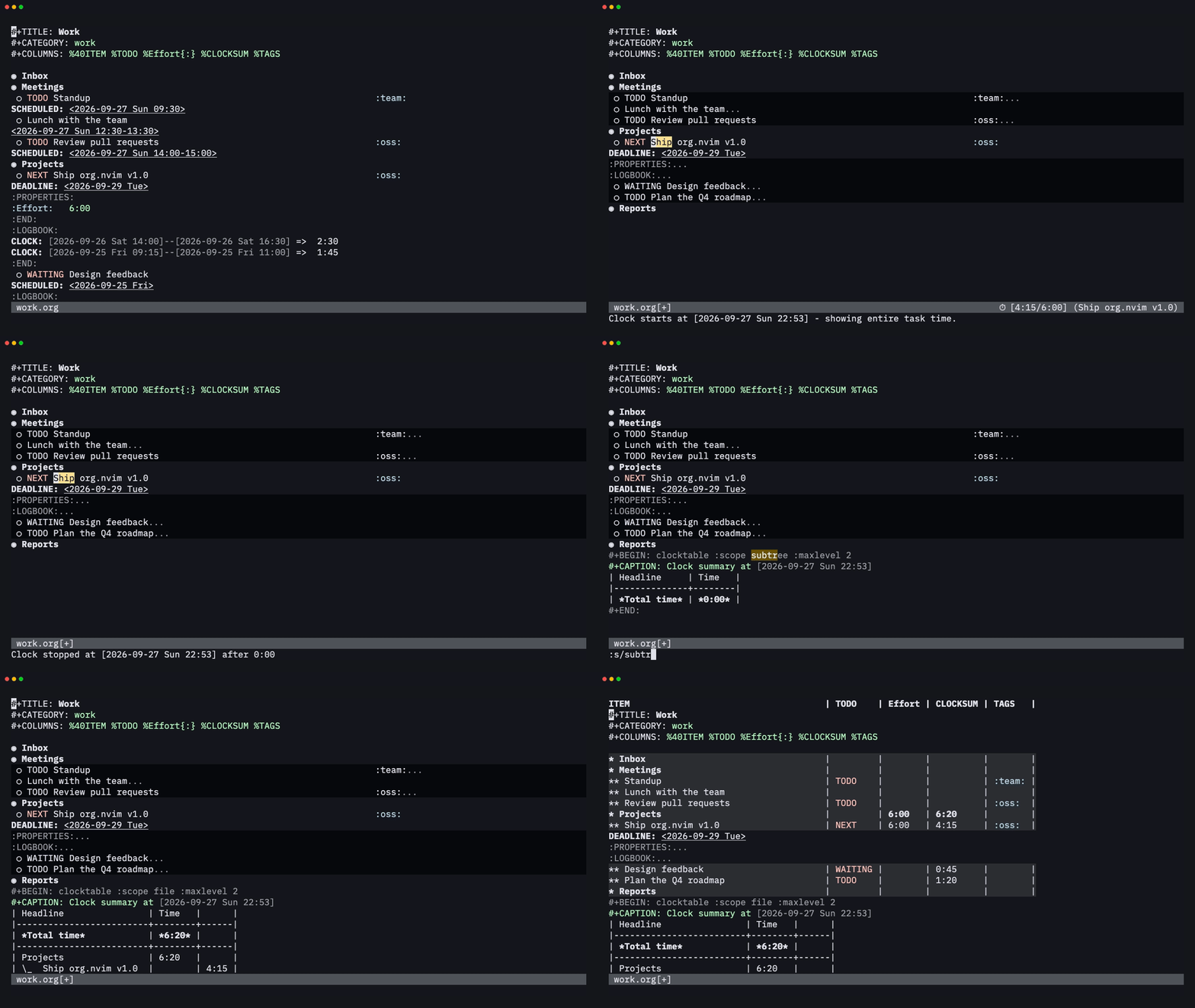
<leader>oxi clocks in, and the statusline shows the running total
against the effort estimate. <leader>oxr inserts a clock table that
matches Emacs's output. <leader>oC opens column view, drawn over
the headlines like Emacs, which sums efforts and clocked time up the tree.
Images and LaTeX, right in your notes
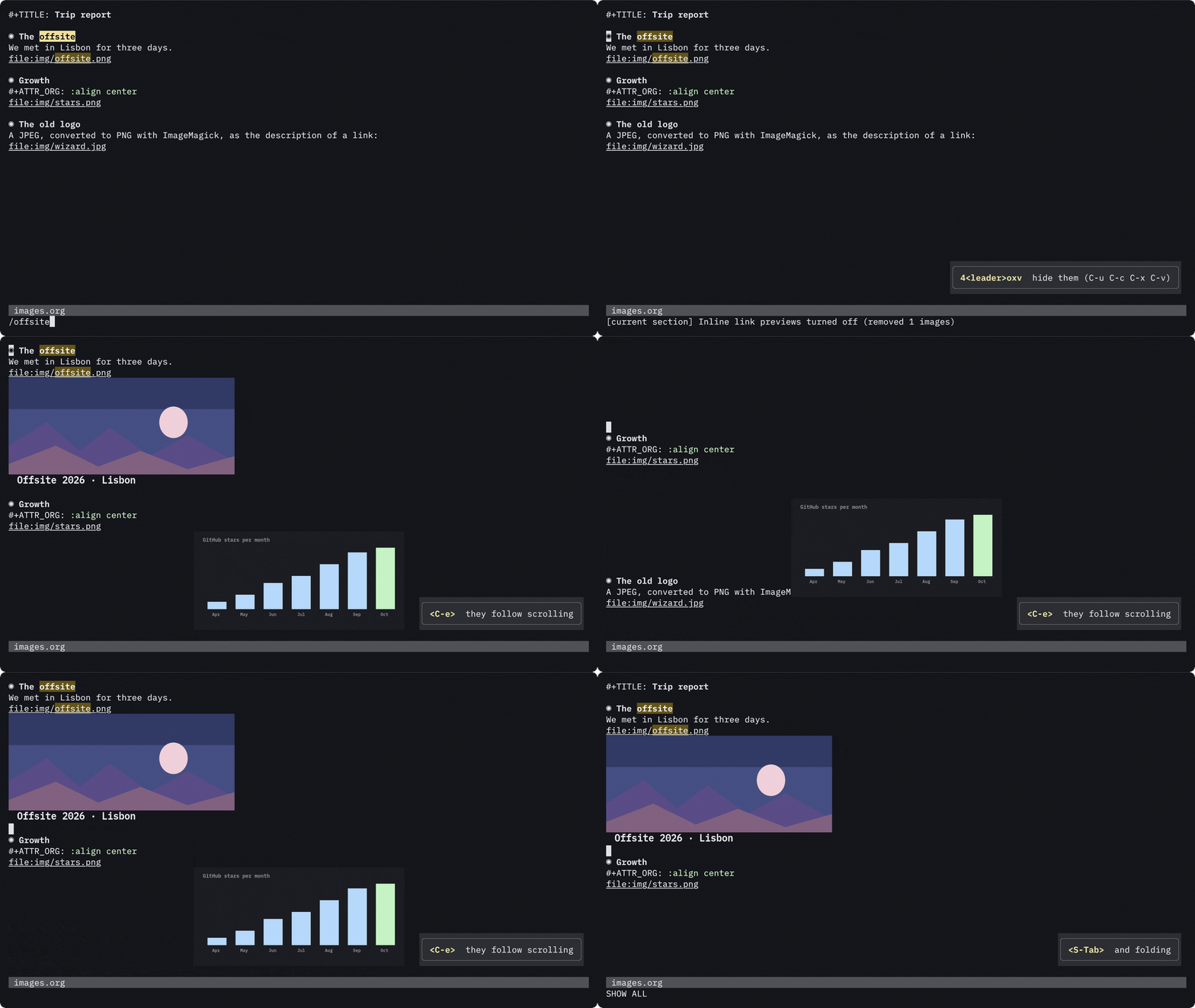
<leader>oxv (C-c C-x C-v) shows image links as images in place of
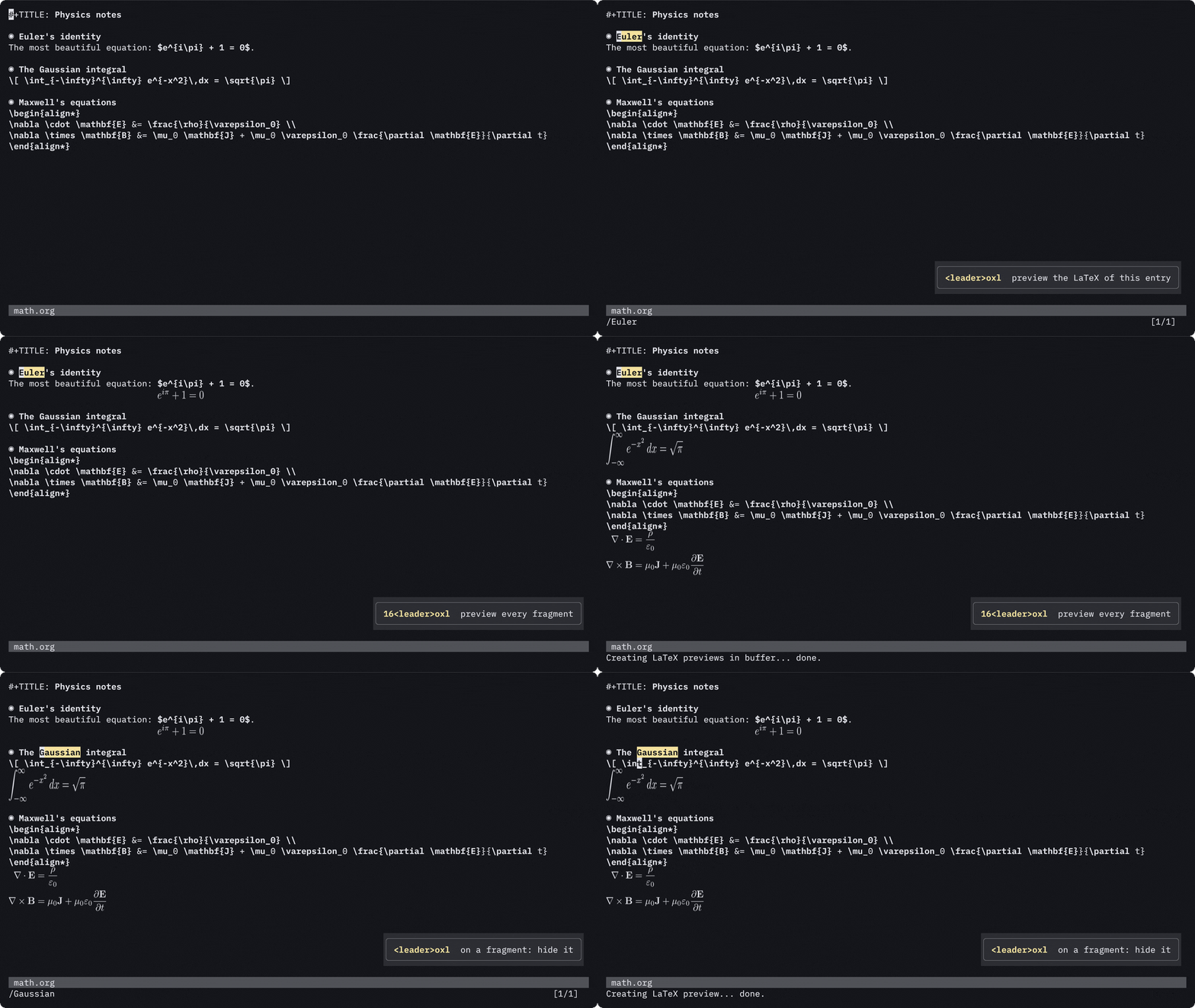
the link, like Emacs, and <leader>oxl (C-c C-x C-l) renders LaTeX fragments. On Neovim
0.13+ they're drawn by the built-in vim.ui.img in any terminal with the
Kitty graphics protocol (kitty, Ghostty, WezTerm). They follow scrolling,
folds and splits, and the link text comes back on the cursor line so you
can edit it. On older Neovim, or inside tmux, org.nvim uses
snacks.nvim's image module or
image.nvim instead. #+STARTUP: linkpreviews and latexpreview turn them on when a file opens.
LaTeX is rendered in the background with latex + dvipng like Emacs, or
with tectonic / pdflatex, in your colorscheme's text color, and the
results are cached:
These two were recorded in a real kitty window
(docs/media/kitty); VHS can't show Kitty graphics.
Where do image previews work? (tmux, Neovim versions, terminals)
Previews depend on the Neovim version, the terminal, and what sits
between them. :checkhealth org shows what it found, and
:h org-images-troubleshooting has the details.
| Setup | What draws the images | Notes |
|---|---|---|
| Neovim 0.13+ in kitty or Ghostty | vim.ui.img (built in) | Everything works, including :align |
| Neovim 0.13+ in WezTerm | vim.ui.img | WezTerm's Kitty graphics support is partial |
| Neovim 0.10–0.12 | snacks.nvim or image.nvim | vim.ui.img needs 0.13 |
| Inside tmux | snacks.nvim | tmux drops vim.ui.img's images. Add set -g allow-passthrough on and install snacks.nvim, or run Neovim outside tmux |
| Inside zellij | nothing | zellij doesn't pass images through |
| Over SSH | vim.ui.img or snacks.nvim | Images and LaTeX tools must be on the machine running Neovim |
| Terminal.app, iTerm2, Alacritty | image.nvim at best | No Kitty graphics protocol |
With snacks.nvim or image.nvim, :align / org-image-align are ignored,
and snacks.nvim draws an image at the start of the line when the link has
text around it.
Jump to any heading
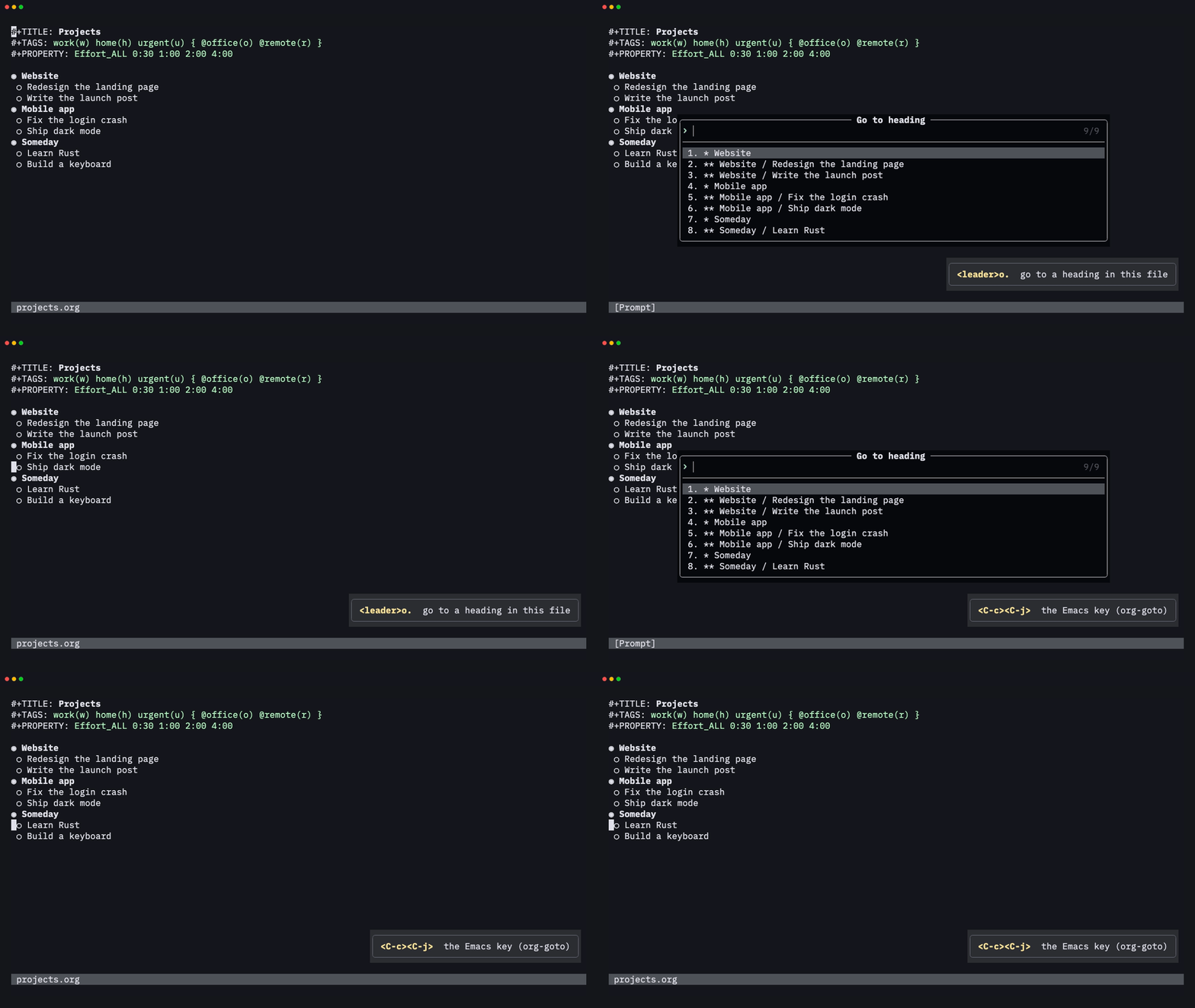
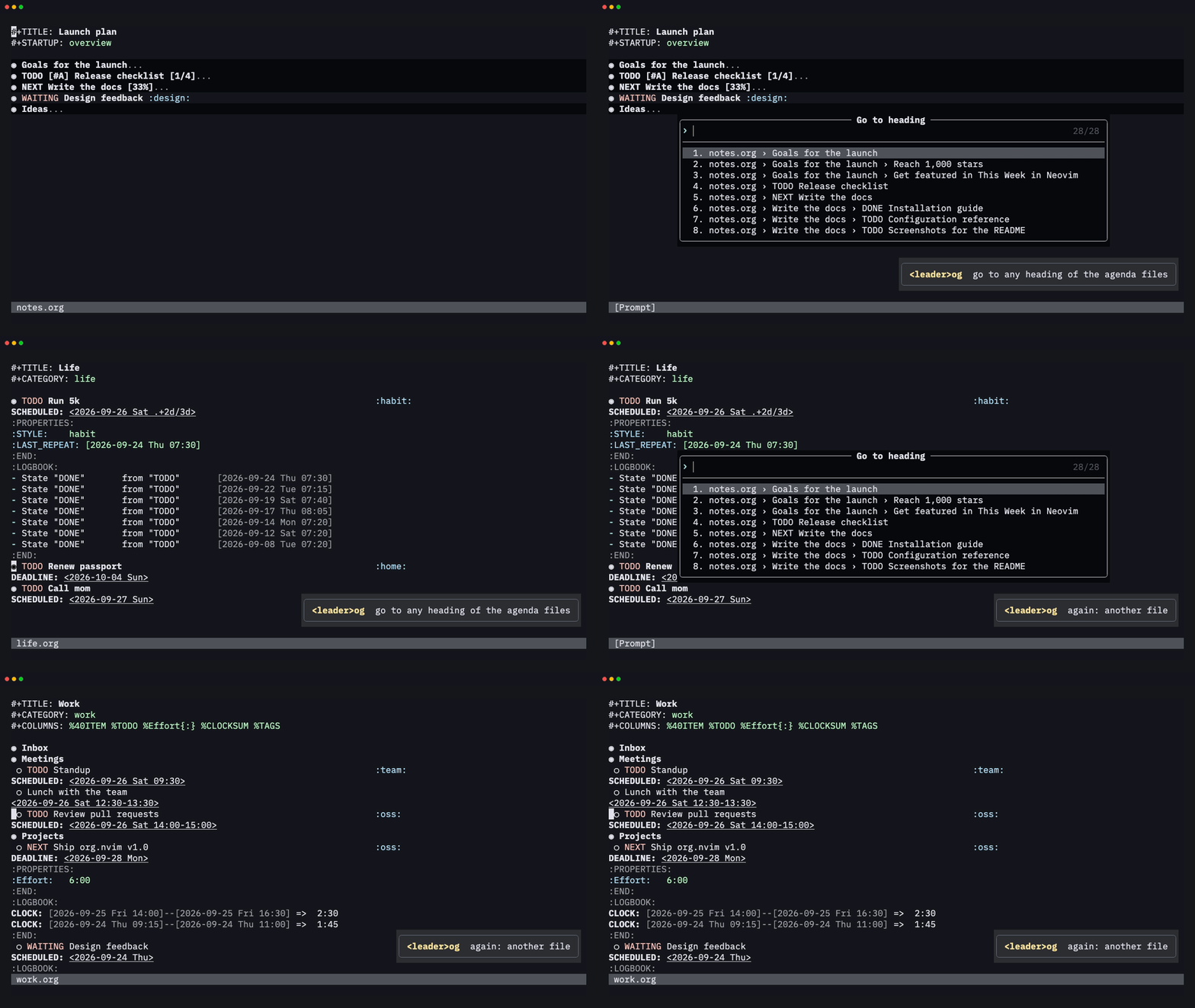
<leader>o. (Emacs C-c C-j) jumps to a heading of the current file, and
<leader>og to any heading of your agenda files. Both use
vim.ui.select, so they get your picker: snacks.nvim here, or Telescope
or fzf-lua.
Timers
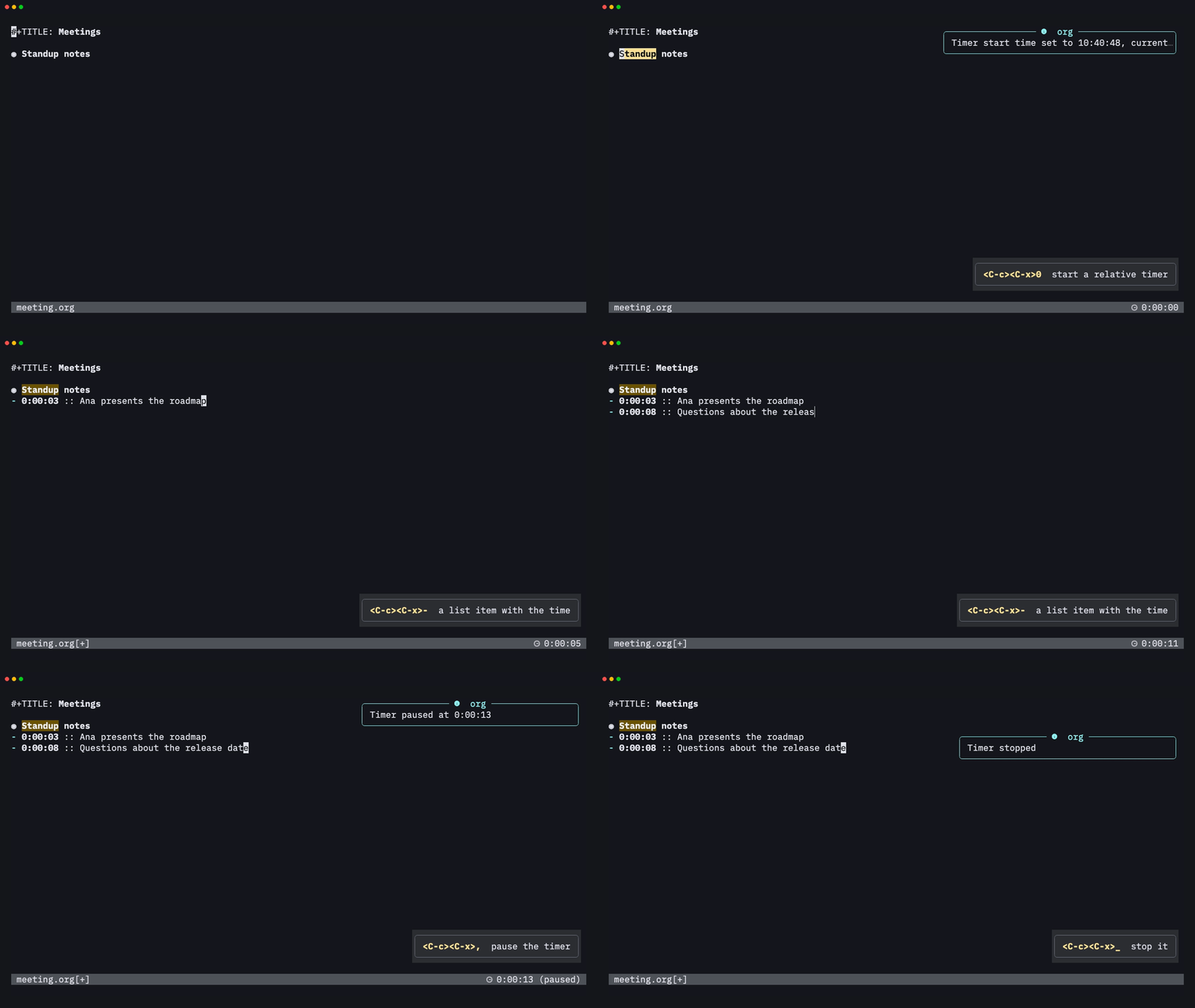
<C-c><C-x>0 starts a relative timer, and <C-c><C-x>- adds a list item
with the elapsed time, handy for meeting notes. <C-c><C-x>, pauses and
resumes it, and <C-c><C-x>_ stops it. The running time is part of the
statusline component.
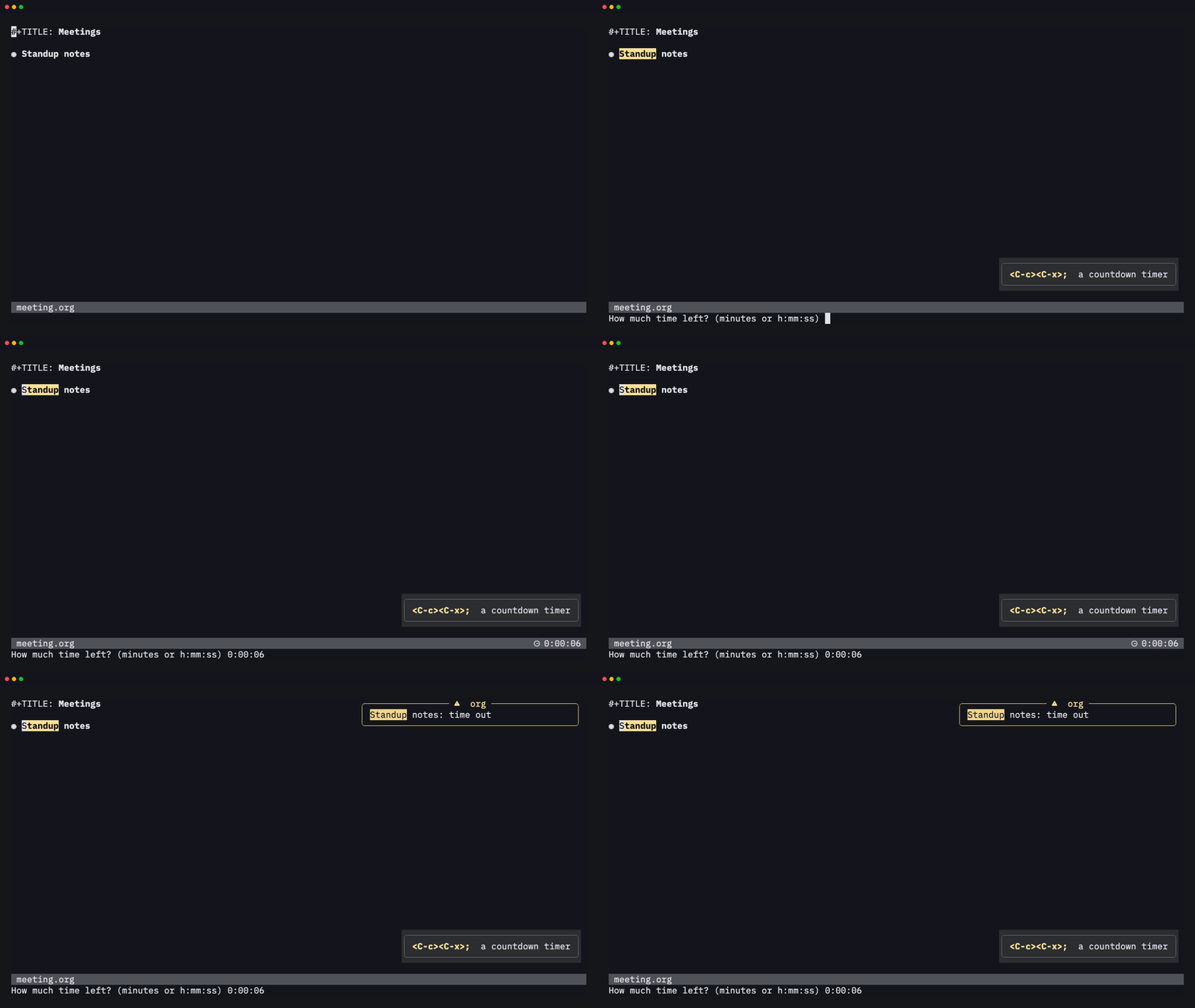
<C-c><C-x>; starts a countdown for the current entry and notifies you
when it runs out:
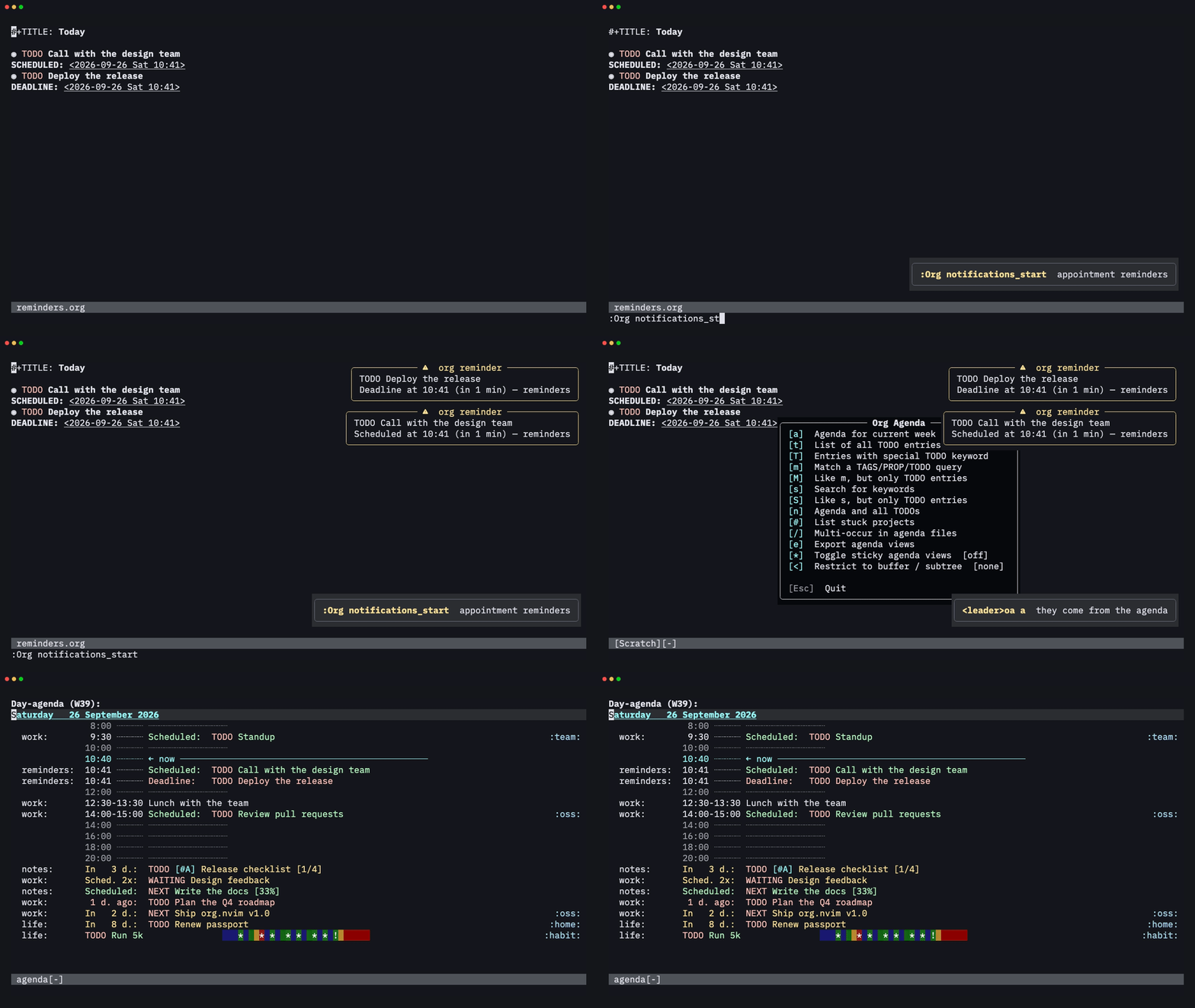
Appointment reminders
With notifications.enabled (or :Org notifications_start), org.nvim
checks your agenda for timed entries and reminds you before they start,
by default 12, 9, 6, 3 and 0 minutes before, through vim.notify and the
system notifier (osascript or notify-send).
Footnotes
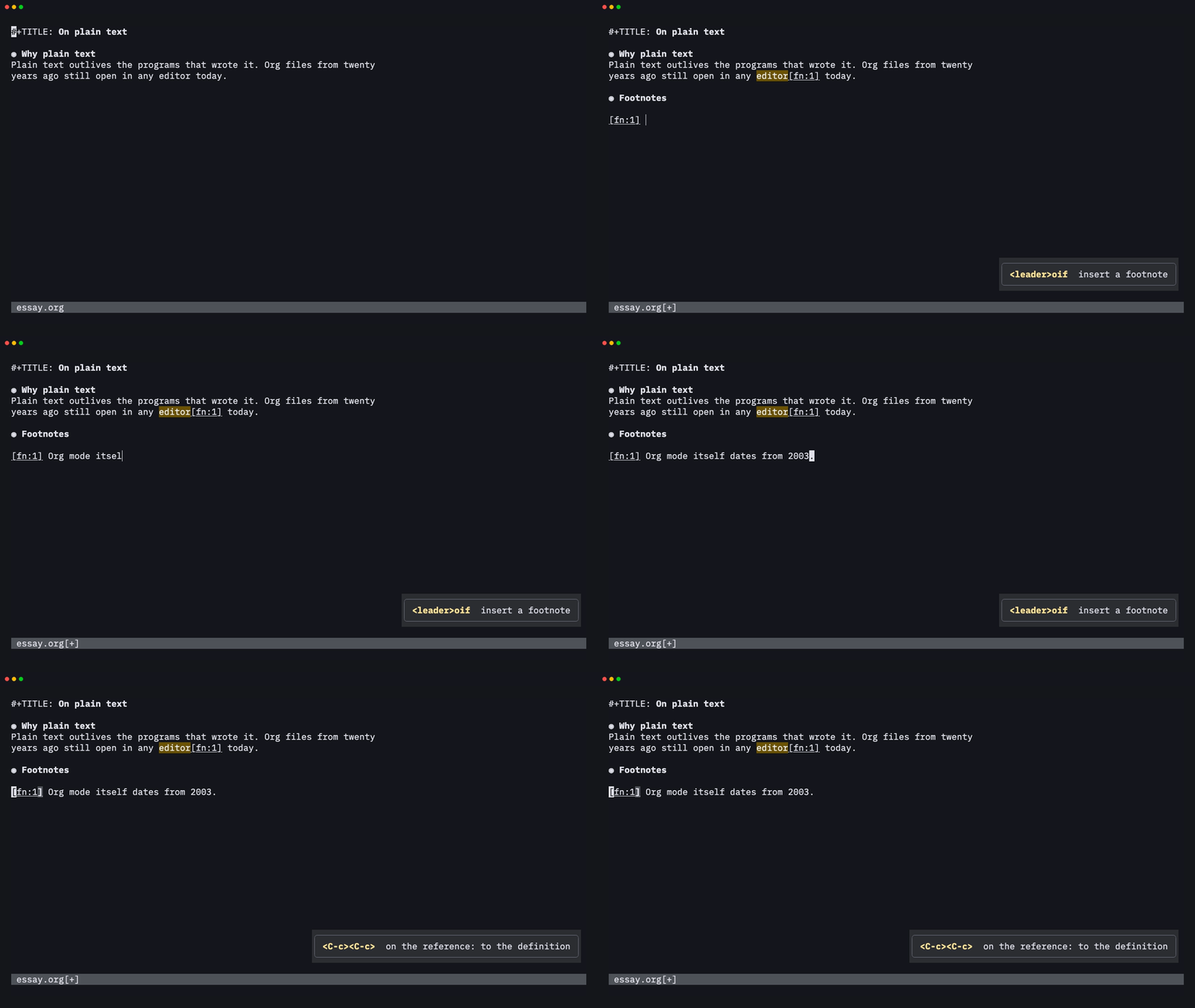
<leader>oif (C-c C-x f) inserts a footnote reference and its
definition, in a Footnotes section or inline. <C-c><C-c> jumps between a
reference and its definition. A count sorts, renumbers or normalizes them.
Checking a file with org-lint
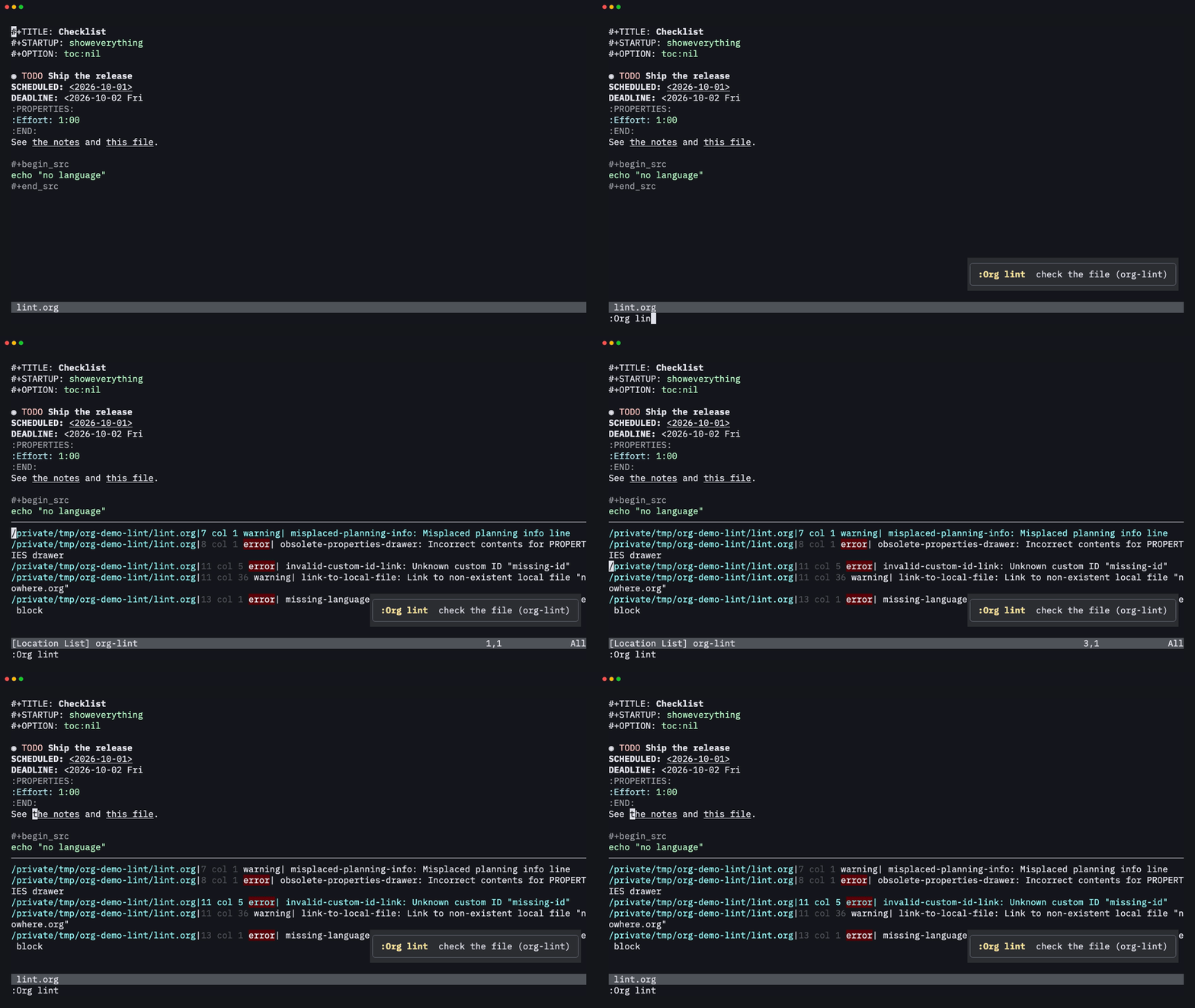
:Org lint runs the org-lint checks, such as misplaced planning lines,
broken property drawers, links to missing IDs or files and src blocks
without a language, and lists the problems in the location list.
Speed keys
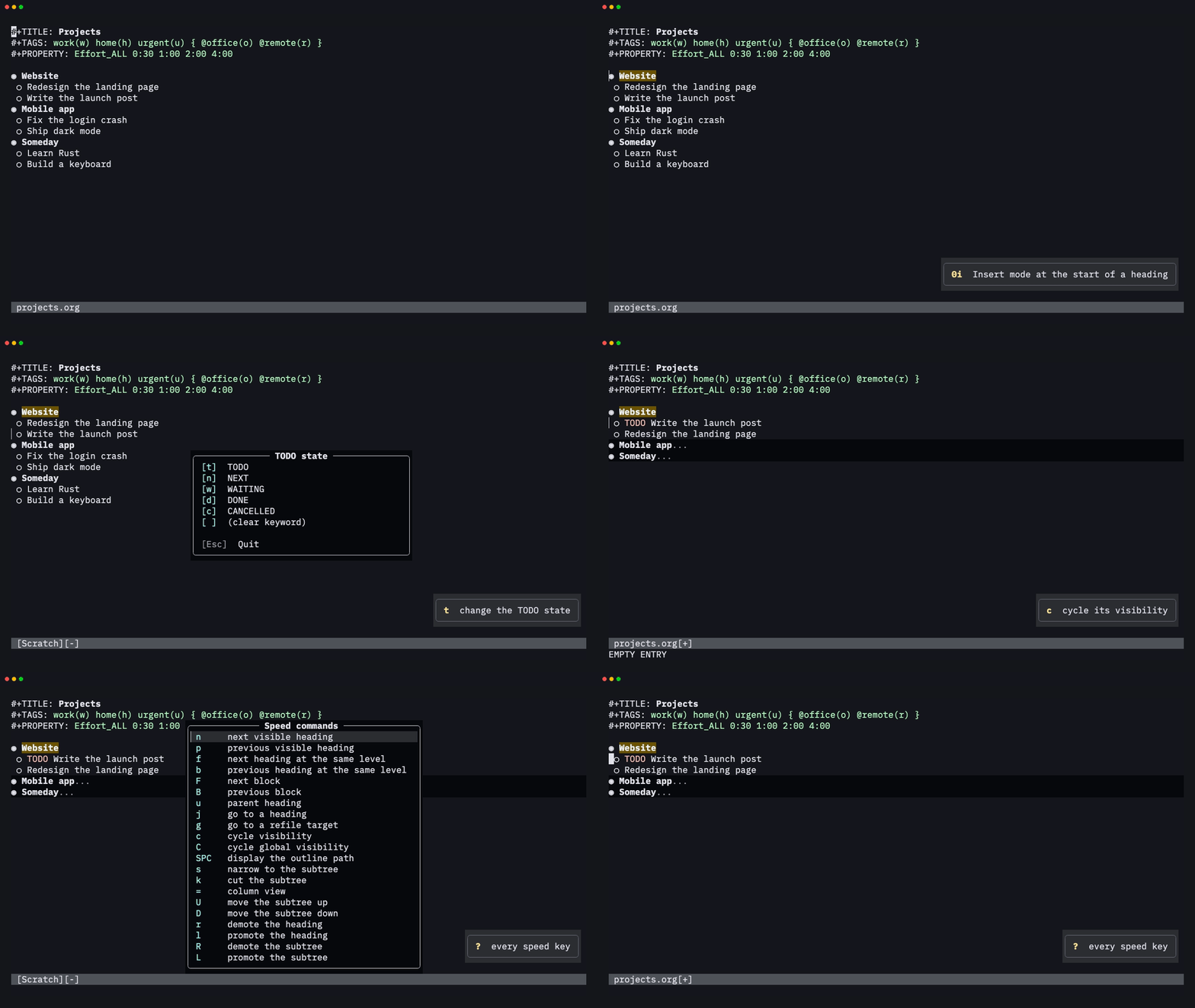
With use_speed_commands = true, single letters typed at the very start
of a heading in Insert mode run commands, like Emacs's speed keys: n /
p to move, t for the TODO state, U / D to move the subtree, c to
cycle, and ? for the full list.
Links
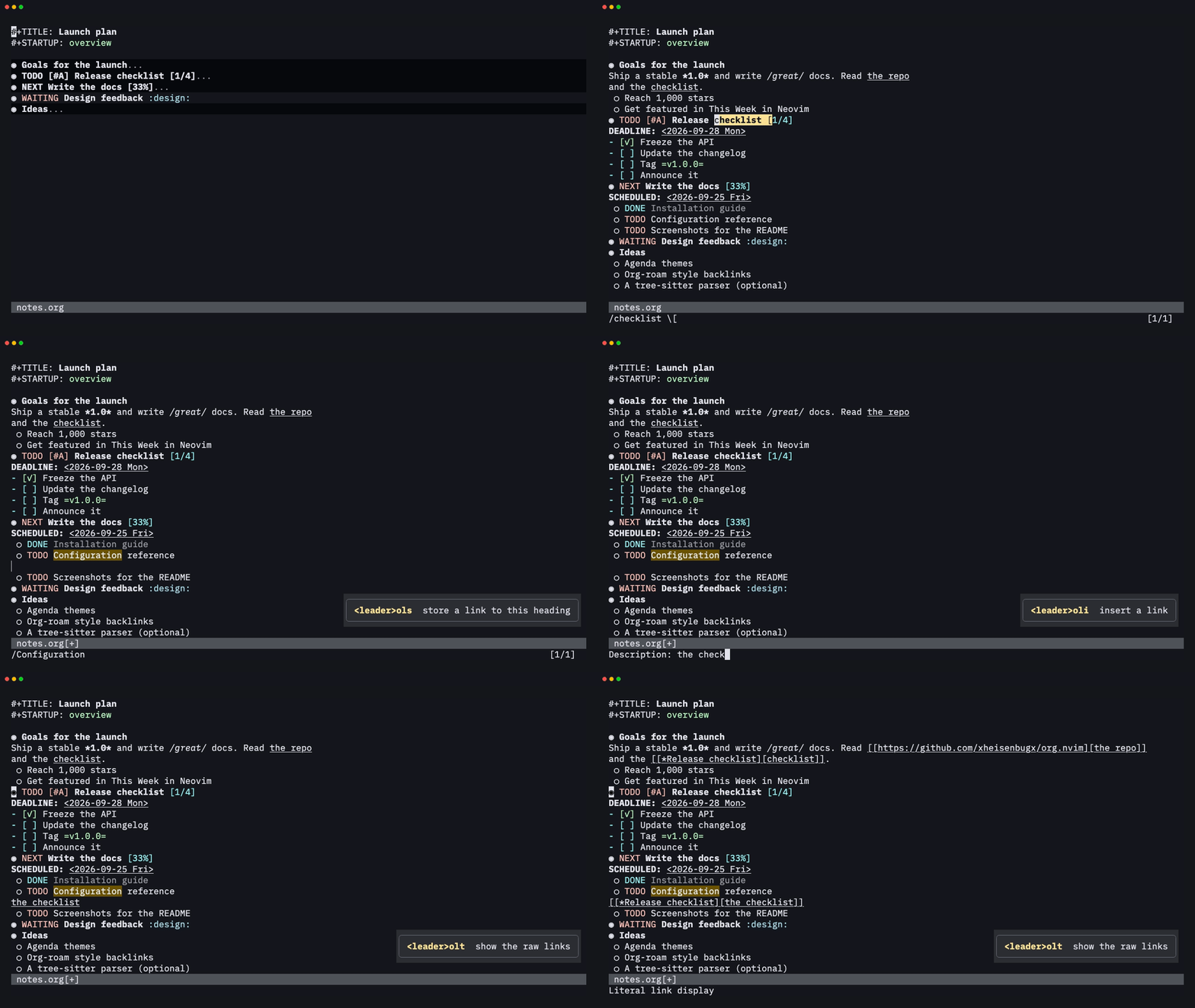
<leader>ols stores a link to the current heading (or file, line or ID),
and <leader>oli inserts it with completion. Links show only their
description. <CR> follows them, and <leader>olt shows the raw text.
Sparse trees
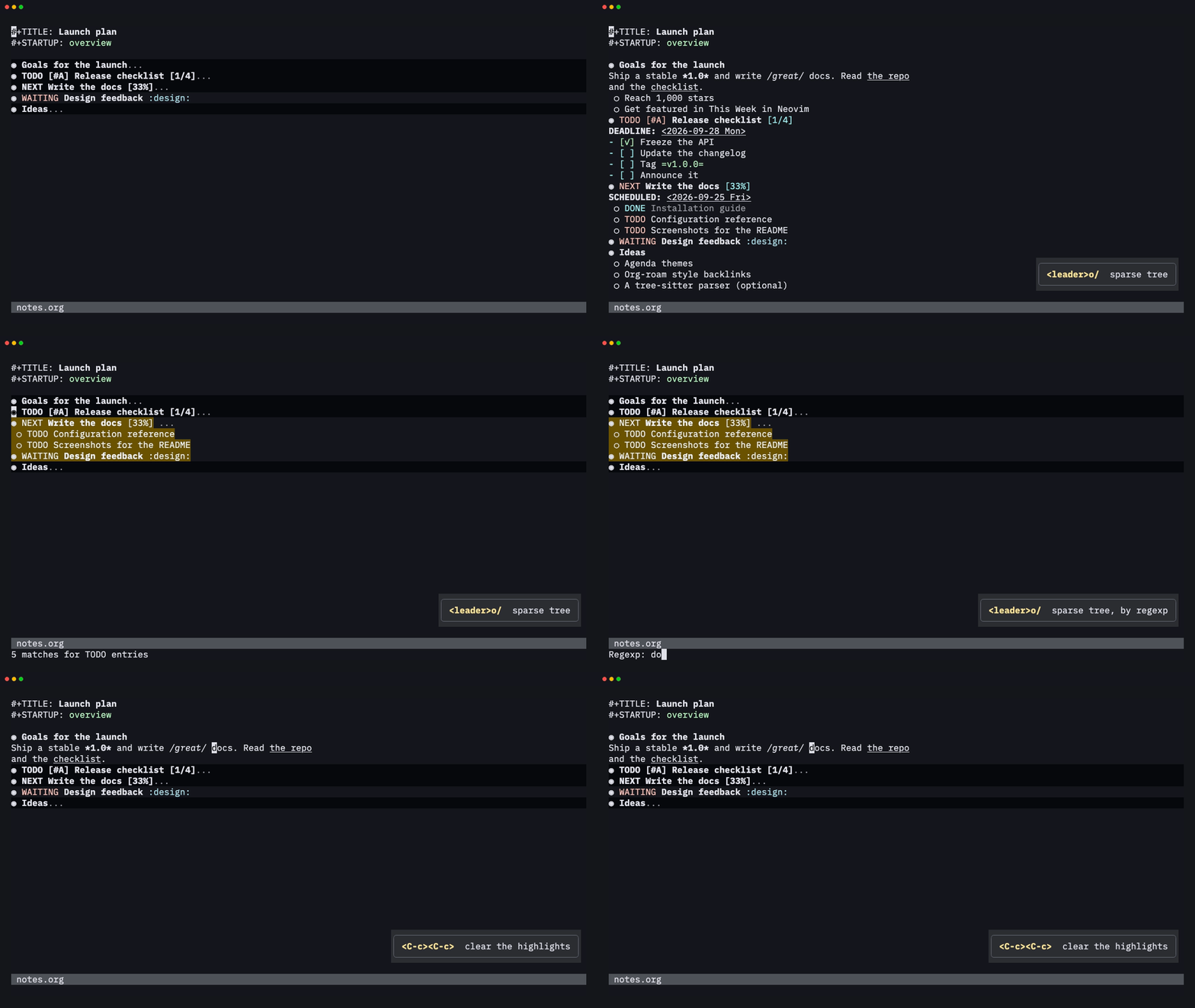
<leader>o/ folds the file down to what matters: TODO entries, a regexp,
a tag or property match, or deadlines. The matches are highlighted, and
<C-c><C-c> clears the highlights.
Export
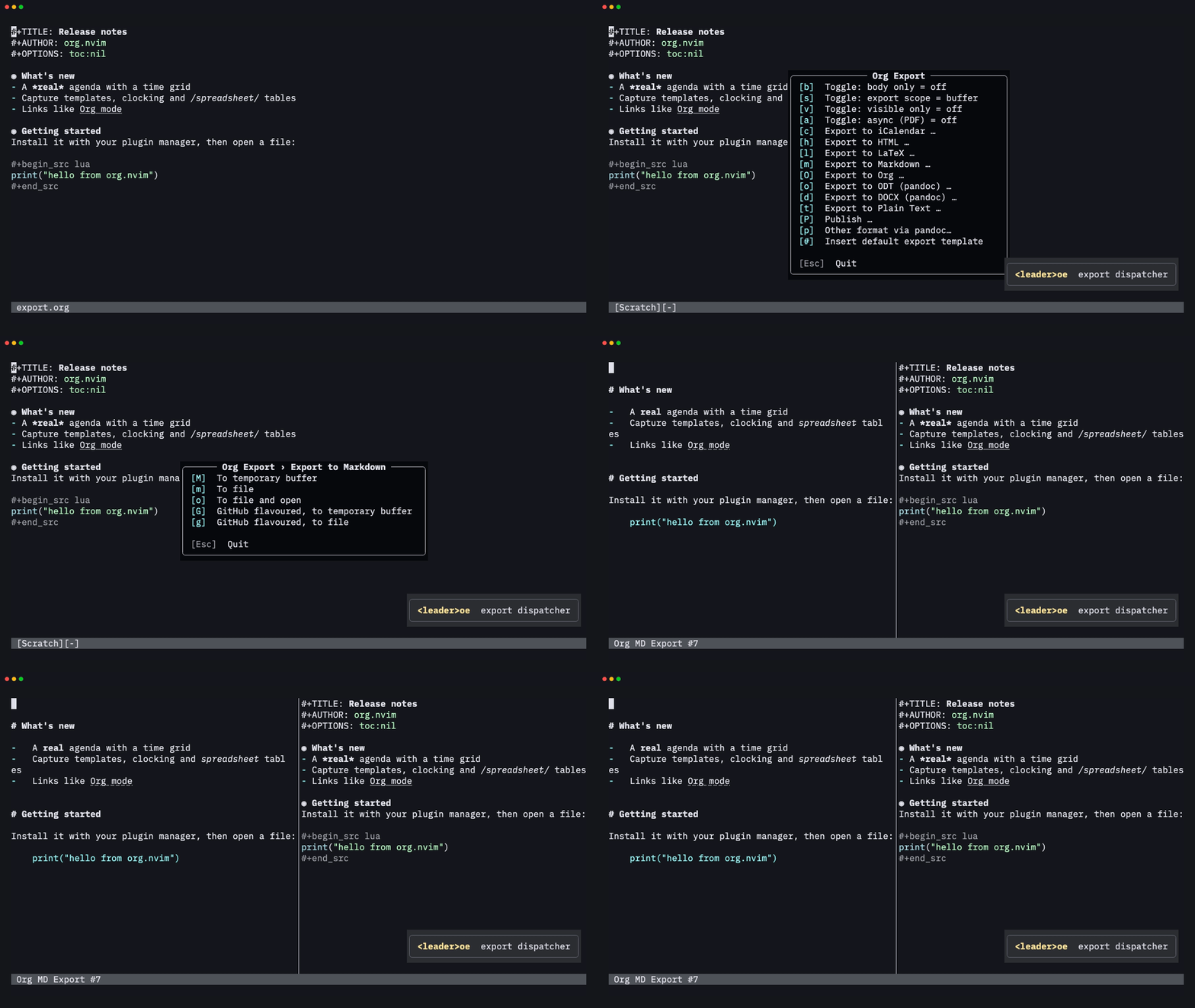
<leader>oe opens the export dispatcher. The HTML, LaTeX, Beamer,
Markdown, ASCII, Org, iCalendar, ODT and Texinfo back-ends are ports of
Emacs's, and pandoc handles DOCX, EPUB and more. You can export to a buffer to
check the result:
Every key, one press away
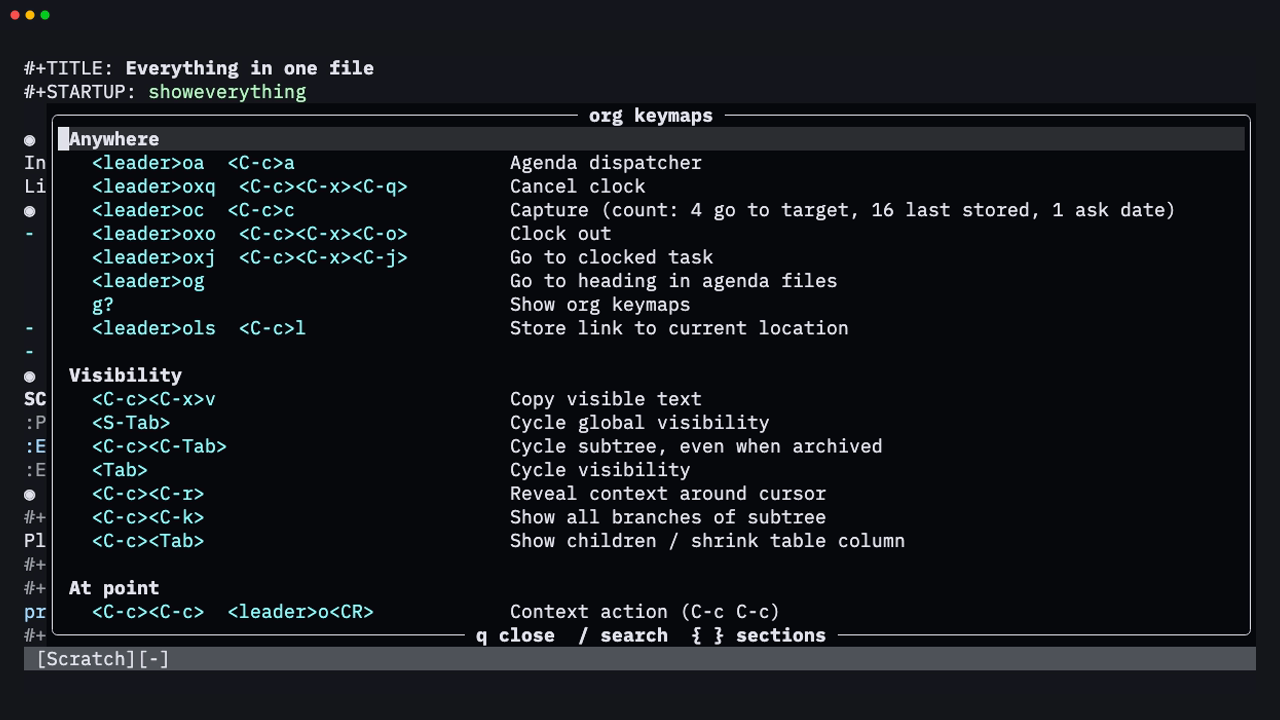
Lost? Press g? in any org or agenda buffer to list every keymap
available there, grouped by topic (visibility, structure, dates, clock,
tables, Babel…), with each command's Vim and Emacs keys on one row. /
searches it, and { / } jump between sections:
✨ Features
| Area | Highlights | |
|---|---|---|
| 🌳 | Outline | Headline folding with Emacs-style TAB/S-TAB cycling, #+STARTUP and VISIBILITY visibility, archived subtrees that stay folded, motions (]] [[ g{), and text objects (ih ah ir ar) |
| ✂️ | Structure editing | A context-aware M-RET, promote and demote, move, cut/copy/paste/clone subtrees, sort, narrow, structure templates |
| 📋 | Plain lists | Every bullet style, checkboxes with a [-] partial state, [2/5] and [40%] statistics cookies, renumbering, TAB on a new item to indent it |
| ✅ | TODO | Multiple keyword sequences, fast selection, !/@ logging, LOGGING / LOG_INTO_DRAWER properties, repeaters (+1w, ++1d, .+2d, REPEAT_TO_STATE), ORDERED / NOBLOCKING dependencies, tag triggers, #+TYP_TODO type sequences, priorities |
| 🏷️ | Tags and properties | Fast tag selection with groups, tag changes over a selection, inheritance, #+FILETAGS, property drawers, Effort, _ALL values cycled with S-Left/S-Right |
| 📅 | Dates | A floating calendar that understands +2w, fri 14:00, sep 15 and w39; SCHEDULED/DEADLINE with warning and delay periods; <C-a>/<C-x> on any part of a timestamp, minutes rounded to 5; custom timestamp formats (C-c C-x C-t) in the buffer and in export; Emacs's org-duration units and formats |
| 🗓️ | Agenda | Day to year views, a time grid, habits, log, clock-report, entry-text and archive modes, the full Emacs match syntax, custom composite commands, tag/category/effort/regexp filters, bulk actions, follow mode, restriction lock, PDF/PostScript export, calendar conversions, moon phases, sunrise/sunset and holidays, the Emacs diary file and every diary sexp of Emacs's calendars |
| 📥 | Capture | Grouped templates; entry, item, checkitem and table-line types; file, headline, outline-path, date-tree, regexp, ID, clock and function targets; all the common %-escapes; :unnarrowed captures in the target file, org-extend-today-until for dates, Emacs Lisp %(sexp) escapes |
| 📦 | Refile and archive | Refile or copy subtrees or regions, with Emacs-style target specs, outline-path completion in steps and refile logging; archive to a file, heading, date tree or Archive sibling with the ARCHIVE_* context properties; refile cache; notes in the *Org Note* buffer |
| 🔗 | Links | file: with ::line, ::*heading, ::#id and ::/regex/; id:, <<targets>>, <<<radio targets>>>, coderefs, shell: (with an *Org Shell Output* buffer), elisp:, wildcard file:*.org listings, attachment:, abbreviations, custom types, concealed display, store/insert last/all links |
| ⏱️ | Clocking | Clock in/out/cancel/jump, clock history with default and interrupted tasks, Emacs's clock resolution (keep, subtract, got-back) for dangling clocks and idle time, auto clock-out, effort estimates with an overrun alert, a statusline component, clocktable blocks matching Emacs output (:step, :formula, :sort, :lang…), agenda clock check, relative and countdown timers |
| 🧮 | Tables | Automatic alignment, column shrinking, row/column/cell editing with formula fixing, copy-down, CSV/TSV import and export, #+TBLFM formulas with a Calc-compatible evaluator, a formula editor and debugger, radio tables, orgtbl-mode (including the unicode and table.el translators) and plots (including radar); Calc symbolic algebra (simplify, deriv, integ, solve), vectors and matrices, modulo forms, complex numbers, HMS forms, error forms, intervals and units; table.el grid tables (C-c ~, C-c ', export) |
| 🧪 | Babel | Asynchronous execution in many languages, :session as live REPL buffers (shells, Python, Node, Ruby, R, Lua) with :async, inline src_lang{…} blocks and call_name(), :results, :var references that evaluate blocks (name(x=1), slices, other files, IDs), :noweb, :wrap, :cache, :file, #+CALL, Library of Babel, tangling, optional evaluation on export, the C-c C-v commands, and editing a block in its own buffer with C-c '; emacs-lisp blocks run in a separate Emacs when one is installed |
| 📤 | Export | A port of Emacs's export engine (with #+BIND and (eval …) macros): HTML, LaTeX/PDF, Beamer, Markdown, ASCII, Org, iCalendar, ODT and Texinfo/Info back-ends matching Emacs output, citations, publishing projects, every #+OPTIONS key, plus DOCX, EPUB and more through pandoc |
| 🖼️ | Images and LaTeX | Image links and LaTeX fragments previewed in place of the link (org-link-preview, -region, -clear, -refresh, org-latex-preview) with Neovim 0.13's vim.ui.img, or snacks.nvim / image.nvim on older versions; org-image-actual-width, #+ATTR_ORG: :width / :align, images as link descriptions, previews on TAB, #+STARTUP: linkpreviews latexpreview, the Emacs LaTeX processes (dvipng, dvisvgm, xelatex, imagemagick) plus tectonic, images in ltximg/, preview functions for custom link types, remote http(s) images |
| 🎁 | And more | Footnotes, sparse trees, org-lint, entry encryption (org-crypt), org-protocol, inline tasks, org-num, pretty entities, appointment notifications, attachments (with org-attach-git), RSS/Atom feeds (org-feed), MobileOrg, IDs, dynamic blocks, completion, :checkhealth org |
The full reference is in :h org.nvim (doc/org.txt).
📚 Contents
- Requirements
- Installation
- Quick start
- Keymaps
- Configuration
- Capture templates
- Custom agenda commands
- Completion
- Statusline
- Parity with Emacs Org
- Differences from Emacs Org mode
- Roadmap
- Contributing
Requirements
- Neovim 0.10+. Nothing else is required.
- Optional:
pandocfor LaTeX, PDF, DOCX and ODT export.latexmkorpdflatexfor native PDF.- The language interpreters you want Babel to run.
- For image and LaTeX previews: Neovim 0.13+ in kitty, Ghostty or
WezTerm (or snacks.nvim / image.nvim), ImageMagick for non-PNG images,
and
latex+dvipngortectonicfor LaTeX.
Installation
LazyVim / lazy.nvim, with blink.cmp completion
-- ~/.config/nvim/lua/plugins/org.lua
return {
  {
    "xheisenbugx/org.nvim",
    main = "org",
    lazy = false,
    opts = {
      org_directory = "~/org",
      agenda_files = { "~/org/**/*.org" },
      default_notes_file = "~/org/refile.org",
    },
  },
  -- completion in blink.cmp (LazyVim default)
  {
    "saghen/blink.cmp",
    optional = true,
    opts = {
      sources = {
        per_filetype = { org = { inherit_defaults = true, "org" } },
        providers = { org = { name = "Org", module = "org.completion.blink" } },
      },
    },
  },
}
Other plugin managers
Add the plugin to your 'runtimepath' and call:
require("org").setup({ org_directory = "~/org" })
Local development checkout
Point lazy.nvim at the directory instead of a GitHub repo:
{
  dir = "~/Workspace/orgmode",
  name = "org.nvim",
  main = "org",
  lazy = false,
  opts = { --[[ … ]] },
}
Restart Neovim (or run :Lazy reload org.nvim) and check the result with
:checkhealth org.
[!TIP] Keymap prefix. All org commands live under
<leader>oby default. If another plugin already uses it (obsidian.nvim, overseer), setmappings = { prefix = "<leader>O" }or any other prefix.
Quick start
mkdir ~/organd open~/org/todo.org.- Type
* TODO Buy milkand press<leader>osto schedule it for today. <leader>oa→aopens the weekly agenda.tchanges the state of the entry under the cursor, and<CR>jumps to it.<leader>oc→tcaptures a new task from anywhere. Finish with<C-c><C-c>or:w.- Press
g?in any org or agenda buffer to list its keymaps.
Keymaps
<prefix> is mappings.prefix (default <leader>o). Every mapping can be
changed or disabled (false) under mappings.<section>.<action>. Keys
marked (ctx) depend on what's under the cursor. When they don't apply,
they fall back to the normal Vim behaviour (>> still indents plain text,
<C-a> still increments numbers).
Emacs keys
Coming from Emacs? The standard Org keys work out of the box, on top of
the Vim-style ones: C-c C-t, C-RET / C-S-RET, C-c C-s / C-c C-d,
C-c ., C-c C-q, C-c C-w, C-c C-x C-i / C-c C-x C-o, C-c C-l,
C-c C-e, C-c ', C-c C-v e, C-c =, C-c -, C-c ^ and about 90 more.
Context-sensitive keys behave as in Emacs (C-c - adds an hline in a table,
cycles a bullet on an item and toggles an item elsewhere). Use a count in
place of C-u: 4<C-c>. inserts a timestamp with the time.
The full list is in :h org-emacs-keys. Turn them off with
mappings = { emacs = false, emacs_insert = false, emacs_global = false }.
Global
| Key | Action |
|---|---|
<prefix>a | Agenda dispatcher |
<prefix>c | Capture |
<prefix>g | Go to any heading in the agenda files |
<prefix>ls | Store a link to the current location |
<prefix>xj / xo / xq | Go to clocked task / clock out / cancel clock |
Org buffers (click to expand)
| Key | Action |
|---|---|
<Tab> / <S-Tab> | Cycle subtree / global visibility (ctx: in insert mode, next table field or cycle the level of a new empty heading/item) |
<C-c><C-c>, <prefix><CR> | Context action: toggle checkbox, align/recalc table, run src block, update dblock/clock line/cookie, set tags on headline, property menu on a property line, clear sparse-tree highlights… |
<CR>, gx, <prefix>o | Open link / footnote / date at point (ctx) |
<M-CR> / <M-S-CR> | New heading, item or row / new TODO heading or checkbox item |
<prefix>ih it is | Insert heading / TODO heading / subheading |
<prefix>id ib if | Insert drawer / block template / footnote (on a footnote: jump; count: sort/renumber/normalize/delete menu) |
<< >> / <s >s | Promote/demote heading or item / subtree (ctx) |
<M-h> <M-l> (also <M-Left> <M-Right>) | Promote / demote heading or item (Visual: every headline); move table column (ctx) |
<M-k> <M-j> (also <M-Up> <M-Down>) | Move subtree, item or table row up / down (ctx) |
<M-H> <M-L> <M-K> <M-J> | Subtree promote/demote; table delete/insert column, delete/insert row; on a CLOCK timestamp move it and the touching clock; elsewhere drag the line up/down (ctx) |
<prefix>K / <prefix>J | Move subtree up / down |
<prefix>hy hd hp hc | Copy / cut / paste / clone subtree |
<prefix>hs hn hC hA hb | Sort / narrow / toggle COMMENT / toggle ARCHIVE tag / cycle bullet |
<prefix>* / <prefix>- | Toggle heading / list item |
cit / ciT / <prefix>S | Next / previous / select TODO state |
<S-Right> <S-Left> | Next/previous TODO; date ±1 day; next/previous allowed property value; cycle bullet (ctx) |
<S-Up> <S-Down>, <C-a> <C-x> | Priority or timestamp part up/down; previous/next list item (ctx) |
<prefix>, t p P | Priority / tags (Visual: add/remove a tag on each headline; count: realign all) / set property / delete property |
<prefix>s d i. i! | Schedule / deadline / active / inactive timestamp |
<C-Space>, <prefix># | Toggle checkbox (Visual: every item; count 4: remove, 16: [-]) / update statistics cookies |
<prefix>xi xo xq xj | Clock in (count: pick from history) / out / cancel / goto |
<prefix>xe xE xm xz | Set effort / next allowed effort / change clocked effort / resolve dangling clocks |
<prefix>xr xd xu xU C | Insert clocktable / show clock sums / update dblock(s) / column view |
<prefix>li ls lt ln lp lI | Insert / store link, toggle link display, next/prev link, create ID |
<prefix>lL lA lg ly | Insert last / all stored links, go to ID, copy ID |
<prefix>r R $ A | Refile / copy to a refile target / archive subtree / attachments |
<prefix>/ e | Sparse tree / export dispatcher |
<prefix>Tc T- Tf Ts Tr TR Ti TI | Table: create/convert, hline, recalc, sort, insert/delete row, insert/delete column |
<prefix>Tt T#, <S-CR>, <S-arrows> | Table: transpose, rotate recalc mark, copy field down (with increment), swap field with neighbour |
<prefix>' | Edit src block or table formulas in a separate buffer |
<prefix>be bb bs bt bk bn bp | Babel: execute block/buffer/subtree, tangle, remove result, next/prev block |
<prefix>bv bd bg br bo bj bi | Babel: expand, split/wrap, go to named block/result, open result, insert header arg, ingest library |
<prefix>bz bZ bl bK | Babel sessions: show session, show session + edit block, load block into session, kill session |
]] [[ ][ [] g{ <prefix>. | Next/prev heading, next/prev sibling, parent, pick heading |
ih ah ir ar | Text objects: heading section / subtree |
g? | Show all keymaps |
Agenda buffer (click to expand)
| Key | Action | Key | Action |
|---|---|---|---|
f / b / . | later / earlier / today | vd vw vt vm vy | day / week / fortnight / month / year |
gd | go to date | r | redo |
<CR> / <Tab> / <Space> / L | switch to / go to / show / show and recenter | F | follow mode |
t, <C-S-Right/Left> | change TODO | , + - | set/raise/lower priority |
: / T | set / show tags | s / d | schedule / deadline |
<S-Right> / <S-Left> / > | date +1 / −1 / prompt | e / <C-c><C-x>p | effort / property |
I O X J | clock in / out / cancel / goto | R / $ / a | refile / archive / archive with confirmation |
<C-c><C-x>A / <C-c><C-x>a | archive sibling / ARCHIVE tag | <C-k> / <C-c><C-o> | delete entry / open link |
z | add note | c | capture (at the date at point) |
l vL / C | log mode (all) / clock report | E / G | entry text / time grid |
va / vA / v[ | archived trees / archive files / inactive timestamps | / < = _ ^ | | filter tag / category / regexp / effort / top headline / clear |
[ ] { } | add +word / -word / +{re} / -{re} to the query | n / p, <C-c><C-n/p> | next / previous item, date line |
m u U B | mark / unmark / unmark all / bulk action | <M-m> * <M-*> % | toggle / mark all / toggle all / mark regexp |
<C-x><C-s> / <C-x><C-w> | save org buffers / export agenda | q / x | quit / quit and wipe |
Capture and edit buffers (click to expand)
| Key | Capture | Edit src (C-c ') |
|---|---|---|
<C-c><C-c>, <prefix>w, :w | finalize | — |
<C-c>', <prefix>' | — | save and exit (:w writes back) |
<C-c><C-k>, <prefix>k | abort | abort |
<C-c><C-w>, <prefix>r | refile | — |
Configuration
Every option with its default is in lua/org/config.lua
and documented in :h org-config. The most common ones:
require("org").setup({
  org_directory = "~/org",
  agenda_files = { "~/org/**/*.org", "~/work/notes.org" },
  default_notes_file = "~/org/refile.org",

  todo_keywords = { "TODO(t) NEXT(n) WAITING(w@/!) | DONE(d!) CANCELLED(c@)" },
  log_done = "time",          -- false | "time" | "note"
  log_into_drawer = "LOGBOOK",
  tags = { "work(w)", "home(h)", "{", "@office(o)", "@remote(r)", "}" },
  tags_column = -77,
  startup_folded = "overview",
  deadline_warning_days = 14,

  agenda = { span = "week", start_on_weekday = 1, window = "current" },
  capture = { templates = { --[[ see below ]] } },
  refile = { max_level = 3 },
  notifications = { enabled = true, reminder_time = { 10, 0 } },

  ui = {
    bullets = { "◉", "○", "✸", "✿" },      -- or false
    checkboxes = { " ", "◐", "✓" },        -- or false
    hide_emphasis_markers = false,
    indent_mode = false,                   -- org-indent-mode
    todo_keyword_faces = { WAITING = ":foreground #e0af68 :weight bold" },
  },

  mappings = {
    prefix = "<leader>o",
    org = { toggle_checkbox = "<C-Space>", open_at_point = { "<CR>", "gx" } },
    agenda = { goto_date = "gd" },
  },
})
Capture templates
capture = {
  templates = {
    t = { description = "Task", template = "* TODO %?\n  %U\n  %a", target = "~/org/refile.org" },
    w = "Work",                                          -- a group: w → wt, wm
    wt = { description = "Work task", template = "* TODO %? :work:", target = "~/org/work.org", headline = "Inbox" },
    wm = { description = "Meeting", template = "* %^{Who} %^g\n  %T\n  %?", target = "~/org/work.org", olp = { "Meetings" }, clock_in = true },
    j = { description = "Journal", template = "* %<%H:%M> %?", target = "~/org/journal.org", datetree = true },
    c = { description = "Checklist item", type = "checkitem", template = "[ ] %?", target = "~/org/todo.org", headline = "Shopping" },
    l = { description = "Log line", type = "table-line", template = "| %U | %^{Amount} | %^{What} |", target = "~/org/log.org", headline = "Expenses", immediate_finish = true },
  },
  window = "split",  -- "split" (like Emacs) | "float" | "vsplit" | "tab" | "current"
}
Target options:
target: the file to capture into (""or none:default_notes_file).headline: a headline in the target, created if it doesn't exist.olp: an outline path, as a list of headlines (they must exist).datetree:true, or{ tree_type = "week" | "month" | { "year", "quarter", ... } }.regexp: a Vim regexp; the text goes where the first match ends.func/location: functions choosing the position (file+function / function targets).id: insert under the entry with this ID.target = "clock": insert under the task being clocked.
Without any template, Emacs's "t" Task template is used (a TODO under
"Tasks" in default_notes_file). capture.templates_contexts limits
templates to some buffers (org-capture-templates-contexts).
Other options: type, prepend, empty_lines, table_line_pos,
properties, immediate_finish, jump_to_captured, kill_buffer,
refile_targets, clock_in, clock_keep, clock_resume,
time_prompt, no_save, and the prepare_finalize, before_finalize
and after_finalize hook functions.
Template expansions (click to expand)
| Escape | Inserts |
|---|---|
%? | cursor position |
%t %T %u %U | date / date+time, active / inactive |
%^t %^T %^u %^U | same, but prompts with the calendar |
%<%Y-%m-%d> | strftime format |
%a %A %l %L | annotation link: plain / with description prompt / without description / bare target |
%i | initial content (the visual selection), the text before it repeated on each line |
%x %c | clipboard / last yank |
%f %F | origin file name / full path |
%n | your full name |
%^{prompt|default|opt} | prompt with a default and options |
%\1 %\*1 | the answer to the first %^{...} prompt / to the first prompt of any kind |
%^g %^G | tags prompt |
%^{PROP}p | property prompt |
%k %K | the running clock's task / a link to it |
%(expr) | the value of an Emacs Lisp form, as in Emacs (a Lisp subset, else a separate Emacs); a Lua expression also works |
%[file] | the contents of a file |
\% | a literal % before an escape character (%% is not an escape, as in Emacs) |
Custom agenda commands
agenda = {
  custom_commands = {
    w = {
      description = "Work overview",
      types = {
        { type = "agenda", span = "day", header = "Today" },
        { type = "tags_todo", match = "+work-someday/!", header = "Open work tasks" },
        { type = "todo", match = "WAITING", header = "Waiting for" },
      },
    },
    u = { description = "Urgent", type = "tags", match = 'PRIORITY="A"|+urgent' },
  },
}
Block types: agenda, todo, tags, tags_todo, search, stuck.
Per-block options: match, header, span, start_day, files,
skip = function(headline) … end, and the todo_ignore_* flags.
Like Emacs' org-agenda-skip-entry-if, require("org.agenda").skip_entry_if("scheduled", "deadline")
and skip_subtree_if("regexp", ":someday:") build skip functions.
The match syntax is the same as in Emacs. Some examples:
+work-bosswork|homeLEVEL>1Effort<"1:00"SCHEDULED<="<+2d>"+proj/NEXT|TODO/!(only entries that aren't done)
Completion
- blink.cmp: add the provider shown in Installation.
- nvim-cmp:
Then addrequire("cmp").register_source("org", require("org.completion.cmp").new()){ name = "org" }to your org sources. - Built in:
<C-x><C-o>(omnifunc).
It completes TODO keywords, tags, #+ keywords, #+STARTUP and
#+OPTIONS values, src block languages, property names, link types,
headings ([[*), custom IDs ([[#) and stored links.
Statusline
-- lualine (LazyVim)
{
  "nvim-lualine/lualine.nvim",
  optional = true,
  opts = function(_, opts)
    table.insert(opts.sections.lualine_x, 1, { function() return require("org").statusline() end })
  end,
}
While a clock runs, it shows something like ⏱ [0:25/1:00] (Write report),
followed by the timer (⏲ 0:12:34) when one runs. It's empty otherwise.
📊 Parity with Emacs Org
How much of Emacs Org 9.8 works the same way in org.nvim, as of the last review against Org 9.8.10 (September 2026):
| Lens | Parity | What it means |
|---|---|---|
| Everyday workflows | ▰▰▰▰▰▰▰▰▰▰ ~97% | Outlines, TODOs, tags, properties, agenda, capture, refile, archive, clocking, tables, links, Markdown and HTML export |
| Overall | ▰▰▰▰▰▰▰▰▰▱ ~92–95% | Every command and option, including rarely used features |
| Strict | ▰▰▰▰▰▰▰▰▱▱ ~80–85% | Also counts Emacs Lisp that must run inside the editor, and Emacs applications |
By area:
| Area | Parity | Notes and main gaps |
|---|---|---|
| 🌳 Outline and structure editing | ▰▰▰▰▰▰▰▰▰▱ 95% | Only minor edge cases left; includes org-num, startup visibility and speed keys |
| 📋 Plain lists | ▰▰▰▰▰▰▰▰▰▰ 97% | Every bullet type, checkboxes, statistics cookies and org-list-checkbox-radio-mode |
| ✅ TODO and priorities | ▰▰▰▰▰▰▰▰▰▱ 95% | #+TYP_TODO type sequences and the TODO hooks (as Lua functions); a repeated C-c C-t is detected by "no edit or motion" instead of last-command |
| 🏷️ Tags, properties and column view | ▰▰▰▰▰▰▰▰▰▱ 95% | Column view is drawn over the headlines, moves a column at a time and refuses typing on its rows; edits started elsewhere (Visual, Ex) can still reach them |
| 📅 Dates and timestamps | ▰▰▰▰▰▰▰▰▰▱ 95% | org-duration, custom timestamp formats in the buffer, the date prompt and export; the plain prompt preview still shows repeaters |
| 🗓️ Agenda | ▰▰▰▰▰▰▰▰▰▱ 95% | The Emacs diary file, every diary sexp of Emacs's calendars (Hebrew birthdays, yahrzeits, parashot...), other Lisp in a separate Emacs; no i (insert a diary entry) |
| 📥 Capture | ▰▰▰▰▰▰▰▰▰▱ 95% | %(sexp) is Emacs Lisp again; narrowed captures are edited in a separate buffer (Neovim has no indirect buffers) |
| 📦 Refile and archive | ▰▰▰▰▰▰▰▰▰▰ 97% | Refile cache, notes in *Org Note*, archiving over a Visual selection; only minor edge cases left |
| 🔗 Links | ▰▰▰▰▰▰▰▰▰▱ 95% | shell: output buffer, wildcard listings, elisp: commands, file-level id: links; no Emacs application links (Gnus, mu4e, BBDB) |
| ⏱️ Clocking and timers | ▰▰▰▰▰▰▰▰▰▱ 95% | Clock tables match Emacs output, clock-out notes use *Org Note*; times in the repeated autumn DST hour stay ambiguous, as in Emacs |
| 🧮 Tables and spreadsheet | ▰▰▰▰▰▰▰▰▰▱ 90% | Calc symbolic algebra, matrices and modulo forms, table.el tables; integ is not Calc's rule-based integrator, no factor/fsolve; the table.el editor has no cell split/span commands |
| 🧪 Babel | ▰▰▰▰▰▰▰▰▰▱ 90% | Sessions are live REPL buffers (shells, Python, Node, Ruby, R); code reaches the REPL as one "run this file" line; Emacs Lisp runs in a separate Emacs |
| 📤 Export | ▰▰▰▰▰▰▰▰▰▱ 95% | HTML, LaTeX, Beamer, Markdown, ASCII, Org, iCalendar, ODT and Texinfo are native; #+BIND covers the variables that have an option |
| 🖼️ Images and LaTeX previews | ▰▰▰▰▰▰▰▰▰▱ 90% | Drawn in place of the link, including fragments over several lines (Neovim 0.11+), continuing in virtual lines; needs an image-capable terminal |
| 📰 Feeds and MobileOrg | ▰▰▰▰▰▰▰▰▰▱ 90% | org-feed (RSS/Atom, Emacs-compatible FEEDSTATUS) and org-mobile push/pull; feeds are fetched with curl; the MobileOrg directory must be local |
[!NOTE] These are estimates, not measurements. They come from reviewing each area against Emacs Org 9.8.10 (its source and Emacs run in batch mode). The test suite checks that implemented behaviour matches Emacs; it can't measure what is still missing. The numbers are updated as parity work lands. Gaps and their reasons are listed in Differences from Emacs Org mode,
:h org-differencesand the parity review. If something behaves differently from Emacs and isn't listed, please open an issue.
Differences from Emacs Org mode
The goal is Emacs Org 9.8 parity: option defaults are Emacs's (so a fresh
setup behaves like a fresh Emacs: no agenda files, TODO | DONE, nothing
logged on DONE, files open expanded), and behaviour is checked against Emacs
run in batch mode. What can't work the same way is listed with the reason in
:h org-differences.
The Org 9.8 review follow-up records concrete regressions, implemented parity work, and remaining feature gaps. The main differences:
- Emacs Lisp runs outside the editor. Capture
%(sexp),(eval ...)macros, table'(...)formulas, diary sexps and Lisp in header arguments run on a built-in Lisp interpreter first; what it can't do runs in a separateemacs --batchwhen Emacs is installed (elisp:links and emacs-lisp Babel blocks always do). That Emacs can't see or change the editor's buffers and has none of your Emacs configuration unlessbabel.emacs_lisp.argsloads it.#+BINDsets the export variables that have an org.nvim option. Hooks and functions are Lua functions. - Emacs applications (Gnus, mu4e, BBDB, the calendar's own commands)
have no counterpart. The Emacs diary file is read by the agenda, but
the
ikey (insert a diary entry) is missing. - Display: image and LaTeX previews replace the link, but a terminal
line can't grow, so a tall image continues in virtual lines under it,
and they need a terminal image backend; hiding body text between
visible headlines and drawing multi-line fragments in place need
Neovim 0.11 (
conceal_lines). - Point vs cursor: Emacs acts between characters, Normal mode on a character, so commands that insert "at point" act at the end of the line in Normal mode (at the cursor in Insert mode).
- Prefix arguments are counts (4 = C-u, 16 = C-u C-u, 64 = C-u C-u C-u).
- Babel sessions send each block to the REPL as one "run this file" line (the REPL shows that line, not the code), and Lua blocks run inside Neovim.
- Captures without
:unnarrowedare edited in a separate buffer and show up in the target file when they are finished (Neovim has no indirect buffers).
🗺️ Roadmap
What's still missing, from the parity gaps:
- Calc's rule-based
integ,factor, polynomial functions and numericsolve/fsolvefor degree 5 and up - table.el's cell commands (split, span, justify) and live realignment in
C-c ' - Babel sessions for more languages (Julia, SQL engines)
- The agenda
ikey (insert a diary entry) and customdiary-date-forms - Column view headlines read-only against every kind of edit (Visual, Ex commands, the API)
-
#+BINDfor export variables that have no org.nvim option
Done in the latest round: Calc symbolic algebra, vectors, matrices and
modulo forms; Babel sessions as live REPL buffers (including R);
table.el tables (C-c ~, C-c ', HTML/LaTeX export); the Emacs diary
file and every remaining diary sexp; multi-line LaTeX fragments in place;
custom timestamp formats in the date prompt; column-wise motion in column
view; #+BIND, (eval ...) macros and Emacs Lisp %(sexp) capture
escapes; notes in *Org Note*; file-level id: links and the Emacs ID
locations file; *Org Shell Output*, wildcard file links, the refile
cache, radio checkbox mode and the TODO hooks.
What needs Emacs itself (indirect buffers for narrowed captures, Emacs applications such as Gnus and mu4e, Lisp that must change the editor's state) isn't planned; see Differences from Emacs Org mode.
If there's something you'd like that isn't here, open an issue.
🤝 Contributing
Contributions of all sizes are welcome: bug reports, docs fixes, new link types, Babel languages, exporters, or anything on the roadmap. Each piece of Org lives in its own small module, and there's a fast headless test suite, so it's easy to get started:
git clone https://github.com/xheisenbugx/org.nvim && cd org.nvim
make test                                 # run all specs headlessly
make test SPEC=tests/spec/agenda_spec.lua # one spec
make lint                                 # stylua --check
CONTRIBUTING.md explains how the code is organised
and how to add a feature.
If org.nvim makes your notes, tasks or agenda better, give it a ⭐. It helps other Neovim users find it.
You can also buy me a coffee on Ko-fi ☕.
Similar repos


Languages
Lua
100.0%
See what people are saying
README
org.nvim
Emacs Org mode, rebuilt for Neovim in pure Lua.
Outlines · TODOs · Agenda · Capture · Clocking · Spreadsheet tables · Babel · Export
Install · Tour · Features · Docs · Contributing
Org mode is one of the most loved tools in Emacs. It works as a plain-text outliner, planner, time tracker, spreadsheet, literate-programming notebook and publishing system. org.nvim puts all of that in Neovim. It isn't a syntax file with a few keymaps on top. It reimplements Org's behaviour: the agenda, capture templates, repeaters, clock tables, table formulas, Babel and export.
- 🪶 No dependencies. It's about 95k lines of Lua and needs no tree-sitter parser, external binary or companion plugin.
- 🔁 Works with Emacs. It reads and writes the same plain-text format, so you can edit a file in Emacs today and in Neovim tomorrow.
- ⌨️ Keys that fit Vim. Context-aware keys fall back to normal Vim
behaviour when they don't apply (
>>still indents,<C-a>still increments). Pressg?anywhere to see what's available. - 💤 Ready for LazyVim. It comes with which-key groups, a blink.cmp
source,
vim.ui.selectpickers and a lualine clock, and it works with any other setup too. - ✅ Tested. The headless test suite has 2,000+ tests across 76 specs.
🤔 Why another Org plugin?
There are already good ways to write Org files in Neovim, above all nvim-orgmode, which has been around for years and is used by many people. If it does what you need, keep using it. Neorg is another fine option, though it uses its own format rather than Org.
org.nvim exists because I wanted something those projects don't aim for:
- Full parity with Emacs Org. The goal is to behave like Org 9.8,
including the parts that are hard to port: Babel with sessions and
:var, a port of the export engine, clock tables,#+TBLFMformulas with a Calc-compatible evaluator, and image and LaTeX previews. Where org.nvim differs, it says so (Differences from Emacs Org mode and:h org-differences). - A different architecture. It's pure Lua with its own Org parser, where nvim-orgmode is built on a tree-sitter grammar. That's a foundational choice, not something a pull request could change.
- Speed. Adding everything above to an existing project would mean big design changes and a slow review cycle, so I built it separately.
- Keys that feel right in both worlds. The Emacs Org keys work as they do in Emacs, and the Vim-style keys fall back to normal Vim behaviour when they don't apply.
On AI: org.nvim is written with AI assistance
(Claude Code). To keep that honest, its
behaviour is checked against the Emacs Org source rather than guessed,
every feature comes with headless tests (make test, 2,000+ of them), and
I review and use every change myself. Bug reports are very welcome,
especially where it doesn't match Emacs.
⚡ Install in 30 seconds
With lazy.nvim / LazyVim:
-- ~/.config/nvim/lua/plugins/org.lua
return {
  "xheisenbugx/org.nvim",
  main = "org",
  lazy = false, -- startup cost is tiny: only :Org and a few global keymaps
  opts = {
    org_directory = "~/org",
    agenda_files = { "~/org/**/*.org" },
    default_notes_file = "~/org/refile.org",
  },
}
Restart Neovim and run :checkhealth org. Then open
examples/tutorial.org, a hands-on tour with a
section and exercises for every feature. To try it without touching your
config or your notes, run it from a checkout with the bundled init file:
nvim -u examples/minimal_init.lua examples/tutorial.org
To go deeper into one feature, open
examples/00-index.org. It links to one file per
feature area (outlines, TODOs, the agenda, tables, spreadsheet formulas,
Babel, export and more), each with many examples, exercises and the result
you should expect.
🎬 A quick tour
Everything below was recorded in a plain Neovim with only org.nvim
installed. The tapes that produce these GIFs live in
docs/media, so they can be re-recorded after every change.
In the newer demos, the box in the bottom-right corner shows the key being
pressed.
Outlines that fold like Emacs
TAB cycles a subtree through folded, children and everything.
S-TAB does the same for the whole file. You can move a subtree with all
of its children (<leader>oK / <leader>oJ or M-k / M-j), promote and
demote it, or cut, paste and sort it.
Structure editing
M-RET adds a heading (or an item, or a table row) at the right level,
and <leader>oit adds a TODO heading. M-h / M-l promote and demote.
<leader>ohs sorts the children (alphabetically, by TODO state, priority,
date and more), and <leader>ohn narrows to a subtree so you can edit it
on its own.
TODOs, checklists and priorities
Ticking a checkbox updates the [2/4] and [50%] cookies of its parents.
Marking a task DONE logs a CLOSED: timestamp and updates its parent's
cookie. Set the state with cit or with the fast-selection menu
(<leader>oS), and the priority with <leader>o,.
Plain lists
S-Right / S-Left on an item cycles the bullet style of the whole list:
-, +, 1. and 1). M-RET adds an item and M-S-RET adds a
checkbox item. TAB on a new empty item indents it. M-Up / M-Down move
an item with its children, and numbered lists are renumbered as you go.
<leader>o- turns plain lines into a list.
Tags and properties
<leader>ot opens fast tag selection: one key per tag, with mutually
exclusive groups like { @office @remote }. <leader>oxe sets the effort
from Effort_ALL, and <leader>op sets any property.
Dates with a real calendar
<leader>os (schedule) and <leader>od (deadline) open a floating
calendar with week numbers, today and weekends marked, and a preview of
the chosen date ("in 3 days"). Move around it with hjkl, or press i
and type a date the way you'd say it: fri 14:00, +2w, sep 15, w39.
Its colors are OrgCalendar* highlight groups (:h org-calendar).
You don't need the calendar to change a date. S-Right / S-Left move it
by a day, <C-a> / <C-x> (or S-Up / S-Down) change the part under
the cursor (year, month, day, hour or minutes, rounded to 5), and <CR>
on a date opens the agenda for that day.
A real agenda
<leader>oa → a. The day view has a time grid, a current-time line,
deadline countdowns, overdue items and a habit consistency graph, the
same as in Emacs. From the agenda you can change states, reschedule, clock
in, refile, filter and run bulk actions. vw switches to the week.
The week view
The dispatcher has the other Emacs views too: every TODO (t), a
tags/property match (m, here +oss) and a word search (s).
Capture from anywhere
Press <leader>oc in any buffer and pick a template. Templates can be
grouped under a prefix key (w → t here). Type the task and finish with
<C-c><C-c> or :w. It's filed where the template says: under a
headline, an outline path or a date tree.
Refile and archive
<leader>or moves a subtree under any heading in your agenda files (here
labelled with the file name). <leader>o$ archives a finished subtree to
<file>_archive and keeps its context in ARCHIVE_* properties.
Spreadsheet tables
Type a rough table, press <C-c><C-c> on its #+TBLFM line, and it
aligns itself and evaluates its formulas with a Calc-compatible evaluator.
Change a value, recalculate with <leader>oTf, and the totals follow.
Rows and columns are easy to edit. <leader>oTr / <leader>oTi insert a
row or a column, M-j / M-k and M-h / M-l move them, and
<leader>oTR / <leader>oTI delete them. Formulas in #+TBLFM are
rewritten to follow the moves.
<leader>oTs sorts the rows (alphabetically, numerically, by date or with
a function), and <leader>oTt transposes the table. Type := followed by
a formula in a field to add a field formula to #+TBLFM.
Code that runs in your notes
<C-c><C-c> on a source block runs it asynchronously and writes the
output back into the file:
Python, shell, Lua (in-process), Node, Ruby, R, Go, SQLite and more are
supported, along with :var, :noweb, :wrap, :cache, #+CALL, inline
src_lang{…} blocks and tangling. Nothing blocks the editor while code
runs; :session keeps a live REPL between blocks (C-c C-v C-z opens it
so you can type into it), and
:session :async writes a placeholder result right away, as in Emacs.
<leader>o' opens a block in its own buffer with the language's filetype,
so it gets that language's highlighting, indentation and filetype plugins.
<C-c>' writes it back.
Clocking, clock tables and column view
<leader>oxi clocks in, and the statusline shows the running total
against the effort estimate. <leader>oxr inserts a clock table that
matches Emacs's output. <leader>oC opens column view, drawn over
the headlines like Emacs, which sums efforts and clocked time up the tree.
Images and LaTeX, right in your notes
<leader>oxv (C-c C-x C-v) shows image links as images in place of
the link, like Emacs, and <leader>oxl (C-c C-x C-l) renders LaTeX fragments. On Neovim
0.13+ they're drawn by the built-in vim.ui.img in any terminal with the
Kitty graphics protocol (kitty, Ghostty, WezTerm). They follow scrolling,
folds and splits, and the link text comes back on the cursor line so you
can edit it. On older Neovim, or inside tmux, org.nvim uses
snacks.nvim's image module or
image.nvim instead. #+STARTUP: linkpreviews and latexpreview turn them on when a file opens.
LaTeX is rendered in the background with latex + dvipng like Emacs, or
with tectonic / pdflatex, in your colorscheme's text color, and the
results are cached:
These two were recorded in a real kitty window
(docs/media/kitty); VHS can't show Kitty graphics.
Where do image previews work? (tmux, Neovim versions, terminals)
Previews depend on the Neovim version, the terminal, and what sits
between them. :checkhealth org shows what it found, and
:h org-images-troubleshooting has the details.
| Setup | What draws the images | Notes |
|---|---|---|
| Neovim 0.13+ in kitty or Ghostty | vim.ui.img (built in) | Everything works, including :align |
| Neovim 0.13+ in WezTerm | vim.ui.img | WezTerm's Kitty graphics support is partial |
| Neovim 0.10–0.12 | snacks.nvim or image.nvim | vim.ui.img needs 0.13 |
| Inside tmux | snacks.nvim | tmux drops vim.ui.img's images. Add set -g allow-passthrough on and install snacks.nvim, or run Neovim outside tmux |
| Inside zellij | nothing | zellij doesn't pass images through |
| Over SSH | vim.ui.img or snacks.nvim | Images and LaTeX tools must be on the machine running Neovim |
| Terminal.app, iTerm2, Alacritty | image.nvim at best | No Kitty graphics protocol |
With snacks.nvim or image.nvim, :align / org-image-align are ignored,
and snacks.nvim draws an image at the start of the line when the link has
text around it.
Jump to any heading
<leader>o. (Emacs C-c C-j) jumps to a heading of the current file, and
<leader>og to any heading of your agenda files. Both use
vim.ui.select, so they get your picker: snacks.nvim here, or Telescope
or fzf-lua.
Timers
<C-c><C-x>0 starts a relative timer, and <C-c><C-x>- adds a list item
with the elapsed time, handy for meeting notes. <C-c><C-x>, pauses and
resumes it, and <C-c><C-x>_ stops it. The running time is part of the
statusline component.
<C-c><C-x>; starts a countdown for the current entry and notifies you
when it runs out:
Appointment reminders
With notifications.enabled (or :Org notifications_start), org.nvim
checks your agenda for timed entries and reminds you before they start,
by default 12, 9, 6, 3 and 0 minutes before, through vim.notify and the
system notifier (osascript or notify-send).
Footnotes
<leader>oif (C-c C-x f) inserts a footnote reference and its
definition, in a Footnotes section or inline. <C-c><C-c> jumps between a
reference and its definition. A count sorts, renumbers or normalizes them.
Checking a file with org-lint
:Org lint runs the org-lint checks, such as misplaced planning lines,
broken property drawers, links to missing IDs or files and src blocks
without a language, and lists the problems in the location list.
Speed keys
With use_speed_commands = true, single letters typed at the very start
of a heading in Insert mode run commands, like Emacs's speed keys: n /
p to move, t for the TODO state, U / D to move the subtree, c to
cycle, and ? for the full list.
Links
<leader>ols stores a link to the current heading (or file, line or ID),
and <leader>oli inserts it with completion. Links show only their
description. <CR> follows them, and <leader>olt shows the raw text.
Sparse trees
<leader>o/ folds the file down to what matters: TODO entries, a regexp,
a tag or property match, or deadlines. The matches are highlighted, and
<C-c><C-c> clears the highlights.
Export
<leader>oe opens the export dispatcher. The HTML, LaTeX, Beamer,
Markdown, ASCII, Org, iCalendar, ODT and Texinfo back-ends are ports of
Emacs's, and pandoc handles DOCX, EPUB and more. You can export to a buffer to
check the result:
Every key, one press away
Lost? Press g? in any org or agenda buffer to list every keymap
available there, grouped by topic (visibility, structure, dates, clock,
tables, Babel…), with each command's Vim and Emacs keys on one row. /
searches it, and { / } jump between sections:
✨ Features
| Area | Highlights | |
|---|---|---|
| 🌳 | Outline | Headline folding with Emacs-style TAB/S-TAB cycling, #+STARTUP and VISIBILITY visibility, archived subtrees that stay folded, motions (]] [[ g{), and text objects (ih ah ir ar) |
| ✂️ | Structure editing | A context-aware M-RET, promote and demote, move, cut/copy/paste/clone subtrees, sort, narrow, structure templates |
| 📋 | Plain lists | Every bullet style, checkboxes with a [-] partial state, [2/5] and [40%] statistics cookies, renumbering, TAB on a new item to indent it |
| ✅ | TODO | Multiple keyword sequences, fast selection, !/@ logging, LOGGING / LOG_INTO_DRAWER properties, repeaters (+1w, ++1d, .+2d, REPEAT_TO_STATE), ORDERED / NOBLOCKING dependencies, tag triggers, #+TYP_TODO type sequences, priorities |
| 🏷️ | Tags and properties | Fast tag selection with groups, tag changes over a selection, inheritance, #+FILETAGS, property drawers, Effort, _ALL values cycled with S-Left/S-Right |
| 📅 | Dates | A floating calendar that understands +2w, fri 14:00, sep 15 and w39; SCHEDULED/DEADLINE with warning and delay periods; <C-a>/<C-x> on any part of a timestamp, minutes rounded to 5; custom timestamp formats (C-c C-x C-t) in the buffer and in export; Emacs's org-duration units and formats |
| 🗓️ | Agenda | Day to year views, a time grid, habits, log, clock-report, entry-text and archive modes, the full Emacs match syntax, custom composite commands, tag/category/effort/regexp filters, bulk actions, follow mode, restriction lock, PDF/PostScript export, calendar conversions, moon phases, sunrise/sunset and holidays, the Emacs diary file and every diary sexp of Emacs's calendars |
| 📥 | Capture | Grouped templates; entry, item, checkitem and table-line types; file, headline, outline-path, date-tree, regexp, ID, clock and function targets; all the common %-escapes; :unnarrowed captures in the target file, org-extend-today-until for dates, Emacs Lisp %(sexp) escapes |
| 📦 | Refile and archive | Refile or copy subtrees or regions, with Emacs-style target specs, outline-path completion in steps and refile logging; archive to a file, heading, date tree or Archive sibling with the ARCHIVE_* context properties; refile cache; notes in the *Org Note* buffer |
| 🔗 | Links | file: with ::line, ::*heading, ::#id and ::/regex/; id:, <<targets>>, <<<radio targets>>>, coderefs, shell: (with an *Org Shell Output* buffer), elisp:, wildcard file:*.org listings, attachment:, abbreviations, custom types, concealed display, store/insert last/all links |
| ⏱️ | Clocking | Clock in/out/cancel/jump, clock history with default and interrupted tasks, Emacs's clock resolution (keep, subtract, got-back) for dangling clocks and idle time, auto clock-out, effort estimates with an overrun alert, a statusline component, clocktable blocks matching Emacs output (:step, :formula, :sort, :lang…), agenda clock check, relative and countdown timers |
| 🧮 | Tables | Automatic alignment, column shrinking, row/column/cell editing with formula fixing, copy-down, CSV/TSV import and export, #+TBLFM formulas with a Calc-compatible evaluator, a formula editor and debugger, radio tables, orgtbl-mode (including the unicode and table.el translators) and plots (including radar); Calc symbolic algebra (simplify, deriv, integ, solve), vectors and matrices, modulo forms, complex numbers, HMS forms, error forms, intervals and units; table.el grid tables (C-c ~, C-c ', export) |
| 🧪 | Babel | Asynchronous execution in many languages, :session as live REPL buffers (shells, Python, Node, Ruby, R, Lua) with :async, inline src_lang{…} blocks and call_name(), :results, :var references that evaluate blocks (name(x=1), slices, other files, IDs), :noweb, :wrap, :cache, :file, #+CALL, Library of Babel, tangling, optional evaluation on export, the C-c C-v commands, and editing a block in its own buffer with C-c '; emacs-lisp blocks run in a separate Emacs when one is installed |
| 📤 | Export | A port of Emacs's export engine (with #+BIND and (eval …) macros): HTML, LaTeX/PDF, Beamer, Markdown, ASCII, Org, iCalendar, ODT and Texinfo/Info back-ends matching Emacs output, citations, publishing projects, every #+OPTIONS key, plus DOCX, EPUB and more through pandoc |
| 🖼️ | Images and LaTeX | Image links and LaTeX fragments previewed in place of the link (org-link-preview, -region, -clear, -refresh, org-latex-preview) with Neovim 0.13's vim.ui.img, or snacks.nvim / image.nvim on older versions; org-image-actual-width, #+ATTR_ORG: :width / :align, images as link descriptions, previews on TAB, #+STARTUP: linkpreviews latexpreview, the Emacs LaTeX processes (dvipng, dvisvgm, xelatex, imagemagick) plus tectonic, images in ltximg/, preview functions for custom link types, remote http(s) images |
| 🎁 | And more | Footnotes, sparse trees, org-lint, entry encryption (org-crypt), org-protocol, inline tasks, org-num, pretty entities, appointment notifications, attachments (with org-attach-git), RSS/Atom feeds (org-feed), MobileOrg, IDs, dynamic blocks, completion, :checkhealth org |
The full reference is in :h org.nvim (doc/org.txt).
📚 Contents
- Requirements
- Installation
- Quick start
- Keymaps
- Configuration
- Capture templates
- Custom agenda commands
- Completion
- Statusline
- Parity with Emacs Org
- Differences from Emacs Org mode
- Roadmap
- Contributing
Requirements
- Neovim 0.10+. Nothing else is required.
- Optional:
pandocfor LaTeX, PDF, DOCX and ODT export.latexmkorpdflatexfor native PDF.- The language interpreters you want Babel to run.
- For image and LaTeX previews: Neovim 0.13+ in kitty, Ghostty or
WezTerm (or snacks.nvim / image.nvim), ImageMagick for non-PNG images,
and
latex+dvipngortectonicfor LaTeX.
Installation
LazyVim / lazy.nvim, with blink.cmp completion
-- ~/.config/nvim/lua/plugins/org.lua
return {
  {
    "xheisenbugx/org.nvim",
    main = "org",
    lazy = false,
    opts = {
      org_directory = "~/org",
      agenda_files = { "~/org/**/*.org" },
      default_notes_file = "~/org/refile.org",
    },
  },
  -- completion in blink.cmp (LazyVim default)
  {
    "saghen/blink.cmp",
    optional = true,
    opts = {
      sources = {
        per_filetype = { org = { inherit_defaults = true, "org" } },
        providers = { org = { name = "Org", module = "org.completion.blink" } },
      },
    },
  },
}
Other plugin managers
Add the plugin to your 'runtimepath' and call:
require("org").setup({ org_directory = "~/org" })
Local development checkout
Point lazy.nvim at the directory instead of a GitHub repo:
{
  dir = "~/Workspace/orgmode",
  name = "org.nvim",
  main = "org",
  lazy = false,
  opts = { --[[ … ]] },
}
Restart Neovim (or run :Lazy reload org.nvim) and check the result with
:checkhealth org.
[!TIP] Keymap prefix. All org commands live under
<leader>oby default. If another plugin already uses it (obsidian.nvim, overseer), setmappings = { prefix = "<leader>O" }or any other prefix.
Quick start
mkdir ~/organd open~/org/todo.org.- Type
* TODO Buy milkand press<leader>osto schedule it for today. <leader>oa→aopens the weekly agenda.tchanges the state of the entry under the cursor, and<CR>jumps to it.<leader>oc→tcaptures a new task from anywhere. Finish with<C-c><C-c>or:w.- Press
g?in any org or agenda buffer to list its keymaps.
Keymaps
<prefix> is mappings.prefix (default <leader>o). Every mapping can be
changed or disabled (false) under mappings.<section>.<action>. Keys
marked (ctx) depend on what's under the cursor. When they don't apply,
they fall back to the normal Vim behaviour (>> still indents plain text,
<C-a> still increments numbers).
Emacs keys
Coming from Emacs? The standard Org keys work out of the box, on top of
the Vim-style ones: C-c C-t, C-RET / C-S-RET, C-c C-s / C-c C-d,
C-c ., C-c C-q, C-c C-w, C-c C-x C-i / C-c C-x C-o, C-c C-l,
C-c C-e, C-c ', C-c C-v e, C-c =, C-c -, C-c ^ and about 90 more.
Context-sensitive keys behave as in Emacs (C-c - adds an hline in a table,
cycles a bullet on an item and toggles an item elsewhere). Use a count in
place of C-u: 4<C-c>. inserts a timestamp with the time.
The full list is in :h org-emacs-keys. Turn them off with
mappings = { emacs = false, emacs_insert = false, emacs_global = false }.
Global
| Key | Action |
|---|---|
<prefix>a | Agenda dispatcher |
<prefix>c | Capture |
<prefix>g | Go to any heading in the agenda files |
<prefix>ls | Store a link to the current location |
<prefix>xj / xo / xq | Go to clocked task / clock out / cancel clock |
Org buffers (click to expand)
| Key | Action |
|---|---|
<Tab> / <S-Tab> | Cycle subtree / global visibility (ctx: in insert mode, next table field or cycle the level of a new empty heading/item) |
<C-c><C-c>, <prefix><CR> | Context action: toggle checkbox, align/recalc table, run src block, update dblock/clock line/cookie, set tags on headline, property menu on a property line, clear sparse-tree highlights… |
<CR>, gx, <prefix>o | Open link / footnote / date at point (ctx) |
<M-CR> / <M-S-CR> | New heading, item or row / new TODO heading or checkbox item |
<prefix>ih it is | Insert heading / TODO heading / subheading |
<prefix>id ib if | Insert drawer / block template / footnote (on a footnote: jump; count: sort/renumber/normalize/delete menu) |
<< >> / <s >s | Promote/demote heading or item / subtree (ctx) |
<M-h> <M-l> (also <M-Left> <M-Right>) | Promote / demote heading or item (Visual: every headline); move table column (ctx) |
<M-k> <M-j> (also <M-Up> <M-Down>) | Move subtree, item or table row up / down (ctx) |
<M-H> <M-L> <M-K> <M-J> | Subtree promote/demote; table delete/insert column, delete/insert row; on a CLOCK timestamp move it and the touching clock; elsewhere drag the line up/down (ctx) |
<prefix>K / <prefix>J | Move subtree up / down |
<prefix>hy hd hp hc | Copy / cut / paste / clone subtree |
<prefix>hs hn hC hA hb | Sort / narrow / toggle COMMENT / toggle ARCHIVE tag / cycle bullet |
<prefix>* / <prefix>- | Toggle heading / list item |
cit / ciT / <prefix>S | Next / previous / select TODO state |
<S-Right> <S-Left> | Next/previous TODO; date ±1 day; next/previous allowed property value; cycle bullet (ctx) |
<S-Up> <S-Down>, <C-a> <C-x> | Priority or timestamp part up/down; previous/next list item (ctx) |
<prefix>, t p P | Priority / tags (Visual: add/remove a tag on each headline; count: realign all) / set property / delete property |
<prefix>s d i. i! | Schedule / deadline / active / inactive timestamp |
<C-Space>, <prefix># | Toggle checkbox (Visual: every item; count 4: remove, 16: [-]) / update statistics cookies |
<prefix>xi xo xq xj | Clock in (count: pick from history) / out / cancel / goto |
<prefix>xe xE xm xz | Set effort / next allowed effort / change clocked effort / resolve dangling clocks |
<prefix>xr xd xu xU C | Insert clocktable / show clock sums / update dblock(s) / column view |
<prefix>li ls lt ln lp lI | Insert / store link, toggle link display, next/prev link, create ID |
<prefix>lL lA lg ly | Insert last / all stored links, go to ID, copy ID |
<prefix>r R $ A | Refile / copy to a refile target / archive subtree / attachments |
<prefix>/ e | Sparse tree / export dispatcher |
<prefix>Tc T- Tf Ts Tr TR Ti TI | Table: create/convert, hline, recalc, sort, insert/delete row, insert/delete column |
<prefix>Tt T#, <S-CR>, <S-arrows> | Table: transpose, rotate recalc mark, copy field down (with increment), swap field with neighbour |
<prefix>' | Edit src block or table formulas in a separate buffer |
<prefix>be bb bs bt bk bn bp | Babel: execute block/buffer/subtree, tangle, remove result, next/prev block |
<prefix>bv bd bg br bo bj bi | Babel: expand, split/wrap, go to named block/result, open result, insert header arg, ingest library |
<prefix>bz bZ bl bK | Babel sessions: show session, show session + edit block, load block into session, kill session |
]] [[ ][ [] g{ <prefix>. | Next/prev heading, next/prev sibling, parent, pick heading |
ih ah ir ar | Text objects: heading section / subtree |
g? | Show all keymaps |
Agenda buffer (click to expand)
| Key | Action | Key | Action |
|---|---|---|---|
f / b / . | later / earlier / today | vd vw vt vm vy | day / week / fortnight / month / year |
gd | go to date | r | redo |
<CR> / <Tab> / <Space> / L | switch to / go to / show / show and recenter | F | follow mode |
t, <C-S-Right/Left> | change TODO | , + - | set/raise/lower priority |
: / T | set / show tags | s / d | schedule / deadline |
<S-Right> / <S-Left> / > | date +1 / −1 / prompt | e / <C-c><C-x>p | effort / property |
I O X J | clock in / out / cancel / goto | R / $ / a | refile / archive / archive with confirmation |
<C-c><C-x>A / <C-c><C-x>a | archive sibling / ARCHIVE tag | <C-k> / <C-c><C-o> | delete entry / open link |
z | add note | c | capture (at the date at point) |
l vL / C | log mode (all) / clock report | E / G | entry text / time grid |
va / vA / v[ | archived trees / archive files / inactive timestamps | / < = _ ^ | | filter tag / category / regexp / effort / top headline / clear |
[ ] { } | add +word / -word / +{re} / -{re} to the query | n / p, <C-c><C-n/p> | next / previous item, date line |
m u U B | mark / unmark / unmark all / bulk action | <M-m> * <M-*> % | toggle / mark all / toggle all / mark regexp |
<C-x><C-s> / <C-x><C-w> | save org buffers / export agenda | q / x | quit / quit and wipe |
Capture and edit buffers (click to expand)
| Key | Capture | Edit src (C-c ') |
|---|---|---|
<C-c><C-c>, <prefix>w, :w | finalize | — |
<C-c>', <prefix>' | — | save and exit (:w writes back) |
<C-c><C-k>, <prefix>k | abort | abort |
<C-c><C-w>, <prefix>r | refile | — |
Configuration
Every option with its default is in lua/org/config.lua
and documented in :h org-config. The most common ones:
require("org").setup({
  org_directory = "~/org",
  agenda_files = { "~/org/**/*.org", "~/work/notes.org" },
  default_notes_file = "~/org/refile.org",

  todo_keywords = { "TODO(t) NEXT(n) WAITING(w@/!) | DONE(d!) CANCELLED(c@)" },
  log_done = "time",          -- false | "time" | "note"
  log_into_drawer = "LOGBOOK",
  tags = { "work(w)", "home(h)", "{", "@office(o)", "@remote(r)", "}" },
  tags_column = -77,
  startup_folded = "overview",
  deadline_warning_days = 14,

  agenda = { span = "week", start_on_weekday = 1, window = "current" },
  capture = { templates = { --[[ see below ]] } },
  refile = { max_level = 3 },
  notifications = { enabled = true, reminder_time = { 10, 0 } },

  ui = {
    bullets = { "◉", "○", "✸", "✿" },      -- or false
    checkboxes = { " ", "◐", "✓" },        -- or false
    hide_emphasis_markers = false,
    indent_mode = false,                   -- org-indent-mode
    todo_keyword_faces = { WAITING = ":foreground #e0af68 :weight bold" },
  },

  mappings = {
    prefix = "<leader>o",
    org = { toggle_checkbox = "<C-Space>", open_at_point = { "<CR>", "gx" } },
    agenda = { goto_date = "gd" },
  },
})
Capture templates
capture = {
  templates = {
    t = { description = "Task", template = "* TODO %?\n  %U\n  %a", target = "~/org/refile.org" },
    w = "Work",                                          -- a group: w → wt, wm
    wt = { description = "Work task", template = "* TODO %? :work:", target = "~/org/work.org", headline = "Inbox" },
    wm = { description = "Meeting", template = "* %^{Who} %^g\n  %T\n  %?", target = "~/org/work.org", olp = { "Meetings" }, clock_in = true },
    j = { description = "Journal", template = "* %<%H:%M> %?", target = "~/org/journal.org", datetree = true },
    c = { description = "Checklist item", type = "checkitem", template = "[ ] %?", target = "~/org/todo.org", headline = "Shopping" },
    l = { description = "Log line", type = "table-line", template = "| %U | %^{Amount} | %^{What} |", target = "~/org/log.org", headline = "Expenses", immediate_finish = true },
  },
  window = "split",  -- "split" (like Emacs) | "float" | "vsplit" | "tab" | "current"
}
Target options:
target: the file to capture into (""or none:default_notes_file).headline: a headline in the target, created if it doesn't exist.olp: an outline path, as a list of headlines (they must exist).datetree:true, or{ tree_type = "week" | "month" | { "year", "quarter", ... } }.regexp: a Vim regexp; the text goes where the first match ends.func/location: functions choosing the position (file+function / function targets).id: insert under the entry with this ID.target = "clock": insert under the task being clocked.
Without any template, Emacs's "t" Task template is used (a TODO under
"Tasks" in default_notes_file). capture.templates_contexts limits
templates to some buffers (org-capture-templates-contexts).
Other options: type, prepend, empty_lines, table_line_pos,
properties, immediate_finish, jump_to_captured, kill_buffer,
refile_targets, clock_in, clock_keep, clock_resume,
time_prompt, no_save, and the prepare_finalize, before_finalize
and after_finalize hook functions.
Template expansions (click to expand)
| Escape | Inserts |
|---|---|
%? | cursor position |
%t %T %u %U | date / date+time, active / inactive |
%^t %^T %^u %^U | same, but prompts with the calendar |
%<%Y-%m-%d> | strftime format |
%a %A %l %L | annotation link: plain / with description prompt / without description / bare target |
%i | initial content (the visual selection), the text before it repeated on each line |
%x %c | clipboard / last yank |
%f %F | origin file name / full path |
%n | your full name |
%^{prompt|default|opt} | prompt with a default and options |
%\1 %\*1 | the answer to the first %^{...} prompt / to the first prompt of any kind |
%^g %^G | tags prompt |
%^{PROP}p | property prompt |
%k %K | the running clock's task / a link to it |
%(expr) | the value of an Emacs Lisp form, as in Emacs (a Lisp subset, else a separate Emacs); a Lua expression also works |
%[file] | the contents of a file |
\% | a literal % before an escape character (%% is not an escape, as in Emacs) |
Custom agenda commands
agenda = {
  custom_commands = {
    w = {
      description = "Work overview",
      types = {
        { type = "agenda", span = "day", header = "Today" },
        { type = "tags_todo", match = "+work-someday/!", header = "Open work tasks" },
        { type = "todo", match = "WAITING", header = "Waiting for" },
      },
    },
    u = { description = "Urgent", type = "tags", match = 'PRIORITY="A"|+urgent' },
  },
}
Block types: agenda, todo, tags, tags_todo, search, stuck.
Per-block options: match, header, span, start_day, files,
skip = function(headline) … end, and the todo_ignore_* flags.
Like Emacs' org-agenda-skip-entry-if, require("org.agenda").skip_entry_if("scheduled", "deadline")
and skip_subtree_if("regexp", ":someday:") build skip functions.
The match syntax is the same as in Emacs. Some examples:
+work-bosswork|homeLEVEL>1Effort<"1:00"SCHEDULED<="<+2d>"+proj/NEXT|TODO/!(only entries that aren't done)
Completion
- blink.cmp: add the provider shown in Installation.
- nvim-cmp:
Then addrequire("cmp").register_source("org", require("org.completion.cmp").new()){ name = "org" }to your org sources. - Built in:
<C-x><C-o>(omnifunc).
It completes TODO keywords, tags, #+ keywords, #+STARTUP and
#+OPTIONS values, src block languages, property names, link types,
headings ([[*), custom IDs ([[#) and stored links.
Statusline
-- lualine (LazyVim)
{
  "nvim-lualine/lualine.nvim",
  optional = true,
  opts = function(_, opts)
    table.insert(opts.sections.lualine_x, 1, { function() return require("org").statusline() end })
  end,
}
While a clock runs, it shows something like ⏱ [0:25/1:00] (Write report),
followed by the timer (⏲ 0:12:34) when one runs. It's empty otherwise.
📊 Parity with Emacs Org
How much of Emacs Org 9.8 works the same way in org.nvim, as of the last review against Org 9.8.10 (September 2026):
| Lens | Parity | What it means |
|---|---|---|
| Everyday workflows | ▰▰▰▰▰▰▰▰▰▰ ~97% | Outlines, TODOs, tags, properties, agenda, capture, refile, archive, clocking, tables, links, Markdown and HTML export |
| Overall | ▰▰▰▰▰▰▰▰▰▱ ~92–95% | Every command and option, including rarely used features |
| Strict | ▰▰▰▰▰▰▰▰▱▱ ~80–85% | Also counts Emacs Lisp that must run inside the editor, and Emacs applications |
By area:
| Area | Parity | Notes and main gaps |
|---|---|---|
| 🌳 Outline and structure editing | ▰▰▰▰▰▰▰▰▰▱ 95% | Only minor edge cases left; includes org-num, startup visibility and speed keys |
| 📋 Plain lists | ▰▰▰▰▰▰▰▰▰▰ 97% | Every bullet type, checkboxes, statistics cookies and org-list-checkbox-radio-mode |
| ✅ TODO and priorities | ▰▰▰▰▰▰▰▰▰▱ 95% | #+TYP_TODO type sequences and the TODO hooks (as Lua functions); a repeated C-c C-t is detected by "no edit or motion" instead of last-command |
| 🏷️ Tags, properties and column view | ▰▰▰▰▰▰▰▰▰▱ 95% | Column view is drawn over the headlines, moves a column at a time and refuses typing on its rows; edits started elsewhere (Visual, Ex) can still reach them |
| 📅 Dates and timestamps | ▰▰▰▰▰▰▰▰▰▱ 95% | org-duration, custom timestamp formats in the buffer, the date prompt and export; the plain prompt preview still shows repeaters |
| 🗓️ Agenda | ▰▰▰▰▰▰▰▰▰▱ 95% | The Emacs diary file, every diary sexp of Emacs's calendars (Hebrew birthdays, yahrzeits, parashot...), other Lisp in a separate Emacs; no i (insert a diary entry) |
| 📥 Capture | ▰▰▰▰▰▰▰▰▰▱ 95% | %(sexp) is Emacs Lisp again; narrowed captures are edited in a separate buffer (Neovim has no indirect buffers) |
| 📦 Refile and archive | ▰▰▰▰▰▰▰▰▰▰ 97% | Refile cache, notes in *Org Note*, archiving over a Visual selection; only minor edge cases left |
| 🔗 Links | ▰▰▰▰▰▰▰▰▰▱ 95% | shell: output buffer, wildcard listings, elisp: commands, file-level id: links; no Emacs application links (Gnus, mu4e, BBDB) |
| ⏱️ Clocking and timers | ▰▰▰▰▰▰▰▰▰▱ 95% | Clock tables match Emacs output, clock-out notes use *Org Note*; times in the repeated autumn DST hour stay ambiguous, as in Emacs |
| 🧮 Tables and spreadsheet | ▰▰▰▰▰▰▰▰▰▱ 90% | Calc symbolic algebra, matrices and modulo forms, table.el tables; integ is not Calc's rule-based integrator, no factor/fsolve; the table.el editor has no cell split/span commands |
| 🧪 Babel | ▰▰▰▰▰▰▰▰▰▱ 90% | Sessions are live REPL buffers (shells, Python, Node, Ruby, R); code reaches the REPL as one "run this file" line; Emacs Lisp runs in a separate Emacs |
| 📤 Export | ▰▰▰▰▰▰▰▰▰▱ 95% | HTML, LaTeX, Beamer, Markdown, ASCII, Org, iCalendar, ODT and Texinfo are native; #+BIND covers the variables that have an option |
| 🖼️ Images and LaTeX previews | ▰▰▰▰▰▰▰▰▰▱ 90% | Drawn in place of the link, including fragments over several lines (Neovim 0.11+), continuing in virtual lines; needs an image-capable terminal |
| 📰 Feeds and MobileOrg | ▰▰▰▰▰▰▰▰▰▱ 90% | org-feed (RSS/Atom, Emacs-compatible FEEDSTATUS) and org-mobile push/pull; feeds are fetched with curl; the MobileOrg directory must be local |
[!NOTE] These are estimates, not measurements. They come from reviewing each area against Emacs Org 9.8.10 (its source and Emacs run in batch mode). The test suite checks that implemented behaviour matches Emacs; it can't measure what is still missing. The numbers are updated as parity work lands. Gaps and their reasons are listed in Differences from Emacs Org mode,
:h org-differencesand the parity review. If something behaves differently from Emacs and isn't listed, please open an issue.
Differences from Emacs Org mode
The goal is Emacs Org 9.8 parity: option defaults are Emacs's (so a fresh
setup behaves like a fresh Emacs: no agenda files, TODO | DONE, nothing
logged on DONE, files open expanded), and behaviour is checked against Emacs
run in batch mode. What can't work the same way is listed with the reason in
:h org-differences.
The Org 9.8 review follow-up records concrete regressions, implemented parity work, and remaining feature gaps. The main differences:
- Emacs Lisp runs outside the editor. Capture
%(sexp),(eval ...)macros, table'(...)formulas, diary sexps and Lisp in header arguments run on a built-in Lisp interpreter first; what it can't do runs in a separateemacs --batchwhen Emacs is installed (elisp:links and emacs-lisp Babel blocks always do). That Emacs can't see or change the editor's buffers and has none of your Emacs configuration unlessbabel.emacs_lisp.argsloads it.#+BINDsets the export variables that have an org.nvim option. Hooks and functions are Lua functions. - Emacs applications (Gnus, mu4e, BBDB, the calendar's own commands)
have no counterpart. The Emacs diary file is read by the agenda, but
the
ikey (insert a diary entry) is missing. - Display: image and LaTeX previews replace the link, but a terminal
line can't grow, so a tall image continues in virtual lines under it,
and they need a terminal image backend; hiding body text between
visible headlines and drawing multi-line fragments in place need
Neovim 0.11 (
conceal_lines). - Point vs cursor: Emacs acts between characters, Normal mode on a character, so commands that insert "at point" act at the end of the line in Normal mode (at the cursor in Insert mode).
- Prefix arguments are counts (4 = C-u, 16 = C-u C-u, 64 = C-u C-u C-u).
- Babel sessions send each block to the REPL as one "run this file" line (the REPL shows that line, not the code), and Lua blocks run inside Neovim.
- Captures without
:unnarrowedare edited in a separate buffer and show up in the target file when they are finished (Neovim has no indirect buffers).
🗺️ Roadmap
What's still missing, from the parity gaps:
- Calc's rule-based
integ,factor, polynomial functions and numericsolve/fsolvefor degree 5 and up - table.el's cell commands (split, span, justify) and live realignment in
C-c ' - Babel sessions for more languages (Julia, SQL engines)
- The agenda
ikey (insert a diary entry) and customdiary-date-forms - Column view headlines read-only against every kind of edit (Visual, Ex commands, the API)
-
#+BINDfor export variables that have no org.nvim option
Done in the latest round: Calc symbolic algebra, vectors, matrices and
modulo forms; Babel sessions as live REPL buffers (including R);
table.el tables (C-c ~, C-c ', HTML/LaTeX export); the Emacs diary
file and every remaining diary sexp; multi-line LaTeX fragments in place;
custom timestamp formats in the date prompt; column-wise motion in column
view; #+BIND, (eval ...) macros and Emacs Lisp %(sexp) capture
escapes; notes in *Org Note*; file-level id: links and the Emacs ID
locations file; *Org Shell Output*, wildcard file links, the refile
cache, radio checkbox mode and the TODO hooks.
What needs Emacs itself (indirect buffers for narrowed captures, Emacs applications such as Gnus and mu4e, Lisp that must change the editor's state) isn't planned; see Differences from Emacs Org mode.
If there's something you'd like that isn't here, open an issue.
🤝 Contributing
Contributions of all sizes are welcome: bug reports, docs fixes, new link types, Babel languages, exporters, or anything on the roadmap. Each piece of Org lives in its own small module, and there's a fast headless test suite, so it's easy to get started:
git clone https://github.com/xheisenbugx/org.nvim && cd org.nvim
make test                                 # run all specs headlessly
make test SPEC=tests/spec/agenda_spec.lua # one spec
make lint                                 # stylua --check
CONTRIBUTING.md explains how the code is organised
and how to add a feature.
If org.nvim makes your notes, tasks or agenda better, give it a ⭐. It helps other Neovim users find it.
You can also buy me a coffee on Ko-fi ☕.
Similar repos
Languages
Lua
100.0%